
99
Приложение
Gigaset SL910/910A / ru / A31008-M2300-S301-1-5619 / appendix.fm / 08.12.2011
V
e
rsion 4.1, 21
.11.2007
Приложение
Уход за телефоном
Протирайте базовый блок, зарядное устройство и трубку влажной тканью (не
используйте растворители или микроволокнистую ткань) или
антистатической салфеткой.
Ни в коем случае не пользуйтесь сухой тканью, это может создать статический
заряд.
Контакт с жидкостью
Если на трубку попала жидкость:
1. Немедленно деактивируйте трубку и извлеките аккумулятор.
2. Дайте жидкости стечь с трубки.
3. Стряхните остатки жидкости и поместите трубку с открытым
аккумуляторным отсеком в сухое теплое место хотя бы на 72 часа (не в
микроволновую печь, духовку и т.п.)
4. Не включайте трубку, пока она не высохнет.
Когда трубка совершенно высохнет, вы, как правило, сможете пользоваться
ею обычным образом.
Технические характеристики
Аккумуляторы
Технология: литиево-ионные (Li-Ion):
Напряжение: 3,7 В
Емкость:
1000 мА-ч
Тип:
V30145-K1310-X447
Трубка поставляется с рекомендуемым аккумулятором. Должен
использоваться только оригинальный аккумулятор.
Ввиду непрерывного совершенствования аккумуляторов список
рекомендуемых аккумуляторов в разделе вопросов и ответов сайта
технической поддержки клиентов Gigaset регулярно обновляется:
www.gigaset.com/ru/service
Это устройство поставляется с рекомендуемым аккумулятором.
!

Время работы трубки и время зарядки, Мощность, потребляемая базовым блоком, Общие технические характеристики
Страница 102 Чат поддержки
- Изображение
- Текст
100
Приложение
Gigaset SL910/910A / ru / A31008-M2300-S301-1-5619 / appendix.fm / 08.12.2011
V
e
rsion 4.1, 21
.11.2007
Время работы трубки и время зарядки
Время работы вашего Gigaset зависит от емкости и возраста аккумулятора и
того, как он используется. (Все значения времени – максимально возможные).
Мощность, потребляемая базовым блоком
Общие технические характеристики
DECT
Время нахождения в готовности (ч) *
200
Время нахождения в готовности в Реж. EcoMode+
(ч) *
130
Продолжительность разговоров (ч)
14
Время работы при разговорах 1,5 ч в день (ч)*
106
Время работы в Реж. EcoMode+ при разговорах 1,5 ч в день (ч)* 75
Время зарядки в зарядном устройстве (ч)
5
*
Без подсветки дисплея
(Настройка подсветки дисплея
¢
стр. 80)
SL910
SL910A
В состоянии ожидания
прибл. 1,1 Вт
прибл. 1,2 Вт
Во время разговора
прибл. 1,2 Вт
прибл. 1,3 Вт
Стандарт DECT
Поддерживается
Стандарт GAP
Поддерживается
Число каналов
60 дуплексных каналов
Диапазон радиочастот
1880 – 1900 МГц
Дуплексный метод
Временное уплотнение, длина кадра 10 мс
Частота повторения импульсов передачи 100 Hz
Длина импульса передачи
370 мкс
Канальная сетка
1728 кГц
Скорость передачи в битах
1152 кбит/с
Модуляция
Гауссовская частотная манипуляция (GFSK)
Код языка
32 кбит/с
Мощность передачи
10 мВт, средняя на канал,
мощность импульса 250 мВт
Радиус действия
До 300 м вне помещения, до 50 м в
помещении
Питание базового блока
230 В, 50 Гц
Внешние условия при работе
от +5°C до +45°C, относительная влажность
от 20% до 75%
Метод набора
DTMF (тональный набор)/PD (импульсный
набор)

101
Приложение
Gigaset SL910/910A / ru / A31008-M2300-S301-1-5619 / appendix.fm / 08.12.2011
V
e
rsion 4.1, 21
.11.2007
Bluetooth
Разводка контактов телефонного штекера
Диапазон радиочастот
2402 – 2480 МГц
Мощность передачи
Мощность импульса 4 мВт
1 не используется
2 не используется
3 а
4 b
5 не используется
6 не используется
3
2
1
4
5
6

102
Использование программного обеспечения с открытым
Gigaset SL910/910A / ru / A31008-M2300-S301-1-5619 / Licence.fm / 08.12.2011
V
e
rsion 4.1, 21
.11.2007
Использование программного обеспечения с
открытым исходным кодом, содержащегося в
продукте
Микропрограмма вашего телефона Gigaset содержит
лицензируемое ПО с открытым кодом, сторонних
производителей. Эти интегрированные файлы ПО с
открытым кодом охраняются авторским правом.
Права использования этого ПО с открытым кодом,
охватывающие не только обычное выполнение
программ, предусмотренное Gigaset Communications
GmbH, оговорены в условиях лицензии на ПО с
открытым кодом.
При соблюдении этих прав ПО с открытым кодом
можно использовать в соответствии с лицензией.
Возможны противоречия между условиями лицензии
Gigaset Communications GmbH и лицензии на ПО с
открытым кодом. В таких случаях предпочтение
отдается условиям использования частей ПО с
открытым кодом, установленным лицензией на ПО с
открытым кодом. На следующих страницах приведен
перевод оригинального английского текста
лицензии. С условиями лицензии можно также
ознакомиться в Интернете на сайте
http://www.gigaset.com/opensource/
Если программы, входящие в состав данного
продукта, лицензируются как часть Стандартной
Общественной Лицензии GNU (GPL), Стандартной
Общественной Лицензии Ограниченного
Применения GNU (LGPL) или любой другим лицензии
на ПО с открытым кодом, которые требуют раскрытия
исходного кода, но продукт не содержит ПО в
формате исходного кода, то исходный код и сведения
об авторском праве можно загрузить с веб-сайта
http://www.gigaset.com/opensource/
Соответствующий исходный код можно получить в
Gigaset Communications GmbH, при этом плата за
предоставление составляет 10 Евро. Запрос можно
послать в течение трех лет с момента покупки. К
запросу следует приложить чек с датой покупки,
идентификационный номер продукта (MAC ID) и
номер версии ПО устройства и отправить по
следующему адресу:
Гарантия на другие применения ПО
с открытым исходным кодом
Gigaset Communications GmbH не предоставляет
гарантии на прилагаемое ПО с открытым кодом, если
оно используется в целях, не предусмотренных
Gigaset Communications GmbH для выполнения
программы. В перечисленных ниже лицензиях
содержится текст гарантии, предоставляемой
авторами и лицензиарами ПО с открытым кодом.
Gigaset Communications GmbH не несет
ответственности за ущерб, причиненный вследствие
изменения программы ПО с открытым кодом или
настройки продукта. Кроме того, Gigaset
Communications GmbH не несет ответственности в
случае нарушения третьими лицами авторских прав в
отношении ПО с открытым кодом.
Техническая поддержка предоставляется, при
необходимости, только для ПО в исходном,
неизмененном состоянии.
ПО с открытым кодом, входящее в
комплект поставки
Данный продукт содержит ПО, разработанное в
Калифорнийском университете, Беркли, и его
филиалах.
GNU General Public License
(GPL)
Version 2, June 1991
Copyright (C) 1989, 1991 Free Software Foundation, Inc.
59 Temple Place, Suite 330, Boston, MA 02111-1307 USA
Everyone is permitted to copy and distribute verbatim
copies of this license document, but changing it is not
allowed.
Preamble
The licenses for most software are designed to take away
your freedom to share and change it. By contrast, the
GNU General Public License is intended to guarantee
your freedom to share and change free software – to
make sure the software is free for all its users. This General
Public License applies to most of the Free Software Foun-
dation’s software and to any other program whose
authors commit to using it. (Some other Free Software
Foundation software is covered by the GNU Lesser Gene-
ral Public License instead.) You can apply it to your pro-
grams, too.
When we speak of free software, we are referring to free-
dom, not price. Our General Public Licenses are designed
to make sure that you have the freedom to distribute
copies of free software (and charge for this service if you
wish), that you receive source code or can get it if you
want it, that you can change the software or use pieces of
it in new free programs; and that you know you can do
these things.
To protect your rights, we need to make restrictions that
forbid anyone to deny you these rights or to ask you to
surrender the rights. These restrictions translate into cer-
tain responsibilities for you if you distribute copies of the
software, or if you modify it.
For example, if you distribute copies of such a program,
whether gratis or for a fee, you must give the recipients all
the rights that you have. You must make sure that they,
Small Parts Dispatch Com Bocholt
Электронная
почта:
kleinteileversand.com@gigaset.com
Факс:
0049 2871 / 91 30 29

103
Использование программного обеспечения с открытым
Gigaset SL910/910A / ru / A31008-M2300-S301-1-5619 / Licence.fm / 08.12.2011
V
e
rsion 4.1, 21
.11.2007
too, receive or can get the source code. And you must
show them these terms so they know their rights.
We protect your rights with two steps: (1) copyright the
software, and (2) offer you this license which gives you
legal permission to copy, distribute and/or modify the
software.
Also, for each author’s protection and ours, we want to
make certain that everyone understands that there is no
warranty for this free software. If the software is modified
by someone else and passed on, we want its recipients to
know that what they have is not the original, so that any
problems introduced by others will not reflect on the ori-
ginal authors’ reputations.
Finally, any free program is threatened constantly by soft-
ware patents. We wish to avoid the danger that redistri-
butors of a free program will individually obtain patent
licenses, in effect making the program proprietary. To
prevent this, we have made it clear that any patent must
be licensed for everyone’s free use or not licensed at all.
The precise terms and conditions for copying, distribu-
tion and modification follow.
GNU GENERAL PUBLIC LICENSE
TERMS AND CONDITIONS FOR
COPYING, DISTRIBUTION AND
MODIFICATION
0. This License applies to any program or other work
which contains a notice placed by the copyright holder
saying it may be distributed under the terms of this Gene-
ral Public License. The «Program», below, refers to any
such program or work, and a «work based on the Pro-
gram» means either the Program or any derivative work
under copyright law: that is to say, a work containing the
Program or a portion of it, either verbatim or with modifi-
cations and/or translated into another language. (Herein-
after, translation is included without limitation in the
term «modification».) Each licensee is addressed as «you».
Activities other than copying, distribution and modifica-
tion are not covered by this License; they are outside its
scope. The act of running the Program is not restricted,
and the output from the Program is covered only if its
contents constitute a work based on the Program (inde-
pendent of having been made by running the Program).
Whether that is true depends on what the Program does.
1. You may copy and distribute verbatim copies of the
Program’s source code as you receive it, in any medium,
provided that you conspicuously and appropriately pub-
lish on each copy an appropriate copyright notice and
disclaimer of warranty; keep intact all the notices that
refer to this License and to the absence of any warranty;
and give any other recipients of the Program a copy of
this License along with the Program.
You may charge a fee for the physical act of transferring a
copy, and you may, at your discretion, offer warranty pro-
tection in exchange for a fee.
2. You may modify your copy or copies of the Program or
any portion of it, thus forming a work based on the Pro-
gram, and copy and distribute such modifications or
work under the terms of Section 1 above, provided that
you also meet all of these conditions:
a) You must cause the modified files to carry promi-
nent notices stating that you changed the files and
the date of any change.
b) You must cause any work that you distribute or
publish, that in whole or in part contains or is derived
from the Program or any part thereof, to be licensed
as a whole at no charge to all third parties under the
terms of this License.
c) If the modified program normally reads commands
interactively when run, you must cause it, when run-
ning is commenced for such interactive use in the
most ordinary way, to print or display an announce-
ment including an appropriate copyright notice and
a notice that there is no warranty (or else, saying that
you provide a warranty) and that users may redistri-
bute the program under these conditions, and telling
the user how to view a copy of this License. (Excep-
tion: if the Program itself is interactive but does not
normally print such an announcement, your work
based on the Program is not required to print an
announcement.)
These requirements apply to the modified work as a
whole. If identifiable sections of that work are not derived
from the Program, and can be reasonably considered
independent and separate works in themselves, then this
License, and its terms, do not apply to those sections
when you distribute them as separate works. But when
you distribute the same sections as part of a whole which
is a work based on the Program, the distribution of the
whole must be on the terms of this License, whose per-
missions for other licensees extend to the entire whole,
and thus to each and every part regardless of who wrote
it. Thus, it is not the intent of this section to claim rights or
contest your rights to work written entirely by you; rather,
the intent is to exercise the right to control the distribu-
tion of derivative or collective works based on the Pro-
gram.
In addition, mere aggregation of another work not based
on the Program with the Program (or with a work based
on the Program) on a volume of a storage or distribution
medium does not bring the other work under the scope
of this License.
3. You may copy and distribute the Program (or a work
based on it, under Section 2) in object code or executable
form under the terms of Sections 1 and 2 above, provided
that you also do one of the following:
a) Accompany it with the complete corresponding
machine-readable source code, which must be distri-
buted under the terms of Sections 1 and 2 above on
a medium customarily used for software interchange;
or,
b) Accompany it with a written offer, valid for at least
three years, to give any third party, for a charge no
more than your cost of physically performing source
distribution, a complete machine-readable copy of
the corresponding source code, to be distributed
under the terms of Sections 1 and 2 above on a
medium customarily used for software interchange;
or,
c) Accompany it with the information you received as
to the offer to distribute corresponding source code.
(This alternative is allowed only for noncommercial
distribution and only if you received the program in
object code or executable form with such an offer, in
accord with Subsection b above.)
The source code for a work means the preferred form of
the work for making modifications to it. For an executable
work, complete source code means all the source code
for all modules it contains, plus any associated interface
definition files, plus the scripts used to control compila-
tion and installation of the executable. However, as a spe-
cial exception, the source code distributed need not
include anything that is normally distributed (in either
source or binary form) with the major components (com-
piler, kernel, and so on) of the operating system on which
the executable runs, unless that component itself accom-
panies the executable.
If distribution of executable or object code is made by
offering access to copy from a designated place, then
offering equivalent access to copy the source code from

104
Использование программного обеспечения с открытым
Gigaset SL910/910A / ru / A31008-M2300-S301-1-5619 / Licence.fm / 08.12.2011
V
e
rsion 4.1, 21
.11.2007
the same place counts as distribution of the source code,
even though third parties are not compelled to copy the
source along with the object code.
4. You may not copy, modify, sublicense, or distribute the
Program except as expressly provided under this License.
Any attempt otherwise to copy, modify, sublicense or dis-
tribute the Program is void, and will automatically termi-
nate your rights under this License. However, parties who
have received copies, or rights, from you under this
License will not have their licenses terminated so long as
such parties remain in full compliance.
5. You are not required to accept this License, since you
have not signed it. However, nothing else grants you per-
mission to modify or distribute the Program or its deriva-
tive works. These actions are prohibited by law if you do
not accept this License. Therefore, by modifying or distri-
buting the Program (or any work based on the Program),
you indicate your acceptance of this License to do so, and
all its terms and conditions for copying, distributing or
modifying the Program or works based on it.
6. Each time you redistribute the Program (or any work
based on the Program), the recipient automatically recei-
ves a license from the original licensor to copy, distribute
or modify the Program subject to these terms and condi-
tions. You may not impose any further restrictions on the
recipients’ exercise of the rights granted herein. You are
not responsible for enforcing compliance by third parties
to this License.
7. If, as a consequence of a court judgment or allegation
of patent infringement or for any other reason (not
limited to patent issues), conditions are imposed on you
(whether by court order, agreement or otherwise) that
contradict the conditions of this License, they do not
excuse you from the conditions of this License. If you can-
not distribute so as to satisfy simultaneously your obliga-
tions under this License and any other pertinent obligati-
ons, then as a consequence you may not distribute the
Program at all. For example, if a patent license would not
permit royalty-free redistribution of the Program by all
those who receive copies directly or indirectly through
you, then the only way you could satisfy both it and this
License would be to refrain entirely from distribution of
the Program.
If any portion of this section is held invalid or unenforce-
able under any particular circumstance, the balance of
the section is intended to apply and the section as a
whole is intended to apply in other circumstances.
It is not the purpose of this section to induce you to
infringe any patents or other property right claims or to
contest validity of any such claims; this section has the
sole purpose of protecting the integrity of the free soft-
ware distribution system, which is implemented by
public license practices. Many people have made gene-
rous contributions to the wide range of software distri-
buted through that system in reliance on consistent
application of that system; it is up to the author/donor to
decide if he or she is willing to distribute software
through any other system and a licensee cannot impose
that choice.
This section is intended to make thoroughly clear what is
believed to be a consequence of the rest of this License.
8. If the distribution and/or use of the Program is restric-
ted in certain countries either by patents or by copyrigh-
ted interfaces, the original copyright holder who places
the Program under this License may add an explicit geo-
graphical distribution limitation excluding those coun-
tries, so that distribution is permitted only in or among
countries not thus excluded. In such a case, this License
incorporates the limitation as if written in the body of this
License.
9. The Free Software Foundation may publish revised
and/or new versions of the General Public License from
time to time. Such new versions will be similar in spirit to
the present version, but may differ in detail to address
new problems or concerns.
Each version is given a distinguishing version number. If
the Program specifies a version number of this License
which applies to it and «any later version», you have the
option of following the terms and conditions either of
that version or of any later version published by the Free
Software Foundation. If the Program does not specify a
version number of this License, you may choose any ver-
sion ever published by the Free Software Foundation.
10. If you wish to incorporate parts of the Program into
other free programs whose distribution conditions are
different, write to the author to ask for permission. For
software which is copyrighted by the Free Software Foun-
dation, write to the Free Software Foundation; we some-
times make exceptions for this. Our decision will be gui-
ded by the two goals of preserving the free status of all
derivatives of our free software and of promoting the sha-
ring and reuse of software generally.
NO WARRANTY
11. BECAUSE THE PROGRAM IS LICENSED FREE OF
CHARGE, THERE IS NO WARRANTY FOR THE PROGRAM,
TO THE EXTENT PERMITTED BY APPLICABLE LAW. EXCEPT
WHEN OTHERWISE STATED IN WRITING THE COPYRIGHT
HOLDERS AND/OR OTHER PARTIES PROVIDE THE PRO-
GRAM «AS IS» WITHOUT WARRANTY OF ANY KIND, EITHER
EXPRESSED OR IMPLIED, INCLUDING, BUT NOT LIMITED
TO, THE IMPLIED WARRANTIES OF MERCHANTABILITY
AND FITNESS FOR A PARTICULAR PURPOSE. THE ENTIRE
RISK AS TO THE QUALITY AND PERFORMANCE OF THE
PROGRAM IS WITH YOU. SHOULD THE PROGRAM PROVE
DEFECTIVE, YOU ASSUME THE COST OF ALL NECESSARY
SERVICING, REPAIR OR CORRECTION.
12. IN NO EVENT UNLESS REQUIRED BY APPLICABLE LAW
OR AGREED TO IN WRITING WILL ANY COPYRIGHT HOL-
DER, OR ANY OTHER PARTY WHO MAY MODIFY AND/OR
REDISTRIBUTE THE PROGRAM AS PERMITTED ABOVE, BE
LIABLE TO YOU FOR DAMAGES, INCLUDING ANY GENE-
RAL, SPECIAL, INCIDENTAL OR CONSEQUENTIAL DAMA-
GES ARISING OUT OF THE USE OR INABILITY TO USE THE
PROGRAM (INCLUDING BUT NOT LIMITED TO LOSS OF
DATA OR DATA BEING RENDERED INACCURATE OR LOS-
SES SUSTAINED BY YOU OR THIRD PARTIES OR A FAILURE
OF THE PROGRAM TO OPERATE WITH ANY OTHER PRO-
GRAMS), EVEN IF SUCH HOLDER OR OTHER PARTY HAS
BEEN ADVISED OF THE POSSIBILITY OF SUCH DAMAGES.
END OF TERMS AND CONDITIONS
How to Apply These Terms to Your
New Programs
If you develop a new program, and you want it to be of
the greatest possible use to the public, the best way to
achieve this is to make it free software which everyone
can redistribute and change under these terms.
To do so, attach the following notices to the program. It is
safest to attach them to the start of each source file to
most effectively convey the exclusion of warranty; and
each file should have at least the «copyright» line and a
pointer to where the full notice is found.

105
Использование программного обеспечения с открытым
Gigaset SL910/910A / ru / A31008-M2300-S301-1-5619 / Licence.fm / 08.12.2011
V
e
rsion 4.1, 21
.11.2007
You should have received a copy of the GNU General
Public License along with this program; if not, write to the
Free Software Foundation, Inc., 59 Temple Place, Suite
330, Boston, MA 02111-1307 USA
Also add information on how to contact you by electronic
and paper mail.
If the program is interactive, make it output a short notice
like this when it starts in an interactive mode:
The hypothetical commands `show w’ and `show c’
should show the appropriate parts of the General Public
License. Of course, the commands you use may be called
something other than `show w’ and `show c’; they could
even be mouse-clicks or menu items – whatever suits
your program.
You should also get your employer (if you work as a pro-
grammer) or your school, if any, to sign a «copyright disc-
laimer» for the program, if necessary.
Here is a sample; alter the names:
This General Public License does not permit incorpora-
ting your program into proprietary programs. If your pro-
gram is a subroutine library, you may consider it more
useful to permit linking proprietary applications with the
library. If this is what you want to do, use the GNU Lesser
General Public License instead of this License.
GNU Lesser General Public
License (LGPL)
Version 2.1, February 1999
Copyright (C) 1991, 1999 Free Software Foundation, Inc.
59 Temple Place, Suite 330, Boston, MA 02111-1307 USA
Everyone is permitted to copy and distribute verbatim
copies of this license document, but changing it is not
allowed.
[This is the first released version of the Lesser GPL. It also
counts as the successor of the GNU Library Public License,
version 2, hence the version number 2.1.]
Preamble
The licenses for most software are designed to take away
your freedom to share and change it. By contrast, the
GNU General Public Licenses are intended to guarantee
your freedom to share and change free software—to
make sure the software is free for all its users.
This license, the Lesser General Public License, applies to
some specially designated software packages – typically
libraries – of the Free Software Foundation and other
authors who decide to use it. You can use it too, but we
suggest you first think carefully about whether this
license or the ordinary General Public License is the bet-
ter strategy to use in any particular case, based on the
explanations below.
When we speak of free software, we are referring to free-
dom of use, not price. Our General Public Licenses are
designed to make sure that you have the freedom to dis-
tribute copies of free software (and charge for this service
if you wish); that you receive source code or can get it if
you want it; that you can change the software and use
pieces of it in new free programs; and that you are infor-
med that you can do these things.
To protect your rights, we need to make restrictions that
forbid distributors to deny you these rights or to ask you
to surrender these rights. These restrictions translate into
certain responsibilities for you if you distribute copies of
the library or if you modify it.
For example, if you distribute copies of the library, whe-
ther gratis or for a fee, you must give the recipients all the
rights that we gave you. You must make sure that they,
too, receive or can get the source code. If you link other
code with the library, you must provide complete object
files to the recipients, so that they can relink them with
the library after making changes to the library and
recompiling it. And you must show them these terms so
they know their rights.
We protect your rights with a two-step method: (1) we
copyright the library, and (2) we offer you this license,
which gives you legal permission to copy, distribute and/
or modify the library.
To protect each distributor, we want to make it very clear
that there is no warranty for the free library. Also, if the
library is modified by someone else and passed on, the
recipients should know that what they have is not the ori-
ginal version, so that the original author’s reputation will
not be affected by problems that might be introduced by
others.
Finally, software patents pose a constant threat to the
existence of any free program. We wish to make sure that
a company cannot effectively restrict the users of a free
program by obtaining a restrictive license from a patent
holder. Therefore, we insist that any patent license obtai-
ned for a version of the library must be consistent with
the full freedom of use specified in this license.
Most GNU software, including some libraries, is covered
by the ordinary GNU General Public License. This license,
the GNU Lesser General Public License, applies to certain
designated libraries, and is quite different from the ordi-
nary General Public License. We use this license for cer-
<one line to give the program’s name and a brief idea
of what it does.>
Copyright (C) <year> <name of author>
This program is free software; you can redistribute it
and/or modify it under the terms of the GNU General
Public License as published by the Free Software Foun-
dation; either version 2 of the License, or (at your
option) any later version.
This program is distributed in the hope that it will be
useful, but WITHOUT ANY WARRANTY; without even
the implied warranty of MERCHANTABILITY or FITNESS
FOR A PARTICULAR PURPOSE. See the GNU General
Public License for more details.
Gnomovision version 69, Copyright (C) <year> <name
of author>
Gnomovision comes with ABSOLUTELY NO WAR-
RANTY; for details type `show w’. This is free software,
and you are welcome to redistribute it under certain
conditions; type `show c’ for details.
Yoyodyne, Inc., hereby disclaims all copyright interest
in the program `Gnomovision’ (which makes passes at
compilers) written by James Hacker.
<signature of Ty Coon>, 1 April 1989, Ty Coon, Presi-
dent of Vice

106
Использование программного обеспечения с открытым
Gigaset SL910/910A / ru / A31008-M2300-S301-1-5619 / Licence.fm / 08.12.2011
V
e
rsion 4.1, 21
.11.2007
tain libraries in order to permit linking those libraries into
non-free programs.
When a program is linked with a library, whether statically
or using a shared library, the combination of the two is
legally speaking a combined work, a derivative of the ori-
ginal library. The ordinary General Public License there-
fore permits such linking only if the entire combination
fits its criteria of freedom. The Lesser General Public
License permits more lax criteria for linking other code
with the library.
We call this license the «Lesser» General Public License
because it does Less to protect the user’s freedom than
the ordinary General Public License. It also provides other
free software developers Less of an advantage over com-
peting non-free programs. These disadvantages are the
reason we use the ordinary General Public License for
many libraries. However, the Lesser license provides
advantages in certain special circumstances.
For example, on rare occasions, there may be a special
need to encourage the widest possible use of a certain
library, so that it becomes a de-facto standard. To achieve
this, non-free programs must be allowed to use the
library. A more frequent case is that a free library does the
same job as widely used non-free libraries. In this case,
there is little to gain by limiting the free library to free
software only, so we use the Lesser General Public
License.
In other cases, permission to use a particular library in
non-free programs enables a greater number of people
to use a large body of free software. For example, permis-
sion to use the GNU C Library in non-free programs enab-
les many more people to use the whole GNU operating
system, as well as its variant, the GNU/Linux operating
system.
Although the Lesser General Public License is Less protec-
tive of the users’ freedom, it does ensure that the user of
a program that is linked with the Library has the freedom
and the wherewithal to run that program using a modi-
fied version of the Library.
The precise terms and conditions for copying, distribu-
tion and modification follow. Pay close attention to the
difference between a «work based on the library» and a
«work that uses the library». The former contains code
derived from the library, whereas the latter must be com-
bined with the library in order to run.
GNU LESSER GENERAL PUBLIC
LICENSE
TERMS AND CONDITIONS FOR
COPYING, DISTRIBUTION AND
MODIFICATION
0. This License Agreement applies to any software library
or other program which contains a notice placed by the
copyright holder or other authorized party saying it may
be distributed under the terms of this Lesser General
Public License (also called «this License»). Each licensee is
addressed as «you».
A «library» means a collection of software functions and/
or data prepared so as to be conveniently linked with
application programs (which use some of those functions
and data) to form executables.
The «Library», below, refers to any such software library or
work which has been distributed under these terms. A
«work based on the Library» means either the Library or
any derivative work under copyright law: that is to say, a
work containing the Library or a portion of it, either ver-
batim or with modifications and/or translated straightfor-
wardly into another language. (Hereinafter, translation is
included without limitation in the term «modification».)
«Source code» for a work means the preferred form of the
work for making modifications to it. For a library, com-
plete source code means all the source code for all modu-
les it contains, plus any associated interface definition
files, plus the scripts used to control compilation and
installation of the library.
Activities other than copying, distribution and modifica-
tion are not covered by this License; they are outside its
scope. The act of running a program using the Library is
not restricted, and output from such a program is covered
only if its contents constitute a work based on the Library
(independent of the use of the Library in a tool for writing
it). Whether that is true depends on what the Library does
and what the program that uses the Library does.
1. You may copy and distribute verbatim copies of the
Library’s complete source code as you receive it, in any
medium, provided that you conspicuously and appropri-
ately publish on each copy an appropriate copyright
notice and disclaimer of warranty; keep intact all the
notices that refer to this License and to the absence of any
warranty; and distribute a copy of this License along with
the Library.
You may charge a fee for the physical act of transferring a
copy, and you may at your option offer warranty protec-
tion in exchange for a fee.
2. You may modify your copy or copies of the Library or
any portion of it, thus forming a work based on the
Library, and copy and distribute such modifications or
work under the terms of Section 1 above, provided that
you also meet all of these conditions:
a) The modified work must itself be a software library.
b) You must cause the files modified to carry promi-
nent notices stating that you changed the files and
the date of any change.
c) You must cause the whole of the work to be
licensed at no charge to all third parties under the
terms of this License.
d) If a facility in the modified Library refers to a func-
tion or a table of data to be supplied by an applica-
tion program that uses the facility, other than as an
argument passed when the facility is invoked, then
you must make a good faith effort to ensure that, in
the event an application does not supply such func-
tion or table, the facility still operates, and performs
whatever part of its purpose remains meaningful.
(For example, a function in a library to compute
square roots has a purpose that is entirely well-defi-
ned independent of the application. Therefore, Sub-
section 2d requires that any application-supplied
function or table used by this function must be opti-
onal: if the application does not supply it, the square
root function must still compute square roots.)
These requirements apply to the modified work as a
whole. If identifiable sections of that work are not derived
from the Library, and can be reasonably considered inde-
pendent and separate works in themselves, then this
License, and its terms, do not apply to those sections
when you distribute them as separate works. But when
you distribute the same sections as part of a whole which
is a work based on the Library, the distribution of the
whole must be on the terms of this License, whose per-
missions for other licensees extend to the entire whole,
and thus to each and every part regardless of who wrote
it.
Thus, it is not the intent of this section to claim rights or
contest your rights to work written entirely by you; rather,
the intent is to exercise the right to control the distribu-
tion of derivative or collective works based on the Library.
In addition, mere aggregation of another work not based
on the Library with the Library (or with a work based on
the Library) on a volume of a storage or distribution

107
Использование программного обеспечения с открытым
Gigaset SL910/910A / ru / A31008-M2300-S301-1-5619 / Licence.fm / 08.12.2011
V
e
rsion 4.1, 21
.11.2007
medium does not bring the other work under the scope
of this License.
3. You may opt to apply the terms of the ordinary GNU
General Public License instead of this License to a given
copy of the Library. To do this, you must alter all the
notices that refer to this License, so that they refer to the
ordinary GNU General Public License, version 2, instead of
to this License. (If a newer version than version 2 of the
ordinary GNU General Public License has appeared, then
you can specify that version instead if you wish.) Do not
make any other change in these notices.
Once this change is made in a given copy, it is irreversible
for that copy, so the ordinary GNU General Public License
applies to all subsequent copies and derivative works
made from that copy. This option is useful when you wish
to copy part of the code of the Library into a program that
is not a library.
4. You may copy and distribute the Library (or a portion or
derivative of it, under Section 2) in object code or exe-
cutable form under the terms of Sections 1 and 2 above
provided that you accompany it with the complete corre-
sponding machine-readable source code, which must be
distributed under the terms of Sections 1 and 2 above on
a medium customarily used for software interchange.
If distribution of object code is made by offering access to
copy from a designated place, then offering equivalent
access to copy the source code from the same place satis-
fies the requirement to distribute the source code, even
though third parties are not compelled to copy the
source along with the object code.
5. A program that contains no derivative of any portion of
the Library, but is designed to work with the Library by
being compiled or linked with it, is called a «work that
uses the Library». Such a work, in isolation, is not a deriva-
tive work of the Library, and therefore falls outside the
scope of this License.
However, linking a «work that uses the Library» with the
Library creates an executable that is a derivative of the
Library (because it contains portions of the Library),
rather than a «work that uses the library». The executable
is therefore covered by this License. Section 6 states
terms for distribution of such executables.
When a «work that uses the Library» uses material from a
header file that is part of the Library, the object code for
the work may be a derivative work of the Library even
though the source code is not. Whether this is true is
especially significant if the work can be linked without
the Library, or if the work is itself a library. The threshold
for this to be true is not precisely defined by law.
If such an object file uses only numerical parameters, data
structure layouts and accessors, and small macros and
small inline functions (ten lines or less in length), then the
use of the object file is unrestricted, regardless of whe-
ther it is legally a derivative work. (Executables contai-
ning this object code plus portions of the Library will still
fall under Section 6.)
Otherwise, if the work is a derivative of the Library, you
may distribute the object code for the work under the
terms of Section 6. Any executables containing that work
also fall under Section 6, whether or not they are linked
directly with the Library itself.
6. As an exception to the Sections above, you may also
combine or link a «work that uses the Library» with the
Library to produce a work containing portions of the
Library, and distribute that work under terms of your
choice, provided that the terms permit modification of
the work for the customer’s own use and reverse engi-
neering for debugging such modifications.
You must give prominent notice with each copy of the
work that the Library is used in it and that the Library and
its use are covered by this License. You must supply a
copy of this License. If the work during execution displays
copyright notices, you must include the copyright notice
for the Library among them, as well as a reference direc-
ting the user to the copy of this License. Also, you must do
one of these things:
a) Accompany the work with the complete corres-
ponding machine-readable source code for the
Library including whatever changes were used in the
work (which must be distributed under Sections 1
and 2 above); and, if the work is an executable linked
with the Library, with the complete machine-rea-
dable «work that uses the Library», as object code
and/or source code, so that the user can modify the
Library and then relink to produce a modified exe-
cutable containing the modified Library.
(It is understood that the user who changes the con-
tents of definitions files in the Library will not neces-
sarily be able to recompile the application to use the
modified definitions.)
b) Use a suitable shared library mechanism for linking
with the Library. A suitable mechanism is one that (1)
uses at run time a copy of the library already present
on the user’s computer system, rather than copying
library functions into the executable, and (2) will ope-
rate properly with a modified version of the library, if
the user installs one, as long as the modified version
is interface-compatible with the version that the
work was made with.
c) Accompany the work with a written offer, valid for
at least three years, to give the same user the materi-
als specified in Subsection 6a, above, for a charge no
more than the cost of performing this distribution.
d) If distribution of the work is made by offering
access to copy from a designated place, offer equiva-
lent access to copy the above specified materials
from the same place.
e) Verify that the user has already received a copy of
these materials or that you have already sent this user
a copy.
For an executable, the required form of the «work that
uses the Library» must include any data and utility pro-
grams needed for reproducing the executable from it.
However, as a special exception, the materials to be distri-
buted need not include anything that is normally distri-
buted (in either source or binary form) with the major
components (compiler, kernel, and so on) of the opera-
ting system on which the executable runs, unless that
component itself accompanies the executable.
It may happen that this requirement contradicts the
license restrictions of other proprietary libraries that do
not normally accompany the operating system. Such a
contradiction means you cannot use both them and the
Library together in an executable that you distribute.
7. You may place library facilities that are a work based on
the Library side-by-side in a single library together with
other library facilities not covered by this License, and dis-
tribute such a combined library, provided that the sepa-
rate distribution of the work based on the Library and of
the other library facilities is otherwise permitted, and pro-
vided that you do these two things:
a) Accompany the combined library with a copy of
the same work based on the Library, uncombined
with any other library facilities. This must be distri-
buted under the terms of the Sections above.
b) Give prominent notice with the combined library
of the fact that part of it is a work based on the
Library, and explain where to find the accompanying
uncombined form of the same work.
8. You may not copy, modify, sublicense, link with, or dis-
tribute the Library except as expressly provided under
this License. Any attempt otherwise to copy, modify, sub-

108
Использование программного обеспечения с открытым
Gigaset SL910/910A / ru / A31008-M2300-S301-1-5619 / Licence.fm / 08.12.2011
V
e
rsion 4.1, 21
.11.2007
license, link with, or distribute the Library is void, and will
automatically terminate your rights under this License.
However, parties who have received copies, or rights,
from you under this License will not have their licenses
terminated so long as such parties remain in full compli-
ance.
9. You are not required to accept this License, since you
have not signed it. However, nothing else grants you per-
mission to modify or distribute the Library or its deriva-
tive works. These actions are prohibited by law if you do
not accept this License. Therefore, by modifying or distri-
buting the Library (or any work based on the Library), you
indicate your acceptance of this License to do so, and all
its terms and conditions for copying, distributing or
modifying the Library or works based on it.
10. Each time you redistribute the Library (or any work
based on the Library), the recipient automatically recei-
ves a license from the original licensor to copy, distribute,
link with or modify the Library subject to these terms and
conditions. You may not impose any further restrictions
on the recipients’ exercise of the rights granted herein.
You are not responsible for enforcing compliance by third
parties with this License.
11. If, as a consequence of a court judgment or allegation
of patent infringement or for any other reason (not
limited to patent issues), conditions are imposed on you
(whether by court order, agreement or otherwise) that
contradict the conditions of this License, they do not
excuse you from the conditions of this License. If you can-
not distribute so as to satisfy simultaneously your obliga-
tions under this License and any other pertinent obligati-
ons, then as a consequence you may not distribute the
Library at all. For example, if a patent license would not
permit royalty-free redistribution of the Library by all
those who receive copies directly or indirectly through
you, then the only way you could satisfy both it and this
License would be to refrain entirely from distribution of
the Library.
If any portion of this section is held invalid or unenforce-
able under any particular circumstance, the balance of
the section is intended to apply, and the section as a
whole is intended to apply in other circumstances.
It is not the purpose of this section to induce you to
infringe any patents or other property right claims or to
contest validity of any such claims; this section has the
sole purpose of protecting the integrity of the free soft-
ware distribution system which is implemented by public
license practices. Many people have made generous con-
tributions to the wide range of software distributed
through that system in reliance on consistent application
of that system; it is up to the author/donor to decide if he
or she is willing to distribute software through any other
system and a licensee cannot impose that choice.
This section is intended to make thoroughly clear what is
believed to be a consequence of the rest of this License.
12. If the distribution and/or use of the Library is restric-
ted in certain countries either by patents or by copyrigh-
ted interfaces, the original copyright holder who places
the Library under this License may add an explicit geo-
graphical distribution limitation excluding those coun-
tries, so that distribution is permitted only in or among
countries not thus excluded. In such case, this License
incorporates the limitation as if written in the body of this
License.
13. The Free Software Foundation may publish revised
and/or new versions of the Lesser General Public License
from time to time. Such new versions will be similar in spi-
rit to the present version, but may differ in detail to
address new problems or concerns.
Each version is given a distinguishing version number. If
the Library specifies a version number of this License
which applies to it and «any later version», you have the
option of following the terms and conditions either of
that version or of any later version published by the Free
Software Foundation. If the Library does not specify a
license version number, you may choose any version ever
published by the Free Software Foundation.
14. If you wish to incorporate parts of the Library into
other free programs whose distribution conditions are
incompatible with these, write to the author to ask for
permission. For software which is copyrighted by the Free
Software Foundation, write to the Free Software Founda-
tion; we sometimes make exceptions for this. Our deci-
sion will be guided by the two goals of preserving the
free status of all derivatives of our free software and of
promoting the sharing and reuse of software generally.
NO WARRANTY
15. BECAUSE THE LIBRARY IS LICENSED FREE OF CHARGE,
THERE IS NO WARRANTY FOR THE LIBRARY, TO THE
EXTENT PERMITTED BY APPLICABLE LAW. EXCEPT WHEN
OTHERWISE STATED IN WRITING THE COPYRIGHT HOL-
DERS AND/OR OTHER PARTIES PROVIDE THE LIBRARY «AS
IS» WITHOUT WARRANTY OF ANY KIND, EITHER
EXPRESSED OR IMPLIED, INCLUDING, BUT NOT LIMITED
TO, THE IMPLIED WARRANTIES OF MERCHANTABILITY
AND FITNESS FOR A PARTICULAR PURPOSE. THE ENTIRE
RISK AS TO THE QUALITY AND PERFORMANCE OF THE
LIBRARY IS WITH YOU. SHOULD THE LIBRARY PROVE
DEFECTIVE, YOU ASSUME THE COST OF ALL NECESSARY
SERVICING, REPAIR OR CORRECTION.
16. IN NO EVENT UNLESS REQUIRED BY APPLICABLE LAW
OR AGREED TO IN WRITING WILL ANY COPYRIGHT HOL-
DER, OR ANY OTHER PARTY WHO MAY MODIFY AND/OR
REDISTRIBUTE THE LIBRARY AS PERMITTED ABOVE, BE
LIABLE TO YOU FOR DAMAGES, INCLUDING ANY GENE-
RAL, SPECIAL, INCIDENTAL OR CONSEQUENTIAL DAMA-
GES ARISING OUT OF THE USE OR INABILITY TO USE THE
LIBRARY (INCLUDING BUT NOT LIMITED TO LOSS OF DATA
OR DATA BEING RENDERED INACCURATE OR LOSSES SUS-
TAINED BY YOU OR THIRD PARTIES OR A FAILURE OF THE
LIBRARY TO OPERATE WITH ANY OTHER SOFTWARE),
EVEN IF SUCH HOLDER OR OTHER PARTY HAS BEEN
ADVISED OF THE POSSIBILITY OF SUCH DAMAGES.
END OF TERMS AND CONDITIONS

24:07
Обзор радиотелефона Gigaset SL910
08:51
Gigaset SL910 — Review [DEUTSCH/GERMAN]
02:18
Gigaset SL910 Cordless DECT Phone Introduction
11:30
Telefon Gigaset SL910A — Unboxing & Review (deutsch)
05:01
Gigaset SL910A review en unboxing (NL/BE)
05:13
Análisis del teléfono inalámbrico Gigaset SL910
05:43
Siemens Gigaset SL910A SL910 SL910H Answering Machine configuration for English Language.mp4
03:00
Видео обзор Gigaset SL910
Нажмите на кнопку для помощи
SL910-SL910A
Поздравляем!
Купив продукцию Gigaset, вы выбрали марку, которая заботится об
окружающей среде. Эта продукция упакована в экологически чистую
упаковку!
Подробнее на сайте www.gigaset.com.

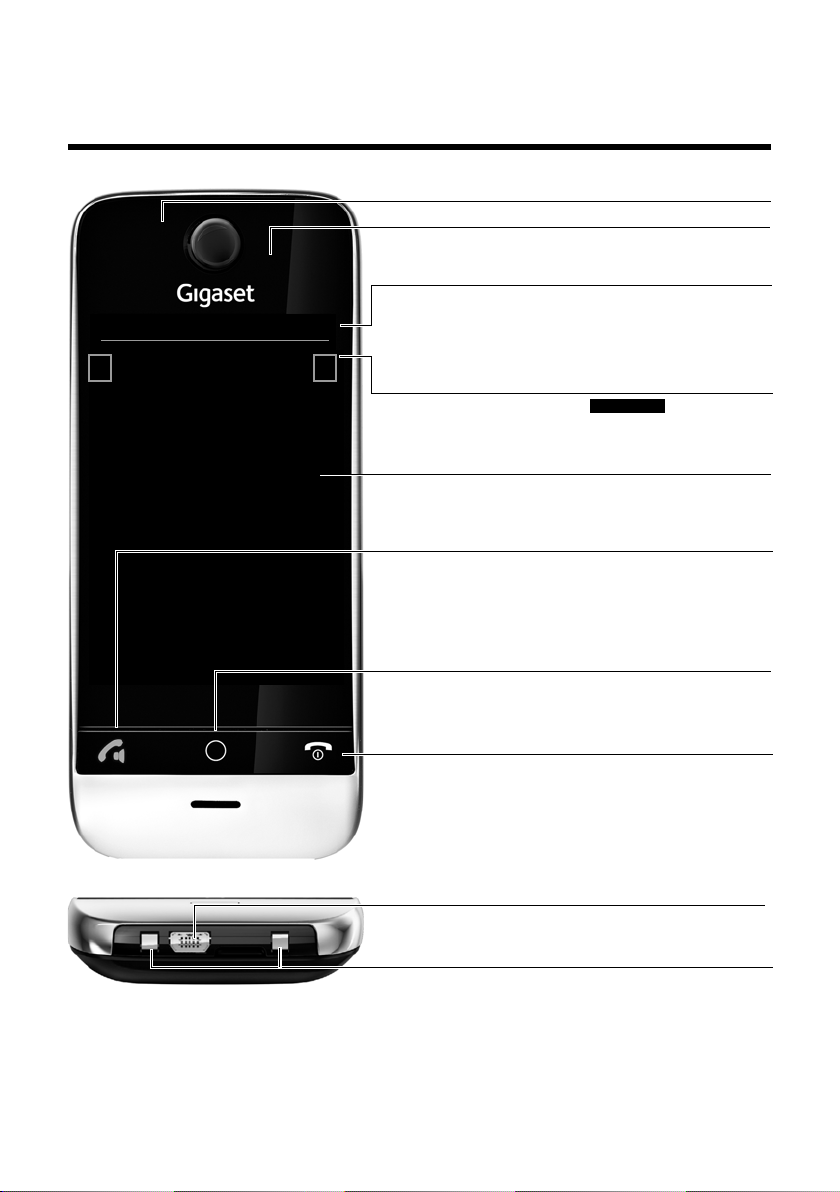
Gigaset SL910/SL910A – с емкостным сенсорным дисплеем
Ð
à òôó¼06:00
V
<
Å Å Å
>
Панель индикаторов состояния (£ стр. 22)
Значки (£ стр. 74) указывают текущие значения параметров и рабочее состояние телефона. Коснитесь
панели индикаторов состояния, чтобы открыть
£ страницу состояния (стр. 22).
v Кнопка меню
Краткое нажатие: открыть главные меню (£ стр. 23)
Длительное нажатие: включить/отключить (
£ стр. 24)
блокировку клавиатуры и дисплея
a Кнопка завершения вызова/выхода
Краткое нажатие: завершить вызов или поисковый
вызов, отклонить внутренний вызов, отключить сигнал
внешнего вызова, вернуться в состояние готовности
Длительное нажатие: включить/выключить телефонную
трубку
Сенсорный дисплей
Светодиодный индикатор сообщений (£ стр. 19)
Датчик близости (£ стр. 24)
Область навигации
Маркер положения страницы
Сменить страницу
ê/ë.
Кнопки на телефонной трубке
c Кнопка разговора
Краткое нажатие: набрать отображаемый номер, при-
нять вызов, переключиться между режимами динамика
трубки и громкой связи, открыть список повторного
набора
Длительное нажатие: назначить линию
Гнездовой разъем mini-USB
Подсоединение проводной трубки к компьютеру
(Gigaset QuickSync)
Контакты для зарядки
Экраны готовности или меню (£ стр. 17)
Gigaset SL910/SL910A – с емкостным сенсорным
дисплеем
1
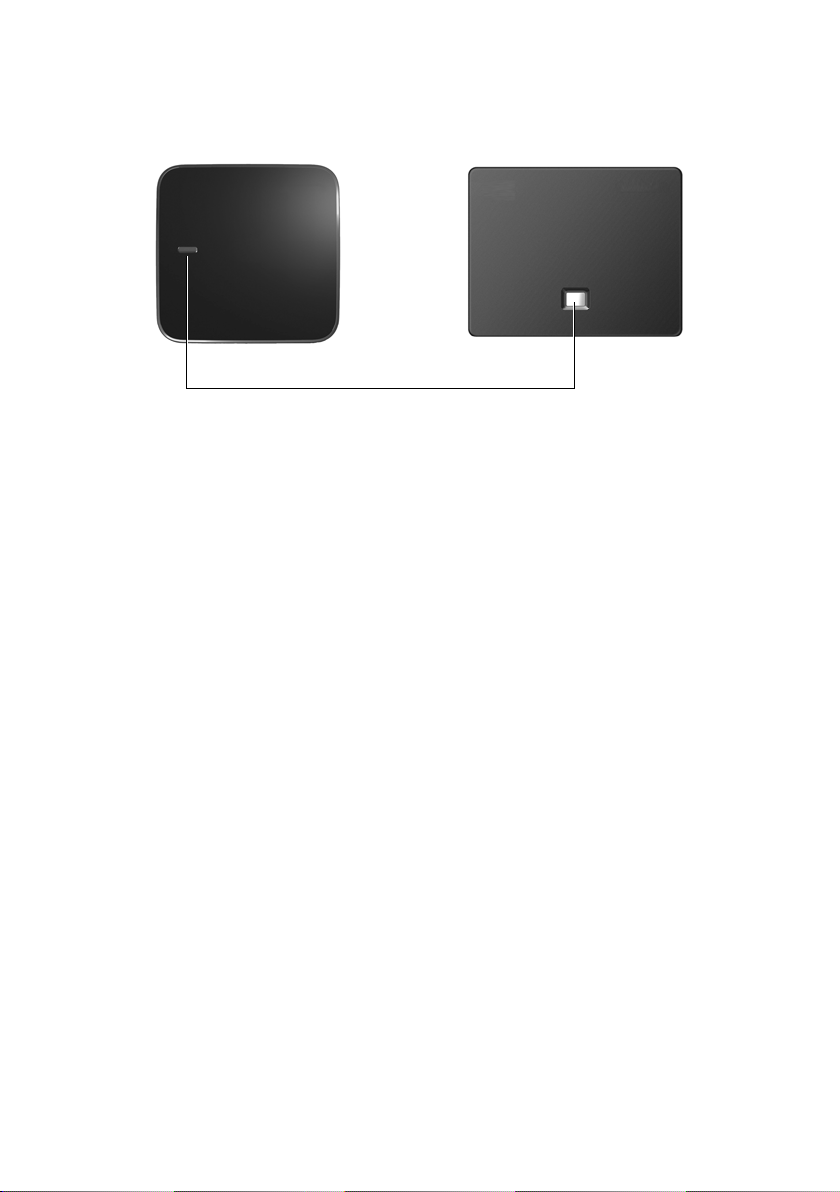
Gigaset SL910/SL910A – с емкостным сенсорным дисплеем
Кнопка регистрации/поиска
Краткое нажатие: начать поиск
(
£ стр. 48)
Длительное нажатие:
перевести базовый блок в режим регистрации (
£ стр. 47)
Модификация базового блока 2 Модификация базового блока 1
или
Базовый блок для Gigaset SL910/SL910A поставляется в двух модификациях. Эти моди-
фикации не различаются по функциональным возможностям и набору компонентов.
2

Содержание
Содержание
Gigaset SL910/SL910A – с емкостным сенсорным дисплеем . . . . . . . . . . . . . . . . . . . . . . . . . . . . . . 1
Правила техники безопасности . . . . . . . . . . . . . . . . . . . . . . . . . . . . . . . . . . . . . . . . . . . . . . . . . . . . . . . . . . 4
Начало работы . . . . . . . . . . . . . . . . . . . . . . . . . . . . . . . . . . . . . . . . . . . . . . . . . . . . . . . . . . . . . . . . . . . . . . . . . . . 5
Основные действия при использовании устройства . . . . . . . . . . . . . . . . . . . . . . . . . . . . . . . . . . . . 16
Страницы на экране . . . . . . . . . . . . . . . . . . . . . . . . . . . . . . . . . . . . . . . . . . . . . . . . . . . . . . . . . . . . . . . . . . . . 17
Использование телефона . . . . . . . . . . . . . . . . . . . . . . . . . . . . . . . . . . . . . . . . . . . . . . . . . . . . . . . . . . . . . . . 24
Совершение вызовов . . . . . . . . . . . . . . . . . . . . . . . . . . . . . . . . . . . . . . . . . . . . . . . . . . . . . . . . . . . . . . . . . . . 29
Изменение параметров телефона . . . . . . . . . . . . . . . . . . . . . . . . . . . . . . . . . . . . . . . . . . . . . . . . . . . . . . 34
Экономичный режим ECO DECT . . . . . . . . . . . . . . . . . . . . . . . . . . . . . . . . . . . . . . . . . . . . . . . . . . . . . . . . 40
Автоответчик (Gigaset SL910A) . . . . . . . . . . . . . . . . . . . . . . . . . . . . . . . . . . . . . . . . . . . . . . . . . . . . . . . . . . 42
Сетевой почтовый ящик . . . . . . . . . . . . . . . . . . . . . . . . . . . . . . . . . . . . . . . . . . . . . . . . . . . . . . . . . . . . . . . . 46
Использование нескольких телефонных трубок . . . . . . . . . . . . . . . . . . . . . . . . . . . . . . . . . . . . . . . . 47
Устройства Bluetooth . . . . . . . . . . . . . . . . . . . . . . . . . . . . . . . . . . . . . . . . . . . . . . . . . . . . . . . . . . . . . . . . . . . 51
Телефонная (адресная) книга . . . . . . . . . . . . . . . . . . . . . . . . . . . . . . . . . . . . . . . . . . . . . . . . . . . . . . . . . . . 54
Списки вызовов . . . . . . . . . . . . . . . . . . . . . . . . . . . . . . . . . . . . . . . . . . . . . . . . . . . . . . . . . . . . . . . . . . . . . . . . . 60
Календарь . . . . . . . . . . . . . . . . . . . . . . . . . . . . . . . . . . . . . . . . . . . . . . . . . . . . . . . . . . . . . . . . . . . . . . . . . . . . . . 61
Будильник . . . . . . . . . . . . . . . . . . . . . . . . . . . . . . . . . . . . . . . . . . . . . . . . . . . . . . . . . . . . . . . . . . . . . . . . . . . . . . 63
Детский вызов . . . . . . . . . . . . . . . . . . . . . . . . . . . . . . . . . . . . . . . . . . . . . . . . . . . . . . . . . . . . . . . . . . . . . . . . . . 64
Заставка, фотографии абонентов и звуки . . . . . . . . . . . . . . . . . . . . . . . . . . . . . . . . . . . . . . . . . . . . . . . 65
SMS (текстовые сообщения) . . . . . . . . . . . . . . . . . . . . . . . . . . . . . . . . . . . . . . . . . . . . . . . . . . . . . . . . . . . . 66
Синхронизация с компьютером (Gigaset QuickSync) . . . . . . . . . . . . . . . . . . . . . . . . . . . . . . . . . . . . 70
Подключение базового блока к офисной АТС . . . . . . . . . . . . . . . . . . . . . . . . . . . . . . . . . . . . . . . . . . . 71
Значки на экране . . . . . . . . . . . . . . . . . . . . . . . . . . . . . . . . . . . . . . . . . . . . . . . . . . . . . . . . . . . . . . . . . . . . . . . 73
Настройка параметров . . . . . . . . . . . . . . . . . . . . . . . . . . . . . . . . . . . . . . . . . . . . . . . . . . . . . . . . . . . . . . . . . 75
Служба сервиса и поддержи . . . . . . . . . . . . . . . . . . . . . . . . . . . . . . . . . . . . . . . . . . . . . . . . . . . . . . . . . . . . 80
Меры экологической безопасности . . . . . . . . . . . . . . . . . . . . . . . . . . . . . . . . . . . . . . . . . . . . . . . . . . . . 86
Приложение . . . . . . . . . . . . . . . . . . . . . . . . . . . . . . . . . . . . . . . . . . . . . . . . . . . . . . . . . . . . . . . . . . . . . . . . . . . . 87
Принадлежности . . . . . . . . . . . . . . . . . . . . . . . . . . . . . . . . . . . . . . . . . . . . . . . . . . . . . . . . . . . . . . . . . . . . . . . . 90
Программное обеспечение с открытым исходным кодом . . . . . . . . . . . . . . . . . . . . . . . . . . . . . . 93
Алфавитный указатель . . . . . . . . . . . . . . . . . . . . . . . . . . . . . . . . . . . . . . . . . . . . . . . . . . . . . . . . . . . . . . . . . 101
3
Правила техники безопасности
Правила техники безопасности
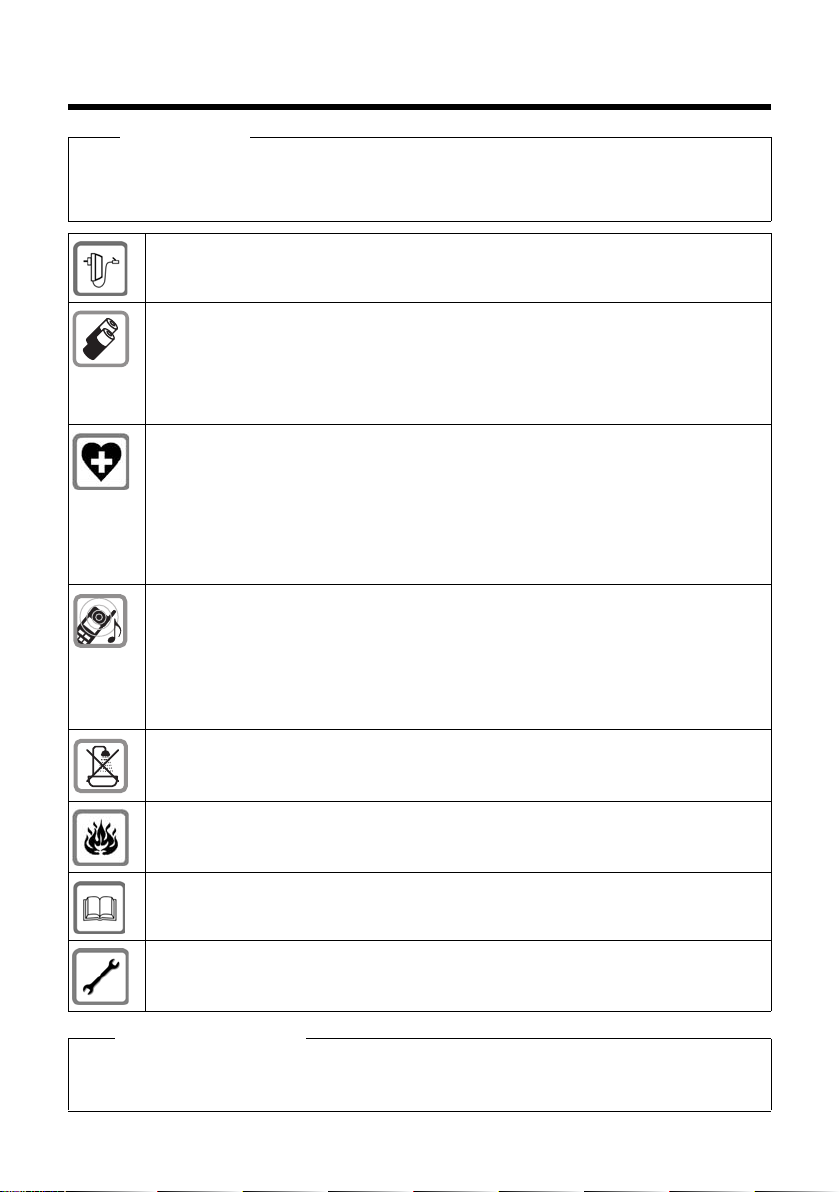
Внимание!
Перед использованием телефона внимательно прочитайте инструкции по технике безопасности
и руководство по эксплуатации.
Разъясните детям содержание инструкций и возможные опасности, связанные с использованием
устройства.
Используйте только адаптер питания, указанный на устройстве.
Используйте только перезаряжаемые аккумуляторы, которые отвечают техническим требо-
ваниям
(см. «Технические характеристики»). Никогда не используйте обычные (одноразовые)
батарейки или аккумуляторы других типов, так как это может значительно навредить Вашему
здоровью и привести
к травме. Аккумуляторы со следами повреждений должны быть заменены.
Работающий телефон может воздействовать на находящееся поблизости медицинское
оборудование. Следите за соблюдением технических требований с учетом конкретных
условий работы (например,
в кабинете врача).
Если Вы пользуетесь каким-либо медицинским устройством (например кардиостимулятором),
обратитесь к изготовителю устройства. Он сообщит Вам сведения о восприимчивости данного
устройства к внешним источникам высокочастотной энергии (технические характеристики
изделия Gigaset см. в разделе «Технические характеристики»).
Не подносите трубку к уху обратной стороной при звонке или в режиме громкой связи. Это
может привести к серьезному хроническому ухудшению слуха.
Ваш телефон Gigaset совместим с большинством продаваемых цифровых слуховых аппаратов.
Однако нельзя гарантировать идеальную работу со всеми слуховыми аппаратами.
Телефон может вызвать помехи (неприятный шум или свист) в аналоговом слуховом аппарате
или привести к его перегрузке. Если Вам потребуется помощь, обратитесь к продавцу
слухового аппарата.
Устройства не защищены от брызг.Не устанавливайте их во влажной среде, например в ванной
или душевой комнате.
Не пользуйтесь устройствами во взрывоопасных помещениях (например, окрасочных цехах).
Если Вы передаете телефон Gigaset кому-либо, обязательно передайте также и инструкцию
по эксплуатации.
Не используйте неисправное устройство или отдайте его в ремонт в наш сервисный центр, так
как оно может создавать помехи другим беспроводным устройствам.
Обратите
u Телефон не может работать при неисправн ом электропитании. Он также не может передавать экстренные
вызовы.
u Номера экстренного вызова невозможно набрать, если кнопки заблокированы!
4

Начало работы
Начало работы
Проверка содержимого упаковки
u Один базовый блок Gigaset SL910/SL910A (модификация 1 или 2)
u Одна подставка базового блока (только для модификации 1)
u Один адаптер питания базового блока
u Один телефонный кабель (уплощенный)
u Одна телефонная трубка Gigaset
u Одна крышка аккумуляторного отсека (задняя крышка телефонной трубки)
u Один аккумулятор
u Одно зарядное устройство
u Один адаптер питания для зарядного устройства
u Один плакат, одно руководство пользователя
Установка базового блока и зарядного устройства
Базовый блок и зарядное устройство рассчитаны на эксплуатацию в сухом помещении
при температуре от +5 °C до +45 °C.
¤ Установите базовый блок на горизонтальной, не скользкой поверхности в централь-
ной части здания или закрепите его на стене (
£ стр. 7).
Обратите внимание!
При выборе места для базового блока следует учитывать дальность связи. Внутри
помещений она составляет до 50 м, вне помещений — до 300 м. При включении
режима Экономич. режим (£ стр. 40) дальность связи уменьшается.
Ножки телефона обычно не оставляют следов на поверхности. Однако с учетом разнообразия современных мебельных лаков и полирующих средств невозможно полностью
исключить вероятность появления таких следов.
Обратите внимание!
u Запрещается подвергать телефон воздействию источников тепла, прямых солнечных
лучей и электрических приборов.
u Берегите телефон Gigaset от влаги, пыли, агрессивных жидкостей и паров.
5
Начало работы
3
2
1
3
5
4
3
2
1
5
4
3
Модификация базового блока 2
Модификация базового блока 1
3a
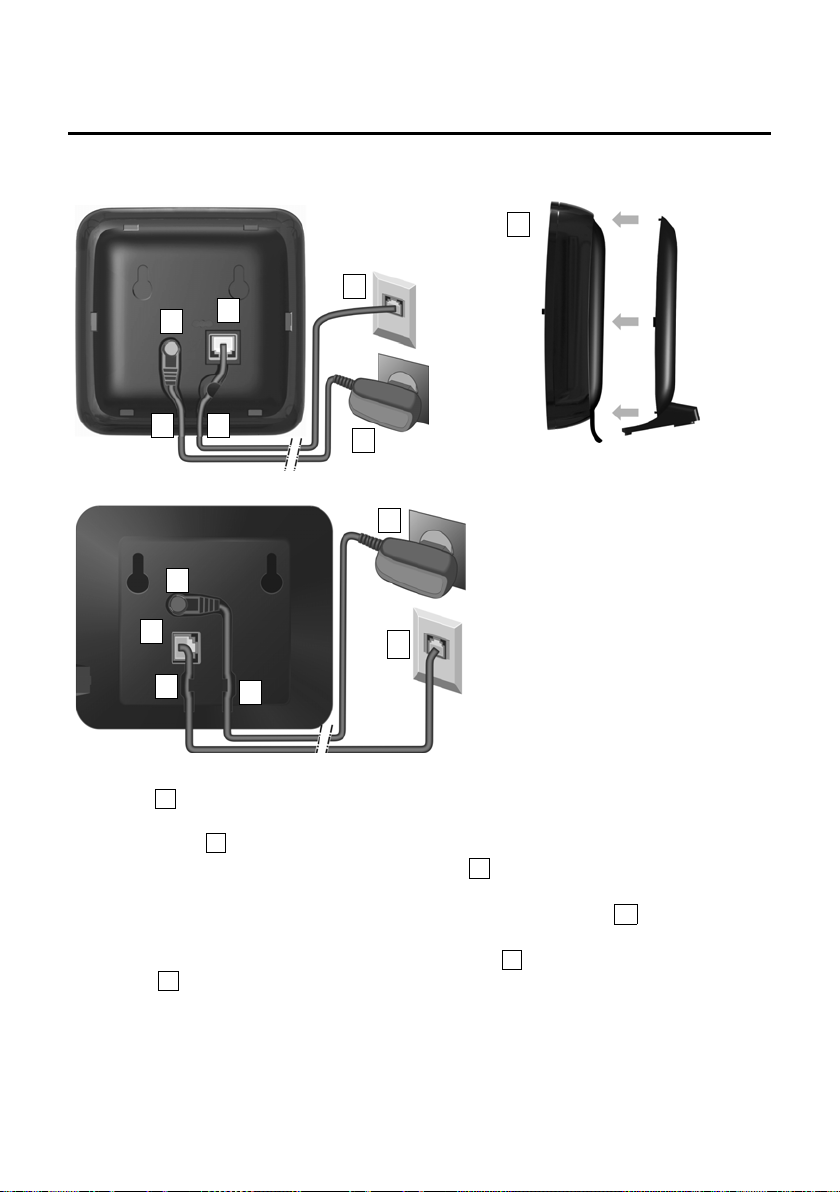
Подключение базового блока к телефонной
иэлектрической сетям
¤ Вставьте телефонный кабель (слегка уплощенный) в правый/нижний гнездовой
разъем в задней части основания до защелкивания в фиксаторах.
¤ Вставьте кабель питания, подключаемый к адаптеру питания, в правый/верхний гнез-
довой разъем .
¤ Уложите оба кабеля в соответствующие желоба .
¤ Модификация базового блока 1. Вставьте выступы крышки в соответствующие выемки
на задней стороне базового блока до защелкивания в фиксаторах (не при настенном монтаже).
¤ Сначала подсоедините телефон к адаптеру питания , а затем к телефонной
розетке .
Обратите внимание!
u Адаптер питания должен быть подключен постоянно, поскольку для работы телефона
необходим источник питания.
u Пользуйтесь только адаптером питания и телефонным кабелем из комплекта
поставки. Телефонные кабели могут различаться по разводке контактов (разводка кон-
£ стр. 89).
тактов,
6
Начало работы
Модификация базового блока 2Модификация базового блока 1
48 мм
прибл. 2,5 мм
2
1
3
4
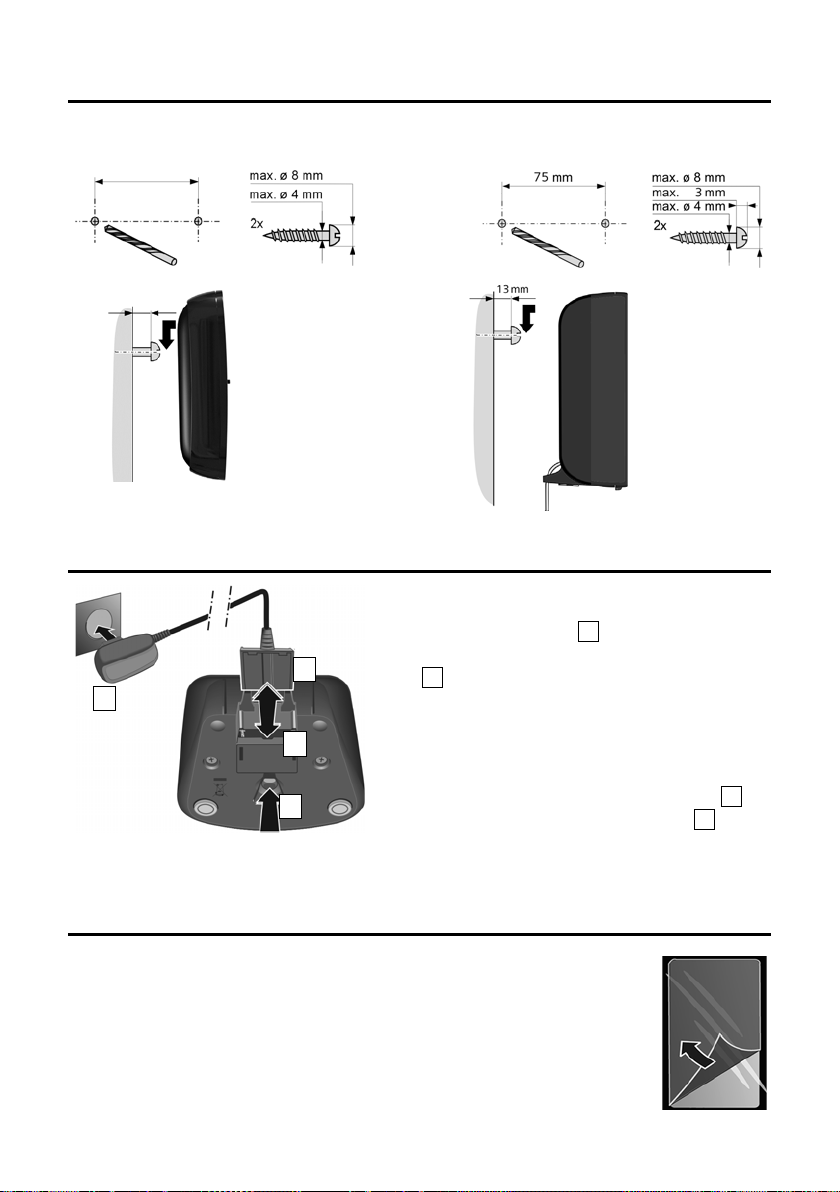
¤ Подсоедините плоский штекерный разъем
к адаптеру питания .
¤ Подсоедините адаптер питания к розетке
.
Если требуется отсоединить штекерный
разъем от зарядного устройства:
¤ Сначала отсоедините адаптер питания
от розетки электросети.
¤ Затем нажмите кнопку освобождения
и отсоедините штекерный разъем .
Настенный монтаж базового блока (не обязательно)
Подключение зарядного устройства
Подготовка телефонной трубки к работе
Дисплей и кнопки на телефонной трубке покрыты защитной пленкой.
Снимите защитную пленку.
Телефонные трубки из комплекта поставки уже зарегистрированы
на базовом блоке. Если телефонная трубка не зарегистрирована
(отображается текст «Трубка не зарегистрирована ни на одной базе»),
зарегистрируйте ее вручную (
7
£ стр. 47).
Начало работы
Внимание!
При работе с сенсорным дисплеем телефонной трубки запрещается пользоваться стилусом.
Не пользуйтесь защитными покрытиями/пленками других изготовителей. Это может
привести к снижению работоспособности телефонной трубки.
Установка аккумулятора и закрытие крышки аккумуляторного
отсека
Внимание!
Устанавливайте только аккумуляторы (£ стр. 88), рекомендованные компанией
Gigaset Communications GmbH. Невыполнение этого требования может привести
к травме или причинению серьезного вреда здоровью. Например, возможно разрушение внешнего корпуса аккумулятора или взрыв аккумулятора. Кроме того, установка
аккумуляторов, тип которых отличается от рекомендованного, может привести к нарушению нормальной работы телефона или его повреждению.
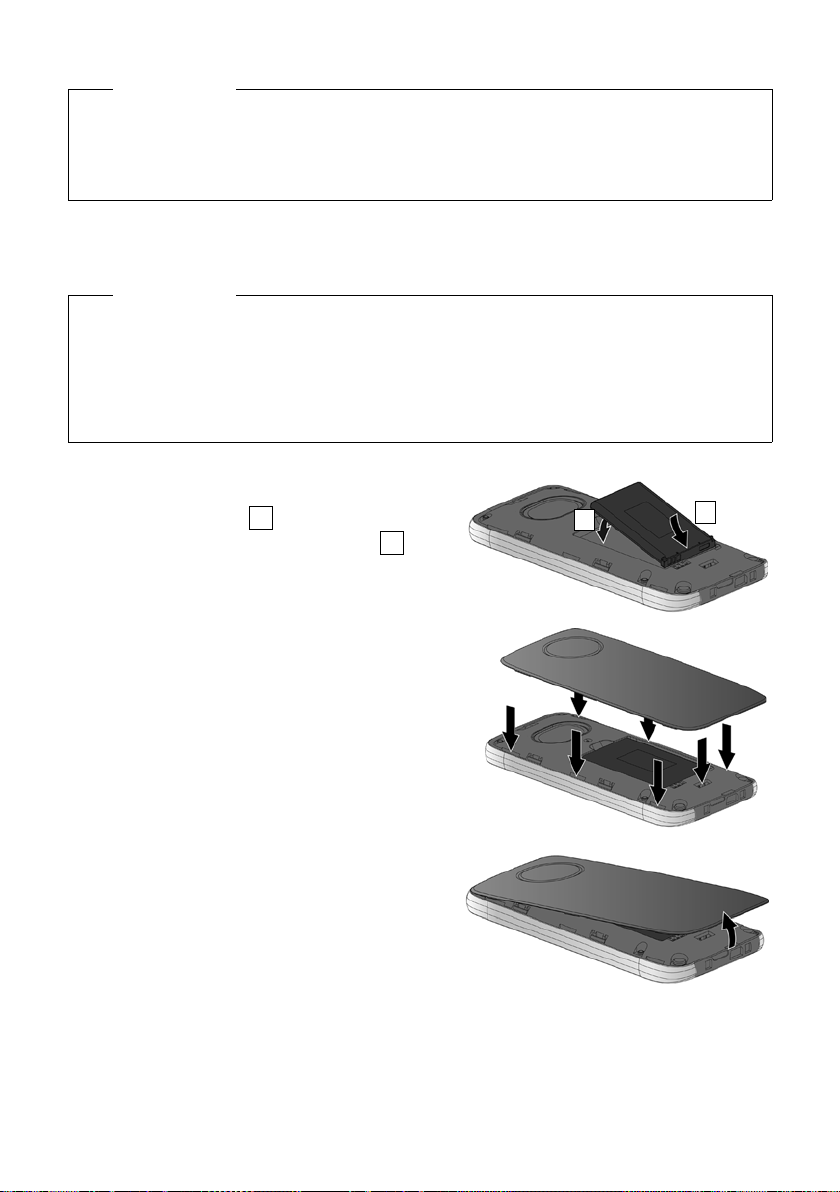
¤ Сначала вложите аккумулятор контактной
поверхностью вниз .
¤ Затем нажмите на аккумулятор вниз
до защелкивания в фиксаторах.
¤ Сначала вставьте выступы, расположенные
по краям крышки аккумуляторного отсека,
впазы на корпусе.
¤ Затем нажмите на крышку до защелкивания
вфиксаторах.
Как открыть крышку аккумуляторного отсека
для замены аккумулятора:
¤ Вс та вьт е н ог от ь в в ые мк у на ни жн ей сто ро не
крышки аккумуляторного отсека и потяните
крышку вверх.
8
Начало работы
Зарядка аккумулятора
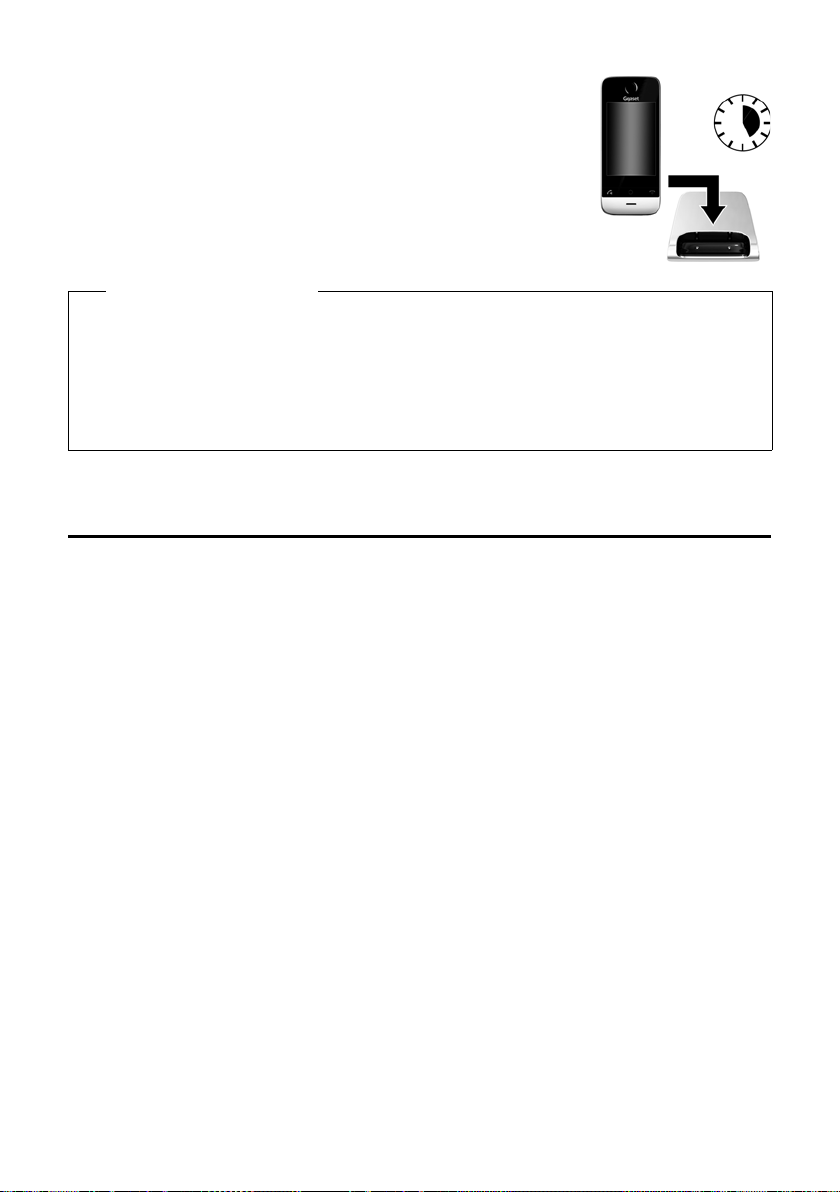
Аккумулятор поставляется частично заряженным. Перед началом
эксплуатации следует полностью зарядить его.
¤ Для зарядки поместите телефонную трубку на зарядное
устройство и оставьте ее на 5 часов.
Обратите внимание!
u Телефонную трубку следует устанавливать только в предназначенное для нее
зарядное устройство.
u Аккумулятор заряжается также при подключении телефонной трубки через разъем
USB к компьютеру с источником питания 500 мА.
u Во время зарядки аккумулятор может нагреваться. Это не опасно.
u С течением времени емкость аккумулятора снижается по техническим причинам.
Настройка базового блока и телефонной трубки: мастер
установки
После установки аккумулятора символы даты и времени мигают. При касании одного
из мигающих символов автоматически запускается мастер установки. Он помогает задать
следующие настройки трубки и базового блока, необходимые для работы телефона.
u Дата и время
u Язык дисплея
u Страна, где будет использоваться телефон
u Код региона
9
Начало работы
L
Приветствие
Время
0:00
M
Дата
01.07.2011 M
Язык дисплея
Русский (ru) M
Страна
Россия M
Город (код набора)
(не введено) M
õè
Проп. настр.
Сохр. настр.
L
Время
Время
22 58
23 59
00:00
01 01
02 01
Формат времени
Дата
01.07.2011 M
Язык дисплея
Русский (ru) M
Страна
M
10
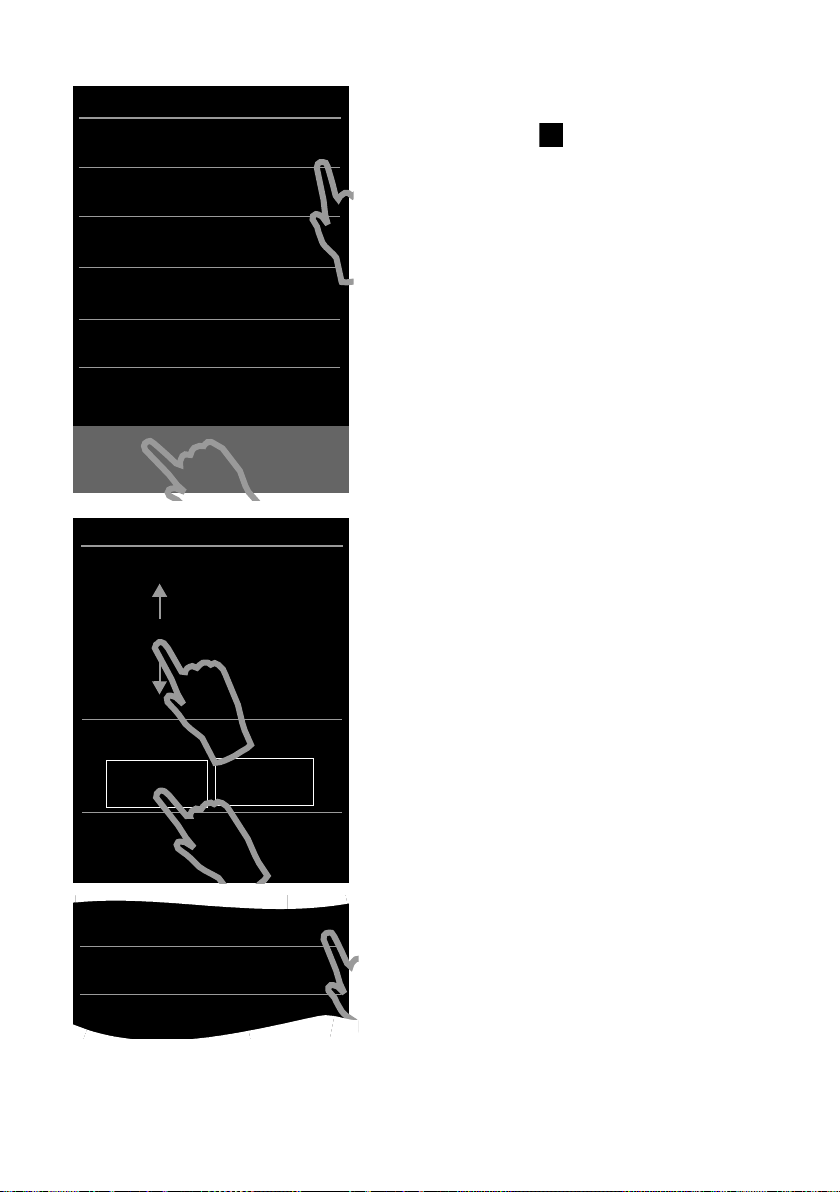
Если позднее потребуется изменить значения параметров:
¤ коснитесь значка [ Проп. настр.] в нижней
части экрана.
Телефонная трубка переключается в состояние
готовности.
В меню Настройки на телефонной трубке можно
в любой момент изменить значения параметров.
Чтобы настроить параметры:
¤ коснитесь значка ’ рядом со значением вре-
мени.
¤ Выберите текущее значение часов, коснувшись
пальцем расположенного слева колесика с цифрами и перемещая палец вверх или вниз. Колесико вращается в том же направлении.
¤ Таким же образом с помощью правого колесика
выберите значение минут.
¤ Выберите формат отображения времени:
12-часовой или 24-часовой. Для этого коснитесь соответствующей области в разделе
Формат времени.
Текущее значение выделяется.
¤ Коснитесь значка ‘ (в левом верхнем углу
экрана), чтобы сохранить значения и вернуться
на страницу Приветствие.
Примечание. Если задан 12-часовой режим, рядом
с колесиками отображается индикация дп/пп.
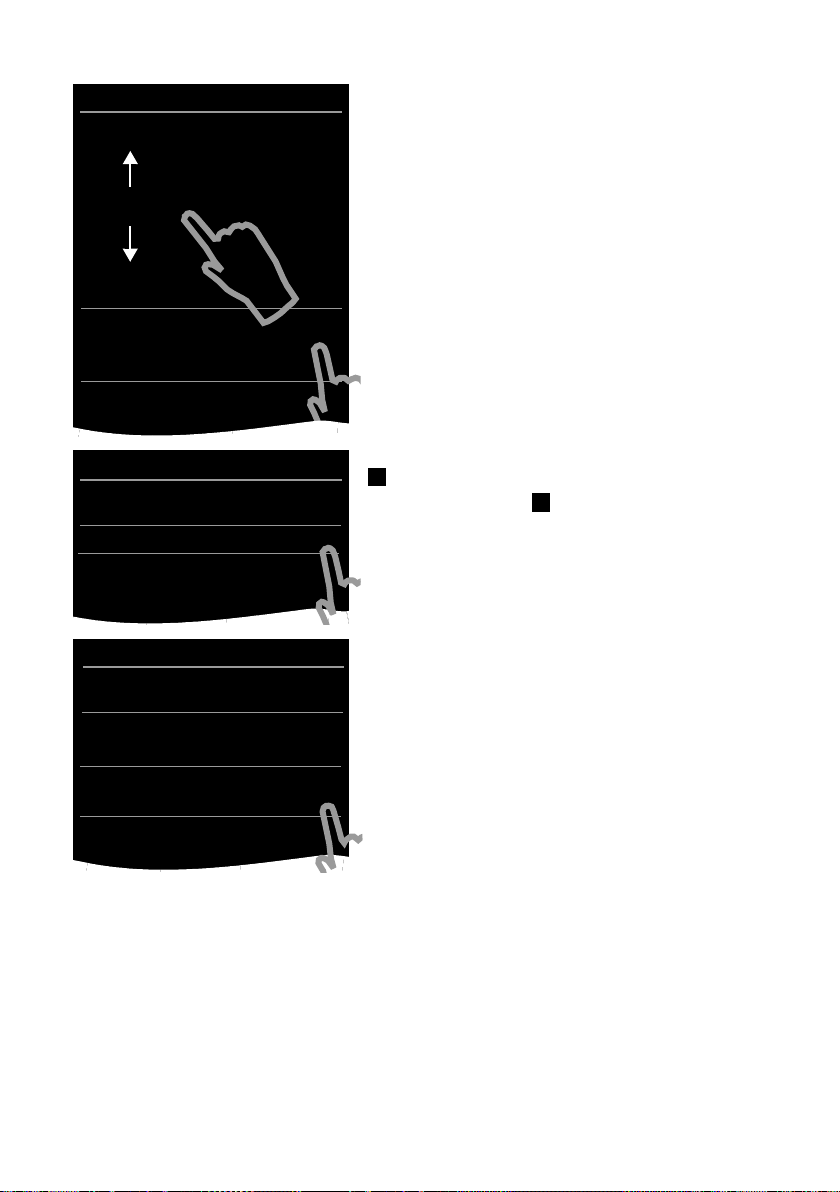
¤ Коснитесь значка ’ рядом с пунктом Дата,
чтобы задать дату.
Начало работы
L
Дата
Дата
24 фев 2014
25 мар 2013
26. апр
.
2012
27 май 2011
28 июн 2010
Формат даты
M
День Месяц Год
L
Формат даты
День Месяц Год
Ø
Месяц День Год
±
L
Приветствие
Время
8:30
M
Дата
26.04.2012 M
Язык дисплея
Русский (ru) M
Страна
M
¤ С помощью трех колесиков с цифрами устано-
вите текущую дату. Пользоваться колесиками
следует тек же, как и при установке времени.
В разделе Формат даты отображается текущий
формат отображения даты (в данном случае: День
Месяц Год). Чтобы изменить формат:
¤ коснитесь значка ’.
Текущее значение формата даты отмечено значком
.
¤ Коснитесь значка для переключения между
форматами День Месяц Год/Месяц День Год.
¤ Коснитесь значка ‘ и удерживайте его, пока
не появится страница Приветствие.
11
В разделе Язык дисплея отображается текущий
язык.
Чтобы изменить текущий язык:
¤ коснитесь значка ’ рядом с отображаемым язы-
ком.
Начало работы
L
Язык дисплея
Русский (ru)
Ø
Română
±
Српски (sr)
±
Català
±
Български (bg)
±
L
Приветствие
Страна
Россия M
Город (код набора)
(не введено) M
L
Страна
Китай
±
Коста-Рика
±
Дания
±
Германия
Ø
Эквадор
±
Эстония
±
Финляндия
±
Франция
±
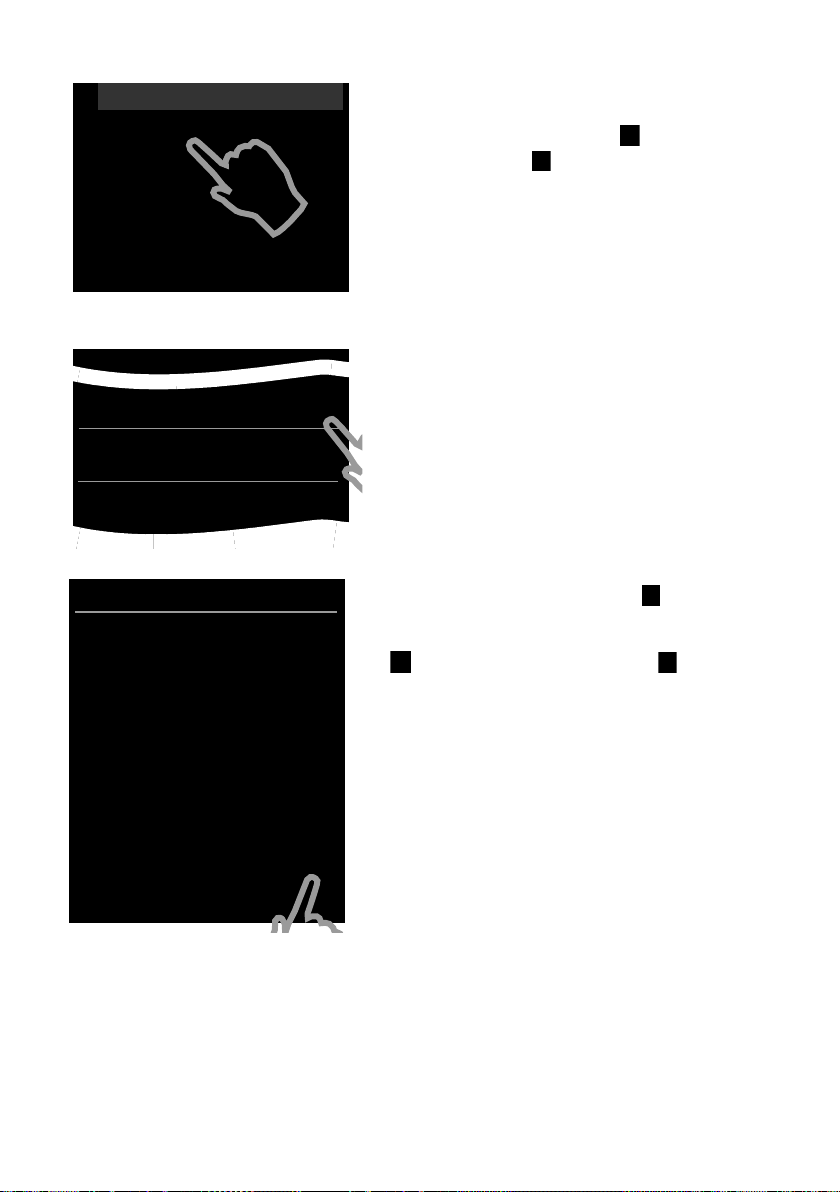
Отображается список всех поддерживаемых языков.
Текущий язык отмечен значком .
¤ Коснитесь значка рядом с нужным языком.
Если нужный язык не отображается, возможно, список не помещается на дисплее целиком. С этом случае прокрутите список.
¤ Для этого поместите палец на дисплей и мед-
ленно перемещайте его вверх.
На экране отображается нижняя часть списка,
в которой можно выбрать язык.
В разделе Страна введите страну, в которой будет
использоваться телефон и для которой выполнена
авторизация. Если значение задано неверно:
¤ коснитесь значка ’ рядом с пунктом Страна.
(Пример)
12
Отображается список стран.
Текущая страна отмечена значком .
¤ При необходимости прокрутите список до нуж-
ной страны, как указано выше. Коснитесь значка
рядом с Вашей страной. Метка перемеща-
ется к этой стране.
¤ Коснитесь значка ‘, чтобы сохранить измене-
ния и вернуться на страницу Приветствие.
L
Приветствие
Время
Город (код набора)
(не введено) M
L
Город (код набора)
4
495
ç ‰
1 2 3
ABC DEF
4 5 6
GHI JKL MNO
7 8 9
PQRS TUV WXYZ
*
0
#
Начало работы
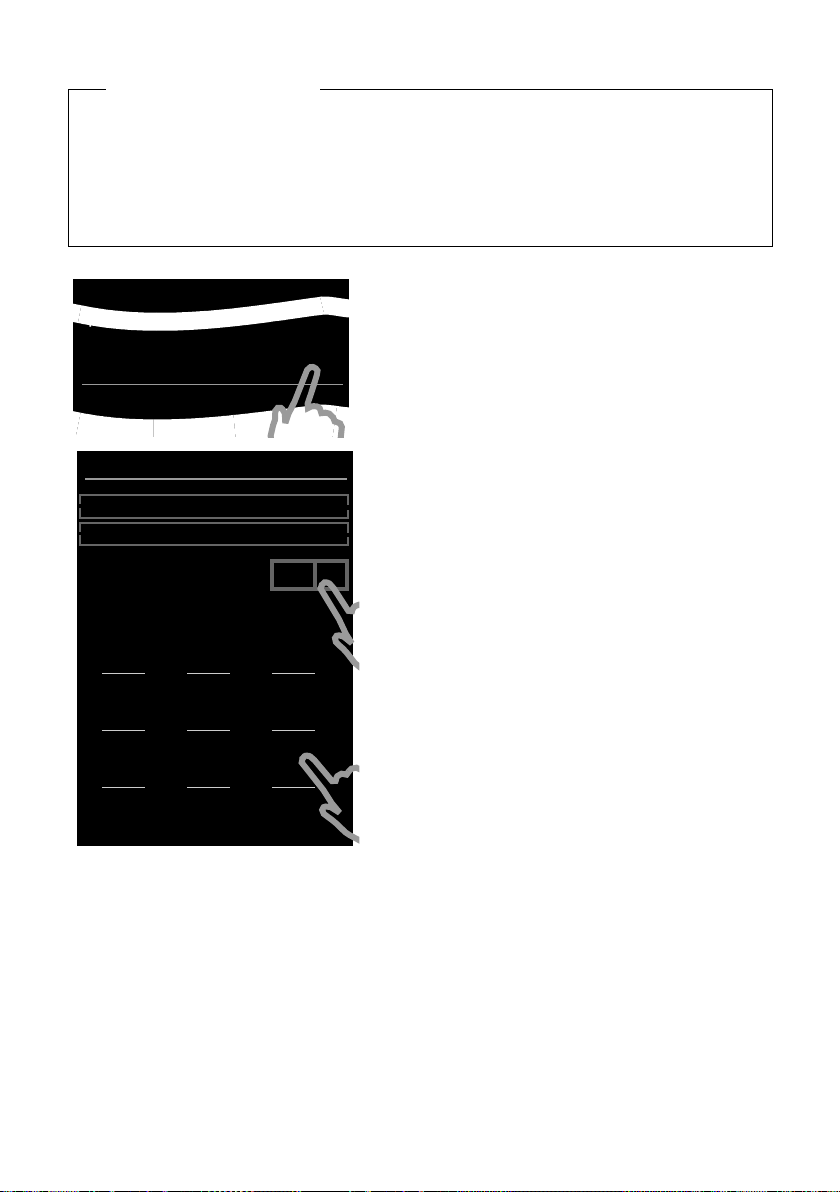
Обратите внимание!
Если вместо страны выбран вариант Другая страна, на странице Приветствие отображается пункт Страна (код набора).
¤ Коснитесь значка ’ рядом с пунктом Страна (код набора) и введите значения пара-
метров Международ. префикс и Код страны для задания международного кода
страны, как описано ниже для кода региона (кода набора).
Действуйте, как описано ниже.
Остается ввести код код региона.
¤ Рядом с пунктом Город (код набора) коснитесь
’.
значка
Параметр Регионал. префикс определяет фрагмент кода страны, который предшествует значению параметра Код города, если код страны
не набирается. России соответствует значение 4.
Поэтому, например, для Москвы в качестве
значения параметра Код города набирается 495.
¤ На появившейся клавиатуре введите в первом
поле значение параметра Регионал. префикс
для Вашей страны (не более 4 символов, в данном примере — «4»). Это поле уже заполнено
в соответствии с выбранной страной.
¤ Кратко коснитесь второго поля ввода, затем вве-
дите значение параметра Код города (не более
8 символов, в данном примере — «495»).
Ошибки при вводе можно исправить с помощью
значка $.
¤ После ввода всех цифр коснитесь значка è для
завершения.
13
Начало работы
L
Приветствие
Время
8:32
M
Дата
26.04.2012 M
Язык дисплея
Русский (ru) M
Страна
Россия M
Город (код набора)
495 M
õè
Проп. настр. Сохр. настр.
Ð
¼
06:00 V
<
Ä Å Ä
>
˜
Список
вызовов
Â
Справочник
апр
26
четверг
Снова отображается страница Приветствие.
¤ Коснитесь значка [ è Сохр. настр.], чтобы сохра-
нить настройки.
После задания всех необходимых параметров телефонная трубка переключается в состояние готовности.
Теперь телефон готов к работе.
14

Начало работы
Что можно делать дальше?
После успешной настройки телефона можно сразу начать совершение вызовов, индивидуально настроить параметры Gigaset или сначала ознакомиться с функциями телефона
£ Использование телефона, £ стр. 24).
(
Настройка пользовательской страницы для экрана готовности
На настраиваемой странице для экрана готовности можно поместить набор важных
функций и телефонных номеров, которые Вам нужно запускать или набирать непосредственно с сенсорного дисплея (
Синхронизация со списком контактов Google или Outlook
Для синхронизации телефонной книги требуется компьютер и программа
Gigaset QuickSync (
Для бесплатной загрузки и получения дополнительной информации перейдите на сайт
www.gigaset.com/gigasetsl910
Настройка звуковых сигналов и вибрационного сигнала
Можно назначить различные звуковые сигналы для внешних и внутренних вызовов,
напоминаний, будильника и отдельных абонентов. Для вызовов можно настроить тай-
£ стр. 36).
мер (
Настройка автоответчика
Можно записать личные уведомления и задать параметры записи (£ стр. 42).
£ стр. 70).
£ стр. 18).
.
Регистрация телефонных трубок Gigaset на базовом блоке
Этими же телефонными трубками можно пользоваться для совершения вызовов
с нового базового блока. Записи контактов можно переносить с телефонных трубок
на новую телефонную трубку (
Подробнее см. в руководствах пользователя соответствующих телефонных трубок.
Задание параметров экономичного режима ECO DECT
Снижение мощности передачи (излучения) для телефона (£ стр. 40).
Загрузка персональных тональных сигналов вызова и изображений
на телефонную трубку
Подключите телефонную трубки к компьютеру через интерфейс Bluetooth/USB
и загрузите рингтоны и изображения на телефонную трубку с помощью программы
Gigaset QuickSync (
Для бесплатной загрузки и получения дополнительной информации перейдите на сайт
www.gigaset.com/gigasetsl910
15
£ стр. 51/(£ стр. 70)).
£ стр. 47/£ стр. 56).
.

Основные действия при использовании устройства
Работа телефона в офисной АТС
При необходимости задайте для офисной АТС продолжительность пауз и режим набора
номера (
Если у Вас возникнут вопросы по использованию телефона, прочитайте советы
по устранению неполадок (
(
£ стр. 80).
£ стр. 71).
£ стр. 81) или обратитесь в нашу сервисную службу
Основные действия при использовании устройства
В инструкциях по использованию Вы встретите следующие изображения
Пример 1
Кнопка меню v ¤[ Ç Радионяня ].
¤ В состоянии готовности нажмите кнопку меню v.
Отображается страница меню Приложения.
¤ Коснитесь значка .
Пример 2
Кнопка меню v ¤страница меню Настройки. ¤[ ° Язык и расположен. ].
¤Город (код набора)
¤ Нажмите кнопку меню v.
¤ Проведите пальцем по дисплею горизонтально, чтобы перейти на страницу меню
Настройки.
¤ Коснитесь значка .
¤ Коснитесь пункта меню Город (код набора) или значка ’ рядом с пунктом меню.
16
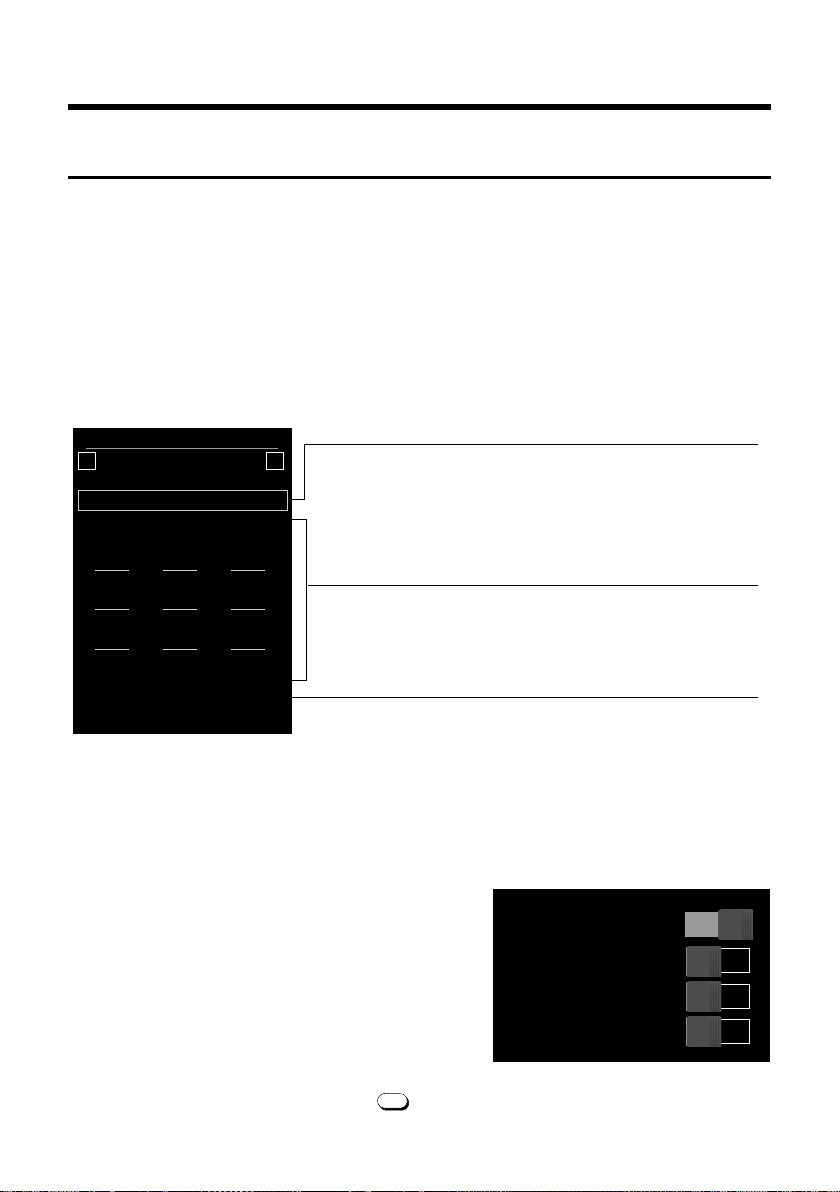
Страницы на экране
Поле номера
Отображает введенные цифры.
Коснитесь значка
ç кратко, чтобы удалить послед-
нюю введенную цифру.
Нажмите и удерживайте значок
ç, чтобы удалить все
цифры.
Панель действий (£ стр. 25)
Служит для набора номеров из списков вызовов,
телефонной книги и списков ускоренного набора,
а также для внутренних вызовов.
Клавиатура
Цифровая клавиатура для ввода телефонных номе-
ров. Когда Вы касаетесь цифры, она отображается
в поле номера.
Ð
à ò ô ó ¼ 06:00
V
<
Å Å Å
>
|
ç
1 2 3
ABC DEF
4 5 6
GHI JKL MNO
7 8 9
PQRS TUV WXYZ
* 0 #
˜Â
í
å
Вызовы Справочн. Б ыстр.наб. Внутрен.
Подменю [ g Дисплей и клавиатура]:
Клавиатура
Сигнал наж. кн.
Вибрация
Кнопки R/P
Буквы на кноп.
on
off
off
off
Страницы на экране
Экран готовности
Экран готовности состоит из трех страниц:
u страница набора номера (см. ниже);
u настраиваемая страница (£ стр. 18);
u страница сообщений (£ стр. 19).
Чтобы переключиться между страницами меню выполните следующее:
u проведите пальцем по экрану горизонтально или
u в области навигации коснитесь значка ë или ê.
Страница набора номера
Индивидуальная настройка клавиатуры/клавишной панели
Внешний вид и режим работы экранной клавиатуры можно настроить для Ваших потребностей. Эти параметры не связаны с кнопками на телефонной трубке (
¤ Кнопка меню v ¤Экран меню Настройки
¤ [ g Дисплей и клавиатура] ¤Прокрутите
до пункта Клавиатура.
Можно настроить следующие параметры:
u Сигнал наж. кн. При каждом касании цифры
звучит сигнал подтверждения.
u Вибрация. При каждом касании цифры на
клавиатуре телефонная трубка вибрирует.
u Кнопки R/P. Чтобы вставить
— прерывание в линии (мигание, R):
нажмите и удерживайте кнопку ;
17
cva).
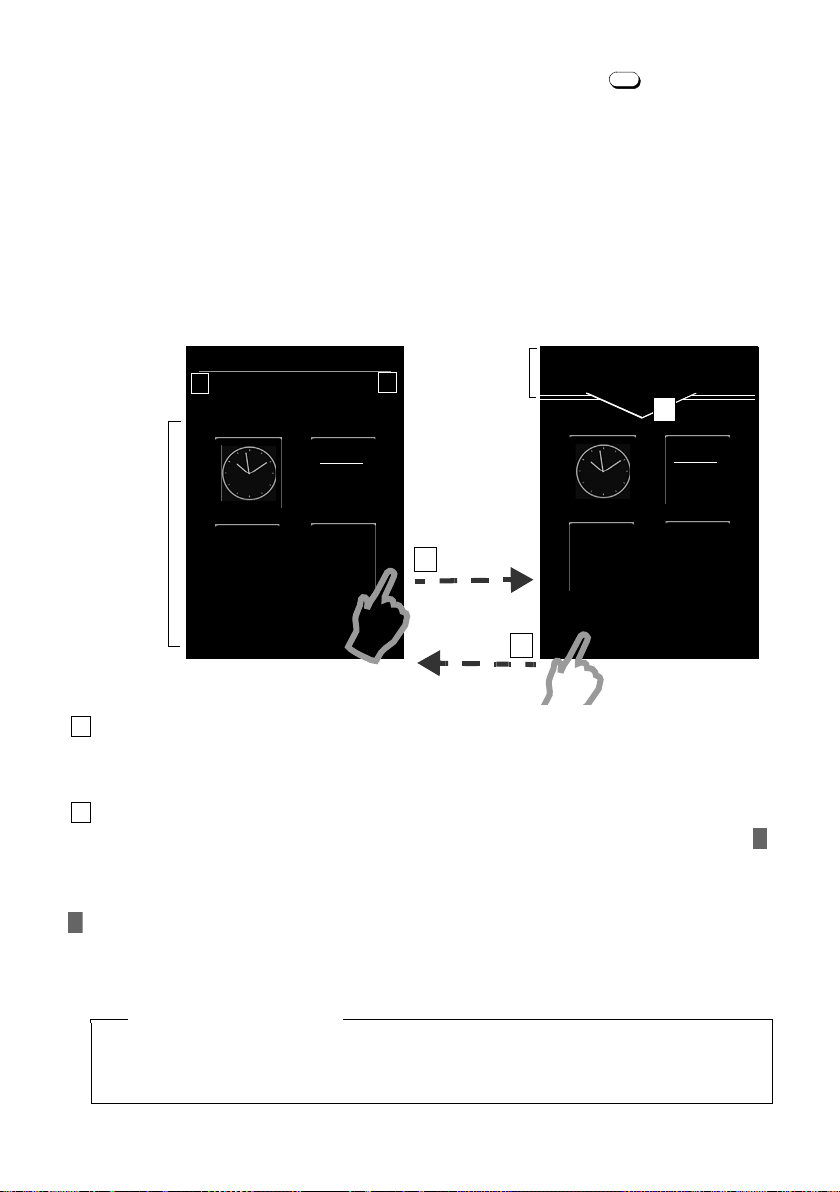
Страницы на экране
Ð Ã ò ô ó ¼ 06:00
V
<
Å Å Å
>
апр
26
четверг
Справочн.
Â
Список
вызовов
˜
Режим настройки
Состояние готовности
Настраиваемая часть
вмещает
до 18
элементов
Нажмите и
удерживайте
апр
26
четверг
Справочн.
Â
Список
вызовов
˜
Ù
Будильник
2
Быстр.набор
Á
Радионяня
Панель
выбора
>
1
2
Нажмите и удерживайте
3
— паузу при наборе номера (P): нажмите и удерживайте кнопку .
u Буквы на кноп. Набор номера, содержащего буквы (например, служебного номера).
¤ Переключатель, расположенный справа, позволяет включить или отключить функцию
напрямую. Чтобы включить/отключить функцию, кратко коснитесь переключателя.
Настраиваемая (персональная) страница
Настраиваемую страницу можно настроить для Ваших потребностей. Можно собрать
на ней важные приложения и номера, чтобы запускать или вызывать их из состояния
готовности одним касанием. По умолчанию отображаются дата и время, с быстрым
доступом к спискам вызовов и телефонной книге.
Начало процесса настройки
¤ Перейдите к настраиваемому экрану.
¤ Нажмите в любом месте настраиваемой области и удерживайте около 2 секунд.
Подбор приложений/функций
У верхнего края экрана отображается список доступных приложений/функций. Значок
(стрелка) справа от списка выбора указывает на то, что список можно перемещать
по горизонтали для отображения дополнительных вариантов. Для этого поместите палец
на список выбора и проведите им по дисплею в направлении, противоположном стрелке
. Отображаются дополнительные функции.
¤ Как вставить приложение/функцию: перетащите функцию/приложение из списка
выбора в настраиваемую область.
Обратите внимание!
За исключением ярлыков быстрого набора, каждая функция может находиться
в настраиваемой области только один раз. Можно подобрать до 18 функций, приложений и номеров быстрого набора.
18
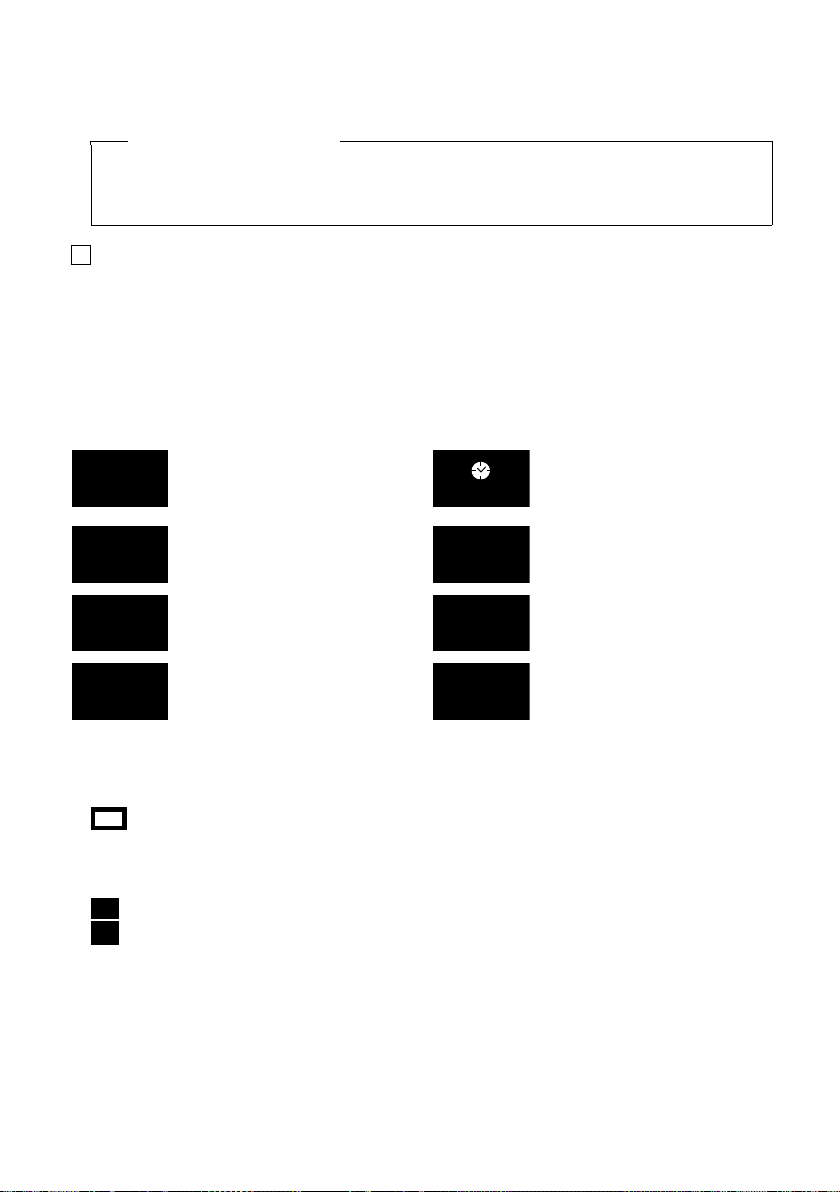
Страницы на экране
¤ Как удалить приложение/функцию: перетащите значок приложения/функции
обратно в список выбора.
Обратите внимание!
Номер быстрого вызова удаляется. Соответствующая запись в телефонной книге
остается неизменной. Настройки всех остальных функций (например, время сигнала будильника) не изменяются.
Завершение процесса настройки
¤ Нажмите и удерживайте в любом месте настраиваемой области на экране, или
¤ кратко нажмите кнопку a.
Значения параметров сохраняются.
Теперь можно запустить/выбрать приложение или телефонный номер, кратко нажав
соответствующий значок.
Приложения/функции, доступные для выбора
Отображение даты
Открытие календаря
£ стр. 61)
(
Открытие списков вызовов
£ стр. 60)
(
Настройка будильника
(£ стр. 63)
Ускоренный набор
£ стр. 59):
(
набор номера
Отображение времени
Установка времени
(£ стр. 10)
Настройка детского вызова
(£ стр. 64)
Открытие телефонной
книги (£ стр. 54)
Ввод текста SMS (
£ стр. 66)
Страница сообщений
Со страницы сообщений можно перейти к следующим спискам сообщений.
u Список автоответчика (только для Gigaset SL785)
u 5 Сетевой почтовый ящик, если эта функция поддерживается оператором связи,
а номер сетевого почтового ящика сохранен в памяти телефона
u · Входящие SMS
u Список пропущенных вызовов ( £ Списки вызовов, стр. 60)
u Список пропущенных напоминаний (£ стр. 62)
19
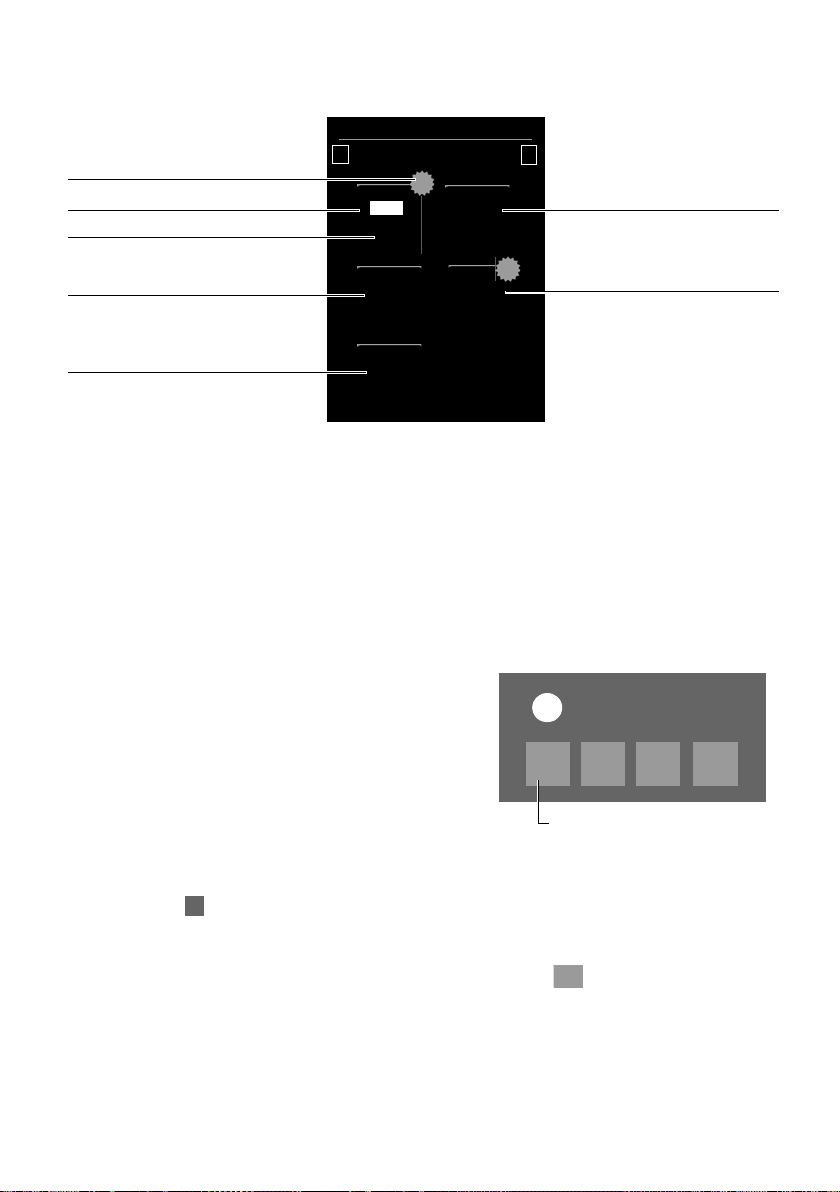
Страницы на экране
Ð
à ò ô ó ¼ 06 :00
V
<
ÅÅÅ
>
4
10
Ã
19
™
2
á
Количество новых сообщений
Сетевой почтовый ящик
Количество старых
сообщений
Автоответчик (Gigaset SL910A)
Пропущенные вызовы
Пропущенные напоминания /
дни рождения
1
Всплывающие сообщения
(пример):
х
Получено
+
Ã1™
1
·
1
á
1
Автоответчик
(Gigaset SL910A , в зависимости от базового блока)
и/или сетевой почтовый
ящик
Страница сообщений (пример)
Список пропущенных вызовов и список автоответчика (Gigaset SL910A) отображаются
всегда, даже если эти списки пусты. Значок сетевого почтового ящика отображается
всегда при условии, что его номер сохранен в памяти телефона. Остальные списки отображаются только при наличии сообщений в них.
¤ При касании значка открывается соответствующий список.
Исключение: при касании значка сетевого почтового ящика телефон набирает номер
этого сетевого почтового ящика (
£ стр. 46). Списки не отображаются на экране.
Всплывающее сообщение
Когда в списке появляется новая запись, звучит предупредительный сигнал. Если включена соответствующая функция (
мигает светодиодный индикатор сообщений и отображается всплывающее сообщение. Всплывающее
сообщение может частично закрывать экран набора
номера и настраиваемый экран. Новые сообщения
отображаются на экране сообщений, как описано
выше.
Под каждым значком отображается количество
новых сообщений в соответствующем списке.
£ стр. 35) слева от динамика трубки
¤ Как закрыть всплывающее сообщение: косни-
тесь значка (справа вверху).
¤ Как открыть список: коснитесь значка нужного
списка.
Если сетевой почтовый ящик настроен: при касании значка открывается не список,
а страница сообщений с соответствующими значками.
Если имеются новые сообщения в других списках, при возврате в состояние готовности
отображается страница сообщений (а не всплывающее сообщение).
Светодиодный индикатор сообщений будет мигать (если эта функция включена:
£ стр. 35), пока не будут открыты все новые сообщения.
20
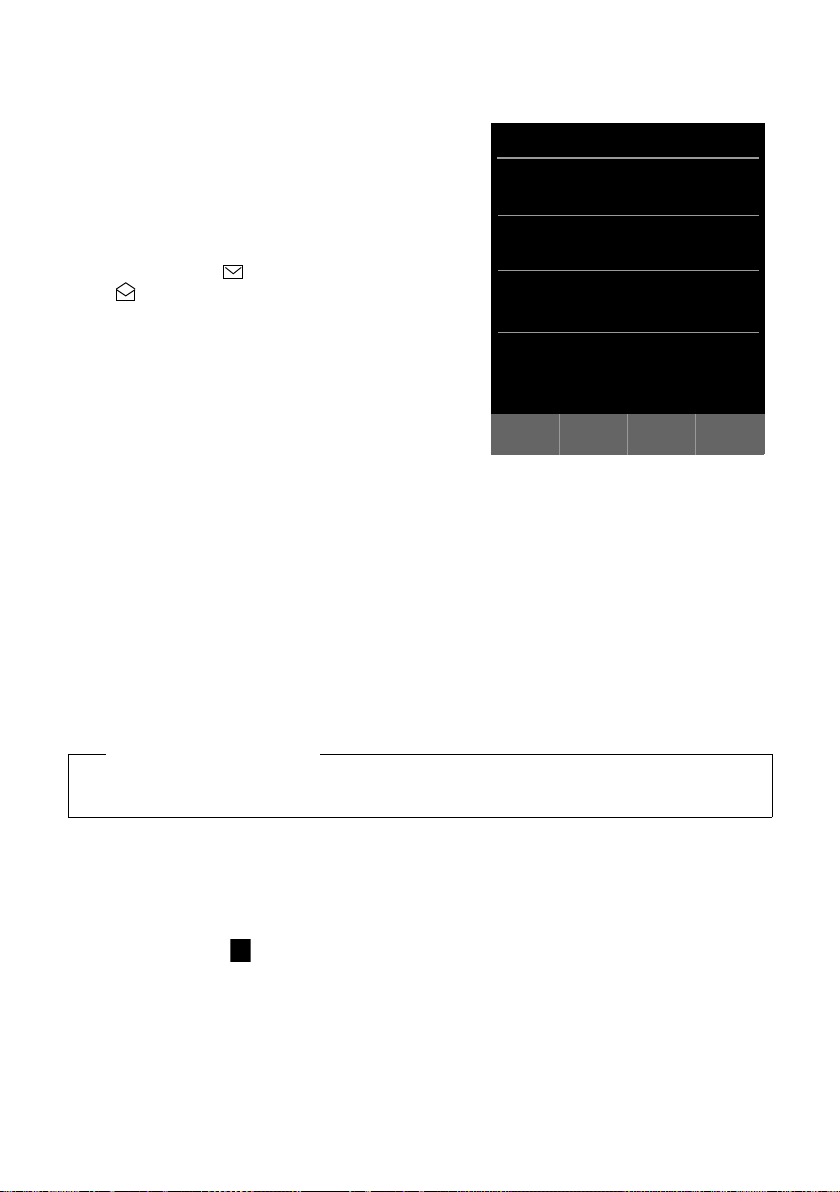
Страницы на экране
Список вызовов (пример)
L
Список вызовов
ý
Josephine Foster M
š
16:00, Домашний
Josephine Foster M
™
[2] 14:20, Мобильн.
089 666777888 M
›
Вчера, 14:20
Martin Grotte M
™
13.06, 16:10, Рабочий
˜
Все™Пропущен.›ПринятыеšИсходящие
Запись в списке
Для записей в списке отображается следующая
информация.
u Тип списка (в заголовке)
u Значок типа записи
— Список вызовов: ™ (Пропущен.),
› (Принятые), š (Исходящие), Ã (вызов
на автоответчике, только Gigaset SL910A)
— Список SMS: (непрочитанные),
(прочитанные)
— Список автоответчика:
à (сообщения на автоответчике)
Для новых (непрочитанных) записей отображается красный значок.
u Номер вызывающего абонента. Если этот номер
сохранен в телефонной книге, вместо него отображается имя вызывающего абонента и тип
номера (Домашний, Рабочий, Мобильн.).
Для пропущенных вызовов в квадратных скобках также отображается количество
вызовов с этого номера.
u Дата и время вызова (если эта функция включена).
Можно выполнить следующие действия.
¤ Перезвонить вызывающему абоненту: кратко коснитесь записи в списке.
¤ Открыть подробное представление: коснитесь значка ’ рядом с записью.
На дисплее отображается вся доступная информация. В списке автоответчика воспроизводится сообщение. В списке входящих SMS отображается текст сообщения.
В подробном представлении можно удалить запись или добавить номер к записи
в телефонной книге (
£ стр. 58).
Обратите внимание!
Если после открытия списка нажать кнопку c, будет сразу набран номер, помеченный
в записи зеленым кружком.
Удаление списков
Можно полностью удалить содержимое отдельных списков.
¤ Кнопка меню v Страница меню Настройки ¤[ Ê Система]
¤(при необходимости прокрутив экран вниз) Очистка списка
¤ Коснитесь значка рядом со списком, который нужно удалить¤ Выберите Да для под-
тверждения.
21
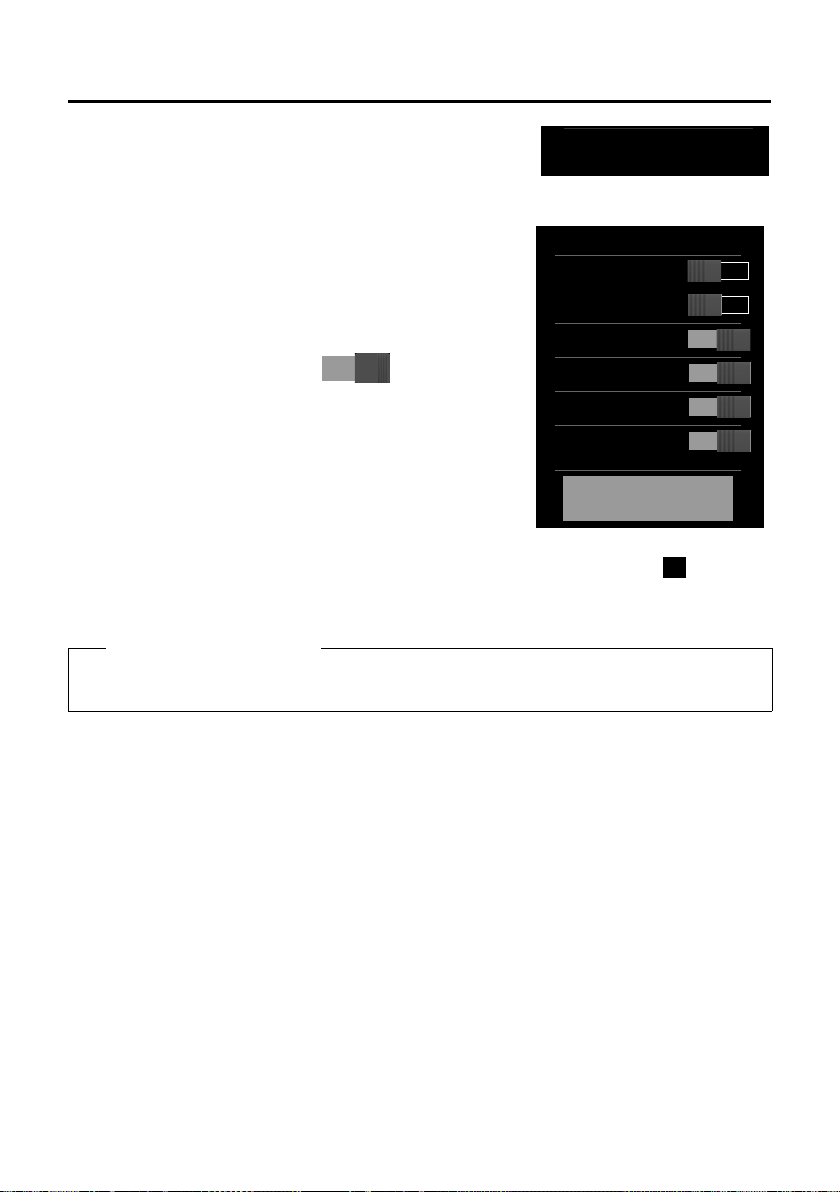
Страницы на экране
>
¹
Макс. удален.
Без излучения
à Автоответчик
ò
Bluetooth
ó
Не беспокоить
Ù
Будильник
6:00
Показать информацию об
услуге
Панель индикаторов состояния и экран состояния
Верхняя строка на дисплее в состоянии готовности называется панелью индикаторов состояния. На ней отображаются текущие значения параметров и рабочее состояние
телефона (значения значков
£ стр. 74).
Страница состояния
На странице состояния можно изменить значения параметров для смежных компонентов.
¤ Чтобы открыть страницу состояния, кратко коснитесь
панели индикаторов состояния.
¤ Чтобы включить/отключить компонент, коснитесь
переключателя рядом с ним ( — включен).
¤ При касании записи в списке, напримерБудильник,
отображается страница (вложенное меню), где можно
настроить параметры компонента.
¤ Коснитесь кнопки Показать информацию об услуге,
чтобы отобразить служебную информацию о телефонной трубке. Служебная информация может потребоваться при обращении в службу поддержки по телефону.
¤ Чтобы вернуться к экрану готовности, нажмите a или коснитесь значка в верхней
строке экрана.
22
Обратите внимание!
Если зарегистрировано несколько телефонных трубок, на панели индикаторов состояния отображается внутренний номер данной телефонной трубки (например, INT 1)
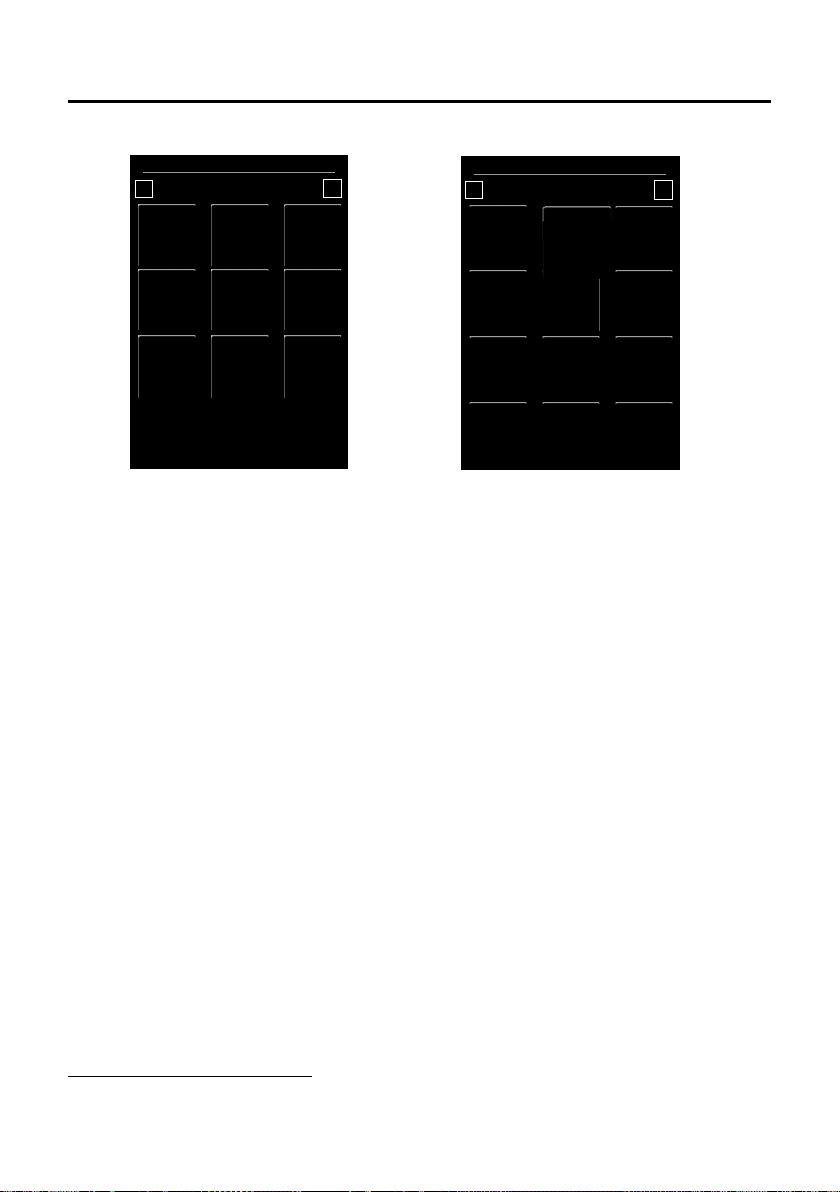
Страницы на экране
Настройки
<
Å Å
>
á
Дата и
время
i
Дисплей и
клавиатура
»
Bluetooth
ã
Выбор
услуг
Æ
Язык и
расположен.
Î
Трубки и
база
Ï
Система
Ì
Авто-
ответчик
ª
Телефония
Ì
Сетев. почт.
ящик
Ë
Номера
SMS-центр.
Приложения
<
Å Å
>
Â
Справочник
¾
Написать
SMS
˜
Список
вызовов
Õ
Заставки
Á
РадионяняКалендарьÙБудильник
[
Изображен.
абонентов
×
Звуки
Страница меню «Настройки»
Страница меню «Приложения»
ï
Настройки
аудио
Страницы меню
*
Как перейти от экрана готовности к Приложениястранице меню:
¤ Кратко нажмите кнопку меню v.
Как переключиться между страницами меню:
u Проведите пальцем по экрану горизонтально или
u В области навигации коснитесь значка ë или ê.
Как вернуться к экрану готовности из любого места меню
¤ Кратко нажмите кнопку a.
*Обратите внимание! Приложения/параметры, которые в данный момент недоступны (например,
из-за того, что расстояние до базового блока превышает дальность связи), не отображаются.
23

Использование телефона
Использование телефона
Включение/выключение телефонной трубки
¤ Как выключить телефонную трубку: в состоянии готовности нажмите и удерживайте
кнопку завершения вызова a.
¤ Как включить телефонную трубку:
-нажмите и удерживайте кнопку завершения вызова a
или
— поместите телефонную трубку в зарядное устройство. Она включится приблизительно через 35 секунд.
Возврат в состояние готовности
¤ Кратко нажмите кнопку завершения вызова a
или
¤ если Вы не нажимаете кнопки и не касаетесь экрана, он автоматически возвращается
в состояние готовности приблизительно через три минуты.
Блокировка клавиатуры и экрана
Блокировка клавиатуры и экрана позволяет исключить случайное выполнение действий
на телефоне. Если Вы коснетесь экрана при включенной блокировке, ничего не произойдет. При нажатии кнопки отображается соответствующее сообщение.
Включение/выключение блокировки клавиатуры
В состоянии готовности телефонной трубки
¤ Чтобы включить или выключить блокировку, нажмите и удерживайте кнопку меню v.
Если на трубку поступает вызов, блокировка клавиатуры/экрана автоматически отключается, и Вы можете принять вызов. По завершении вызова блокировка клавиатуры и экрана
снова включается.
Обратите внимание!
При включенной блокировке клавиатуры экстренные вызовы невозможны.
Автоматическая блокировка экрана
Во время вызова, если Вы подносите телефонную трубку к уху, экран автоматически блокируется в результате срабатывания датчика расстояния (подсветка экрана выключается).
Эта блокировка выключается, если Вы снова отдалите трубку от уха.
Датчик расположен справа рядом с динамиком (
экран пальцем во время вызова, он также блокируется.
24
£ стр. 1). Если Вы случайно закроете

Использование телефона
lY :
Создать Имя Коп. список
>
<
Y: X
Имя Коп. список Память
><
Управление с сенсорного экрана
Управление телефонной трубкой осуществляется в основном через экран.
Зонами чувствительности на экране являются значки, пункты списков, переключатели
и области выбора. Касаясь этих участков и перетаскивая их по экрану, можно настраивать
и включать функции, вводить или набирать номера телефонов и перемещаться между
страницами экрана.
Выбор функций/пунктов в списках
Чтобы выбрать пункт списка (телефонной книги, вложенного меню, списков вызовов) или
включить/отключить функцию, коснитесь записи в списке или соответствующего значка.
Прокрутка списков и меню (прокрутка по вертикали)
¤ Проведите пальцем по экрану в вертикальном направлении.
Если возможно одновременное отображение нескольких записей в списке, тень у верхнего или нижнего края экрана указывает направление последней прокрутки.
Во время прокрутки списка у правого края экрана отображается полоса прокрутки.
Она указывает размер и положение видимой части списка.
Прокрутка списков не является циклической: для возврата от конца списка к его началу
необходимо прокрутить список назад.
Действия, панель действий
На многих экрана внизу отображается панель действий. На ней представлены все действия, доступные в данный момент (значения значков
гаться на панелях действий в один ряд (например, в телефонной книге) или в два ряда
(например, во время входящего вызова).
£ стр. 73). Значки могут распола-
¤ Чтобы выполнить действие, коснитесь соответствующего значка.
Если не все значки действий помещаются на панели действий, можно отобразить дополнительные значки следующим образом.
u Если значки на панели действий расположены в один ряд, стрелка справа и/или
слева от значков (см. рисунок) указывает на наличие дополнительных значков действий.
¤ Чтобы отобразить дополнительные значки действий, коснитесь панели действий
и проведите пальцем по экрану в направлении стрелки (прокрутка по горизонтали).
u Если значки на панели действий расположены в два ряда, значок под панелью дей-
ствий указывает на наличие дополнительных значков действий.
25
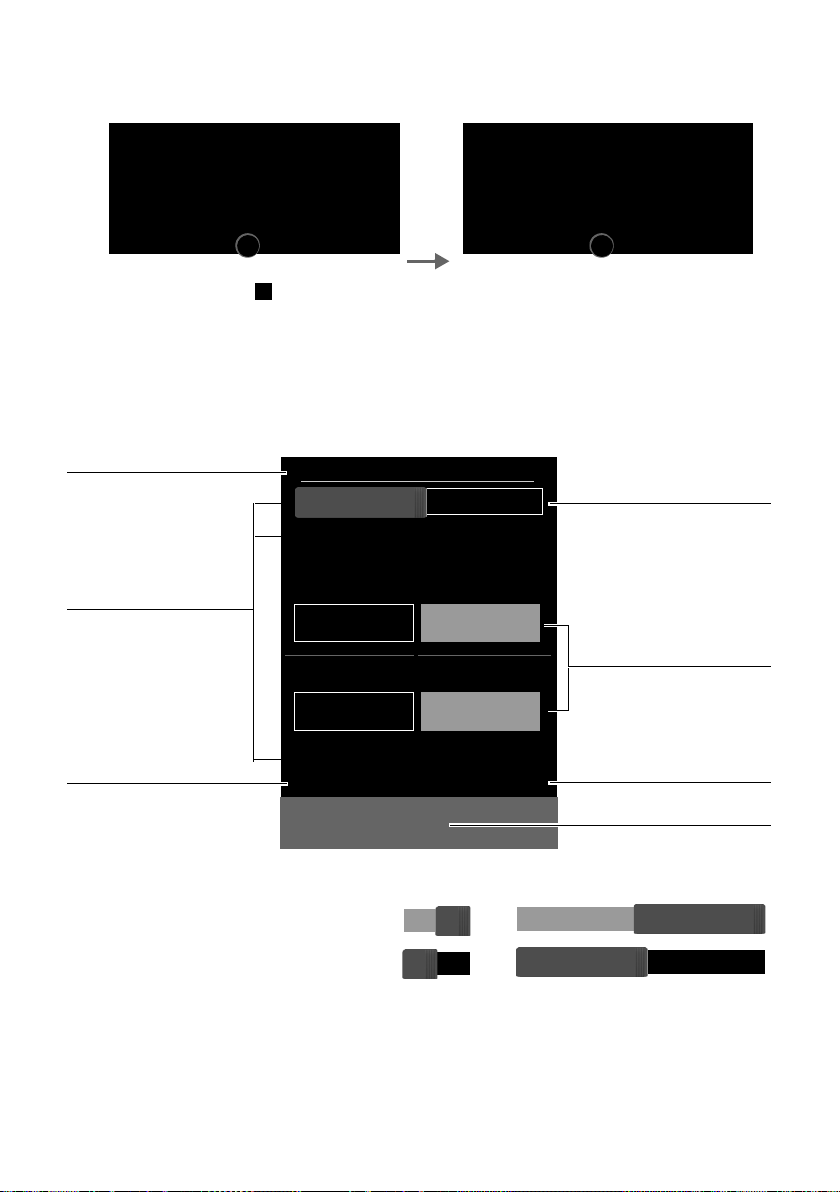
Использование телефона
‹hR
Гарнитура Беззвучн. Громкость
QSÂ
Клавиатура Консульт. Телеф. справочник
>
‰À Ý
Прин.удерж. Откл. удерж. Обр.выз.
Œý Q
Профили HF Записать Клавиатура
х
L
Радионяня
Выкл.
Чувствительность
k
k
Направл. сигнала
Номер
1234567890 M
è
Сохранить
Возврат к предыдущему
экрану
Тихо
Внутренний
Следующее подменю
Переключатель: включить/
отключить во время вызова
Текущее значение
Параметры приложения
Сохранить изменения
(может отсутствовать)
Громко
Внешний
Поля выбора
¤ Коснитесь значка , чтобы отобразить ранее скрытую часть панели действий
и скрыть ранее отображаемую часть.
¤ Коснитесь значка , чтобы снова скрыть дополнительные значки.
Изменение параметров
Коснитесь значка на одной из страниц меню, чтобы открыть соответствующее приложение/функцию. На экране отображаются настраиваемые параметры и элементы интерфейса, а также их текущие значения (оранжевым цветом).
Примеры
Переключатель: включение/отключение функций
¤ Кратко коснитесь переключателя,
чтобы включить/отключить функцию, например детские вызовы или
автоответчик.
Функцию можно включить/отключить,
если видна область оранжевого цвета (Вкл. / on).
26

Использование телефона
Направл. сигнала
Внутренний Внешний
Поля выбора
Если для одного параметра возможны два или три
значения, они отображаются в виде полей выбора.
Текущее значение отображается оранжевым цветом.
¤ Чтобы изменить его, кратко коснитесь нужного
поля выбора.
Открытие подменю для настройки параметра
Значок ’ указывает на наличие подменю.
¤ Чтобы открыть это подменю, кратко коснитесь значка ’.
Возврат к предыдущему экрану
¤ Можно шаг за шагом возвращаться к предыдущим экранам, касаясь значка ‘ (в левом
верхнем углу экрана).
Ввод цифр и текста
Чтобы увеличить символ, коснитесь его на экране. Не убирайте палец с экрана, пока нужный символ не увеличится. Когда Вы убираете палец с экрана, символ копируется в текстовое поле, в котором мигает курсор.
Если на экране есть несколько числовых или текстовых полей (например, имя и фамилия
в записи телефонной книги), автоматически активируется первое поле. Чтобы активировать последующие поля, необходимо коснуться их. В активном поле отображается мигающий курсор.
Исправление ошибок при вводе
Коснитесь значка $ кратко: удаляется последний введенный символ.
Нажмите и удерживайте кнопку
ностью удаляется.
Ввод текста
¤ Коснитесь значка (Shift): выполняется переключение между нижним и верхним
регистрами.
Верхний регистр включается только для следующего символа.
В телефонной книге первая буква и каждая буква, следующая за пробелом,
автоматически вводится в верхнем регистре.
¤ Коснитесь значка §123§: включается режим ввода цифр и специальных символов.
¤ Чтобы отобразить дополнительные специальные символы, коснитесь слова Другие;
для возврата к предыдущему экрану коснитесь слова Назад.
¤ Чтобы вернуться в режим ввода обычных символов, коснитесь значка §abc§.
27
$: содержимое числового или текстового поля пол-
Использование телефона
¤ Для ввода специальных символов (диакритических знаков, например знаков умлаута)
нажмите соответствующую начальную букву и, удерживая ее нажатой, выберите нужный символ в появившемся списке.
Набор символов латинского алфавита (применяется по умолчанию):
а дбавгжеą c
l ł n ńñ o цутфхшő s ßś u üúùûű
у ÿý z źż
Набор символов греческого алфавита:
α ά ε έ η ή ι ίϊΐ ο ό σ ς υ ύϋΰ ω ώ
Набор символов кириллицы:
е эёєийї г ґ ь ъ
Символы из наборы кириллицы занимают больше места, поэтому для доступа к следующим буквам можно нажимать и удерживать символы, показанные ниже полужирным
шрифтом. Коснитесь нужного символа.
ц й х ъ ж э
çć
e ëéèêę i ïíìî
¤ Коснитесь значка ° (при необходимости — несколько раз): для изменения набора
символов/раскладки клавиатуры. Ниже представлены варианты списков.
— Набор символов латинского алфавита (применяется по умолчанию) с раскладками
QWERTZ (для Центральной Европы), QWERTY (стандартная американская) и AZERTY
для франкоязычных стран
— Набор символов греческого алфавита
— Набор символов кириллицы
28
Loading…
-
Страница 1
Gigaset SL910A/SL910 / NDL / A31008 -M2300-M101-2-5419 / C over_fr ont.fm / 10/19/12 SL910 — SL910 A[…]
-
Страница 2
Gigaset SL910A/SL910 / NDL / A31008 -M2300-M101-2-5419 / C over_fr ont.fm / 10/19/[…]
-
Страница 3
1 Gigaset SL910A/SL910 / NDL / A31008-M2300-M101-2-5419 / overview .fm / 10/19/12 T emplate Lion A5, V ersion 2, 01.03.2012 Gigaset SL910/SL910A – het toestel met een bijzondere “touch” Gigaset SL910/SL910A – het toestel met een bijzondere “touch ” Ð Ã òô ó ¼ 06:00 V < Å Å Å > Statusbal k ( £ pagina 21) Symbolen ( £ pag[…]
-
Страница 4
2 Gigaset SL910A/SL910 / NDL / A31008-M2300-M101-2-5419 / overview .fm / 10/19/12 T emplate Lion A5, V ersion 2, 01.03.2012 Gigaset SL910/SL910A – he t toestel met een bijzondere “touch” Het basisstation Gigaset SL910/SL910A wordt gele verd in twee uitvoeringen. F unctionaliteit en mogelijkheden van beide uit voeringen zijn iden tiek . Aanmel[…]
-
Страница 5
3 Gigaset SL910A/SL910 / NDL / A31008-M2300-M101-2 -5419 / SL910-SL910A-L UGIVZ.fm / 10/19/12 T emplate Lion A5, V ersion 2, 01.03.2012 In hou ds opg ave Inhoudsop gav e Gigaset SL910/SL910A – het toestel met een bijzonder e “touch ” . . . . . . . . . . . . . . . . . . . . . . . . . . . . 1 V eiligheidsinstructies . . . . . . . . . . . . . . […]
-
Страница 6
4 Gigaset SL910A/SL910 / NDL / A31008-M2300- M101-2-5419 / security.f m / 10/19/12 T emplate Lion A5, V ersion 2, 01.03.2012 V eiligheidsinstruc ties V eiligheidsinstruc ties Let op Lees voor gebruik de veiligheidsins truc ties en de gebruiksaanwijzing. Indien u dit product gebru ikt in een huiselijke omge ving, breng dan uw kinderen op de hoogte v[…]
-
Страница 7
5 Gigaset SL910A/SL910 / NDL / A31008-M2300-M101-2-5419 / starting.fm / 10/19/12 T emplate Lion A5, V ersion 2, 01.03.2012 To e s t e l i n g e b r u i k n e m e n T oestel in gebruik nemen Inhoud van de verpakking controleren u een basisstat ion Gigaset SL910/SL910A (uit voering 1 of uitvoering 2), u een basisafdekk ing met voet, (alleen bij basis[…]
-
Страница 8
6 Gigaset SL910A/SL910 / NDL / A31008-M2300-M101-2-5419 / starting.fm / 10/19/12 T emplate Lion A5, V ersion 2, 01.03.2012 T oestel in gebruik nemen Basisstation aansluiten op vast e telef oonnet en lichtnet ¤ Het telefoonsnoerlicht afgevlakte kabel) in de rechter/onderste aansluiting aan de ach- terzijde van het basiss tation steken tot het vastk[…]
-
Страница 9
7 Gigaset SL910A/SL910 / NDL / A31008-M2300-M101-2-5419 / starting.fm / 10/19/12 T emplate Lion A5, V ersion 2, 01.03.2012 To e s t e l i n g e b r u i k n e m e n W andmontage van het basisstation (optioneel) Lader aansluiten Handset in gebruik nem en Het display en de toetsen van de handset zijn door een folie beschermd. U kunt deze folie nu verw[…]
-
Страница 10
8 Gigaset SL910A/SL910 / NDL / A31008-M2300-M101-2-5419 / starting.fm / 10/19/12 T emplate Lion A5, V ersion 2, 01.03.2012 T oestel in gebruik nemen Accupack plaa tsen en klepje sluiten ¤ Plaats het ac cupack eerst met de contactpun- ten naar beneden in het toestel . ¤ V er volgens het accupack naar beneden druk- ken tot het vastklikt. ¤ Het kle[…]
-
Страница 11
9 Gigaset SL910A/SL910 / NDL / A31008-M2300-M101-2-5419 / starting.fm / 10/19/12 T emplate Lion A5, V ersion 2, 01.03.2012 To e s t e l i n g e b r u i k n e m e n Basisstation en handset in stellen – Installatiewizar d Na het plaatsen van het accupack kni pperen de symbolen voor tijd en datum. Als u op een van de knip perende symbolen tikt, wor […]
-
Страница 12
10 Gigaset SL910A/SL910 / NDL / A31008-M2300-M101-2-5419 / starting.fm / 10/19/12 T emplate Lion A5, V ersion 2, 01.03.2012 T oestel in gebruik nemen ¤ Selecteer met de linker teller de ac tuele tijd door met een vinger de teller naar boven of naar bene- den te bew egen. De teller v olgt de beweg ing van uw vinger . ¤ Gebruik op dezelfde manier d[…]
-
Страница 13
11 Gigaset SL910A/SL910 / NDL / A31008-M2300-M101-2-5419 / starting.fm / 10/19/12 T emplate Lion A5, V ersion 2, 01.03.2012 To e s t e l i n g e b r u i k n e m e n De ingestelde datumvolgor de is met gemarkeerd. ¤ Tik op het symbool om tuss en Dag Maand Jaar / Maand Dag Jaar te wisselen ¤ Tik meerder e keren op het symbool ‘ tot weer de pagina[…]
-
Страница 14
12 Gigaset SL910A/SL910 / NDL / A31008-M2300-M101-2-5419 / starting.fm / 10/19/12 T emplate Lion A5, V ersion 2, 01.03.2012 T oestel in gebruik nemen ( Voorbeeld) Er word t een lijst met landen weergegev en. Het actueel ingestelde land is gemarkeerd met . ¤ Eventueel moet u zoals hierboven beschr even in de lijst bladeren tot uw land w ordt weerge[…]
-
Страница 15
13 Gigaset SL910A/SL910 / NDL / A31008-M2300-M101-2-5419 / starting.fm / 10/19/12 T emplate Lion A5, V ersion 2, 01.03.2012 To e s t e l i n g e b r u i k n e m e n Als Prefix word t het landspecifieke prefix genoemd, dat voor de Regionummer wordt geplaa tst als de landcode niet wordt meegekoz en. In Nederland is dit “0” . Regionummer is dan bi[…]
-
Страница 16
14 Gigaset SL910A/SL910 / NDL / A31008-M2300-M101-2-5419 / starting.fm / 10/19/12 T emplate Lion A5, V ersion 2, 01.03.2012 T oestel in gebruik nemen Nadat u alle noodzakelijke instellingen heeft ingevoerd, schakelt uw handset over in de rust- stand. Uw toestel is nu klaar voor gebruik! ˜ Oproeplijst  Contacten Apr 26 Donde rd ag Ð ¼ 06:00 V &[…]
-
Страница 17
15 Gigaset SL910A/SL910 / NDL / A31008-M2300-M101-2-5419 / starting.fm / 10/19/12 T emplate Lion A5, V ersion 2, 01.03.2012 To e s t e l i n g e b r u i k n e m e n T oestel aan uw eigen voorkeur en aanpassen Nadat u uw toest el in gebruik heeft genomen, kunt u direct telefoner en, uw Gigaset aan uw per- soonlijke wensen aanpassen of eerst ver trou[…]
-
Страница 18
16 Gigaset SL910A/SL910 / NDL / A31008-M2300-M101-2-5419 / starting.fm / 10/19/12 T emplate Lion A5, V ersion 2, 01.03.2012 W eergave van de bedieningsstap pen in de gebruiksaanwijzing W eergav e van de bedieningsstap pen in de gebruiksaanwijzing In de gebruiksaanwijzing worden de v olgende weerga ven gebruikt: V oorbeeld 1: Menutoets v ¤ [ Ç Rui[…]
-
Страница 19
17 Gigaset SL910A/SL910 / NDL / A31008-M2300-M101 -2-5419 / make_familiar .fm / 10/19/12 T emplate Lion A5, V ersion 2, 01.03.2012 Displaypagina ’ s Displaypagina ’ s Rustdisplay Het rustdisplay bestaat uit drie pagina ’ s: u de kiespagina (zie beneden) u de configureerbare pagina ( £ pagina 18) u de berichtenpagina ( £ pagina 19) Heen en w[…]
-
Страница 20
18 Gigaset SL910A/SL910 / NDL / A31008-M2300-M101 -2-5419 / make_familiar .fm / 10/19/12 T emplate Lion A5, V ersion 2, 01.03.2012 Displa ypagina ’ s u Met letter s : voor het kiezen met letters — wor dt bijvoorbeeld gebruikt voor het invoeren v an sommige ser vicenummers. ¤ Met de schakelaars aan de rechterzijde kunt u de betreffende eigenschap[…]
-
Страница 21
19 Gigaset SL910A/SL910 / NDL / A31008-M2300-M101 -2-5419 / make_familiar .fm / 10/19/12 T emplate Lion A5, V ersion 2, 01.03.2012 Displaypagina ’ s ¤ Fu nctie/toepas sing verwijderen: het symbool van de toepa ssin g/functie met drag&drop terug in de selectiebalk slepen. Configura tie beëindigen ¤ Lang op een willekeurige positie in het co[…]
-
Страница 22
20 Gigaset SL910A/SL910 / NDL / A31008-M2300-M101 -2-5419 / make_familiar .fm / 10/19/12 T emplate Lion A5, V ersion 2, 01.03.2012 Displa ypagina ’ s Bericht enpagi na ( voorbeeld) De lijst met gemiste oproepen en de antwoorda pparaatlijst (Gigaset SL910A) worden altijd weergegeven — ook als de lijsten leeg zijn. Het symbool voor de voicemail w o[…]
-
Страница 23
21 Gigaset SL910A/SL910 / NDL / A31008-M2300-M101 -2-5419 / make_familiar .fm / 10/19/12 T emplate Lion A5, V ersion 2, 01.03.2012 Displaypagina ’ s Lijstvermelding De volgende informatie wordt in de lijstvermeldingen weergegeven: u De lijstsoor t (in de kopregel) u Symbool voor het type vermelding. — Oproepli jst: ™ (Gemist), › (Beantwoord),[…]
-
Страница 24
22 Gigaset SL910A/SL910 / NDL / A31008-M2300-M101 -2-5419 / make_familiar .fm / 10/19/12 T emplate Lion A5, V ersion 2, 01.03.2012 Displa ypagina ’ s Statuspagina Via de statuspagina kunt u de instelli ngen van de componen- ten ernaast wijzigen. ¤ Tik kort op de statusbalk om de statuspagina te openen. ¤ Tik kort op de schakelaar naast een comp[…]
-
Страница 25
23 Gigaset SL910A/SL910 / NDL / A31008-M2300-M101 -2-5419 / make_familiar .fm / 10/19/12 T emplate Lion A5, V ersion 2, 01.03.2012 T oestel bedienen Heen en weer schakelen tussen de menupag ina ’ s: u Horizontaal over het display v egen, of u in het navigatiegebied op ë of ê tikken. V a nuit een w illekeu rige plaats i n het menu te rugker en n[…]
-
Страница 26
24 Gigaset SL910A/SL910 / NDL / A31008-M2300-M101 -2-5419 / make_familiar .fm / 10/19/12 T emplate Lion A5, V ersion 2, 01.03.2012 T oest el bedienen Automatische displayblokkering Tijdens een gesprek wordt het display automatisch met een bewegingssensor geblok keerd als u de handset aan het oor houdt (disp layverlichtin g gaat uit). Deze blokkerin[…]
-
Страница 27
25 Gigaset SL910A/SL910 / NDL / A31008-M2300-M101 -2-5419 / make_familiar .fm / 10/19/12 T emplate Lion A5, V ersion 2, 01.03.2012 T oestel bedienen Opties, optiebalken V eel displaypagina’ s beschikken in het onderste gedeelte over een optiebalk . In deze balk wor- den alle ac ties weergegeven die u in de actuele context kunt uitvoeren (gebruikt[…]
-
Страница 28
26 Gigaset SL910A/SL910 / NDL / A31008-M2300-M101 -2-5419 / make_familiar .fm / 10/19/12 T emplate Lion A5, V ersion 2, 01.03.2012 T oestel bedienen Instellingen wijzigen Als u op een van de menupagina’ s op een symbool drukt, dan wordt de bijbehorende toepas- sing/functie geo pend. Op het display worden de instelbare paramet ers en bedieningsele[…]
-
Страница 29
27 Gigaset SL910A/SL910 / NDL / A31008-M2300-M101 -2-5419 / make_familiar .fm / 10/19/12 T emplate Lion A5, V ersion 2, 01.03.2012 T oestel bedi enen Nummers en tekst in voeren Als u een teken op het display aanraakt, da n word t d it vergr oot weergegev en. V erplaats uw vin- ger net zolang over het display tot het gewenste teken verg root wordt w[…]
-
Страница 30
28 Gigaset SL910A/SL910 / NDL / A31008-M2300-M101 -2-5419 / make_familiar .fm / 10/19/12 T emplate Lion A5, V ersion 2, 01.03.2012 T oestel bedienen ¤ Op ° tikken (indien nodig meerdere keren): tekenset/toetsindeling wijzigen. U kun t kiezen uit de volg ende opties: — Latin-tekenset (standaard) met toetsindeling QWERTZ voor Midden-Europa, QWERT Y[…]
-
Страница 31
29 Gigaset SL910A/SL910 / NDL / A31008-M2300-M101-2-5419 / telefony .fm / 10/19/12 T emplate Lion A5, V ersion 2, 01.03.2012 Te l e f o n e r e n T elefoner en Extern bellen ¤ Kiespagina oproepen ¤ nummer invoeren ¤ Kor t op c drukken. Of: ¤ In de ruststand lang op c drukken ¤ Nummer invoeren. Met a kunt u het kiezen annuleren. Met nummerherha[…]
-
Страница 32
30 Gigaset SL910A/SL910 / NDL / A31008-M2300-M101-2-5419 / telefony .fm / 10/19/12 T emplate Lion A5, V ersion 2, 01.03.2012 Te l e f o n e r e n Kiezen uit een oproeplijst ¤ Overschakelen naar de ber ichtenpagina ¤ Op tikken. U kunt kiezen uit de volgende opties: ¤ Op c druk ken. Het nummer van de vermelding met de groene punt wor dt gekozen. O[…]
-
Страница 33
31 Gigaset SL910A/SL910 / NDL / A31008-M2300-M101-2-5419 / telefony .fm / 10/19/12 T emplate Lion A5, V ersion 2, 01.03.2012 Te l e f o n e r e n ¤ Gesprek beantwoorden met de handsfree -cl ip Gigaset L410 £ pagina 92 : de verbin- dingstoets indrukken. De Gigaset L410 moet bij het basisstation zijn aangemeld. Meer inf or- matie vindt u n de gebru[…]
-
Страница 34
32 Gigaset SL910A/SL910 / NDL / A31008-M2300-M101-2-5419 / telefony .fm / 10/19/12 T emplate Lion A5, V ersion 2, 01.03.2012 Te l e f o n e r e n Wisselen tusse n normaal en handsfree telefoneren Tijdens een gesprek, bij het tot stand komen van de verbinding en bij het beluisteren van het antwoordapparaat (alleen Gigas et SL910A): ¤ Op c drukke n […]
-
Страница 35
33 Gigaset SL910A/SL910 / NDL / A31008-M2300-M101-2-5419 / telefony .fm / 10/19/12 T emplate Lion A5, V ersion 2, 01.03.2012 Te l e f o n e r e n netdiensten heel eenvoudig in-/uitschakelen via het submenu [ ä Net diensten] op menu- pagina Instellingen . u Netdiensten die tijdens een extern gesprek word en ingeschakeld, bijvoorbeeld “Rugge- spra[…]
-
Страница 36
34 Gigaset SL910A/SL910 / NDL / A31008-M2300-M101-2-5419 / telefony .fm / 10/19/12 T emplate Lion A5, V ersion 2, 01.03.2012 Te l e f o n e r e n De func tie Oproepdoorschakeling k an pas worden ingeschakeld nadat u een telefoonnummer heeft opgeslagen. Netdiensten tijdens een e xtern gesprek Ruggespraak Tijdens een extern gesprek een tweede externe[…]
-
Страница 37
35 Gigaset SL910A/SL910 / NDL / A31008-M2300-M101-2-5419 / settings.fm / 10/19/12 T emplate Lion A5, V ersion 2, 01.03.2012 T oestel inst ellen T oestel instellen De handset en het basisstation zijn bij levering al ingesteld. U kunt deze instellingen afzonder- lijk wijzigen. U kunt de instellingen tijdens een gesprek wijz igen of in de ruststand vi[…]
-
Страница 38
36 Gigaset SL910A/SL910 / NDL / A31008-M2300-M101-2-5419 / settings.fm / 10/19/12 T emplate Lion A5, V ersion 2, 01.03.2012 T oes tel instellen Berichten-pop-up en het k nip peren van de berichten-LED inschakelen/uitschakelen Geef aan, of de ontvangst van nieuwe berichten door een berichten-pop-up en het k nipperen van de berichten-LED op de handse[…]
-
Страница 39
37 Gigaset SL910A/SL910 / NDL / A31008-M2300-M101-2-5419 / settings.fm / 10/19/12 T emplate Lion A5, V ersion 2, 01.03.2012 T oestel inst ellen Oproepsignaal-V olume voor alle oproepen ¤ Eventueel meerdere ker en op Ô / Ó tikken om het volume in te stellen. Of ¤ Met de schakelaar naast Oplopend het oplo pende volume in-/uitschakelen. De instell[…]
-
Страница 40
38 Gigaset SL910A/SL910 / NDL / A31008-M2300-M101-2-5419 / settings.fm / 10/19/12 T emplate Lion A5, V ersion 2, 01.03.2012 T oes tel instellen Att entiesignalen in-/uitschakelen De handset maak t u door middel van een akoestis ch signaal op verschillende activiteiten en situaties attent . De attentiesignalen kunt u onafhankelijk van elkaar in- en […]
-
Страница 41
39 Gigaset SL910A/SL910 / NDL / A31008-M2300-M101-2-5419 / settings.fm / 10/19/12 T emplate Lion A5, V ersion 2, 01.03.2012 T oestel inst ellen W achtmuziek in-/uitschakelen U kunt de wachtmuziek voor externe bellers bij interne ruggespraak en doorschak elen inscha- kelen/uitschakelen. ¤ Menutoets v ¤ Menupagina I nstellingen ¤ [ ì Geluiden ] .[…]
-
Страница 42
40 Gigaset SL910A/SL910 / NDL / A31008-M2300-M101-2-5419 / settings.fm / 10/19/12 T emplate Lion A5, V ersion 2, 01.03.2012 T oes tel instellen Standaardinstellingen van het t oestel herstellen U kunt individuele wijzigingen in de instellingen van het bas isstation en de handset gescheiden van elkaar terugzetten op de standaardinstellingen. Een res[…]
-
Страница 43
41 Gigaset SL910A/SL910 / NDL / A31008-M2300-M101-2-5419 / settings.fm / 10/19/12 T emplate Lion A5, V ersion 2, 01.03.2012 ECO DECT EC O DEC T ECO DECT zorg voor een lager str oomverbruik en een lager DECT -vermogen. Lager zendvermogen (DECT -signaal) in normaal bedrijf : (standaardinstelling): Bij levering is het toestel op maximaal bereik in ges[…]
-
Страница 44
42 Gigaset SL910A/SL910 / NDL / A31008-M2300-M101-2-5419 / settings.fm / 10/19/12 T emplate Lion A5, V ersion 2, 01.03.2012 EC O DECT 2) Draadloze module in de ruststan d uitschakelen ( Geen DEC T in rust). Met de inst elling Geen DECT in ru st kunt u het DECT -signaal van het basisstation in de rust- stand volledig uitschakelen. ¤ Menutoets v ¤ […]
-
Страница 45
43 Gigaset SL910A/SL910 / NDL / A31008-M2300-M101-2-5419 / answering_m.fm / 10/19 /12 T emplate Lion A5, V ersion 2, 01.03.2012 Antwoordappara at (Gigaset SL910A) Antwoor dapparaat ( Gigaset SL910A) Het submenu voor het instellen en bedienen van het antwoordapparaat openen: ¤ Menutoets v ¤ Menupagina I nstellingen ¤ [ ¶ Antwoo rdap paraat ] Of:[…]
-
Страница 46
44 Gigaset SL910A/SL910 / NDL / A31008-M2300-M101-2-5419 / answering_m.fm / 10/19 /12 T emplate Lion A5, V ersion 2, 01.03.2012 Antwoordappara at (Gigaset SL910A) Overige instellingen u Parameters v oor de opname instellen : ¤ Naar de gewenste opnameparameter scrollen: — Maximale lengte per bericht : 1 minuut , 2 minuten , 3 minuten of Maximaal . […]
-
Страница 47
45 Gigaset SL910A/SL910 / NDL / A31008-M2300-M101-2-5419 / answering_m.fm / 10/19 /12 T emplate Lion A5, V ersion 2, 01.03.2012 Antwoordappara at (Gigaset SL910A) Overige functies van het antwoordapparaa t u Gesprek tijdens het opnemen overnemen van het antwoordapparaat: ¤ Op c druk ken of op [ ‰ Aannemen] tikken. u Oproep doorverbinden naar ant[…]
-
Страница 48
46 Gigaset SL910A/SL910 / NDL / A31008-M2300-M101-2-5419 / answering_m.fm / 10/19 /12 T emplate Lion A5, V ersion 2, 01.03.2012 Antwoordappara at (Gigaset SL910A) Antwoordappar aat bellen en bericht en beluistere n V oor waarde: het antwoordapparaat is ingeschakeld. ¤ Bel uw eigen telefoonnummer ¤ T er wijl u de welkomstboodschap hoor t: Op toets[…]
-
Страница 49
47 Gigaset SL910A/SL910 / NDL / A31008-M2300-M101-2-5419 / T -NetBox_SAG.fm / 10/19/12 T emplate Lion A5, V ersion 2, 01.03.2012 V oicemail V oicemail U kunt de voicemail pas gebruiken als u deze bij uw netwerk aanbieder heeft aangevraagd en het nummer van de voicemail in het toestel heeft opgeslagen. ¤ Menutoets v ¤ Menupagina I nstellingen ¤ [[…]
-
Страница 50
48 Gigaset SL910A/SL910 / NDL / A31008-M2300-M101-2-5419 / Register-HS.fm / 10/19/12 T emplate Lion A5, V ersion 2, 01.03.2012 Meerdere handsets Meerdere handsets Handsets aanmelden U kunt maximaal zes handsets bij het basisstation aanmelden. Het aanmelden van de handset moet u zowel op het basis station als op de handset inleiden. Deze procedure m[…]
-
Страница 51
49 Gigaset SL910A/SL910 / NDL / A31008-M2300-M101-2-5419 / Register-HS.fm / 10/19/12 T emplate Lion A5, V ersion 2, 01.03.2012 Meerdere handsets Handsets afmelden ¤ Menutoets v ¤ Menupagina I nstellingen ¤ [ É Handset(s) en basissta tion] . u U wilt de handset die u momenteel gebruikt afmelden: ¤ Op Afme lden tikken ¤ Eventueel systeem-PIN in[…]
-
Страница 52
50 Gigaset SL910A/SL910 / NDL / A31008-M2300-M101-2-5419 / Register-HS.fm / 10/19/12 T emplate Lion A5, V ersion 2, 01.03.2012 Meerdere handsets Interne ruggespraak / intern doorverbinden U telefoneert met een ex tern e gesprekspar tner en u wilt het gesprek door verbinden naar een inte rne deelnemer of ruggespraak met hem houden. ¤ Op [ P Ruggesp[…]
-
Страница 53
51 Gigaset SL910A/SL910 / NDL / A31008-M2300-M101-2-5419 / Register-HS.fm / 10/19/12 T emplate Lion A5, V ersion 2, 01.03.2012 Meerdere handsets Bijschakelen in een extern gespr ek U voert een extern gesprek . Een interne gesprekspartner ka n zich bij het gesprek bijschakelen en aan het gesprek deelnemen (conferentie). V oor waarde: de functie Inbr[…]
-
Страница 54
52 Gigaset SL910A/SL910 / NDL / A31008-M2300-M 101-2-5419 / Bluetooth.fm / 10/19/12 T emplate Lion A5, V ersion 2, 01.03.2012 Bluetooth-toestelle n Bluetooth-toestellen U kunt tot 5 datatoestellen (PC, PDA, mobiele telefoons) en een Bluetooth-headset aanmelden . U dient Bluetooth op de handset in te schakelen om de toestellen zichtbaar te maken en […]
-
Страница 55
53 Gigaset SL910A/SL910 / NDL / A31008-M2300-M 101-2-5419 / Bluetooth.fm / 10/19/12 T emplate Lion A5, V ersion 2, 01.03.2012 Blu etoo th- toes tell en De handset zoekt naar Bl uetooth-toestellen bi nnen bereik. Alle gevonden toestellen wor den weergegeven in de lijst Gev onden toestel(en ) . T oestel vert rouwen — toev oegen aan de lijst met vert […]
-
Страница 56
54 Gigaset SL910A/SL910 / NDL / A31008-M2300-M 101-2-5419 / Bluetooth.fm / 10/19/12 T emplate Lion A5, V ersion 2, 01.03.2012 Bluetooth-toestelle n Gesprek met de handset via de Bluetooth-headset voortzetten Vo o r wa a r d e : Bluetooth is ingeschakeld, bestaande verbinding tussen Bluetooth-headset en handset. ¤ V erbindingstoets van de headsets […]
-
Страница 57
55 Gigaset SL910A/SL910 / NDL / A31008-M2300-M101-2-5419 / direct_charges.fm / 10/19/12 T emplate Lion A5, V ersion 2, 01.03.2012 Contacten (telefoonboek ) Contacten (telef oonboek) In een co ntactp ersoon slaat u tot acht nummers en de bijbehorende voor- en achternaam, e- mailadres, v erjaardag / speciale datum met si gnalering , VIP-ringtones en […]
-
Страница 58
56 Gigaset SL910A/SL910 / NDL / A31008-M2300-M101-2-5419 / direct_charges.fm / 10/19/12 T emplate Lion A5, V ersion 2, 01.03.2012 Contacten (telefoonboek) Contactpersoon opslaan ¤ Op [ è Opslaan] tik ken. Con tac tpersoon weer geven (gedetailleer de weer gave) ¤ Contacten openen ¤ Naast de gewenste vermelding op ’ tikken. Alle informatie van […]
-
Страница 59
57 Gigaset SL910A/SL910 / NDL / A31008-M2300-M101-2-5419 / direct_charges.fm / 10/19/12 T emplate Lion A5, V ersion 2, 01.03.2012 Contacten (telefoonboek ) Contactpersoon selec teren, bladeren in C ontacten Als uw Contacten meer dan zeven vermeldingen bevat, wordt aan de rechterzijde een scrollbalk weergege ven. U ku nt dan ver vol gens: u Naar de […]
-
Страница 60
58 Gigaset SL910A/SL910 / NDL / A31008-M2300-M101-2-5419 / direct_charges.fm / 10/19/12 T emplate Lion A5, V ersion 2, 01.03.2012 Contacten (telefoonboek) Overdracht annuleren ¤ Op a drukken. Contacten via Bluetooth als vC ard verstur en. ¤ Contacten openen ( £ pagina 55) . ¤ All e Co nta ct en ve rs ture n: op [ : Ve r ze n d e n ] tik ken. Of[…]
-
Страница 61
59 Gigaset SL910A/SL910 / NDL / A31008-M2300-M101-2-5419 / direct_charges.fm / 10/19/12 T emplate Lion A5, V ersion 2, 01.03.2012 Contacten (telefoonboek ) u Nummer aan een b estaande contac tpersoon toevoegen : ¤ V ermelding selecteren ¤ Op de k nop To e v o e g e n tikken. Nummer wordt inclusief nummert ype Thui s ingevoerd ¤ V ermelding event[…]
-
Страница 62
60 Gigaset SL910A/SL910 / NDL / A31008-M2300-M101-2-5419 / direct_charges.fm / 10/19/12 T emplate Lion A5, V ersion 2, 01.03.2012 Contacten (telefoonboek) Snelkiesnu mmer wissen ¤ In de configuratiemode het snelkiessymbool dat u wilt wissen naar de selectieba lk slepen. De vermelding in Contacten wor dt niet gewijzigd. Of: ¤ Nummer in Contacten w[…]
-
Страница 63
61 Gigaset SL910A/SL910 / NDL / A31008-M2300-M101-2-5419 / direct_charges.fm / 10/19/12 T emplate Lion A5, V ersion 2, 01.03.2012 Oproepli jst Oproeplijst Uw toestel slaat verschillende oproeptypes op: u — Alle : overzichtlijst Alle van alle oproepen (gemiste, uit gaande, beantwoor de) u Gemist : lijst met gemiste (niet beantwoorde) oproepen u Be[…]
-
Страница 64
62 Gigaset SL910A/SL910 / NDL / A31008-M2300-M 101-2-5419 / applications.fm / 10/19/12 T emplate Lion A5, V ersion 2, 01.03.2012 Kalender Kalender Op uw handset kunt u tot 100 afspraken in voeren. V er- jaardagen die in Contacten zijn opgeslagen, worden overgenomen in de kalender . I n de kalender is de actu- ele dag grijs w eergegeven. Dagen met a[…]
-
Страница 65
63 Gigaset SL910A/SL910 / NDL / A31008-M2300-M 101-2-5419 / applications.fm / 10/19/12 T emplate Lion A5, V ersion 2, 01.03.2012 Kalender Tijdens het telefoneren wordt een afspraak/verjaardag één keer gesignaleerd met een atten- tiesignaal op de handset. Als het oproepsignaal uitgeschakeld is, klinkt het herinneringssignaal niet. Niet bevestigde […]
-
Страница 66
64 Gigaset SL910A/SL910 / NDL / A31008-M2300-M 101-2-5419 / applications.fm / 10/19/12 T emplate Lion A5, V ersion 2, 01.03.2012 We k k e r W ek ker Vo o r wa a r d e : datum en tijd zijn ingesteld ( £ pagina 9) . U kunt de wekker via de statuspagina ( £ pagina 21) of als volgt in-/uitschakelen en instellen: ¤ Menutoets v ¤ [ Ü W ekker] ¤ Met[…]
-
Страница 67
65 Gigaset SL910A/SL910 / NDL / A31008-M2300-M 101-2-5419 / applications.fm / 10/19/12 T emplate Lion A5, V ersion 2, 01.03.2012 Ruimtebewaking (babyfoon) Als u een inkomende oproep beantwoordt, word t de functie Ruimtebewak ing voor de duur van het gesprek onderbroken. De func tie blijft echter ingeschakeld. De functie Ruimtebewaking (babyfoon) wo[…]
-
Страница 68
66 Gigaset SL910A/SL910 / NDL / A31008-M2300-M 101-2-5419 / applications.fm / 10/19/12 T emplate Lion A5, V ersion 2, 01.03.2012 Screen save r , contactfot o ’ s en sounds Ruimtebewaking (babyfoon) op afstand uitschakelen Vo o r wa a r d e n : het bestemmingsnummer voor de functie Ruimtebewaking is een extern num- mer . De telefoon van de ontvang[…]
-
Страница 69
67 Gigaset SL910A/SL910 / NDL / A31008-M2300-M101-2-5419 / sms.fm / 10/19/12 T emplate Lion A5, V ersion 2, 01.03.2012 SMS (tekstberichten) SMS (tekstberichten) Bij levering is het toestel zodanig ingesteld, dat u direct SMS-berichten kunt versturen. V oorwaarden: u De functie NummerWeerga ve is vrijgegeven. u Uw netwerkaan bieder ondersteunt SMS i[…]
-
Страница 70
68 Gigaset SL910A/SL910 / NDL / A31008-M2300-M101-2-5419 / sms.fm / 10/19/12 T emplate Lion A5, V ersion 2, 01.03.2012 SMS (tekstberichten) SMS-berichten ontvangen Inkomende SMS-be richten w orden opgeslage n in de Inbox, waa rbij gekoppelde SMS-bericht en doorgaans als een SMS -bericht wor den weergegev en. Onderdrukken van eerste opr oepsignaal u[…]
-
Страница 71
69 Gigaset SL910A/SL910 / NDL / A31008-M2300-M101-2-5419 / sms.fm / 10/19/12 T emplate Lion A5, V ersion 2, 01.03.2012 SMS (tekstberichten) SMS- centr ale instellen Om de SMS-functie te kunnen gebruiken, moet het telefoonnummer van ten minste één SMS- centrale in het toestel zijn opgeslagen. ¤ Acti eve SMS -centra le contro leren: ¤ Menu to ets[…]
-
Страница 72
70 Gigaset SL910A/SL910 / NDL / A31008-M2300-M101-2-5419 / sms.fm / 10/19/12 T emplate Lion A5, V ersion 2, 01.03.2012 SMS (tekstberichten) SMS-func tie in-/uitschakelen Als deze functie is uitgeschakeld, kunt u geen SMS -berichten meer ontvangen en versturen. Alle instellingen en de vermeldingen in de Inbox en Outbox blijv en ook na het uitschakel[…]
-
Страница 73
71 Gigaset SL910A/SL910 / NDL / A31008-M2300-M101-2-5419 / QuickSync-P ABX.fm / 10/19/12 T emplate Lion A5, V ersion 2, 01.03.2012 Synchroniseren met uw PC (Gigaset QuickSync) Synchr oniseren met uw PC ( Gigaset QuickS ync) U kunt: u online via cloud de Contacten van uw handset synchroniseren met uw Google — contacten. u de Contacten van uw basiste[…]
-
Страница 74
72 Gigaset SL910A/SL910 / NDL / A31008-M2300-M101-2-5419 / QuickSync-P ABX.fm / 10/19/12 T emplate Lion A5, V ersion 2, 01.03.2012 Basisstation op telefooncentrale aansluiten Basisstation op telefoonc entrale aansluiten W elke instellingen er nodig zijn op uw telefooncentrale kunt u nalezen in de gebruiksaanwij- zing van de telefooncentrale . Via t[…]
-
Страница 75
73 Gigaset SL910A/SL910 / NDL / A31008-M2300-M101-2-5419 / QuickSync-P ABX.fm / 10/19/12 T emplate Lion A5, V ersion 2, 01.03.2012 Basisstati on op tele foonce ntrale aan sluiten Tijdelijk naar t oonkiezen (TDK (toon kiezen) omschakelen Na het kiezen van het externe nummer resp. na het tot stand komen van de verbinding ( # wordt w eergegeven): ¤ O[…]
-
Страница 76
74 Gigaset SL910A/SL910 / NDL / A31008-M2300- M101-2-5419 / symbols.fm / 10/19/12 T emplate Lion A5, V ersion 2, 01.03.2012 Symbolen op het di splay Symbolen op het displa y Symbolen van de optiebalk De volgende functies worden afhankelijk van de bedieningssituatie aangeboden op de optie- balk. Symbool Actie † Hands free- telefoneren inschakelen.[…]
-
Страница 77
75 Gigaset SL910A/SL910 / NDL / A31008-M2300- M101-2-5419 / symbols.fm / 10/19/12 T emplate Lion A5, V ersion 2, 01.03.2012 Symbolen op het di splay Symbolen van de statusbalk De volgende symbolen worden afhankelijk van de instellingen en de bedrijfstoestand van het toestel weergegeven op de statusbalk : Displaysymbo len bij het signaleren v an Ove[…]
-
Страница 78
76 Gigaset SL910A/SL910 / NDL / A31008-M2300-M101-2-5419 / menutree .fm / 10/19/12 T emplate Lion A5, V ersion 2, 01.03.2012 Mogelijk e instel lingen Mogelijke instellingen Menupagina Instelli ngen openen: ¤ In de ruststand va n de handset kor t op de menutoets v drukken. ¤ Horizontaal over het display v egen om over te schakelen op menupagina In[…]
-
Страница 79
77 Gigaset SL910A/SL910 / NDL / A31008-M2300-M101-2-5419 / menutree .fm / 10/19/12 T emplate Lion A5, V ersion 2, 01.03.2012 Mogelijke instellingen g Display en toetsen Screensav er pagina 35 Act ivere n Ty p e S l i d e s h ow Analoge klok Digitale klok 1 Digitale klok 2 (lijst met Screens avers — afbeeldingen) V erlichting pagina 35 In lade r Uit[…]
-
Страница 80
78 Gigaset SL910A/SL910 / NDL / A31008-M2300-M101-2-5419 / menutree .fm / 10/19/12 T emplate Lion A5, V ersion 2, 01.03.2012 Mogelijk e instel lingen É Handset(s) en basisstation Deze handset Aanmelden pagina 48 Afmelden Hernoemen Aangemelde handset(s) (lijst met aangemelde handsets) (alleen als er meer dan één handset is aangemeld) pagina 49 V […]
-
Страница 81
79 Gigaset SL910A/SL910 / NDL / A31008-M2300-M101-2-5419 / menutree .fm / 10/19/12 T emplate Lion A5, V ersion 2, 01.03.2012 Mogelijke instellingen Alleen bij basisstation variant 2 (ook na firmware-update) Lok aa l ne twe rk 192.168.2.2 Ty p e I P- a d r e s (actueel IP-adres) Statisch Dynamisch IP-adres Subnetmasker Standaard Gateway Vo or k e u […]
-
Страница 82
80 Gigaset SL910A/SL910 / NDL / A31008-M2300-M101-2-5419 / menutree .fm / 10/19/12 T emplate Lion A5, V ersion 2, 01.03.2012 Mogelijk e instel lingen ³ Bluetooth Eigen toestel pagina 52 Geko ppel de toes tellen Bluetooth Gevond en toes tel(en) (alleen als Bluetooth = on ) Naam toeste l ¶ Antwoord- apparaat Act ivere n (Gigaset SL910A) pagina 43 W[…]
-
Страница 83
81 Gigaset SL910A/SL910 / NDL / A31008-M2300-M101-2-5419 / appendix.fm / 10/19/12 T emplate Lion A5, V ersion 2, 01.03.2012 Klantenservice Klantenser vice Stap voor stap naar de oplossing met de klantenser vice van Gigaset www.gigaset.com/service Registreer uw toestel direct na aanschaf : ww w .gigaset.com/register Met uw persoonlijke klantaccount […]
-
Страница 84
82 Gigaset SL910A/SL910 / NDL / A31008-M2300-M101-2-5419 / appendix.fm / 10/19/12 T emplate Lion A5, V ersion 2, 01.03.2012 Klant enservice V ragen en antwoor den Mochten er tijdens het gebruik van uw toestel problemen ontstaan, dan vindt u mogelijke oplossingen op internet onder www.gigaset.c om/ser vice ¤ FA Q ¤ First steps f or troubleshooting[…]
-
Страница 85
83 Gigaset SL910A/SL910 / NDL / A31008-M2300-M101-2-5419 / appendix.fm / 10/19/12 T emplate Lion A5, V ersion 2, 01.03.2012 Klantenservice Alleen Gigaset SL910A: Systeem-P IN vergeten. ¥ Systeem-PIN terugz etten op 0000 ( £ pagina 39) . Uw gesprekspartner kan u niet horen. De microfoon van de handset is uitgeschakeld. ¥ Microfoon weer inschake l[…]
-
Страница 86
84 Gigaset SL910A/SL910 / NDL / A31008-M2300-M101-2-5419 / appendix.fm / 10/19/12 T emplate Lion A5, V ersion 2, 01.03.2012 Klant enservice Ser vice-info van het basisstation/ op vragen U heeft de ser vice-info van uw basisstation wellicht nodig bij het contact met onze hotline . Ser vice-info van het basi sstation: Vo o r wa a r d e : u probeert e[…]
-
Страница 87
85 Gigaset SL910A/SL910 / NDL / A31008-M2300-M101-2-5419 / appendix.fm / 10/19/12 T emplate Lion A5, V ersion 2, 01.03.2012 Klantenservice De garantie vervalt indien: u Reparaties, vervanging of uitbreidingen aan het toestel zijn verricht door anderen dan Giga- set Communications Nederland B.V . zonder haar schriftelijke toestemming; u Het toestel […]
-
Страница 88
86 Gigaset SL910A/SL910 / NDL / A31008-M2300-M101-2-5419 / appendix.fm / 10/19/12 T emplate Lion A5, V ersion 2, 01.03.2012 Milieu Disclai mer Het display van uw handset heeft een resolutie van 480×320 pix els (beeldpunten), die met behulp van 460.800 stuurelemen ten wordt bereikt. Elke pixel bestaat uit drie subpixels (r ood, groen, blauw). Het ka[…]
-
Страница 89
87 Gigaset SL910A/SL910 / NDL / A31008-M2300-M101-2-5419 / appendix.fm / 10/19/12 T emplate Lion A5, V ersion 2, 01.03.2012 Bijlage Inzameling van afval en oude appara ten Oplaadbare batterijen zijn klein chemisch afva l. Uitgebreide inf ormatie over het v erwijderen van oude batterijen kunt u opvragen bij uw gemeente of de v akhandel waar u het pr[…]
-
Страница 90
88 Gigaset SL910A/SL910 / NDL / A31008-M2300-M101-2-5419 / appendix.fm / 10/19/12 T emplate Lion A5, V ersion 2, 01.03.2012 Bijlage T echnische gegevens Accupack T echnologie: Lithium-Ion (Li-Ion) Spanning: 3,7V Capaciteit: 1000 mAh T ype: V30145-K1310- X447 Aangezien de ontwik keling van oplaadbare batt erijen en accupacks voortdurend doorgaat, wo[…]
-
Страница 91
89 Gigaset SL910A/SL910 / NDL / A31008-M2300-M101-2-5419 / appendix.fm / 10/19/12 T emplate Lion A5, V ersion 2, 01.03.2012 Bijlage Algemene technische ge gevens DECT Bluetooth Materiaalkenmerken en st orende factoren in een huiselijke of zakelijke omgeving Er bestaat een aantal storende factoren die met name het bereik en de kwaliteit van het DEC […]
-
Страница 92
90 Gigaset SL910A/SL910 / NDL / A31008-M2300-M101-2-5419 / appendix.fm / 10/19/12 T emplate Lion A5, V ersion 2, 01.03.2012 Bijlage Storing of reflecties als gevolg v an obstakels Mogelijke obstakels zijn: u gebouwconstructies en installaties zoals plafonds en muren uit gewapend beton, lange gangen, stijg- leidingen en kabelkanalen. u ruimtes met m[…]
-
Страница 93
91 Gigaset SL910A/SL910 / NDL / A31008-M2300-M101-2-5419 / accessories .fm / 10/19/12 T emplate Lion A5, V ersion 2, 01.03.2012 Accesso ires Ac cessoir es U kunt van uw Gigaset een draadloze telefoonc entrale maken: Gigaset-handset SL910H V olledige compatibiliteit pas na fi rmw are-update (vanaf versie 100)ca. november / december 201 2. u Innovati[…]
-
Страница 94
92 Gigaset SL910A/SL910 / NDL / A31008-M2300-M101-2-5419 / accessories .fm / 10/19/12 T emplate Lion A5, V ersion 2, 01.03.2012 Accessoire s Gigaset-handset S820H u Comf ortabele handsfree-func tie met uitstekende kwaliteit u V erlichte toetsen u T oets aan de zijkant voor eenvoudige volumeregeling u 2,4´´ touchscreen u Bluetooth en mini-USB u Co[…]
-
Страница 95
93 Gigaset SL910A/SL910 / NDL / A31008-M2300-M101-2-5419 / accessories .fm / 10/19/12 T emplate Lion A5, V ersion 2, 01.03.2012 Accesso ires ZX600 Bluetooth Headset u Ondersteuning van Bluetooth® 2.0 (headset- en handsfree -profiel) u Perfecte spraak kwaliteit u Optimaal draagc omfo rt u Gewicht ca. 15 g u Spreektijd tot 7 h www.gigaset.c om/gigas[…]
-
Страница 96
94 Gigaset SL910A/SL910 / NDL / A31008-M2300-M101-2-5419 / Licence.fm / 10/19/12 T emplate Lion A5, V ersion 2, 01.03.2012 Ope n Sou rce Sof t ware Open Sourc e Sof tware Algemeen Uw Gigaset-toestel bevat onder andere Open Source Sof tware , waar voor bepaalde licentievoorwaarden gelden. De verle — ning van de gebruiksrecht en met betr ekking tot d[…]
-
Страница 97
95 Gigaset SL910A/SL910 / NDL / A31008-M2300-M101-2-5419 / Licence.fm / 10/19/12 T emplate Lion A5, V ersion 2, 01.03.2012 Open So urc e Softwa re Activities other than copying, di stribution and modification are not covered by this License; they are out sid e its scope. The a ct of running the Program is not restricted, and t he output from the Pr[…]
-
Страница 98
96 Gigaset SL910A/SL910 / NDL / A31008-M2300-M101-2-5419 / Licence.fm / 10/19/12 T emplate Lion A5, V ersion 2, 01.03.2012 Ope n Sou rce Sof t ware 7. If, as a consequence of a court judgment or allegation of patent infringement or for any ot her reason (not limited to patent issues), condi- tions are imposed on you (whether by court or der , agree[…]
-
Страница 99
97 Gigaset SL910A/SL910 / NDL / A31008-M2300-M101-2-5419 / Licence.fm / 10/19/12 T emplate Lion A5, V ersion 2, 01.03.2012 Open So urc e Softwa re Y ou should ha ve received a copy of the GNU General Public Lic ense along with this program; if not , write to the Free Software F oundation, Inc., 51 Franklin Street, Fifth Floor , Boston, MA 02110-130[…]
-
Страница 100
98 Gigaset SL910A/SL910 / NDL / A31008-M2300-M101-2-5419 / Licence.fm / 10/19/12 T emplate Lion A5, V ersion 2, 01.03.2012 Ope n Sou rce Sof t ware Most GNU software, including some libraries, is covered by the ordinary GNU G eneral Public License. This license, the GNU Lesse r General Public License, applies to certain designa ted libraries, and i[…]
-
Страница 101
99 Gigaset SL910A/SL910 / NDL / A31008-M2300-M101-2-5419 / Licence.fm / 10/19/12 T emplate Lion A5, V ersion 2, 01.03.2012 Open So urc e Softwa re These requirements apply to the modified work as a whole. If iden tifiable sections of that work are not derived from the Librar y , and can be reasonably considered independent and separate wo rks in th[…]
-
Страница 102
100 Gigaset SL910A/SL910 / NDL / A31008-M2300-M101-2-5419 / Licence.fm / 10/19/12 T emplate Lion A5, V ersion 2, 01.03.2012 Ope n Sou rce Sof t ware For an executable, the required form of th e “work that uses the Libr ary” must include any data and utility programs needed for reproducing the executable from it. However, as a s pecial exception[…]
-
Страница 103
101 Gigaset SL910A/SL910 / NDL / A31008-M2300-M101-2-5419 / Licence.fm / 10/19/12 T emplate Lion A5, V ersion 2, 01.03.2012 Open So urc e Softwa re P ARTIES PROVIDE THE LIBRAR Y “AS IS” WITHOUT W A RRANTY OF ANY K IND, EITHER EXPRESSED OR I MPLIED, INCLUDING, BUT NOT LIMITED TO, THE IMPLIED W ARRANTIES OF MERCHANT ABILIT Y AND FITNESS FOR A P A[…]
-
Страница 104
102 Gigaset SL910A/SL910 / NDL / A31008-M2300-M101-2-5419 / SL910-SL910A-L UGSIX.fm / 10/19/12 T emplate Lion A5, V ersion 2, 01.03.2012 T refwoordenregister T refwoor denregister A Aangemelde handsets . . . . . . . . . . . . . . . . . 49 Aanmelden (handset) . . . . . . . . . . . . . . . . . 48 Aanmeld-mode . . . . . . . . . . . . . . . . . . . . .[…]
-
Страница 105
103 Gigaset SL910A/SL910 / NDL / A31008-M2300-M101-2-5419 / SL910-SL910A-L UGSIX.fm / 10/19/12 T emplate Lion A5, V ersion 2, 01.03.2012 T refwoordenregister C CLIP . . . . . . . . . . . . . . . . . . . . . . . . . . . . . . . . . . 31 CLIP-afbeelding zie Con tactfoto CLIR . . . . . . . . . . . . . . . . . . . . . . . . . . . . . . . . . . 33 Cloud[…]
-
Страница 106
104 Gigaset SL910A/SL910 / NDL / A31008-M2300-M101-2-5419 / SL910-SL910A-L UGSIX.fm / 10/19/12 T emplate Lion A5, V ersion 2, 01.03.2012 T refwoordenregister Geen DEC T in rust (draadloze module uitschakelen) . . . . . . . . . . . . . . . . . . . . . 42 Gehoorapparaten . . . . . . . . . . . . . . . . . . . . . . . 4 Gemiste oproep . . . . . . . . .[…]
-
Страница 107
105 Gigaset SL910A/SL910 / NDL / A31008-M2300-M101-2-5419 / SL910-SL910A-L UGSIX.fm / 10/19/12 T emplate Lion A5, V ersion 2, 01.03.2012 T refwoordenregister wisselgesprek (aanklo ppen) . . . . . . . . . . 31 Interne ruggespraak . . . . . . . . . . . . . . . . . . . 50 Inzameling van afval en oude apparaten 87 K Kal en der . . . . . . . . . . . . .[…]
-
Страница 108
106 Gigaset SL910A/SL910 / NDL / A31008-M2300-M101-2-5419 / SL910-SL910A-L UGSIX.fm / 10/19/12 T emplate Lion A5, V ersion 2, 01.03.2012 T refwoordenregister Onderdrukken eerste oproepsignaal . . . . . . . . . . . . . . . . 68 Onderhoud van het toestel . . . . . . . . . . . . 87 Onjuiste invoer corrigeren . . . . . . . . . . . . . 27 Ontvangsts ter[…]
-
Страница 109
107 Gigaset SL910A/SL910 / NDL / A31008-M2300-M101-2-5419 / SL910-SL910A-L UGSIX.fm / 10/19/12 T emplate Lion A5, V ersion 2, 01.03.2012 T refwoordenregister van pagina wisselen . . . . . . . . . . . . . . 17 , 23 Ruststa nd handset . . . . . . . . . . . . . . . . . . . . . . . . . 14 , 17 Ruststand, terugkeren naar de . . . . . . . . . . 23 S Scha[…]
-
Страница 110
108 Gigaset SL910A/SL910 / NDL / A31008-M2300-M101-2-5419 / SL910-SL910A-L UGSIX.fm / 10/19/12 T emplate Lion A5, V ersion 2, 01.03.2012 T refwoordenregister Tijd stur ing oproepsignaal voor externe oproepen . . . . . . . . . . . . . . . . . . . . . . 38 Tijdsturing (antwoordappar aat) . . . . . . . . 43 To e g a n g s c o d e n e t l i j n netlijn[…]
-
Страница 111
109 Gigaset SL910A/SL910 / NDL / A31008-M2300-M101-2-5419 / SL910-SL910A-L UGSIX.fm / 10/19/12 T emplate Lion A5, V ersion 2, 01.03.2012 T refwoordenregister W eergav e melding van de voicemail . . . . . . . . . 20 , 47 niet bevestigde afspraken/verjaardagen . . . . . . . . . 63 nieuwe berichten in-/uitschakelen . . . . 36 W eergave menu starten . […]
-
Страница 112
Gigaset SL910A/SL910 / NDL / A31008-M2300-M101-2-541 9 / Co ver_back.fm / 10/19/12[…]
Просмотр
Доступно к просмотру 121 страница. Рекомендуем вам скачать файл инструкции, поскольку онлайн просмотр документа может сильно отличаться от оригинала.
-
Gigaset SL910/910A / ru / A31008-M2300-S301-1-5619 / Cover_front.fm / 14.09.2011
Поздравляем!
Купив продукцию Gigaset, вы выбрали  марку, которая заботится об
окружающей среде. Эта продукция упакована в экологически чистую
упаковку!
Подробнее на сайте www.gigaset.com.
-
Gigaset SL910/910A / ru / A31008-M2300-S301-1-5619 / Cover_front.fm / 14.09.2011
-
Gigaset SL910/910A / ru / A31008-M2300-S301-1-5619 / introduction.fm / 14.09.2011
Gigaset SL910/SL910A  с ёмкостным сенсорным дисплеем
Gigaset SL910/SL910A  с ёмкостным сенсорным
дисплеем
Поздравляем вас с приобретением первого телефона Gigaset с сенсорным дисплеем.
Высококачественный оригинальный металлический корпус, 3,2-дюймовый цветной
сенсорный TFT-дисплей и великолепное качество звука, a также, далеко не в последнюю
очередь, впечатляющие возможности делают этот телефон образцом для аналогичных
аппаратов. Используя Gigaset, вы можете гораздо больше, чем просто звонить:
В зависимости от того, что вам нужно, вы можете настроить один из трех
домашних экранов
Вы можете объединить важнейшие функции и номера и вызывать их или звонить
простым «прикосновением» (? стр. 77).
Настроить по собственному вкусу
Вы можете сопоставить каждому контакту его фотографию (? стр. 47), просматривать
свои фотографии в качестве слайд-шоу и экранных заставок (? стр. 81) и загружать в
свой телефон выбранные мелодии звонков (? стр. 104).
Следите, чтобы у вас всегда была самая последняя версия программного
обеспечения
Используйте разъем LAN (Ethernet) базового блока для загрузки новых и расширенных
версий микропрограммы непосредственно из Интернета (? стр. 87).
Вы можете загружать новое программное обеспечение из ПК в трубку при помощи
программы Gigaset QuickSync (? стр. 104).
Другая практическая информация
Копируйте телефонные книги между трубками Gigaset (? стр. 49), используйте
функцию быстрого набора QuickDial (? стр. 80), приспосабливайте Gigaset к своим
потребностям, пользуясь громкой связью (? стр. 82). Используйте тихий вызов
(? стр. 83), управление временем вызова  (? стр. 83) и многими другими
возможностями ...
Дополнительную информацию о вашем телефоне вы найдете на сайте
www.gigaset.com/gigasetsl910
Купив телефон Gigaset, зарегистрируйте его на сайте www.gigaset.com/ru/service – и
любые вопросы, которые у вас возникнут, или гарантийные услуги которые вам
потребуются, будут обрабатываться еще быстрее!
Если у вас возникнут вопросы по использованию телефона, прочитайте советы по
обнаружению и устранению неисправностей (? стр. 94) или обратитесь в нашу группу
поддержки клиентов (? стр. 93).
Желаем вам получить удовольствие от использования нового телефона!
Version 4.1, 21.11.2007                                                         1
- 1
- 2
- 3
- 4
- 121