
Вейпы китайского производителя GeekVape становятся довольно популярными, поскольку предлагают потребителям не только приятные вкусы, но и высочайшие стандарты современного вейпинга. Сегодня компания выпускает продукцию более чем для 30 миллионов клиентов по всему миру. Оригинальные поды Гик Вейп производятся по самым высоким требованиям качества.
Отличительная особенность Geek Vape – создание надежного пользовательского интерфейса для индустрии электронных сигарет. Соответственно, такие вейпы удобны в использовании и обслуживании, обычно у владельцев таких электронных сигарет не возникает сложностей. Тем не менее, будет полезно знать основные правила по их настройке – эту информацию мы представим в данной статье и разберем на двух наиболее популярных моделях: GeekVape B60 и H45.
Настройка мощности GeekVape B60
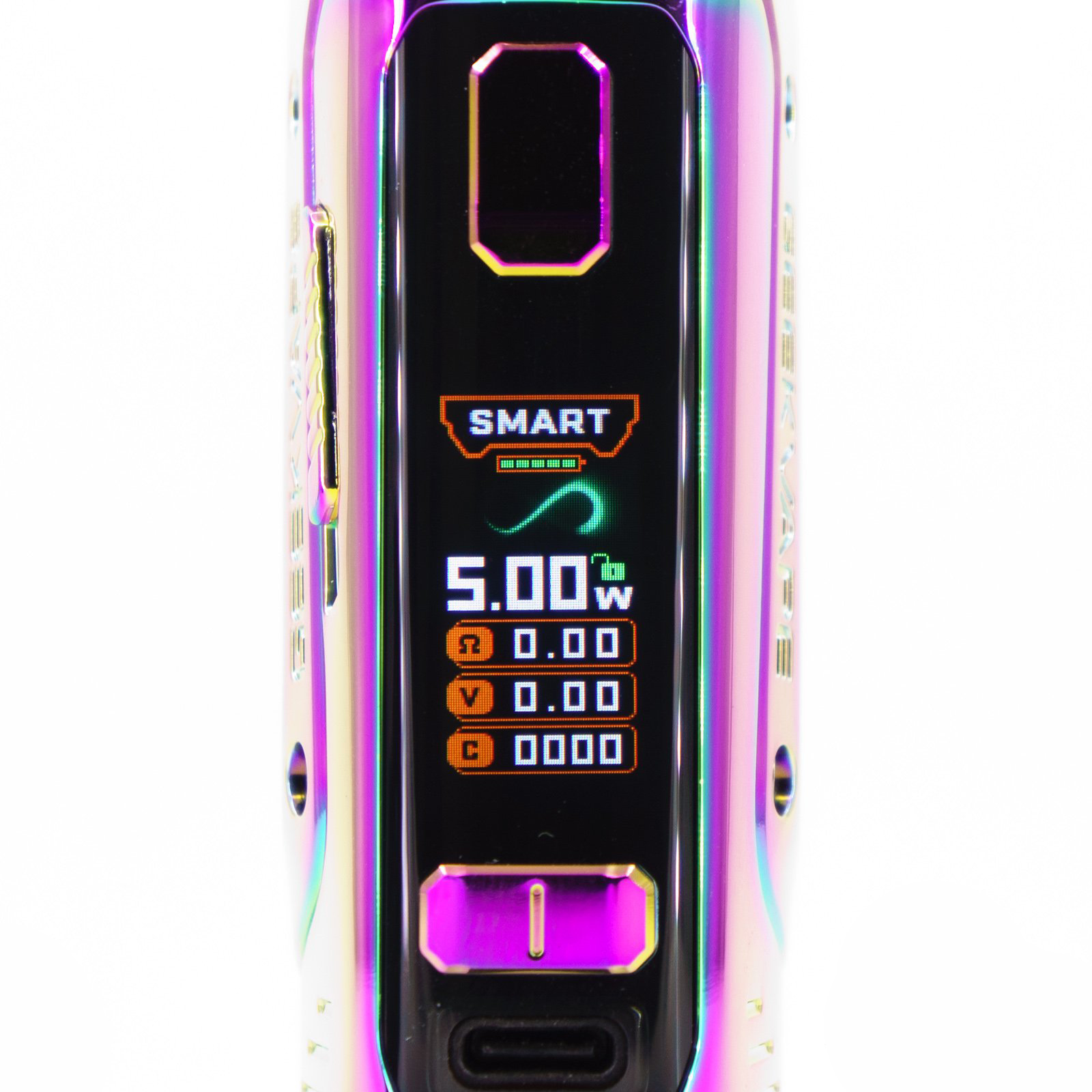
Данная модель может работать в пределах мощности от 5 до 60 watt и оснащена цветным дисплеем с диагональю 0.96”, на котором можно выбрать один из режимов. Мощность настраивается автоматически, также ее можно выставить и вручную.
Проще сразу выбрать подходящий режим – эта информация представлена в таблице:
| Power | Это стандартный режим работы. |
| Smart | Устройство самостоятельно выбирает мощность в зависимости от сопротивления испарителя. |
| Bypass | Здесь мощность настраивается автоматически в зависимости от заряда аккумулятора и установленного испарителя. Обратите внимание: данный параметр показывается не в watt, а в volt. |
| Boosting | Обеспечивает большее пароиспарение. Работает только при настройках power и bypass. |
| Другие режимы | Есть еще такие режимы, как tc, tcr – это термоконтроль. Также возможна настройка с отображением кривой мощности vps. |
Ручная настройка мощности в GeekVape B60
Возможна и ручная регулировка с выбором наиболее оптимального значения. Она круговая, то есть можно выбрать сразу 60 watt, переключить на 5 или наоборот. Для этого нужно нажать кнопку «fire» и перейти в меню выбора режима. После всех настроек следует заблокировать кнопки при помощи слайдера, который находится сбоку. Отклик при нажатии на эти кнопки моментальный.
Настройка мощности GeekVape H45

У модели GeekVape H45 всего два режима работы: power и bypass, выбрать который можно трехкратным нажатием кнопки «огня». После этой комбинации значок изменит свой цвет с белого на оранжевый, затем можно выбрать наиболее оптимальный режим, нажав клавиши «+/–». Подтверждаются выбранные действия однократным длительным удерживанием кнопки «огня». Если ничего не делать в течение 2 секунд, то устройство все самостоятельно сохранит и выйдет из меню.
Можно настроить мощность и вручную:
- включаем устройство;
- выбираем режим настройки мощности;
- регулируем ее кратковременным нажатием клавишами «+/–», что обеспечит прибавление на 0,5 Вт;
- быстрая регулировка осуществляется удерживанием клавиш «+/–»;
- при достижении максимальных или минимальных значений регулировка автоматически закончится;
- подтвердите свои действия длительным удерживанием клавиши «огня».

Важное замечание! Мощность пода необходимо выставлять в соответствии с диапазоном указанным на испарителе. Например, если установлен испаритель на 0,4 Ом, то необходимо не выходить за пределы мощности от 25 до 35 Ватт.
Следуйте этим инструкциям и выберите наиболее оптимальный режим, основные рабочие параметры отображаются на экране. Помимо настроек следите за уровнем заряда аккумулятора и не забывайте вовремя заправлять картридж. Блокировка кнопок осуществляется одновременным нажатием клавиш «+/–».
Периодически сбрасывайте счетчик затяжек, выполняя следующую комбинацию: одновременно нажимайте и удерживайте кнопку «Fire» и кнопку «–». Сброс осуществляется нажатием именно последней клавиши.
Популярные вопросы о настройке мощности Geekvape различных моделей
Как настроить мощность geekvape n30?
Как настроить мощность geekvape b100?
Как менять мощность geekvape aegis one?
Как менять мощность geekvape b60?
Вернуться к списку публикаций
Сегодня у нас на обзоре новый интересный девайс от китайской компании Geekvape — наследник популярного подмода Aegis Boost, получивший название Geekvape B60.
Содержание и навигация
- Упаковка Geekvape B60 Pod Mod
- Комплект Geekvape B60 Pod Mod
- Внешний вид и конструктив Geekvape B60 Pod Mod
- Характеристики Geekvape B60 Pod Mod
- Картридж Geekvape B60 Pod Mod
- Испарители Geekvape B Series Coil
- Индикация и управление Geekvape B60 Pod Mod
- Впечатления и выводы
Упаковка Geekvape B60 Pod Mod
Устройство попало ко мне в руки в стандартной черной коробке, завернутой в слив с черно-оранжевым принтом, в фирменных цветах производителя. На лицевой стороне упаковки можно увидеть лого компании Geekvape, название девайса, его основные характеристики (объем и емкость встроенного аккумулятора), подписанный вариант оформления корпуса, а также само изображение девайса в той расцветке, которая вас ждет внутри. На обороте перечислены основные «заманухи» Geekvape B60 — маркетинговое описание продукта и его ключевые достоинства, перечисление комплекта, призыв внимательно изучить инструкцию перед использованием, реквизиты и адрес компании, товарный штрихкод с еще раз указанным цветом (точно не ошибетесь!) и наклейка с проверкой оригинальности — QR-ссылкой и цифрами под стираемым слоем.

Сразу же под крышкой во всей красе нас встречает устройство. Ну, или как в моем случае, не совсем «в красе», а уже слегка поцарапанное в верхней части. Видно эти царапины не под каждым углом, но все же они есть. Тут два варианта: либо девайс положили уже с царапинами в коробку, либо картонная крышка оказалась не способна защитить корпус от «тягот и лишений» транспортировки.
Комплект Geekvape B60 Pod Mod

- Батарейный блок Geekvape B60 Mod
- Картридж Geekvape B60 Pod (5 мл/2 мл для TPD)
- Инструмент для испарителей
- Кабель USB Type-C
- Испаритель Geekvape B Series Coil 0.2Ω 50~58W (установлен)
- Испаритель Geekvape B Series Coil 0.6Ω 15~25W (запасной)
- Оринг
Кроме устройства в собранном виде с уже установленным испарителем, внутри упаковки можно найти толстый метровый кабель USB Type-C, сменник с другим сопротивлением, специальный инструмент для извлечения испарителей из картриджа и оринг, по всей видимости, устанавливаемый в мундштук. Макулатура представлена карточкой с предупреждениями, касающимися особенностей зарядки; конвертом, где можно найти пустой гарантийник и еще одну бумажку со всяческими предостережениями; а также мануалом с иллюстрациями на девяти языках, включая русский перевод. К слову, не самым «упоротым» вариантом, хотя и не без ляпов. Если вам это зачем-то нужно, то качать инструкцию всегда можно на сайте производителя в разделе Downloads.
Внешний вид и конструктив Geekvape B60 Pod Mod

После долгого и внимательного изучения, что же там насыпал в коробку комплектовщик, можно перейти непосредственно к рассмотрению устройства. Здесь нас ждет хорошо узнаваемый внешний вид, который мы уже видели во множестве устройств серии Aegis: эргономичная форма с кожаной накладкой под ладонь, защитной рамкой на корпусе и нарочито оставленными на виду винтами. Но, в отличие от, например, прорезиненного Aegis Boost, второй версией которого и стал Geekvape B60, вся поверхность корпуса блестящая, как известно что у кота. И, естественно, вся эта прелесть моментально покрывается отпечатками пальцев (четвертое фото ниже отлично это иллюстрирует), пылью и, к сожалению, царапинами. Несмотря на защиту от пыли и влаги по стандарту IP68.
Обе стороны устройства украшает лишь имя Geekvape. Куда, как и почему исчезли из названий производителя милые сердцу знакомые названия Aegis и Zeus — я так и не понял. При этом наш B60 на сайте производителя находится именно в разделе AEGIS. Из особенностей во внешнем виде можно отметить появившуюся слева кнопку-ползунок и скругленный экран. Хотя, конечно же, речь про защитный пластик, а не спрятанный за ним дисплей.

Во всем остальном, не зная досконально модельный ряд этих самых Аегисов, отличить один от другого лично для меня довольно сложно. Тех же Aegis Boost было выпущено аж четыре версии (!), а вслед за ними появился еще и Geekvape B100 21700, работающий, как понятно, от сменного аккумулятора 21700. Что их все объединяет — наличие защиты от пыли и влаги по классификации IP, эргономичная форма, отличный хват в ладони и приличный для своих габаритов вес. Который если не обеспечивает, то по крайней мере внушает чувство надежности.

Цвета Geekvape B60 Pod Mod
Производитель выпустил семь вариантов оформления Geekvape B60, среди них есть как сдержанные черный и стальной, так и цветные синий, зеленый и красный, и совсем уж вейперские пестрые красно-синий и радужный. Если судить по рендерам и найденным в сети изображениям, все, кроме радужного, как раз и попавшего ко мне в руки, имеют матовое покрытие корпуса, но рамка глянцевая везде .
Характеристики Geekvape B60 Pod Mod
- Габариты: 111,5 * 30,5 * 41 мм
- Вес: 154 г
- Материалы: цинковый сплав, PCTG, кожа
- Аккумулятор: встроенный 2000 мАч
- Режимы работы: вариватт, Smart, Boost, температурный контроль (никель, титан, нержавейка, ТКС), настраиваемый график подачи мощности
- Выходная мощность: 5 — 60 Вт
- Максимальная выходная сила тока: 20 A
- Максимальное выходное напряжение: 7,5 В
- Поддерживаемое сопротивление: 0,2 — 2,0 Ом
- Емкость картриджа: 5 мл/2 мл (версия TPD)
- Используемые испарители: Geekvape B Series
- Разъем для зарядки: USB Type-C
- Дисплей: цветной TFT 0,96″
- Вид защиты: IP68
- Рабочие температуры: 0° — 45°C
- Температура хранения: -20° — 60°C
- Особенности:
верхняя заправка
отсутствие протечек
блокировка отдельной кнопкой - Цвета: Blue Red, Silver, Bottle Green, Golden Red, Black, Mint Blue, Rainbow

Мундштук, в отличие от первого Aegis Boost, здесь не круглый, а плоский, и очень похож на тот, который был в комплекте с Aegis Boost Luxury Edition. Жаль, конечно, что производитель не добавил к коробку альтернативный. Тем более, что поменять на какой-то свой его не получится.


Зато его можно повернуть так, как вам будет удобнее пользоваться — держится дриптип на выступе за счет оринга. Отверстие в выступе на миллиметр меньше стандартного посадочного для 510 дриптипа. Думаю, используя сверло на ∅8 мм, посадку можно расточить до нужного диаметра. Но делать это надо очень аккуратно, чтобы не испортить картридж, короче, я бы не рисковал. Тем более, что комплектный мундштук меня вполне устраивает: держится надежно, не греется после нескольких затяжек, конденсат внутри не собирает, при этом пропускает через себя приличное количество пара.

От прорезиненного покрытия первого Буста осталась только рифленая пяточка на нижней части корпуса. Благодаря ей девайс надежно стоит на ровной поверхности и не скользит. Ну, и конечно же, корпус снизу не затирается.


Регулировка затяжки в виде диска исчезла, теперь на задней стенке картриджа появилась горизонтальная прорезь и выступающий из нее на миллиметр рычажок. В левом положении воздух полностью перекрывается (практически наглухо), в правом — максимально открыт. Естественно, подбирая комфортную для себя затяжку, можно выставлять и промежуточные положения, рычаг двигается с заметным сопротивлением и случайно не сбивается.


Интересная деталь, которая впервые появилась в устройствах Geekvape, кажется, начиная с Aegis Legend L200 — A-Lock, она же кнопка блокировки. Смещая ее вниз, вы можете быстро и не глядя на экран (в отличие от полного отключения, в котором нужно будет все-таки убедиться) быстро заблокировать управление. И точно также просто сдвинув вверх, разблокировать девайс. Удивительно, что другие производители до сих пор не подхватили эту находку. На мой взгляд, очень удобное решение.

Картридж сидит в батарейном блоке практически без люфта — даже руками деталь сдвинуть с места сложно, как и ухватиться за скользкий пластик. Проще всего его достать — нажав на картридж большим пальцем со стороны обдува. Соединение обеспечивается при помощи двух кольцевых магнитов: один стоит в разъеме устройства, второй — в картридже. Внутри девайса можно увидеть два подпружиненных контакта, по которым напряжение подается на испаритель; винты, удерживающие пластиковую крышку; серийный номер, а также стандартные пиктограммы, которые продублированы на картридже — перечеркнутая мусорка, CE и UKCA — знак сертификации, который указывает на соответствие требованиям к продукции, продаваемой в Великобритании.

На внутренней стенке нашлась еще и гравировка с указанием емкости аккумулятора и стандартным Designed by Geekvape/Made in China. В общем, все необходимые надписи на девайсе есть, но в то же время не уродуют корпус снаружи.
Картридж Geekvape B60 Pod Mod
Картридж, вмещающий 5 мл жидкости, ничем особо не примечательный, но в то же время сконструирован довольно продуманно. Прозрачный пластик, из которого изготовлена емкость, позволяет легко отслеживать уровень жидкости; отверстие сверху не требует извлекать сменник из батарейного блока для заправки; поступление воздуха в испаритель происходит не внутри коннектора, а в самом картридже.


На клапане, прикрывающем отверстие заправки, изображены капля и «+» (с очевидным посылом: «добавь жидкость»). В новом устройстве на контактах испарителя находится защитная наклейка, которая предотвратит случайную подачу напряжения на испаритель. Особенно это спасет любителей достать девайс из коробки и тут же начать нажимать на нем все кнопки. Естественно, не удосужившись хотя бы заправить картридж. Эта небольшая наклейка иногда очень спасает.

Так как достать испаритель при помощи одних ногтей и можно, но опасно для маникюра — три оринга держат сменник внутри очень уверено — для этих целей Geekvape предусмотрительно кладет в набор своеобразный «ухват». Зацепив ключом нижнюю часть испарителя, сменник можно легко достать. Если вы боитесь потерять или забыть это нужное приспособление — его можно повесить на ключи, в ручке есть отверстие.
Испарители Geekvape B Series Coil

Испарители, с которыми работает девайс, нам хорошо знакомы и ничем не отличаются от тех, которые были разработаны пару лет назад еще для Aegis Boost. Они только сменили название и называются теперь не G.Coil BOOST или GV Boost Coils как раньше, а выпускаются под маркировкой Geekvape B Series Coil. Если честно, довольно необычное желание запутать покупателя. Полный ассортимент сменников и использующих его устройств на сегодняшний день выглядит следующим образом (наш Geekvape B60, он же Aegis Boost 2, производитель почему-то забыл сюда включить):

Список поддерживаемых испарителей Geekvape B Series Coil для Geekvape B60
Продаются испарители упаковками по 5 штук в блистерах, но при покупке в вейпшопе вам скорее всего без проблем продадут и поштучно.


Гравировки на корпусе содержат информацию только о типе испарителей и стандартную надпись Made in China, а вот на контактах можно найти больше полезного: сопротивление, рекомендуемую мощность, тип и материал нагревательного элемента. Хотя почему на испарителе на 0,2 Ом не указано, что он тоже на сетке, я так и не понял.

У резиновой заглушки, прикрывающей заправочное отверстие, есть небольшой язычок, потянув за который, можно легко открыть пробку. Отверстие для заправки без проблем вмещает капельницы пластиковой гориллы, остается еще и свободное место для выхода лишнего воздуха из емкости.

Правда, для того, чтобы полностью наполнить весь резервуар, картридж необходимо наклонить — если он будет расположен строго горизонтально, большая часть емкости останется пустой. Точно так же придется наклонять и девайс, чтобы можно было выпарить жидкость без остатка. А вот для контроля за жидкостью наклонять B60 придется уже в другую сторону — часть емкости скрыта стенками батарейного блока.

После заправки перед первым использованием нового испарителя не забудьте подождать несколько минут, пока намотка хорошо пропитается жидкостью. Иначе сухой хлопок может запросто сгореть при первом же нажатии на Fire, а избавиться от «аромата» сгоревшей ваты без замены испарителя не получится.
Индикация и управление Geekvape B60 Pod Mod

Девайс оборудован стандартной схемой управления: Fire и кнопки регулировки «+» и «-», которые объединены в одну качельку. Ну, и конечно же не забываем про кнопку-слайдер A-Lock, при помощи которой можно быстро заблокировать устройство. Включается и отключается плата стандартным пятикратным нажатием на Fire, причем, даже с заблокированной A-Lock. Geekvape B60 оборудован цветным TFT экраном 0,96″ (2,43 см) со скругленным защитным стеклом, как в каких-нибудь модных мобильниках. На ярком солнце изображение на максимальной яркости хоть заметно и блекнет, но все еще остается вполне читаемым. Яркость можно настроить, удерживая одновременно Fire и «-» и «+».
На работающем экране одновременно есть название режима, графическое отображение заряда встроенного аккумулятора, анимированный значок бесконечности (просто для красоты), выставленные значения мощности или температуры, сопротивление намотки, подаваемое напряжение или мощность и ТКС (в режиме ТК), счетчик затяжек. При нажатии на Fire вместо количество затяжек появляется секундомер — бессмысленное решение, т.к. после отпускания Fire он тут же снова показывает количество затяжек. Либо надпись 10S CUTT-OFF, если вы умудрились допарить до отсечки в 10 секунд.
Мощность меняется от 5 до 60 Ватт с шагом лишь в 0,5 Вт, несмотря на наличие сотых в цифрах — еще одно спорное решение, если только у дизайнеров не было желания «забить» пустое место на экране лишними нулями.
Для того, чтобы переключиться между режимами, необходимо нажать на Fire три раза. Верхняя надпись — название режима — станет оранжевой, после этого одиночным нажатием на Fire можно либо переключаться между настройками и менять их (например, настраивать мощность в термоконтроле), либо кнопками «-» и «+» переключиться в другой режим. Окончание настроек в выбранном режиме происходит после удержания (2 секунды) кнопки Fire.
- SMART — режим вариватт, в котором максимальное и минимальное значение мощности ограничивается настройками платы в зависимости от сопротивления испарителя.
- POWER — вариватт без ограничений, как в режиме SMART.
- BOOSTING — плата отдает все напряжение на аккумуляторе, аналог bypass.
- TC-Ni, TC-Ti, TC-SS — режимы температурного контроля с никелем, титаном и нержавейкой. Можно настроить температуру (от 100°C до 315°C с шагом 1°C или от 200°F до 600°F с шагом 5°F) и максимальное ограничение выдаваемой мощности (от 5 до 60 Вт с шагом 1 Вт).
- TC-TCR — температурный контроль с возможностью вручную настроить температурный коэффициент материала — предпоследняя строчка напротив «T».
При желании можно узнать и версию прошивки вашего устройства: необходимо выключить девайс пятикратным нажатием на Fire, а затем зажать на пару секунд кнопки «-» и «+». Правда, о возможности обновления ПО производитель нигде не пишет, нет необходимых файлов и на сайте Geekvape в разделе Downloads.

Производитель как-то скромно умалчивает о токе зарядки (или я его просто не нашел), поэтому пришлось проверять экспериментальным путем. Оказалось, что Geekvape B60 не только оборудован современным Type-C, но и поддерживает быструю зарядку, по моим замерам девайс «потянул» до 5В/1,80 А. Возможно, когда аккумулятор разрядится сильнее, этот ток будет еще выше, а может мой кабель-лапша просто не смог пропустить больше. Плата поддерживает и пастру — при подключенном кабеле можно продолжать пользоваться устройством, потребление тока при нажатии на Fire из зарядного устройства прекращается. Правда, производитель на отдельной картонке (та, которая с большой надписью WARNING) категорически не рекомендует этого делать.
Впечатления и выводы

Ну что ж, осталось подвести итоги. Девайс вышел симпатичным, хорошо собранным, функциональным (в отличие от первого Aegis Boost с единственным режимом вариватт) и наверняка порадует всех любителей компактных подмодов, способных выдавать приличные облака пара и имеющие тонкую настройку. Каких-то нареканий к девайсу у меня нет — за несколько дней я на нем выпарил около 10 мл вкуснейшего Dragon Frappe от Juice Man, и полностью остался доволен как вкусопередачей, так и количеством пара на испарителе 0,6 Ом. Единственное, что расстроило лично меня — неглубокие, но отчетливые царапины на корпусе уже из коробки. Надеюсь, что это просто мне «повезло», и в остальных экземплярах ничего подобного нет. Ну, и обычное брюзжание олдфага по поводу отсутствие картриджа с обслуживаемой базой. К Aegis Boost, кстати, она выпускалась, хоть и была дефицитом.

На момент публикации обзора на официальном сайте производителя за Geekvape B60 просили $54,02. Два сменных картриджа (без испарителей) вам обойдутся в $8,30, упаковка с пятью испарителями Geekvape B Series Coil потянут от $14,99 до $17,99 в зависимости от сопротивления. Думаю, как и первый Aegis Boost с его «расширенными версиями», новинка найдет своих верных фанатов.
Цена в онлайн магазинах: $28,27 (опт) | $27,31 | $48,99 | $54,02 | $33,8 | $27,99 | $45,93 | $54,02 | $49,99 | $54,02
2022 | kroix
Фотографии | kroix
Если вы нашли ошибку, выделите ее и нажмите Ctrl+Enter.
The Geekvape B60 is the latest device in the famed series of Geekvape Aegis Boost pod systems. Also known as the Aegis Boost 2, the Geekvape B60 is compact, stylish and very powerful – it’s just about everything that you could ever want in a pod mod.
The one thing the Geekvape B60 isn’t, though, is easy to discern from the many other devices in the Geekvape Aegis series unless you’re already a Geekvape fan and are familiar with the product range. One of the most prominent strong points of the Geekvape Aegis devices is that there’s something for just about everyone. The weak point, though, is that it can be difficult to tell which of the many devices is the right one for you – and that’s what we’re going to cover in this Geekvape B60 review.
So, are you looking at the wide selection of vape kits here at VapeJuice.com and trying to decide whether the Geekvape B60 is going to be your next vape? In this review, we’re going to help you figure it out. We’ll start by discussing some of the prices associated with this device, and then we’ll continue by explaining the features that make it unique. Let’s dive in!
What Is the Price of the Geekvape B60?

The Geekvape B60 kit includes everything that you need in order to get started with this device, but it’s a good idea to know all of the associated costs because you’re going to need replacement parts from time to time. Here’s how much the Geekvape B60 and its replacement parts cost.
- Geekvape B60 Kit: Costs $35.49. The kit includes the Geekvape B60 device along with one pod, two coils, a coil removal tool, a spare drip tip, a charging cable and an instruction manual.
- Geekvape B60 Pods: Cost $7.49 per two-pack. The replacement pods do not include coils. Since the Geekvape B60 uses a pod with replaceable coils, you can continue using the same pod for as long as you like.
- Geekvape B60 Coils: Cost $12.95 per five-pack. The Geekvape B60 is compatible with all coils in the Geekvape B series. Five different coil resistances are available, ranging from 0.2 to 1.2 ohm – so you should have no trouble finding one that suits your vaping style. The Geekvape B60 kit includes the 0.2- and 0.4-ohm coils, which are optimized for direct-to-lung inhaling and work best with lower nicotine strengths.
What Makes the Geekvape B60 Special?

Now that you understand what kind of investment you’re making when you buy the Geekvape B60, why is this a device that you might want to buy in the first place? Here are this device’s key features.
- It has an updated design with racecar-inspired lines and a curved color display.
- It has the IP68 rating for ingress protection. The IP68 rating means that dust can’t penetrate it, and it’s resistant to water at a depth of up to 1.5 meters for up to 30 minutes. The Geekvape B60 is also shock resistant.
- It has a built-in 2,000-mAh battery and reaches a maximum power of 60 watts.
- It has a physical locking switch that prevents the device from activating accidentally when you carry it in your pocket.
- It has every vaping mode you could ever want, along with a couple of new ones. SMART mode automatically optimizes the device’s output for the best blend of flavor quality and coil life, and BOOST mode optimizes the device’s output for the best possible vapor production.
- It has an advanced boost-buck circuit that maintains a stable power output even as the battery reaches the end of its charge.
Geekvape B60 vs. Aegis Boost: Is It Worth the Upgrade?
If you already own the original Geekvape Aegis Boost, is it worthwhile to upgrade to the B60? Here are some of the key improvements that Geekvape has made to the B60.
- The Geekvape B60 has a maximum power of 60 watts, while the original Aegis Boost reaches a maximum of 40 watts.
- The Geekvape B60 has a redesigned pod with a side air inlet that improves flavor and helps to prevent leaking.
- The Geekvape B60 has an improved design with a better screen.
- The Geekvape B60 has the IP68 ingress protection rating, whereas the Aegis Boost has an IP67 rating.
- The Geekvape B60 has a higher battery capacity of 2,000 mAh. The Aegis Boost has a 1,500-mAh battery.
- The Geekvape B60 has a USB-C charging port, while the Aegis Boost charges via Micro-USB.
Geekvape B60 vs. B100: What’s the Difference?
The fact that Geekvape has changed the naming conventions for its devices might be a bit of a source of confusion for you, since the Geekvape B60 (formerly the Aegis Boost 2) and Geekvape B100 (formerly the Aegis Boost Pro 2) have very similar names. Here are the key differences between the two.
- The Geekvape B100 uses a single removable 18650 battery, whereas the Geekvape B60 has a built-in battery.
- The Geekvape B100 reaches a maximum power of 100 watts, while the Geekvape B60 has a maximum power of 60 watts.
- The Geekvape B100 uses its own pod. The two pods aren’t compatible with each other.
- The Geekvape B100 uses Geekvape P-Series coils, while the Geekvape B60 uses B-Series coils.
Other than the differences outlined above, the Geekvape B100 and Geekvape B60 are very similar to one another. You can think of them as being more or less the same, except that the Geekvape B100 uses a removable battery and offers a bit more power as a result.
How to Use the Geekvape B60

Now that you know just about everything there is to know about the Geekvape B60, it’s time to learn how to use the device. Since the Geekvape B60 is a proprietary pod mod, there are a few things about its operation that are a bit unique. We’ll walk you through it.
How to Charge the Geekvape B60
To charge the Geekvape B60, connect the device to your computer using the included USB-C cable. The animated battery gauge on the display will let you know when the device is fully charged.
How to Fill the Geekvape B60 Pod

To fill the Geekvape B60 pod, flip open the filling port at the top of the pod with your fingernail. Add e-liquid until the pod is nearly full and close the port. If you’re filling the pod for the first time or have just installed a new coil, wait several minutes before vaping.
How to Replace the Geekvape B60 Coil

To replace the Geekvape B60 coil, remove the pod from the device and turn it upside down. On the underside of the pod, you’ll see the base of the coil. You can grasp the coil’s base with your fingers and pull it out, or you can use the coil removal tool included with the Geekvape B60 kit. Push the coil all the way in and replace the pod.
How to Vape with the Geekvape B60
After charging the device and filling the pod, you’re ready to begin using the Geekvape B60 – but before you get started, remove the pod from the device and look for a sticker covering the bottom of the coil. The sticker is there to prevent the coil from activating accidentally in shipping. Remove the sticker and discard it.
If the device’s screen isn’t on, you’ll need to turn it on. You can do that by pressing the fire button five times. Once you’ve done that, you’re ready to vape. Hold the fire button while puffing on the pod’s mouthpiece.
If you want to change the Geekvape B60’s settings, you can adjust the wattage using the adjustment buttons below the device’s screen. The Geekvape B60 starts out at a power level of just 5 watts to prevent burning the coil. To change vaping modes, press the fire button three times to enter the device’s menu system.
How to Fix Problems with the Geekvape B60
If you already own the Geekvape B60, this part of our instruction manual is for you. In it, we’ll explain how to troubleshoot some of the common problems that you might encounter with this unique pod mod.
Geekvape B60 Not Hitting
If your Geekvape B60 isn’t hitting when you press the fire button, don’t panic. This device has a few unique features and quirks, and you’ll probably find that it’s very easy to get your device working.
- Check the underside of the pod. Did you remove the sticker? If not, do so and try using the device again.
- Does the device do nothing at all when you try to vape? It’s probably turned off. Turn the Geekvape B60 on by pressing the fire button five times.
- Does the screen say “Locked” when you try to vape? Flip the switch on the side of the Geekvape B60 to unlock the device.
- Does the screen say “Low Voltage” when you try to vape? Charge the battery fully before vaping again.
- Does the screen say “No Atomizer” when you try to vape? Remove the pod and make sure that the coil is pushed in all the way. If you see e-liquid in the chamber under the pod, dry the Geekvape B60 thoroughly with a paper towel. If the issue continues, install a new coil.
Geekvape B60 Not Charging
If you don’t see a battery animation on the screen when you connect the device to your computer, your Geekvape B60 isn’t charging. Here’s what you should do next.
- Charge the Geekvape B60 only by connecting it to your computer. Although this device supports 2-amp charging, you should still avoid using a wall adapter because some wall chargers may be incompatible with the device.
- Try charging the Geekvape B60 with a different USB-C cable.
- Remove dust and lint from the device’s charging port with a toothpick.
Geekvape B60 Tastes Burnt
If you get a burnt flavor from your Geekvape B60, there’s no need to panic. Follow these steps to fix it.
- Reduce the device’s wattage. Although the Geekvape B60 operates at up to 60 watts, not all coils will work well at that power level.
- Make sure that the pod is full. If the pod is nearly out of vape juice, you’ll get a burnt flavor.
- Install a new coil. When the coil is covered with e-liquid residue, it’ll start to taste burnt. You can expect to replace the Geekvape B60 coil every several days.
Geekvape B60 Leaking
Have you removed the pod from your Geekvape B60 and found e-liquid under it? Dry the leak completely and make sure that the coil is pushed all the way into the pod. If the leak persists, install a new coil – and if the problem continues, it’s probably time to begin using a new pod.
Geekvape B60 Screen Not Working
The Geekvape B60 has a built-in stealth mode that lets you disable the screen for more discreet vaping. If the screen on your Geekvape B60 doesn’t seem to be working, you’ve most likely enabled stealth mode. Turn the screen back on by pressing the fire button and the “+” and “-“ buttons simultaneously.

The Geekvape B60 manual provides guidance on operating the device, including navigation of the 0․96-inch LED curved display and utilization of intelligent working modes by AS-Chip for optimal performance always․
Overview of the Device
The Geekvape B60 device is a pod mod kit that features a stunningly leakproof design, making it a reliable choice for vapers․ The device is constructed from a durable zinc-alloy chassis, providing a robust and versatile vaping experience․ With a compact design, the B60 is ideal for on-the-go vaping, and its 2000mAh internal battery ensures extended vaping sessions․ The device also boasts a comprehensive temperature control suite, allowing users to customize their vaping experience․ Additionally, the B60 features a 0․96-inch LED curved display, providing users with a clear and concise interface to navigate the device’s settings and modes․ Overall, the Geekvape B60 is a well-designed and feature-rich device that is sure to meet the needs of vapers looking for a reliable and customizable vaping experience․ The device’s intelligent working modes and leakproof design make it an excellent choice for those seeking a hassle-free vaping experience․
Technical Specifications

Geekvape B60 features output power of 5W-60W and maximum output current of 20A with Type-C port charging always․
Device Parameters
The Geekvape B60 device parameters include a resistance range of 0․2 ohm to 2 ohm, which is suitable for various vaping styles․ The device also features a maximum output voltage of 7․5V, ensuring a safe and consistent vaping experience․ Additionally, the B60 has a built-in 2000mAh battery, providing ample power for extended vaping sessions․ The device’s parameters are designed to work in conjunction with the AS-Chip, which provides intelligent working modes for optimal performance․ The parameters of the device are also complemented by a 0․96-inch LED curved display, which provides clear and concise information about the device’s status․ Overall, the device parameters of the Geekvape B60 are designed to provide a superior vaping experience, with a focus on safety, consistency, and performance․ The parameters are carefully calibrated to ensure that the device operates within a safe and efficient range․

Design and Features
Geekvape B60 features a zinc-alloy chassis and stunningly leakproof design with intelligent working modes always․
Display Screen and Operating Temperature
The Geekvape B60 features a 0․96-inch LED curved display screen that provides users with essential information, including power output and battery life․ This display screen is designed to be easy to read and navigate, making it simple for users to adjust their settings and monitor their device’s performance․ The operating temperature of the Geekvape B60 ranges from 0C to 45C, allowing users to vape in a variety of environments․ The device also has a storage temperature range of -20C to 60C, making it suitable for use in different climates․ Additionally, the relative humidity range of 10RH to 70RH ensures that the device can withstand various levels of moisture, providing users with a reliable and consistent vaping experience․ The display screen and operating temperature of the Geekvape B60 are designed to work together to provide users with a superior vaping experience․

Usage and Safety
Proper usage and safety precautions are essential for Geekvape B60 users to ensure a safe vaping experience always with caution․
Warning and Nicotine Content
The Geekvape B60 manual includes important warnings and information about nicotine content, as this product contains nicotine, an addictive chemical․ Users are advised to be aware of the risks associated with nicotine consumption․ The manual provides guidance on safe usage and handling of the device, as well as precautions to take when using e-liquids with nicotine․ It is essential for users to follow these guidelines to ensure a safe and enjoyable vaping experience․ The warnings and guidelines outlined in the manual are designed to protect users from potential harm and to promote responsible vaping practices․ By following these guidelines, users can minimize the risks associated with nicotine consumption and enjoy the benefits of vaping with the Geekvape B60․ The manual is an essential resource for users, providing valuable information and guidance on safe and responsible vaping․
The Geekvape B60 manual concludes with final thoughts on device usage always․
Geekvape Brand and Innovation
Geekvape is a renowned brand in the vaping industry, known for its innovative products and commitment to quality․ The company has established itself as a leader in the market, with a wide range of devices and accessories that cater to different needs and preferences․ With the Geekvape B60, the brand has once again demonstrated its ability to push the boundaries of technology and design, creating a device that is both functional and stylish․ The B60’s tri-proof design, intelligent working modes, and stunning leakproof construction are just a few examples of the brand’s innovative approach to vaping technology․ By continually striving to improve and expand its product line, Geekvape has earned a loyal following among vapers and established itself as a major player in the industry․ The brand’s dedication to innovation and customer satisfaction has made it a go-to choice for many vaping enthusiasts․
Geekvape B60 Manual⁚ A Comprehensive Guide
This guide provides a comprehensive overview of the Geekvape B60‚ a powerful and versatile pod mod kit. It covers everything from key features and design to usage‚ maintenance‚ and troubleshooting. Whether you’re a seasoned vaper or just starting out‚ this manual will equip you with the knowledge to get the most out of your B60.
Introduction
The Geekvape B60‚ also known as the Aegis Boost 2‚ is a compact and powerful pod mod kit that delivers a satisfying vaping experience. This device is a successor to the popular Aegis Boost line‚ boasting a range of upgrades and improvements. It combines a durable design with advanced features‚ making it an ideal choice for vapers of all levels.
This manual serves as your comprehensive guide to the Geekvape B60‚ providing detailed information on its features‚ operation‚ and maintenance. Whether you’re a seasoned vaper or just starting out‚ this guide will equip you with the knowledge to understand and enjoy your B60 to the fullest.
From setting up your device to troubleshooting common issues‚ this manual covers all the essential aspects of using your B60. We encourage you to read through it carefully to familiarize yourself with its capabilities and ensure a safe and enjoyable vaping experience.
Key Features of the Geekvape B60
The Geekvape B60 is packed with features that cater to both experienced and novice vapers. Some of its standout features include⁚
- Powerful Output⁚ The B60 boasts a maximum output of 60 watts‚ providing ample power for a variety of vaping styles and coil resistances.
- Durable Tri-Proof Design⁚ Featuring an IP68 rating‚ the B60 is dustproof‚ waterproof‚ and shockproof‚ making it suitable for use in various environments.
- Leakproof Design⁚ The B60’s pod system is designed to minimize leaks‚ ensuring a clean and mess-free vaping experience.
- AS-Chip 3.0⁚ This advanced chipset provides intelligent working modes‚ including variable wattage‚ temperature control‚ and custom curves‚ for personalized vaping.
- Large Battery Capacity⁚ The B60 is powered by a built-in 2000mAh battery‚ providing extended vaping sessions without the need for frequent charging.
- Refillable Pods⁚ The B60 uses refillable pods with a 5mL e-liquid capacity‚ allowing you to use your preferred e-liquids.
- Multiple Coil Options⁚ The B60 is compatible with a range of coils‚ allowing you to customize your vaping experience with different resistances and vapor production.
- User-Friendly Interface⁚ The B60 features a clear and intuitive interface with a 0.96-inch curved display‚ making it easy to navigate settings and monitor your vaping data.
- A-Lock Feature⁚ This safety feature prevents accidental button presses‚ ensuring your device remains in a safe and secure state.
These features combine to create a versatile and user-friendly vaping experience that caters to a wide range of preferences.
Design and Build Quality
The Geekvape B60 boasts a sleek and modern design that reflects its rugged and reliable nature. Crafted from a combination of zinc alloy‚ vegan leather‚ and food-grade silicone‚ the B60 exudes a premium feel and durability. The zinc alloy chassis provides a solid foundation‚ while the leather accents add a touch of sophistication and improve grip. The silicone elements contribute to the device’s shock resistance‚ ensuring it can withstand accidental drops and bumps. The B60’s overall design is compact and ergonomic‚ fitting comfortably in the hand and making it easy to carry around.
The B60 features a 0.96-inch curved display that provides clear and vibrant visuals‚ showcasing essential vaping data like wattage‚ battery life‚ and coil resistance. The display’s curved design enhances visibility from various angles‚ ensuring you can easily read the information even in bright sunlight. The B60’s button layout is intuitive and user-friendly‚ with dedicated buttons for power adjustment and menu navigation. The fire button is strategically placed for easy access and comfortable use. The B60’s design and build quality combine to create a device that is both visually appealing and highly functional.
Battery Life and Charging
The Geekvape B60 is equipped with a built-in 2000mAh battery‚ providing ample power for extended vaping sessions. The battery’s capacity allows for a full day of vaping on a single charge‚ even with moderate to heavy use. The B60’s impressive battery life is further enhanced by its efficient AS-Chip 3.0 chipset‚ which optimizes power consumption and ensures consistent performance; The device’s battery life is a significant advantage‚ especially for vapers who are on the go and need a reliable device that can keep up with their active lifestyle.
The B60 supports fast charging via a Type-C port‚ allowing for a quick and convenient recharge. The device’s charging time is relatively short‚ ensuring that you won’t have to wait long to get back to vaping. The B60’s charging system is designed for safety and efficiency‚ incorporating features to prevent overcharging and short circuits. The device’s battery life and charging capabilities make it a practical and user-friendly option for vapers who value convenience and reliability.
Modes Available
The Geekvape B60 offers a variety of vaping modes to cater to different preferences and vaping styles. The device’s advanced AS-Chip 3.0 chipset enables a wide range of customization options‚ allowing users to fine-tune their vaping experience. The B60’s modes include⁚
- Smart Mode⁚ This mode automatically adjusts the wattage based on the coil resistance‚ providing optimal performance and preventing coil burnout. It’s a convenient option for beginners or those who prefer a simplified vaping experience.
- Power (Variable Wattage)⁚ This mode allows users to manually adjust the wattage output‚ providing precise control over the vaping experience. It’s ideal for vapers who want to experiment with different wattage levels and find their preferred settings.
- Boosting⁚ This mode delivers a quick burst of power for a more intense and flavorful vaping experience. It’s particularly well-suited for vapers who enjoy cloud chasing or seeking a powerful hit.
- Temperature Control (NI‚ TI‚ SS‚ TCR)⁚ This mode allows users to set a specific temperature for their coil‚ providing a consistent and controlled vaping experience. It’s a good choice for vapers who want to prevent dry hits and preserve the flavor of their e-liquid.
- VPC (Custom Curves)⁚ This mode allows users to create custom vaping curves by adjusting the wattage output over time‚ providing a personalized and dynamic vaping experience. It’s ideal for experienced vapers who want to fine-tune their vaping experience and explore advanced customization options.
The B60’s versatile modes offer a wide range of options to meet the needs of different vapers‚ making it a highly customizable and user-friendly device.
Pod and Coil Options
The Geekvape B60 is designed to work with a refillable pod system‚ offering a convenient and leak-resistant vaping experience. The B60 pod has a generous 5ml e-liquid capacity‚ allowing for extended vaping sessions without frequent refills. It features a top-fill design for easy refilling‚ simply remove the silicone plug and pour in your e-liquid.
The B60 utilizes replaceable coils‚ providing a flexible and customizable vaping experience. Geekvape offers a variety of coil options with different resistances and materials‚ enabling users to fine-tune their vaping experience to their preferences. The B60 is compatible with both 0.2ohm and 0.6ohm coils‚ providing a range of power output and vapor production options.
The 0.2ohm coil is designed for high wattage vaping‚ offering dense clouds and a robust flavor profile. It’s ideal for vapers who enjoy cloud chasing or seek a powerful hit. The 0.6ohm coil‚ on the other hand‚ is suited for lower wattage vaping‚ providing a smoother and more nuanced flavor experience. It’s a good choice for vapers who prefer a balanced vaping experience with a focus on flavor.
Geekvape recommends using the appropriate coil resistance for the selected wattage level to ensure optimal performance and prevent coil burnout. Experiment with different coil options to find the perfect combination for your vaping preferences.
Usage and Maintenance
The Geekvape B60 is designed for ease of use. To begin vaping‚ simply fill the pod with your preferred e-liquid‚ install a compatible coil‚ and press the fire button. The B60 features a user-friendly interface with various vaping modes‚ including Power‚ Temperature Control‚ and VPC‚ allowing you to customize your vaping experience.
To change the wattage or vaping mode‚ press the fire button three times to enter the menu system. Use the adjustment buttons to navigate the menu and select your desired settings. To lock the device and prevent accidental button presses‚ use the A-lock feature. This is especially useful when carrying the device in your pocket or bag.
Regular maintenance is crucial for optimal performance and longevity. It’s important to keep the B60 clean and free from dirt and debris. After each use‚ wipe down the device with a clean‚ dry cloth. If any e-liquid leaks‚ promptly clean it up to prevent damage to the device. For more thorough cleaning‚ use a cotton swab and isopropyl alcohol to gently clean the contacts and other parts.
Replace the coil regularly‚ as it will eventually wear out with use. The frequency of coil replacement depends on factors such as e-liquid usage and vaping habits. Keep an eye on the flavor and vapor production; if you notice a decline in either‚ it’s a good indication that the coil needs to be replaced. Always prime new coils before use to prevent them from burning out.
Troubleshooting
While the Geekvape B60 is a reliable device‚ you may encounter occasional issues. Here are some common troubleshooting tips⁚
- No power⁚ Ensure the device is fully charged. If the battery is charged‚ check the charging port for any debris or damage. If the problem persists‚ try a different charging cable.
- Weak vapor production⁚ This could be due to a worn-out coil. Replace the coil with a new one and prime it properly before use. It’s also worth checking if the pod is properly seated and the airflow is adjusted correctly.
- E-liquid leaking⁚ Ensure the pod is correctly inserted and the O-rings are intact. Overfilling the pod can also lead to leaks. If the problem persists‚ try a new pod or contact Geekvape support.
- Device not responding⁚ Try pressing the fire button five times to turn the device off and on again. If this doesn’t work‚ try resetting the device by holding down the fire button and the adjustment buttons simultaneously for a few seconds.
- Strange taste or burnt flavor⁚ This could be due to a burnt coil. Try replacing the coil with a new one. It’s also worth checking if the wattage setting is appropriate for the coil resistance. If the problem persists‚ contact Geekvape support.
If you’re experiencing persistent issues that cannot be resolved with these troubleshooting steps‚ it’s best to contact Geekvape support for further assistance. They can provide more specific guidance and potentially help you determine if the device requires repairs or replacement.
Safety Information
The Geekvape B60 is a safe and reliable vaping device when used responsibly. However‚ it’s crucial to follow these safety guidelines to minimize risks⁚
- Keep away from children and pets⁚ E-liquids contain nicotine‚ which is harmful if ingested. Store your B60 and e-liquids out of reach of children and animals.
- Avoid contact with eyes and skin⁚ E-liquids can irritate the eyes and skin. If you come into contact with e-liquid‚ rinse the affected area with water immediately.
- Do not use damaged or faulty devices⁚ If your B60 shows signs of damage‚ such as cracks or loose connections‚ discontinue use immediately. Do not attempt to repair the device yourself;
- Use only approved e-liquids⁚ Using e-liquids not intended for pod systems can damage your B60 and potentially create unsafe conditions.
- Avoid charging in extreme temperatures⁚ Charge your B60 in a well-ventilated area and avoid charging in extreme temperatures. Excessive heat or cold can damage the battery.
- Do not modify the device⁚ Modifying the B60 in any way can compromise its safety and void the warranty.
- Follow local laws and regulations⁚ Vaping laws and regulations vary depending on your location. Make sure you are aware of and follow the rules in your area.
By adhering to these safety guidelines‚ you can ensure a safe and enjoyable vaping experience with your Geekvape B60. Remember‚ safety is paramount.
Where to Find the Manual
The Geekvape B60 user manual is readily available for download through various online resources. You can access it directly from the Geekvape website‚ where they offer comprehensive support for their products. Navigate to the Geekvape website‚ locate the “Support” or “Downloads” section‚ and select the Geekvape B60 from the product list. You’ll find the manual in PDF format‚ ready for download and viewing on your device.
Alternatively‚ you can find the B60 manual on websites dedicated to vape reviews and resources. Websites like Vape Juice‚ TABlites‚ and others often provide user manuals for popular vape devices‚ including the Geekvape B60. Search for “Geekvape B60 manual” or “Geekvape B60 user guide” on these websites to locate the document.
If you purchased your B60 from a reputable retailer‚ they might also provide a downloadable manual for your specific device. Check your purchase confirmation email or contact the retailer’s customer support for assistance. Always ensure that you are downloading the manual from a trusted source to avoid getting outdated or incorrect information.
The Geekvape B60 is a robust and versatile pod mod kit that offers a satisfying vaping experience. Its durable build‚ intelligent features‚ and impressive battery life make it a great choice for both beginners and experienced vapers. With its user-friendly interface and various vaping modes‚ the B60 caters to different preferences and allows for personalized customization. The comprehensive manual provides detailed information on all aspects of the device‚ enabling users to maximize its potential.
From understanding the key features and design to navigating the various modes and troubleshooting common issues‚ the manual is a valuable resource for any B60 owner. By following the instructions and safety guidelines‚ you can ensure a safe and enjoyable vaping experience. Whether you’re seeking a reliable everyday vape or a powerful device for cloud chasing‚ the Geekvape B60 offers a compelling option‚ backed by a comprehensive user manual that guides you through its intricacies.

Remember to regularly check for updates and firmware releases to enhance your B60’s performance and take full advantage of its capabilities. With proper care and maintenance‚ your B60 will provide a satisfying vaping experience for a long time to come.