
Данная лицензия не предназначена для продажи этого Руководства и Вы не становитесь владельцем этого Руководства после приобретения любого продукта, загрузки и/или использования. Nikon сохраняет за собой право владения данным Руководством и, следовательно, всеми копиями и все соответствующие права, относящиеся к интеллектуальной собственности, и сохраняет за собой все права, которые явно не предоставлены Вам в рамках данного Соглашения. Данное Соглашение представляет собой полное и эксклюзивное соглашение, устное и письменное, между Вами и Nikon.
1. РУКОВОДСТВО
Руководство предназначено для клиентов, которые приобрели наши продукты. Мы можем не иметь возможности ответить на запрос физических лиц, которые не приобрели наши продукты. Пожалуйста, имейте в виду, что данное руководство и контактная информация, указанные здесь, могут быть изменены без уведомления.
Данное Руководство защищено Законом об авторском праве Японии и международными законами об авторском праве и международными договорами. Вам необходимо воспроизвести на каждой копии уведомление об авторском праве Nikon и любую другую информацию о праве собственности, которые присутствовали на оригинале.
2. ОГРАНИЧЕНИЯ
Кроме случаев, когда в данном Соглашении указано иное, нельзя делать или передавать копии данного Руководства другим или передавать в электронной форме Руководство с одного компьютера на другой по сети. НЕЛЬЗЯ ИЗМЕНЯТЬ ИЛИ УДАЛЯТЬ ЛЮБЫЕ УВЕДОМЛЕНИЯ ОБ АВТОРСКОМ ПРАВЕ, ТОРГОВОЙ МАРКЕ ИЛИ ДРУГИЕ ЗАЩИТНЫЕ УВЕДОМЛЕНИЯ, СОДЕРЖАЩИЕСЯ В ДАННОМ РУКОВОДСТВЕ. НЕЛЬЗЯ ПРИСВАИВАТЬ ИЛИ ИНЫМ ОБРАЗОМ ИЗБАВЛЯТЬСЯ, МОДИФИЦИРОВАТЬ, НАСТРАИВАТЬ, ПЕРЕВОДИТЬ, АРЕНДОВАТЬ, БРАТЬ В НАЕМ, ЗАНИМАТЬ, ПЕРЕПРОДАВАТЬ, РАСПРОСТРАНЯТЬ, ПЕРЕДАВАТЬ ПО СЕТИ ИЛИ СОЗДАВАТЬ ИЛИ ИМЕТЬ СОЗДАННЫЕ ПРОИЗВОДСТВЕННЫЕ РАБОТЫ, ОСНОВАННЫЕ НА ДАННОМ РУКОВОДСТВЕ ИЛИ ЛЮБОЙ ЧАСТИ ТАКОВОГО.
3. ОГРАНИЧЕННАЯ ГАРАНТИЯ И ОТКАЗ
В НАИБОЛЬШЕЙ СТЕПЕНИ, РАЗРЕШЕННОЙ В СИЛУ ДЕЙСТВУЮЩЕГО ЗАКОНОДАТЕЛЬСТВА, ДАННОЕ РУКОВОДСТВО ПРЕДОСТАВЛЕНО НА ОСНОВЕ ПРИНЦИПА «КАК ЕСТЬ», БЕЗ ГАРАНТИИ В ЛЮБОЙ ФОРМЕ, И КОМПАНИЯ NIKON, ЕЕ СОТРУДНИКИ, РАСПРОСТРАНИТЕЛИ, ДИЛЕРЫ И АГЕНТЫ ПРЯМО НЕ ПРИЗНАЮТ ЛЮБУЮ ГАРАНТИЮ В ЛЮБОЙ ФОРМЕ, ВЫРАЖЕННУЮ ИЛИ ПОДРАЗУМЕВАЕМУЮ, ВКЛЮЧАЯ, НО НЕ ОГРАНИЧИВАЯСЬ, ЛЮБОЙ ПОДРАЗУМЕВАЕМОЙ ГАРАНТИЕЙ ПРИГОДНОСТИ ДЛЯ ТОРГОВЛИ, ПРИГОДНОСТИ ДЛЯ ОПРЕДЕЛЕННОГО НАЗНАЧЕНИЯ ИЛИ ОТСУТСТВИЯ НАРУШЕНИЙ. В НАИБОЛЬШЕЙ СТЕПЕНИ, РАЗРЕШЕННОЙ В СИЛУ ДЕЙСТВУЮЩЕГО ЗАКОНОДАТЕЛЬСТВА, КОМПАНИЯ NIKON, ЕЕ СОТРУДНИКИ, РАСПРОСТРАНИТЕЛИ, ДИЛЕРЫ И АГЕНТЫ НЕ ГАРАНТИРУЮТ ИСПОЛНЕНИЕ ИЛИ РЕЗУЛЬТАТЫ, КОТОРЫЕ ВЫ МОЖЕТЕ ПОЛУЧИТЬ ИЗ ДАННОГО РУКОВОДСТВА, ИЛИ ЧТО ДАННОЕ РУКОВОДСТВО БУДЕТ СООТВЕТСТВОВАТЬ ВАШИМ ТРЕБОВАНИЯМ ИЛИ ЧТО РАБОТА РУКОВОДСТВА БУДЕТ БЕСПЕРЕБОЙНОЙ, БЕЗОШИБОЧНОЙ ИЛИ НЕ БУДЕТ СОДЕРЖАТЬ ВИРУСОВ. В НАИБОЛЬШЕЙ СТЕПЕНИ, РАЗРЕШЕННОЙ В СИЛУ ДЕЙСТВУЮЩЕГО ЗАКОНОДАТЕЛЬСТВА, НИ КОМПАНИЯ NIKON, НИ ЕЕ СОТРУДНИКИ, РАСПРОСТРАНИТЕЛИ, ДИЛЕРЫ И АГЕНТЫ НЕ ДОЛЖНЫ НЕСТИ ПЕРЕД ВАМИ ОТВЕТСТВЕННОСТЬ ЗА ЛЮБЫЕ КОСВЕННЫЕ, ПОСЛЕДУЮЩИЕ ИЛИ НЕПРЕДНАМЕРЕННЫЕ УБЫТКИ, ПОТЕРИ ИЛИ ИЗДЕРЖКИ ЛЮБОГО ТИПА, БУДЬ ТО ПОТЕРЯ ПРИБЫЛИ, ПЕРЕРЫВ В ДЕЯТЕЛЬНОСТИ ИЛИ ИНЫМ СПОСОБОМ ВОЗНИКАЮЩИЙ ИЛИ ЯВЛЯЮЩИЙСЯ СЛЕДСТВИЕМ ДАННОГО РУКОВОДСТВА, ВЫЗВАННЫЙ КАКИМ-ЛИБО СПОСОБОМ, ДАЖЕ ЕСЛИ КОМПАНИЯ NIKON, ЕЕ СОТРУДНИКИ, РАСПРОСТРАНИТЕЛИ, ДИЛЕРЫ ИЛИ АГЕНТЫ УВЕДОМЛЕНЫ О ВОЗМОЖНОСТИ ВОЗНИКНОВЕНИЯ ТАКИХ УБЫТКОВ, ПОТЕРЬ ИЛИ ИЗДЕРЖЕК. ЭТОТ ОТКАЗ СОСТАВЛЯЕТ СУЩЕСТВЕННУЮ ЧАСТЬ ДАННОГО СОГЛАШЕНИЯ, И НЕИСПОЛЬЗОВАНИЕ ДАННОГО РУКОВОДСТВА УПОЛНОМОЧЕНО, КРОМЕ СЛУЧАЕВ В РАМКАХ ДАННОГО ОТКАЗА.
4. ОБЩИЕ СВЕДЕНИЯ
Данное соглашение регулируется и должно истолковываться в соответствии с законами Японии независимо от его принципов коллизионного права. В случае возникновения спора в рамках или в связи с данным соглашением Вы, таким образом, даете согласие на персональную юрисдикцию Японии и отказываетесь от любого возражения, что такая дискуссия вызывает затруднение. Далее Вы соглашаетесь на получение судебных извещений в любом действии, возникающем из данного Соглашения по обычной почте или другими коммерчески оправданными способами доставки расписки в получении. Если любое положение данного Соглашения должно быть определено недействительным по какой-либо причине, то оставшиеся положения не должны быть признаны недействительными и должны остаться в силе без изменений. Данное Соглашение устанавливает в дальнейшем целое соглашение и понимание между Вами и компанией Nikon, и замещает собой и заменяет любые другие соглашения, относящиеся к сути дела данного Соглашения. Неуспех любой стороны в настаивании на строгом исполнении любого правила или положения данного соглашения, или выполнение любой опции, права или защиты прав, содержащихся в данном документе, не должны толковаться в качестве отказа от любого применения такого правила, положения, опции, права или защиты прав в будущем, и такое правило, положение, опция, право или защита прав должны продолжиться и сохранить полную юридическую силу и действие. Заголовки разделов данного Соглашения вставлены только для удобства и не должны составлять часть данного документа или влиять каким-либо образом на значение или толкование данного Соглашения. Кроме случаев, когда иначе явно указано в данном документе, положения раздела 3 и раздела 4 вместе с любыми положениями, которые с помощью своих прямо выраженных условий относятся к периодам после прекращения срока действия данного Соглашения, должны оставаться в силе после прекращения действия данного Соглашения по какой-либо причине.
Руководства для продуктов Nikon/ 2018/02/15/ Вер. 2.0.0
ЦИФРОВАЯ ФОТОКАМЕРА
Подробное руководство
пользователя
Ru
Nikon Manual Viewer 2
Установите приложение Nikon Manual Viewer 2 на Ваш смартфон
или планшетный компьютер для просмотра руководств к
цифровым фотокамерам Nikon в любое время и в любом месте. Nikon
Manual Viewer 2 можно загрузить бесплатное с App Store или Google Play.

Чтобы наилучшим образом использовать все возможности
фотокамеры, внимательно прочтите все инструкции и сохраните их
в таком месте, где с ними смогут ознакомиться все пользователи
данного изделия в дальнейшем.
Символы и обозначения
Для упрощения поиска необходимой информации используются следующие
символы и обозначения:
Пункты меню, параметры и сообщения, отображаемые на мониторе
фотокамеры, набраны жирным шрифтом.
Настройки фотокамеры
Объяснения в данном руководстве даны с учетом использования заводских
настроек.
D
Этим символом обозначены предупреждения; с данной
информацией необходимо ознакомиться перед тем, как
приступить к использованию, чтобы избежать
повреждения фотокамеры.
A
Этим символом обозначены примечания; с данной
информацией необходимо ознакомиться перед началом
работы с фотокамерой.
0
Этот символ обозначает ссылки на другие страницы
данного руководства.
A Меры безопасности
Перед началом работы с фотокамерой прочтите сведения о мерах
безопасности в разделе «Меры безопасности» (
0 xi–xiv).

i
Меры безопасности …………………………………………………………………….. xi
Уведомления……………………………………………………………………………….. xv
Беспроводной……………………………………………………………………………… xx
Введение
1
Знакомство с фотокамерой …………………………………………………………. 1
Меню фотокамеры: Обзор ………………………………………………………… 13
Использование сенсорного экрана………………………………………….. 17
Перед началом работы ……………………………………………………………… 27
Фотосъемка «Наведи и снимай» Режимы (
i и j)
38
Наведение снимков в видоискателе………………………………………… 39
Просмотр фотографий……………………………………………………………………….. 42
Удаление ненужных снимков……………………………………………………………. 43
Наведение снимков на мониторе …………………………………………….. 45
Просмотр фотографий……………………………………………………………………….. 48
Удаление ненужных снимков……………………………………………………………. 49
Запись видеороликов ……………………………………………………………….. 50
Просмотр видеороликов …………………………………………………………………… 52
Удаление ненужных видеороликов………………………………………………… 53
Оглавление
ii
Выбор настроек в соответствии с объектом или ситуацией
(Сюжетный режим)
54
k Портрет………………………………………………………………………………………. 55
l Пейзаж………………………………………………………………………………………… 55
p Ребенок………………………………………………………………………………………. 55
m Спорт…………………………………………………………………………………………… 56
n Макро …………………………………………………………………………………………. 56
o Ночной портрет……………………………………………………………………….. 56
r Ночной пейзаж…………………………………………………………………………. 57
s Праздник/в помещении …………………………………………………………. 57
t Пляж/снег…………………………………………………………………………………… 57
u Закат ……………………………………………………………………………………………. 58
v Сумерки/рассвет ……………………………………………………………………… 58
w Портрет питомца……………………………………………………………………… 58
x Свет от свечи………………………………………………………………………………. 59
y Цветение…………………………………………………………………………………….. 59
z Краски осени …………………………………………………………………………….. 59
0 Еда ………………………………………………………………………………………………… 60
Специальные эффекты
61
% Ночное видение……………………………………………………………………….. 61
S Суперяркие ……………………………………………………………………………….. 62
T Поп ……………………………………………………………………………………………… 62
U Фотоиллюстрация……………………………………………………………………. 62
‘ Эффект игрушечной камеры…………………………………………………. 63
( Эффект миниатюры…………………………………………………………………. 63
3 Выборочный цвет ……………………………………………………………………. 63
1 Силуэт …………………………………………………………………………………………. 64
2 Высокий ключ …………………………………………………………………………… 64
3 Низкий ключ ……………………………………………………………………………… 64
Параметры, доступные в режиме Live view…………………………………… 66

iii
Дополнительная информация о фотосъемке
71
Выбор режима съемки ………………………………………………………………. 71
Непрерывная съемка (Режим серийной съемки)……………………. 72
Тихий затвор ………………………………………………………………………………. 74
Режим автоспуска ………………………………………………………………………. 75
Фокусировка (Фотосъемка с использованием
видоискателя) ……………………………………………………………………….. 78
Выбор способа фокусировки фотокамеры:
Режим фокусировки ………………………………………………………………………. 78
Выбор способа выбора точки фокусировки: Режим зоны АФ …. 82
Выбор точки фокусировки ……………………………………………………………….. 85
Блокировка фокусировки…………………………………………………………………. 86
Ручная фокусировка…………………………………………………………………………… 88
Качество и размер изображения ……………………………………………… 90
Качество изображения………………………………………………………………………. 90
Размер изображения …………………………………………………………………………. 92
Использование встроенной вспышки ……………………………………… 93
Режимы автоматического подъема ……………………………………………….. 93
Режимы ручного подъема ………………………………………………………………… 95
Чувствительность ISO ………………………………………………………………… 99
Интервальная съемка ………………………………………………………………. 101
Съемка с дистанционным управлением ………………………………… 107
Использование дополнительного дистанционного
управления ML-L3…………………………………………………………………………. 107
Восстановление настроек по умолчанию ………………………………. 110
Режимы P, S, A и M
113
Выдержка и диафрагма……………………………………………………………. 113
Режим P (Программный автоматический режим)……………………… 115
Режим S (Автоматический режим с приоритетом
выдержки) ………………………………………………………………………………………. 117
Режим A (Автоматический режим с приоритетом
диафрагмы)…………………………………………………………………………………….. 118
Режим M (Ручной) ………………………………………………………………………………. 119
Длительная экспозиция (только режим M) …………………………………. 121

iv
Экспозиция……………………………………………………………………………….. 125
Замер экспозиции …………………………………………………………………………….. 125
Блокировка автоматической экспозиции…………………………………… 127
Коррекция экспозиции……………………………………………………………………. 129
Коррекция вспышки…………………………………………………………………………. 131
Сохранение деталей в светлых и затененных участках ……….. 133
Активный D-Lighting ………………………………………………………………………… 133
Расширенный динамический диапазон (HDR)…………………………… 135
Баланс белого …………………………………………………………………………… 137
Тонкая настройка баланса белого………………………………………………… 140
Ручная настройка ……………………………………………………………………………… 142
Брекетинг………………………………………………………………………………….. 148
Режимы Picture Control ……………………………………………………………. 152
Выбор Picture Control……………………………………………………………………….. 152
Изменение режимов Picture Control…………………………………………….. 154
Создание пользовательских Picture Control ………………………………. 158
Совместное использование пользовательских Picture
Control……………………………………………………………………………………………… 161
Live View
162
Наведение фотографий на мониторе…………………………………….. 162
Фокусировка в режиме Live view ………………………………………………….. 164
Экран Live view ………………………………………………………………………………….. 168
Запись и просмотр видеороликов
174
Запись видеороликов ……………………………………………………………… 174
Настройки видео ………………………………………………………………………………. 177
Просмотр видеороликов…………………………………………………………. 181
Редактирование видеороликов ……………………………………………… 183
Обрезка видеороликов …………………………………………………………………… 183
Сохранение выбранных кадров ……………………………………………………. 186

v
Просмотр и удаление
188
Просмотр снимков……………………………………………………………………. 188
Полнокадровый просмотр ……………………………………………………………… 188
Просмотр уменьшенных изображений……………………………………….. 190
Календарный просмотр…………………………………………………………………… 191
Информация о снимке……………………………………………………………… 192
Просмотр крупным планом: Увеличение при просмотре ……. 200
Защита фотографий от удаления ……………………………………………. 202
Оценка снимков………………………………………………………………………… 203
Оценка отдельных снимков……………………………………………………………. 203
Оценка нескольких снимков ………………………………………………………….. 204
Удаление фотографий ……………………………………………………………… 205
Полнокадровый просмотр, просмотр уменьшенных
изображений и календарный просмотр…………………………………. 205
Меню режима просмотра ……………………………………………………………….. 206
Показ слайдов …………………………………………………………………………… 208
Параметры показа слайдов…………………………………………………………….. 209
Подключения
210
Установка ViewNX 2 ………………………………………………………………….. 210
Использование ViewNX 2 …………………………………………………………. 211
Копирование снимков на компьютер ………………………………………….. 211
Печать фотографий ………………………………………………………………….. 214
Подключение принтера…………………………………………………………………… 214
Печать снимков по очереди …………………………………………………………… 215
Печать нескольких снимков …………………………………………………………… 216
Создание задания печати DPOF: Установить печать………………… 218
Просмотр снимков на экране телевизора ……………………………… 220
Устройства стандартной четкости ………………………………………………… 220
Устройства высокой четкости………………………………………………………… 222

vi
Wi-Fi
224
Возможности Wi-Fi …………………………………………………………………… 224
Доступ к фотокамере……………………………………………………………….. 225
WPS (Только Android)……………………………………………………………………….. 226
Вход с PIN-кодом (Только Android)……………………………………………….. 228
SSID (Android и iOS)…………………………………………………………………………… 229
Выбор снимков для загрузки ………………………………………………….. 231
Выбор отдельных снимков для загрузки…………………………………….. 231
Выбор нескольких снимков для загрузки …………………………………… 232
Меню фотокамеры
233
D Меню режима просмотра: Управление изображениями…………… 233
Параметры меню режима просмотра………………………………………….. 233
Папка просмотра……………………………………………………………………….. 234
Настройки просмотра………………………………………………………………. 234
Просмотр изображения…………………………………………………………… 234
Авт. поворот изображения……………………………………………………… 235
Повернуть вертикально…………………………………………………………… 235
C Меню режима съемки: Параметры съемки ……………………………. 236
Параметры меню режима съемки ………………………………………………… 236
Сброс меню режима съемки …………………………………………………… 237
Папка для хранения ………………………………………………………………….. 238
Наименование файлов …………………………………………………………….. 240
Запись изображения NEF (RAW) …………………………………………….. 240
Настройки чувствит. ISO ………………………………………………………….. 241
Цветовое пространство …………………………………………………………… 243
Под. шума для длинн. экспоз. …………………………………………………. 243
Под. шума для выс. ISO……………………………………………………………… 244
Контроль виньетирования ……………………………………………………… 244
Авт. управление искаж-ями…………………………………………………….. 245
Оптический VR……………………………………………………………………………. 245

vii
A Пользовательские настройки: Тонкая настройка параметров
фотокамеры
……………………………………………………………………………. 246
Пользовательские настройки ………………………………………………………… 247
Сброс польз. настроек ……………………………………………………………… 248
a: Автофокусировка ……………………………………………………………………… 248
a1: Выбор приор. для AF-C……………………………………………………….. 248
a2: Число точек фокусировки …………………………………………………. 249
a3: Встроенная подсветка АФ …………………………………………………. 250
a4: Дальномер …………………………………………………………………………….. 250
a5: Кольцо ручной фокус. при АФ………………………………………….. 251
b: Экспозиция ………………………………………………………………………………… 252
b1: Шаг EV контроля экспоз. ……………………………………………………. 252
b2: Отображение ISO…………………………………………………………………. 252
c: Таймеры/блокировка АЭ ………………………………………………………… 252
c1: Блок. АЭ спусков. кнопкой…………………………………………………. 252
c2: Таймеры авт. выключения …………………………………………………. 253
c3: Автоспуск……………………………………………………………………………….. 254
c4: Время ожид. дист. упр. (ML-L3) …………………………………………. 254
d: Съемка/дисплей ……………………………………………………………………….. 254
d1: Режим задержки экспозиции …………………………………………… 254
d2: Посл. нумерации файлов …………………………………………………… 255
d3: Показ сетки в видоискат. …………………………………………………… 256
d4: Штамп с датой………………………………………………………………………. 256
d5: Инвертировать индик-ры………………………………………………….. 258
e: Брекетинг/вспышка………………………………………………………………….. 259
e1: Управлен. встр. вспышкой/Дополнительная
вспышка …………………………………………………………………………………… 259
e2: Установка автобрекетинга ………………………………………………… 264
f: Управление …………………………………………………………………………………. 265
f1: Функция кнопки «Fn»……………………………………………………………. 265
f2: Функция кн. «AE-L/AF-L» ………………………………………………………. 267
f3: Функция сенсора Fn …………………………………………………………….. 268
f4: Обратный поворот диска……………………………………………………. 269

viii
B Меню настройки: Настройка фотокамеры………………………………… 270
Параметры меню настройки ………………………………………………………….. 270
Форматировать карту памяти ………………………………………………… 272
Комментарий к изображению………………………………………………… 273
Инф. об авторских правах ……………………………………………………….. 274
Часовой пояс и дата………………………………………………………………….. 275
Язык (Language) …………………………………………………………………………. 275
Параметры звукового сигнала……………………………………………….. 276
Сенсорные кнопки управления……………………………………………… 276
Яркость монитора……………………………………………………………………… 276
Формат информ. экрана…………………………………………………………… 277
Авт. отображ. информации……………………………………………………… 278
Автовыключение инф. экрана ………………………………………………… 278
Эталон. снимок для уд. пыли…………………………………………………… 279
Подавление мерцания……………………………………………………………… 281
Блокиров. спуск без карты………………………………………………………. 281
Режим видеовыхода …………………………………………………………………. 281
Разъём для доп. принадл-й……………………………………………………… 282
Загрузка Eye-Fi ……………………………………………………………………………. 284
Единообразие маркировки …………………………………………………….. 285
Версия прошивки………………………………………………………………………. 285
N Меню обработки: Создание обработанных копий………………………. 286
Параметры меню обработки………………………………………………………….. 286
Создание обработанных копий …………………………………………………….. 288
Обработка NEF (RAW) ……………………………………………………………….. 289
Кадрирование…………………………………………………………………………….. 291
Изменить размер……………………………………………………………………….. 292
D-Lighting…………………………………………………………………………………….. 294
Быстрая обработка……………………………………………………………………. 295
Подавление «красных глаз» …………………………………………………….. 295
Выравнивание ……………………………………………………………………………. 296
Управление искажениями……………………………………………………….. 296
Управление перспективой ……………………………………………………… 297

24:56
Тест зеркалки Nikon D5500
32:48
Nikon D5500|Лучшая зеркалка для любителей 2015
06:23
DRTV по-русски: Обзор Nikon D5500
03:17
Nikon D5500 — Обзор обновления 5xxx серии от Nikon
19:11
Nikon D5500. Интерактивный видео тест
09:10
DRTV по-русски: Сравнение Canon 750D, 760D и Nikon D5500
07:32
Nikon D5500 Review After 1 year of using + samples 2017 4K
Нажмите на кнопку для помощи
-
Инструкции по эксплуатации
20
Языки:
Nikon D5500 инструкция по эксплуатации
(436 страниц)
- Языки:Русский
-
Тип:
PDF -
Размер:
21.29 MB -
Описание:
Цифровой фотоаппарат
Просмотр
Nikon D5500 инструкция по эксплуатации
(160 страниц)
- Языки:Русский
-
Тип:
PDF -
Размер:
6.84 MB
Просмотр
Nikon D5500 инструкция по эксплуатации
(436 страниц)
- Языки:Русский
-
Тип:
PDF -
Размер:
21.3 MB
Просмотр
Nikon D5500 инструкция по эксплуатации
(436 страниц)
- Языки:Вьетнамский
-
Тип:
PDF -
Размер:
20.79 MB
Просмотр
Nikon D5500 инструкция по эксплуатации
(156 страниц)
- Языки:Португальский
-
Тип:
PDF -
Размер:
6.26 MB -
Описание:
Brasil
Просмотр
Nikon D5500 инструкция по эксплуатации
(436 страниц)
- Языки:Португальский
-
Тип:
PDF -
Размер:
21.37 MB -
Описание:
Brasil
Просмотр
Nikon D5500 инструкция по эксплуатации
(160 страниц)
- Языки:Нидерландский
-
Тип:
PDF -
Размер:
6.61 MB
Просмотр
Nikon D5500 инструкция по эксплуатации
(436 страниц)
- Языки:Латышский
-
Тип:
PDF -
Размер:
21.8 MB
Просмотр
Nikon D5500 инструкция по эксплуатации
(436 страниц)
- Языки:Хинди
-
Тип:
PDF -
Размер:
17.25 MB
Просмотр
Nikon D5500 инструкция по эксплуатации
(160 страниц)
- Языки:Эстонский
-
Тип:
PDF -
Размер:
6.64 MB
Просмотр
Nikon D5500 инструкция по эксплуатации
(436 страниц)
- Языки:Эстонский
-
Тип:
PDF -
Размер:
21.75 MB
Просмотр
Nikon D5500 инструкция по эксплуатации
(160 страниц)
- Языки:Греческий
-
Тип:
PDF -
Размер:
6.76 MB
Просмотр
Nikon D5500 инструкция по эксплуатации
(436 страниц)
- Языки:Датский
-
Тип:
PDF -
Размер:
21.01 MB
Просмотр
Nikon D5500 инструкция по эксплуатации
(436 страниц)
- Языки:Португальский
-
Тип:
PDF -
Размер:
21.14 MB
Просмотр
Nikon D5500 инструкция по эксплуатации
(160 страниц)
- Языки:Португальский
-
Тип:
PDF -
Размер:
6.65 MB
Просмотр
Nikon D5500 инструкция по эксплуатации
(160 страниц)
- Языки:Немецкий
-
Тип:
PDF -
Размер:
6.62 MB
Просмотр
Nikon D5500 инструкция по эксплуатации
(436 страниц)
- Языки:Немецкий
-
Тип:
PDF -
Размер:
21.02 MB
Просмотр
Nikon D5500 инструкция по эксплуатации
(160 страниц)
- Языки:Чешский
-
Тип:
PDF -
Размер:
6.61 MB
Просмотр
Nikon D5500 инструкция по эксплуатации
(436 страниц)
- Языки:Чешский
-
Тип:
PDF -
Размер:
21.01 MB
Просмотр
Nikon D5500 инструкция по эксплуатации
(436 страниц)
-
Тип:
PDF -
Размер:
20.84 MB
Просмотр
На NoDevice можно скачать инструкцию по эксплуатации для Nikon D5500. Руководство пользователя необходимо для ознакомления с правилами установки и эксплуатации Nikon D5500. Инструкции по использованию помогут правильно настроить Nikon D5500, исправить ошибки и выявить неполадки.

En
Nikon Manual Viewer 2
Install the Nikon Manual Viewer 2 app on your smartphone or tablet
to view Nikon digital camera manuals, anytime, anywhere.
Nikon Manual Viewer 2 can be downloaded free of charge from the App Store
and Google Play.
DIGITAL CAMERA
User’s Manual

D5500
Model Name: N1405
For a complete guide to using your camera, see the Reference
Manual (0 i). To get the most from your camera, please be sure
to read this User’s Manual thoroughly and keep it where it will be
read by all who use the product.
Symbols and Conventions
To make it easier to find the information you need, the following
symbols and conventions are used:
This icon marks cautions; information that should be
D
read before use to prevent damage to the camera.
This icon marks notes; information that should be read
A
before using the camera.
This icon marks references to other pages in this
0
manual.
Menu items, options, and messages displayed in the camera monitor are
shown in bold.
Camera Settings
The explanations in this manual assume that default settings are used.
Nikon User Support for India and Australia
Contact a Nikon representative for technical assistance with the
operation of your Nikon product or products. For information on the
Nikon representatives in your area, visit
http://www.nikon-asia.com/support.
A For You r Safet y
Before using the camera for the first time, read the safety instructions
in “For Your Safety” (0 ix–xii).

The Reference Manual
For more information on using your Nikon camera, download a
pdf copy of the camera Reference Manual from the website listed
below. The Reference Manual can be viewed using Adobe Reader
or Adobe Acrobat Reader 5.0 or later.
1 On your computer, launch a web browser and open the Nikon
manual download site at
http://downloadcenter.nikonimglib.com/
2 Navigate to the page for the desired product and download
the manual.
ViewNX 2
Use ViewNX 2 to copy photos and movies to a computer, where
they can be viewed, edited, and shared.
download from the following website:
http://downloadcenter.nikonimglib.com/
ViewNX 2 is available for
Capture NX-D
Use Capture NX-D to fine-tune photos that have been copied to
the computer and to convert NEF (RAW) images to other
formats.
following website:
http://downloadcenter.nikonimglib.com/
Capture NX-D is available for download from the
A System Requirements and Other Information
For the latest information on Nikon software, including system
requirements, visit the websites listed on page xvii.
i
Package Contents
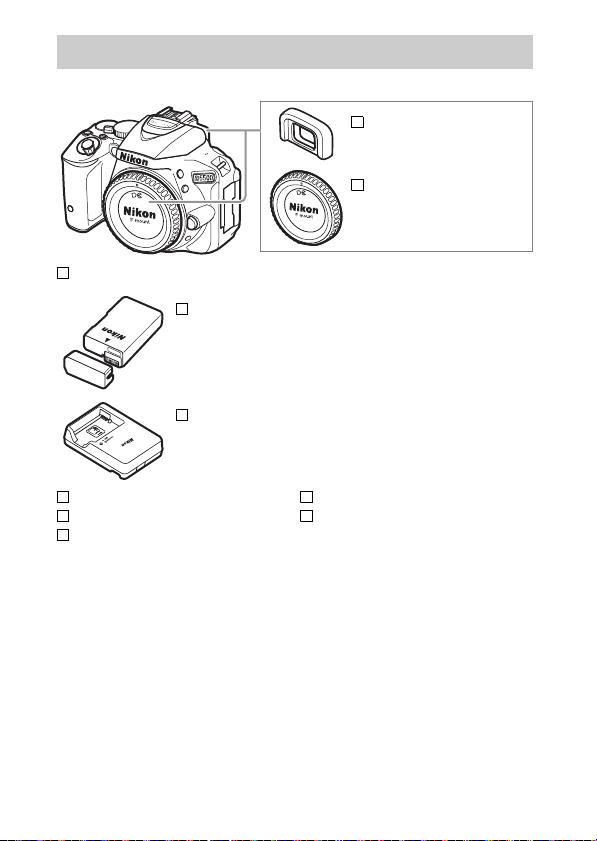
Confirm that the package contains the following items:
DK-25 rubber eyecup
BF-1B body cap
D5500 camera
EN-EL14a rechargeable Li-ion battery (with terminal cover)
MH-24 battery charger (plug adapter supplied in countries or
regions where required; shape depends on country of sale)
AN-DC3 strap
UC-E23 USB cable
EG-CP16 audio/video cable
User’s Manual (this booklet)
Warr ant y
Purchasers of the lens kit option should confirm that the
package also includes a lens.
Memory cards are sold separately
(0 101). Cameras purchased in Japan display menus and
messages in English and Japanese only; other languages are not
supported. We apologize for any inconvenience this may cause.
ii
Quick Start Guide
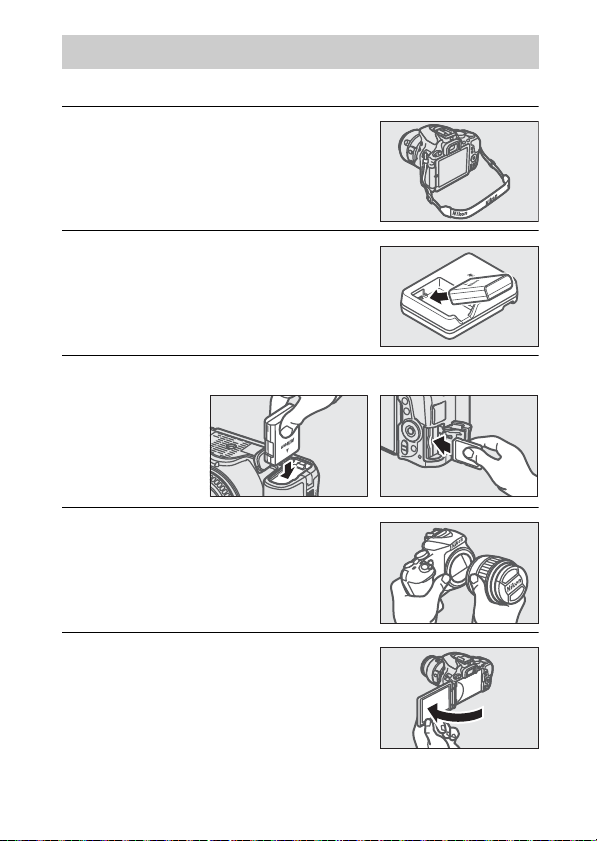
Follow these steps for a quick start with the D5500.
1 Attach the camera strap (0 24).
Attach the strap as shown. Repeat
for the second eyelet.
2 Charge the battery (0 24).
3 Insert the battery and memory card (0 25).
4 Attach a lens (0 26).
5 Open the monitor (0 7, 28).
iii
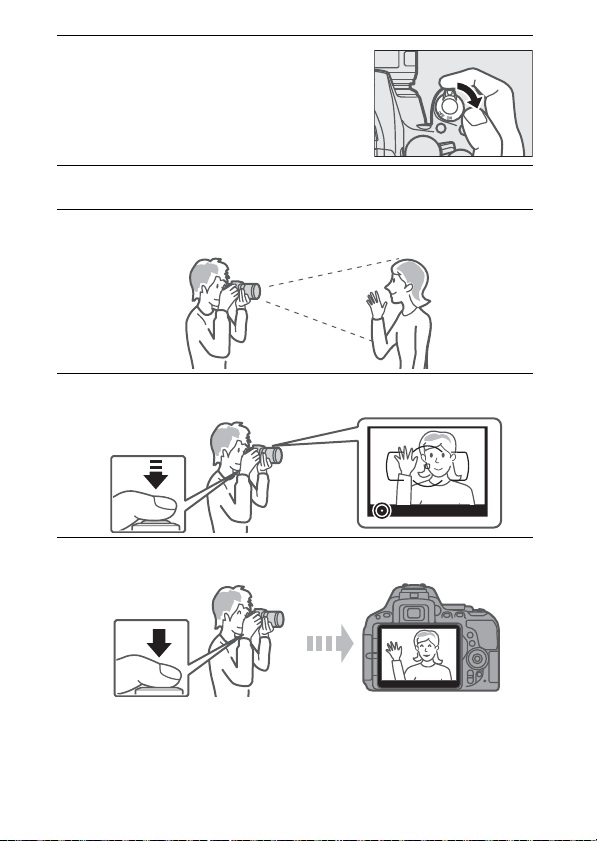
6 Turn the camera on (0 28).
7 Choose a language and set the camera clock (0 29).
8 Frame the photograph (0 37).
9 Press the shutter-release button halfway (0 37).
10 Shoot (0 38).
iv

Table of Contents
Package Contents………………………………………………………………. ii
For Your Safety………………………………………………………………….. ix
Notices…………………………………………………………………………….. xiii
Wireless …………………………………………………………………………. xviii
Introduction 1
Getting to Know the Camera……………………………………………… 1
Using the Touch Screen……………………………………………………. 14
First Steps…………………………………………………………………………. 24
“Point-and-Shoot” Modes (i and j)35
Framing Photos in the Viewfinder …………………………………… 36
Viewing Photographs……………………………………………………………… 39
Deleting Unwanted Pictures………………………………………………….. 41
Framing Photos in the Monitor………………………………………… 43
Viewing Photographs……………………………………………………………… 46
Deleting Unwanted Pictures………………………………………………….. 47
Recording Movies…………………………………………………………….. 48
Viewing Movies………………………………………………………………………… 52
Deleting Unwanted Movies……………………………………………………. 54
v

Matching Settings to the Subject or Situation
(Scene Mode) 55
k Portrait……………………………………………………………………………. 56
l Landscape ……………………………………………………………………… 56
p Child ……………………………………………………………………………….. 56
m Sports ……………………………………………………………………………… 56
n Close up………………………………………………………………………….. 56
o Night Portrait…………………………………………………………………. 56
r Night Landscape …………………………………………………………… 57
s Party/Indoor ………………………………………………………………….. 57
t Beach/Snow…………………………………………………………………… 57
u Sunset …………………………………………………………………………….. 57
v Dusk/Dawn ……………………………………………………………………. 57
w Pet Portrait …………………………………………………………………….. 57
x Candlelight ……………………………………………………………………… 58
y Blossom ………………………………………………………………………….. 58
z Autumn Colors………………………………………………………………. 58
0 Food…………………………………………………………………………………. 58
Special Effects 59
% Night Vision …………………………………………………………………… 59
S Super Vivid……………………………………………………………………… 60
T Pop………………………………………………………………………………… 60
U Photo Illustration ………………………………………………………….. 60
‘ Toy Camera Effect …………………………………………………………. 60
( Miniature Effect…………………………………………………………….. 60
3 Selective Color………………………………………………………………. 61
1 Silhouette ………………………………………………………………………. 61
2 High Key…………………………………………………………………………. 61
3 Low Key ………………………………………………………………………….. 61
Options Available in Live View………………………………………………. 63
vi

P, S, A, and M Modes 68
Mode P (Programmed Auto)………………………………………………….. 68
Mode S (Shutter-Priority Auto)………………………………………………. 69
Mode A (Aperture-Priority Auto) …………………………………………… 69
Mode M (Manual) …………………………………………………………………….. 70
Exposure Compensation………………………………………………………… 72
Restoring Default Settings 74
Wi-Fi 77
What Wi-Fi Can Do for You ………………………………………………. 77
Accessing the Camera ……………………………………………………… 78
WPS (Android Only) ………………………………………………………………… 79
PIN Entry (Android Only)………………………………………………………… 80
SSID (Android and iOS)…………………………………………………………… 81
Camera Menus 84
Menu Options ………………………………………………………………….. 85
Using Camera Menus ……………………………………………………………… 89
ViewNX 2 92
Installing ViewNX 2………………………………………………………….. 92
Using ViewNX 2 ……………………………………………………………….. 93
Copy Pictures to the Computer…………………………………………….. 93
vii

Technical Notes 95
Compatible Lenses…………………………………………………………… 95
Other Accessories …………………………………………………………….. 97
Approved Memory Cards …………………………………………………….. 101
Caring for the Camera …………………………………………………… 102
Storage……………………………………………………………………………………. 102
Cleaning………………………………………………………………………………….. 102
Caring for the Camera and Battery: Cautions ……………….. 103
Error Messages………………………………………………………………. 108
Specifications ………………………………………………………………… 113
Battery Life…………………………………………………………………….. 132
viii
For Your Safety
To prevent damage to your Nikon product or injury to yourself or to others,
read the following safety precautions in their entirety before using this
equipment. Keep these safety instructions where all those who use the
product will read them.
The consequences that could result from failure to observe the precautions
listed in this section are indicated by the following symbol:
This icon marks warnings. To prevent possible injury, read all
A
warnings before using this Nikon product.
❚❚ WARNING S
AKeep the sun out of the frame
Keep the sun well out of the frame
when shooting backlit subjects.
Sunlight focused into the camera
when the sun is in or close to the
frame could cause a fire.
ADo not look at the sun through the
viewfinder
Viewing the sun or other strong light
source through the viewfinder could
cause permanent visual impairment.
AUsing the viewfinder diopter adjustment
control
When operating the viewfinder
diopter adjustment control with your
eye to the viewfinder, care should be
taken not to put your finger in your
eye accidentally.
ATurn off immediately in the event of
malfunction
Should you notice smoke or an
unusual smell coming from the
equipment or AC adapter (available
separately), unplug the AC adapter
and remove the battery immediately,
taking care to avoid burns.
Continued operation could result in
injury. After removing the battery,
take the equipment to a Nikonauthorized service center for
inspection.
ADo not use in the presence of flammable
gas
Do not use electronic equipment in
the presence of flammable gas, as
this could result in explosion or fire.
ix

Keep out of reach of children
A
Failure to observe this precaution
could result in injury. In addition,
note that small parts constitute a
choking hazard. Should a child
swallow any part of this equipment,
consult a physician immediately.
ADo not disassemble
Touching the product’s internal parts
could result in injury. In the event of
malfunction, the product should be
repaired only by a qualified
technician. Should the product break
open as the result of a fall or other
accident, remove the battery and/or
AC adapter and then take the product
to a Nikon-authorized service center
for inspection.
ADo not place the strap around the neck of
an infant or child
Placing the camera strap around the
neck of an infant or child could result
in strangulation.
ADo not remain in contact with the
camera, battery, or charger for extended
periods while the devices are on or in use
Parts of the device become hot.
Leaving the device in direct contact
with the skin for extended periods
may result in low-temperature burns.
ADo not leave the product where it will be
exposed to extremely high
temperatures, such as in an enclosed
automobile or in direct sunlight
Failure to observe this precaution
could cause damage or fire.
ADo not aim a flash at the operator of a
motor vehicle
Failure to observe this precaution
could result in accidents.
AObserve c aution when using the flash
• Using the camera with the flash in
close contact with the skin or other
objects could cause burns.
• Using the flash close to the subjec t’s
eyes could cause temporary visual
impairment. The flash should be no
less than one meter (3 ft 4 in.) from
the subject. Particular care should
be observed when photographing
infants.
AAvoid contact with liquid crystal
Should the monitor break, care
should be taken to avoid injury due to
broken glass and to prevent the liquid
crystal from the monitor touching the
skin or entering the eyes or mouth.
ADo not carry tripods with a lens or camera
attached
You could trip or accidentally strike
others, resulting in injury.
x

Observe proper precautions when
A
handling batteries
Batteries may leak, overheat, rupture,
or catch fire if improperly handled.
Observe the following precautions
when handling batteries for use in
this product:
• Use only batteries approved for use
in this equipment.
• Do not short or disassemble the
battery.
• Do not expose the battery or the
camera in which it is inserted to
powerful physical shocks.
• Be sure the product is off before
replacing the battery. If you are
using an AC adapter, be sure it is
unplugged.
• Do not attempt to insert the battery
upside down or backwards.
• Do not expose the battery to flame
or to excessive heat.
• Do not immerse in or expose to
water.
• Replace the terminal cover when
transporting the batter y. Do not
transport or store the battery with
metal objects such as necklaces or
hairpins.
• Batteries are prone to leakage when
fully discharged. To avoid damage
to the product, be sure to remove
the battery when no charge
remains.
• When the battery is not in use,
attach the terminal cover and store
in a cool, dry place.
• The battery may be hot
immediately after use or when the
product has been used on battery
power for an extended period.
Before removing the battery turn
the camera off and allow the battery
to cool.
• Discontinue use immediately
should you notice any changes in
the battery, such as discoloration or
deformation.
AObserve proper precautions when
handling the charger
• Keep dry. Failure to observe this
precaution could result in injury or
product malfunction due to fire or
electric shock.
• Do not short the charger terminals.
Failure to observe this precaution
could result in overheating and
damage to the charger.
• Dust on or near the metal parts of
the plug should be removed with a
dry cloth. Continued use could
result in fire.
• Do not go near the charger during
thunderstorms. Failure to observe
this precaution could result in
electric shock.
• Do not handle the plug or charger
with wet hands. Failure to observe
this precaution could result in injur y
or product malfunction due to fire
or electric shock.
• Do not use with travel converters or
adapters designed to convert from
one voltage to another or with DCto-AC inverters. Failure to observe
this precaution could damage the
product or cause overheating or fire.
xi

Use appropriate cables
A
When connecting cables to the input
and output jacks, use only the cables
provided or sold by Nikon for the
purpose to maintain compliance with
product regulations.
AFollow the instructions of airline and
hospital personnel
xii
Notices
• No part of the manuals included
with this product may be
reproduced, transmitted,
transcribed, stored in a retrieval
system, or translated into any
language in any form, by any means,
without Nikon’s prior written
permission.
• Nikon reserves the right to change
the appearance and specifications
of the hardware and software
described in these manuals at any
time and without prior notice.
Notice for Customers in Canada
CAN ICES-3 B / NMB-3 B
Notices for Customers in Europe
CAUTION: RISK OF EXPLOSION IF BATTERY IS REPLACED BY AN INCORRECT
TYPE. DISPOSE OF USED BATTERIES ACCORDING TO THE INSTRUCTIONS.
This symbol indicates that
electrical and electronic
equipment is to be
collected separately.
The following apply only
to users in European
countries:
• This product is designated for
separate collection at an
appropriate collection point. Do not
dispose of as household waste.
• Separate collection and recycling
helps conserve natural resources
and prevent negative consequences
for human health and the
environment that might result from
incorrect disposal.
• For more information, contact the
retailer or the local authorities in
charge of waste management.
• Nikon will not be held liable for any
damages resulting from the use of
this product.
• While every effort has been made to
ensure that the information in these
manuals is accurate and complete,
we would appreciate it were you to
bring any errors or omissions to the
attention of the Nikon
representative in your area (address
provided separately).
This symbol on the battery indicates that the
battery is to be collected
separately.
The following apply only to users in
European countries:
• All batteries, whether marked with
this symbol or not, are designated
for separate collection at an
appropriate collection point. Do not
dispose of as household waste.
• For more information, contact the
retailer or the local authorities in
charge of waste management.
xiii

Notices for Customers in the U.S.A.
The Battery Charger
IMPORTANT SAFETY INSTRUCTIONS—SAVE THESE
INSTRUCTIONS
DANGER—TO REDUCE THE RISK OF FIRE OR ELECTRIC
SHOCK, CAREFULLY FOLLOW THESE INSTRUCTIONS
For connection to a supply not in the U.S.A., use an attachment plug adapter
of the proper configuration for the power outlet if needed. This power unit
is intended to be correctly oriented in a vertical or floor mount position.
Federal Communications Commission (FCC) Radio Frequency Interference Statement
This equipment has been tested and
found to comply with the limits for a
Class B digital device, pursuant to Part 15
of the FCC rules. These limits are
designed to provide reasonable
protection against harmful interference
in a residential installation. This
equipment generates, uses, and can
radiate radio frequency energy and, if
not installed and used in accordance
with the instructions, may cause harmful
interference to radio communications.
However, there is no guarantee that
interference will not occur in a particular
installation. If this equipment does
cause harmful interference to radio or
television reception, which can be
determined by turning the equipment
off and on, the user is encouraged to try
to correct the interference by one or
more of the following measures:
• Reorient or relocate the receiving
antenna.
• Increase the separation between
the equipment and receiver.
• Connect the equipment into an
outlet on a circuit different from that
to which the receiver is connected.
• Consult the dealer or an
experienced radio/television
technician for help.
xiv
CAUTIONS
Modifications
The FCC requires the user be notified
that any changes or modifications
made to this device that are not
expressly approved by Nikon
Corporation may void the user’s
authority to operate the equipment.
Interface Cables
Use the interface cables sold or
provided by Nikon for your
equipment. Using other interface
cables may exceed the limits of Class
B Part 15 of the FCC rules.
Notice for Customers in the State of California
WARNING: Handling the cord on this
product may expose you to lead, a
chemical known to the State of
California to cause birth defects or
other reproductive harm. Wash hands
after handling.
Nikon Inc., 1300 Walt Whitman Road,
Melville, New York 11747-3064, U.S.A.
Tel.: 631-547-4200
D5500

Notice Concerning Prohibition of Copying or Reproduction
Note that simply being in possession of material that has been digitally
copied or reproduced by means of a scanner, digital camera, or other device
may be punishable by law.
• Items prohibited by law from being copied
or reproduced
Do not copy or reproduce paper
money, coins, securities,
government bonds, or local
government bonds, even if such
copies or reproductions are
stamped “Sample.”
The copying or reproduction of
paper money, coins, or securities
which are circulated in a foreign
country is prohibited.
Unless the prior permission of the
government has been obtained, the
copying or reproduction of unused
postage stamps or post cards issued
by the government is prohibited.
The copying or reproduction of
stamps issued by the government
and of certified documents stipulated by law is prohibited.
• Cautions on cer tain copies and
reproductions
The government has issued
cautions on copies or reproductions
of securities issued by private
companies (shares, bills, checks, gift
certificates, etc.), commuter passes,
or coupon tickets, except when a
minimum of necessary copies are to
be provided for business use by a
company. Also, do not copy or
reproduce passports issued by the
government, licenses issued by
public agencies and private groups,
ID cards, and tickets, such as passes
and meal coupons.
• Comply with copyright notices
The copying or reproduction of
copyrighted creative works such as
books, music, paintings, woodcuts,
prints, maps, drawings, movies, and
photographs is governed by
national and international
copyright laws. Do not use this
product for the purpose of making
illegal copies or to infringe
copyright laws.
xv

Disposing of Data Storage Devices
Please note that deleting images or formatting memory cards or other data
storage devices does not completely erase the original image data. Deleted
files can sometimes be recovered from discarded storage devices using
commercially available software, potentially resulting in the malicious use of
personal image data. Ensuring the privacy of such data is the user’s
responsibility.
Before discarding a data storage device or transferring ownership to another
person, erase all data using commercial deletion software, or format the
device and then completely refill it with images containing no private
information (for example, pictures of empty sky). Be sure to also replace any
pictures selected for preset manual. Before discarding the camera or
transferring ownership to another person, you should also use the Wi-Fi >
Network settings > Reset network settings (0 83) option in the camera
setup menu to delete any personal network information. Care should be
taken to avoid injury when physically destroying data storage devices.
AVC Patent Portfolio License
THIS PRODUCT IS LICENSED UNDER THE AVC PATENT PORTFOLIO LICENSE FOR THE PERSONAL
AND NON—COMMERCIAL USE OF A CONSU MER TO (i) ENCODE VIDEO IN COMPLIANCE WITH
THE AVC STANDARD (“AVC VIDEO”) AND/OR (ii) DECODE AVC VIDEO THAT WAS ENCODED
BY A CONSUMER ENGAGED IN A PERSONAL AND NON—COMMERCIAL ACTIVITY AND/OR WAS
OBTAINED FROM A VIDEO PROVIDER LICENSED TO PROVIDE AVC VIDEO.
GRANTED OR SHALL BE IMPLIED FOR ANY OTHER USE.
OBTAINED FROM MPEG LA, L.L.C.
SEE http://www.mpegla.com
ADDITIONAL INFORMATION MAY BE
NO LICENSE IS
xvi

Use Only Nikon Brand Electronic Accessories
Nikon cameras are designed to the highest standards and include complex
electronic circuitry. Only Nikon brand electronic accessories (including
chargers, batteries, AC adapters, and flash accessories) certified by Nikon
specifically for use with this Nikon digital camera are engineered and proven
to operate within the operational and safety requirements of this electronic
circuitry.
The use of non-Nikon electronic accessories could damage
the camera and may void your Nikon warranty. The use of
third-party rechargeable Li-ion batteries not bearing the
Nikon holographic seal shown at right could interfere with
normal operation of the camera or result in the batteries overheating, igniting, rupturing, or leaking.
For more information about Nikon brand accessories, contact a local authorized Nikon dealer.
D Use Only Nikon Brand Accessories
Only Nikon brand accessories certified by Nikon specifically for use with
your Nikon digital camera are engineered and proven to operate within its
operational and safety requirements. THE USE OF NON-NIKON ACCESSORIES
COULD DAMAGE YOUR CAMERA AND MAY VOID YOUR NIK ON WARRANTY.
A Before Taking Important Pictures
Before taking pictures on important occasions (such as at weddings or
before taking the camera on a trip), take a test shot to ensure that the
camera is functioning normally. Nikon will not be held liable for damages
or lost profits that may result from product malfunction.
A Life-Long Learning
As part of Nikon’s “Life-Long Learning” commitment to ongoing product
support and education, continually-updated information is available online at the following sites:
• For users in the U.S.A.: http://www.nikonusa.com/
• For users in Europe and Africa: http://www.europe-nikon.com/support/
• For users in Asia, Oceania, and the Middle East: http://www.nikon-asia.com/
Visit these sites to keep up-to-date with the latest product information, tips,
answers to frequently-asked questions (FAQs), and general advice on digital
imaging and photography. Additional information may be available from
the Nikon representative in your area. See the following URL for contact
information: http://imaging.nikon.com/
xvii

Wireless
This product, which contains encryption software developed in the United
States, is controlled by the United States Export Administration Regulations
and may not be exported or re-exported to any country to which the United
States embargoes goods.
embargo: Cuba, Iran, North Korea, Sudan, and Syria.
The use of wireless devices may be prohibited in some countries or regions.
Contact a Nikon-authorized service representative before using the wireless
features of this product outside the country of purchase.
Notices for Customers in the U. S. A.
This device complies with Part 15 of the FCC Rules. Operation is subjec t to the
following two conditions: (1) this device may not cause harmful interference,
and (2) this device must accept any interference received, including
interference that may cause undesired operation.
FCC WARNING
The FCC requires the user to be notified that any changes or modifications
made to this device that are not expressly approved by Nikon Corporation
may void the user’s authority to operate the equipment.
FCC Radio Frequency Interference Statement
Note: This equipment has been tested and found to comply with the limits for
a Class B digital device, pursuant to part 15 of the FCC Rules. These limits are
designed to provide reasonable protection against harmful interference in a
residential installation. This equipment generates, uses and can radiate radio
frequency energy and, if not installed and used in accordance with the
instructions, may cause harmful interference to radio communications.
However, there is no guarantee that interference will not occur in a particular
installation. If this equipment does cause harmful interference to radio or
television reception, which can be determined by turning the equipment off
and on, the user is encouraged to try to correct the interference by one or
more of the following measures:
• Reorient or relocate the receiving antenna.
• Increase the separation between the equipment and receiver.
• Connect the equipment into an outlet on a circuit different from that to
which the receiver is connected.
• Consult the dealer or an experienced radio/TV technician for help.
Co-location
This transmitter must not be co-located or operated in conjunction with any
other antenna or transmitter.
Nikon Inc., 1300 Walt Whitman Road, Melville, New York 11747-3064, U.S.A.
Tel.: 631-547-4200
xviii
The following countries are currently subject to

Notices for Customers in Canada
This device complies with Industry Canada licence-exempt RSS standard(s).
Operation is subject to the following two conditions: (1) this device may not
cause interference, and (2) this device must accept any interference,
including interference that may cause undesired operation of the device.
FCC/IC RF Exposure Statement
The available scientific evidence does not show that any health problems are
associated with using low power wireless devices. There is no proof, however,
that these low power wireless devices are absolutely safe. Low power
Wireless devices emit low levels of radio frequency energy (RF) in the
microwave range while being used. Whereas high levels of RF can produce
health effects (by heating tissue), exposure of low-level RF that does not
produce heating effects causes no known adverse health effects. Many
studies of low-level RF exposures have not found any biological effects. Some
studies have suggested that some biological effects might occur, but such
findings have not been confirmed by additional research. The D5500, which
is equipped with a LBWA1U5YR1 (FCC ID: VPYLBYR650/IC ID: 772C-LBYR650)
wireless LAN module, has been tested and found to comply with FCC/IC
radiation exposure limits set forth for an uncontrolled environment and
meets the FCC radio frequency (RF) Exposure Guidelines in Supplement C to
OET65 and RSS-102 of the IC radio frequency (RF) Exposure rules. Please refer
to the SAR test report that was uploaded to FCC website.
xix
Notices for Customers in Europe
Hereby, Nikon Corporation, declares that the D5500 is in
compliance with the essential requirements and other relevant
provisions of Directive 1999/5/EC.
The declaration of conformity
may be consulted at http://imaging.nikon.com/suppor t/pdf/DoC_D5500.pdf
Notice for Customers in Singapore
Trade Name:
Model: D5500
This device complies with radio-frequency regulations. The content of
certification labels not affixed to the device is given below.
Complies with
IDA Standards
DA103423
Security
Although one of the benefits of this product is that it allows others to freely
connect for the wireless exchange of data anywhere within its range, the
following may occur if security is not enabled:
• Data theft: Malicious third-parties may intercept wireless transmissions to
steal user IDs, passwords, and other personal information.
• Unauthorized access: Unauthorized users may gain access to the network
and alter data or perform other malicious actions.
Note that due to the
design of wireless networks, specialized attacks may allow unauthorized
access even when security is enabled.
xx
Introduction
Getting to Know the Camera
Take a few moments to familiarize yourself with camera controls
and displays. You may find it helpful to bookmark this section
and refer to it as you read through the rest of the manual.
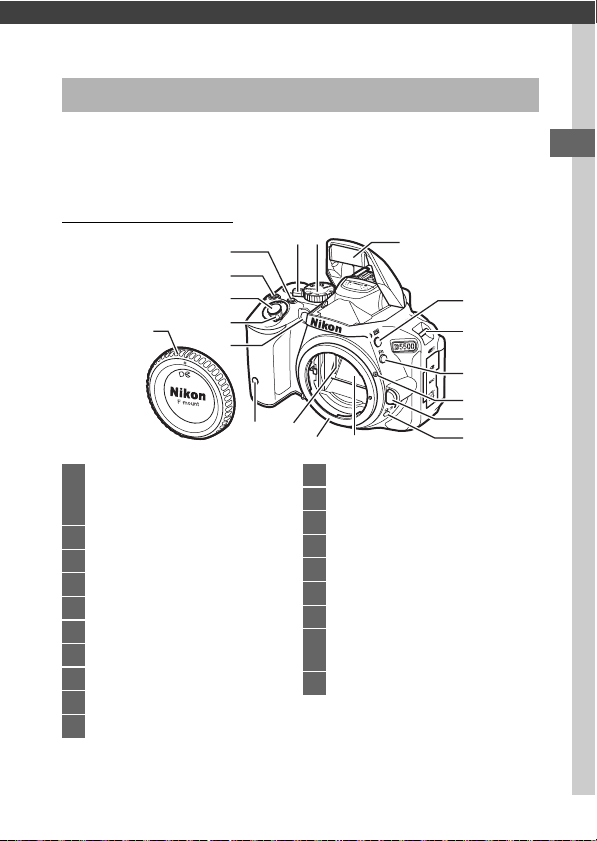
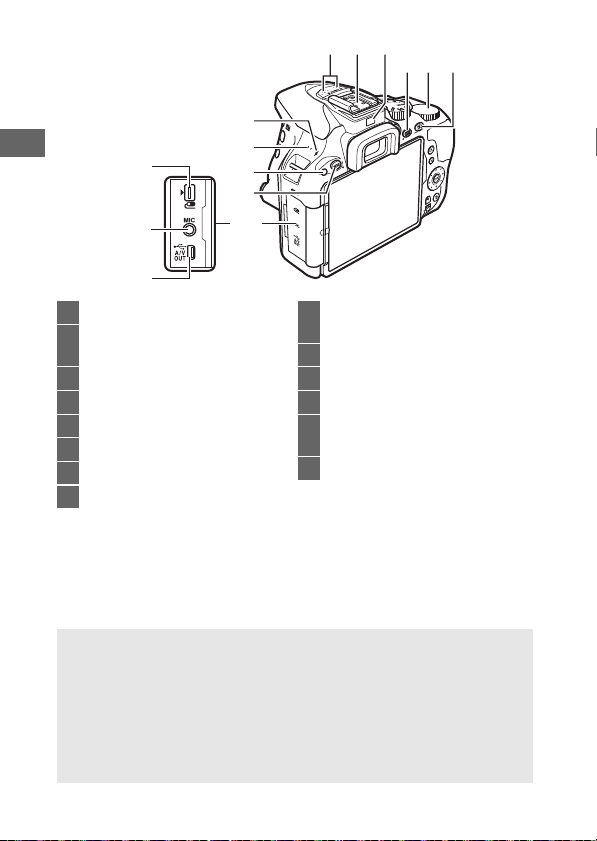
The Camera Body
5
4
3
19
1 AF-assist illuminator
Self-timer lamp
Red-eye reduction lamp
2 Power switch……………………………. 28
3
Shutter-release button
4 E/N button………………………..70, 72
5 Movie-record button ………………. 49
6 Live view switch………………….43, 48
7 Mode dial…………………………………….4
8 Built-in flash ……………………………..42
9 M/ Y button………………………58, 68
10 Eyelets for camera strap………….. 24
2
1
18
…………….. 38
17
67
11 Fn button …………………………………. 86
12 Mounting mark ……………………….. 26
13 Lens release button…………………. 34
14 I/E/# button…………………………… 5
15 Mirror
16 Lens mount ……………………………… 26
17 CPU contacts
18 Infrared receiver for ML-L3 remote
control (front) …………………………99
19 Body cap
8
9
10
11
12
13
1516
14
1
31
32
33
30
29
28
27
21 2220
23 24 25
26
20 Stereo microphone
21 Accessory shoe (for optional flash
units)
22 Eye sensor………………………………….10
23 R
(information) button
24 Command dial
25 A/L button …………………………..86
26 Connector cover
27 G button…………………………74, 84
…………. 9, 74
28 Infrared recei ver for ML-L3 remote
control (rear) …………………………..99
29 Speaker
30 Focal pla ne mark (E)
31 USB and A/V connector ……………93
32 Connector for external
microphone ………………………….100
33 Accessory terminal………………… 100
D Close the Connector Cover
Close the connector cover when the connectors are not in use.
matter in the connectors can interfere with data transfer.
D The Speaker
Do not place the speaker in close proximity to magnetic devices.
Failure to observe this precaution could affect the data recorded on
the magnetic devices.
2
Forei gn
344835 36 37
38
39
40
41
47
46
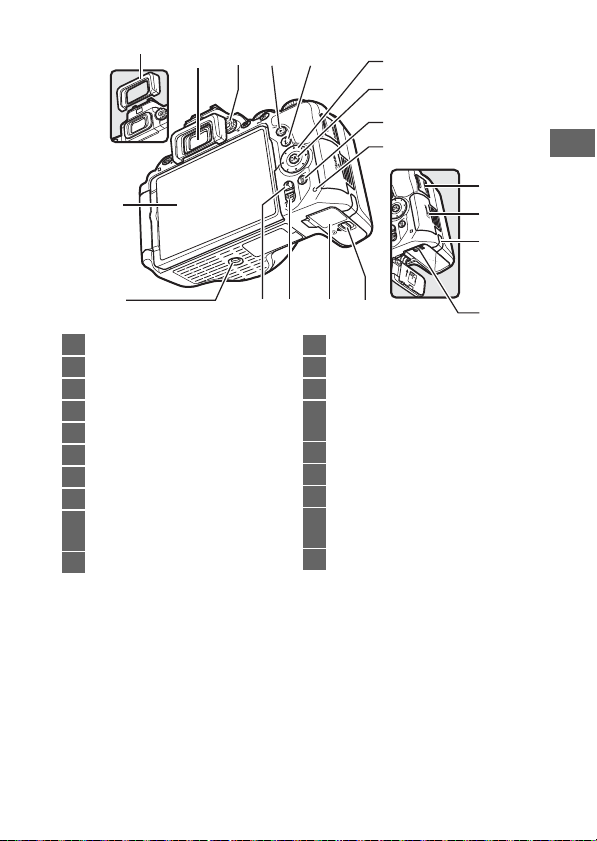
34 Viewfinder eyepiece…………….. 6, 30
35 Diopter adjustment control …….30
36 K button…………………………………. 39
37 P button…………………………………… 11
38 Multi selector ………………………13, 89
39 J (OK) button…………………….13, 89
40 O button ………………………………….. 41
41 Memory card access lamp ……….38
42 Battery-chamber cover
latch ……………………………………25, 32
43 Battery-chamber cover ………25, 32
49
50
51
424345 44
44 W/Q button……………………….39, 40
45 X button……………………………..39, 40
46 Tri pod socket
47 Vari-angle monitor
………………………………….7, 14, 39, 43
48 Rubber eyecup
49 HDMI connector cover
50 Memory card slot cover ……..25, 32
51 Power connector cover for
optional power connector
52 Battery latch………………………..25, 32
52
3
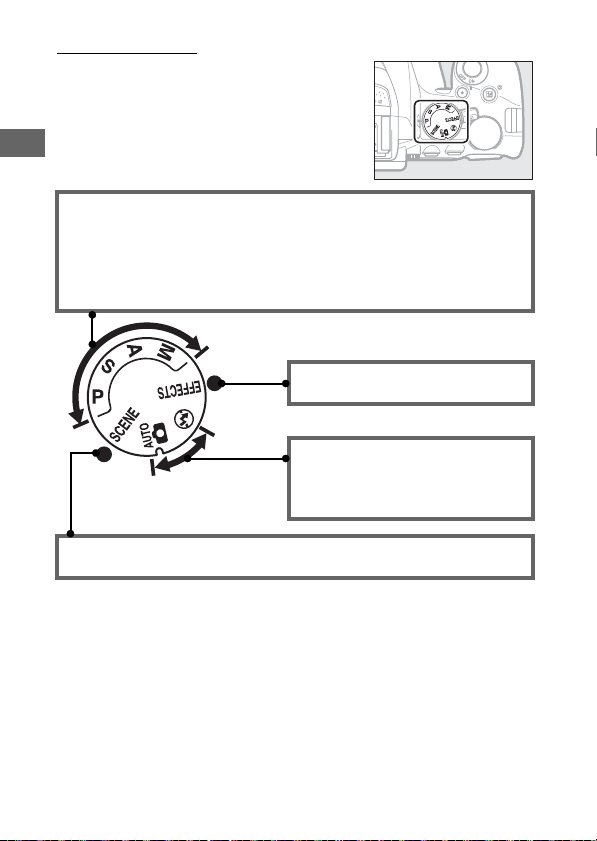
The Mode Dial
The camera offers a choice of the
following shooting modes.
P, S, A, and M Modes:
• P —Programmed auto (0 68)
• S —Shutter -priority auto (0 69)
• A —Aperture- priority auto (0 69)
• M—Manual (0 70)
Scene Modes (0 55)
Special Effects Modes (0 59)
Auto Modes:
• i Auto (0 35)
• j Auto (flash off ) (0 35)
4
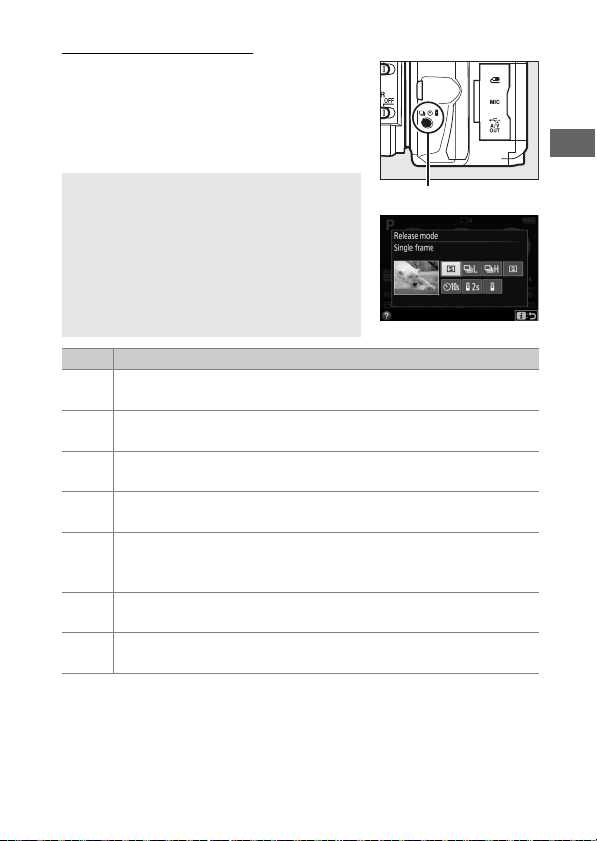
The I (E/#) Button
To choose how the shutter is released
(release mode), press the I (E/#)
button, then use the multi selector to
highlight the desired option and press
J.
A Choosing a Release Mode with the Command
Dial
The release mode can also be selected by
keeping the I (E/#) button pressed while
rotating the command dial.
I (E/#) button to select the highlighted
option and return to the information
display.
Mode Description
Single frame: Camera takes one photograph each time shutter-
8
release button is pressed.
Continuous L: The camera takes photographs at a slow rate while
!
the shutter-release button is pressed.
Continuous H: The camera takes photographs at a fast rate while
9
the shutter-release button is pressed.
Quiet shutter release: As for single -frame, except that camera noise
J
is reduced.
Self-timer: Take pictures with the self-timer. The timer starts
E
when the shutter-release button is pressed all the way down,
and the shutter is released after about 10 seconds.
Delayed remote (ML-L3): Shutter is released 2 s after shutter-release
«
button on optional ML-L3 remote control is pressed.
Quick-respon se remote (ML-L3): Shutter is released when shutter-
#
release button on optional ML-L3 remote control is pressed.
Release the
5
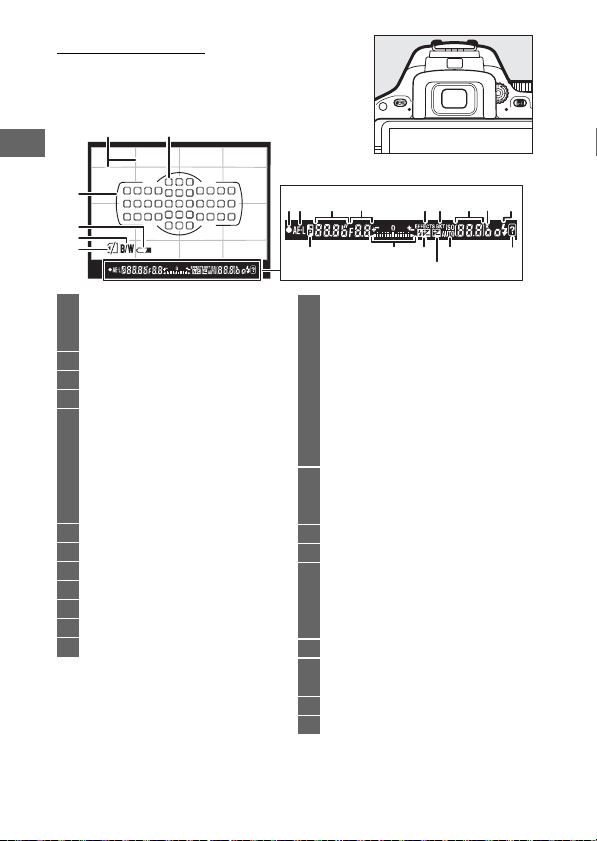
The Viewfinder
Note: Display shown with all indicators lit
for illustrative purposes.
12
3
4
5
6
1 Framing grid (displayed when On
is selected for Custom Setting d3,
Viewfinder grid display)
2 Focus points………………………………37
3 AF area brackets………………….30, 37
4 Low battery warning ………………..31
5 Monochrome indicator (displayed
in % mode or when the
Monochrome Picture Control or
a Picture Control based on
Monochrome is
selected) …………………………….12, 59
6 “No memory card” indicator…….25
7 Focus indicator………………………….37
8 Autoexposure (AE) lock indicator
9 Shutter speed ……………………………71
10 Aperture (f-number)…………………71
11 Special effects mode indicator…59
12 Bracketing indicator………………….11
7
8
13 Number of exposures
remaining…………………………………31
Number of shots remaining before
memory buffer fills ………………….37
White balance recording indicator
Exposure compensation value… 72
Flash compensation value ……….12
ISO sensitivity……………………………12
Capture mode indicator
14 “k” (appears when memory
remains for over 1000
exposures) ……………………………….31
15 Flash-ready indicator………………..42
16 Flexible program indicator
17 Exposure indicator……………………70
Exposure compensation
display………………………………………72
Electronic rangefinder ……………..86
18 Flash compensation indicator….12
19 Exposure compensation
indicator …………………………………..72
20 Auto ISO sensitivity indicator
21 Warning indicator …………………. 108
11 12 1491710 1513
1816
19
2120
6
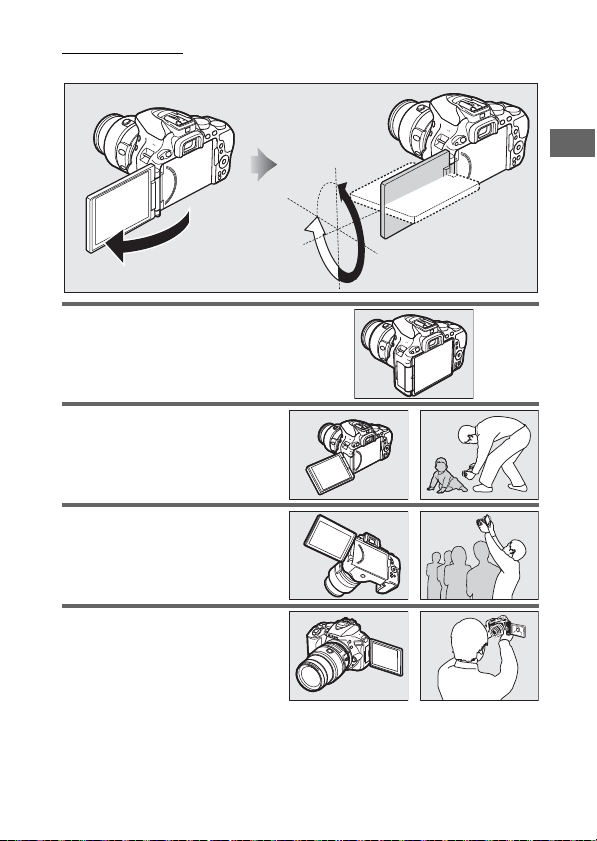
The Monitor
The monitor can be angled and rotated as shown below.
180°
Normal use: Fold the monitor
against the camera face out.
monitor is normally used in this
position.
Low-angle shots: Tilt the monitor
up to take sh ots in live view with
the camera held low.
High-angle shots: Tilt the monitor
down to take shots in live view
with the camera held high.
Self-portraits: Use for self-portraits
in live view.
a mirror image of what will
appear in the final picture.
The monitor shows
The
90°
180°
7

D Using the Monitor
Rotate the monitor gently within the limits shown.
Failure to observe these precautions could damage the camera or
monitor.
back face down against the camera body.
Do not lift or carry the camera by the monitor.
precaution could damage the camera.
To protect the monitor when the camera is not in use, fold it
Do not use force.
Failure to observe this
8
Loading…

ЦИФРОВАЯ ФОТОКАМЕРА
Подробное руководство
пользователя
Ru
Nikon Manual Viewer 2
Установите приложение Nikon Manual Viewer 2 на Ваш смартфон
или планшетный компьютер для просмотра руководств к
цифровым фотокамерам Nikon в любое время и в любом месте. Nikon
Manual Viewer 2 можно загрузить бесплатное с App Store или Google Play.
————————————————————————————————————————————————————-
Чтобы наилучшим образом использовать все возможности
фотокамеры, внимательно прочтите все инструкции и сохраните их
в таком месте, где с ними смогут ознакомиться все пользователи
данного изделия в дальнейшем.
Символы и обозначения
Для упрощения поиска необходимой информации используются следующие
символы и обозначения:
Пункты меню, параметры и сообщения, отображаемые на мониторе
фотокамеры, набраны
жирным шрифтом
.
Настройки фотокамеры
Объяснения в данном руководстве даны с учетом использования заводских
настроек.
D
Этим символом обозначены предупреждения; с данной
информацией необходимо ознакомиться перед тем, как
приступить к использованию, чтобы избежать
повреждения фотокамеры.
A
Этим символом обозначены примечания; с данной
информацией необходимо ознакомиться перед началом
работы с фотокамерой.
0
Этот символ обозначает ссылки на другие страницы
данного руководства.
A
Меры безопасности
Перед началом работы с фотокамерой прочтите сведения о мерах
безопасности в разделе «Меры безопасности» (
0
xi–xiv).
————————————————————————————————————————————————————-
i
Меры безопасности . . . . . . . . . . . . . . . . . . . …. xi
Уведомления. . . . . . . . . . . . . . . . . . . . . . . xv
Беспроводной. . . . . . . . . . . . . . . . . . . . . . .. xx
Введение
1
Знакомство с фотокамерой . . . . . . . . . . . . . . . . … 1
Меню фотокамеры: Обзор . . . . . . . . . . . . . . . . .. 13
Использование сенсорного экрана. . . . . . . . . . . . .. 17
Перед началом работы . . . . . . . . . . . . . . . . . . 27
Фотосъемка «Наведи и снимай» Режимы (
i
и
j
)
38
Наведение снимков в видоискателе. . . . . . . . . . . . 39
Просмотр фотографий. . . . . . . . . . . . . . . . . . . . … 42
Удаление ненужных снимков. . . . . . . . . . . . . . . . . .. 43
Наведение снимков на мониторе . . . . . . . . . . . . . . 45
Просмотр фотографий. . . . . . . . . . . . . . . . . . . . … 48
Удаление ненужных снимков. . . . . . . . . . . . . . . . . .. 49
Запись видеороликов . . . . . . . . . . . . . . . . . . .. 50
Просмотр видеороликов . . . . . . . . . . . . . . . . . . . .. 52
Удаление ненужных видеороликов. . . . . . . . . . . . . . . 53
Оглавление
————————————————————————————————————————————————————-
ii
Выбор настроек в соответствии с объектом или ситуацией
(Сюжетный режим)
54
k
Портрет. . . . . . . . . . . . . . . . . . . . . . . . …. 55
l
Пейзаж. . . . . . . . . . . . . . . . . . . . . . . . . .. 55
p
Ребенок. . . . . . . . . . . . . . . . . . . . . . . . …. 55
m
Спорт. . . . . . . . . . . . . . . . . . . . . . . . . ….. 56
n
Макро . . . . . . . . . . . . . . . . . . . . . . . . . … 56
o
Ночной портрет. . . . . . . . . . . . . . . . . . . . … 56
r
Ночной пейзаж. . . . . . . . . . . . . . . . . . . . ….. 57
s
Праздник/в помещении . . . . . . . . . . . . . . . . … 57
t
Пляж/снег. . . . . . . . . . . . . . . . . . . . . . . . 57
u
Закат . . . . . . . . . . . . . . . . . . . . . . . . . . .. 58
v
Сумерки/рассвет . . . . . . . . . . . . . . . . . . . ….. 58
w
Портрет питомца. . . . . . . . . . . . . . . . . . . ….. 58
x
Свет от свечи. . . . . . . . . . . . . . . . . . . . . . … 59
y
Цветение. . . . . . . . . . . . . . . . . . . . . . . . .. 59
z
Краски осени . . . . . . . . . . . . . . . . . . . . . ….. 59
0
Еда . . . . . . . . . . . . . . . . . . . . . . . . . . . … 60
Специальные эффекты
61
%
Ночное видение. . . . . . . . . . . . . . . . . . . . … 61
S
Суперяркие . . . . . . . . . . . . . . . . . . . . . . …. 62
T
Поп . . . . . . . . . . . . . . . . . . . . . . . . . . . 62
U
Фотоиллюстрация. . . . . . . . . . . . . . . . . . . … 62
‘
Эффект игрушечной камеры. . . . . . . . . . . . . . .. 63
(
Эффект миниатюры. . . . . . . . . . . . . . . . . . …. 63
3
Выборочный цвет . . . . . . . . . . . . . . . . . . . … 63
1
Силуэт . . . . . . . . . . . . . . . . . . . . . . . . . … 64
2
Высокий ключ . . . . . . . . . . . . . . . . . . . . . … 64
3
Низкий ключ . . . . . . . . . . . . . . . . . . . . . . .. 64
Параметры, доступные в режиме Live view. . . . . . . . . . .. 66
————————————————————————————————————————————————————-
iii
Дополнительная информация о фотосъемке
71
Выбор режима съемки . . . . . . . . . . . . . . . . . ….. 71
Непрерывная съемка (Режим серийной съемки). . . . . ….. 72
Тихий затвор . . . . . . . . . . . . . . . . . . . . . . … 74
Режим автоспуска . . . . . . . . . . . . . . . . . . . . .. 75
Фокусировка (Фотосъемка с использованием
видоискателя) . . . . . . . . . . . . . . . . . . . . … 78
Выбор способа фокусировки фотокамеры:
Режим фокусировки . . . . . . . . . . . . . . . . . . . …… 78
Выбор способа выбора точки фокусировки: Режим зоны АФ …. 82
Выбор точки фокусировки . . . . . . . . . . . . . . . . . …… 85
Блокировка фокусировки. . . . . . . . . . . . . . . . . . …. 86
Ручная фокусировка. . . . . . . . . . . . . . . . . . . . . … 88
Качество и размер изображения . . . . . . . . . . . . . .. 90
Качество изображения. . . . . . . . . . . . . . . . . . . …… 90
Размер изображения . . . . . . . . . . . . . . . . . . . . ….. 92
Использование встроенной вспышки . . . . . . . . . . .. 93
Режимы автоматического подъема . . . . . . . . . . . . . …. 93
Режимы ручного подъема . . . . . . . . . . . . . . . . . . … 95
Чувствительность ISO . . . . . . . . . . . . . . . . . . … 99
Интервальная съемка . . . . . . . . . . . . . . . . . . . 101
Съемка с дистанционным управлением . . . . . . . . . … 107
Использование дополнительного дистанционного
управления ML-L3. . . . . . . . . . . . . . . . . . . . . . 107
Восстановление настроек по умолчанию . . . . . . . . . . 110
Режимы P, S, A и M
113
Выдержка и диафрагма. . . . . . . . . . . . . . . . . .. 113
Режим
P
(Программный автоматический режим). . . . . . … 115
Режим
S
(Автоматический режим с приоритетом
выдержки) . . . . . . . . . . . . . . . . . . . . . . . . . 117
Режим
A
(Автоматический режим с приоритетом
диафрагмы). . . . . . . . . . . . . . . . . . . . . . . . .. 118
Режим
M
(Ручной) . . . . . . . . . . . . . . . . . . . . . . … 119
Длительная экспозиция (только режим
M
) . . . . . . . . . . 121
————————————————————————————————————————————————————-
iv
Экспозиция. . . . . . . . . . . . . . . . . . . . . . . 125
Замер экспозиции . . . . . . . . . . . . . . . . . . . . . . . 125
Блокировка автоматической экспозиции. . . . . . . . . . .. 127
Коррекция экспозиции. . . . . . . . . . . . . . . . . . . … 129
Коррекция вспышки. . . . . . . . . . . . . . . . . . . . . . 131
Сохранение деталей в светлых и затененных участках . . … 133
Активный D-Lighting . . . . . . . . . . . . . . . . . . . . . 133
Расширенный динамический диапазон (HDR). . . . . . . . . 135
Баланс белого . . . . . . . . . . . . . . . . . . . . . … 137
Тонкая настройка баланса белого. . . . . . . . . . . . . . . 140
Ручная настройка . . . . . . . . . . . . . . . . . . . . . . .. 142
Брекетинг. . . . . . . . . . . . . . . . . . . . . . . … 148
Режимы Picture Control . . . . . . . . . . . . . . . . . .. 152
Выбор Picture Control. . . . . . . . . . . . . . . . . . . . … 152
Изменение режимов Picture Control. . . . . . . . . . . . . . 154
Создание пользовательских Picture Control . . . . . . . . . . 158
Совместное использование пользовательских Picture
Control. . . . . . . . . . . . . . . . . . . . . . . . . . . 161
Live View
162
Наведение фотографий на мониторе. . . . . . . . . . . 162
Фокусировка в режиме Live view . . . . . . . . . . . . . . … 164
Экран Live view . . . . . . . . . . . . . . . . . . . . . . . … 168
Запись и просмотр видеороликов
174
Запись видеороликов . . . . . . . . . . . . . . . . . . 174
Настройки видео . . . . . . . . . . . . . . . . . . . . . . … 177
Просмотр видеороликов. . . . . . . . . . . . . . . . … 181
Редактирование видеороликов . . . . . . . . . . . . . .. 183
Обрезка видеороликов . . . . . . . . . . . . . . . . . . . .. 183
Сохранение выбранных кадров . . . . . . . . . . . . . . . . 186
————————————————————————————————————————————————————-
v
Просмотр и удаление
188
Просмотр снимков. . . . . . . . . . . . . . . . . . . … 188
Полнокадровый просмотр . . . . . . . . . . . . . . . . . . 188
Просмотр уменьшенных изображений. . . . . . . . . . . … 190
Календарный просмотр. . . . . . . . . . . . . . . . . . . .. 191
Информация о снимке. . . . . . . . . . . . . . . . . . 192
Просмотр крупным планом: Увеличение при просмотре . … 200
Защита фотографий от удаления . . . . . . . . . . . . . 202
Оценка снимков. . . . . . . . . . . . . . . . . . . . . 203
Оценка отдельных снимков. . . . . . . . . . . . . . . . . .. 203
Оценка нескольких снимков . . . . . . . . . . . . . . . . . 204
Удаление фотографий . . . . . . . . . . . . . . . . . . 205
Полнокадровый просмотр, просмотр уменьшенных
изображений и календарный просмотр. . . . . . . . . . 205
Меню режима просмотра . . . . . . . . . . . . . . . . . . .. 206
Показ слайдов . . . . . . . . . . . . . . . . . . . . . … 208
Параметры показа слайдов. . . . . . . . . . . . . . . . . … 209
Подключения
210
Установка ViewNX 2 . . . . . . . . . . . . . . . . . . . . 210
Использование ViewNX 2 . . . . . . . . . . . . . . . . … 211
Копирование снимков на компьютер . . . . . . . . . . . . .. 211
Печать фотографий . . . . . . . . . . . . . . . . . . . . 214
Подключение принтера. . . . . . . . . . . . . . . . . . . .. 214
Печать снимков по очереди . . . . . . . . . . . . . . . . . . 215
Печать нескольких снимков . . . . . . . . . . . . . . . . . . 216
Создание задания печати DPOF: Установить печать. . . . . . 218
Просмотр снимков на экране телевизора . . . . . . . . . 220
Устройства стандартной четкости . . . . . . . . . . . . . . . 220
Устройства высокой четкости. . . . . . . . . . . . . . . . .. 222
————————————————————————————————————————————————————-
vi
Wi-Fi
224
Возможности Wi-Fi . . . . . . . . . . . . . . . . . . . .. 224
Доступ к фотокамере. . . . . . . . . . . . . . . . . . .. 225
WPS (Только Android). . . . . . . . . . . . . . . . . . . . … 226
Вход с PIN-кодом (Только Android). . . . . . . . . . . . . . 228
SSID (Android и iOS). . . . . . . . . . . . . . . . . . . . . … 229
Выбор снимков для загрузки . . . . . . . . . . . . . . … 231
Выбор отдельных снимков для загрузки. . . . . . . . . . . 231
Выбор нескольких снимков для загрузки . . . . . . . . . . .. 232
Меню фотокамеры
233
D
Меню режима просмотра:
Управление изображениями
. . . … 233
Параметры меню режима просмотра. . . . . . . . . . . . .. 233
Папка просмотра. . . . . . . . . . . . . . . . . . . . … 234
Настройки просмотра. . . . . . . . . . . . . . . . . . . 234
Просмотр изображения. . . . . . . . . . . . . . . . . . 234
Авт. поворот изображения. . . . . . . . . . . . . . . … 235
Повернуть вертикально. . . . . . . . . . . . . . . . . . 235
C
Меню режима съемки:
Параметры съемки
. . . . . . . . .. 236
Параметры меню режима съемки . . . . . . . . . . . . . . . 236
Сброс меню режима съемки . . . . . . . . . . . . . . . 237
Папка для хранения . . . . . . . . . . . . . . . . . . . . 238
Наименование файлов . . . . . . . . . . . . . . . . . … 240
Запись изображения NEF (RAW) . . . . . . . . . . . . . . 240
Настройки чувствит. ISO . . . . . . . . . . . . . . . . . 241
Цветовое пространство . . . . . . . . . . . . . . . . . . 243
Под. шума для длинн. экспоз. . . . . . . . . . . . . . . .. 243
Под. шума для выс. ISO. . . . . . . . . . . . . . . . . . 244
Контроль виньетирования . . . . . . . . . . . . . . . … 244
Авт. управление искаж-ями. . . . . . . . . . . . . . . .. 245
————————————————————————————————————————————————————-
vii
A
Пользовательские настройки:
Тонкая настройка параметров
фотокамеры
. . . . . . . . . . . . . . . . . . . . . . 246
Пользовательские настройки . . . . . . . . . . . . . . . . .. 247
Сброс польз. настроек . . . . . . . . . . . . . . . . . . 248
a: Автофокусировка . . . . . . . . . . . . . . . . . . . . . 248
a1: Выбор приор. для AF-C. . . . . . . . . . . . . . . . . 248
a2: Число точек фокусировки . . . . . . . . . . . . . . .. 249
a3: Встроенная подсветка АФ . . . . . . . . . . . . . . .. 250
a4: Дальномер . . . . . . . . . . . . . . . . . . . . . . . 251
b: Экспозиция . . . . . . . . . . . . . . . . . . . . . . . . 252
b1: Шаг EV контроля экспоз. . . . . . . . . . . . . . . . . 252
b2: Отображение ISO. . . . . . . . . . . . . . . . . . . 252
c: Таймеры/блокировка АЭ . . . . . . . . . . . . . . . . .. 252
c1: Блок. АЭ спусков. кнопкой. . . . . . . . . . . . . . .. 252
c2: Таймеры авт. выключения . . . . . . . . . . . . . . .. 253
c3: Автоспуск. . . . . . . . . . . . . . . . . . . . . . . 254
c4: Время ожид. дист. упр. (ML-L3) . . . . . . . . . . . . . 254
d: Съемка/дисплей . . . . . . . . . . . . . . . . . . . . … 254
d1: Режим задержки экспозиции . . . . . . . . . . . . … 254
d2: Посл. нумерации файлов . . . . . . . . . . . . . . . 255
d3: Показ сетки в видоискат. . . . . . . . . . . . . . . . 256
d4: Штамп с датой. . . . . . . . . . . . . . . . . . . . .. 256
d5: Инвертировать индик-ры. . . . . . . . . . . . . . … 258
e: Брекетинг/вспышка. . . . . . . . . . . . . . . . . . . . 259
e1: Управлен. встр. вспышкой/Дополнительная
вспышка . . . . . . . . . . . . . . . . . . . . . . . . 259
e2: Установка автобрекетинга . . . . . . . . . . . . . . . 264
f: Управление . . . . . . . . . . . . . . . . . . . . . . . .. 265
f1: Функция кнопки «Fn». . . . . . . . . . . . . . . . . .. 265
f2: Функция кн. «AE-L/AF-L» . . . . . . . . . . . . . . . . 267
f3: Функция сенсора Fn . . . . . . . . . . . . . . . . . … 268
f4: Обратный поворот диска. . . . . . . . . . . . . . . . 269
————————————————————————————————————————————————————-
viii
B
Меню настройки:
Настройка фотокамеры
. . . . . . . . . … 270
Параметры меню настройки . . . . . . . . . . . . . . . . . 270
Форматировать карту памяти . . . . . . . . . . . . . . . 272
Комментарий к изображению. . . . . . . . . . . . . . . 273
Инф. об авторских правах . . . . . . . . . . . . . . . . . 274
Часовой пояс и дата. . . . . . . . . . . . . . . . . . . . 275
Язык (Language) . . . . . . . . . . . . . . . . . . . . . . 275
Параметры звукового сигнала. . . . . . . . . . . . . . 276
Сенсорные кнопки управления. . . . . . . . . . . . . .. 276
Яркость монитора. . . . . . . . . . . . . . . . . . . . . 276
Формат информ. экрана. . . . . . . . . . . . . . . . . . 277
Авт. отображ. информации. . . . . . . . . . . . . . . … 278
Автовыключение инф. экрана . . . . . . . . . . . . . . . 278
Эталон. снимок для уд. пыли. . . . . . . . . . . . . . . 279
Подавление мерцания. . . . . . . . . . . . . . . . . . 281
Блокиров. спуск без карты. . . . . . . . . . . . . . . . 281
Режим видеовыхода . . . . . . . . . . . . . . . . . . . 281
Разъём для доп. принадл-й. . . . . . . . . . . . . . . … 282
Загрузка Eye-Fi . . . . . . . . . . . . . . . . . . . . . . 284
Единообразие маркировки . . . . . . . . . . . . . . . .. 285
Версия прошивки. . . . . . . . . . . . . . . . . . . . .. 285
N
Меню обработки:
Создание обработанных копий
. . . . . . . 286
Параметры меню обработки. . . . . . . . . . . . . . . . . 286
Создание обработанных копий . . . . . . . . . . . . . . . .. 288
Обработка NEF (RAW) . . . . . . . . . . . . . . . . . . .. 289
Кадрирование. . . . . . . . . . . . . . . . . . . . . . . 291
Изменить размер. . . . . . . . . . . . . . . . . . . . … 292
D-Lighting. . . . . . . . . . . . . . . . . . . . . . . . .. 294
Быстрая обработка. . . . . . . . . . . . . . . . . . . … 295
Подавление «красных глаз» . . . . . . . . . . . . . . . .. 295
Выравнивание . . . . . . . . . . . . . . . . . . . . . . 296
Управление искажениями. . . . . . . . . . . . . . . . . 296
Управление перспективой . . . . . . . . . . . . . . . … 297
————————————————————————————————————————————————————-
ix
«Рыбий глаз» . . . . . . . . . . . . . . . . . . . . . . . . 297
Эффекты фильтра . . . . . . . . . . . . . . . . . . . . .. 298
Монохромный. . . . . . . . . . . . . . . . . . . . . . . 299
Наложение изображений . . . . . . . . . . . . . . . . .. 300
Цветовой контур. . . . . . . . . . . . . . . . . . . . …. 302
Фотоиллюстрация . . . . . . . . . . . . . . . . . . . . . 303
Цветной эскиз . . . . . . . . . . . . . . . . . . . . . . . 303
Эффект миниатюры . . . . . . . . . . . . . . . . . . . .. 304
Выборочный цвет. . . . . . . . . . . . . . . . . . . . .. 305
Картина . . . . . . . . . . . . . . . . . . . . . . . . . .. 307
Наглядное сравнение. . . . . . . . . . . . . . . . . . .. 307
m
Недавние Настройки/
O
Мое Меню . . . . . . . . . . …. 309
Выбор меню. . . . . . . . . . . . . . . . . . . . . . . . . .. 309
m
Недавние Настройки. . . . . . . . . . . . . . . . . . . … 310
O
Мое Меню. . . . . . . . . . . . . . . . . . . . . . . . . . 310
Технические примечания
314
Совместимые объективы . . . . . . . . . . . . . . . . .. 314
Совместимые объективы со встроенным
микропроцессором. . . . . . . . . . . . . . . . . . . . . 314
Совместимые объективы без микропроцессора . . . . . . … 316
Дополнительные вспышки (Speedlights) . . . . . . . . . .. 323
Вспышки, совместимые с системой креативного освещения
Nikon (CLS). . . . . . . . . . . . . . . . . . . . . . . . …. 323
Прочие принадлежности . . . . . . . . . . . . . . . . … 330
Рекомендованные карты памяти . . . . . . . . . . . . . . … 334
Подключение разъема питания и сетевого блока питания. … 335
Уход за фотокамерой. . . . . . . . . . . . . . . . . . .. 337
Хранение. . . . . . . . . . . . . . . . . . . . . . . . . . …. 337
Чистка. . . . . . . . . . . . . . . . . . . . . . . . . . . . .. 337
Чистка матрицы . . . . . . . . . . . . . . . . . . . . . . . .. 338
————————————————————————————————————————————————————-
x
Уход за фотокамерой и батареей: Внимание . . . . . . . .. 343
Доступные настройки . . . . . . . . . . . . . . . . . . 348
Поиск и устранение неисправностей . . . . . . . . . . . 350
Батарея/дисплей. . . . . . . . . . . . . . . . . . . . . . …. 350
Съемка (все режимы). . . . . . . . . . . . . . . . . . . . … 351
Съемка (
P
,
S
,
A
,
M
) . . . . . . . . . . . . . . . . . . . . . . …. 354
Просмотр. . . . . . . . . . . . . . . . . . . . . . . . . . … 355
Wi-Fi (Беспроводные сети) . . . . . . . . . . . . . . . . . …. 357
Прочее . . . . . . . . . . . . . . . . . . . . . . . . . . . …. 357
Сообщения об ошибках . . . . . . . . . . . . . . . . . . 358
Технические характеристики . . . . . . . . . . . . . . .. 364
Объективы . . . . . . . . . . . . . . . . . . . . . . . . . …. 377
Емкость карты памяти. . . . . . . . . . . . . . . . . . 391
Ресурс работы батареи . . . . . . . . . . . . . . . . . .. 392
Предметный указатель . . . . . . . . . . . . . . . . . .. 394
————————————————————————————————————————————————————-
xi
Перед началом работы с данным устройством внимательно изучите
следующие меры безопасности во избежание получения травм и
повреждения изделия Nikon. Сохраните инструкции по технике безопасности
в месте, доступном всем пользователям данного устройства для дальнейшего
ознакомления.
Возможные последствия невыполнения указанных мер безопасности, список
которых представлен в данном разделе, обозначены следующим символом:
❚❚
ПРЕДУПРЕЖДЕНИЯ
A
Не допускайте попадания солнечных лучей в
кадр
При съёмке освещенных сзади объектов
не допускайте попадания солнечных
лучей в кадр. Солнечные лучи,
сфокусированные в фотокамеру, когда
солнце находится в кадре или рядом с
ним, могут стать причиной пожара.
A
Не смотрите на солнце через видоискатель
Взгляд на солнце или другой яркий
источник света через видоискатель
может вызвать необратимое ухудшение
зрения.
A
Использование регулятора диоптрийной
настройки видоискателя
При использовании регулятора
диоптрийной настройки видоискателя в
процессе съемки будьте осторожны: не
повредите случайно глаз пальцем или
ногтем.
A
При появлении неисправности немедленно
выключите фотокамеру
При появлении дыма или необычного
запаха, исходящих из фотокамеры или
сетевого блока питания (приобретается
дополнительно), немедленно
отсоедините сетевой блок питания от
сети и извлеките батарею из
фотокамеры, стараясь избежать ожогов.
Продолжение эксплуатации может
привести к телесному повреждению.
Вынув батарею, отнесите устройство в
официальный сервисный центр Nikon на
проверку.
A
Не пользуйтесь устройством в среде горючих
газов
Не работайте с электронным
оборудованием и с фотокамерой в
присутствии горючих газов: это может
привести к взрыву или пожару.
Меры безопасности
A
Этот символ обозначает предупреждение. Во избежание возможных травм
прочтите все предупреждения до начала использования данного изделия
Nikon.
————————————————————————————————————————————————————-
xii
A
Храните устройство в недоступном для детей
месте
Несоблюдение этого требования может
привести к травме. Кроме того, имейте в
виду, что при проглатывании мелких
деталей ими можно поперхнуться. В
случае проглатывания детьми каких-
либо деталей данного устройства
немедленно обратитесь к врачу.
A
Не разбирайте устройство
Прикосновение к внутренним частям
изделия может вызвать телесные
повреждения. В случае неисправности
ремонт изделия должен выполнять
только квалифицированный специалист.
Если изделие разбилось в результате
падения или при других
обстоятельствах, извлеките батарею и/
или отключите сетевой блок питания, а
затем отнесите изделие для проверки в
официальный сервисный центр Nikon.
A
Не надевайте ремень для переноски детям
на шею
Надевание ремня фотокамеры на шею
младенца или ребенка может привести к
удушению.
A
Не допускайте длительного контакта с
фотокамерой, батареей или зарядным
устройством, когда они включены или
используются
Некоторые части устройства
нагреваются. При длительном
непосредственном контакте устройства
с кожей возможно появление
низкотемпературных ожогов.
A
Не оставляйте изделие в местах,
подвергающихся воздействию очень
высоких температур, например, в закрытом
автомобиле или под прямым солнечным
светом
Несоблюдение этой меры безопасности
может привести к повреждению или
возгоранию.
A
Не направляйте вспышку на людей,
управляющих транспортными средствами
Несоблюдение этого требования может
привести к аварии.
A
Соблюдайте осторожность при
использовании вспышки
•
Прикосновение вспышки во время ее
срабатывания к коже или другим
объектам может привести к ожогам.
•
Использование вспышки на близком
расстоянии от глаз объекта съемки
может вызвать временное
ухудшение зрения. Вспышка должна
находиться не менее 1 метра от
объекта. Особую осторожность
следует соблюдать при
фотографировании младенцев.
A
Избегайте контакта с
жидкокристаллическим веществом
Если монитор фотокамеры разбился,
соблюдайте осторожность, чтобы не
пораниться осколками стекла и
избежать контакта
жидкокристаллического вещества с
кожей, а также попадания этого
вещества в глаза или рот.
A
Не переносите штативы с установленным
объективом или фотокамерой
Вы можете споткнуться или нечаянно
кого-то ударить, причинив травму.
————————————————————————————————————————————————————-
xiii
A
Соблюдайте осторожность при обращении с
батареями
Неправильное обращение с батареями
может привести к их протеканию или
взрыву. Соблюдайте следующие меры
предосторожности при использовании
батарей с данным изделием:
•
Используйте с данным изделием
только рекомендованные батареи.
•
Не разбирайте батарею и не замыкайте
ее контакты.
•
Перед извлечением батареи
убедитесь, что фотокамера выключена.
Если используется сетевой блок
питания, убедитесь, что он отключен от
сети.
•
При установке батареи соблюдайте
правильную ориентацию.
•
Не подвергайте батарею сильному
нагреву или воздействию открытого
огня.
•
Не погружайте батареи в воду и не
допускайте попадания на них воды.
•
При транспортировке батареи
закройте контакты защитной крышкой.
Не храните и не транспортируйте
батареи вместе с металлическими
предметами, например шпильками
или украшениями.
•
Полностью разряженные батареи
имеют тенденцию протекать. Во
избежание повреждения изделия
извлекайте из него разряженные
батареи.
•
Если батарея не используется,
закройте ее контакты защитной
крышкой и поместите батарею на
хранение в сухое прохладное место.
•
Батарея может быть горячей сразу
после использования или при
длительной работе изделия от батареи.
Перед извлечением батареи,
выключите фотокамеру и дайте
батарее остыть.
•
Немедленно прекратите использовать
батарею, если заметили в ней какие-
либо изменения, например, изменение
окраски или деформацию.
A
Соблюдайте необходимые меры
предосторожности при работе с зарядным
устройством
•
Берегите устройство от влаги.
Несоблюдение этого требования
может привести к травме или
неисправности изделия из-за
возгорания или поражения
электрическим током.
•
Не допускайте короткого замыкания
контактов зарядного устройства.
Несоблюдение этого требования
может привести к перегреву и
повреждению зарядного устройства.
•
Пыль на металлических частях сетевой
вилки или вокруг них необходимо
удалять сухой тканью. Продолжение
эксплуатации может привести к
возгоранию.
•
Не приближайтесь к зарядному
устройству во время грозы.
Несоблюдение этого требования
может привести к поражению
электрическим током.
•
Не прикасайтесь к сетевой вилке или
зарядному устройству мокрыми
руками. Несоблюдение этого
требования может привести к травме
или неисправности изделия из-за
возгорания или поражения
электрическим током.
•
Не используйте с преобразователями
напряжения или преобразователями
постоянного тока. Несоблюдение этого
указания может привести к
повреждению изделия, а также к его
перегреву или возгоранию.
————————————————————————————————————————————————————-
xiv
A
Используйте соответствующие кабели
При подключении кабелей к входным и
выходным разъёмам и гнездам
фотокамеры используйте только
специальные кабели Nikon,
поставляемые вместе с фотокамерой
или продаваемые отдельно.
A
Следуйте инструкциям персонала больниц и
авиалиний
————————————————————————————————————————————————————-