
LABELS thAt StiCK
& StAY StUCK
RHINO labels are as exceptional as the RHINO 6000. Easy to use and
super-strong, they’re designed for the long haul. Thanks to industrialstrength adhesives, they deliver the lasting durability and legibility
you demand – in six materials, for a multitude of applications. To meet
your high standards, RHINO labels are designed to work exclusively
with our printers and perform on any surface you encounter.
• Easy-to-peel, split-back styles will speed you along.
• Industrial-strength adhesives help these labels stick
and stay stuck – in harsh worksite conditions.
• Thermal transfer print technology produces labels
that are durable, smear-proof and resistant to
chemicals, solvents, heat, UV and more.
NEW! RHINO self-laminating labels protect your printed area from
exposure (to oil, solvents, water and abrasion). Ideal for wire and
cable identification, these versatile labels offer excellent conformity
to round, irregular and flexible surfaces:
• Specially-formulated to stick and last – on wire and cable
• Resistant to abrasion, chemicals and moisture
• Die-cut labels allow easy “peel away” from liner
BUY thE tooL.
RHINO 6000 Professional Labeling Tool
Part No. 1734519 UPC: 0 71701 12173
Includes:
RHINO 6000 Printer
1” Black on White Flexible Nylon Label Cartridge
Li-ion Rechargeable Battery Pack
AC Adapter
Quick Reference Guide
Registration Card
BUY thE SoFtWARE.
RHINO CONNECT Software
Part No. 1738636 UPC: 0 71701 110492
GEt it ALL – And SAVE!
RHINO 6000 Hard Case Kit
Part No. 1734520 UPC: 0 71701 12174
Includes:
RHINO 6000 Printer
RHINO CONNECT Software
Hard Carry Case
1” Black on White Flexible Nylon Label Cartridge
3/8” Black on White Vinyl Label Cartridge
Li-ion Rechargeable Battery Pack
AC Adapter
Quick Reference Guide
Registration Card
RhinoTM LABELS
F LE X IBL E NY L ON– Curved or flat surfaces.
Wires, patch panels, machinery, equipment, bins, etc.
P A RT # D ESC RI P TI O N L ENG TH
18488 White Flexible Nylon Tape 1/2” (12mm) 11.5‘
18489 White Flexible Nylon Tape 3/4” (19mm) 11.5’
1734524 White Flexile Nylon Tape 1” (24mm) 11.5’
NEW
18490 Yellow Flexible Nylon Tape 1/2” (12mm) 11.5’
18491 Yellow Flexible Nylon Tape 3/4” (19mm) 11.5’
1734525 Yellow Flexible Nylon Tape 1” (24mm) 11.5’
NEW
P ER M ANE N T P O LY EST ER – Flat surfaces.
Equipment, bins, patch panels, etc.
P A RT # D ESC RI P TI O N L ENG TH
18482 White Perm Poly Tape 3/8” (9mm) 18’
18483 White Perm Poly Tape 1/2” (12mm) 18’
18484 White Perm Poly Tape 3/4” (19mm) 18’
1734523 White Perm Poly Tape 1” (24mm) 18’
NEW
18508 Clear Perm Poly Tape 3/8” (9mm) 18’
622289 Clear Perm Poly Tape 1/2” (12mm) 18’
622290 Clear Perm Poly Tape 3/4” (19mm) 18’
18485 Metallized Perm Poly Tape 3/8” (9mm) 18’
18486 Metallized Perm Poly Tape 1/2” (12mm) 18’
18487 Metallized Perm Poly Tape 3/4” (19mm) 18’
V IN Y L– All surfaces. Ideal for outdoor and
color-coding applications. Warning messages,
wires, patch panels, equipment, machinery, etc.
P A RT # D ESC RI P TI O N L ENG TH
18443 White Vinyl 3/8” (9mm) 18’
18444 White Vinyl 1/2” (12mm) 18’
18445 White Vinyl 3/4” (19mm) 18’
18431 Yellow Vinyl 3/8” (9mm) 18’
18432 Yellow Vinyl 1/2” (12mm) 18’
18433 Yellow Vinyl 3/4” (19mm) 18’
18434 Orange Vinyl 3/8” (9mm) 18’
18435 Orange Vinyl 1/2” (12mm) 18’
18436 Orange Vinyl 3/4” (19mm) 18’
18437 Red Vinyl 3/8” (9mm) 18’
18438 Red Vinyl 1/2” (12mm) 18’
18439 Red Vinyl 3/4” (19mm) 18’
18440 Green Vinyl 3/8” (9mm) 18’
18441 Green Vinyl 1/2” (12mm) 18’
18442 Green Vinyl 3/4” (19mm) 18’
H EA T S HR I NK TUB E – Wire and cable.
P A RT # D ESC RI P TI O N L ENG TH
18051 White Heat Shrink Tube 1/4” (6mm) 5’
18053 White Heat Shrink Tube 3/8” (9mm) 5’
18055 White Heat Shrink Tube 1/2” (12mm) 5’
18057 White Heat Shrink Tube 3/4” (19mm) 5’
18052 Yellow Heat Shrink Tube 1/4” (6mm) 5’
18054 Yellow Heat Shrink Tube 3/8” (9mm) 5’
18056 Yellow Heat Shrink Tube 1/2” (12mm) 5’
18058 Yellow Heat Shrink Tube 3/4” (19mm) 5’
N ON — ADH E SIV E – Patch panels, distribution
blocks, faceplates, etc.
P A RT # D ESC RI P TI O N L ENG TH
18111 White Non-Adhesive Tag 1/4” (6mm) 18’
18112 White Non-Adhesive Tag 3/8” (9mm) 18’
18113 White Non-Adhesive Tag 1/2” (12mm) 18’
18114 White Non-Adhesive Tag 3/4” (19mm) 18’
18115 Yellow Non-Adhesive Tag 1/4” (6mm) 18’
18116 Yellow Non-Adhesive Tag 3/8” (9mm) 18’
18117 Yellow Non-Adhesive Tag 1/2” (12mm) 18’
18118 Yellow Non-Adhesive Tag 3/4” (19mm) 18’
S EL F LA M INAT I NG – Protects vital information
in harsh environments.
P A RT # D ESC RI P TI O N L ENG TH
1734821 White Self-Laminating 1” x 1” (24mm x 24mm) 18’
NEW
Metallized
White
Orange
White
White
White
White
Clear
Yellow
Green
Yellow
White
Red
Yellow
Yellow
Yellow
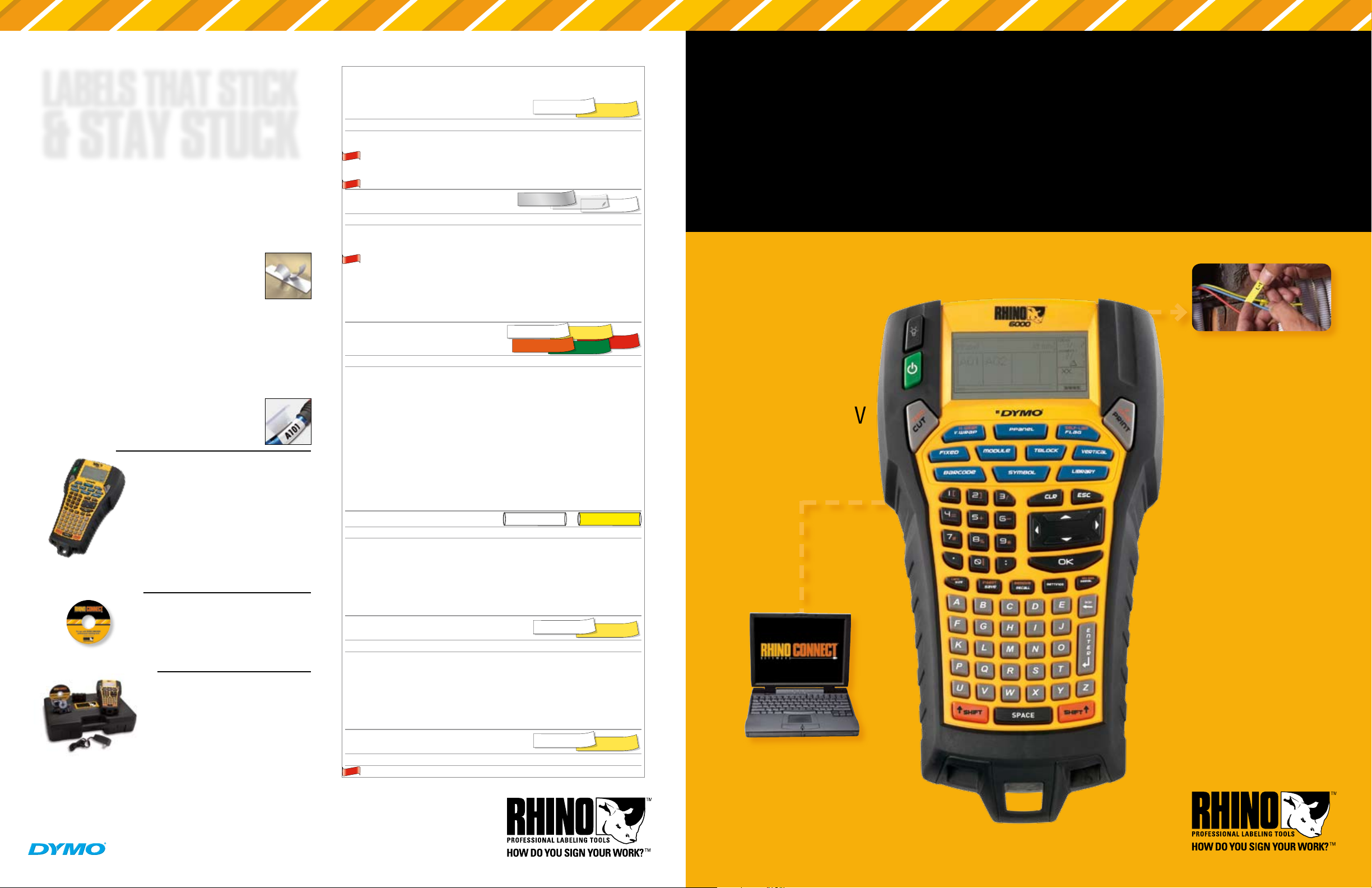
RhinoTM 6000
P R O F E S S I O N A L L A B E L I N G T O O L
Perfect for:
• Datacomm
• Electrical
• Facility
Maintenance
• Professional A/V
• Security
P C C o nn e C t i v i t y
Create labels on a PC and download
to RHINO 6000, or create and print
labels at the worksite. Either way,
rugged RHINO 6000 simplifies
labeling with advanced functions
that are genuine time-savers. And
RHINO labels stay stuck, long after
you’re gone.
•
PC connectivity for fast label
downloads – and uploads for
documentation purposes.
•
”Hot Keys” for instant wire and
cable wraps, flags, vertical and
fixed length labels, patch panels,
distribution modules and more.
•
Over 250 easy-to-find, pre-
programmed industry terms and
symbols save you time.
•
Save over 1,000 custom labels,
including industry terms, graphics,
logos and symbols, for on-demand
printing at the worksite.
•
Large graphic display with
backlight for previewing entire
label files and increased visibility.
•
One-touch powered cutter and
cassette ejection system for
effortless labels.
•
Prints on industrial-strength
RHINO labels, NOW up to 1” wide.
For more information visit: www.rhinolabeling.com or call us at 1-800-426-7827.
©2007 DYMO, Stamford, CT Sanford, LP., Oak Brook, IL 60523 A Newell Rubbermaid Company www.rhinolabeling.com 28408
RhinoTM 6000
PC Connectivity
FREE Windows® driver available at www.rhinolabeling.com for printing
from any Windows® program via USB interface.
Upgrade printer firmware when new features become available.
Works best with RHINO CONNECT™ Software* (not included) to:
Upload / download label files for in-the-field and on-demand printing.
Insert customized graphics, logos, symbols and industry terms.
Import data from any Windows® based program.
Create labels using the integrated step-by-step wizard.
Print labels directly from RHINO CONNECT™ Software.
* To learn more about RHINO CONNECT™ Software, visit www.rhinolabeling.com.
Windows is a registered trademark of Microsoft Corporation in the United States and/or other countries.
P R O F E S S I O N A L L A B E L I N G T O O L
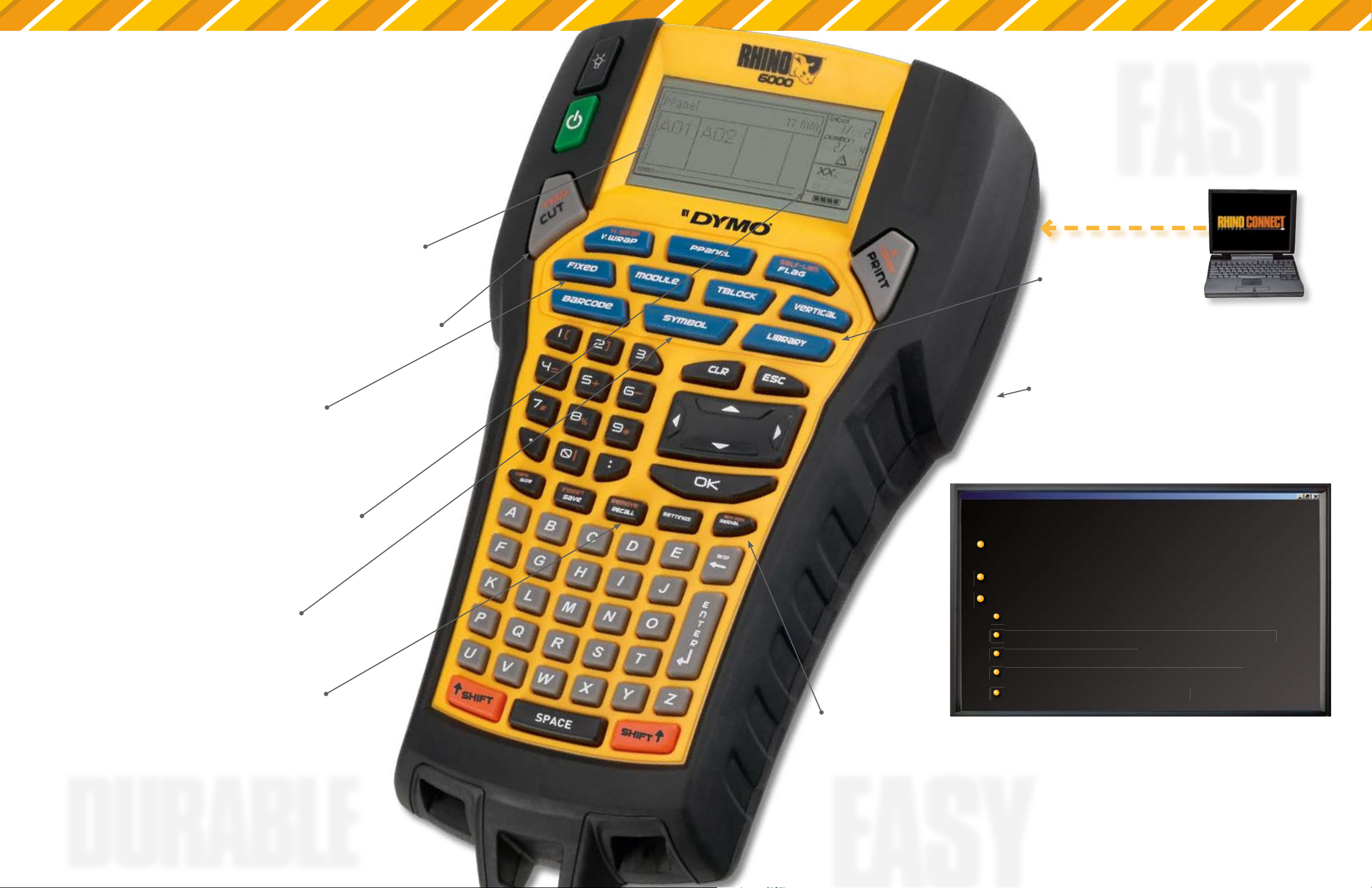
FASt
If you’ve “held out” for the best
labeling tool with PC Connectivity,
feast your eyes (and rest your
fingers) on RHINO 6000. Installers
tell us the three things they want
from a labeling tool are “EASY,
EASY and EASY.” So go ahead
– load and unload label cassettes
without hesitation. Use the
generously-sized LCD to create,
edit and preview multiple labels
without breaking a sweat. If you
do, our labels resist solvents, UV,
moisture, harsh temperatures
and, yes, even smearing. For
high-end installations and the
highest level of satisfaction,
Intuitive Graphical Interface
Create, edit and preview multiple
labels on our largest backlit LCD
One-Touch, Power-Assisted Cutter
Eliminate the fatigue of manual
cutting and increase efficiency
Hot Keys
Eliminate guesswork,
complicated menus and enjoy
fast and easy formatting of
commonly-used label types
Quick-Charge Li-Ion
Rechargeable Battery
With on-screen
battery life indicator
Library
Over 150 pre-programmed industry
terms and the ability to customize
your own library of terms, graphics,
logos and symbols
Integrated Impact Bumpers
Protects against harsh conditions while
allowing easy access to label cartridge
P C C o nn e Ct i vi t y
RHINO 6000 is built for the long
haul – and to please you every
step of the way.
Symbols
Over 100 pre-programmed
industry symbols
dURABLE
Save Your Labels
Customize over 1,000 labels
with logos and symbols –
and recall them instantly
Powerful Serialization
Built-in wizards for simple
and advanced serialization
EASY

Rhino
TM
6000
P r o f e s s i o n a l l a b e l i n g T o o l
rHino 6000 Professional labeling Tool
Part No. 1734519 UPC: 0 71701 12173
Includes:
RHINO 6000 Printer
1” Black on White Flexible Nylon Label Cartridge
Li-ion Rechargeable Battery Pack
AC Adapter
Quick Reference Guide
Registration Card
rHino ConneCT software
Part No. 1738636 UPC: 0 71701 110492
rHino 6000 Hard Case Kit
Part No. 1734520 UPC: 0 71701 12174
Includes:
RHINO 6000 Printer
RHINO CONNECT Software
Hard Carry Case
1” Black on White Flexible Nylon Label Cartridge
3/8” Black on White Vinyl Label Cartridge
Li-ion Rechargeable Battery Pack
AC Adapter
Quick Reference Guide
Registration Card
Create labels on a PC and download
to rHino 6000, or create and print
labels at the worksite. Either way,
rugged RHINO 6000 simplifies
labeling with advanced functions
that are genuine time-savers. And
RHINO labels stay stuck, long after
you’re gone.
• PC connectivity for fast label
downloads – and uploads for
documentation purposes.
• ”Hot Keys” for instant wire and
cable wraps, flags, vertical and
fixed length labels, patch panels,
distribution modules and more.
• Over 250 easy-to-find, pre-
programmed industry terms and
symbols save you time.
• Save over 1,000 custom labels,
including industry terms, graphics,
logos and symbols, for on-demand
printing at the worksite.
• Large graphic display with
backlight for previewing entire
label files and increased visibility.
• One-touch powered cutter and
cassette ejection system for
effortless labels.
• Prints on industrial-strength
RHINO labels, NOW up to 1” wide.
LABELS thAt StiCK
& StAY StUCK
RHINO labels are as exceptional as the RHINO 6000. Easy to use and
super-strong, they’re designed for the long haul. Thanks to industrial-
strength adhesives, they deliver the lasting durability and legibility
you demand – in six materials, for a multitude of applications. To meet
your high standards, RHINO labels are designed to work exclusively
with our printers and perform on any surface you encounter.
•
Easy-to-peel, split-back styles will speed you along.
•
Industrial-strength adhesives help these labels stick
and stay stuck – in harsh worksite conditions.
•
Thermal transfer print technology produces labels
that are durable, smear-proof and resistant to
chemicals, solvents, heat, UV and more.
NEW! RHINO self-laminating labels protect your printed area from
exposure (to oil, solvents, water and abrasion). Ideal for wire and
cable identification, these versatile labels offer excellent conformity
to round, irregular and flexible surfaces:
•
Specially-formulated to stick and last – on wire and cable
•
Resistant to abrasion, chemicals and moisture
•
Die-cut labels allow easy “peel away” from liner
BUY thE tooL.
BUY thE SoFtWARE.
GEt it ALL – And SAVE!
FPO
Rhino
TM
LABELS
f l e X i b l e n Y l o n
–
Curved or flat surfaces.
Wires, patch panels, machinery, equipment, bins, etc.
P A R T #
D E S C R I P T I O N
L E N G T H
18488
White Flexible Nylon Tape 1/2” (12mm)
11.5‘
18489
White Flexible Nylon Tape 3/4” (19mm)
11.5’
1734524
White Flexile Nylon Tape 1” (24mm)
11.5’
18490
Yellow Flexible Nylon Tape 1/2” (12mm)
11.5’
18491
Yellow Flexible Nylon Tape 3/4” (19mm)
11.5’
1734525
Yellow Flexible Nylon Tape 1” (24mm)
11.5’
P e r M a n e n T P o lY e s T e r
–
Flat surfaces.
Equipment, bins, patch panels, etc.
P A R T #
D E S C R I P T I O N
L E N G T H
18482
White Perm Poly Tape 3/8” (9mm)
18’
18483
White Perm Poly Tape 1/2” (12mm)
18’
18484
White Perm Poly Tape 3/4” (19mm)
18’
1734523
White Perm Poly Tape 1” (24mm)
18’
18508
Clear Perm Poly Tape 3/8” (9mm)
18’
622289
Clear Perm Poly Tape 1/2” (12mm)
18’
622290
Clear Perm Poly Tape 3/4” (19mm)
18’
18485
Metallized Perm Poly Tape 3/8” (9mm)
18’
18486
Metallized Perm Poly Tape 1/2” (12mm)
18’
18487
Metallized Perm Poly Tape 3/4” (19mm)
18’
V i n Y l
–
All surfaces. Ideal for outdoor and
color-coding applications. Warning messages,
wires, patch panels, equipment, machinery, etc.
P A R T #
D E S C R I P T I O N
L E N G T H
18443
White Vinyl 3/8” (9mm)
18’
18444
White Vinyl 1/2” (12mm)
18’
18445
White Vinyl 3/4” (19mm)
18’
18431
Yellow Vinyl 3/8” (9mm)
18’
18432
Yellow Vinyl 1/2” (12mm)
18’
18433
Yellow Vinyl 3/4” (19mm)
18’
18434
Orange Vinyl 3/8” (9mm)
18’
18435
Orange Vinyl 1/2” (12mm)
18’
18436
Orange Vinyl 3/4” (19mm)
18’
18437
Red Vinyl 3/8” (9mm)
18’
18438
Red Vinyl 1/2” (12mm)
18’
18439
Red Vinyl 3/4” (19mm)
18’
18440
Green Vinyl 3/8” (9mm)
18’
18441
Green Vinyl 1/2” (12mm)
18’
18442
Green Vinyl 3/4” (19mm)
18’
H e aT s H r i n K T U b e
–
Wire and cable.
P A R T #
D E S C R I P T I O N
L E N G T H
18051
White Heat Shrink Tube 1/4” (6mm)
5’
18053
White Heat Shrink Tube 3/8” (9mm)
5’
18055
White Heat Shrink Tube 1/2” (12mm)
5’
18057
White Heat Shrink Tube 3/4” (19mm)
5’
18052
Yellow Heat Shrink Tube 1/4” (6mm)
5’
18054
Yellow Heat Shrink Tube 3/8” (9mm)
5’
18056
Yellow Heat Shrink Tube 1/2” (12mm)
5’
18058
Yellow Heat Shrink Tube 3/4” (19mm)
5’
n o n — a D H e s i V e
–
Patch panels, distribution
blocks, faceplates, etc.
P A R T #
D E S C R I P T I O N
L E N G T H
18111
White Non-Adhesive Tag 1/4” (6mm)
18’
18112
White Non-Adhesive Tag 3/8” (9mm)
18’
18113
White Non-Adhesive Tag 1/2” (12mm)
18’
18114
White Non-Adhesive Tag 3/4” (19mm)
18’
18115
Yellow Non-Adhesive Tag 1/4” (6mm)
18’
18116
Yellow Non-Adhesive Tag 3/8” (9mm)
18’
18117
Yellow Non-Adhesive Tag 1/2” (12mm)
18’
18118
Yellow Non-Adhesive Tag 3/4” (19mm)
18’
s e l f l a M i n aT i n g
–
Protects vital information
in harsh environments.
P A R T #
D E S C R I P T I O N
L E N G T H
1734821
White Self-Laminating 1” x 1” (24mm x 24mm)
18’
Yellow
White
White
Clear
Metallized
Yellow
White
Red
Yellow
White
Green
Orange
Yellow
White
NEW
NEW
NEW
Yellow
White
NEW
Perfect for:
•
Datacomm
•
Electrical
•
Facility
Maintenance
•
Professional A/V
•
Security
For more information visit:
www.rhinolabeling.com or call us at 1-800-426-7827.
©2007 DYMO, Stamford, CT Sanford, LP., Oak Brook, IL 60523 A Newell Rubbermaid Company www.rhinolabeling.com
28408
P C C o n n e C t i v i t y
LABELS that STICK
& STAY STUCK
RHINO labels are as exceptional as the RHINO 6000. Easy to use and super-strong, they’re designed for the long haul. Thanks to industrial- strength adhesives, they deliver the lasting durability and legibility you demand – in six materials, for a multitude of applications. To meet your high standards, RHINO labels are designed to work exclusively
RHINOTM Labels
|
F L E X I B L E N Y L O N – Curved or flat surfaces. |
White |
Yellow |
|||
|
Wires, patch panels, machinery, equipment, bins, etc. |
|||||
|
P a r t # |
D e s c r i p t i o n |
L E N G T H |
|||
|
18488 |
White Flexible Nylon Tape 1/2” (12mm) |
11.5‘ |
|||
|
18489 |
White Flexible Nylon Tape 3/4” (19mm) |
11.5’ |
|||
|
NEW 1734524 |
White Flexile Nylon Tape 1” (24mm) |
11.5’ |
|||
|
18490 |
Yellow Flexible Nylon Tape 1/2” (12mm) |
11.5’ |
|||
|
18491 |
Yellow Flexible Nylon Tape 3/4” (19mm) |
11.5’ |
|||
|
NEW 1734525 |
Yellow Flexible Nylon Tape 1” (24mm) |
11.5’ |
|||
|
P E R M A N E N T P O LY E S T E R – Flat surfaces. |
Metallized |
Clear |
White |
||
|
Equipment, bins, patch panels, etc. |
|||||
|
P a r t # |
D e s c r i p t i o n |
L E N G T H |
RhinoTM 6000
P r o f e s s i o n a l L a b e l i n g t o o l
with our printers and perform on any surface you encounter.
•Easy-to-peel, split-back styles will speed you along.
•Industrial-strength adhesives help these labels stick and stay stuck – in harsh worksite conditions.
•Thermal transfer print technology produces labels that are durable, smear-proof and resistant to chemicals, solvents, heat, UV and more.
NEW
18482
18483
18484
1734523
18508
622289
622290
18485
18486
18487
|
White Perm Poly Tape 3/8” (9mm) |
18’ |
|
White Perm Poly Tape 1/2” (12mm) |
18’ |
|
White Perm Poly Tape 3/4” (19mm) |
18’ |
|
White Perm Poly Tape 1” (24mm) |
18’ |
|
Clear Perm Poly Tape 3/8” (9mm) |
18’ |
|
Clear Perm Poly Tape 1/2” (12mm) |
18’ |
|
Clear Perm Poly Tape 3/4” (19mm) |
18’ |
|
Metallized Perm Poly Tape 3/8” (9mm) |
18’ |
|
Metallized Perm Poly Tape 1/2” (12mm) |
18’ |
|
Metallized Perm Poly Tape 3/4” (19mm) |
18’ |
Perfect for: |
• Datacomm |
NEW! RHINO self-laminating labels protect your printed area from exposure (to oil, solvents, water and abrasion). Ideal for wire and cable identification, these versatile labels offer excellent conformity to round, irregular and flexible surfaces:
•Specially-formulated to stick and last – on wire and cable
•Resistant to abrasion, chemicals and moisture
•Die-cut labels allow easy “peel away” from liner
BUY THE TOOL.
RHINO 6000 Professional Labeling Tool
|
Part No. 1734519 |
UPC: 0 71701 12173 |
Includes:
RHINO 6000 Printer
1” Black on White Flexible Nylon Label Cartridge Li-ion Rechargeable Battery Pack
AC Adapter
Quick Reference Guide Registration Card
BUY THE SOFTWARE.
RHINO CONNECT Software
Part No. 1738636 UPC: 0 71701 110492
GET IT ALL – and SAVE!
RHINO 6000 Hard Case Kit
Part No. 1734520 UPC: 0 71701 12174
Includes:
RHINO 6000 Printer RHINO CONNECT Software Hard Carry Case
1” Black on White Flexible Nylon Label Cartridge 3/8” Black on White Vinyl Label Cartridge
|
V i n y l – All surfaces. Ideal for outdoor and |
White |
|||
|
color-coding applications. Warning messages, |
Orange |
|||
|
wires, patch panels, equipment, machinery, etc. |
||||
|
P a r t # |
D e s c r i p t i o n |
|||
|
18443 |
White Vinyl 3/8” (9mm) |
|||
|
18444 |
White Vinyl 1/2” (12mm) |
|||
|
18445 |
White Vinyl 3/4” (19mm) |
|||
|
18431 |
Yellow Vinyl 3/8” (9mm) |
|||
|
18432 |
Yellow Vinyl 1/2” (12mm) |
|||
|
18433 |
Yellow Vinyl 3/4” (19mm) |
|||
|
18434 |
Orange Vinyl 3/8” (9mm) |
|||
|
18435 |
Orange Vinyl 1/2” (12mm) |
|||
|
18436 |
Orange Vinyl 3/4” (19mm) |
|||
|
18437 |
Red Vinyl 3/8” (9mm) |
|||
|
18438 |
Red Vinyl 1/2” (12mm) |
|||
|
18439 |
Red Vinyl 3/4” (19mm) |
|||
|
18440 |
Green Vinyl 3/8” (9mm) |
|||
|
18441 |
Green Vinyl 1/2” (12mm) |
|||
|
18442 |
Green Vinyl 3/4” (19mm) |
|||
|
H E AT S H R I N K T U B E – Wire and cable. |
||||
|
White |
||||
|
P a r t # |
D e s c r i p t i o n |
|||
|
18051 |
White Heat Shrink Tube 1/4” (6mm) |
|||
|
18053 |
White Heat Shrink Tube 3/8” (9mm) |
|||
|
18055 |
White Heat Shrink Tube 1/2” (12mm) |
|||
|
18057 |
White Heat Shrink Tube 3/4” (19mm) |
|||
|
18052 |
Yellow Heat Shrink Tube 1/4” (6mm) |
|||
|
18054 |
Yellow Heat Shrink Tube 3/8” (9mm) |
|||
|
18056 |
Yellow Heat Shrink Tube 1/2” (12mm) |
|||
18058 |
Yellow Heat Shrink Tube 3/4” (19mm) |
|||
|
N O N — A D H E S I V E – Patch panels, distribution |
White |
|||
|
blocks, faceplates, etc. |
||||
|
P a r t # |
D e s c r i p t i o n |
|||
|
18111 |
White Non-Adhesive Tag 1/4” (6mm) |
|||
|
18112 |
White Non-Adhesive Tag 3/8” (9mm) |
|||
|
18113 |
White Non-Adhesive Tag 1/2” (12mm) |
|||
|
18114 |
White Non-Adhesive Tag 3/4” (19mm) |
|||
|
18115 |
Yellow Non-Adhesive Tag 1/4” (6mm) |
|||
|
18116 |
Yellow Non-Adhesive Tag 3/8” (9mm) |
|||
|
18117 |
Yellow Non-Adhesive Tag 1/2” (12mm) |
|||
18118 |
Yellow Non-Adhesive Tag 3/4” (19mm) |
|||
|
S e l f L a m i n at i n g – Protects vital information |
White |
|||
|
in harsh environments. |
Yellow
Green Red
L E N G T H
18’
18’
18’
18’
18’
18’
18’
18’
18’
18’
18’
18’
18’
18’
18’
Yellow
L E N G T H
5’
5’
5’
5’
5’
5’
5’
5’
Yellow
L E N G T H
18’
18’
18’
18’
18’
18’
18’
18’
Yellow
|
• Electrical |
|||||
|
• Facility |
Create labels on a PC and download |
||||
|
to RHINO 6000, or create and print |
|||||
|
Maintenance |
|||||
|
labels at the worksite. Either way, |
|||||
|
rugged RHINO 6000 simplifies |
|||||
|
• Professional A/V |
labeling with advanced functions |
||||
FPO |
that are genuine time-savers. And |
||||
• Security |
RHINO labels stay stuck, long after |
||||
you’re gone. |
|||||
• PC connectivity for fast label |
|||||
|
downloads – and uploads for |
|||||
documentation purposes. |
|||||
|
• ”Hot Keys” for instant wire and |
|||||
|
cable wraps, flags, vertical and |
|||||
|
fixed length labels, patch panels, |
|||||
|
distribution modules and more. |
|||||
• Over 250 easy-to-find, pre- |
|||||
|
programmed industry terms and |
|||||
symbols save you time. |
|||||
|
• Save over 1,000 custom labels, |
|||||
|
including industry terms, graphics, |
|||||
|
logos and symbols, for on-demand |
|||||
printing at the worksite. |
|||||
• Large graphic display with |
|||||
|
backlight for previewing entire |
|||||
|
label files and increased visibility. |
|||||
|
• One-touch powered cutter and |
|||||
cassette ejection system for |
|||||
effortless labels. |
|||||
• Prints on industrial-strength |
|||||
P C C o n n e c t i v i t y |
RHINO labels, NOW up to 1” wide. |
||||

-
Contents
-
Table of Contents
-
Bookmarks
-
Guide de Démarrage Rapide
Rhino
6000
Advanced Labeling Tool with PC Connectivity
Erste Schritte……………………………………………..21
Need help?
Do you have a question about the Rhino 6000 and is the answer not in the manual?
Questions and answers
Subscribe to Our Youtube Channel
Related Manuals for Dymo Rhino 6000
Summary of Contents for Dymo Rhino 6000
-
Page 1
Rhino 6000 Advanced Labeling Tool with PC Connectivity Quick Start Guide ……….1 Guide de démarrage rapide ………7 Beknopte handleiding ……..15 Erste Schritte………….21… -
Page 3: Quick Start Guide
English Quick Start Guide Follow these steps to install your RHINO 6000 label printer and software, and print your first label. 1. Unpacking your printer Do not plug the printer into your computer until asked to do so during the NOTE software installation.
-
Page 4: Connecting The Power
2. Connecting the power The label printer can operate using the rechargable battery pack or the AC power adapter. For temporary backup power, six AA alkaline batteries can be used. To charge the battery pack the first time you use the printer, insert the battery pack and plug in the power adapter.
-
Page 5: Inserting The Label Cassette
3. Inserting the label cassette Your printer comes with two RHINO label cassettes. Visit www.dymo.com for information about purchasing additional label cassettes. To insert the label cassette Lift the label cassette cover to open the Lift label compartment. See Figure 4.
-
Page 6: Connecting The Printer To Your Computer
4. Connecting the printer to your computer Your printer connects to your computer using the USB connection located on the top of the printer. Do not connect the printer to your computer until prompted to do so during NOTE the software installation. To connect the printer to your computer Plug the USB cable into the USB port on the bottom of the printer.
-
Page 7
6. Printing your first label with the printer You are now ready to print your first label. The first time you turn on the printer, you are asked to select your language and units of measure. You are also asked to select the width of the tape cassette currently inserted in the printer. -
Page 8: Using Rhino Connect Software
7. Using RHINO Connect Software The following figure shows some of the many features available in RHINO Connect Software. Add images, barcodes, Quickly create a series of symbols, and predefined text. labels using serialization. Change the label type on the fly. Transfer label files and custom symbols and text…
-
Page 9: Guide De Démarrage Rapide
Français Guide de démarrage rapide Suivez les étapes ci-dessous pour installer le logiciel et l’imprimante d’étiquettes RHINO 6000 et imprimer votre première étiquette. 1. Déballage de l’imprimante Ne reliez pas l’imprimante à l’ordinateur avant d’être invité à le faire au cours NOTE de l’installation du logiciel.
-
Page 10: Mise En Marche
2. Mise en marche L’imprimante d’étiquettes peut être alimentée par des piles rechargeables ou par un adaptateur c.a. Pour une alimentation de réserve temporaire, vous pouvez utiliser six piles alcalines AA. Pour charger le bloc-piles la première fois que vous utilisez l’imprimante, mettez-le en place et branchez l’adaptateur.
-
Page 11
3. Insertion de la cassette d’étiquettes Votre imprimante est livrée avec deux cassettes d’étiquettes RHINO. Visitez www.dymo.com pour des informations sur l’achat de cassettes d’étiquettes supplémentaires. Pour insérer la cassette d’étiquettes Soulevez le couvercle de la cassette Soulevez d’étiquettes afin d’ouvrir le compartiment à… -
Page 12
Pour retirer la cassette d’étiquettes Soulevez le couvercle de la cassette d’étiquettes afin d’ouvrir le compartiment à cassette. Appuyez sur le bouton d’éjection. La cassette d’étiquettes est alors automatiquement éjectée. Replacez la cassette comme indiqué plus haut. 4. Connexion de l’imprimante à l’ordinateur Vous devez connecter votre imprimante à… -
Page 13: Installation Du Logiciel
5. Installation du logiciel Pour installer le logiciel Insérez le CD RHINO Connect Software dans votre lecteur de CD-ROM. L’écran d’installation s’affiche au bout de quelques secondes. S’il ne s’affiche pas : Cliquez sur Démarrer puis sur Exécuter dans la barre des tâches Windows.
-
Page 14
6. Impression de votre première étiquette Vous êtes maintenant prêt à imprimer votre première étiquette. La première fois que vous allumez l’imprimante, vous serez invité à sélectionner la langue et les unités de mesure de votre choix. Vous serez également invité à sélectionner la largeur de la cassette que vous avez insérée dans l’imprimante. -
Page 15
7. Utilisation de RHINO Connect Software L’illustration suivante montre quelques-unes des nombreuses fonctions disponibles dans RHINO Connect Software. Modifiez le type Ajoutez des codes-barres, des Créez rapidement une série d’étiquettes à la symboles et des textes prédéfinis. d’étiquettes au moyen de la sérialisation.. volée. -
Page 17: Beknopte Handleiding
Nederlands Beknopte handleiding Voer de volgende stappen uit om de RHINO 6000 labelprinter en software te installeren en een eerste label af te drukken. 1. De printer uitpakken Sluit de printer pas op uw computer aan wanneer dat tijdens de OPMERKING software-installatie wordt gevraagd.
-
Page 18
2. De stroomtoevoer aansluiten U kunt labelprinter met de oplaadbare batterij of de voedingsadapter gebruiken. De printer kan tijdelijk ook werken op zes AA-alkalinebatterijen. Als u de batterij wilt opladen wanneer u de printer voor het eerst gebruikt, brengt u de batterij in het apparaat aan en sluit u de voedingsadapter aan. -
Page 19
3. De labelcassette plaatsen De printer wordt geleverd met twee RHINO-labelcassettes. Bezoek www.dymo.com voor informatie over het kopen van meer labelcassettes. De labelcassette plaatsen Trek de klep van de labelcassette omhoog Omhoog trekken om het labelcompartiment te openen. Zie Afbeelding 4. -
Page 20
4. De printer op uw computer aansluiten De printer wordt via de USB-aansluiting op de bovenkant van de printer op uw computer aangesloten. Sluit de printer pas op uw computer aan wanneer dat tijdens de OPMERKING software-installatie wordt gevraagd. De printer op uw computer aansluiten Sluit de USB-kabel aan op de USB- poort in de onderkant van de printer. -
Page 21
Volg de instructies op het scherm. Sluit de USB-kabel aan op de USB-poort wanneer daarom tijdens de installatie wordt gevraagd. 6. Een eerste label met de printer afdrukken Alles is nu gereed om een eerste label af te drukken. Wanneer u de printer voor het eerst inschakelt, wordt u verzocht de gewenste taal en maateenheden te kiezen. -
Page 22
7. De RHINO Connect Software gebruiken In de volgende afbeelding worden enkele van de talrijke functies van de RHINO Connect Software getoond. Voeg afbeeldingen, barcodes, symbolen Maak met serialisatie en vooraf gedefinieerde tekst toe. snel een serie labels. Verander snel het labeltype. -
Page 23: Erste Schritte
Englisch Erste Schritte So installieren Sie Ihren RHINO 6000 Etikettendrucker sowie die dazugehörige Soft- ware und erfahren, wie Sie ganz unkompliziert Ihre ersten Etiketten drucken können. 1. Auspacken des Druckers Schließen Sie den Drucker noch nicht an Ihren Computer an. ANMERKUNG Sie werden im Laufe der Software-Installation dazu aufgefordert.
-
Page 24
2. Netzanschluss Der Etikettendrucker arbeitet entweder über den wieder aufladbaren Akkusatz oder den Wechselstromadapter. Zur zeitweiligen Stromversorgung können im Notfall sechs AA-Alkalibatterien genutzt werden. Zum Laden des Akkusatzes bei der erstmaligen Nutzung des Druckers legen Sie den Akkusatz ein und schließen Sie den Netzadapter an. Das erstmalige Laden des Akkusatzes dauert etwa acht Stunden. -
Page 25
3. Einlegen der Etikettenkassette Der Lieferumfang Ihres Drucker umfasst zwei RHINO-Etikettenkassetten. Besuchen Sie www.dymo.com, um nähere Informationen zum Kauf zusätzlicher Etikettenkassetten zu erhalten. Einlegen der Etikettenkassette Heben Sie zum Öffnen die Abdeckung des Anheben Kassettenfachs an. Siehe Abbildung 4. Vergewissern Sie sich, dass Etikett und Farbband straff über den Kassettenkopf… -
Page 26
Entnehmen der Etikettenkassette Heben Sie zum Öffnen die Abdeckung des Kassettenfachs an. Drücken Sie die Ausgabe-Taste. Die Etikettenkassette wird automatisch ausgegeben. Tauschen Sie die Kassette wie oben beschrieben aus. 4. Anschluss des Druckers an Ihren Computer Der Drucker wird über den USB-Anschluss an der Unterseite des Druckers mit Ihrem Computer verbunden. -
Page 27
5. Installation der Software Installation der Software Legen Sie die RHINO Connect Software CD in Ihr CD-ROM-Laufwerk. Nach wenigen Sekunden erscheint der Installationsbildschirm. Falls der Installationsbildschirm nicht erscheint: Klicken Sie auf Start und dann auf Ausführen in der Windows-Startleiste. Das Dialogfeld „Ausführen“ erscheint. Geben Sie D:\setup.exe ein (D steht für den Buchstaben des CD-ROM- Laufwerks) und klicken Sie OK. -
Page 28
6. Erste Etiketten mit dem Drucker erstellen Nun können Sie Ihre ersten Etiketten drucken. Beim ersten Einschalten des Druckers werden Sie aufgefordert, Ihre Sprache und die in Ihrem Land geltenden Maßeinheiten auszuwählen. Außerdem müssen Sie die Breite der derzeit in Ihrem Drucker befindlichen Kassette auswählen. -
Page 29
7. Nutzung der RHINO Connect Software Die folgende Abbildung zeigt einige der zahlreichen Funktionen innerhalb der RHINO Connect Software. Ändern Sie im Fügen Sie Strichcodes, Symbole Erstellen Sie über die Serienfunktion schnell Handumdrehen die und vordefinierten Text hinzu. eine komplette Reihe von Etiketten. Art des Etiketts. -
Page 32
Distributed by: DYMO bvba, Sint-Niklaas, Belgium www.dymo.com ©2010 Sanford, L.P. W006790 11/10…
Краткое содержание страницы № 1
TM
TM
Rhino LABELS
LABELS ht A t Sit CK
f l e X i b l e n Y l o n – Curved or flat surfaces.
White
Yellow
Wires, patch panels, machinery, equipment, bins, etc.
P A R T # D E S C R I P T I O N L E N G T H
18488 White Flexible Nylon Tape 1/2” (12mm) 11.5‘
18489 White Flexible Nylon Tape 3/4” (19mm) 11.5’
& St AY St UCK
1734524 White Flexile Nylon Tape 1” (24mm) 11.5’
18490 Yellow Flexible Nylon Tape 1/2” (12mm) 11.5’
Ronih 6000
18491 Yellow Flexible Nylon Tape 3/4” (19mm) 11.5’
RHINO labe
Краткое содержание страницы № 2
TM FASt Ronih 6000 P r o f e s s i o n a l l a b e l i n g T o o l If you’ve “held out” for the best intuitive graphical interface labeling tool with PC Connectivity, Create, edit and preview multiple labels on our largest backlit LCD feast your eyes (and rest your library Over 150 pre-programmed industry fingers) on RHINO 6000. Installers terms and the ability to customize P C C o n n e C t i v i t y tell us the three things they want your own library of terms, graphics, one-Touch, Pow