
New model information
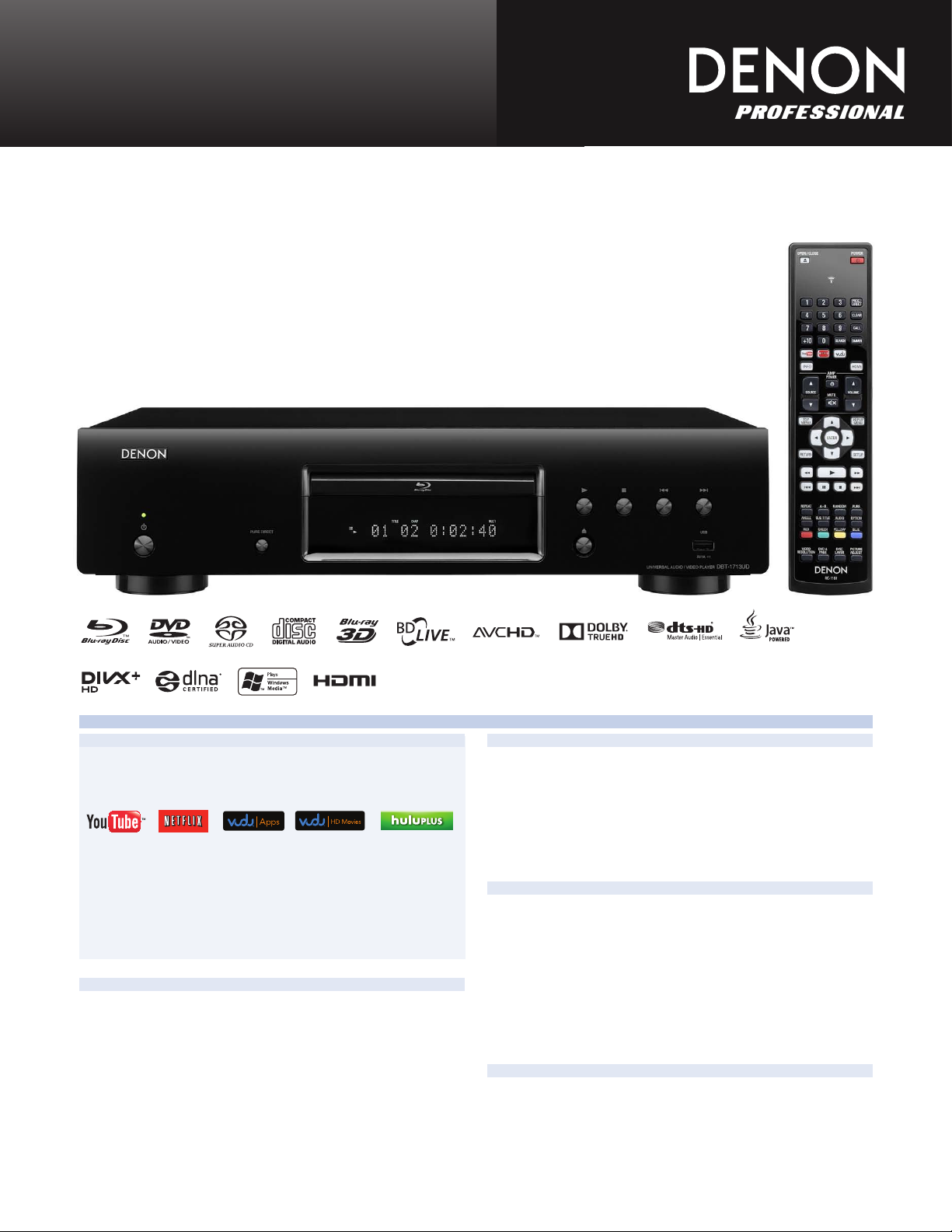
DBT-1713UD
Universal Audio/Video Player
Denon 3D Universal disc player
with versatile media and streaming service supports
Denon’s 3D ‘Universal’ disc playback technology provides playback of virtually all popular disc fo rmat s ,
in c l u ding high definition Blu-ray discs, as well as DVD-Audio and Super Audio CD high r e s o lu ti on s t ereo and mult i-channel music format discs, along with DVD-Video and music CD playback. The
DBT-1713UD also supports playback of your locally stored music, photo and video content via network (DLNA
1.5) and USB, as well as versatile online video streaming services such as Netflix, Youtube, Hulu Plus, and
VUDU, all with Denon superb audio and video technology.
Features
New Features
• Design Matching to the new Denon A/V Receivers
• Wide variety of video streaming, movies, videos, TV shows
(YouTube, Netix, VUDU, Hulu Plus)
• Quick response for disc loading and playback
(20% faster than current model)
• Quick Start mode, enables fast access to play
• New servo circuit, to reduce moving noise of pickup mechanism
• HDMI cable included (HIGH SPEED HDMITM CABLE)
*Netix is available in certain countries. Unlimited membership required. More information at www.netix.com.
Denon Technologies for superior sound and picture quality
• Universal Disc Playability
(Blu-ray, DVD-Audio, DVD-Video, Super Audio CD, CD)
• DLNA 1.5 Support and front USB port
for music, photo, video contents playback
• 1080p/24 video output, to bring out the full quality of lm
• HDMI source direct mode to output native resolution of the disc
• Picture adjustments
• Playing high-quality audio, using by pure direct function
Build Quality
• Fully Shielded Mechanism, suppress internal and external vibrations and
electromagnetic noises for high precision disc playability at all times
• Separated 4-block construction for faithful playback of audio and video
signals (Disc mechanism, Video/Audio, Power supply, and Indicator block)
• Fan-less construction for noise reduction
• Solid cabinet and large foot
Ease of Use
• Easy-to-use Multi language GUI and CD-ROM interactive manual
• User-friendly GUI
• Easy-to-use remote control handset
-Glow-key for cursor keys and operation keys
-Direct access for online video services
-Remote Control also controls Denon AV receiver for convenience
• New “Denon Remote App” control
via 2012 new Denon networking A/V Receivers
Others
• One stereo channel (2ch) output for Multi-zone
• Eco Stand-by mode, lower power consumption (0.3W)
• Detachable AC cord
*1) The DBT-1713UD has remote control functionality by using the new “Denon Remote App” together
with Denon new A/V Receiver such as AVR-1713.
*1)
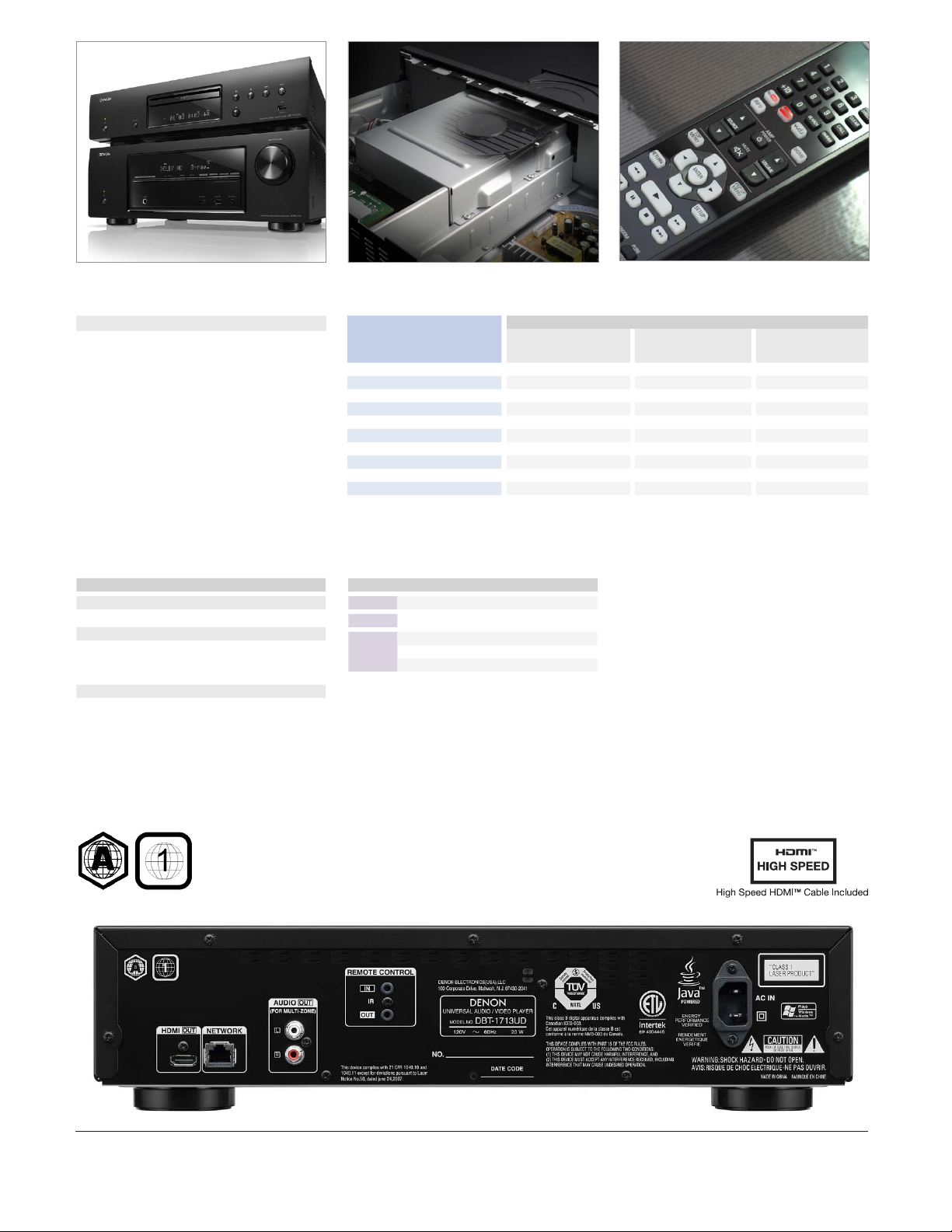
Design Matching to the new Denon A/V Receivers
Fully Shielded Mechanism Easy-to-use remote control handset
Versatile Disc Formats Playability
• BD-Video
• BD-R
• BD-RE
• DVD-Video
• DVD-Audio
• DVD+R, DVD+RW
(Video mode, AVCHD format)
• DVD-R, DVD-RW
(Video mode, AVCHD format)
• Super Audio CD
• Audio CD
• CD-R, CD-RW
Main Specications
Video
Signal format NTSC, PAL
Audio output characteristics
S/N 115 dB (BD)
Total harmonic distortion 1 kHz, 0.0025% (BD)
Dynamic range 100 dB (BD)
General
Power supply 120V, 60Hz
Power consumption 20 W
Dimensions W x H x D
Weight 10 lbs 13 oz, 4.9 kg
0.3 W (Energy Saving Standby)
0.5 W (Normal Standby)
12 W (Quick Start)
17 3/32” x 4 1/4” x 11 39/64”
434 x 108 x 295 mm
Playable les Playable media
BD-R/-RE
DVD-R/-RW/+R/+RW/
MP3 (.mp3)
WMA (.wma)
AAC (.m4a)
LPCM (.wav)
FLAC (.ac)
JPEG (.jpg/.jpeg)
PNG (.png)
DivX® (.avi/.divx/.mkv)
MPEG (.mpg/.mpeg/.mp4/.ts/.m2t)
WMV (.wmv)
AVI (.avi)
* Depending on recording conditions (Bit-rate), these les may not be playable.
*1) Except CD-R/-RW.
CD-R/-RW
• • •
• • •
• • •
1
•*
1
•*
• • •
• • •
1
•*
1
•*
1
•*
1
•*
Ports
Video HDMI output 1
Audio Analog output (2ch, L/R) 1
Control Ethernet 1
USB port 1
Remote control (IN/OUT) 1 / 1
USB memory device Network
• •
• •
• •
• •
• •
• •
*Design and specications are subject to change without notice.
*The “BD-LIVE” logo is trademark of Blu-ray Disc Association
*“AVCHD” and the «AVCHD» logo are trademark of Panasonic Corporation
and Sony Corporation.
*Dolby and the double-D symbol are trademarks of Dolby Laboratories.
*DTS-HD, the Symbol, & DTS-HD and the Symbol together are registered
trademarks & DTS-HD Master Audio | Essential is a trademark of DTS, Inc.
© DTS, Inc. All Rights Reserved.
*The terms HDMI and HDMI High-Denition Multimedia Interface, and the
HDMI L ogo ar e trade marks or regi stered trademarks of HDMI Licensing
LLC in the United States and other countries.
*DivX®, DivX Certied®, DivX Plus® HD and associated logos are trademarks of Rovi Corporation or its subsidiaries and are used under license.
*Java and all Java based trademarks and logos are trademarks or regis-
tered trademarks of Oracle and/or its afliates.
*Windows Media and the Windows logo are trademarks or registered trademarks of Microsoft Corporation in the United States and/or other countries.
*Netix and Netix logo are the registered trademarks of Netix, Inc.
*DLNA CERTIFIEDTM Audio/Video/Image Player
*DLNA®, the DLNA Logo and DLNA CERTIFIED™ are trademarks, service
marks, or certi cation marks of the Digital Living Network Alliance.
*VUDU™ is a trademarks of VUDU, Inc.
*HULU and HULU.COM are trademarks and service marks of Hulu, LLC
Copyright © 2010 Hulu, LLC. All Rights Reserved.
DVD
RegionBDRegion
D&M Professional, Americas
Denon Electronics (USA), LLC.
1100 Maplewood Drive, Itasca, Illinois 60143 USA
100 Corporate Drive, Mahwah, New Jersey 07430 USA
TEL: 630-741-0330
TEL: 201-762-6500
www.d-mpro.com
usa.denon.com
D&M Holdings Inc.
D&M Building, 2-1 Nisshin-cho, Kawasaki-ku, Kawasaki-shi,
Kanagawa, 210-8569, Japan
www.denon.com
20100511A
1-855-MY.DENON
Cal l fo r Assi stance : 9:00 AM to 8:00PM M—F E.S.T.
For fre quentl y aske d ques tions please visit www.u sa.den on.com /FAQ
1—8 55—6 93—366 6
Report abuse
Libble takes abuse of its services very seriously. We’re committed to dealing with such abuse according to the laws in your country of residence. When you submit a report, we’ll investigate it and take the appropriate action. We’ll get back to you only if we require additional details or have more information to share.
Product:
Get your user manual by e-mail
Enter your email address to receive the manual of Denon DBT-1713UD in the language / languages: English as an attachment in your email.
The manual is 14,48 mb in size.
You will receive the manual in your email within minutes. If you have not received an email, then probably have entered the wrong email address or your mailbox is too full. In addition, it may be that your ISP may have a maximum size for emails to receive.
The manual is sent by email. Check your email
If you have not received an email with the manual within fifteen minutes, it may be that you have a entered a wrong email address or that your ISP has set a maximum size to receive email that is smaller than the size of the manual.
FAQ: Types of Manuals and Their Contents
Denon DBT-1713UD Manuals come in various types, each serving a specific purpose to help users effectively operate and maintain their devices. Here are the common types of Denon DBT-1713UD User Guides and the information they typically include:
- User Manuals: Provide comprehensive instructions on how to use the device, including setup, features, and operation. They often include troubleshooting tips, safety information, and maintenance guidelines.
- Service Instructions: Designed for technicians and repair professionals, these manuals offer detailed information on diagnosing and repairing issues with the device. They include schematics, parts lists, and step-by-step repair procedures.
- Installation Guides: Focus on the installation process of the device, providing detailed instructions and diagrams for proper setup. They are essential for ensuring the device is installed correctly and safely.
- Maintenance Manuals: Provide guidance on routine maintenance tasks to keep the device in optimal condition. They cover cleaning procedures, part replacements, and regular servicing tips.
- Quick Start Guides: Offer a concise overview of the essential steps needed to get the device up and running quickly. They are ideal for users who need immediate assistance with basic setup and operation.
Each type of Denon DBT-1713UD instruction is designed to address specific needs, ensuring users have the necessary information to use, maintain, and repair their devices effectively.
Related Instructions for Denon DBT-1713UD:
1
SYS-5.1
Owner’s manual PDF User Guide (@3P4L86), Denon SYS-5.1 Speaker System (Sun 11.2024)
12
433
109
3
AVR 1508 — AV Receiver
Manual del usuario AVR 1508 — AV Receiver (Home Theater System ePDF Manual, #B79A9H)
60
120
21
5
AVR 689 — AV Receiver
Setup manual PDF User Guide (@7KGM6V), Denon AVR 689 — AV Receiver Home Theater System (Mon 11.2024)
2
397
100
8
DN-D9000
Service manual Denon DN-D9000 Manual (Service manual), @8U44I9
97
733
125
9
AVR-3300
Brochure AVR-3300 Brochure — Y9XZ1K
6
752
143
10
DN-700R
Quick start manual PDF Guide (@WW77OB), Denon DN-700R Tuner (16th Feb 2025)
17
60
14
DVD Player Devices by Other Brands:
|
Panasonic DMPBDT320 Basic Operating Instructions Manual PDF User Guide (@JL5H1I), Panasonic DMPBDT320 Blu-ray disc player (30.03.2025) Model No. DMP-BDT320 30 Mar 2025 | 156 |
|
|
Sony DVP-M35 Service Manual DVD Player #X9VNJX Chinese Model 26 Oct 2024 | 15 |
|
|
Toshiba D-R5SC Service Manual PDF Manual (@8C1IR1), Toshiba D-R5SC DVR (01.02.2025) DVD VIDEO RECORDER 01 Feb 2025 | 33 |
|
|
Marantz SR8500 Specification Sheet Marantz Receiver Specification sheet (File: marantz-sr8500-specifications-2, Sun 01.2025) The SR8500 combines extraordinary flexibility and rarely found simplicity. The THX Select designation assures accurate reproduction of movie 12 Jan 2025 | 2 |
Categories:
TV Receiver
Switch
Adapter
Headphones
Headsets
Racks & Stands
Denon DBT-1713UD Quick Start Guide
Quick Start Guide
10 pages
en
Owner’s Manual
78 pages
en
Denon DBT-1713UD Specification
The Denon DBT-1713UD is a high-performance Universal Disc Transport that supports a wide array of disc formats, including Blu-ray, DVD, SACD, CD, and DVD-Audio, ensuring versatility in media playback. It is designed to deliver top-tier audio and video quality, featuring advanced AL32 Processing and a high-precision 32-bit/192 kHz digital-to-analog converter that enhances audio fidelity. The DBT-1713UD supports 3D Blu-ray playback and offers full HD 1080p video output, providing an immersive cinematic experience. It is equipped with Denon’s proprietary Denon Link HD, which ensures a jitter-free digital audio connection when partnered with a Denon AV receiver.
The system’s construction is robust, utilizing a vibration-resistant design to minimize interference and ensure stable playback. The transport features a fan-less design to eliminate unwanted noise, contributing to a quieter operation. Network connectivity is facilitated through an Ethernet port, allowing for internet-based content access and firmware updates. The unit supports FLAC, WAV, and MP3 file playback, offering high-resolution audio streaming capabilities. The front panel includes a USB port for convenient playback from external storage devices.
Control and integration are streamlined with compatibility for Denon’s remote app, allowing users to manage the system via smartphones or tablets. The DBT-1713UD also includes an intuitive on-screen display for ease of navigation through settings and media options. The player is designed to seamlessly integrate into a home theater setup, offering HDMI output and compatibility with control systems for a unified home entertainment experience. With its focus on delivering superior audio-visual performance and multi-format support, the Denon DBT-1713UD is a versatile choice for discerning audiophiles and home theater enthusiasts.
To connect the Denon DBT-1713UD to your home network, use an Ethernet cable to connect the player to your router or network hub. Ensure that the network settings are configured correctly in the setup menu.
First, check if the power cable is securely connected to both the player and the power outlet. Try plugging it into a different outlet. If it still doesn’t power on, consider resetting the device by unplugging it for a few minutes and then reconnecting it.
Yes, the Denon DBT-1713UD is capable of playing 3D Blu-ray discs. Ensure that your TV and HDMI cables are also 3D-compatible to enjoy the 3D content.
To update the firmware, connect the player to the internet and navigate to the settings menu. Select ‘Firmware Update’ and follow the on-screen instructions to download and install the latest firmware.
Ensure that the player is powered on. If the tray still won’t open, check for any physical obstructions. As a last resort, perform a power cycle by unplugging the device for a few minutes and then plugging it back in.
To reset the Denon DBT-1713UD to factory settings, press the ‘Setup’ button on the remote, navigate to ‘System Setup’, and select ‘Initialize’. Follow the prompts to complete the reset process.
The Denon DBT-1713UD supports a variety of audio formats including Dolby TrueHD, DTS-HD Master Audio, FLAC, WAV, and MP3. Ensure your audio files are in a compatible format for playback.
Yes, the Denon DBT-1713UD can be controlled using a universal remote. Ensure that the remote is programmed with the correct codes for Denon devices. Refer to your universal remote’s manual for programming instructions.
To improve video quality, check that your HDMI cables are of high quality and connected securely. In the setup menu, you can adjust the video settings such as resolution and noise reduction to better suit your display.
Ensure that the Blu-ray discs are not scratched or dirty. Check if there is a firmware update available, as new releases may require updated software for compatibility. Clean the disc and try again.