
3
corpuls
User Manual

Contents User Manual corpuls
3
ii ENG — Version 2.1 – P/N 04130.2

User Manual corpuls
3
Contents
This user manual has been compiled to provide users with information
necessary for safe and trouble-free operation, use on patients and maintenance
3
of corpuls
. All persons dealing with use, maintenance and troubleshooting
must read and implement this user manual.
In addition to this user manual, the currently applicable ordinances and the
generally accepted engineering principles as well as regulations for
occupational health and safety and accident prevention must be complied with.
The corpuls
«Medical Device Directive 93/42/EC of the Commission». The corpuls
3
complies with the basic standards as specified in Annex I of the
3
is a
medical product class IIb. In the UMDNS (Universal Medical Device
Nomenclature System) the corpuls
3
has the code 17-882.
GS Elektromedizinische Geräte
G. Stemple GmbH
Hauswiesenstrasse 26
86916 Kaufering
Germany
All rights reserved, particularly rights of reproduction and distributi on, in additi on to translation.
Technical modifications, errors or printing mistakes reserved.
The rights to the trademarks and registered trademarks remain with the originators and holders of
the respective trademarks.
No part of the user manual may be reproduced,
electronic systems in any form whatsoever without the written agreement of GS Elektromedizinische
Geräte G. Stemple GmbH.
ENG — Version 2.1 – P/N 04130.2 iii
saved, processed, copied or circulated by means of

Contents User Manual corpuls
Address of the sales and service partner
Service address
In case of enquiries, please contact:
3
Information on the authorised service and sales partners can also be found on
the following website:
www.corpuls.com
iv ENG — Version 2.1 – P/N 04130.2

User Manual corpuls
3
Contents
Versions of the corpuls3 user manual
Issue Date User manual version Software version
1 06/2007 ENG V1.1 – 04130.2 1.1.0
2 08/2007 ENG V1.2 – 04130.2 1.2.0
3 11/2007 ENG V1.3 – 04130.2 1.3.0
4 07/2008 ENG V1.4 – 04130.2 1.4.1
5 07/2009 ENG V1.5 – 04130.2 1.5.0
6 12/2009 ENG V1.6 – 04130.2 1.6.0
7 11/2010 ENG V1.7 – 04130.2 1.7.0
8 07/2011 ENG V1.8 – 04130.2 1.8.0
9 10/2011 ENG V1.9 – 04130.2 1.9.0
10 07/2012 ENG V2.0 – 04130.2 2.0.0
11 06/2013 ENG V2.1 – 04130.2 2.1.0
Versions of the supplements
to the user manual corpuls
Version Date Description Version
A 04/2010 Supplement of
the alarm
messages
A 06/2010 New Defibrillator
Keyboard
A 03/2011 Interval
Measurement
NIBP
A 07/2011 NVG mode EN V1.8 – 04130.2 1.8.0
user manual
EN V1.4 — 04130.2
EN V1.5 — 04130.2
EN V1.6 — 04130.2
EN V1.7 — 04130.2 1.7.0
EN V1.7 — 04130.2 1.7.2
Version
Software
1.4
1.5
1.6
ENG — Version 2.1 – P/N 04130.2 v

Contents User Manual corpuls
Contents
Safety ……………………………………………………………………………………… 1
1
1.1 General ………………………………………………………………………………. 1
1.2 Operating Staff …………………………………………………………………….. 1
1.2.1 Restrictions of Therapeutic Functions ………………………………… 1
1.2.2 Maintenance …………………………………………………………………… 2
1.3 Information and Warning Labels on the Device ………………………… 2
1.4 Warning Notices and Symbols ……………………………………………….. 3
1.5 Special Types of Risk …………………………………………………………… 3
2 Intended Use …………………………………………………………………………… 4
3 Introduction ……………………………………………………………………………. 6
3.1 Components ………………………………………………………………………… 6
3.2 Device Design ……………………………………………………………………… 8
3.2.1 Pairing (Connection Authorisation) …………………………………… 10
3.2.2 Monitoring Unit ………………………………………………………………. 12
3.2.3 Patient Box and Accessory Bag ………………………………………. 14
3.2.4 Defibrillator/Pacer ………………………………………………………….. 17
3.2.5 Defibrillator/Pacer SLIM ………………………………………………….. 18
3.2.6 Brackets ……………………………………………………………………….. 19
3.3 Description of the Monitoring, Diagnostic and Therapeutic
Functions …………………………………………………………………………… 20
3.3.1 Monitoring and Diagnostic F unctio ns ………………………………… 20
3.3.2 Therapeutic Functions ……………………………………………………. 21
3.4 Alarm management …………………………………………………………….. 23
3.4.1 Alarm Signals at the Monitoring unit …………………………………. 24
3.4.2 Alarm Signals at the Patient box ………………………………………. 26
3.5 Energy Management …………………………………………………………… 27
3.5.1 Battery Operation …………………………………………………………… 27
3.5.2 Mains Operation …………………………………………………………….. 29
3
4 General Operating Instructions ……………………………………………… 31
4.1 Operating and Display Elements ………………………………………….. 31
4.1.1 Operating Elements and LEDs on the Monitoring Unit ………… 31
4.1.2 Basic Structure of the Display Pages on the
Monitoring Unit ………………………………………………………………. 35
4.1.3 Patient Box Display ………………………………………………………… 39
4.1.4 Control Keys and LEDs on the Patient Box ……………………….. 40
4.1.5 Control Key and LEDs on the Defibrillator/Pacer ……………….. 41
4.1.6 Control Key and LEDs on the Defibrillator /Pac er SLI M ……….. 42
4.2 Switching On and Off ………………………………………………………….. 43
4.2.1 Switching On …………………………………………………………………. 43
4.2.2 Switching Off …………………………………………………………………. 44
vi ENG — Version 2.1 – P/N 04130.2

User Manual corpuls
3
Contents
4.3 Menu Control ……………………………………………………………………… 46
4.3.1 Softkey Context Menu…………………………………………………….. 46
4.3.2 Parameter Context Menu and Curve Context Menu …………… 47
4.3.3 Main Menu ……………………………………………………………………. 49
4.3.4 Configuration Dialogue …………………………………………………… 50
4.4 Disconnecting and Connecting Modules ……………………………….. 51
4.4.1 Disconnecting the Monitoring Unit from the
Defibrillator/Pacer ………………………………………………………….. 51
4.4.2 Disconnecting the Patient Box from the Monitoring
Unit ………………………………………………………………………………. 52
4.4.3 Connecting the Patient Box to the Monitoring Unit ……………… 53
4.4.4 Connecting the Monitoring Unit to the
Defibrillator/Pacer ………………………………………………………….. 54
4.4.5 Removing the Patient Box from the Compact Device …………. 55
4.5 Accessory Bag …………………………………………………………………… 56
4.5.1 Fitting the Accessory Bag ……………………………………………….. 56
4.5.2 Packing the Accessory Bag …………………………………………….. 57
4.6 Inserting the Device into the Brackets …………………………………… 60
4.6.1 Defibrillator/Compact Device Bracket ……………………………….. 60
4.6.2 Monitoring Unit Bracket…………………………………………………… 61
4.6.3 Patient Box Charging Bracket ………………………………………….. 62
5 Operation – Therapy ……………………………………………………………… 63
5.1 Therapy Electrodes for Defibrillation and Pacing …………………….. 63
5.1.1 Types of Therapy Electrodes …………………………………………… 63
5.1.2 Connecting the Electrode Cable ………………………………………. 65
5.1.3 Removing the Shock Paddles from their Holders and
Re-inserting them …………………………………………………………… 66
5.2 Preparing the Patient for Defibrillation, Cardioversion and
Pacer Therapy……………………………………………………………………. 67
5.3 Defibrillation in AED Mode …………………………………………………… 68
5.3.1 Information on the AED Mo de …………………………………………. 68
5.3.2 Defibrillation in AED mode with corPatch Electrodes ……….. 70
5.3.3 Defibrillation in AED Mode with Shock Paddles …………………. 71
5.4 Manual Defibrillation and Cardioversion ………………………………… 74
5.4.1 Information on Manual Defibrillation and
Cardioversion ………………………………………………………………… 74
5.4.2 Manual Defibrillation with corPatch Electrodes ……………….. 76
5.4.3 Manual Defibrillation and C ardio vers i on with Sh ock
Paddles ………………………………………………………………………… 77
5.4.4 Manual Defibrillation and C ardio vers i on with Sh ock
Spoons …………………………………………………………………………. 79
5.4.5 Manual Defibrillation and C ardio vers i on of Neona tes
and Children ………………………………………………………………….. 80
5.5 External Pacer……………………………………………………………………. 81
5.5.1 Information on the External Pacer ……………………………………. 81
5.5.2 Preparing the pacer function ……………………………………………. 83
ENG — Version 2.1 – P/N 04130.2 vii

Contents User Manual corpuls
5.5.3 Starting the Pacer Function …………………………………………….. 85
5.6 Metronome ………………………………………………………………………… 89
5.6.1 Information on the Metronome …………………………………………. 89
5.6.2 Starting the Metronome ………………………………………………….. 90
5.7 CPR Feedback …………………………………………………………………… 91
5.7.1 Information on CPR Feedback ………………………………………… 91
5.7.2 Preparing CPR Feedback ……………………………………………….. 93
5.7.3 Working with CPR Feedback …………………………………………… 94
6 Operation – Monitoring and Diagnosis …………………………………… 95
6.1 Information on Monitoring and Diagnosis ………………………………. 95
6.2 ECG Monitoring………………………………………………………………….. 95
6.2.1 Information on ECG Monitoring ……………………………………….. 95
6.2.2 ECG Lead Colour Coding ……………………………………………….. 96
6.2.3 Preparing ECG Monitoring ………………………………………………. 97
6.2.4 Performing ECG Monitoring …………………………………………….. 98
6.2.5 Adapting the Representation of the ECG Curve ……………….. 100
6.2.6 Heart Rate Monitoring …………………………………………………… 102
6.3 Recording, Measuring, Printing and Interpreting a
Diagnostic ECG………………………………………………………………… 102
6.3.1 Information on Diagnostic ECG ……………………………………… 102
6.3.2 Preparing the Patient for a D-ECG …………………………………. 103
6.3.3 Recording and Measuring a Diagnostic ECG …………………… 106
6.3.4 Representative Cycle ……………………………………………………. 111
6.4 Longterm ECG …………………………………………………………………. 113
6.4.1 Information on Longterm ECG ……………………………………….. 113
6.4.2 Preparing Longterm ECG ……………………………………………… 114
6.4.3 Performing Longterm ECG ……………………………………………. 114
6.5 Oximetry Monitoring (Option) ……………………………………………… 115
6.5.1 Information on Oximetry Monitoring ………………………………… 115
6.5.2 Preparing Oximetry Monitoring ………………………………………. 117
6.5.3 Performing Oximetry Measurement ………………………………… 118
6.5.4 Adjusting the Representation of the Oximetry
Parameters …………………………………………………………………. 120
6.5.5 Monitoring Pulse Rate and Perfusion Index …………………….. 120
6.6 CO2 Monitoring (option) …………………………………………………….. 121
6.6.1 Information on CO2 Monitoring ………………………………………. 121
6.6.2 Preparing CO2 Monitoring ……………………………………………… 122
6.6.3 Performing CO2 Measurement……………………………………….. 124
6.6.4 Adjusting the Representation of the CO2 Values ………………. 125
6.6.5 Monitoring Respiratory Rate ………………………………………….. 125
6.7 Non-invasive Blood Pressure Monitoring (option) …………………. 126
6.7.1 Information on NIBP Monitoring ……………………………………… 126
6.7.2 Preparing Blood Pressure Monitoring ……………………………… 129
6.7.3 Performing Individual Blood Pressure Measurement ………… 129
3
viii ENG — Version 2.1 – P/N 04130.2

User Manual corpuls
3
Contents
6.7.4 Performing Blood Pressure Interval Monitoring ………………… 131
6.8 Invasive Blood Pressure Monitoring (Option) ……………………….. 131
6.8.1 Information on IBP Monitoring ……………………………………….. 131
6.8.2 Preparing Invasive Blood Pressure Monitoring ………………… 132
6.8.3 Performing Invasive Blood Pressure Monitoring ………………. 134
6.9 Temperature Monitoring (Option) ………………………………………… 135
6.9.1 Information on Temperature Monitoring ………………………….. 135
6.9.2 Preparing Temperature Monitoring …………………………………. 135
6.9.3 Performing Temperature Monitoring ……………………………….. 136
7 Configuration ………………………………………………………………………. 137
7.1 Configuring the System ……………………………………………………… 137
7.1.1 General System Settings ………………………………………………. 137
7.1.2 Display Configuration ……………………………………………………. 140
7.1.3 Printer settings …………………………………………………………….. 143
7.1.4 Configuration of the Fax Transmission (Default User) ………. 148
7.2 Configuration of the Monitoring Functions ……………………………. 148
7.2.1 ECG Monitoring …………………………………………………………… 148
7.2.2 Oximetry ……………………………………………………………………… 150
7.2.3 CO2 ……………………………………………………………………………. 151
7.2.4 IBP …………………………………………………………………………….. 152
7.2.5 CPR Feedback …………………………………………………………….. 154
7.3 Alarm Configuration ………………………………………………………….. 155
7.3.1 Configuring Alarm Settings ……………………………………………. 155
7.3.2 Configuring Alarm Settings ……………………………………………. 156
7.3.3 Setting Alarm Limits for Monitoring Functions
Manually ……………………………………………………………………… 156
7.3.4 Setting the Alarm Limits for Monitoring Functions
Automatically ……………………………………………………………….. 158
7.4 Advanced Settings (Persons Responsible for the Device) …….. 159
7.4.1 Authorisation for Persons Responsible for the Device ………. 159
7.4.2 General System Settings (Person responsible for the
device) ……………………………………………………………………….. 160
7.4.3 Configuration of the Defibrillation Function (Persons
Responsible for the Device) …………………………………………… 163
7.4.4 Filter Settings (Persons Responsible for the Device) ………… 165
7.4.5 Alarm Configuration (Persons Responsible for the
Device) ……………………………………………………………………….. 166
7.4.6 Basic Configuration of the Views (Persons
Responsible for the Device) …………………………………………… 168
7.4.7 Configuration of Master Data (Persons Responsible
for the Device) ……………………………………………………………… 169
7.4.8 Configuration of Telemetry (Persons Responsible for
the Device) ………………………………………………………………….. 170
7.4.9 Bluetooth® data interface (Persons Responsible for
the Device) ………………………………………………………………….. 177
ENG — Version 2.1 – P/N 04130.2 ix

Contents User Manual corpuls
7.4.10 Configuration of ECG Measurement and ECG
Interpretation (Persons Responsible for the Device) …………. 179
7.4.11 Demo Mode (Persons Responsible for the Device) ………….. 181
7.4.12 Data Protection Settings (Persons responsible for the
device) ……………………………………………………………………….. 182
7.4.13 Configuration of the Metronome (Persons
Responsible for the Device) …………………………………………… 183
7.4.14 Configuration of Non-I nv as i ve Blood Pres s ure
Measurement (NIBP) (Persons Responsible for the
Device) ……………………………………………………………………….. 184
8 Data Management ……………………………………………………………….. 186
8.1 Creating a Patient File ………………………………………………………. 186
8.2 Event Key ………………………………………………………………………… 187
8.3 Handling Data ………………………………………………………………….. 187
8.4 Master Data ……………………………………………………………………… 188
8.5 Browser Key …………………………………………………………………….. 189
8.5.1 Protocol ………………………………………………………………………. 189
8.5.2 Mission Browser …………………………………………………………… 192
8.6 Analysis of the Data with corView2 ……………………………………… 193
8.7 Screenshot ………………………………………………………………………. 194
8.8 Telemetry (Option) ……………………………………………………………. 194
8.8.1 Installing the SIM Card………………………………………………….. 196
8.8.2 Starting Fax Transmission …………………………………………….. 196
8.8.3 Starting Live Data transmission with corpuls.web ………… 198
8.9 Bluetooth® data interface …………………………………………………… 199
8.9.1 Establishing and interrupting a Bluetooth® connection ……… 201
8.10 Insurance card reader (option) ……………………………………………. 202
8.10.1 Data Transmission via Bluetooth® ………………………………….. 204
8.11 Insurance card reader (Option) …………………………………………… 204
3
9 Maintenance and Tests ………………………………………………………… 206
9.1 General Information ………………………………………………………….. 206
9.2 Function Checks ………………………………………………………………. 207
9.2.1 Function check of the Device …………………………………………. 208
9.2.2 Function check of the Power Supply ………………………………. 213
9.2.3 Checking Accessories and Consumables ……………………….. 213
9.3 Automatic Self Test …………………………………………………………… 215
9.4 Regular Maintenance Work ……………………………………………….. 215
9.4.1 Safety-related Checks…………………………………………………… 215
9.4.2 Metrological Check ………………………………………………………. 216
9.4.3 Repair and Service ………………………………………………………. 216
9.5 Loading the Printer Paper ………………………………………………….. 217
9.6 Changing the Battery ………………………………………………………… 218
9.7 Cleaning, Disinfection and Sterilisat io n ……………………………….. 219
x ENG — Version 2.1 – P/N 04130.2

User Manual corpuls
3
Contents
9.7.1 Monitoring Unit, Patient Box and Defibrillator/Pacer …………. 219
9.7.2 Shock Paddles …………………………………………………………….. 221
9.7.3 Therapy Master Cable ………………………………………………….. 222
9.7.4 Cables for Monitoring Functions …………………………………….. 222
9.7.5 Oximetry Sensor ………………………………………………………….. 222
9.7.6 CO2 Sensor …………………………………………………………………. 223
9.7.7 NIBP Cuffs ………………………………………………………………….. 223
9.7.8 IBP Transducer Cable…………………………………………………… 223
9.7.9 Temperature Sensor …………………………………………………….. 223
9.7.10 Accessory Bag and Carrying Strap …………………………………. 223
9.8 Approved Accessories, Spare Parts and Consumables …………. 224
10 Procedure in Case of Malfunctions ………………………………………. 233
10.1 Device alarms ………………………………………………………………….. 233
10.2 Troubleshooting and Corrective Actions ………………………………. 250
10.3 Notifications Message Line and Inf ormation in the
Protocol …………………………………………………………………………… 263
Appendix ………………………………………………………………………………………….. 272
A Symbols ………………………………………………………………………….. 272
B Function Checklist …………………………………………………………….. 277
C Factory Settings ……………………………………………………………….. 278
D Technical Specifications ……………………………………………………. 286
E Biphasic Defibrillator …………………………………………………………. 300
F Saf et y Information …………………………………………………………….. 303
G ECG Analysis during Sem i-automatic Defibrillation (AED
mode) ……………………………………………………………………………… 307
H corpuls3 HYPERBARIC (HBO) …………………………………………… 310
I Guidelines and Manufacturer’s Declaration ………………………….. 311
J Warranty ………………………………………………………………………….. 316
K Protection Rights and Patents ……………………………………………. 317
L Disposal of the Device and Acc ess or ies ………………………………. 318
M Note on Data Protection …………………………………………………….. 319
N List of Illustrations …………………………………………………………….. 320
O List of Tables ……………………………………………………………………. 325
Index 328
ENG — Version 2.1 – P/N 04130.2 xi

Contents User Manual corpuls
Conventions
The following conventions app l y in this user m anual:
3
Key
Key on monitoring unit, patient box and
defibrillator/pacer
[Softkey] Softkey on the monitoring unit
«Menu item» ► «Submenu item» Menu items of the main menu and
parameter and curve context menus
«Alarm message» Messages for physiological and
technical alarms on the monitoring unit
and patient box
VERBAL MESSAGE Spoken operating instructions and
alarm messages in the AED mode
Operating instructions and i nf ormation
information
in the message line of the monitoring
unit
xii ENG — Version 2.1 – P/N 04130.2

User Manual corpuls
Refresher
courses in
therapeutic use
oxyg
3
Safety
1 Safety
1.1 General
The corpuls
• in technically perfect condition;
• used as intended (see chapter 2 Intended Use, p. 4);
• the instructions of this user manual are followed.
Malfunctions must be eliminated immediately (see chapter 10 Pr oce dur e in
Case of Malfunctions, page 233).
For the product variant corpuls
Appendix H corpuls3 HYPERBARIC (HBO).
3
may only be operated if:
3
HYPERBARIC please read and understand
1.2 Operating Staff
The corpuls
hospitals, doctor’s offices and emergency medical services, as well as of
authorities and public safety organisations.
The qualified staff must be
• trained in proper handling, use and operation of the device and of the
approved accessories as well as be
• trained in basic and advanced resuscitatory measures (BLS and ALS).
The initial instruction and training on the device must be performed by the
manufacturer or by authorised personnel.
1.2.1 Restrictions of Therapeutic Functions
Use of the therapeutic functions (defibrillation, cardioversion and pacing) is
restricted to qualified and authorised staff.
The manufacturer recommends that persons who use the therapeutic functions
of the device should take part in refresher courses regularly. The operating
company/operator is responsible for offering such refresher courses.
3
may only be operated by trained medical staff of for example
ENG — Version 2.1 – P/N 04130.2 1
Intended Use
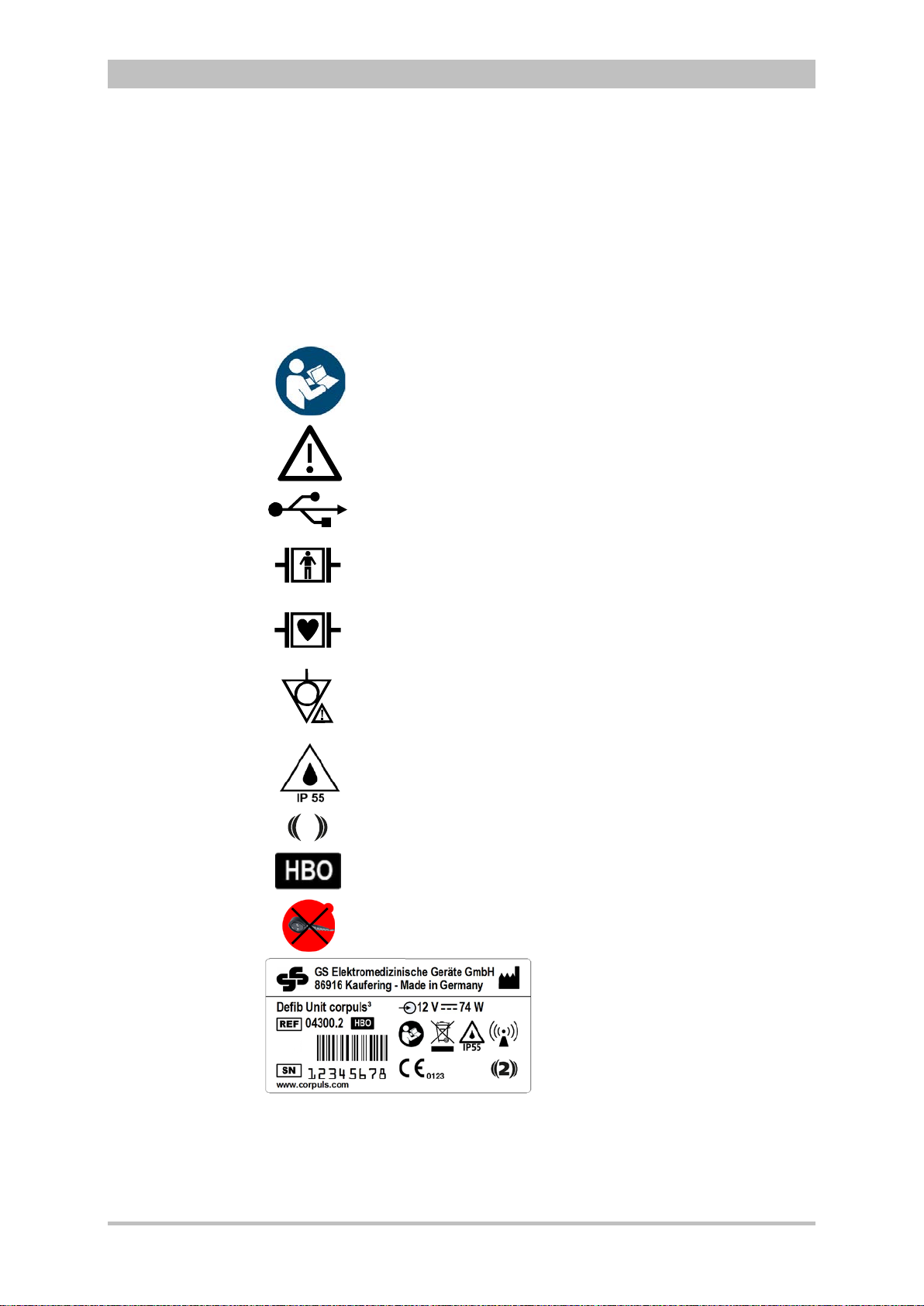
Please read and follow the instructions in the user manual
Please read the additiona
USB interface (Devices up to 09/2010)
BF (body floating, defibrillation
An isolated application
external and internal use on the patient
CF (cardiac floating, defibrillation
An isolated application component of this type is approved for use
on
Symbol for second generation of radio module.
Approved for operation in a multiplace hyperbaric chamber for
hyperbaric oxygen therapy (HBO) (option).
MagCode connector is
chamber for hyperbaric oxygen therapy (HBO).
1.2.2 Maintenance
Maintenance work may only be performed by persons who are appropriately
trained and authorised by the manufacturer. Failure to observe this will result in
invalidation of claims under the warranty.
1.3 Information and Warning Labels on the Device
User Manual corpuls
l instructions in the user manual
3
the patient or patient’s heart
-proof):
component of this type is approved for
-proof):
NOT approved for operation in a hyperbaric
Fig. 1-1 Sample rating plate
2 ENG — Version 2.1 – P/N 04130.2

User Manual corpuls
Warning
Caution
3
Safety
1.4 Warning Notices and Symbols
A number of actions during the operation of the corpuls
patients, users and third parties.
Such actions are indicated by warni ng not ices in this user manual.
The following symbols are used:
«Warning» denotes a dangerous situation.
If the warning is not heeded, extremely severe injuries or substantial material
damage may occur.
«Caution» denotes a possibly dangerous situation.
If not heeded, minor injuries or slight material damage may occur.
These paragraphs contain information which must be read and understood.
3
carry risks for
1.5 Special Types of Risk
The defibrillator emits powerful electrical energy. Severe injuries or death may
result if the defibrillator is not used in accordance with this user manual.
• Familiarise yourself with the device and this user manual.
The defibrillator must not be opened. Internal components may carry high
voltages.
• If a fault is suspected, have the device checked by the authorised sales
and service partner and, if necessary, repaired.
The defibrillator may cause electromagnetic interference, particularly during
charging and on triggering the defibrillation shock.
The functioning of devices operated in the vicinity may be compromised.
• Check the effects of the defibrillator on other devices, preferably before
an emergency occurs.
Electromagnetic fields of other devices may invalidate the ECG readings.
ECG analysis may be impaired. It may be impossible to trigger a defibrillation
shock or pacer pulse.
• Please read and follow the instructions for operation of the device in
chapter 2 Intended Use, p. 4 in addition to the safety warnings during use
It is essential to read and follow the safety information in the appendix F (from
page 272).
.
ENG — Version 2.1 – P/N 04130.2 3

2 Intended Use
The corpuls3 is intended
• for measurement and monitoring of vital functions in addition to
• defibrillation, cardioversion or cardiac pacing
of patients in the preclinical and clinical field by qualified medical staff trained in
the use of the device.
The following monitoring functions are available:
• ECG
• diagnostic ECG
Optional:
• oximetry (SpO
2,
• capnometry (CO
• temperature (T)
• non-invasive blood pressure monitoring (NIBP)
• invasive blood pressure monitoring (IBP)
The corpuls
3
is approved for monitoring in operating diagnostic X-ray units
(e. g. computed tomography). Exempt from this is the oximetry option, because
measured values might be falsified. When equipped with the HBO (hyperbaric
oxygen therapy) option, the corpuls
hyperbaric chamber up to 3 barg and an oxygen concentration of < 23%.
Intended use of corpuls
• approved by the manufacturer (see chapter 9.8 Approved Accessories,
Spare Parts and Consumables, p. 224) and
• appropriate for the function and patient.
Use of accessories on corpuls
is not considered to be intended use.
®,
SpCO
)
2
SpHb, SpMet®)
3
is approved for operation in a multiplace
3
includes employment of accessories which are
3
which are not approved by the manufacturer
4
Warning
Defibrillation protection for patients, user and third parties cannot be
guaranteed, if accessories other than those authorised by the manufacturer
are used.
The therapeutic functions of defibrillation, cardioversion and pacer must only be
performed with constant monitoring of the patient.
Performing the therapeutic functions without eye contact with the patient is not
considered to be intended use.
ENG — Version 2.1 – P/N 04130.2

User Manual corpuls
Usage other than
as intended
3
Intended Use
If monitoring functions are performed, the patient’s condition must also be
regularly monitored even when the alarm function is enabled.
The corpuls
3
is not intended for
• operation in the vicinity of readily inflammable substances,
• setup and operation under the influence of strong electromagnetic fields,
which occur in the direct vicinity of radio masts, switched-on nuclear
magnetic resonance tomography units, high voltage installations and
overhead power lines,
• operation in the vicinity of therapeutic radiation units (e.g. tumor
treatment),
• operation in connection with a high frequency surgical device,
• operation in a monoplace hyperbaric chamber (option HBO),
• operation in a multiplace hyperbaric chamber with more than 3 barg
and/or more than 23 % oxygen concentration (option HBO).
The pacer function must not be used near high frequency surgical devices or
microwave therapy devices .
Individual modules must not be used without batteries inserted.
Defibrillation and cardioversion must not be performed without protec t ive
measures (see chapter 5.3.1 Information on the AED Mode , p. 68 and 5.4.1
Information on Manual Defibrillation and Cardioversion, p. 74):
• on a metal surface;
• on a wet surface.
The defibrillator must only be used for defibrillation and cardioversion and must
not be used as a stimulation current device or as a pacer.
The pacer may only be used as a transcutaneous pacer.
The pacer must not be used as an intracardial defibrillator.
3
The corpuls
may not be used simultaneously on two or more patients.
The manufacturer cannot accept any liability for damage occurring as a result of
failure to use corpuls
3
as intended.
ENG — Version 2.1 – P/N 04130.2 5

Introduction
Monitoring,
diagnostic and
therapeutic
functions
3 Introduction
3.1 Components
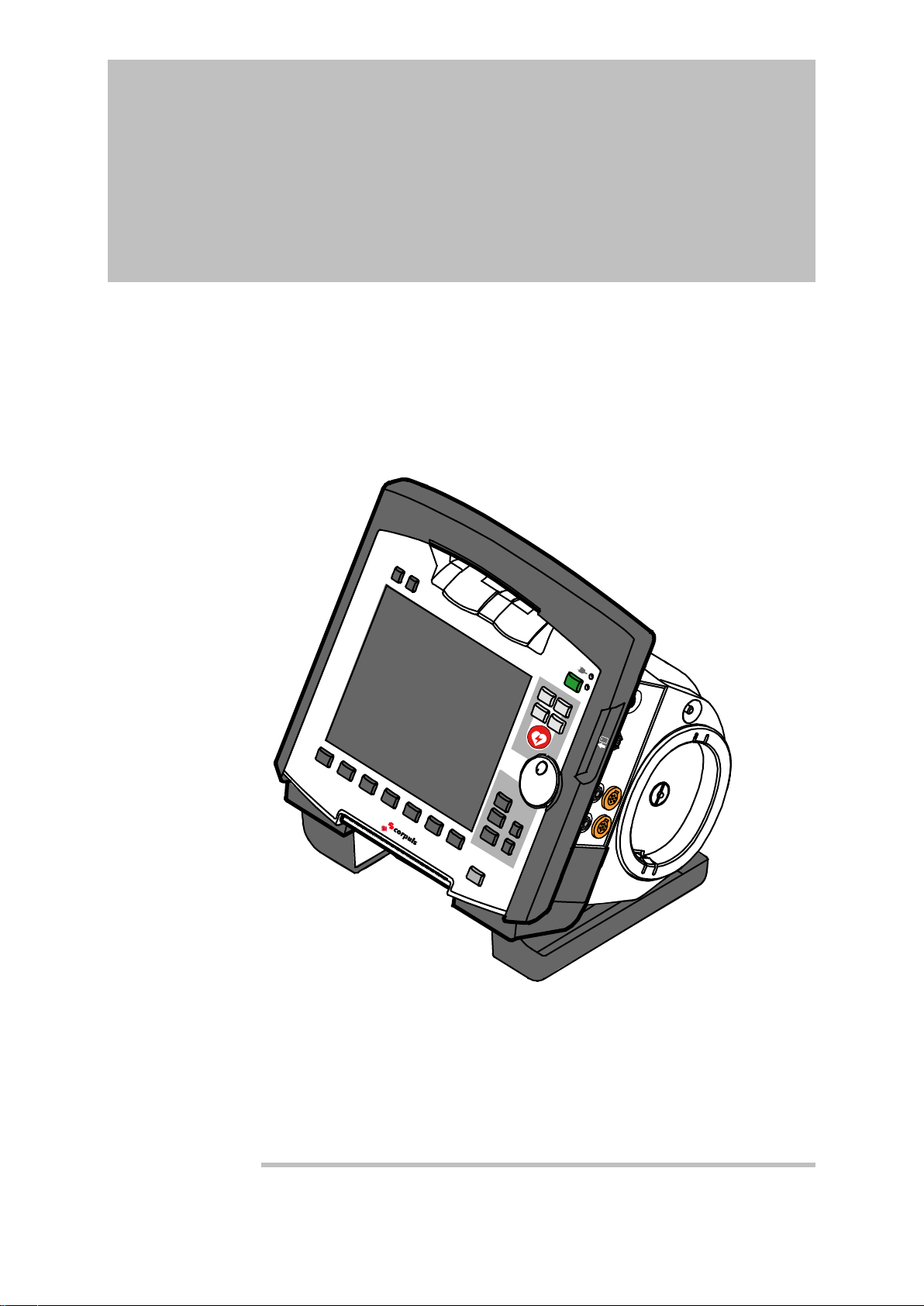
corpuls
The corpuls
functions for treatment of emergency and intensive-care patients. Especially as
part of the resuscitation of emergency patients, defibrillations, cardioversions or
pacer therapies can also be performed, in addition to monitoring of vital
parameters.
A maximum of six ECG curves can be displayed on the monitor at the same
time. A 12 lead ECG function allows the user a comprehensive ECG diagnosis,
which can be optionally supplemented by ECG analysis software.
Further monitoring functions include oxygen saturation measurement (pulse
oximetry), carbon dioxide measurement (capnometry) and temperature
measurement, in addition to non-invasive and invasive blood pressure
monitoring. The recorded measuring values can be displayed both numerically
and as a curve. Configurable alarms draw the user’s attention to current
changes in the patient’s condition. All measured values or logs can be printed
out on paper.
corpuls
events, alarms and logs. These can be transferred to external systems for
further processing and arch iving .
3
is a portable device with a modular structure which can be used
• as a defibrillator/monitor or
• as a full patient monitor in its own right.
3
provides comprehensive monitoring, diagnostic and therapeutic
3
has extensive documentation functions for internal recording of
User Manual corpuls
3
6 ENG — Version 2.1 – P/N 04130.2
User Manual corpuls
3
Introduction
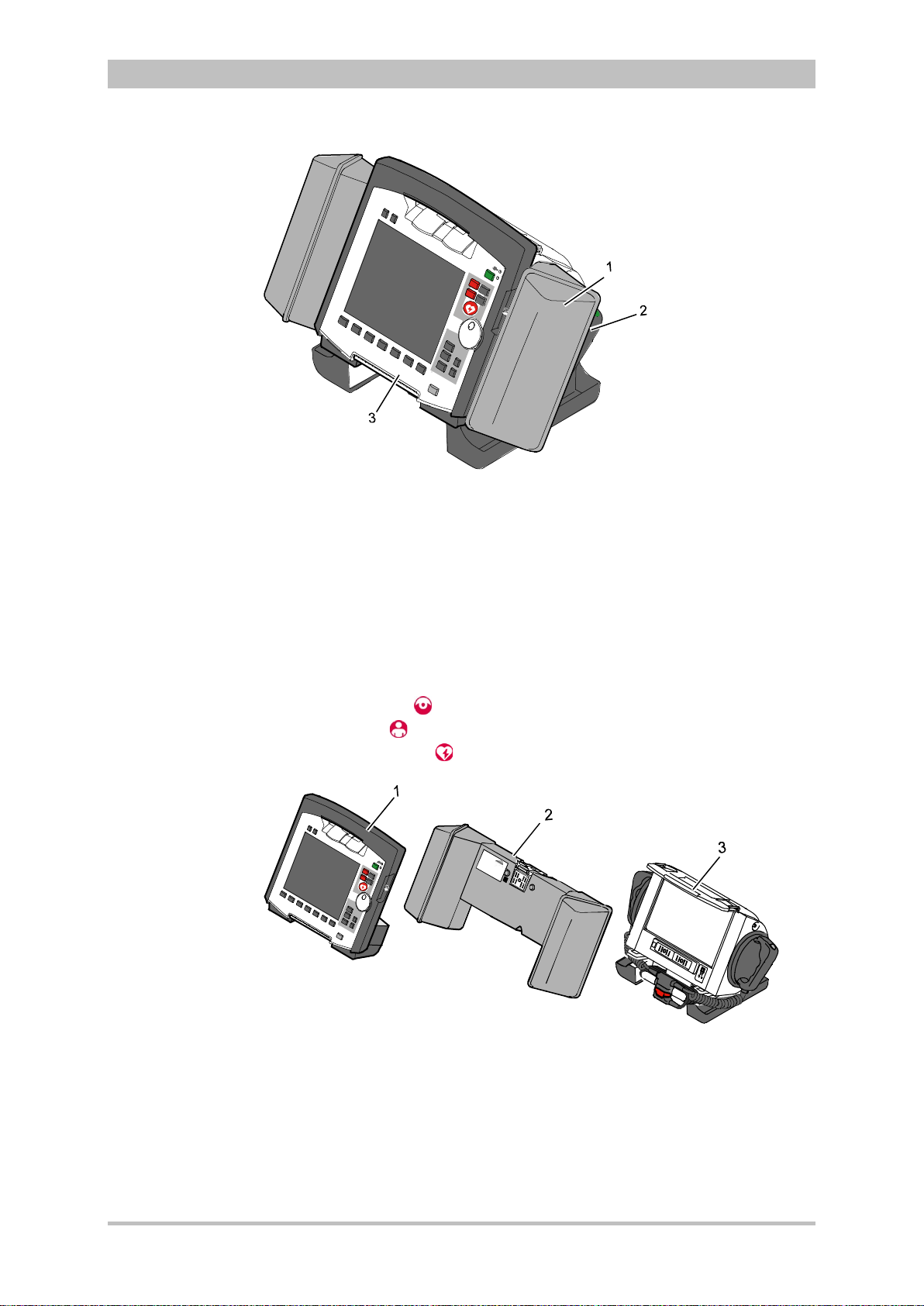
Fig. 3-1 Compact device
1 Accessory bag
2 Shock paddles (2 x)
3 Printer
The corpuls
3
can be tilted vertically up to 30°.
Depending on the mission conditions, the monitor can be adjusted to the
appropriate visual angle.
The system can be divided into the following three modules :
• Monitoring unit
• Patient box
• Defibrillator/Pacer
ENG — Version 2.1 – P/N 04130.2 7
Fig. 3-2 Individual modules
1 Monitoring unit
2 Patient box
3 Defibrillator/Pacer
Introduction
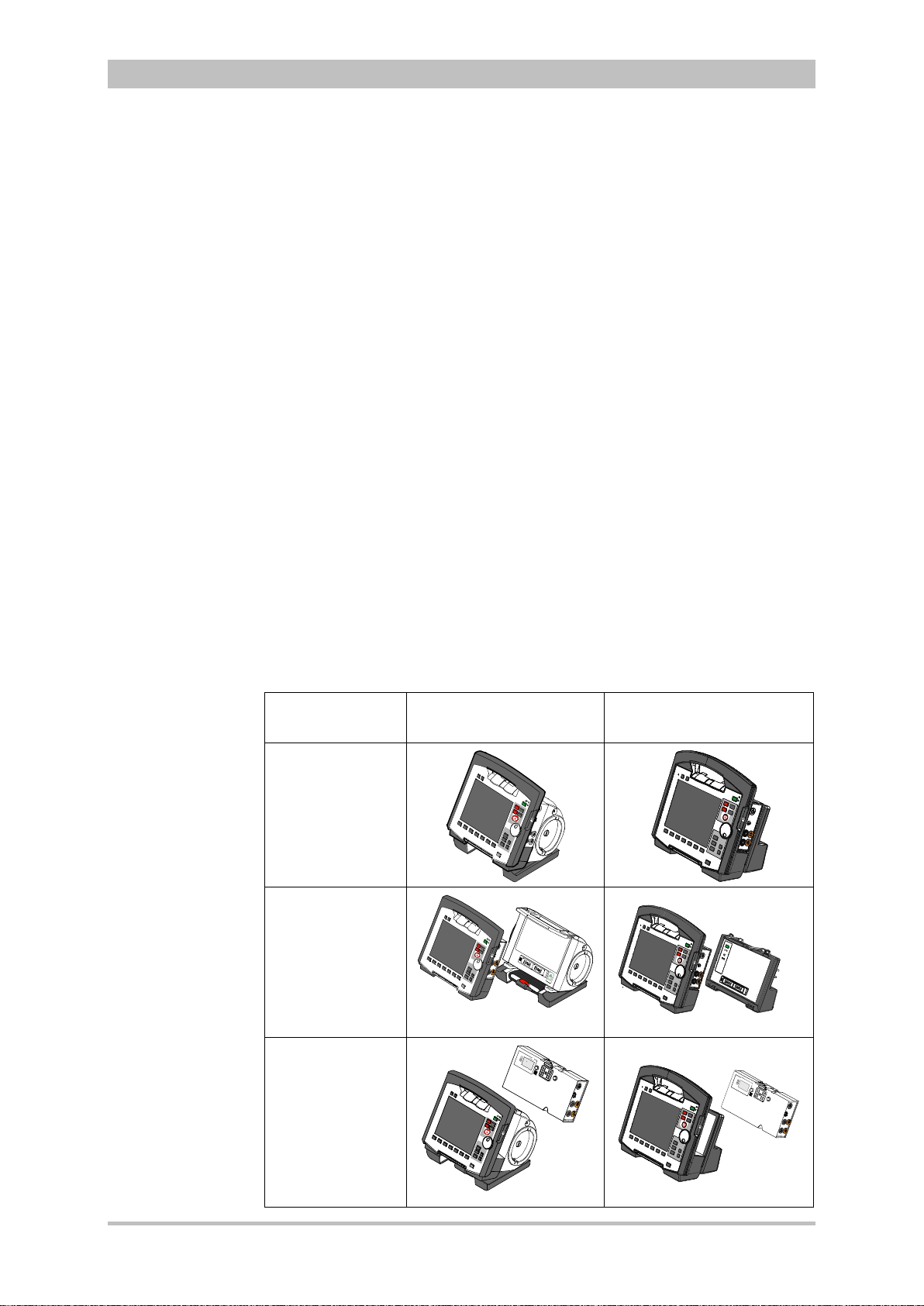
3.2 Device Design
The three modules monitoring unit, patient box and defibrillator/pacer can
operate via an infrared connection or, if separated, via radio connection.
The connection status is shown on the display of the monitoring unit (see Table
4-2, page 36) and the patient box (see Table 4-3, page 39).
Communication between the modules in semi-modular and modular use is
performed by radio up to a distance of 10 m in open terrain.
In the connected mechanically state, the modules communicate via an optical
infrared connection.
If the radio connection is interrupted, the modules have to be connected to each
other mechanically. The corpuls
connection to infrared connection in this case.
The antenna of the radio unit in the patient box is located at the top. In case the
antenna is shadowed, for example by metallic or metallised objects, the
maximal reach of the radio connection may be reduced. This may happen, for
example, when the patient box is placed between the patient’s legs on the
stretcher. If possible, choose a position for the patient box that allows
unimpeded view to the other modules.
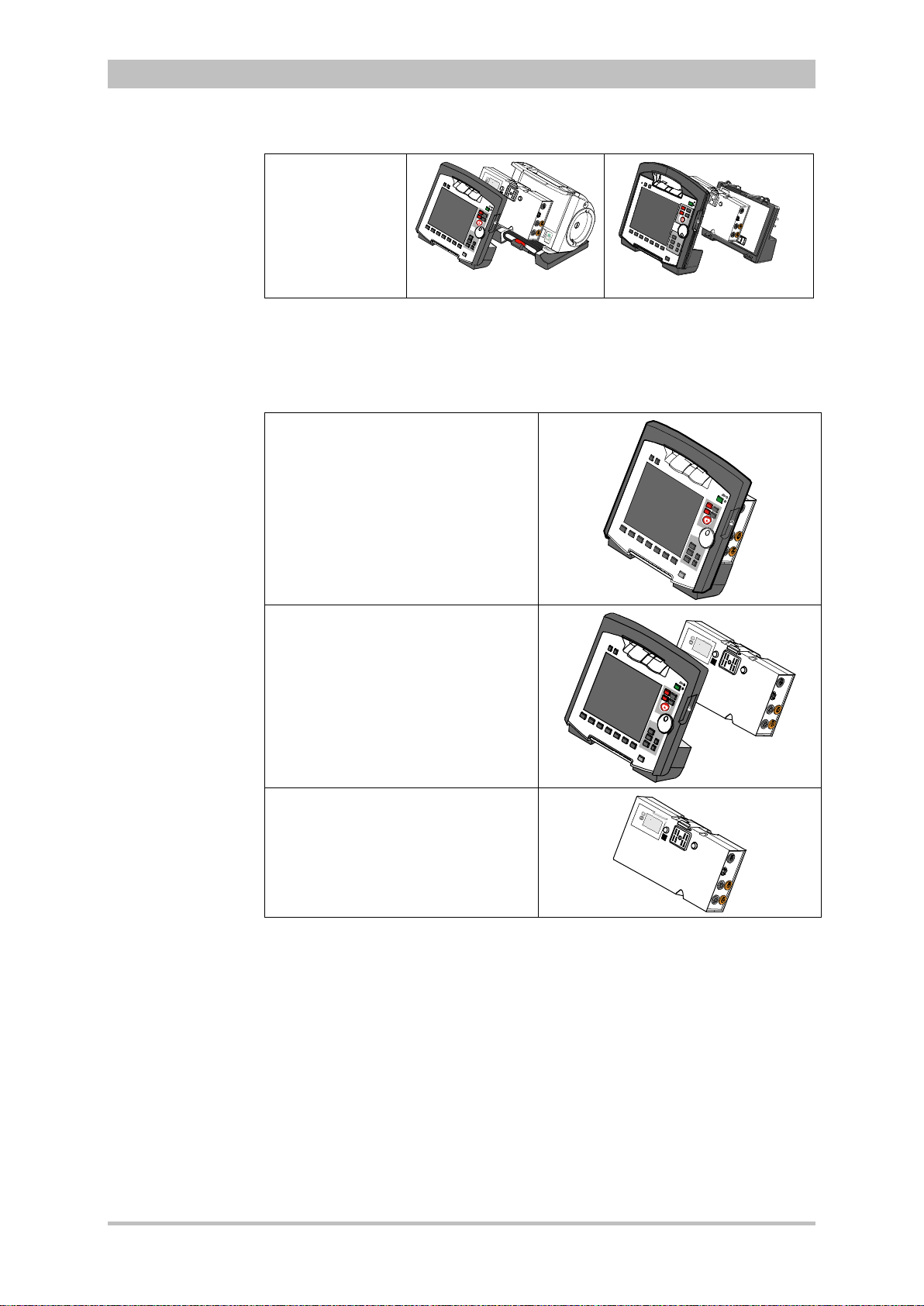
The following combinations are possible:
User Manual corpuls
3
switches automatically from radio
3
Device Design Defibrillator-/pacer unit Defibrillator-/pacer unit
SLIM
1. Compact
device:
All three modules
are connected
mechanically
2. Semi-modular
use:
Monitoring unit
and patient box
are connected,
defibrillator/ pacer
is disconnected.
3. Semi-modular
use:
Monitoring unit
and
defibrillator/pacer
are connected,
patient box is
disconnected.
8 ENG — Version 2.1 – P/N 04130.2
User Manual corpuls
3
Introduction
4. Modular use:
Monitoring unit,
patient box and
defibrillator/pacer
are disconnected
mechanically
Fig. 3-3 Usage options of the modular corpuls3
The following combinations are possible when used as a stand-alone patient
monitoring system:
1. Compact monitor:
Monitoring unit and patient box are
connected mechanically
2. Modular monitoring mode:
Monitoring unit and patient box are
disconnected mechanically
3. Patient box:
Patient box in stand-alone use for
temporary initial monitoring
Fig. 3-4 Usage options of the modular corpuls3
as a patient monitoring system
ENG — Version 2.1 – P/N 04130.2 9

Introduction
Labelling of the
radio modules
3.2.1 Pairing (Connection Authorisation)
The modules of the corpuls
means of two procedures:
• Pairing and
• Ad-hoc connection
The corpuls
3
thus provides the option of substituting individual modules of one
compact device for in di vidu al modules of the same t ype f rom another corpuls
It is not possible to connect a monitoring unit to more than one patient box or
one defibrillator/pacer at the same time.
Pairing is a connection authorisation that enables the communication between
wirelessly connected modules.
An ad-hoc connection allows the use of mechanically connected modules
without having to perform a pairing beforehand.
For both procedures the following prerequisites apply:
1. For a pairing, monitoring unit, patient box and defibrillator/pacer have to be
equipped with radio modules of the same type (hardware version).
2. If this is not the case, if the hardware version of the radio modules is
different (1
st
and 2nd generation), those modules can only form an ad-hoc
connection.
3. For both a pairing and for an ad-hoc connection all modules have to be
equipped with an identical sof tware versio n.
As of July 2011 the corpuls3 comes equipped with a second generation radio
module. This new radio module is not compatible with those of the first
generation.
The corpuls
3
modules with the 2nd generation radio module are labelled with a
number symbol. This symbol is attached at the following places:
• Monitoring unit: at the front side, top left,
• Patient box: on top,
• Defibrillator/pacer: at the rear side, on top.
The number symbol also marks the position of the radio module in the modules.
3
can be connected to form a functional unit by
User Manual corpuls
3
3
.
10 ENG — Version 2.1 – P/N 04130.2

User Manual corpuls
Starting an ad-
hoc connection
3
Introduction
To star a pairing, proceed as follows:
1. Connect the monitoring unit, the patient box and, if present, the
defibrillator/pacer mechanically.
2. There are the following options:
a) The message Perform pairing? appears:
Confirm the message by pressing the softkey [Start].
b) The message Perform pairing? does not appear:
Select in the main menu «System“► «Start Pairing».
3. The message Pairing successful appears on the screen oft he
monitoring unit. The three modules now are paired. The corpuls
3
is ready
for operation via wireless connection.
To start an ad-hoc connection, proceed as follows:
1. Connect the modules mechanically.
2. Do not confirm the message Perform pairing?
The message Ad-hoc connection [Module], e.g. Ad-hoc
connection P-box or Ad-hoc connection Defib appears on the
screen of the monitoring unit. The corpuls
3
is ready for operation.
The connection status is shown by symbols in the status line in the upper right
corner of the monitoring unit (see Table 4-2 Module connection status, page 36
and Appendix A Symbols, page 272) .
If a new pairing is performed between a monitoring unit and a patient box or
with another compact device, the previously saved wireless connection
authorisation to the patient box or to the defibrillator/pacer is automatically
deleted.
ENG — Version 2.1 – P/N 04130.2 11
Caution
Caution
Warning
When connecting different patient boxes by ad-hoc connection, there can be
inconsistent entries in the data management.
During an ad-hoc connection a wireless connection to other modules is not
possible.
If two modules connected by an ad-hoc connection are separated, a radio
connection to the original patient box and defibrillator/pacer is automatically
re-established.
Introduction
3.2.2 Monitoring Unit
User Manual corpuls
3
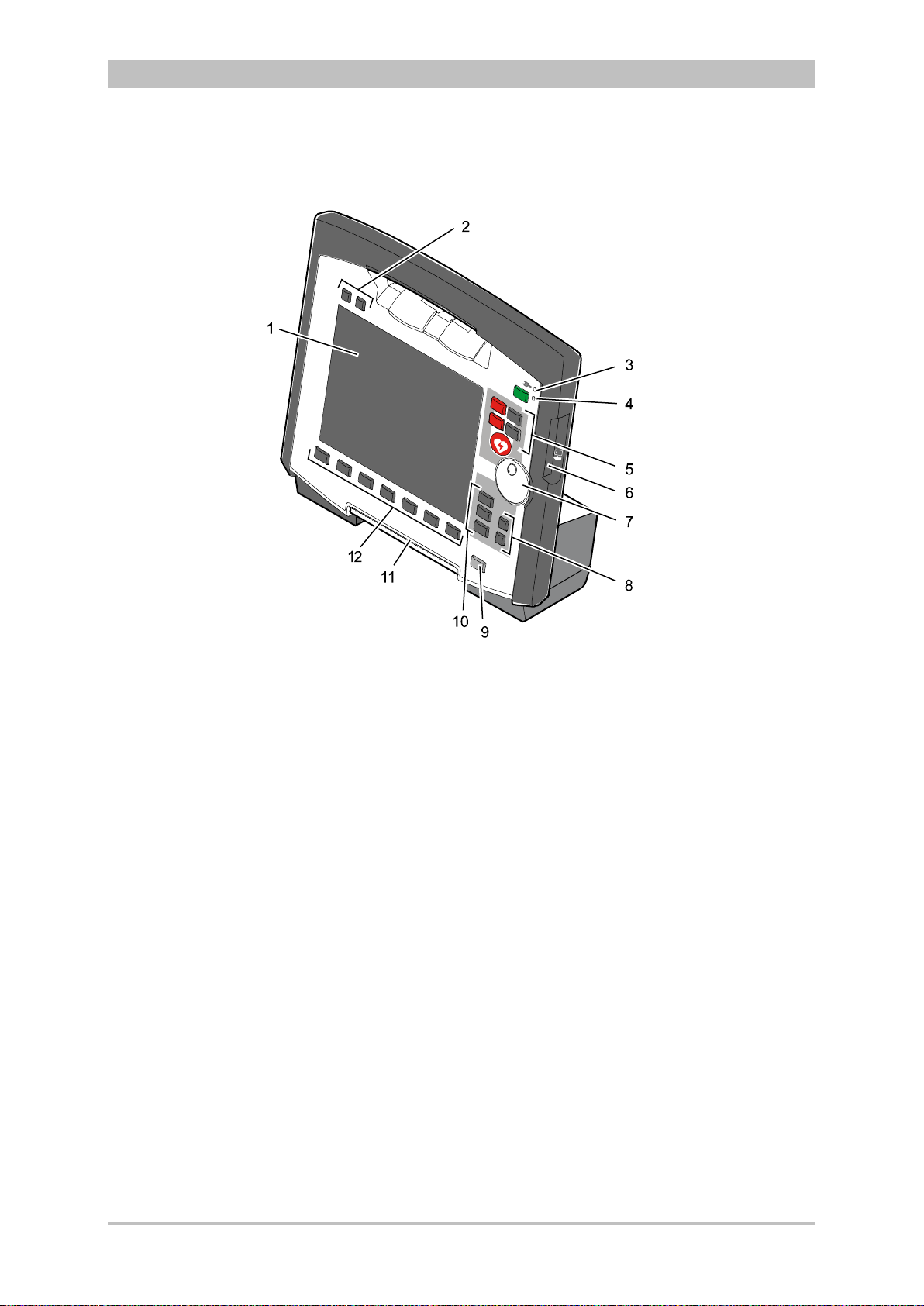
Fig. 3-5 Monitoring Unit
1 Display
2 Alarm and event function keys
3 Status LED power supply/charging status
4 On/Off key with operating status LED
5 Defibrillation mode function key s
6 Insurance card reader
7 Jog dial and alarm light
8 Function keys for navigation
9 Print key
10 Operating mode keys
11 Printer
12 Softkeys
The monitoring unit is the central user interface of corpuls
3
. The monitoring
unit comprises the display (item 1), the printer (item 11) and the insurance card
reader (item 6, option) , as wel l th e jog dial (item 7) , the f unc tion keys (items 2, 5,
8 and 9), the operating mode keys (item 10) and the softkeys (item 12).
The jog dial is used to navigate in the main menu, the parameter and curve
context menus and in the display areas on the display.
An alarm light is integrated into the jog dial.
The monitor, pacer and operation browser functions can be selected directly by
pressing the function keys.
Softkey assignment varies according to the selected function. Softkey
assignments are described in the chapters dealing with the respective functions.
12 ENG — Version 2.1 – P/N 04130.2
User Manual corpuls
3
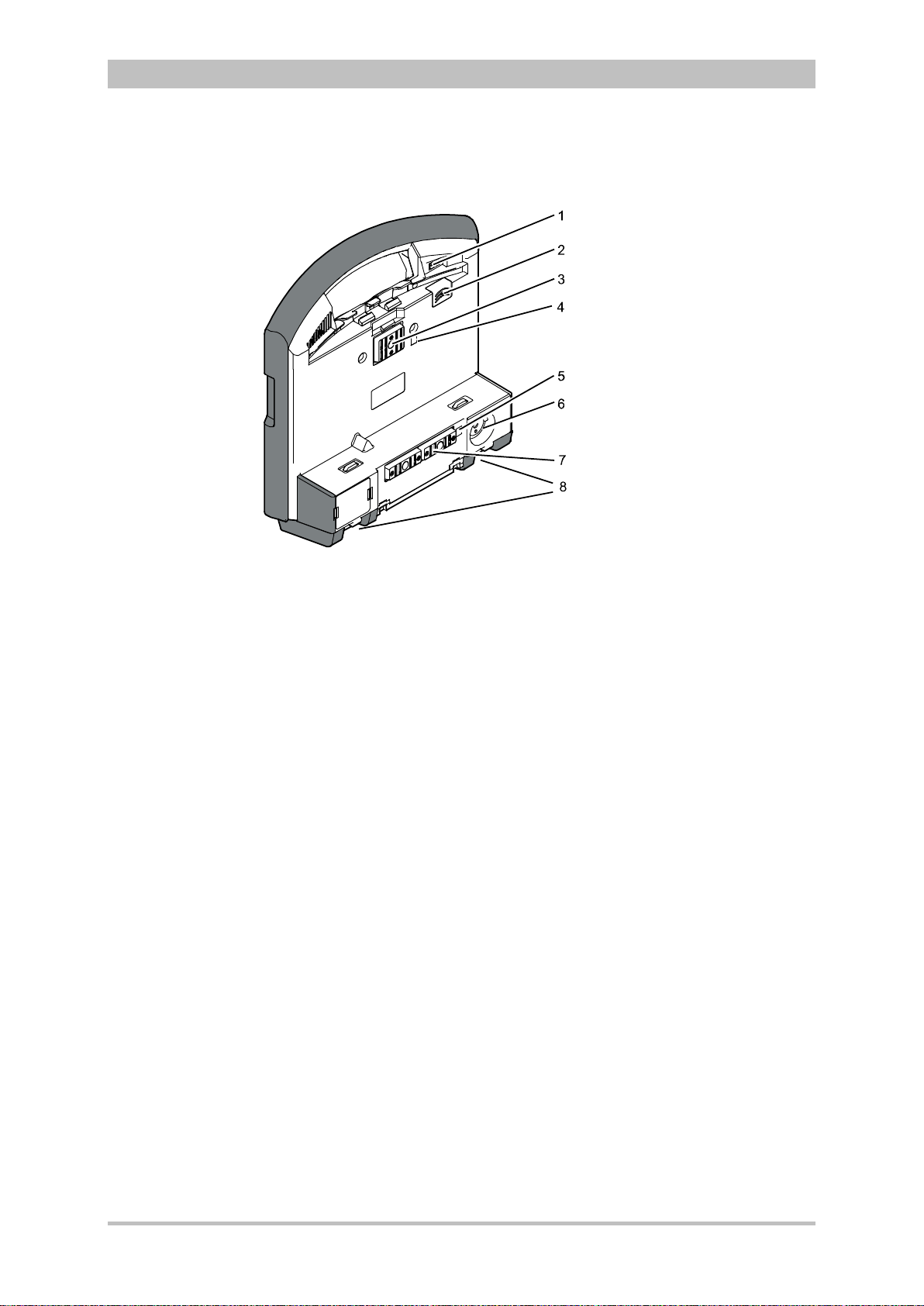
Fig. 3-6 shows the interfaces on the monitoring unit
Introduction
Fig. 3-6 Monitoring unit, rear view
1 Cover for LAN interface (option)
2 SIM card slot (slot for SIM card tray)
3 Contact element with patient box
4 Infrared interface with patient box
5 Infrared interface with defibrillator/pacer
6 Charging cable magnetic plug socket
7 Contact element with defibrillator/pacer
8 Fold-out feet
ENG — Version 2.1 – P/N 04130.2 13
Introduction
3.2.3 Patient Box and Accessory Bag
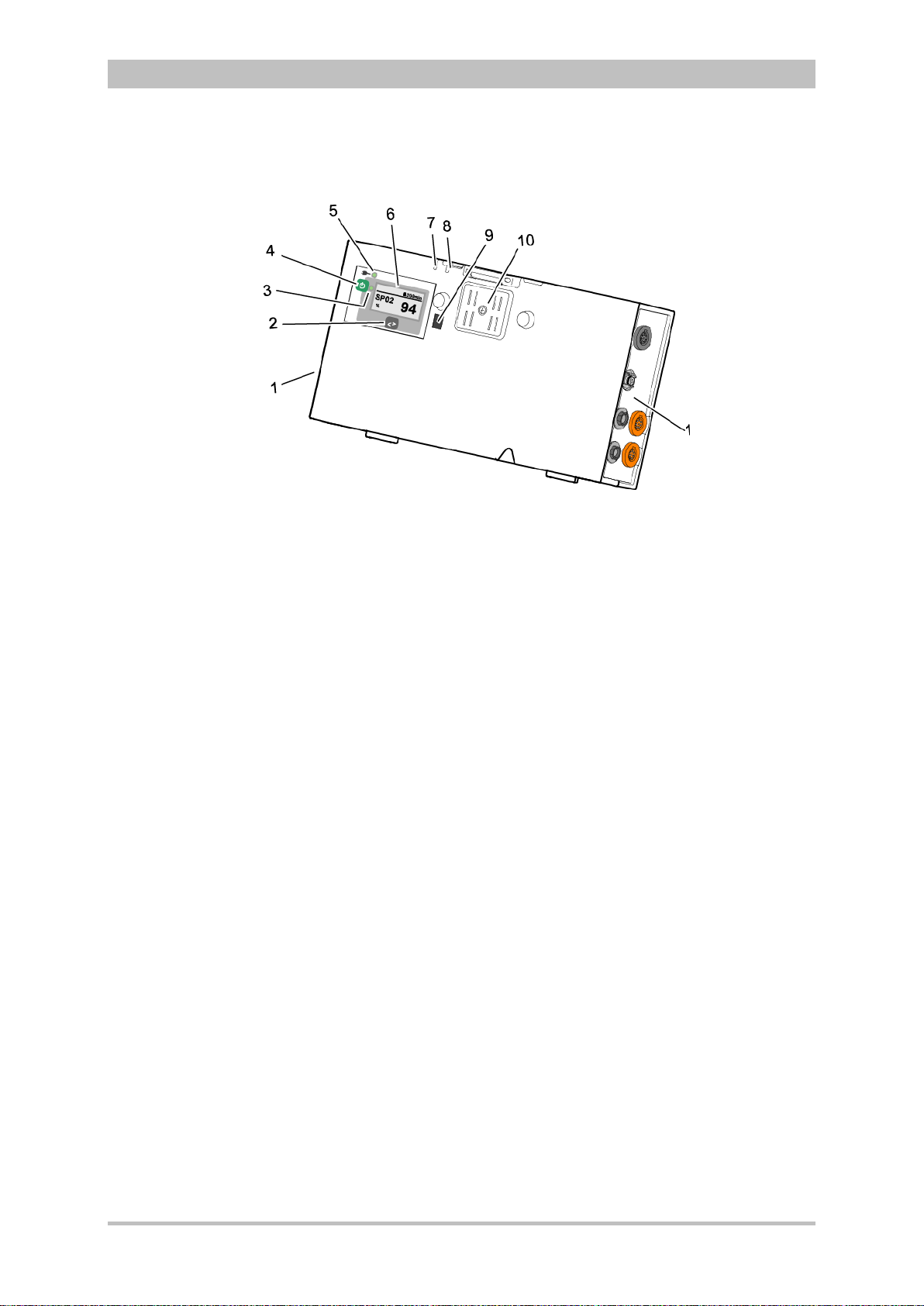
Fig. 3-7 Patient Box (illustration may differ)
1 Sensor interfaces
2 Multifunction key
3 Multifunction LED operating status/HR/alarm
4 On/Off key
5 Status LED power supply/charging status
6 Display
7 Microphone
8 Acoustic alarm (pulse signal indicator)
9 Infrared interface with monitoring unit
10 Contact element
The patient box monitors and records the monitoring sensor signals. The
sensors of the various monitoring functions are connected to it.
The patient box can be used as a stand-alone unit (without the monitoring unit)
for patient monitoring. The display (item 6) on the patient box shows the
following:
• The monitoring function values
• Physiological and technical alarms.
• Heart rate is visually represented by an LED (item 3).
User Manual corpuls
3
14 ENG — Version 2.1 – P/N 04130.2
User Manual corpuls
3
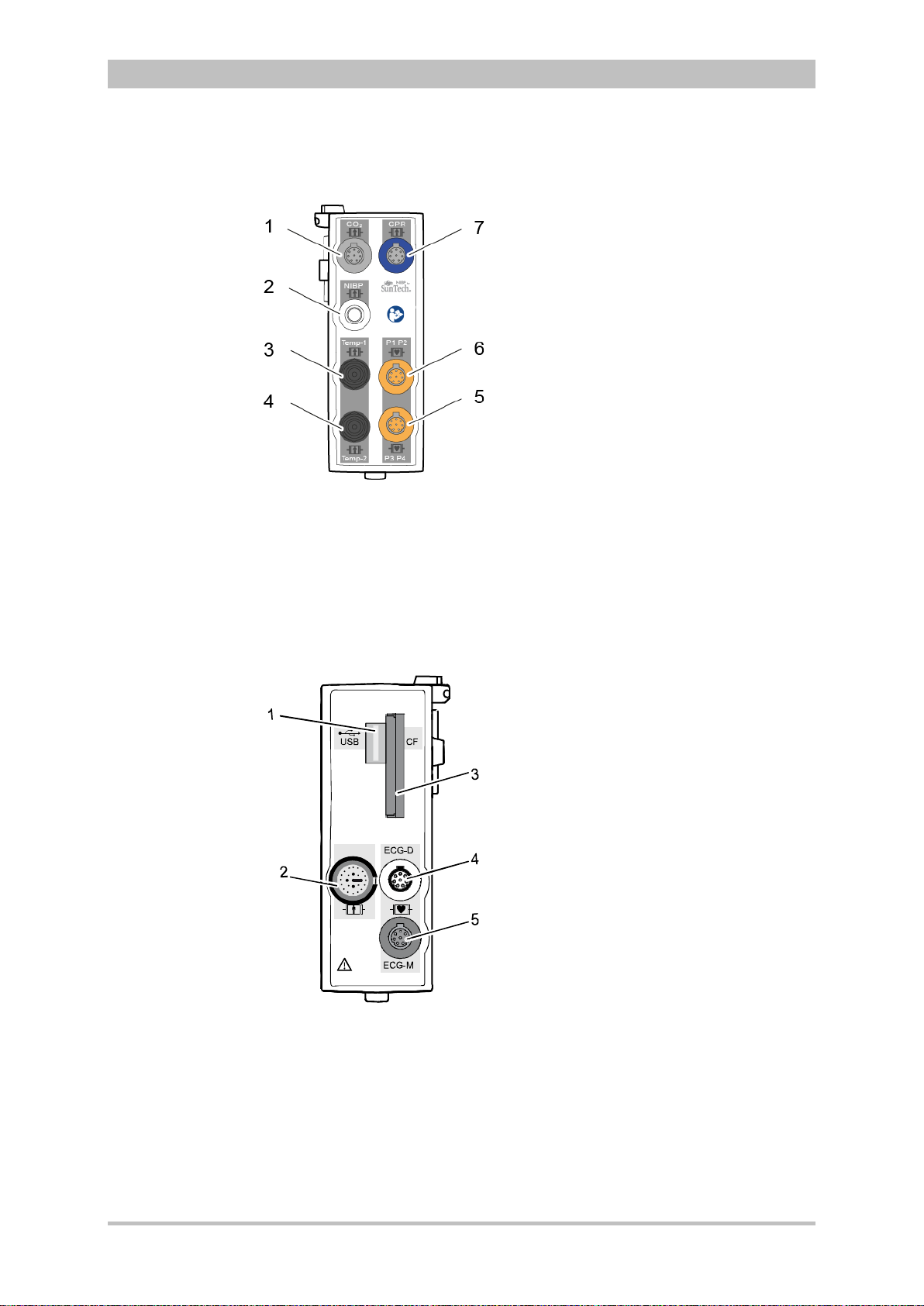
Patient Box Interfaces
Fig. 3-8 Patient Box Interfaces, right hand side, ports for:
1 CO2: sensor for capnometry
2 NIBP: sensor for non-invasive blood pressure monitoring
3 Temp-1: temperature sensor
4 Temp-2: temperature sensor
5 P1 P2: sensor for invasive blood pressure monitoring (channels 1 and 2)
6 P3 P4: sensor for invasive blood pressure monitoring (channels 3 and 4)
7 CPR: CPR feedback sensor
Introduction
ENG — Version 2.1 – P/N 04130.2 15
Fig. 3-9 Patient Box Interfaces, left hand side, ports for:
1 USB interface (devices up to 09/2010)
2 Rainbow®: interface for oximetry sensor
3 CF: slot for CompactFlash® card for data back-up
4 ECG-D: complementary ECG diagnostic cable
5 ECG-M: ECG monitoring cable
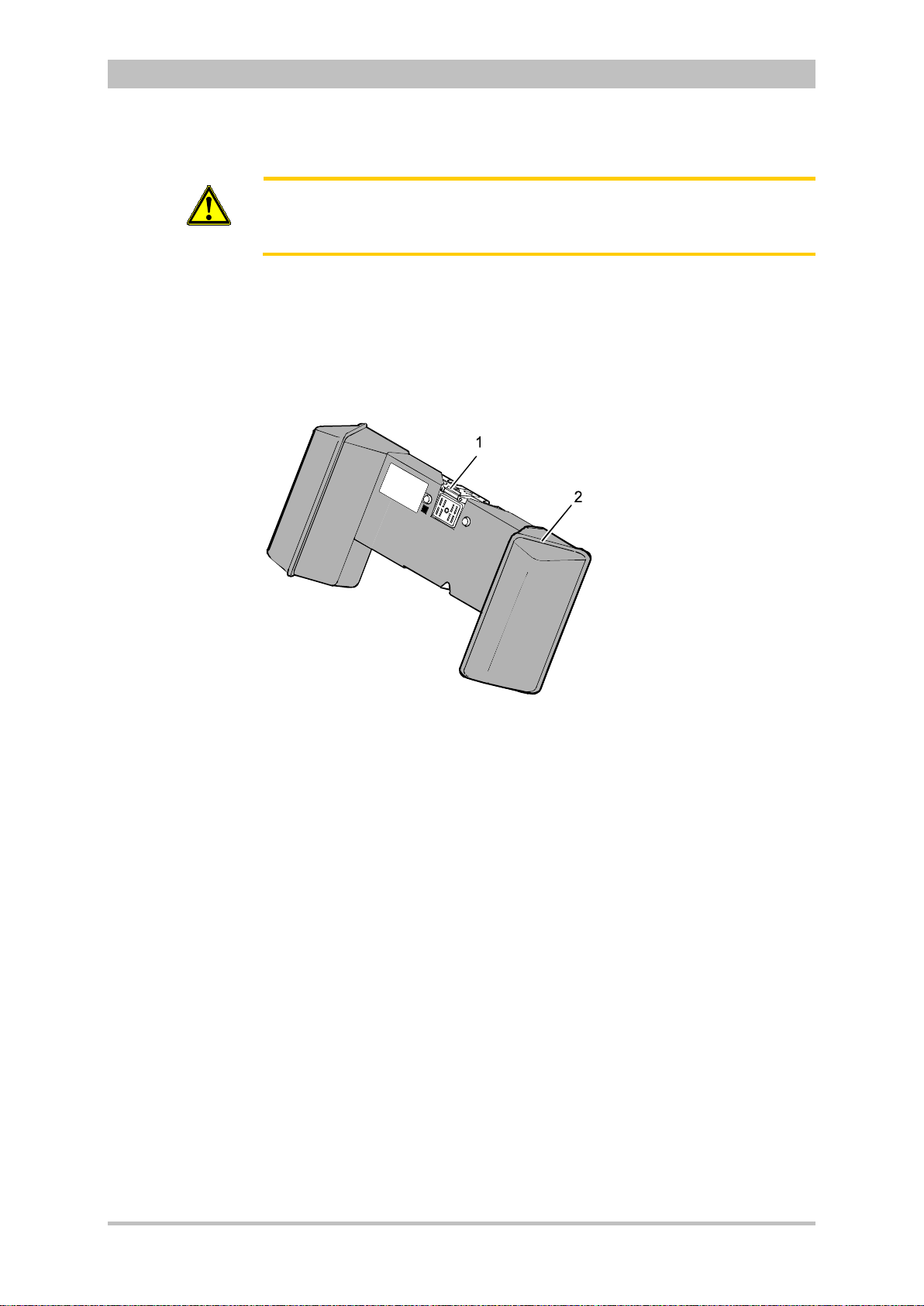
Introduction
Caution
At the moment, connecting USB devices or –cables to the USB slot is not
allowed.
Accessory Bag
An accessory bag is available for the patient box (P/N 04221.1).
The accessory bag is used to store the preconnected cables as well as the
sensors and ECG electrodes, so that they are quickly accessible during use.
User Manual corpuls
3
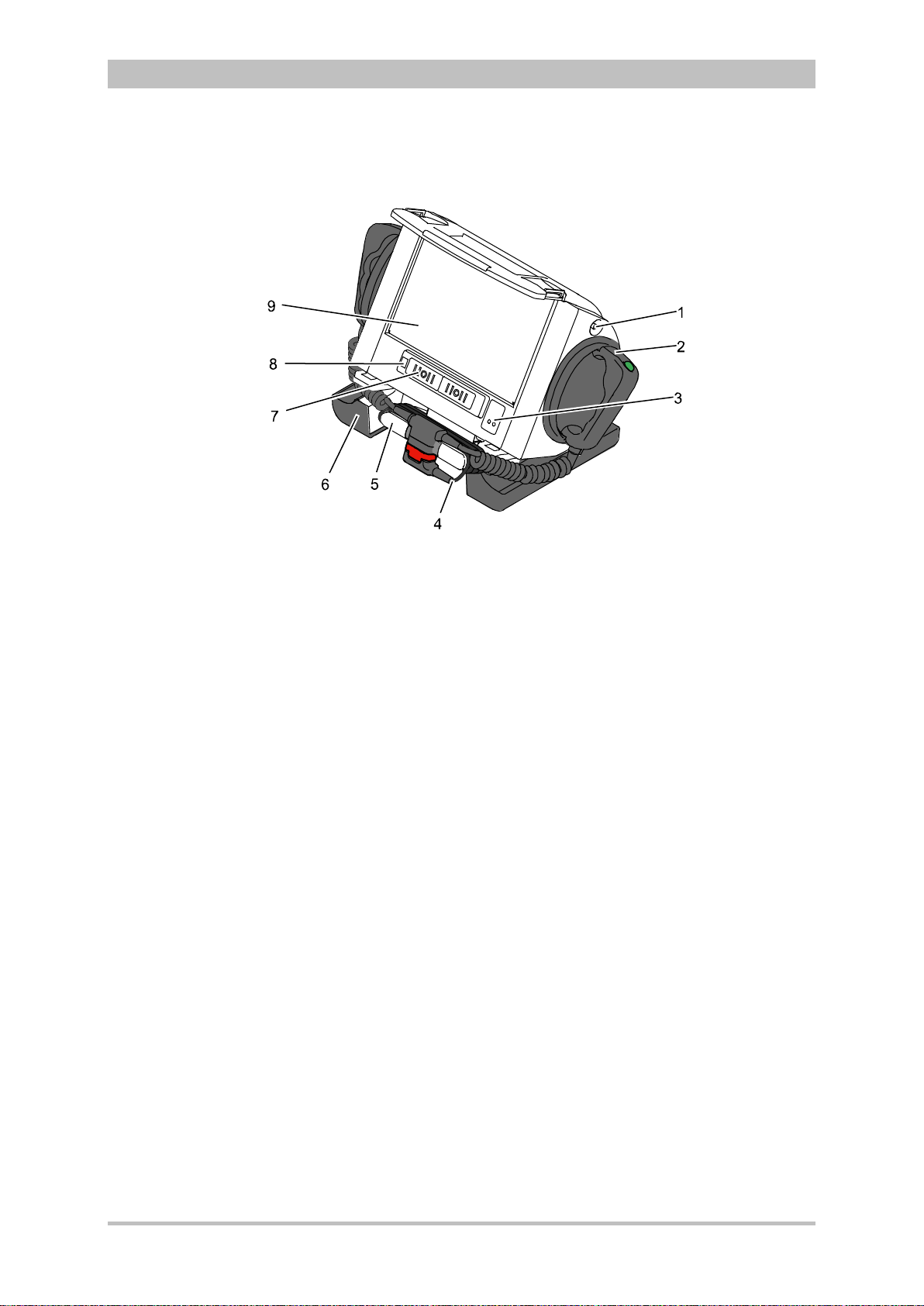
Fig. 3-10 Patient Box with Accessory Bag
1 Patient box
2 Accessory bag
Chapter 4.5 Accessory Bag, p. 56 contains information on installing and packing
the accessory bag.
16 ENG — Version 2.1 – P/N 04130.2
User Manual corpuls
3
3.2.4 Defibrillator/Pacer
Introduction
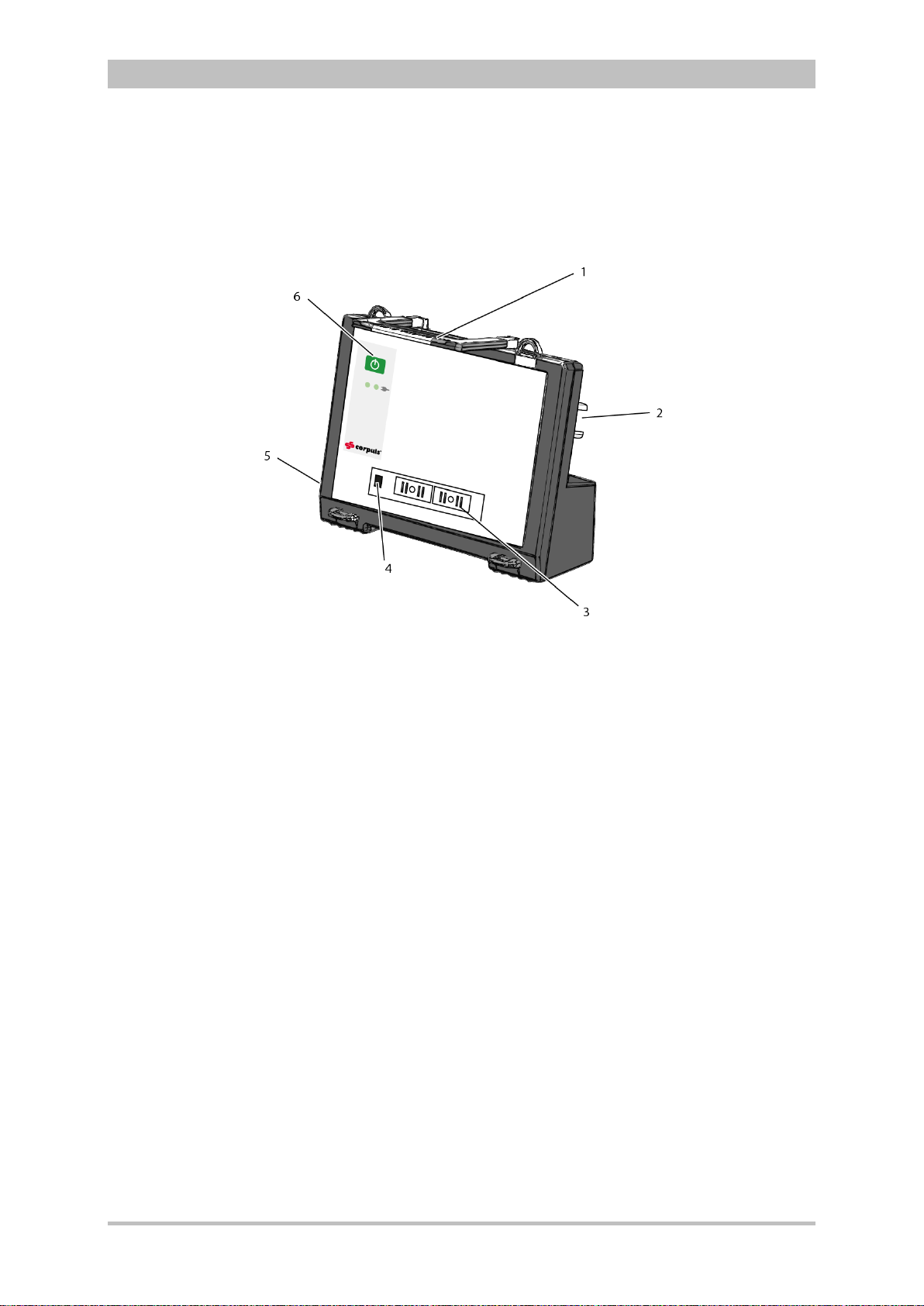
Fig. 3-11 Defibrillator/Pacer
1 Equipotential bonding pin with insu lat ing cap
2 Shock paddle
3 On/Off key
4 Therapy master cable with plug
5 Cable socket with test contact
6 Stand and storage compartments
7 Contact element with monitoring unit
8 Infrared interface with monitoring unit
9 Compartment for corPatch electrodes
The therapy electrodes have to be connected to the therapy master cable
(item 4). The therapy master cable can be wound around the socket (item 5).
The plug can be lodged in the socket.
Equipotential bonding can be performed during clinical use with the
equipotential bonding pin (item 1). For this, the insulating cap has to be
removed.
The shock paddle marked with the green label APEX must be positioned in the
right-hand shock paddle holder to ensure that the twistproof plug connector on
the therapy master cable is correctly aligned. For guidance, identical labels for
the APEX and STERNUM shock paddle are located on the side of the
defibrillator/pacer. The plug can be lodged in the socket.
The stand (item 6) additionally serves as a storage compartment for electrode
gel and razors, etc.
The angle of the defibrillator/pacer can be tilted vertically (30°) to achieve an
optimal view of the screen during use.
ENG — Version 2.1 – P/N 04130.2 17
Introduction
3.2.5 Defibrillator/P acer SLIM
The defibrillator/pacer SLIM differs from the previous defibrillator/pacer unit only
in terms of form and weight.
The basic functions are identical.
User Manual corpuls
3
Fig. 3-12 Defibrillator/Schrittmacher Slim
1 Carrying handle and lock
2 Therapy socket
3 Contact element with monitoring unit
4 Infrared interface with monitoring unit
5 Equipotential bonding pin with insu lat ing cov er
6 On/Off key
The therapy electrodes have to be connected to the therapy socket (item 2).
Equipotential bonding can be performed during clinical use with the
equipotential bonding pin (item 5). For this, the insulating cover has to be
removed.
18 ENG — Version 2.1 – P/N 04130.2
Loading…
Can You Chip In?
Dear Patron: Please don’t scroll past this. The Internet Archive is a nonprofit fighting for universal access to quality information. We build and maintain all our own systems, but we don’t charge for access, sell user information, or run ads. We’d be deeply grateful if you’d join the one in a thousand users that support us financially.
We understand that not everyone can donate right now, but if you can afford to contribute this Thursday, we promise it will be put to good use. Our resources are crucial for knowledge lovers everywhere—so if you find all these bits and bytes useful, please pitch in.
Can You Chip In? Dear Patron: Please don’t scroll past this. The Internet Archive is working to keep the record straight by recording government websites, news publications, historical documents, and more. If you find our work useful, please pitch in.
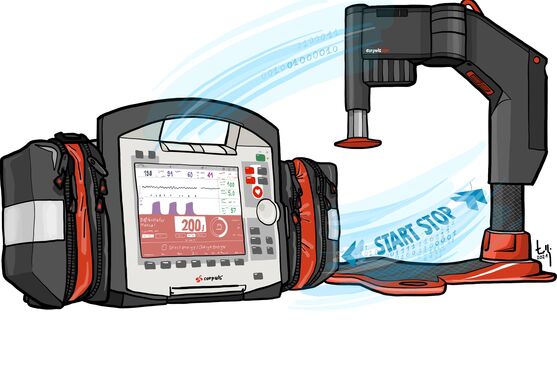
The corpuls3 leaves the traditional path of a classic defibrillator/patient monitor and convinces with its modular design.
MDR Certification
corpuls3 and corpuls3T meet the significantly more stringent EU Medical Device Regulation requirements and are MDR certified. As the telemedicine software corpuls.mission LIVE has also overcome this hurdle, corpuls provides a future-proof, MDR certified telemedicine solution.
Concept
Three modules, flexible application
The corpuls3 has a unique and revolutionary device concept. The modular design distinguishes the patient monitor with integrated defibrillator/pacemaker from other compact devices and can be divided into:
Monitor unit
Patient box
Defibrillator/pacemaker
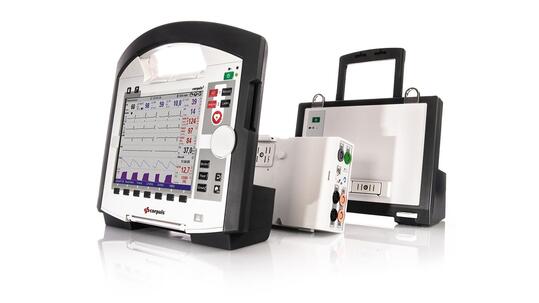
Modularity
- Continuous monitoring from the incident site all the way to the hospital
- Permanent monitoring from a safe distance (e.g. in CT)
- More ergonomic when transporting the patient through division of the modules
- More patient safety by recording and saving the parameters directly on the patient
- More flexibility at the incident site through division into function sections, display, data recording and therapy
Specifications
- Intuitive user interface for an optimum and fast diagnosis
- Brilliant 8.4″ display with customisable views
- Regular software updates
- Many accessories (bag, adapter, electrodes…)
- High degree of dust and water jet protection (IP55)
- In conformity with selected sections of the US military standard MIL-STD-810 G
- In conformity with selected sections of the internationally valid
- aerospace standard (RTCA DO 160 G)
- Application with night vision devices possible (NVG mode)
Mounts
- Special mounts for each module
- Space-saving design of the mounts
- Mounts available with and without
- power supply
- Ergonomic placement of the device in the vehicle
- Mount for the complete device with self-locking mechanism
- Adapter solution for standard vehicles
- Stretcher adapter for secure placement on stretchers with wheels
Weight
6 kg
SLIM, basic configuration
Operating temperatures
-20 °C to +55 °C
basic functions: ECG monitoring, defibrillation
Dimensions
29.6 cm (H) × 30.5 cm (W) × 19.5 cm (D)
corpuls3 SLIM
Monitor unit
Maximum mobility, easy to operate, fast diagnosis
The monitor unit displays all curves and vital parameters and is at the same time the operating interface of the corpuls3. The intuitive user interface supports and assists the user during the emergency call. The ergonomic handle and the shock protection on all sides additionally insure that the monitor with its weight of only 2.7 kg operates under even the toughest conditions.

Specifications
- Large, transflective colour display (8.4″)
- Large display of up to 6 curves and 13 vital parameters
- Resting ECG preview with 12 leads
- Views can be freely configured and named.
- 4G modem and WLAN or LAN port for data transmission/live streaming
- Wide printer (106 mm) with simultaneous real time printout of up to 6 curves
- 7 soft keys and function buttons for instant access to important menu items
- Intuitive concept of operations with jog dial for easy menu navigation
1-2-3 operation in the defibrillation modes - Shock protection on all sides
Dimensions
29.5 cm (H) × 30.5 cm (W) × 12 cm (D)
Full control
Up to 6 curves and 13 vital parameters can be displayed simultaneously on the brilliant 8.4″ display. Fully customisable, freely nameable and, in the case of the NIBD display, with quality indicator. This way, paramedics or the emergency physician always have the information at hand that they need at that very moment. No more, no less.
Full communication
The integrated connectivity functions such as WLAN and GSM are ideally suited for remote medicine and the corpuls telemetric solution corpuls.mission. Up to 6 curves can be printed in real time via the broad printer.
Patient box
Uninterrupted monitoring from the incident site all
the way to the hospital
The patient box serves to process and transmit the ECG and sensor signals. This very lightweight module together with the pre-connected sensors and cables that are stored in the spacious protective bags can remain directly on the patient. This way, the patient can be monitored continuously, also when the patient is moved.

- 12-channel rest ECG, heart frequency
- HES ECG analysis software
- Masimo Rainbow SET® technology for measuring SpO2, PP, PI, SpCO, SpMet, and SpHb
- (Automated) non-invasive blood pressure measurement (SunTech®)
- CO2 measurement with the capONE® main stream technology (also in non-intubated patients)
- 2 channels for measuring the temperature
- 4 channels for invasive pressure measurement (e.g. arterial/venous and cranial pressure)
- Inherent display shows the vital parameters, remaining time and alarms
- Acoustic signaller
- Microphone for voice recording
- Data export via CompactFlash®
- PAX® accessories bag for sensors and cables
Weight
1.0 to 1.3 kg (excl. accessories)
Dimensions
13.5 cm (H) × 26.5 cm (W) × 5.5 cm (D)
Inherent DISPLAY
Thanks to an inherent display, important vital parameters such as heart frequency or NIBD can also be monitored directly on the patient box. When necessary, these parameters can be recorded by the patient box together with the voice and acoustic alarms.
Permanent companion
With a weight of 1 to 1.3 kg depending on equipment, the patient box is so mobile that it can remain on the patient. This also includes all sensor cables. This way, they are not only out of the way; continuous monitoring is also possible, for example when transporting a patient through a narrow staircase.
Defibrillator / pacemaker
Optimum ergonomics and flexibility in use
The modular design of the corpuls3 allows complete detachment of the defibrillator/pacemaker. This saves weight and shocks can be administered from a safe distance via the monitor unit (in connection with the corPatch therapy electrodes).
- Bi-phase square pulse, impedance-compensated
- 2 to 200 Joule, configurable energy protocol
- AED and manual defibrillator
- 1-2-3 operation
- AED protocol in accordance with the current guidelines, can be updated at any time
- Transcutaneous pacemaker with FIX mode, DEMAND mode and overdrive mode
SLIM defibrillator / pacemaker
- Pre-connected corPatch therapy electrodes in separate bag
- Can also be used with hard paddles or internal shock paddles
- Compact and lightweight
Dimensions
22 cm (H) × 28 cm (W) × 12 cm (D)
Defibrillator / pacemaker with paddles
- Patented safety shock paddles
- 30° swivel radius
- Can also be used with internal shock paddles
Dimensions
29 cm (H) × 30 cm (W) × 19 cm (D)
primeCPR-Feedbacksensor
To increase the quality of resuscitation, the corpuls3 is equipped with CPR feedback. For this purpose, the primeCPR feedback sensor is placed on the lower half of the sternum. It measures the pressure frequency and depth of the chest compressions during resuscitation. Depending on the configuration, the quality of the chest compressions is shown on the display (bar graphs) and improved by voice guidance.1 The bar graph shows the pressure depth and quality of the chest compressions. This view serves as support and feedback for the rescuer.2
1 Quelle: F. Lakomek et al.: Real-time feedback improves chest compression quality in out-of-hospital cardiac arrest: A prospective cohort study
2 only when using the primeCPR feedback sensor. The reusable sensor is an OEM product from Schiller AG.

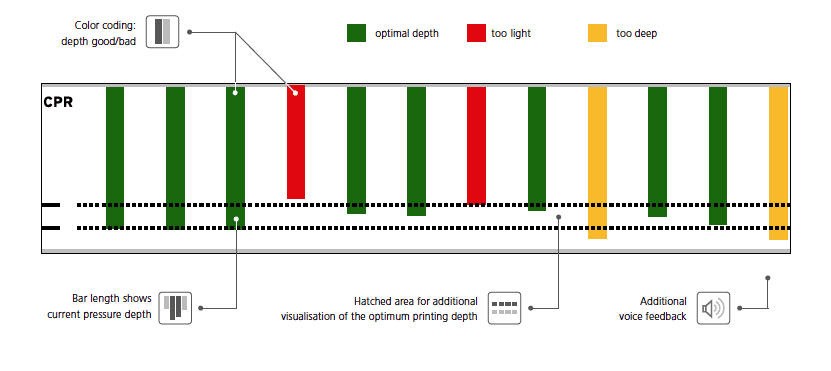

The primeCPR feedback sensor as a reusable sensor2 is made of robust plastic. It can be easily disinfected and reprocessed according to the hygiene plan.

Optionally the primeCPR easy feedback sensor is available as a disposable product with an intermediate cable.
Synchronised Therapy
Resuscitation can quickly become stressful. Thanks to the Bluetooth connection, the corpuls cpr is effectively the fourth module of the corpuls3T / corpuls3. The team is supported by the remote control of the corpuls cpr via the corpuls3T / corpuls3. Treatment can be safer and the hands-off time reduced thus increasing the patient’s chance of survival.
- Shorter Hands-off time
- Perfect in tight spaces and during transport (land/air)
- Easier and faster operation
- Increased safety
- Data transmission to corpuls3T as well as corpuls.mission and corpuls.manager
- Can be used in aed- & manual modes
- From software version 4.0 (corpuls3) & software version 1.2 (corpuls cpr
Sophisticated energy management
The best energy management is the one you don’t have to think about. This is precisely the optimum we have achieved with the corpuls3 energy management.
When you take the corpuls3 out of the charge mount in the vehicle it is ready for operation. As soon as the device is returned to the mount the batteries are charged automatically and the corpuls3 is ready for its next job. Time-consuming and fault-prone manual charging and changing of batteries is not required and the user can fully concentrate on the patient.
The batteries of all three modules are identical and extremely powerful. In compact mode, they simply use the battery reserves of the other modules. This concept always provides sufficient power even in long deployments to ensure comprehensive monitoring and the therapy with the defibrillator/pacemaker.
- Battery life of up to 10 hours as a compact device
- A complete charge of the batteries in the device takes approximately 2 hours
- Display of the remaining battery life on the monitor’s display and on the patient box
- Charging via 12 V DC or 100V AC — 240V AC (50 Hz — 60 Hz) via magnetic contact (MagCode)
- Operation as a compact device even if up to two batteries are discharged
Display of the remaining battery life in minutes
Power supply via MagCode plug
Versatile mounts
There are solutions for each application: Mounts on the wall and floor, with or without swivel mechanism or safe attachment on the stretchers by different manufacturers. Almost all mounts are in conformity with DIN EN 1789 and have been tested with an acceleration of up to 24 g instead of the specified 10 g. The mounts are also available with or without integrated power supply.
Monitor mount
- Shallow installation depth, low weight
- Also fits monitor and patient box combinations
- 12 V DC, 100V AC — 240V AC (50 Hz — 60 Hz)
Patient box mount
- Adaptation options to standard stretchers with wheels
- Easy adaptation and unlocking
- 12 V DC, 100V AC — 240V AC (50 Hz — 60 Hz)
Compact device / defibrillator mount
- Can be unlocked with one hand via the handle
- Self-locking after 10 seconds
- 12 V DC, 100V AC — 240V AC (50 Hz — 60 Hz)

Versatile application fields
Emergency medical service
People trapped in cars after a traffic accident, reanimation in a small bathroom, trapped survivors or transport through a staircase – emergency medical service calls are very versatile just as the demands on personnel and devices. With its modular design, the corpuls3 offers an optimum degree of ergonomics and flexibility in almost any situation.

Military
Regardless of whether in rough terrain, in deep snow or in a sandstorm: the corpuls3 reliably provides extensive patient data even in the most adverse weather conditions and most versatile application situations. It is therefore the ideal patient monitor/defibrillator for military use.

Air rescue
Almost every patient who is transported in a helicopter or aeroplane is in critical condition and must be permanently and extensively monitored. The stress factor increases enormously due to time pressure, tight spatial conditions and loud volume. The innovative device concept of the corpuls3 optimally supports the response staff.

Hospital
In a hospital environment the corpuls3 can be applied in almost any area due to its versatility: as a modular transport monitor for intensive care patients, as a 12-channel rest ECG device in the emergency room or as a defibrillator that is integrated in the hospital’s reanimation concept.

Downloads
Articles and videos
-
corpuls on a mission: Large scale MCI exercise
Two cars that had fallen down an embankment were hit at high speed by a train. There were multiple injuries. Fortunately, it was only a training exercise — but it could one day be a reality. A large group of emergency services were training for mass casualty incidents on the Mering-Weilheim railway line in St. Ottilien/Bavaria. corpuls was able to be there for this mission, which was special for everyone involved.
-
Tutorials by corpuls | How to use corpuls3: Softwareversion 4.4
There are some new features in the corpuls3 Touch software version 4.4. Verena and Ben explain the relevant changes in this tutorial. This includes the function text, monitor and manual mode, troubleshooting in aed mode and the CPR feedback sensor.
-
Tutorials by corpuls | Our new format
From now on we give you tips and recommendations on the corpuls products and their features and possibilities in short, practial how-to videos. Verena and Andreas have help for users without corpuls experience as well as smart options for professionals. In the first episode of our new format, the two emergency paramedics first briefly introduce themselves.
-
Tutorials by corpuls | How to use corpuls3: Modularity
In this episode, we focus on the modularity of our corpuls3T. The device can be divided into three different parts: display, patient box and defibrillator module. Verena and Andreas explain how to handle the individual modules and how to connect and disconnect them. There are also some other valuable tips on how to use them.
-

Equipo Prime Costa Rica
This Costa Rican «special unit» was set up right at the beginning of the pandemic specifically for the transfer of coronavirus patients: «Equipo Prime» – these are the «best of the best» emergency and intensive care specialists, respiratory therapists and experienced nurses and carers in Costa Rica. They have transported patients during the worst times of the pandemic and relied heavily on corpuls devices.
-
Tutorials by corpuls | How to use corpuls3T: Respiration Rate RRp®
How to measure respiratory rate from the pleth (RRp®) feature with the corpuls3? Find out in this video! In this tutorial, Verena and Andi explain what settings you can make, why the pleth curve is central to respiratory rate measurement and what you should be aware of.
-
Tutorials by corpuls | How to use corpuls3: Alarms
Which alarm on the corpuls3 means what exactly? This time, Verena and Andi explain the different types of alarms, how they appear and how to deal with them. For example, you will also learn how you can adjust alarm limits. They also have some other helpful tips for you.
-
In action with the rescue service – corpuls in Costa Rica
Costa Ricans are generally viewed as being happier and more satisfied than average. This is definitely due to their positive attitude to life and the wonderful nature. But certainly also because of the health system, which is the most exemplary in this region. The best example of this: Emergencias Médicas. corpuls was on duty with the pre hospital service provider – on two and on four wheels.
-
Tutorials by corpuls | How to use corpuls3: Pulse oximetry
In this tutorial, you will learn how pulse oximetry works with the corpuls3. Verena and Andi will show you what Masimo technology can measure and what it means. Our experts also explain the display and setting options, as well as special features.
-
corpuls on mission: water rescue
The so-called «Bavarian sea» attracts tourists from all over Germany and the world. Lake Chiemsee offers countless water sports and outdoor activities and, with its islands (Herreninsel/Fraueninsel), charming excursion destinations. The DLRG Traunstein-Siegsdorf, among others, keeps watch over the hustle and bustle on and around the lake. From the watch station in Prien, which is located directly on the water, the volunteers in the rescue boat head for the most diverse missions — on the water, in the shore area and on the islands.
-
Tutorials by corpuls | How to use corpuls3: Invasive blood pressure measurement
In this video, Andi and Verena explain how the invasive (blood) pressure measurement with the corpuls3/corpuls3T is carried out. They show you what you need and what you should pay attention to. They explain how to vent, configure and calibrate the system and how to connect it to the corpuls3/corpuls3T.
-
corpuls on-field: Champions League
Champions League matches are always highly emotional, the atmosphere sometimes explosive. So the emergency services ist also much in demand. At the quarter-final between FC Porto and Inter Milan at the Estádio do Dragão, corpuls had the exclusive opportunity to get a taste of Champions League action.
-
Tutorials by corpuls | How to use corpuls3: changing printer paper
After about 22 metres of (ECG) printout, we have to change the printer paper on the corpuls3/ corpuls3T. In this short video, Verena and Andreas show you how to recognise the upcoming replacement and how to insert the new roll quickly and easily.
-
Tutorials by corpuls | How to use corpuls3: cable management and bags
We show you the structure of the various pockets of the corpuls3/corpuls3T and give you tips on correct cable management: In this tutorial, Verena and Andreas show you where which cables are located and point out special features. They also have valuable tips on how to handle the cables, for example to avoid cable breakage.
-
Tutorials by corpuls | How to use corpuls3: cardioversion
Verena und Andreas demonstrate the cardioversion with the corpuls3/corpuls3T in this video. You learn the correct settings and how to operate the device. Furthermore they show you the equipment and what you should pay attention during and after the cardioversion.
-
Tutorials by corpuls | How to use corpuls 3: primeCPR-Feedback system
The corpuls3 is equipped with primeCPR feedback to improve resuscitation quality. This technology provides feedback to users during resuscitation regarding the depth and frequency of cardiopulmonary resuscitation. In this video, Andi and Verena explain how the technology works, how the feedback sensor is attached and what we should bear in mind.
-
Bomberos with passion – corpuls in Costa Rica
The firefighters in Costa Rica enjoy a high reputation, which is why the bomberos wear their logo with great pride. After all, they take on even more tasks than the firefighters in other countries, because there is no military in this nature paradise. Get into the typical American fire engines of the Bomberos with corpuls and get to know the sworn troop.
-
Tutorials by corpuls | How to use corpuls 3: Non-invasive blood pressure measurement
How does non-invasive blood pressure measurement work with the corpuls3 and what features are there? Verena and Andreas explain this and much more in this episode. Among other things, they go into the basic requirements for a reliable measurement, guide you through the versatile display menu and explain the different parameters and numerous options. You will also learn what to consider when choosing cuff sizes.
-
Tutorials by corpuls | How to use corpuls 3: Daily function test
In this episode, Verena and Andreas go through the daily functional testing with the corpuls3. Starting with the self-test of the device, they then show you the various options for checking the function of the defibrillator. They also go into the test of the printer and the power supply. Finally, there is a visual inspection of all modules.
-
Starcode — Emergency on board of «Mein Schiff 2»
On the «Mein Schiff 2», the medical team is always prepared for emergencies, despite the holiday mood.
-
DOWN UNDER – Queensland Ambulance Service
3,800 paramedics are on duty every day with state-of-the-art equipment in often extreme conditions for almost 5 million residents.
-
Emergency rescue at the Oseberg oil field in Norway
Why the probability of surviving a cardiac arrest in the middle of the North Sea is almost higher than on the mainland
-
Competence Centre for Rescue Services in Peru
With the training of rescue service professionals, the rescue system in Peru and Bolivia is optimised sustainably.
-
Air Zermatt – RESCUE AT 4,000 METRES
Extreme Alpine Air Rescue — with 11 helicopters, Air Zermatt flies 2000 rescue missions per year
-
Perfect partners on duty
Revolution in resuscitation: The modular monitoring/defibrillator system corpuls3 can now work synchronously and directly with the chest compression device corpuls cpr. Another step towards the perfect rescue system.
-
«SMUR Pédiatrique» – CHILDREN RESCUE SERVICE IN PARIS
Paris. City of love — and crowded streets. We accompanied the «SMUR Pédiatrique», a rescue service especially for children, on a mission.
-
corpuls on ice
Dr. Tim Heitland, Base Commander of the Neumayer III research station, reports on life in the eternal ice and the use of corpuls devices under extreme conditions.
-
Mission under the red dragon
corpuls in Wales: Rugby, Sheeps, corpuls3 and the Welsh Ambulance Service in the rough landscape of the Brecon Beacons.
-
corpuls in the Helicopter
DRF, Helgoland, Georgia, corpuls cpr, corpuls3 and 40 years of Air Rescue in the interview.
-
ECGmax – The new dimension of ECG
22 channels from only 10 electrodes. Including rear wall and right side. Any damage to the heart is immediately visible thanks to the ingeniously simple CEB. Display of vector loops.








GS corpuls3 user guide recommended for: Passport 12, XXL-Rehab Patient/Dinner chair, 27841, SaeboReJoyce, MD300I.
The GS corpuls3 Medical Equipment manual (GS Service manual, 529 pages) is completely safe to download (last scan date: 02/03/2025). You can rest assured of your safety when interacting with GS corpuls3 document.
1
ECG100+
Operation & user’s manual Cardioline Medical Equipment Operation & user’s manual (File: cardioline-ecg100-operation-user-s-manual-84, 20/03/2025)
84
1410
254
2
NRX STRAP
Instructions Mediroyal Medical Equipment Instructions (File: mediroyal-nrx-strap-instructions-2, Thu 11.2024)
2
429
95
3
CT8632
User manual manual PDF Guide (@H22D27), SOLAC CT8632 Medical Equipment (Friday 14-02-2025)
60
589
95
4
LX-8000 Series
Operation manual User Manual: Fukuda Denshi LX-8000 Series (L926XN, Upd.Fri 01.2025)
100
1045
241
6
HeartStart MRx M3535A
14
28
5
8
CERAMO RICHTER X
3
986
247
9
Pronto M71 Base
Service manual Pronto M71 Base (Wheelchair ePDF Manual, #737LVU)
116
765
115
10
SpaBuddy Mini Go
Instruction manual Manual: zewa SpaBuddy Mini Go (16ST2T, Upd.21/10/2024)
18
1394
335
- Главная
- Продукция
- Реаниматология
- Дефибрилляторы
- Дефибрилляторы Corpuls, Германия
- Система мониторирования и дефибрилляции Corpuls-3 с принадлежностями (включает трансторакальный кардиостимулятор), встроенный принтер, SpO2, NIBP, PetCO2, Германия
Цена: по запросу
Страна-производитель: Германия
Система мониторирования и дефибрилляции модели Corpuls-3 поставляется вместе с принадлежностями. В комплектацию поставки входит трансторакальный кардиостимулятор. Прибор может функционировать в автоматическом и ручном режиме; электрокардиограмма на 12 отведений; также кардиостимулятор оснащен принтером; зарядным устройством. Доступны пульсоксиметрия и плетизмография (SpO2), замеры неинвазивного АД (NIBP), функция капнографии (PetCO2).
Система модели Corpuls-3 — это новейшая модульная система, предназначенная для дефибрилляции (кардиоверсии), внешней кардиостимуляции и наблюдения за витальными функциями больного. Система модели Corpuls-3 оснащена принтером. Соответствует всем нормативам служб экстренной медпомощи на этапе лечения до госпитализации, а также при нахождении на стационаре. В случае надобности прибор может быть поделен на 3 автономных модуля, в числе которых следующие: экран витальных функций, модуль контроля состояния больного, дефибриллятор с кардиостимулятором. Модули можно использовать в автономном режиме или комбинированно с другими модулями. Это дает возможность врачу в случае возникновения непредвиденной ситуации наладить конфигурацию аппарата. Все модули системы мониторирования и дефибрилляции Corpuls-3 оснащены автономным источником электропитания. Они могут связываться с другими модулями прибора с помощью современной беспроводной технологии. Впервые стало достижимым долговременное беспрерывное беспроводное наблюдение за больным, также и в процессе проведения КТ.
Комплектация
- Монитор с принтером
- Модуль пациента с 12 –канальным ЭКГ и интерфейсом для карты
- Защитное покрытие для дисплея
- Модуль дефибриллятора/кардиостимулятора, шт.
- Электроды CorPatch easy для дефибрилляции/кардиостимуляции с кабелем
- Многоразовые электроды для дефибрилляции/кардиостимуляции 2 шт. с кабелем.
- Наплечный ремень для модуля Дефибриллятора/кардиостимулятора
- Литиево-ионовая батарея — 3 шт.
- 4-жильный кабель мониторинга ЭКГ
- 6-жильный кабель для снятия «диагностического» ЭКГ
- Зажимы для предотвращения скручивания жил кабеля — 8 шт.
- Карта памяти CompactFlash ТМ 2 Гб
- Сумка для принадлежностей PAX, черная для модуля пациента.
- Инструкция по использованию пользователя Corpuls-3
- Зарядное устройство с кабелем
- Удлинитель 1,8 м с изогнутым электрозащитным разъемом
- Программное обеспечение corView2
- Бумага для принтера – в упаковке10 рулонов
- Комплект одноразовых электродов для ЭКГ для взрослых-50 шт.
- Встроенный блок SpO2
- Промежуточный кабель для пальцевого датчика SpO2
- Многоразовый пальчиковый датчик MASIMO SpO2 для взрослых и детей от 30 кг. скабелем
- Встроенный блок измерения неинвазивного артериального давления
- Манжета для измерения НИАД для взрослых
- Шланг для манжеты НИАД 2,5 м
- Встроенный блок СО2
- Датчик СО2 capONE
- Одноразовый адаптер для подсоединения к эндотрахеальной трубки СО2 (уп. 30 шт)
- Промежуточный кабель для СО2 capONE
Технические характеристики
| Режимы работы дефибриллятора | автоматический и ручной |
| ЭКГ | 12 отведений |
| Принтер | встроенный |
С этим товаром покупают
| Электрокардиографы (ЭКГ аппараты) | Шприцевые и инфузионные насосы (дозаторы) | Пульсоксиметры |
| Расходные материалы для реанимации | Расходные материалы для анестезиологии | Комплект плакатов для кабинета анестезиологии и реаниматологии матовый/ламинированный А1/А2 |