
Datalogic S.p.A. — разработчик и производитель оборудования для автоматизации производства и бизнес-процессов. Решения компании позволяют повысить эффективность работы предприятий, относящихся к различным отраслям и сферам деятельности. Организации по всему миру пользуются продукцией Datalogic уже более 45 лет.
Одно и направлений компании-изготовителя — разработка устройств для автоматического сбора данных. Среди моделей, заслуживающих внимания, можно выделить проводной сканер штрихкодов QuickScan QD2430, созданный специально для удовлетворения потребностей точек розничной торговли и обслуживания. Аппарат отличается высоким уровнем производительности и возможностью считывания всех распространенных одномерных и двумерных штриховых кодов, что в сочетании с доступной ценой позволяет использовать его в различных местах:
- ретейл: декодирование различных средств идентификации при расчете с покупателями, учет товаров при инвентаризации и приемке;
- сфера услуг: обработка купонов, подарочных карт;
- банки и госучреждения: учет документов;
- медицина: электронное отслеживание пациентов, контроль срока годности одноразовых инструментов;
- фармацевтика: отпуск медицинских препаратов;
- логистика: прослеживание перевозимых грузов;
- почтовые службы: быстрый доступ к информации о посылках.
Подскажем, какой сканер штрихкодов подойдет для вашего магазина.
Оставьте заявку и получите консультацию в течение 5 минут.
Характеристики и функциональные возможности
Основная функциональная возможность QuickScan QD2430 — декодирование идентификационных меток и передача информации управляющему оборудованию. Модель распознает почти все известные 1D- и 2D-штрихкоды, включая почтовые и QR-коды, DataMatrix. Последние наносятся на товары, подпадающие под требования Распоряжения Правительства Российской Федерации № 792-р (от 28 апреля 2018 года). Таким образом, QuickScan QD2430 подходит для работы со всеми группами товаров, в т. ч. подлежащими обязательной маркировке.
В устройстве реализована имиджевая технология считывания, превосходящая по своим характеристикам лазерную и светодиодную. Ее главное отличие заключается в высокой чувствительности к сканируемому коду: аппарат распознает даже сильно поврежденную маркировку. Кроме обыкновенных бумажных этикеток, имиджевый сканер QuickScan QD2430 способен считывать данные с экранов мобильных телефонов, компьютеров и пр. Рабочие характеристики модели указаны в таблице:
| Линейный оптический датчик | Wide VGA: 752 × 480 пикселей |
| Источник света | Подсветка: лазерный светодиод темно-красного цвета 610–650 нм Прицел: LED (2 шт.) синего цвета |
| Устойчивость при считывании в движении | 25 IPS |
| Минимальная контрастность штрихкода | 25 % |
| Угол сканирования | По вертикали — 60°;
по горизонтали — 65°; осевое вращение — 360° |
| Разрешение (максимально) | 0,102 mm/4 mils (линейные штриховые коды) |
| Глубина поля считывания | Зависит от контраста штрихкода, разрешения печати и степени освещенности:
Code 39: 5 mils: 0,5 до 15,0 см; Data Matrix: 10 mils: 1,0 до 13,0 см; EAN/UPCA: 13 mils: 0,5 до 35,0 см; PDF417: 6,6 mils: 1,0 до 13,0 см |
Возможности подключения
Управление сканером осуществляется посредством внешнего управляющего оборудования. Для подсоединения к POS-системе или ПК используется порт USB или эмуляция интерфейса RS-232.
Рабочие условия
QuickScan QD2430 функционирует при температуре внешней среды от 0 до 50 °C. Уровень относительной влажности — от 0 до 95 % без конденсации. Допускается хранение и транспортировка устройства при температуре от -40 до 70 °C.
При правильной эксплуатации на аппарат распространяется гарантия от производителя — 5 лет.
Сканеры для маркировки и работы с подакцизными товарами! Доставка в любой регион РФ.
Оставьте заявку и получите консультацию в течение 5 минут.
Базовая комплектация QuickScan QD2430
В стандартный комплект поставки, помимо сканера QickScan QD2430, входит инструкция на русском языке и кабель USB. Другая документация и драйверы не включены производителем в базовую поставку — все файлы необходимо скачивать с официального сайта Datalogic.
Опционально поставляется специальная подставка для использования аппарата в стационарном режиме. Дополнительно можно заказать интерфейсные кабели:
- для подсоединения в разрыв клавиатуры;
- для подключения посредством эмуляции СОМ-порта;
- для интеграции с внешним оборудованием посредством интерфейса IBM.
Внешний вид и удобство эксплуатации
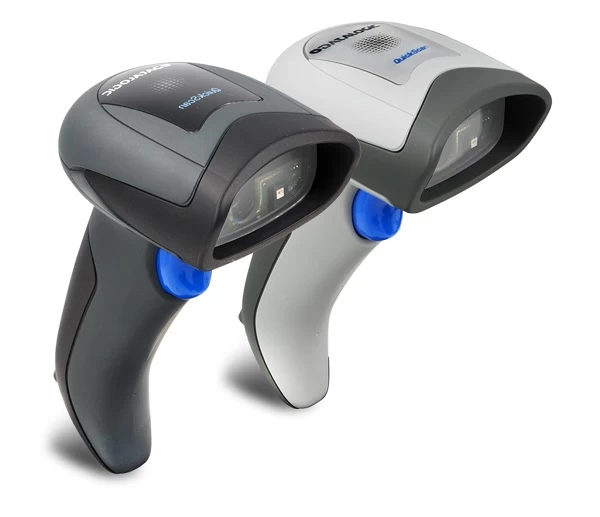
QuickScan QD2430 отличается компактными габаритами (16,3 × 9,1 × 4,1 см) и малым весом (145 г), что в сочетании с удобным сбалансированным корпусом способствует комфортной работе кассира на протяжении всей смены без нагрузки на руку.
Работа с устройством интуитивно понятна даже для неопытного пользователя — обучение по эксплуатации оборудования не потребуется. После небольшой настройки аппарат готов к использованию по назначению.
Корпус выполнен из ударопрочного пластика и выдерживает многочисленные падения с высоты 1,5 метра на бетонную поверхность, благодаря чему QuickScan QD2430 может использоваться в сложных рабочих условиях.
Пользователю на выбор доступно два цвета модели: черный и белый, что позволяет подобрать подходящую под интерьер рабочего помещения.
Сканирующий модуль излучает мягкую подсветку красного цвета и луч прицеливания, который образует два голубых треугольника, указывающих на сканируемый штрихкод. Точная система прицела снижает усталость глаз оператора и повышает эффективность его работы. Об успешном сканировании пользователя оповещают следующие элементы:
- светодиодный индикатор, расположенный на верхней панели корпуса;
- звуковой сигнал (громкость регулируется);
- зеленый световой поток, направленный на штрихкод.
Команда декодирования задается путем нажатия пусковой кнопки синего цвета, расположенной на рукоятке аппарата.
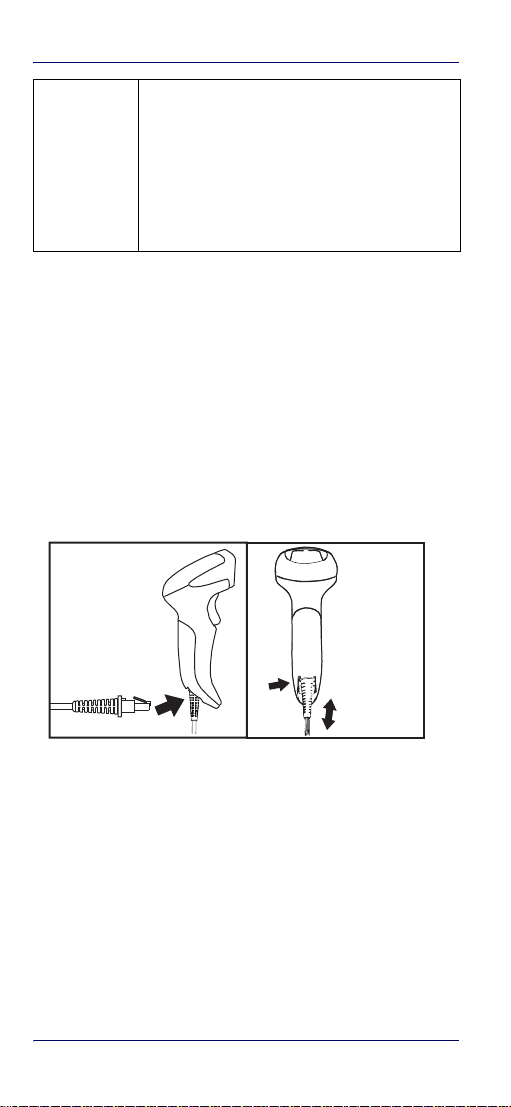
В нижней части корпуса находится разъем для подсоединения интерфейсного кабеля. Для его отсоединения требуется вставить скрепку или иголку в отверстие, находящееся рядом с разъемом, что исключает случайное отключение.
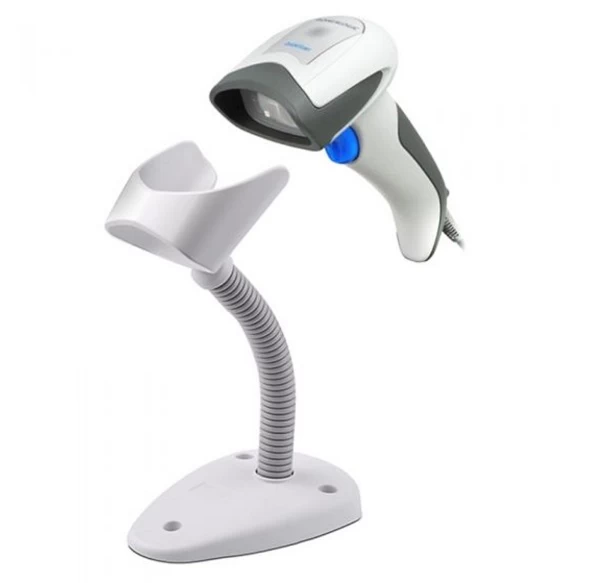
Для освобождения рук оператора можно использовать сканер в стационарном режиме, расположив его на специальной подставке, выполненной в цвет корпуса устройства. Положение аппарата можно менять благодаря гибкой ножке. Для дополнительной фиксации подставка прикручивается к рабочей поверхности.
Инструкция, прошивки, драйверы для QuickScan QD2430
На официальном веб-сайте изготовителя представлены все необходимые программы и документация для QuickScan QD2430:
- технический паспорт;
- инструкция по эксплуатации на русском языке;
- руководство по использованию сканера в здравоохранении;
- инструкция по быстрому запуску;
- драйвер для ОС Windows (32 bit/64 bit);
- утилиты и полезная информация.
Все файлы находятся в бесплатном доступе, однако для их загрузки сервис потребует пройти регистрацию.
Для быстрой и удобной настройки производитель разработал многоплатформенную служебную программу Datalogic Aladdin, которую также можно скачать с веб-сайта компании. Утилита позволяет провести программирование считывателя посредством выбора команд конфигурирования через интерфейс USB/RS-232. С помощью программы можно обновлять ПО подключенного оборудования.
Настройка QuickScan QD2430
Перед началом работы необходимо настроить параметры сканера. Программирование устройства осуществляется посредством считывания управляющих штриховых кодов, отраженных в руководстве по эксплуатации. Каждый соответствует определенному параметру.
По умолчанию оборудование активирует интерфейс USB. Для перевода аппарата в режим эмуляции СОМ-порта следует считать следующий штрихкод:

Сканер можно использовать в качестве клавиатуры — в таком режиме осуществляется быстрый ввод данных о товарах в кассовые программы посредством сканирования. Для включения эмуляции USB-клавиатуры предназначен соответствующий код:

Если пользователь совершил ошибочное действие, следует отсканировать штрихкод:

Настройки аппарата будут сброшены до заводских.
При считывании представленных штриховых кодов будут заданы стандартные настройки для того или иного интерфейса. Для более глубокой настройки параметров следует изучить полное руководство по эксплуатации аппарата.
Отзывы о QuickScan QD2430
Клиенты, которые приобрели имиджер, среди его значимых преимуществ отмечают:
- быстрое декодирование всех стандартных одномерных и двумерных штрихкодов;
- удобную систему прицеливания;
- эргономичную конструкцию корпуса, повышающую комфорт работы кассира;
- ударопрочный корпус.
Среди недостатков модели — наличие одного интерфейсного кабеля в комплекте (USB). Однако нужные можно приобрести отдельно.
Стоимость QuickScan QD2430
Аппарат представлен в различных модификациях, отличающихся по стоимости. Наименьшую цену имеют модели QD2430-WHK1 и QD2430-BKK1 с USB-кабелем в комплекте. Их отличие состоит в цвете корпуса. Модификации QD2430-WHK1S и QD2430-BKK1S оснащаются стойкой для размещения сканера на горизонтальной поверхности и имеют более высокую стоимость. Цену прибавляют интерфейсные кабели RS-232, IBM и Keyboard Wedge, которые приобретаются отдельно.
Как выбрать
Пользователю доступно 4 модификации для удовлетворения различных нужд. Стандартной модели с USB-кабелем достаточно для использования сканера в ручном режиме и подключения к ПК. При работе с большим количеством мелких предметов рекомендуется приобрести подставку, для того чтобы освободить руки кассира и увеличить скорость сканирования. Если управляющее оборудование предусматривает подсоединение считывателя посредством портов RS-232 или IBM, следует заказать интерфейсные кабели. Для подключения аппарата в разрыв клавиатуры также понадобится соответствующий провод.
Итог
Datalogic QuickScan QD2430 — проводной сканер штрихкодов с имиджевой технологией считывания в компактном корпусе. Устройство имеет высокие эксплуатационные характеристики, отличается доступной ценой. Производитель позаботился о комфорте кассира, реализовав в аппарате систему точного прицела и мягкой подсветки. Облегченная конструкция и наличие подставки обеспечивают удобство применения сканера как в ручном, так и в стационарном режиме.
Оцените, насколько полезна была информация в статье?
Краткая инструкция. Настройка сканера Datalogic QUICKSCAN QD2430.
1. Количество светодиодных вспышек / звуковых сигналов
При запуске, если у сканера звучит длинный звуковой тон, это означает, что сканер не прошел тест. Выкл. и вкл. сканер, если сигнал повторился, нужно нажать и отпустить кнопку, чтобы услышать код индикации.
1 — Ошибка конфигурации
2 — Ошибка интерфейсной платы
4 — При удачном включении издает четыре сигнала
6 — Ошибка цифровой печатной платы
Мигает зеленый светодиод сверху — проверьте в Диспетчере устройств ПК, как сканер определяется. Если определяется как USB-COM, то нужно установить драйвера эмуляция СОМ порта. Либо изменить настройки интерфейса на USB-OEM. Удерживайте 5 сек кнопку и сканируйте штрих-код настройки интерфейса.
Решение:
2. Режим USB клавиатуры
3. Режим USB COM
Сканер QD2430 не считывает новую акцизную марку. Не читает шк честный знак. Требуется настройка сканера. Ниже следуют штрих-коды настроек.
Проверено. Сканер хорошо считывает новые акцизные марки на крепком алкоголе и штрих-кода честный знак GTIN на обуви, DataMatrix на пачках сигарет. Хорошо считывает qr-коды с экрана мобильных устройств.
4. Настройка сканера для считывания Data Matrix
Сброс на заводские настройки — Развернуть
Режим постоянного сканирования — Развернуть
5. Настройка уровня звукового сигнала
6. Индикация радиобазы BC2030 (Сканер QBT2400)
Желтый светодиод горит — Станция включилась;
Желтый светодиод мигает ~1 Гц — Сканер отключен от базы или связь с базой не установлена;
Желтый светодиод выключается на 100 мс — Данные передаются на базу;
Желтый светодиод быстро мигает — Режим программирования;
Красный светодиод горит — Аккумулятор заряжается;
Зеленый светодиод горит — Аккумулятор заряжен;
Зеленый светодиод и красный светодиоды мигают попеременно ~1 Гц — Сканер неправильно установлен на базе или ошибка зарядного устройства, аккумулятора;
Красный и зеленый светодиоды выключены — Сканер не установлен на подставку
Вопросы и ответы
Сканер datalogic quickscan qd2400 не передает разделитель GS1 в режиме клавиатура.
Не сканируется маркированная молочная продукция.
Настройка для лекарств.
Настройка для ЕГАИС.
Сканер datalogic quickscan qd2430 перестал работать
QUICKSCAN QD2430. Настроить сканер для маркировки в 1с
Пишите в support@kasselect.ru,
WhatsApp +7(987)-268-84-37
quickscan qd2430 сканирует товар 4 раза что делать — попробуйте сбросить на заводские настройки и настроить заново сканер.
datalogic quickscan qd2430 настройка litebox
datalogic qd2430 не сканирует табак
Как подключить сканер к компьютеру через usb.
Полезные заметки:
Маркировка
Проверьте сканер
Автор: Нуруллин И.Н. Дата: 2017-12-11
спасибо
даже в 2024 году это оч полезно!
Datalogic QuickScan I QD2430
General Purpose Corded
Handheld Area Imager
Bar Code Reader
Quick Reference Guide
Manual
View the manual for the Datalogic QuickScan I QD2430 here, for free. This manual comes under the category barcode reader and has been rated by 3 people with an average of a 9.4.
This manual is available in the following languages: English. Do you have a question about the Datalogic QuickScan I QD2430 or do you need help?
Ask your question here
Index
- QuickScan™ QD2430
- Table of Contents
- DATALOGIC ADC, INC.
- FOR THE QUICKSCAN™ QD24XX
- QuickScan™ QD2430
Product Images (3)

Datalogic QuickScan I QD2430 specifications
Below you will find the product specifications and the manual specifications of the Datalogic QuickScan I QD2430.
The Datalogic QuickScan I QD2430 is a wired handheld barcode reader that supports 2D barcodes such as Aztec Code, Data Matrix, MaxiCode, Micro QR Code, and QR Code. With a wavelength of 650 nm, it can accurately scan and decode various types of barcodes.
Featuring an International Protection (IP) code of IP42, this barcode reader offers a certain level of protection against dust and moisture, making it suitable for use in various environments. Its shock-resistant properties ensure durability and reliability, even in demanding conditions.
In terms of sustainability, the Datalogic QuickScan I QD2430 is RoHS certified, complying with international standards for reducing hazardous substances. This certification highlights the product’s commitment to environmental responsibility.
Powered by a DC power source, this barcode reader is designed to provide consistent performance and efficiency. Its handheld design allows for easy and comfortable use, enabling users to effortlessly scan barcodes for extended periods.
The Datalogic QuickScan I QD2430 is an ideal choice for businesses and industries that require accurate and efficient barcode scanning. Its compatibility with a range of 2D barcodes allows for versatile use in various applications, such as retail, logistics, and healthcare.
In conclusion, the Datalogic QuickScan I QD2430 is a reliable and durable wired handheld barcode reader that supports various 2D barcode formats. With its shock-resistant design, RoHS certification, and comfortable ergonomics, it offers a high level of performance and efficiency for barcode scanning needs.
Connectivity technology
Wired
Sustainability certificates
RoHS
Operating temperature (T-T)
0 — 50 °C
General
| Brand | Datalogic |
| Model | QuickScan I QD2430 | QD2430-WH |
| Product | barcode readers |
| EAN | 5054484617945, 5054533617940, 5054565449496, 5054629449493, 5711045697920 |
| Language | English |
| Filetype | User manual (PDF) |
Scanning
| Sensor type | — |
| 2D (matrix & stacked) barcodes supported | Aztec Code, Data Matrix, MaxiCode, Micro QR Code, QR Code |
| Wavelength | 650 nm |
| Tilt reading angle | 0 — 360 ° |
| Pitch reading angle | 0 — 65 ° |
| Yaw reading angle | 0 — 60 ° |
| Type | Handheld bar code reader |
| Scanner type | 2D |
Ports & interfaces
| Connectivity technology | Wired |
| Standard interfaces | RS-232, USB, Keyboard wedge |
Performance
| Product color | White |
| Housing material | — |
| International Protection (IP) code | IP42 |
| Protection features | Shock resistant |
Technical details
| Sustainability certificates | RoHS |
Power
| Power source type | DC |
| Input voltage | 4.5 — 14 V |
| Power consumption | 140 mA |
Operational conditions
| Operating temperature (T-T) | 0 — 50 °C |
| Storage temperature (T-T) | -40 — 70 °C |
| Operating relative humidity (H-H) | 0 — 95 % |
Weight & dimensions
| Width | 41 mm |
| Depth | 91 mm |
| Height | 163 mm |
| Weight | 145 g |
Packaging data
Logistics data
| Harmonized System (HS) code | 84716070 |
show more
Frequently Asked Questions
Can’t find the answer to your question in the manual? You may find the answer to your question in the FAQs about the Datalogic QuickScan I QD2430 below.
How to Turn Off Carriage Return on Datalogic QuickScan I QD2430
Is the Datalogic QuickScan I QD2430 a wired barcode reader?
Yes, the Datalogic QuickScan I QD2430 uses wired connectivity technology.
Why is the barcode reader not scanning any barcodes?
Ensure that the barcode reader is properly connected to the device and that it is receiving power. Also, verify that the scanning beam is aligned with the barcode and that the barcode is within the scanner’s scanning range.
How can I configure the barcode reader to support a specific barcode type?
Access the barcode reader’s configuration interface and navigate to the barcode symbologies settings. Enable the desired barcode types by selecting them from the available options.
How can I adjust the scanning beam’s intensity for different lighting conditions?
Use the barcode reader’s settings menu to adjust the illumination level. Increase the intensity in low-light environments and decrease it in bright environments to ensure optimal barcode scanning performance.
Is it possible to use the barcode reader to scan very small or large barcodes?
Yes, the barcode reader has a scanning range that supports various barcode sizes. However, it may be necessary to hold the reader closer or farther from the barcode to ensure successful scanning of extremely small or large barcodes.
How can I review the scanned barcode data without connecting the reader to a device?
The barcode reader typically has a built-in memory that stores the scanned barcode data. You can access this data by connecting the scanner to a computer via USB and using the provided software to retrieve and analyze the stored barcode information.
What types of barcodes does the Datalogic QuickScan I QD2430 support?
The Datalogic QuickScan I QD2430 supports 2D barcodes such as Aztec Code, Data Matrix, MaxiCode, Micro QR Code, and QR Code.
What is the International Protection (IP) code of the Datalogic QuickScan I QD2430?
The Datalogic QuickScan I QD2430 has an IP42 rating, which means it is protected against ingress of solid objects larger than 1mm and vertically dripping water.
Does the Datalogic QuickScan I QD2430 have any protection features?
Yes, the Datalogic QuickScan I QD2430 is shock resistant, providing durability and reliability for the user.
Is the Datalogic QuickScan I QD2430 environmentally sustainable?
Yes, the Datalogic QuickScan I QD2430 has RoHS sustainability certificates, indicating that it meets environmental standards by limiting the use of certain hazardous substances.
What is the weight of the Datalogic QuickScan I QD2430?
The Datalogic QuickScan I QD2430 has a weight of 145 g.
What is the height of the Datalogic QuickScan I QD2430?
The Datalogic QuickScan I QD2430 has a height of 163 mm.
What is the width of the Datalogic QuickScan I QD2430?
The Datalogic QuickScan I QD2430 has a width of 41 mm.
What is the depth of the Datalogic QuickScan I QD2430?
The Datalogic QuickScan I QD2430 has a depth of 91 mm.
Is the manual of the Datalogic QuickScan I QD2430 available in English?
Yes, the manual of the Datalogic QuickScan I QD2430 is available in English .
Is your question not listed? Ask your question here

QuickScan™ QD2430
General Purpose Corded
Handheld Area Imager
Bar Code Reader

Datalogic ADC, Inc.
959 Terry Street
Eugene, OR 97402
USA
Telephone: (541) 683-5700
Fax: (541) 345-7140
©2013-2014 Datalogic ADC, Inc.
An Unpublished Work — All rights reserved. No part of the contents of this documentation or the procedures described
therein may be reproduced or transmitted in any form or by
any means without prior written permission of Datalogic ADC,
Inc. or its subsidiaries or affiliates («Datalogic» or “Datalogic
ADC”). Owners of Datalogic products are hereby granted a
non-exclusive, revocable license to reproduce and transmit
this documentation for the purchaser’s own internal business
purposes. Purchaser shall not remove or alter any proprietary
notices, including copyright notices, contained in this documentation and shall ensure that all notices appear on any
reproductions of the documentation.
Should future revisions of this manual be published, you can
acquire printed versions by contacting your Datalogic representative. Electronic versions may either be downloadable
from the Datalogic website (www.datalogic.com) or provided
on appropriate media. If you visit our website and would like
to make comments or suggestions about this or other Datalogic publications, please let us know via the «Contact Datalogic» page.
Datalogic has taken reasonable measures to provide information in this manual that is complete and accurate, however,
Datalogic reserves the right to change any specification at any
time without prior notice.
Datalogic and the Datalogic logo are registered trademarks of
Datalogic S.p.A. in many countries, including the U.S.A. and
the E.U. All other brand and product names may be trademarks of their respective owners.
See www.patents.datalogic.com
This product is covered by one or more of the following patents:
Design patents: EP002158717, ZL201330271434.1
Utility patents: EP0996284B1, EP0997760B1, EP0999514B1,
EP1128315B1, EP1396811B1, EP1413971B1, EP1828957B1,
JP4435343B2, US6478224, US6512218, US6513714,
US6561427, US6808114, US6997385, US7053954, US7075663,
US7234641, US7387246, US7721966, US8245926, US8561906
Disclaimer
Patents
for patent list.

Table of Contents
END USER SOFTWARE LICENSE AGREEMENT (EULA) …………………iii
Software Product Policy ……………………………………………………. vi
Customers Under Software Support ………………………….. vi
Description ………………………………………………………………………… 1
Setting Up the Reader ……………………………………………………….. 2
Connect/Disconnect Cable to Reader …………………………. 2
Using the Quickscan™ QD24XX …………………………………………… 3
Selecting the Interface Type ………………………………………………. 4
Interface Selection ……………………………………………………..4
Configuring the Interface …………………………………… 5
Keyboard Interface ……………………………………………. 6
Scancode Tables………………………………………………… 9
Country Mode……………………………………………………. 9
Caps Lock State……………………………………………….. 13
Numlock………………………………………………………….. 14
Programming …………………………………………………………………… 15
Using Programming Bar Codes …………………………………15
Configure Other Settings ………………………………………….. 15
Resetting Product Defaults ………………………………………15
Reading Parameters ………………………………………………………… 16
Aiming System …………………………………………………………16
Good Read Green Spot Duration ………………………………. 16
Operating Modes ……………………………………………………………… 17
Scan Mode ………………………………………………………………. 17
Pick Mode ………………………………………………………………… 19
Multiple Label Reading …………………………………………….. 19
Technical Specifications …………………………………………………… 20
LED and Beeper Indications ……………………………………………… 23
Error Codes ………………………………………………………………………26
Cleaning …………………………………………………………………………… 27
Regulatory Information ……………………………………………………. 28
Statement of Agency Compliance …………………………….. 28
FCC Class B Compliance Statement ………………………….. 28
Canadian Notice ……………………………………………………….29
Power Supply …………………………………………………………… 29
Imager Labeling ……………………………………………………….. 30
WEEE Statement ……………………………………………………… 31
Datalogic ADC
Limited Factory Warranty ………………………………………… 33
Ergonomic Recommendations ………………………………………….35
Services and Support ……………………………………………………….. 36
Quick Reference Guide i

NOTES
ii QuickScan™ QD2430

DATALOGIC ADC, INC.
END USER SOFTWARE LICENSE AGREEMENT (EULA)
FOR THE QUICKSCAN™ QD24XX
Notice to End User: There are two types of software covered by this END USER
LICENSE AGREEMENT («EULA»): (1) The Datalogic Product you have acquired contains embedded software («Embedded Software») which is integral to the Product’s
operation; and (2) Optional Application Software provided to you on an optional
basis («Application Software»). Embedded Software and Application Software are
collectively referred to as «Software» and are subject to the terms and conditions
contained in this EULA. Software is provided only for use with, and for authorized
end users of, the Datalogic QuickScan™ QD24XX («Product»). Portions of the
Embedded Software include or operate with Open Source software or libraries
(«Open Source»). Use of Open Source is subject to the Open Source licenses entitled
«QD24XX .zip License File .pdf» available at the following website: http://
www.datalogic.com/software_lan_sb2783_1.html.
This EULA (End User Software License Agreement) («EULA” or «Agreement») is a
legally binding agreement governing the licensing of the Software and Documentation by Datalogic ADC, Inc. and its subsidiaries and affiliates («Datalogic») to the
entity or person who has purchased or otherwise acquired a Datalogic Product
(«End User»). For purposes of this Agreement, any software that is not Embedded
Software or Application Software is software associated with a separate end-user
license agreement is licensed to you under the terms of that license agreement.
Datalogic and End User hereby agree as follows:
1. Definitions.
1.1 «Affiliate» means a business entity currently existing or later acquired that
controls, is controlled by, or is under common control with Datalogic S.p.A.
1.2 «Documentation» means materials such as user’s guides, program reference
guides, quick reference guides, manuals, or similar materials associated with
or related to the Datalogic Product, whether in printed, «online», or other form.
1.3 «Proprietary Information» means: (a) source code, object code, software, documentation, and any related internal design, system design, data base design,
algorithms, technology, technical data or information, implementation techniques, and trade secrets related to the Software, (b) any other trade secrets
marked appropriately or identified as proprietary or confidential, and (c) any
information that End User, under the circumstances, should recognize as confidential. Proprietary Information does not include any information that the
receiving party can establish was (1) in the public domain, (2) already in the
receiving party’s possession or rightfully known prior to receipt, (3) rightfully
learned from a third party not in violation of any other’s proprietary rights, or
(4) independently developed without access to Proprietary Information.
1.4 «Datalogic Product» means the Datalogic® QuickScan™ series scanner product,
including all embedded Software in and all Documentation related to such
product, which has been purchased or otherwise acquired by End User,
whether obtained directly or indirectly from Datalogic.
1.5 «Software» means any software or computer programs of Datalogic or its third
party licensors in machine readable form which is embedded in the Datalogic
Product, whether obtained directly or indirectly from Datalogic, including any
replacement, update, upgrade, enhancement or modification.
2. Scope Of License Granted.
2.1 Datalogic grants to End User a non-exclusive, non-transferable, perpetual
license to use the Software, solely on the Datalogic Product in which it is
embedded («designated Datalogic Product»), in machine-readable form only,
solely for End User’s internal business purposes. This Agreement does not
convey ownership of the Software to End User. Title to the Software shall be
and remain with Datalogic or the third party from whom Datalogic has
obtained a licensed right. As used in this Agreement, the term «purchase» or
its equivalents when applied to the Software shall mean «acquire under
license.» End User is not entitled to receipt or use of the source code to any
Software.
2.2 End User shall not copy, modify, decompile, disassemble, reverse engineer, or
otherwise reproduce or remanufacture the Software, whether modified or
unmodified, nor sell, assign, sublicense, distribute, lend, rent, give, or otherwise
transfer the Software to any other person or organization, for purposes other
than as expressly provided in this Agreement, without Datalogic’s prior written
consent.
3. Transfers, Support.
3.1 Any copying, installing, reproduction, remanufacture, reverse engineering,
electronic transfer, or other use of the Software on other than the designated
Quick Reference Guide iii

Datalogic Product will be a material breach of this Agreement. However, Datalogic may elect not to terminate this Agreement or the granted licenses, but
instead may elect to notify End User that End User is deemed to have ordered
and accepted a license for each breaching use. End User shall pay Datalogic
the applicable list price for such licenses as of the date of such breach.
3.2 End User shall not sell, assign, sublicense, distribute, lend, rent, give, or otherwise transfer the Datalogic Product to any third party unless such third party
agrees with Datalogic in writing to be bound by the terms and conditions of
this Agreement. Any such transfer of the Datalogic Product absent such
agreement shall be null and void.
3.3 End User may obtain support for Soft ware from Datalogic at Datalogic’s standard support fees and under Datalogic’s standard support terms and conditions in effect at the time the support is requested.
4. Intellectual Property.
End User acknowledges that the Software constitutes valuable trade secrets of
Datalogic or Datalogic’s third party licensors and that the Software is protected by
intellectual property laws and treaties. The license set forth in this Agreement
does not transfer to End User any ownership of Datalogic’s or its third party licensors’ copyrights, patents, trademarks, service marks, trade secrets, or other intellectual property rights and End User shall have no right to commence any legal
actions to obtain such rights. End User shall not remove, modify, or take any other
action that would obscure any copyright, trademark, patent marking, or other
intellectual property notices contained in or on the Datalogic Product.
5. Proprietary Information.
5.1 End User acknowledges that Proprietary Information is the confidential, proprietary, and trade secret property of Datalogic and Datalogic’s third party
licensors and End User acquires no right or interest in any Proprietary Information.
5.2 End User shall not disclose, provide, or otherwise make available the Proprietary Information of Datalogic or its third party licensors to any person other
than End User’s authorized employees or agents who are under confidentiality
agreement, and End User shall not use the Proprietary Information other than
in conjunction with use of the Datalogic Product exclusively for End User’s
internal business purposes. End User shall take steps to protect the Proprietary Information no less securely than if it were End User’s own intellectual
property.
5.3 The provisions of this Proprietary Information Section shall survive and continue for five (5) years after the termination of this Agreement.
6. Limited Warranty.
6.1 Datalogic warrants that, under normal use and operation, the Datalogic Product will conform substantially to the applicable Documentation for the period
specified in the Documentation. During this period, for all reproducible nonconformities for which Datalogic has been given written notice, Datalogic will
use commercially reasonable efforts to remedy nonconformities verified by
Datalogic. End User agrees to supply Datalogic with all reasonably requested
information and assistance necessary to help Datalogic in remedying such
nonconformities. For all defects reported to Datalogic within the warranty
period, Datalogic’s liability is limited to providing End User with one copy of
corrections or responding to End User’s problem reports according to Datalogic’s standard assistance practices. Datalogic does not warrant that the
product will meet End User’s requirements or that use of the product will be
uninterrupted or error free, or that Datalogic’s remedial efforts will correct any
nonconformance. This limited warranty does not cover any product that have
been subjected to damage or abuse, whether intentionally, accidentally, or by
neglect, or to unauthorized repair or unauthorized installation, and shall be
void if End User modifies the product, uses the product in any manner other
than as established in the Documentation, or if End User breaches any of the
provisions of this Agreement.
6.2 EXCEPT AS PROVIDED IN THIS AGREEMENT, THE DATALOGIC PRODUCT IS
PROVIDED «AS IS» AND DATALOGIC MAKES NO WARRANTIES OF ANY KIND,
EXPRESS OR IMPLIED, WRITTEN OR ORAL, WITH RESPECT TO THE PRODUCT,
AND SPECIFICALLY DISCLAIMS THE IMPLIED WARRANTIES OF MERCHANTABILITY AND FITNESS FOR A PARTICULA R PURPOSE.
7. Infringement.
7.1 Datalogic will defend End User against any claim in a lawsuit that the Datalogic Product furnished hereunder infringe a United States patent or copyright
of a third party and Datalogic will pay any damages finally awarded against
End User by a court of competent jurisdiction that are attributable to such
claim or will pay End User’s part of any settlement that is attributable to such
iv QuickScan™ QD2430

claim, provided, that 1) End User notifies Datalogic promptly in writing of the
claim, 2) Datalogic controls the defense or settlement of the claim, and 3) End
User cooperates fully with Datalogic in such defense or settlement. All notices
of a claim should be sent to Datalogic ADC, Inc., Legal Department, 959 Terry
Street, Eugene, OR 97402.
7.2 In the defense or settlement of any such claim, Datalogic may, at its option, 1)
procure for End User the right to continue using the Datalogic Product, 2)
modify the Datalogic Product so that it becomes non-infringing, 3) replace the
Datalogic Product with an equivalent product not subject to such claim, or 4)
provide End User an opportunity to return the Datalogic Product and receive a
refund of the purchase price paid, less a reasonable allowance for use.
7.3 Datalogic shall have no liability to End User for claims of infringement based
upon 1) the use of any Datalogic Product in combination with any product
which Datalogic has not either furnished or authorized for use with such Datalogic Product 2) the use of any Datalogic Product designed, manufactured, or
modified to the specifications of End User, or 3) End User’s modification of the
Datalogic Product without written authorization from Datalogic.
7.4 THE FOREGOING STATES DATALOGIC’S COMPLETE AND ENTIRE OBLIGATION
CONCERNING CLAIMS OF PATENT, COPYRIGHT, OR OTHER INTELLECTUAL
PROPERTY INFRINGEMENT, CANCELS AND SUPERCEDES ANY PRIOR AGREEMENTS, WHETHER ORAL OR WRITTEN, BETWEEN THE PARTIES CONCERNING
SUCH CLAIMS, AND WILL NOT BE MODIFIED OR AMENDED BY ANY PAST, CONTEMPORANEOUS, OR FUTURE AGREEMENTS OR DEALINGS BETWEEN THE
PARTIES, WHETHER ORAL OR WRITTEN, EXCEPT AS SET FORTH IN A FUTURE
WRITING SIGNED BY BOTH PARTIES.
8. Limitation Of Liability.
EXCEPT AS PROVIDED IN SECTION 7, DATALOGIC SHALL NOT BE LIABLE FOR ANY
CLAIMS AGAINST END USER BY ANY OTHER PARTY. IN NO EVENT SHALL DATALOGIC’S LIABILITY FOR DAMAGES, IF ANY, WHETHER BASED UPON CONTRACT,
TORT (INCLUDING NEGLIGENCE), PRODUCT LIABILITY, STRICT LIABILITY, WARRANTY, OR ANY OTHER BASIS, EXCEED THE PRICE OR FEE PAID BY END USER FOR
THE DATALOGIC PRODUCT. UNDER NO CIRCUMSTANCES SHALL DATALOGIC BE
LIABLE TO END USER OR ANY THIRD PARTY FOR LOST PROFITS, LOST DATA,
INTERRUPTION OF BUSINESS OR SERVICE, OR FOR ANY OTHER SPECIAL, CONSEQUENTIAL, CONTINGENT, INDIRECT, INCIDENTAL, PUNITIVE, EXEMPLARY, OR
OTHER SIMILAR DAMAGES, EVEN IF DATALOGIC HAS BEEN ADVISED OF THE POSSIBILITY OF SUCH DAMAGES.
9. Government Restricted Rights; International Use.
9.1 Use, duplication, or disclosure of the Software by the U.S. Government is subject to the restrictions for computer software developed at private expense as
set forth in the U.S. Federal Acquisition Regulations at FAR 52.227-14(g), or
52.227-19 or in the Rights in Technical Data and Computer Software clause at
DFARS 252.227-7013(c)(1)(ii), whichever is applicable.
9.2 If End User is using the Datalogic Product outside of the United States, End
User must comply with the applicable local laws of the country in which the
Datalogic Product is used, with U.S. export control laws, and with the English
language version of this Agreement. The provisions of the «United Nations
Convention on International Sale of Goods» shall not apply to this Agreement.
10. Termination.
10.1Either party may terminate this Agreement or any license granted under this
Agreement at any time upon written notice if the other party breaches any
provision of this Agreement.
10.2Upon termination of this Agreement, End User immediately shall cease using
any nonembedded software and shall return to Datalogic or destroy all nonembedded software covered by this Agreement, and shall furnish Datalogic
with a certificate of compliance with this provision signed by an officer or
authorized representative of End User. For embedded software, End User
agrees to sign a waiver prepared by Datalogic concerning further use of the
embedded Software. End User’s resumed or continued use of the embedded
Software after termination shall constitute End User’s agreement to be bound
by the terms and conditions of this Agreement for such use.
11. General Provisions.
11.1 Entire Agreement; Amendment. This document contains the entire agreement between the parties relating to the licensing of the Software and supersedes all prior or contemporaneous agreements, written or oral, between the
parties concerning the licensing of the Software. This Agreement may not be
changed, amended, or modified except by written document signed by Datalogic.
Quick Reference Guide v

Software Product Policy
11.2 Notice. All notices required or authorized under this Agreement shall be given
in writing, and shall be effective when received, with evidence of receipt.
Notices to Datalogic shall be sent to the attention of Contract Administration,
Datalogic ADC, Inc., 959 Terry Street, Eugene, OR 97402, or such other address
as may be specified by Datalogic in writing.
11.3 Waiver. A party’s failure to enforce any of the terms and conditions of this
Agreement shall not prevent the party’s later enforcement of such terms and
conditions.
11.4 Governing Law; Venue: This Agreement and the rights of the parties hereunder shall be governed by and construed in accordance with the laws of the
State of Oregon U.S.A, without regard to the rules governing conflicts of law.
The state or federal courts of the State of Oregon located in either Multnomah
or Lane counties shall have exclusive jurisdiction over all matters regarding
this Agreement, except that Datalogic shall have the right, at its absolute discretion, to initiate proceedings in the courts of any other state, country, or territory in which End User resides, or in which any of End User’s assets are
located.
11.5 Attorneys’ Fees. In the event an action is brought to enforce the terms and
conditions of this Agreement, the prevailing party shall be entitled to reasonable attorneys’ fees, both at trial and on appeal.
— END —
Software Product Policy
Datalogic reserves the right to ship its products with the
latest version of software/firmware available. This provides our customers with the very latest in Datalogic software technology.
The only exception to this policy is when the buyer has a
signed contract with Datalogic that clearly defines the
terms and conditions for making software/firmware
changes in products shipped to the buyer.
Customers Under Software Support
Customers that elect to subscribe to Datalogic Software
Maintenance and Support Agreement will receive 30 days
advance notification of: (1) the release of a new software
version; and/or (2) discontinuation of any prior software
version that will no longer be supported. Datalogic will
provide maintenance for a fee that will assist customers
in transitioning to the next software version. If a customer
is currently using the software version being discontinued, the customer may elect to transition to any one of
the newer versions, depending on the hardware in use.
To arrange for a Software Maintenance and Support
Agreement please contact your Datalogic sales person.
vi QuickScan™ QD2430

QuickScan™ QD2430
Description
The QuickScan™ QD2400 2D imager has been specifically created to meet the market demand for omni-directional reading
performance on virtually all codes at an affordable price. Elegant design details are incorporated into a smaller, balanced
lightweight enclosure without sacrificing Datalogic’s wellknown durability.
Ideally suited for applications at the point-of-sale (POS), the
QuickScan QD2400 imager features a new illumination and
aiming system developed with the unique intent to reduce
visual stress of the operator during the daily scanning activities. It consists of a soft, dark red illumination combined with
two blue LED triangles pointing at the targeted bar code. The
result is a precise aiming system which contributes to low eye
fatigue, yet still allows top operator efficiency.
Constructed with a combination of design and performancebased ideals such as bar code reading snappiness, motion tolerance, perfect ergonomics and an attractive price, this 2D
imager is the ideal solution for the customer who is looking to
replace their linear only reading scanners with image-based
technology.
To read a symbol simply aim the reader and pull
the trigger. The QuickScan™ QD24XX is a powerful
omni-directional reader, so the orientation of the
symbol is not important.
OmniDirectional
Operating
Datalogic’s exclusive patented ‘Green Spot’ for
good-read feedback helps to improve productivity
in noisy environments or in situations where
silence is required. When using the product with
the cradle at a 45° position, the aiming pattern can
work as an aiming system to aid in positioning the
bar code for quick and intuitive reading.
Quick Reference Guide 1
Setting Up the Reader
Reliably decodes all standard 1D (linear) and 2D
bar codes, including GS1 DataBar™ linear codes,
Postal Codes (China Post), Stacked Codes (such as
Decoding
GS1 DataBar Expanded Stacked, GS1 DataBar
Stacked, GS1 DataBar, Stacked Omnidirectional).
The data stream — acquired from decoding a symbol — is rapidly sent to the host. The reader is
immediately available to read another symbol.
Setting Up the Reader
Follow the steps below to connect and get your reader up and
communicating with its host.
1. Connect the Cable to the reader and the Host.
2. Configure the Interface (see page 5).
3. Configure the Reader starting on page 15 (optional,
depends on settings needed).
Connect/Disconnect Cable to Reader
Figure 1. Connecting to the Reader
Host Connection —
device as shown in Figure 2. The power can also be supplied
through an external power supply via the Interface Cable supplied with a power jack.
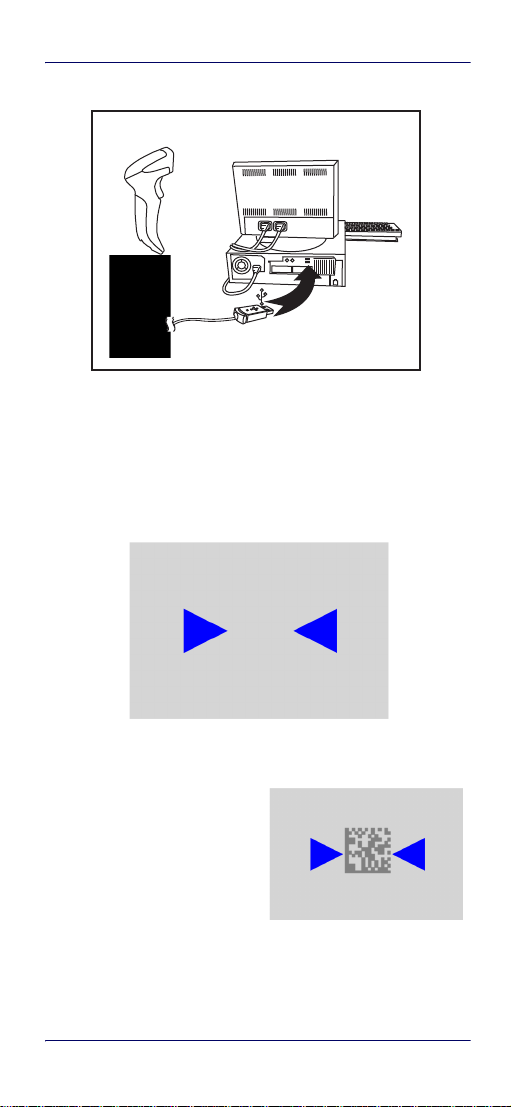
The QuickScan plugs directly into the host
2 QuickScan™ QD2430
Using the Quickscan™ QD24XX
Linear bar
2D Matrix symbol
Figure 2. Connecting to the Host
Using the Quickscan™ QD24XX
The Quickscan™ QD24XX normally functions by capturing and
decoding codes. The aiming system is activated on trigger pull
and indicates the center of the field of view which should be
positioned over the bar code:
Aiming System
Relative Size and Location of Aiming System Pattern
Quick Reference Guide 3

Selecting the Interface Type
A beam illuminates the label. The projected pattern of the
aiming system will be smaller when the reader is closer to the
bar code and larger when it is farther from the code. Symbologies with smaller bars or elements (mil size) should be read
closer to the unit. Symbologies with larger bars or elements
(mil size) should be read farther from the unit.
If the aiming system is centered you will get a good read. Successful reading is signaled by an audible tone plus a goodread green spot LED indicator.
Reference the QuickScan QD24XX Product Reference Guide
(PRG) on the Datalogic website for more information about
this feature and other programmable settings.
Selecting the Interface Type
Upon completing the physical connection between the reader
and its host, proceed directly to Interface Selection below for
information and programming for the interface type the
reader is connected to (for example: RS-232, Keyboard Wedge,
USB, etc.) and scan the appropriate bar code to select your
system’s correct interface type.
Interface Selection
The reader model will support one of the following sets of
host interfaces:
General Purpose Models —
board Wedge.
Retail Point of Sale Models —
Information and programming options for each interface type
are provided in this section. For defaults and additional information associated with each interface, proceed to the corresponding chapter in the QuickScan QD2430 PRG.
RS-232, RS-232 OPOS, USB, Key-
RS-232, RS-232 OPOS, USB.
4 QuickScan™ QD2430
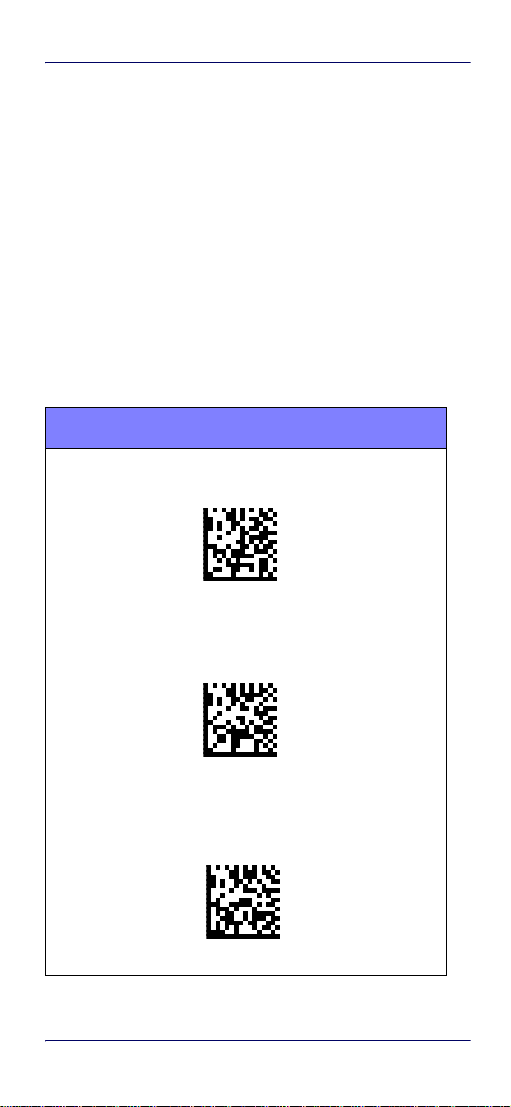
Selecting the Interface Type
Configuring the Interface
Scan the appropriate programming bar code to select the
interface type for your system.
Unlike some other programming features and
options, interface selections require that you
scan only one programming bar code label. DO
NOT scan an ENTER/EXIT bar code prior to scanning an interface selection bar code.
Some interfaces require the scanner to start in
the disabled state when powered up. If additional scanner configuration is desired while in
this state, pull the trigger and hold for 5 seconds. The scanner will change to a state that
allows programming with bar codes.
RS-232
RS-232 standard interface
Select RS232-STD
RS-232 Wincor-Nixdorf
Select RS232-WN
RS-232 for use with OPOS/UPOS/JavaPOS
Select RS-232 OPOS
Quick Reference Guide 5
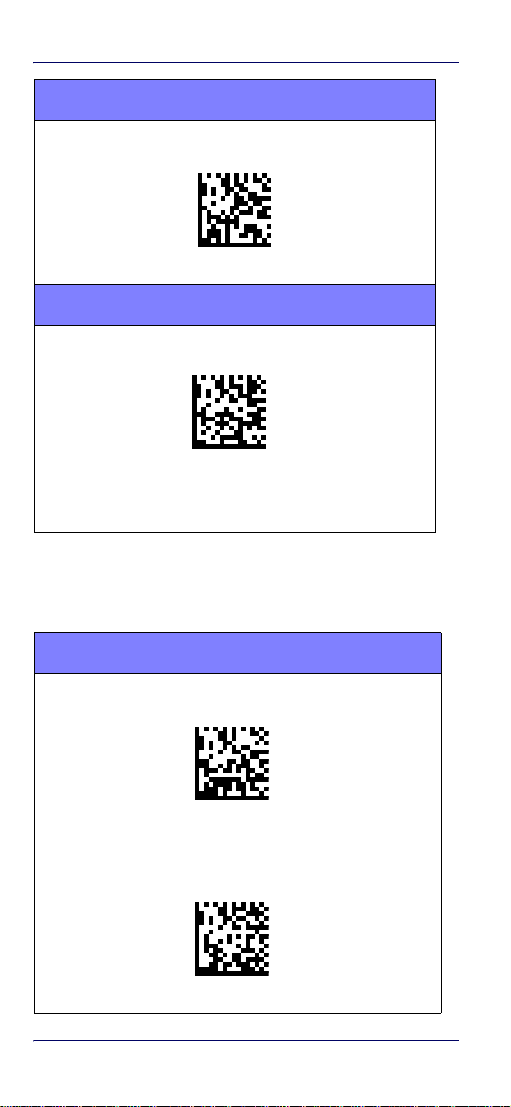
Selecting the Interface Type
RS-232 (continued)
USB Com to simulate RS-232 standard interface
Select USB-COM-STD
a
USB-OEM
USB-OEM (can be used for OPOS/UPOS/JavaPOS)
Select USB-OEM
a. Download the correct USB Com driver from www.datalogic.com
Keyboard Interface
Use the programming bar codes to select options for
USB Keyboard and Wedge Interfaces.
KEYBOARD
AT, PS/2 25-286, 30-286, 50, 50Z, 60, 70, 80, 90 & 95 w/
Standard Key Encoding
Select KBD-AT
Keyboard Wedge for IBM AT PS2 with standard key encoding
but without external keyboard
Select KBD-AT-NK
6 QuickScan™ QD2430
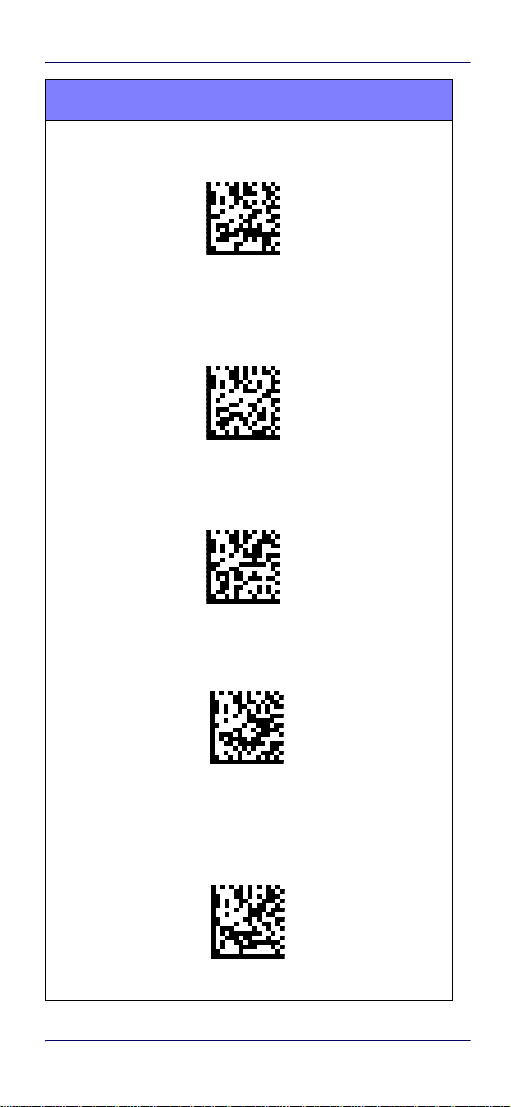
KEYBOARD (continued)
Selecting the Interface Type
AT, PS/2 25-286, 30-286, 50, 50Z, 60, 70, 80, 90 & 95
w/Alternate Key
Select KBD-AT-ALT
Keyboard Wedge for IBM AT PS2 with alternate key encoding
but without external keyboard
Select KBD-AT-ALT-NK
PC/XT w/Standard Key Encoding
Select KBD-XT
Keyboard Wedge for IBM Terminal 3153
Select KBD-IBM-3153
Keyboard Wedge for IBM Terminals 31xx, 32xx, 34xx, 37xx
make break keyboard
Select KBD-IBM-MB
Quick Reference Guide 7
Loading…
[78] Санкт-Петербург
[47] Ленинградская область
[77] г. Москва
[01] Республика Адыгея (Адыгея)
[03] Республика Бурятия
[04] Республика Алтай
[05] Республика Дагестан
[07] Кабардино-Балкарская Республика
[09] Карачаево-Черкесская Республика
[10] Республика Карелия
[11] Республика Коми
[12] Республика Марий Эл
[13] Республика Мордовия
[14] Республика Саха (Якутия)
[15] Республика Северная Осетия — Алания
[16] Республика Татарстан
[17] Республика Тыва
[18] Удмуртская Республика
[19] Республика Хакасия
[20] Чеченская Республика
[21] Чувашская Республика — Чувашия
[22] Алтайский край
[23] Краснодарский край
[24] Красноярский край
[25] Приморский край
[26] Ставропольский край
[27] Хабаровский край
[28] Амурская область
[29] Архангельская область
[30] Астраханская область
[31] Белгородская область
[32] Брянская область
[33] Владимирская область
[34] Волгоградская область
[35] Вологодская область
[36] Воронежская область
[37] Ивановская область
[38] Иркутская область
[39] Калининградская область
[40] Калужская область
[42] Кемеровская область
[43] Кировская область
[44] Костромская область
[45] Курганская область
[46] Курская область
[48] Липецкая область
[50] Московская область
[51] Мурманская область
[52] Нижегородская область
[53] Новгородская область
[55] Омская область
[56] Оренбургская область
[57] Орловская область
[58] Пензенская область
[59] Пермский край
[60] Псковская область
[61] Ростовская область
[62] Рязанская область
[63] Самарская область
[64] Саратовская область
[65] Сахалинская область
[66] Свердловская область
[67] Смоленская область
[68] Тамбовская область
[69] Тверская область
[70] Томская область
[71] Тульская область
[72] Тюменская область
[73] Ульяновская область
[74] Челябинская область
[75] Забайкальский край
[76] Ярославская область
[79] Еврейская автономная область
[83] Ненецкий автономный округ
[86] Ханты-Мансийский автономный округ — Югра
[89] Ямало-Ненецкий автономный округ
[91] Республика Крым
[92] Севастополь
[93] Донецкая Народная Республика
[94] Луганская Народная Республика
[95] Херсонская область