
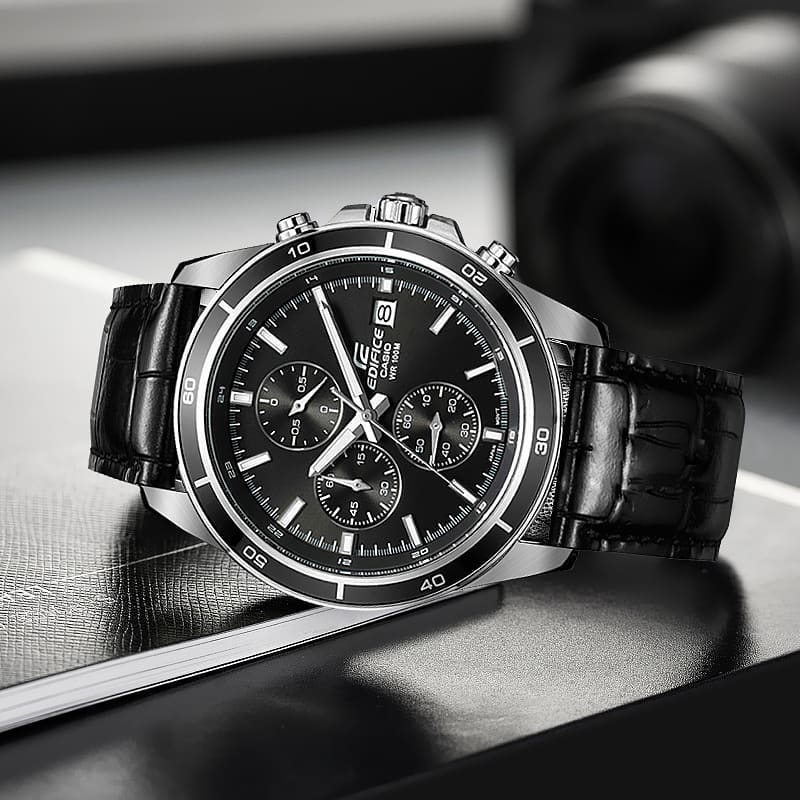
Casio EFR-526 / линейка Edifice / модуль 5345 / год 2014
Инструкция к модулю Casio 5345
- Смотреть онлайн → (без скачивания, удобно на мобильных и планшетах);
- Скачать русскую инструкцию → (типичная «как у всех», не всегда понятные картинки);
- Скачать английскую инструкцию → (детальная, много фото, более понятная).
Сложно настроить? Спрашивай на форуме Edifice →
Читайте новости о любимых часах EFR-526 на блоге
[display-posts tag=»EFR-526″ posts_per_page=»4″]
Все новости о EFR-526 →
Побывайте на заводе Casio, изучайте последние новинки Edifice на Casioblog.RU
1
Operation Guide 5345
MA1212-EA
#!3)/#/-054%2#/,4$
To change the day indicator setting
To adjust the time setting
Pull the Crown out to Click 1.
Push the Crown back in.
Push the Crown back in.
Rotate the Crown to change the
time setting.
When the second hand is at
12 o’clock, pull the
Crown out to
Click 2.
Rotate the Crown to set the day.
Note
Take care that you set the correct AM
x
or PM time.
When changing the time, move the
x
minute hand four or fi ve minutes past
your fi nal setting, and then back it up
to the setting you want.
Note
The day indicator setting uses a 31-
x
day month. Make adjustments for
months of shorter lengths.
Avoid changing the day indicator
x
setting between the hours of 9
p.m. and 1 a.m. Otherwise, the day
indicator may not change correctly at
midnight.
Specifi cations
Accuracy: ±20 seconds average per month
Stopwatch: Measuring Capacity: 59’59.9″ (60 minutes)
Measuring Unit: 1/10 second
Measurements: Elapsed time; split time; two fi nishes
Battery: One silver oxide battery (Type: SR920SW)
Battery Life: Approximately 2 years (60 minutes stopwatch operation per day)
Stopwatch functions
Crown Operations
Some water-resistant models (100 meters, 200 meters)
have a screw-in crown. When you need to perform a crown
operation, rotate it towards you to unscrew it. Then pull
the crown out. Avoid applying undue force when pulling.
The watch loses its water resistance while the crown is
unscrewed. After performing a crown operation, fully screw
the crown back in.
CrownLoosen
If your watch has a rotary bezel…
You can rotate the bezel to align its
▼
mark with the
minute hand. Then you will be able to tell how much
time has elapsed since aligning the
▼
mark.
StartElapsed timeCurrent
Your watch may differ somewhat from the one shown in the illustration. x
Some models may use a combination of hands and rotating disks to indicate x
information. The word “hand” in this section is used to mean both analog hands
and rotating disks.
Using the Stopwatch
Elapsed time
A
A
A A
B
Start Stop Re-start Stop Reset
Split time
A
B
B A
B
Start Split Split release Stop Reset
Two fi nishes
A
B
A B
B
Start SplitFirst runner fi nishes.Display time of fi rst runner.
Stop
Second runner fi nishes.Split releaseDisplay time of second runner.Reset
Important!
Do not operate the stopwatch with the crown pulled out.
x
Note
An elapsed time operation will stop automatically at the end of 60 minutes.
x
The stopwatch measures elapsed time in 1/10-second increments up to 59 minutes,
59.9 seconds.
Perform the following procedure if the stopwatch hands do not return to their 0 (zero)
positions when you reset the stopwatch.
Correcting the 0 Positions of the Hands
Pull the Crown out to Click 2.
Press A to move the
Stopwatch 1/10-Second Hand
clockwise.
Holding down x A will move the hand at high speed.
Press B to move the
Stopwatch Second Hand
clockwise.
Holding down
x B will move the hand at high speed.
The
x
Stopwatch Minute Hand
is synchronized with the
Stopwatch Second Hand
.
After all of the hands are the way you want, push the Crown back in.
Important!
Timekeeping stops while the crown is pulled out. Correct the current time setting
x
after performing the above operation.
Second HandDay IndicatorClick 2Click 1Hour HandMinute Hand
A
B
Crown Stopwatch Minute Hand Stopwatch 1/10-Second Hand Stopwatch Second Hand
Casio Watch Line: Edifice
Module number: 5345
Manual in PDF: Watch 5345 Online → (without downloading, good for mobile);
English Instruction Manual in PDF: Download
Like your watch? Enjoy our recent news about EFR-526 Series


All Edifice EFR-526 News →
Being a fan of CASIO watches since 2009, I strive to share my passion and knowledge with others. Through publishing short notes and curating all listings on this site, I hope to inspire fellow enthusiasts to explore the world of high-quality CASIO watches. A proud owner of GST-B200, GG-1000, GA-110. Remember: Fake Watches are for Fake People.
1
Operation Guide 5345
MA1212-EA
#!3)/#/-054%2#/,4$
To change the day indicator setting
To adjust the time setting
Pull the Crown out to Click 1.
Push the Crown back in.
Push the Crown back in.
Rotate the Crown to change the
time setting.
When the second hand is at
12 o’clock, pull the
Crown out to
Click 2.
Rotate the Crown to set the day.
Note
Take care that you set the correct AM
x
or PM time.
When changing the time, move the
x
minute hand four or fi ve minutes past
your fi nal setting, and then back it up
to the setting you want.
Note
The day indicator setting uses a 31-
x
day month. Make adjustments for
months of shorter lengths.
Avoid changing the day indicator
x
setting between the hours of 9
p.m. and 1 a.m. Otherwise, the day
indicator may not change correctly at
midnight.
Specifi cations
Accuracy: ±20 seconds average per month
Stopwatch: Measuring Capacity: 59’59.9″ (60 minutes)
Measuring Unit: 1/10 second
Measurements: Elapsed time; split time; two fi nishes
Battery: One silver oxide battery (Type: SR920SW)
Battery Life: Approximately 2 years (60 minutes stopwatch operation per day)
Stopwatch functions
Crown Operations
Some water-resistant models (100 meters, 200 meters)
have a screw-in crown. When you need to perform a crown
operation, rotate it towards you to unscrew it. Then pull
the crown out. Avoid applying undue force when pulling.
The watch loses its water resistance while the crown is
unscrewed. After performing a crown operation, fully screw
the crown back in.
CrownLoosen
If your watch has a rotary bezel…
You can rotate the bezel to align its
▼
mark with the
minute hand. Then you will be able to tell how much
time has elapsed since aligning the
▼
mark.
StartElapsed timeCurrent
Your watch may differ somewhat from the one shown in the illustration. x
Some models may use a combination of hands and rotating disks to indicate x
information. The word “hand” in this section is used to mean both analog hands
and rotating disks.
Using the Stopwatch
Elapsed time
A
A
A A
B
Start Stop Re-start Stop Reset
Split time
A
B
B A
B
Start Split Split release Stop Reset
Two fi nishes
A
B
A B
B
Start SplitFirst runner fi nishes.Display time of fi rst runner.
Stop
Second runner fi nishes.Split releaseDisplay time of second runner.Reset
Important!
Do not operate the stopwatch with the crown pulled out.
x
Note
An elapsed time operation will stop automatically at the end of 60 minutes.
x
The stopwatch measures elapsed time in 1/10-second increments up to 59 minutes,
59.9 seconds.
Perform the following procedure if the stopwatch hands do not return to their 0 (zero)
positions when you reset the stopwatch.
Correcting the 0 Positions of the Hands
Pull the Crown out to Click 2.
Press A to move the
Stopwatch 1/10-Second Hand
clockwise.
Holding down x A will move the hand at high speed.
Press B to move the
Stopwatch Second Hand
clockwise.
Holding down
x B will move the hand at high speed.
The
x
Stopwatch Minute Hand
is synchronized with the
Stopwatch Second Hand
.
After all of the hands are the way you want, push the Crown back in.
Important!
Timekeeping stops while the crown is pulled out. Correct the current time setting
x
after performing the above operation.
Second HandDay IndicatorClick 2Click 1Hour HandMinute Hand
A
B
Crown Stopwatch Minute Hand Stopwatch 1/10-Second Hand Stopwatch Second Hand
Перейти к контенту

Русские электронные инструкции по эксплуатации
Постоянно обновляемый большой каталог документации по эксплуатации и использованию современных устройств и оборудования на русском языке. Бесплатное скачивание файлов.
Поиск:
Главная
♥ В закладки
Просмотр инструкции в pdf
Инструкция по эксплуатации наручных часов Casio Edifice EFR-526L-1A.
Скачать инструкцию к наручным часам Casio Edifice EFR-526L-1A (237,48 КБ)
Инструкции наручных часов Casio
« Инструкция к наручным часам Casio W-96H-1A
» Инструкция к наручным часам Casio MTP-1303PD-1A
Вам также может быть интересно
Инструкция к наручным часам Casio AW-90H-9E

Инструкция к наручным часам Casio Pro Trek PRG-270-1E
Инструкция к наручным часам Casio LTP-2069D-7A2

Инструкция к наручным часам Casio BGA-131-7B
Инструкция к наручным часам Casio B640WD-1A
Инструкция к наручным часам Casio G-SHOCK G-9000-1V

Инструкция к наручным часам Casio BA-110-4A2

Инструкция к наручным часам Casio G-SHOCK DW-6935C-4E
Добавить комментарий
Имя *
Email *
Сайт
Комментарий
Сохранить моё имя, email и адрес сайта в этом браузере для последующих моих комментариев.
- Добавить инструкцию
- Заказать инструкцию
- Политика конфиденциальности