
Table of Contents
- TINY DEAL BTS06 Bluetooth Speaker
- What’s Included
- Volume/ Audio Track Functions
- FCC Statement
- RF Exposure Information
- Read User Manual Online (PDF format)
- Download This Manual (PDF format)
TINY DEAL BTS06 Bluetooth Speaker
Product Specifications
- Compliance: FCC Part 15
- RF Exposure: General RF exposure requirement met
- Usage: Portable exposure condition without restrictions
Frequently Asked Questions (FAQ)
Q: What should I do if the device causes interference?
A: If the device causes interference, try repositioning it or moving it away
from other electronic devices to minimize interference.
Q: Can I use the device in areas with specific RF exposure restrictions?
A: As per the RF Exposure Information provided, the device can be used in
portable exposure conditions without restrictions. However, always adhere to
specific regulations in your area.
What’s Included
- Grip Speaker
- USB Charging Cable
- User Manual
Charging
Before using your Grip Speaker,
please charge using the Included micro USB cable.
Please note: Most USB chargers are compatible with Speaker. For optimal AC
charging, please use a 1.0A USB Charger.
On/Off
Splash Grip Speaker can be powered On or Off by a long press on the “Power
On/Off” multi-function button of the Speaker.
Pairing
- After switching thePower On/Off/M” button, the Speaker will Power On &automatically enter pairing mode. A blue light will rapidly blink on the Speaker.
- On your Mobile Device, search for the pairing menu.
- A list of available devices will show available for pairing.
- Select BTS-06/BTS-07″& the speaker will automatically pair with your device for use.
- Once paired to your mobile device the Speaker will automatically re-pair if shutdown or powered off and back on.
Volume/ Audio Track Functions
- Raise Volume by long press the multifunction button “Raise Volume/ Switch Tracks” or by pressing volume button on your mobile device
- Lower Volume by long press the multifunction button “Lower Volume/ Switch Tracks” or by pressing volume button on your mobile device
- To switch to the next audio track, short press “Raise Volume/ Switch Tracks” multifunction button.
BT Pairing
- After Pairing mobile device, begin playing audio from mobile device to stream audio. Short single press “Play/Pause” function button to play or pause streaming audio.
- To switch to the next audio track, short press “Raise Volume/ Switch Tracks” multifunction button.
Answering/ Ending calls
- For Incoming Calls short press the “Play/Pause” multifunction button to pick up or hang up the call
- Double tap the “Play/ Pause” multifunction button to redial the last dialed number
- Verslon:5.0
- Range:10M
- Battery Capacity:400 mAh
- Power input: DC 5V Micro USB Cable
- Output Power 3 W
- Playing Time Up to 2 Hours
- Input Power Supply DC 5V
- The Playback Time mentioned may vary by user operation mode & device settings
FCC Statement
This device complies with part 15 of the FCC Rules. Operation is subject to
the following two conditions:
- This device may not cause harmful interference, and
- This device must accept any interference received, including interference that may cause undesired operation.
This equipment has been tested and found to comply with the limits for a Class
B digital device, pursuant to part 15 of the FCC Rules. These limits are
designed to provide reasonable protection against harmful interference in a
residential installation. This equipment generates, uses and can radiate radio
frequency energy and, if not installed and used in accordance with the
instructions, may cause harmful interference to radio communications. However,
there is no guarantee that interference will not occur in a particular
installation. If this equipment does cause harmful interference to radio or
television reception, which can be determined by turning the equipment off and
on, the user is encouraged to try to correct the interference by one or more
of the following measures:
- Reorient or relocate the receiving antenna.
- Increase the separation between the equipment and receiver.
- Connect the equipment into an outlet on a circuit different from that to which the receiver is connected.
- Consult the dealer or an experienced radio/TV technician for help.
Caution: Any changes or modifications to this device not explicitly
approved by manufacturer could void your authority to operate this equipment.
RF Exposure Information
The device has been evaluated to meet general RF exposure requirement. The
device can be used in portable exposure condition without restriction.
Read User Manual Online (PDF format)
Read User Manual Online (PDF format) >>
Download This Manual (PDF format)
Download this manual >>
Highlight all
Match case
Current View
Current View
Enter the password to open this PDF file:
File name:
—
File size:
—
Title:
—
Author:
—
Subject:
—
Keywords:
—
Creation Date:
—
Modification Date:
—
Creator:
—
PDF Producer:
—
PDF Version:
—
Page Count:
—
Preparing document for printing…
0%
Related Documents
| External photos | External Photos | |
| Label | ID Label/Location Info | |
| Label location | ID Label/Location Info | |
| Internal photos | Internal Photos | |
| User manual | Users Manual |
| Document ID | 2821030 |
| Application ID | KkhqIdk6ZqP9gjrXPFPw4Q== |
| Document Description | User manual |
| Download: | |
| Mirror Download [FCC.gov] | |
| Short Term Confidential | No |
| Permanent Confidential | No |
| Supercede | No |
| Document Type | User Manual |
| Display Format | Adobe Acrobat PDF — pdf |
| Filesize | 41.01kB (512649 bits) |
| Date Submitted | 2015-11-24 00:00:00 |
| Date Available | 2015-11-24 00:00:00 |
| Creation Date | 2015-11-12 15:36:44 |
| Producing Software | Corel PDF Engine Version 16.1.0.843 |
| Document Lastmod | 2015-11-16 16:20:30 |
| Document Title | 未命å -1 |
| Document Creator | CorelDRAW X6 |
| Document Author: | Administrator |
Source Exif Data [exif.tools]:
File Type                       : PDF
File Type Extension             : pdf
MIME Type                       : application/pdf
PDF Version                     : 1.6
Linearized                      : No
XMP Toolkit                     : 3.1-701
Create Date                     : 2015:11:12 15:36:44+08:00
Creator Tool                    : CorelDRAW X6
Modify Date                     : 2015:11:16 16:20:30+08:00
Metadata Date                   : 2015:11:16 16:20:30+08:00
Format                          : application/pdf
Creator                         : Administrator
Title                           : 未命名 -1
Producer                        : Corel PDF Engine Version 16.1.0.843
Document ID                     : uuid:be413288-56ac-43d7-801c-3b7e62b582c9
Instance ID                     : uuid:e03cbd8c-f61a-4702-8723-987e6387e990
Page Count                      : 3
Profile CMM Type                : Lino
Profile Version                 : 2.1.0
Profile Class                   : Display Device Profile
Color Space Data                : RGB
Profile Connection Space        : XYZ
Profile Date Time               : 1998:02:09 06:49:00
Profile File Signature          : acsp
Primary Platform                : Microsoft Corporation
CMM Flags                       : Not Embedded, Independent
Device Manufacturer             : IEC
Device Model                    : sRGB
Device Attributes               : Reflective, Glossy, Positive, Color
Rendering Intent                : Perceptual
Connection Space Illuminant     : 0.9642 1 0.82491
Profile Creator                 : HP
Profile ID                      : 0
Profile Copyright               : Copyright (c) 1998 Hewlett-Packard Company
Profile Description             : sRGB IEC61966-2.1
Media White Point               : 0.95045 1 1.08905
Media Black Point               : 0 0 0
Red Matrix Column               : 0.43607 0.22249 0.01392
Green Matrix Column             : 0.38515 0.71687 0.09708
Blue Matrix Column              : 0.14307 0.06061 0.7141
Device Mfg Desc                 : IEC http://www.iec.ch
Device Model Desc               : IEC 61966-2.1 Default RGB colour space - sRGB
Viewing Cond Desc               : Reference Viewing Condition in IEC61966-2.1
Viewing Cond Illuminant         : 19.6445 20.3718 16.8089
Viewing Cond Surround           : 3.92889 4.07439 3.36179
Viewing Cond Illuminant Type    : D50
Luminance                       : 76.03647 80 87.12462
Measurement Observer            : CIE 1931
Measurement Backing             : 0 0 0
Measurement Geometry            : Unknown
Measurement Flare               : 0.999%
Measurement Illuminant          : D65
Technology                      : Cathode Ray Tube Display
Red Tone Reproduction Curve     : (Binary data 2060 bytes, use -b option to extract)
Green Tone Reproduction Curve   : (Binary data 2060 bytes, use -b option to extract)
Blue Tone Reproduction Curve    : (Binary data 2060 bytes, use -b option to extract)
Author                          : Administrator
30255
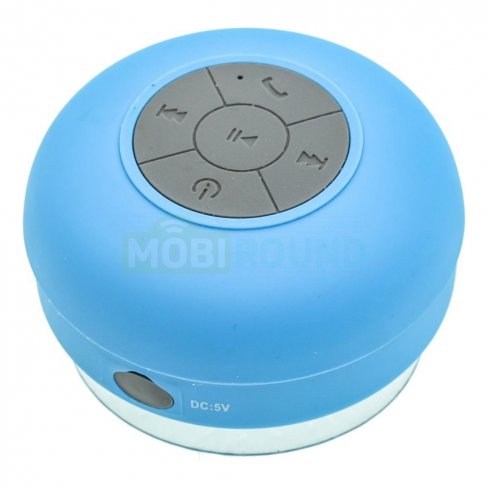
Акустика портативная (колонка) BTS-06 водонепроницаемая (Bluetooth)
Товар купили: 68 раз
На складе 2 шт. Ожидаем 0 шт. Отсутствует на складе
Доставка →
с учетом товаров в корзине
Предоплата
При получении
- DPD (пункт выдачи)
-
1 дн.
199
259
- DPD (курьер)
-
1 дн.
199
259
- СДЭК (пункт выдачи)
-
1 дн.
199
259
- СДЭК (курьер)
-
1 дн.
199
259
- Почта России (1 класс)
-
1 дн.
199
259
- Почта России (посылка)
-
1 дн.
199
259
- EMS (курьер)
-
1 дн.
199
259
Описание товара
Водонепроницаемая колонка BTS-06 придется по вкусу всем любителям слушать музыку во время принятия ванны или душа. Прием сигнала происходит по Bluetooth каналу на расстоянии до 15 метров, теперь можно не бояться что вода попадет в смартфон, ведь он может находиться даже в другой комнате.
Функция громкой связи при поступлении звонка на телефон превращает колонку в беспроводную гарнитуру поэтому, не покидая ванну, Вы сможете ответить на звонок.
Качественная присоска надежно крепится на любые гладкие поверхности.
Характеристики
- Производитель
- Noname (все товары)
- Тип
- моно
- Кол-во динамиков
- 1 шт.
- Мощность
- 3 Вт
- Bluetooth
- Встроенная батарея
- Емкость батареи
- 400 мАч
- Время работы от акб
- 7 ч
- Комплектация
- USB-кабель, колонка
- Водонепроницаемость
- Степень пылевлагозащиты
- IPX4
- Артикул
- 30254, 30255, 30253
- В упаковке
- 1 шт.
- Страна
- Китай
- Вес (с упаковкой)
- 125 — 126 г
- Размер (в упаковке)
- 86x54x87 мм, 85x54x88 мм