
ManualsPro
Behringer
behringer HC 2000B Studio-Quality Wireless Headphones User Guide
- June 7, 2024
- Behringer
Table of Contents
- Controls
- Getting started
- Power Supply
- Turning the unit on/of
- Bluetooth pairing
- Using A Bluetooth Device
- Receiving A Phone Call
- Using the AUX IN Jack
- Troubleshooting
- Specification
- Documents / Resources
- References
- Read User Manual Online (PDF format)
- Download This Manual (PDF format)
behringer HC 2000B Studio-Quality Wireless Headphones
Controls
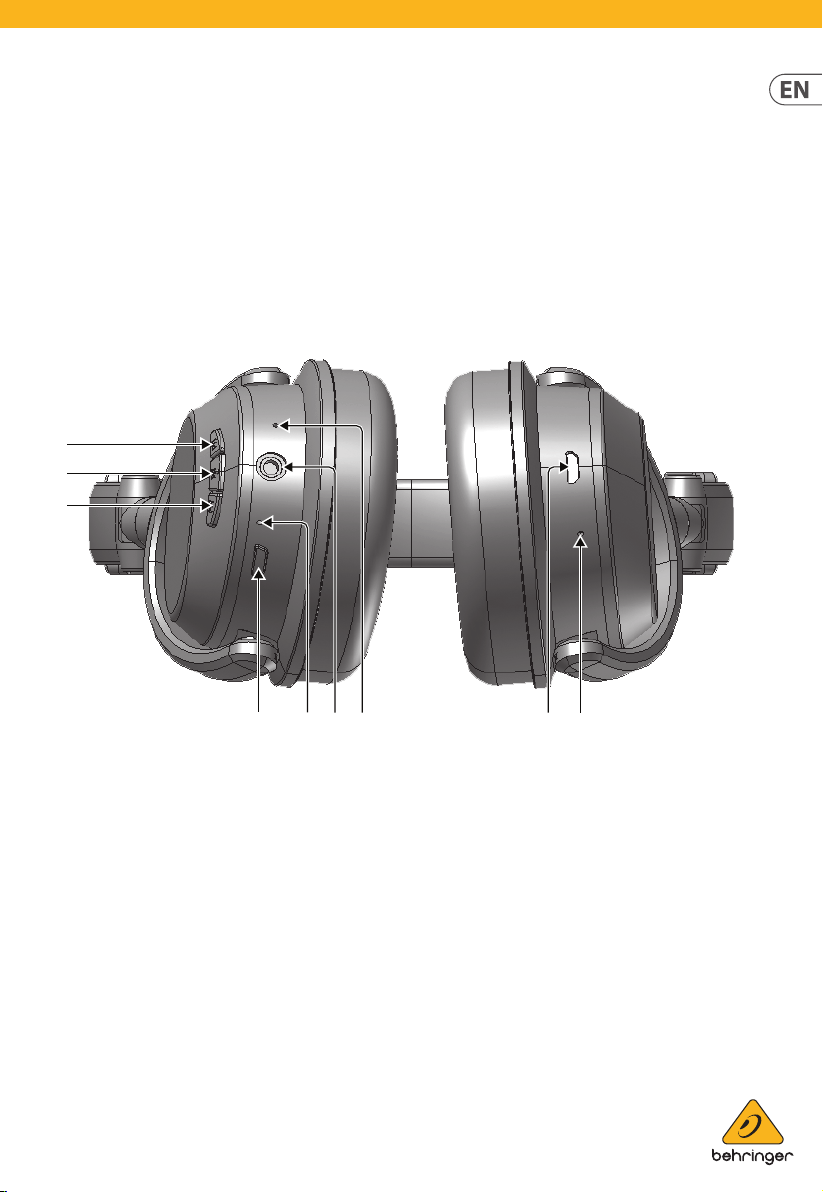
- POWER button switches the headphones on and off.
- PLAY/PAUSE button begins and pauses audio playback. Secondary call functions include Answer Call/End Call/Reject Call (press and hold).
- MICRO USB jack is for charging rechargeable batteries.
- MICROPHONE can be used for talkback during phone calls.
- AUX IN stereo jack can be used to listen to audio from external devices as normal wired headphones using audio cables with 3.5 mm stereo connectors.
- BLUETOOTH LED shows the Bluetooth status (blinking blue and red = in pairing mode; blue = connected; blinking blue = audio playback underway).
- CHARGE LED shows the charge status (red = charging; blue = fully charged).
- FORWARD/VOLUME button can be used to increase volume (short press), skip to the next song (long press), or begin/end a phone call on a Bluetooth-connected mobile phone.
- BACK/VOLUME button can be used to decrease volume (short press) or skip to the previous song (long press).
Getting started
Power Supply
The unit is powered by a built-in, lithium-polymer rechargeable battery.
Charge the built-in battery for at least four hours before using the device
for the first time.
To charge the internal battery, follow these steps:
- Connect the smaller end of the supplied USB cable to the MICRO USB jack.
- Connect the other end to a powered USB jack on your computer or an AC power supply (not included).
- The CHARGE LED indicator will change color to red during charging.
- When fully charged, the CHARGE LED indicator will turn blue
Warnings:
- Do not throw batteries in fire!
- While using the built-in battery, the environmental temperature should be 5° C (41° F) to 35° C (95° F).
- To get the longest service life for the built-in battery, charge at room temperature.
- Attention should be drawn the environmental aspects of battery disposal.
- Battery shall not be exposed to excessive heat such as sunshine, fire or the like.
- When the battery is low, the unit will beep every 20 seconds. The unit will turn off automatically when the battery is too low to work.
Turning the unit on/of
- Long press the POWER button to turn ON the unit. The BLUETOOTH LED indicator will light on.
- Long press the POWER button again turn OFF the unit. The BLUETOOTH LED indicator will turn of
Bluetooth pairing
- Long press to turn ON the unit. The BLUETOOTH LED indicator will blink blue and red alternately to indicate the unit is in pairing mode.
- On the Bluetooth device, enable Bluetooth and select “HC 2000B” from the Device List. (Refer to the user manual of your Bluetooth device for detailed operations.)
- If the Bluetooth device prompts for a passcode, use “0000”.
Some Bluetooth devices will ask you to accept and confirm the connection. If
the units are paired properly, you will hear an indication sound. If pairing
is not successful within 10 minutes, the headphones will turn off
automatically.
NOTE : If you want to connect your headphones to another Bluetooth audio
device, you need to disconnect the current device first and follow the above
steps to make a new connection.
Using A Bluetooth Device
- When successfully paired, sound from your Bluetooth device will be audible through the headphones.
- Press the PLAY/PAUSE button to pause playback. Press again to resume playback.
- Short press the FORWARD/BACK buttons to adjust the headphone volume. You can also adjust the volume directly on your paired Bluetooth device.
- Long press the FORWARD/BACK buttons to select your desired audio file
NOTE : The BLUETOOTH LED indicator will blink blue during playback.
Receiving A Phone Call
These headphones are equipped with a built-in microphone, which allows you to
make calls on a Bluetooth-enabled mobile phone. Make sure your Bluetooth-
enabled mobile phone is paired with the headphones. When a call comes in to
the connected mobile phone, you will hear an incoming call alert on the
headphones.
- . Press the FORWARD button to answer the incoming call.
- Press the FORWARD button again to end the call.
- The reject the incoming call, press and hold the BACK button.
- To transfer the sound between the headphones and the mobile phone, press and hold the PLAY/PAUSE button during the call.
Using the AUX IN Jack
-
Insert one end of the audio cable into the LINE OUT or headphone jack on your external audio device.
-
Connect the other end of the cable to the AUX IN 3.5 mm stereo jack on the headphones.
NOTE: If the headphones are in ON mode, the headphones will automatically turn
off once the audio cable is plugged in and will work as normal, wired
headphones. -
Begin playback on the external device. The external device’s sound output will be heard through the headphones.
-
To adjust volume, use the volume control on the external audio device.
-
When done, stop playback on the external device and disconnect the audio cable from the AUX IN jack on the headphones.
To prevent possible hearing damage, do not listen at high volume for long
periods.
Troubleshooting
No power
|
- Power is not on; Long press to turn ON the unit.
- Make sure the battery is charged.
—|—
The Bluetooth device cannot pair or connect with the headphones
|
- You have not activated the Bluetooth function on your device. Refer to your device’s user manual to activate the Bluetooth function.
- The unit is already paired with another Bluetooth device; disconnect that device and then try again.
IMPORTANT SAFETY INFORMATION
- Read these instructions.
- Keep these instructions.
- Heed all warnings.
- Follow all instructions.
- Do not use this apparatus near water.
- Clean only with dry cloth.
- Do not throw this product in the fire, to avoid explosion.
- Do not expose this product to bright sunshine for a long time.
- Do not disassemble or modify this product.
- Please store this product in a clean and dry environment
WARNING! To prevent possible hearing damage, do not listen at high volume
levels for long periods.
Specification
| Max. output voltage | ≤ 150 mV wide band |
|---|---|
| Characteristic voltage | ≥ 75 mV |
| Rechargeable battery |
Battery type
| 3.7 V 185 mAh
lithium-polymer battery
Charging power
| DC 5 V 300 mA
Operating time
| Up to 7 hours after fully charged
Charging time
| Appr. 2 – 3 hours
Bluetooth|
Version
| Version 5.0
Operating frequency
| 2.4 to 2.48 GHz
RF output power
| 0 dBm
Working distance| Up to 10 m measured in open space (wall and structures
may affect range of device)
LEGAL DISCLAIMER
Music Tribe accepts no liability for any loss which may be suffered by any
person who relies either wholly or in part upon any description, photograph,
or statement contained herein. Technical specifications, appearances and other
information are subject to change without notice.
All trademarks are the property of their respective owners. Midas, Klark
Teknik, Lab Gruppen, Lake, Tannoy, Turbosound, TC Electronic, TC Helicon,
Behringer, Bugera, Oberheim, Auratone, Aston Microphones, Aston Microphones
and Coolaudio are trademarks or registered trademarks of Music Tribe Global
Brands Ltd. © Music Tribe Global Brands Ltd. 2021 All rights reserved.
LIMITED WARRANTY
For the applicable warranty terms and conditions and additional information
regarding Music Tribe’s Limited Warranty, please see complete details online
at musictribe.com/warranty.
FEDERAL COMMUNICATIONS COMMISSION COMPLIANCE INFORMATION
Behringer
HC 2000B
FCC ID: QWH-MTHP-02
HC 2000B
This equipment has been tested and found to comply with the limits for a Class
B digital device, pursuant to part 15 of the FCC Rules. These limits are
designed to provide reasonable protection against harmful interference in a
residential installation.
This equipment generates, uses and can radiate radio frequency energy and, if
not installed and used in accordance with the instructions, may cause harmful
interference to radio communications.
However, there is no guarantee that interference will not occur in a
particular installation. If this equipment does cause harmful interference to
radio or television reception, which can be determined by turning the
equipment off and on, the user is encouraged to try to correct the
interference by one or more of the following measures:
- Reorient or relocate the receiving antenna.
- Increase the separation between the equipment and receiver.
- Connect the equipment into an outlet on a circuit different from that to which the receiver is connected.
- Consult the dealer or an experienced radio/TV technician for help.
This device complies with Part 15 of the FCC rules. Operation is subject to
the following two conditions:
(1) this device may not cause harmful interference, and
(2) this device must accept any interference received, including
interference that may cause undesired operation.
Important information:
Changes or modifications to the equipment not expressly approved by Music
Tribe can void the user’s authority to use the equipment.
This equipment complies with FCC RF radiation exposure limits set forth for an
uncontrolled environment.
Hereby, Music Tribe declares that this product is in compliance with Directive
2014/53/EU, Directive 2014/30/EU, Directive 2014/35/EU, Directive 2011/65/EU
and Amendment 2015/863/EU, Directive 2012/19/EU, Regulation 519/2012 REACH
SVHC and Directive 1907/2006/EC.
Full text of EU DoC is available at https://community.musictribe.com/
EU Representative: Music Tribe Brands DK A/S
Address : Ib Spang Olsens Gade 17, DK – 8200 Aarhus N, Denmark
Responsible Party Name: Music Tribe Commercial NV Inc.
Address : 5270 Procyon Street, Las Vegas NV 89118, United States
Phone Number : +1 702 800 8290
Documents / Resources
|
behringer HC 2000B Studio-Quality Wireless
Headphones
[pdf] User Guide
HC 2000B, Studio-Quality Wireless Headphones
—|—
|
behringer HC 2000B Studio-Quality Wireless
Headphones
[pdf] User Guide
HC 2000B, Studio-Quality Wireless Headphones
|
behringer HC 2000B Studio Quality Wireless
Headphones
[pdf] User Manual
HC 2000B Studio Quality Wireless Headphones, HC 2000B, Studio Quality Wireless
Headphones, Quality Wireless Headphones, Wireless Headphones, Headphones
References
- Music Tribe
- Music Tribe
- Music Tribe
- Music Tribe
- Music Tribe
Read User Manual Online (PDF format)
Read User Manual Online (PDF format) >>
Download This Manual (PDF format)
Download this manual >>
Quick Start Guide
HC 2000B
Studio-Quality Wireless Headphones with
Bluetooth® Wireless Technology Connectivity
Controls
(8)
(2)
(9)
(1) (6) (5) (4) (3) (7)
(1) POWER button switches the headphones on and off.
(2) PLAY/PAUSE button begins and pauses audio
playback. Secondary call functions include Answer
Call/End Call/Reject Call (press and hold).
(3) MICRO USB jack is for charging rechargeable
batteries.
(4) MICROPHONE can be used for talkback during
phone calls.
(5) AUX IN stereo jack can be used to listen to audio from
external devices as normal wired headphones using
audio cables with 3.5 mm stereo connectors.
(6) BLUETOOTH LED shows the Bluetooth status
(blinking blue and red = in pairing mode;
blue = connected; blinking blue = audio
playback underway).
(7) CHARGE LED shows the charge status
(red = charging; blue = fully charged).
(8) FORWARD/VOLUME button can be used to
increase volume (short press), skip to the next
song (long press), or begin/end a phone call on a
Bluetooth-connected mobile phone.
(9) BACK/VOLUME button can be used to decrease
volume (short press) or skip to the previous song
(long press).

Getting started
Power Supply
The unit is powered by a built-in, lithium-polymer rechargeable
batter y. Charge the built-in b attery for at least f our hours before
using the device f or the rst time.
To charge the internal bat tery, follow these steps:
1. Connect the smaller end of the supplied USB cable to the
MICRO USB jack.
2. Conne ct the other end to a powered USB jack on your computer
or an AC power supply (not include d).
3. The CHARGE LED indicator will change color to red
during charging.
4. When f ully charged, the CHARGE LED indicator will turn blue.
⚠ Warnings:
• Do not throw batteries in re!
• While using the built-in bat tery, the environmental
temperature should be 5° C (41° F) to 35° C (95° F).
• To get the longest service life for the built-in battery, charge at
room temperature.
• Attention should be drawn the environmental aspects of
battery disposal.
• Battery shall not be exposed to excessive heat such as
sunshine, re or the like.
• When the battery is low, the unit will beep every 20 se conds.
The unit will turn o automatically when the bat tery is too low
to work.
Turning the unit on/o
1. Long press the POWER button to turn ON the unit. The
BLUETOOTH LED indicator will light on.
2. Long press the POWER button again turn OFF the unit. The
BLUETOOTH LED indicator will turn o .
3. If the Bluetooth device prompts for a passcode, use “0000”.
Some Bluetooth devices will ask you to accept and con rm the
connection. If the units are paired properly, you will hear an
indication sound. If pairing is not success ful within 10 minutes,
the headphones will turn o automatically.
NOTE: If you want to connect your headphones to another
Bluetooth audio device, you need to disconnec t the current device
rst and follow the above steps to make a new connection.
Using A Bluetooth Device
1. When successfully paired, sound from your Bluetooth device
will be audible through the headphones
2. Press the PLAY/PAUSE button to pause playback. Press again to
resume playback.
3. Shor t press the FORWARD/BACK buttons to adjust the
headphone volume. You can also adjust the volume dire ctly on
your paired Bluetooth device.
4. Long press the FORWARD/BACK buttons to select your desired
audio le.
NOTE: The BLUETOOTH LED indicator will blink blue
during playback.
Receiving A Phone Call
These headphones are equipped with a built-in microphone, which
allows you to make calls on a Bluetooth-enabled mobile phone.
Make sure your Bluetooth-enabled mobile phone is paired with the
headphones. When a call comes in to the connected mobile phone,
you will hear an incoming call alert on the headphones.
1. Press the FORWARD button to answer the incoming call.
2. Press the FORWARD button again to end the call.
3. The reject the incoming call, press and hold the BACK but ton.
4. To transfer the sound bet ween the headphones and the mobile
phone, press and hold the PLAY/PAUSE button during the call.
Bluetooth pairing
1. Long press to turn ON the unit. The BLUETOOTH LED indicator
will blink blue and red alternately to indicate the unit is in
pairing mode.
2. On the Bluetooth device, enable Bluetooth and selec t “HC
2000B” from the Device List. (Refer to the user manual of your
Bluetooth device for detailed operations.)
Behringer HC 2000B Quick Start Guide
Studio-Quality Wireless Headphones with Bluetooth* Connectivity
Controls
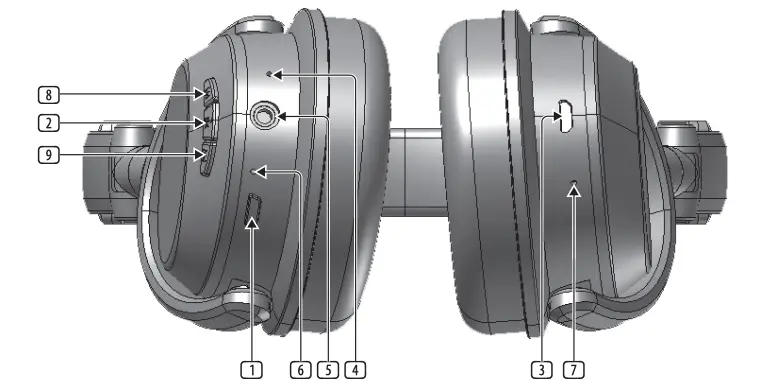
- POWER button switches the headphones on and off.
- PLAY/PAUSE button begins and pauses audio playback. Secondary call functions include Answer Call/End Call/Reject Call (press and hold).
- MICRO USB jack is for charging rechargeable batteries.
- MICROPHONE can be used for talkback during phone calls.
- AUX IN stereo jack can be used to listen to audio from external devices as normal wired headphones using audio cables with 3.5 mm stereo connectors.
- BLUETOOTH LED shows the Bluetooth status (blinking blue and red = in pairing mode; blue = connected; blinking blue = audio playback underway).
- CHARGE LED shows the charge status (red = charging; blue = fully charged).
- FORWARD/VOLUME button can be used to increase volume (short press), skip to the next song (long press), or begin/end a phone call on a Bluetooth-connected mobile phone.
- BACK/VOLUME button can be used to decrease volume (short press) or skip to the previous song (long press).
Getting started
Power Supply
The unit is powered by a built-in, lithium-polymer rechargeable battery. Charge the built-in battery for at least four hours before using the device for the first time.
To charge the internal battery, follow these steps:
- Connect the smaller end of the supplied USB cable to the MICRO USB jack.
- Connect the other end to a powered USB jack on your computer or an AC power supply (not included).
- The CHARGE LED indicator will change color to red during charging.
- When fully charged, the CHARGE LED indicator will turn blue.
- Do not throw batteries in fire!
- While using the built-in battery, the environmental temperature should be 5° C (41° F) to 35° C (95° F).
- To get the longest service life for the built-in battery, charge at room temperature.
- Attention should be drawn the environmental aspects of battery disposal.
- Battery shall not be exposed to excessive heat such as sunshine, fire or the like.
- When the battery is low, the unit will beep every 20 seconds. The unit will turn off automatically when the battery is too low to work.
Turning the unit on/off
- Long press the POWER button to turn ON the unit. The BLUETOOTH LED indicator will light on.
- Long press the POWER button again turn OFF the unit. The BLUETOOTH LED indicator will turn off.
Bluetooth pairing
- Long press to turn ON the unit. The BLUETOOTH LED indicator will blink blue and red alternately to indicate the unit is in pairing mode.
- On the Bluetooth device, enable Bluetooth and select “HC 2000B” from the Device List. (Refer to the user manual of your Bluetooth device for detailed operations.)
- If the Bluetooth device prompts for a passcode, use “0000”.
Some Bluetooth devices will ask you to accept and confirm the connection. If the units are paired properly, you will hear an indication sound. If pairing is not successful within 10 minutes, the headphones will turn off automatically.
NOTE: If you want to connect your headphones to another Bluetooth audio device, you need to disconnect the current device first and follow the above steps to make a new connection.
Using A Bluetooth Device
- When successfully paired, sound from your Bluetooth device will be audible through the headphones
- Press the PLAY/PAUSE button to pause playback. Press again to resume playback.
- Short press the FORWARD/BACK buttons to adjust the headphone volume. You can also adjust the volume directly on your paired Bluetooth device.
- Long press the FORWARD/BACK buttons to select your desired audio file.
NOTE: The BLUETOOTH LED indicator will blink blue during playback.
Receiving A Phone Call
These headphones are equipped with a built-in microphone, which allows you to make calls on a Bluetooth-enabled mobile phone. Make sure your Bluetooth-enabled mobile phone is paired with the headphones. When a call comes in to the connected mobile phone, you will hear an incoming call alert on the headphones.
- Press the FORWARD button to answer the incoming call.
- Press the FORWARD button again to end the call.
- The reject the incoming call, press and hold the BACK button.
- To transfer the sound between the headphones and the mobile phone, press and hold the PLAY/PAUSE button during the call.
Using the AUX IN Jack
- Insert one end of the audio cable into the LINE OUT or headphone jack on your external audio device.
- Connect the other end of the cable to the AUX IN 3.5 mm stereo jack on the headphones.
NOTE: If the headphones are in ON mode, the headphones will automatically turn off once the audio cable is plugged in and will work as normal, wired headphones. - Begin playback on the external device. The external device’s sound output will be heard through the headphones.
- To adjust volume, use the volume control on the external audio device.
- When done, stop playback on the external device and disconnect the audio cable from the AUX IN jack on the headphones.
To prevent possible hearing damage, do not listen at high volume for long periods.
IMPORTANT SAFETY INFORMATION
- Read these instructions.
- Keep these instructions.
- Heed all warnings.
- Follow all instructions.
- Do not use this apparatus near water.
- Clean only with dry cloth.
- Do not throw this product in the fire, to avoid explosion.
- Do not expose this product to bright sunshine for a long time.
- Do not disassemble or modify this product.
- Please store this product in a clean and dry environment.
Troubleshooting
| No power |
|
| The Bluetooth device cannot pair or connect with the headphones. |
|
Specification
| Max. output voltage | ≤ 150 mV wide band |
| Characteristic voltage | ≥ 75 mV |
| Rechargeable battery | |
| Battery type | 3.7 V 185 mAh lithium-polymer battery |
| Charging power | DC 5 V 300 mA |
| Operating time | Up to 7 hours after fully charged |
| Charging time | Appr. 2 – 3 hours |
| Bluetooth | |
| Version | Version 5.0 |
| Operating frequency | 2.4 to 2.48 GHz |
| RF output power | 0 dBm |
| Working distance | Up to 10 m measured in open space (wall and structures may affect range of device) |
FEDERAL COMMUNICATIONS COMMISSION COMPLIANCE INFORMATION SUPPLIER’S DECLARATION OF CONFORMITY (SDoC)
Behringer
HC 2000B
Responsible Party Name: Music Tribe Commercial NV Inc.
Address: 5270 Procyon Street Las Vegas, NV 89118 USA
Phone Number: +1 702 800 8290
FCC-ID: QWH-MTHP-02
HC 2000B
This equipment has been tested and found to comply with the limits for a ClassB digital device, pursuant to part 15 of the FCC Rules. These limits are designed to provide reasonable protection against harmful interference in a residential installation. This equipment generates, uses and can radiate radio frequency energy and, if not installed and used in accordance with the instructions, may cause harmful interference to radio communications. However, there is no guarantee that interference will not occur in a particular installation. If this equipment does cause harmful interference to radio or television reception, which can be determined by turning the equipment off and on, the user is encouraged to try to correct the interference by one or more of the following measures:
- Reorient or relocate the receiving antenna.
- Increase the separation between the equipment and receiver.
- Connect the equipment into an outlet on a circuit different from that to which the receiver is connected.
- Consult the dealer or an experienced radio/TV technician for help.
This device complies with part 15 of the FCC Rules. Operation is subject to the following two conditions: (1) This device may not cause harmful interference, and (2) this device must accept any interference received, including interference that may cause undesired operation.
Changes or modifications not expressly approved by the party responsible for compliance could void the user’s authority to operate the equipment.
Caution!
The Music Tribe is not responsible for any radio or TV interference caused by unauthorized modifications to this equipment.
Such modifications could void the user authority to operate the equipment FCC RF Radiation Exposure Statement.
FCC RF Radiation Exposure Statement:
- This Transmitter must not be co-located or operating in conjuction with any other antenna or transmitter.
- This equipment complies with FCC RF radiation exposure limits set forth for an uncontrolled environment.
LEGAL DISCLAIMER
Music Tribe accepts no liability for any loss which may be suffered by any person who relies either wholly or in part upon any description, photograph, or statement contained herein.Technical specifications, appearances and other information are subject to change without notice. All trademarks are the property of their respective owners. Midas, Klark Teknik, Lab Gruppen, Lake, Tannoy, Turbosound, TC Electronic, TC Helicon, Behringer, Bugera, Auratone and Coolaudio are trademarks or registered trademarks of Music Tribe Global Brands Ltd. © Music Tribe Global Brands Ltd. 2020 All rights reserved.
LIMITED WARRANTY
For the applicable warranty terms and conditions and additional information regarding Music Tribe’s Limited Warranty, please see complete details online at musictribe.com/warranty.
More Manuals From Behringer
Quick Start Guide
HC 2000B
Studio-Quality Wireless Headphones with
Bluetooth® Wireless Technology Connectivity
Controls
(1) POWER button switches the headphones on and off.
(2) PLAY/PAUSE button begins and pauses audio
playback. Secondary call functions include Answer
Call/End Call/Reject Call (press and hold).
(3) MICRO USB jack is for charging rechargeable
batteries.
(4) MICROPHONE can be used for talkback during
phone calls.
(5) AUX IN stereo jack can be used to listen to audio from
external devices as normal wired headphones using
audio cables with 3.5 mm stereo connectors.
(6) BLUETOOTH LED shows the Bluetooth status
(blinking blue and red = in pairing mode;
blue = connected; blinking blue = audio
playback underway).
(7) CHARGE LED shows the charge status
(red = charging; blue = fully charged).
(8) FORWARD/VOLUME button can be used to
increase volume (short press), skip to the next
song (long press), or begin/end a phone call on a
Bluetooth-connected mobile phone.
(9) BACK/VOLUME button can be used to decrease
volume (short press) or skip to the previous song
(long press).
(1) (6) (5) (4) (3) (7)
(2)
(9)
(8)
Behringer HC 2000B Quick Start Guide
Behringer HC 2000B Specification
The Behringer HC 2000B is a high-performance set of wireless Bluetooth headphones designed for both casual and professional use, offering exceptional sound quality and comfort. These headphones are engineered with high-definition speaker drivers that deliver a wide frequency response and dynamic sound, making them suitable for various audio applications. The HC 2000B supports Bluetooth 5.0 technology, ensuring seamless wireless connectivity with a range of devices, including smartphones, tablets, and laptops, for up to 10 meters.
With a built-in rechargeable lithium-ion battery, the HC 2000B provides up to 14 hours of continuous playback time, allowing users to enjoy extended listening sessions without frequent recharging. The headphones feature an integrated microphone, enabling hands-free calling and voice assistant support for added convenience. The ergonomic design includes adjustable headbands and plush ear cushions that offer maximum comfort during prolonged use.
The HC 2000B also includes a 3.5mm audio cable, offering users the flexibility to connect to non-Bluetooth devices or continue listening when the battery is depleted. The intuitive onboard controls allow for easy management of volume, track selection, and call handling directly from the headphones. Additionally, the foldable design facilitates compact storage, making it ideal for travel and portability. The Behringer HC 2000B combines high-quality audio performance with practical features, catering to users seeking reliable and versatile wireless headphones.
To pair your Behringer HC 2000B headphones, turn on the device and enable pairing mode by holding the power button until the LED indicator starts flashing. Then, enable Bluetooth on your device, find ‘Behringer HC 2000B’ in the list of available devices, and select it to pair.
If your headphones are not charging, check the charging cable and port for any debris or damage. Ensure the charger is functioning by testing it with another device. If the issue persists, try using a different cable or power source.
To reset your Behringer HC 2000B headphones, turn them off, then press and hold the power button for 10 seconds until you see the LED flash red and blue. This indicates the reset is complete, and you can now pair it again with your device.
Poor sound quality can be due to interference or low battery. Ensure your headphones are fully charged and within range of the Bluetooth device. Check for any obstructions or interference from other wireless devices and try adjusting the audio settings on your source device.
To maintain battery life, avoid overcharging the headphones. Disconnect the charger once fully charged. Store the headphones in a cool, dry place, and charge them at least once every three months if not in use.
Use a soft, slightly damp cloth to wipe the exterior surfaces of the headphones. Avoid using any harsh chemicals or abrasives. For the ear pads, use a dry cloth to remove dust and debris.
It is not recommended to use the Behringer HC 2000B while charging as it can lead to battery degradation over time. For optimal battery health, it’s best to use them when they are not connected to a charger.
As of now, the Behringer HC 2000B does not support firmware updates. Check the Behringer website or contact customer support for any future updates or instructions.
First, check the audio balance settings on your device to ensure it’s not set to one side. Inspect the headphones for any visible damage. If the problem persists, try connecting to another device to rule out a source issue. If still unresolved, contact Behringer support for assistance.
The Behringer HC 2000B headphones can last up to 14 hours on a full charge, depending on usage and volume levels.