

P8B75-V
Motherboard

E7641
First Edition
July 2012
Copyright © 2012 ASUSTeK COMPUTER INC. All Rights Reserved.
No part of this manual, including the products and software described in it, may be reproduced,
transmitted, transcribed, stored in a retrieval system, or translated into any language in any form or by any
means, except documentation kept by the purchaser for backup purposes, without the express written
permission of ASUSTeK COMPUTER INC. (“ASUS”).
Product warranty or service will not be extended if: (1) the product is repaired, modied or altered, unless
such repair, modication of alteration is authorized in writing by ASUS; or (2) the serial number of the
product is defaced or missing.
ASUS PROVIDES THIS MANUAL “AS IS” WITHOUT WARRANTY OF ANY KIND, EITHER EXPRESS
OR IMPLIED, INCLUDING BUT NOT LIMITED TO THE IMPLIED WARRANTIES OR CONDITIONS OF
MERCHANTABILITY OR FITNESS FOR A PARTICULAR PURPOSE. IN NO EVENT SHALL ASUS, ITS
DIRECTORS, OFFICERS, EMPLOYEES OR AGENTS BE LIABLE FOR ANY INDIRECT, SPECIAL,
INCIDENTAL, OR CONSEQUENTIAL DAMAGES (INCLUDING DAMAGES FOR LOSS OF PROFITS,
LOSS OF BUSINESS, LOSS OF USE OR DATA, INTERRUPTION OF BUSINESS AND THE LIKE),
EVEN IF ASUS HAS BEEN ADVISED OF THE POSSIBILITY OF SUCH DAMAGES ARISING FROM ANY
DEFECT OR ERROR IN THIS MANUAL OR PRODUCT.
SPECIFICATIONS AND INFORMATION CONTAINED IN THIS MANUAL ARE FURNISHED FOR
INFORMATIONAL USE ONLY, AND ARE SUBJECT TO CHANGE AT ANY TIME WITHOUT NOTICE,
AND SHOULD NOT BE CONSTRUED AS A COMMITMENT BY ASUS. ASUS ASSUMES NO
RESPONSIBILITY OR LIABILITY FOR ANY ERRORS OR INACCURACIES THAT MAY APPEAR IN THIS
MANUAL, INCLUDING THE PRODUCTS AND SOFTWARE DESCRIBED IN IT.
Products and corporate names appearing in this manual may or may not be registered trademarks or
copyrights of their respective companies, and are used only for identication or explanation and to the
owners’ benet, without intent to infringe.
Offer to Provide Source Code of Certain Software
This product contains copyrighted software that is licensed under the General Public License (“GPL”),
under the Lesser General Public License Version (“LGPL”) and/or other Free Open Source Software
Licenses. Such software in this product is distributed without any warranty to the extent permitted by the
applicable law. Copies of these licenses are included in this product.
Where the applicable license entitles you to the source code of such software and/or other additional data,
you may obtain it for a period of three years after our last shipment of the product, either
(1) for free by downloading it from http://support.asus.com/download
or
(2) for the cost of reproduction and shipment, which is dependent on the preferred carrier and the location
where you want to have it shipped to, by sending a request to:
ASUSTeK Computer Inc.
Legal Compliance Dept.
15 Li Te Rd.,
Beitou, Taipei 112
Taiwan
In your request please provide the name, model number and version, as stated in the About Box of the
product for which you wish to obtain the corresponding source code and your contact details so that we
can coordinate the terms and cost of shipment with you.
The source code will be distributed WITHOUT ANY WARRANTY and licensed under the same license as
the corresponding binary/object code.
This offer is valid to anyone in receipt of this information.
ASUSTeK is eager to duly provide complete source code as required under various Free Open Source
Software licenses. If however you encounter any problems in obtaining the full corresponding source
code we would be much obliged if you give us a notication to the email address gpl@asus.com, stating
the product and describing the problem (please DO NOT send large attachments such as source code
archives, etc. to this email address).
ii

Contents
Contents ………………………………………………………………………………………………………. iii
Safety information ………………………………………………………………………………………… vi
About this guide ………………………………………………………………………………………….. vii
P8B75-V specications summary ………………………………………………………………….. ix
Chapter 1: Product introduction
1.1 Welcome! …………………………………………………………………………………………1-1
1.2 Package contents …………………………………………………………………………….
1.3 Special features ……………………………………………………………………………….
1.3.1 Product highlights ……………………………………………………………….
1.3.2 ASUS Exclusive Features …………………………………………………….
1.3.3 ASUS Quiet Thermal Solution
1.3.4 ASUS EZ DIY ……………………………………………………………………..
1.3.5 Other special features ………………………………………………………….
Chapter 2: Hardware information
2.1 Before you proceed ………………………………………………………………………….2-1
2.2 Motherboard overview ………………………………………………………………………
2.2.1 Motherboard layout ……………………………………………………………..
2.2.2 Central Processing Unit (CPU) ……………………………………………..
2.2.3 System memory ………………………………………………………………….
2.2.4 Expansion slots …………………………………………………………………
2.2.5 Jumper …………………………………………………………………………….
2.2.6 Onboard switches ……………………………………………………………..
2.2.7 Onboard LEDs ………………………………………………………………….
2.2.8 Internal connectors ……………………………………………………………
2.3 Building your computer system ………………………………………………………
2.3.1 Additional tools and components to build a PC system …………..
2.3.2 CPU installation ………………………………………………………………..
2.3.3 CPU heatsink and fan assembly installation ………………………….
2.3.4 DIMM installation ………………………………………………………………
2.3.5
2.3.6
2.3.7
2.3.8 Front I/O Connector …………………………………………………………..
2.3.9 Expension Card installation ………………………………………………..
2.3.10 Rear panel connection ……………………………………………………….
2.3.11 Audio I/O connections ………………………………………………………..
Motherboard installation ……………………………………………………..2-30
ATX Power connection ……………………………………………………….2-32
SATA device connection ……………………………………………………..2-33
………………………………………………. 1-4
1-1
1-2
1-2
1-3
1-4
1-5
2-2
2-2
2-4
2-5
2-11
2-13
2-14
2-15
2-16
2-24
2-24
2-25
2-27
2-29
2-34
2-35
2-36
2-38
iii

Contents
2.4 Starting up for the rst time …………………………………………………………….2-40
2.5 Turning off the computer
Chapter 3: BIOS setup
3.1 Knowing BIOS ………………………………………………………………………………….3-1
3.2 BIOS setup program …………………………………………………………………………
3.2.1 EZ Mode ……………………………………………………………………………
3.2.2 Advanced Mode ………………………………………………………………….
3.3 Main menu ……………………………………………………………………………………….
3.4 Ai Tweaker menu ………………………………………………………………………………
3.5 Advanced menu ……………………………………………………………………………..
3.5.1 CPU Conguration …………………………………………………………….
3.5.2 PCH Conguration …………………………………………………………….
3.5.3 SATA Conguration ……………………………………………………………
3.5.4 System Agent Conguration ……………………………………………….
3.5.5 USB Conguration …………………………………………………………….
3.5.6 Onboard Devices Conguration …………………………………………..
3.5.7 APM ………………………………………………………………………………..
3.5.8 Network Stack …………………………………………………………………..
3.6 Monitor menu …………………………………………………………………………………
3.7 Boot menu ……………………………………………………………………………………..
3.8 Tools menu …………………………………………………………………………………….
3.8.1 ASUS EZ Flash 2 Utility ……………………………………………………..
3.8.2. ASUS O.C. Prole ……………………………………………………………..
3.8.3 ASUS SPD Information ………………………………………………………
3.9 Exit menu ……………………………………………………………………………………….
3.10 Updating BIOS ………………………………………………………………………………..
3.10.1 ASUS Update utility …………………………………………………………..
3.10.2 ASUS EZ Flash 2 utility ………………………………………………………
3.10.3 ASUS CrashFree BIOS 3 utility …………………………………………..
3.10.4 ASUS BIOS Updater ………………………………………………………….
………………………………………………………………… 2-40
3-13
3-14
3-16
3-17
3-18
3-19
3-20
3-22
3-23
3-24
3-27
3-29
3-29
3-29
3-30
3-31
3-32
3-32
3-35
3-36
3-37
3-1
3-2
3-3
3-5
3-7
Chapter 4: Software support
4.1 Installing an operating system …………………………………………………………. 4-1
4.2 Support DVD information ………………………………………………………………….
4.2.1 Running the support DVD …………………………………………………….
4.2.2 Obtaining the software manuals ……………………………………………
4.2.3 Intel
iv
®
SBA support ……………………………………………………………….4-3
4-1
4-1
4-2

Contents
4.3 Software information ………………………………………………………………………..4-4
4.3.1 AI Suite II …………………………………………………………………………..
4.3.2 DIGI+ VRM …………………………………………………………………………
4.3.3 TurboV EVO ……………………………………………………………………….
4.3.4 EPU …………………………………………………………………………………..
4.3.5 FAN Xpert ………………………………………………………………………….
4.3.6 Probe II ……………………………………………………………………………
4.3.7 Sensor Recorder ……………………………………………………………….
4.3.8 USB 3.0 Boost ………………………………………………………………….
4.3.9 ASUS Update ……………………………………………………………………
4.3.10 MyLogo2 ………………………………………………………………………….
4.3.11 Audio congurations ………………………………………………………….
4.4 Intel
Chapter 5: Multiple GPU technology support
5.1 ATI® CrossFireX™ technology ………………………………………………………….. 5-1
®
2012 Desktop responsiveness technologies …………………………..4-17
4.4.1 System Requirements ……………………………………………………….
5.1.1 Requirements ……………………………………………………………………..
5.1.2 Before you begin …………………………………………………………………
5.1.3 Installing two CrossFireX™ graphics cards …………………………….
5.1.4 Installing the device drivers …………………………………………………..
5.1.5 Enabling the ATI
®
CrossFireX™ technology ……………………………5-3
4-4
4-5
4-6
4-8
4-9
4-10
4-11
4-12
4-13
4-14
4-16
4-17
5-1
5-1
5-2
5-3
v

Safety information
Electrical safety
• To prevent electrical shock hazard, disconnect the power cable from the electrical outlet
before relocating the system.
• When adding or removing devices to or from the system, ensure that the power cables
for the devices are unplugged before the signal cables are connected. If possible,
disconnect all power cables from the existing system before you add a device.
• Before connecting or removing signal cables from the motherboard, ensure that all
power cables are unplugged.
• Seek professional assistance before using an adapter or extension cord. These devices
could interrupt the grounding circuit.
• Ensure that your power supply is set to the correct voltage in your area. If you are not
sure about the voltage of the electrical outlet you are using, contact your local power
company.
• If the power supply is broken, do not try to x it by yourself. Contact a qualied service
technician or your retailer.
Operation safety
• Before installing the motherboard and adding devices on it, carefully read all the manuals
that came with the package.
• Before using the product, ensure all cables are correctly connected and the power
cables are not damaged. If you detect any damage, contact your dealer immediately.
• To avoid short circuits, keep paper clips, screws, and staples away from connectors,
slots, sockets and circuitry.
• Avoid dust, humidity, and temperature extremes. Do not place the product in any area
where it may become wet.
• Place the product on a stable surface.
• If you encounter technical problems with the product, contact a qualied service
technician or your retailer.
vi

About this guide
This user guide contains the information you need when installing and conguring the motherboard.
How this guide is organized
This guide contains the following parts:
• Chapter 1: Product introduction
This chapter describes the features of the motherboard and the new technology it
supports.
• Chapter 2: Hardware information
This chapter lists the hardware setup procedures that you have to perform when
installing system components. It includes description of the switches, jumpers, and
connectors on the motherboard.
• Chapter 3: BIOS setup
This chapter tells how to change system settings through the BIOS Setup menus.
Detailed descriptions of the BIOS parameters are also provided.
• Chapter 4: Software support
This chapter describes the contents of the support DVD that comes with the
motherboard package and the software.
• Chapter 5: Multiple GPU technology support
This chapter describes how to install and congure multiple ATI® CrossFireX™ and
NVIDIA® SLI™ graphics cards.
Where to nd more information
Refer to the following sources for additional information and for product and software updates.
1. ASUS websites
The ASUS website provides updated information on ASUS hardware and software
products. Refer to the ASUS contact information.
2. Optional documentation
Your product package may include optional documentation, such as warranty yers,
that may have been added by your dealer. These documents are not part of the
standard package.
vii

Conventions used in this guide
To ensure that you perform certain tasks properly, take note of the following symbols used
throughout this manual.
DANGER/WARNING: Information to prevent injury to yourself when
completing a task.
CAUTION: Information to prevent damage to the components when
completing a task
IMPORTANT: Instructions that you MUST follow to complete a task.
NOTE: Tips and additional information to help you complete a task.
Typography
Bold text Indicates a menu or an item to select.
Italics
<Key> Keys enclosed in the less-than and greater-than sign means that you must
<Key1> + <Key2> + <Key3> If you must press two or more keys simultaneously, the key names are linked
Used to emphasize a word or a phrase.
press the enclosed key.
Example: <Enter> means that you must press the Enter or Return key.
with a plus sign (+).
viii
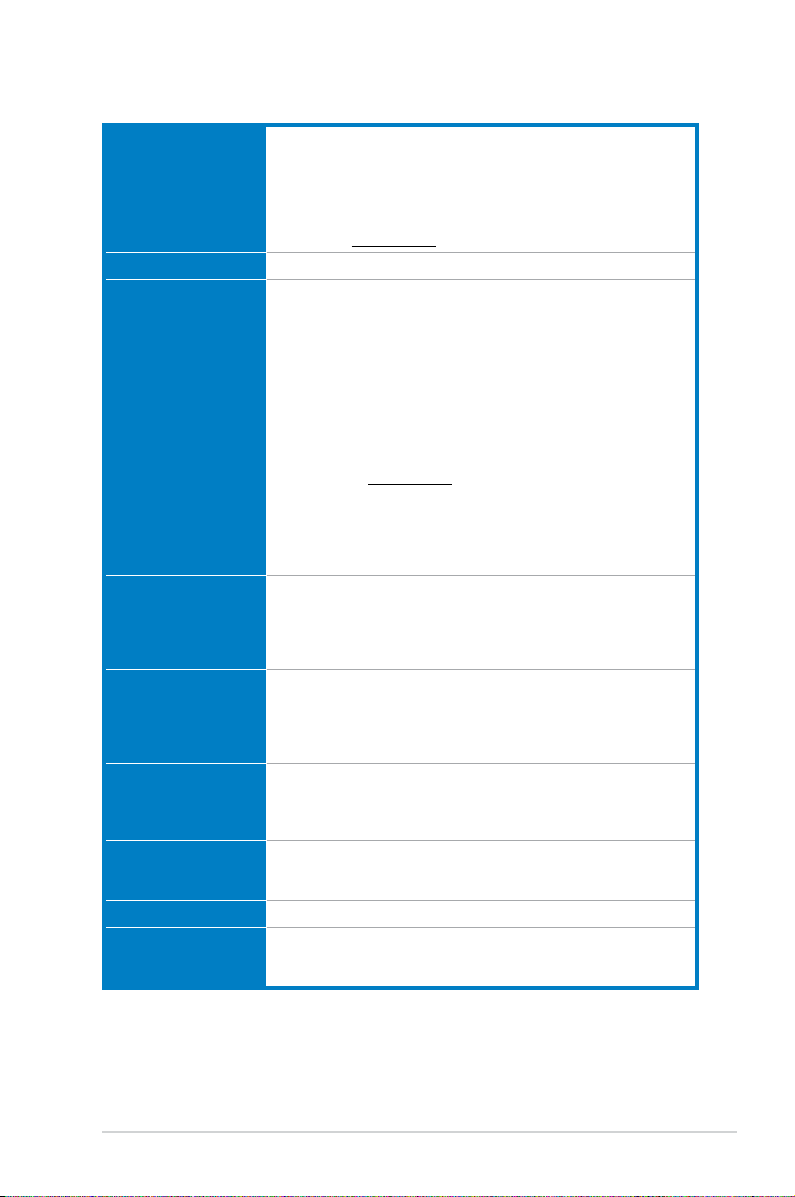
P8B75-V specications summary
CPU LGA1155 socket for Intel® Second/Third Generation Core™ i7 /
Chipset Intel® B75 Express Chipset
Memory 4 x DIMM, max. 32GB, DDR3 2200(O.C.)/2133(O.C.)/2000(O.C.)/
Expansion slots 1 x PCI Express 3.0 x16 slot [blue] (at x16 mode)
VGA
Multi-GPU support Supports ATI® Quad-GPU CrossFireX™ Technology
Storage Intel® B75 Express Chipset
LAN Realtek 8111E / 8111F Gigabit LAN controller
Audio ALC887 8-channel high denition audio CODEC
Core™ i5 / Core™ i3, Pentium®, and Celeron® processors
Supports 22/32nm CPU
Supports Intel® Turbo Boost Technology 2.0
* The Intel® Turbo Boost Technology 2.0 support depends on the
CPU types.
** Refer to www.asus.com for Intel CPU support list
1866(O.C.)/1600/1333/1066 MHz, non-ECC, un-buffered memory
Dual channel memory architecture
Supports Intel® Extreme Memory Prole (XMP)
* DDR3 1600 MHz and higher memory frequency is supported by
Intel® 3rd generation processors.
** Due to the CPU behavior, DDR3 2133/1866 memory module will
run at DDR3 2000/1800 MHz frequency as default.
*** The maximum 32GB memory capacity can be supported with
8GB or above DIMMs. ASUS will update the memory QVL once the
DIMMs are available in the market.
**** Refer to www.asus.com for the latest Memory QVL (Qualied
Vendors List).
***** When you install a total memory of 4GB capacity or more,
Windows® 32-bit operating system may only recognize less than
3GB. We recommend a maximum of 3GB system memory if you
are using a Windows® 32-bit operating system.
1 x PCI Express 2.0 x16 slot [black] (at x4 mode, compatible with PCIe
x1 and x4 devices)
2 x PCI Express 2.0 x1 slots
3 x PCI slots
Integrated Graphics Processor — Intel® HD Graphics support
Multi-VGA support: DVI, RGB port
— Supports DVI with max. resolution up to 1920 x 1200 @ 60Hz
— Supports RGB with max. resolution up to 2048 x 1536 @ 75Hz
— Maximum shared memory of 1696 MB
Supports Lucidlogix® Virtu MVP™ Technology*
*LucidLogix Virtu MVP™ is supported on Windows® 7 operating
system.
— 1 x SATA 6.0 Gb/s ports (gray)
— 5 x SATA 3.0 Gb/s ports (blue)
— Supports jack-detection, multi-streaming and front panel jackretasking
(continued on the next page)
ix
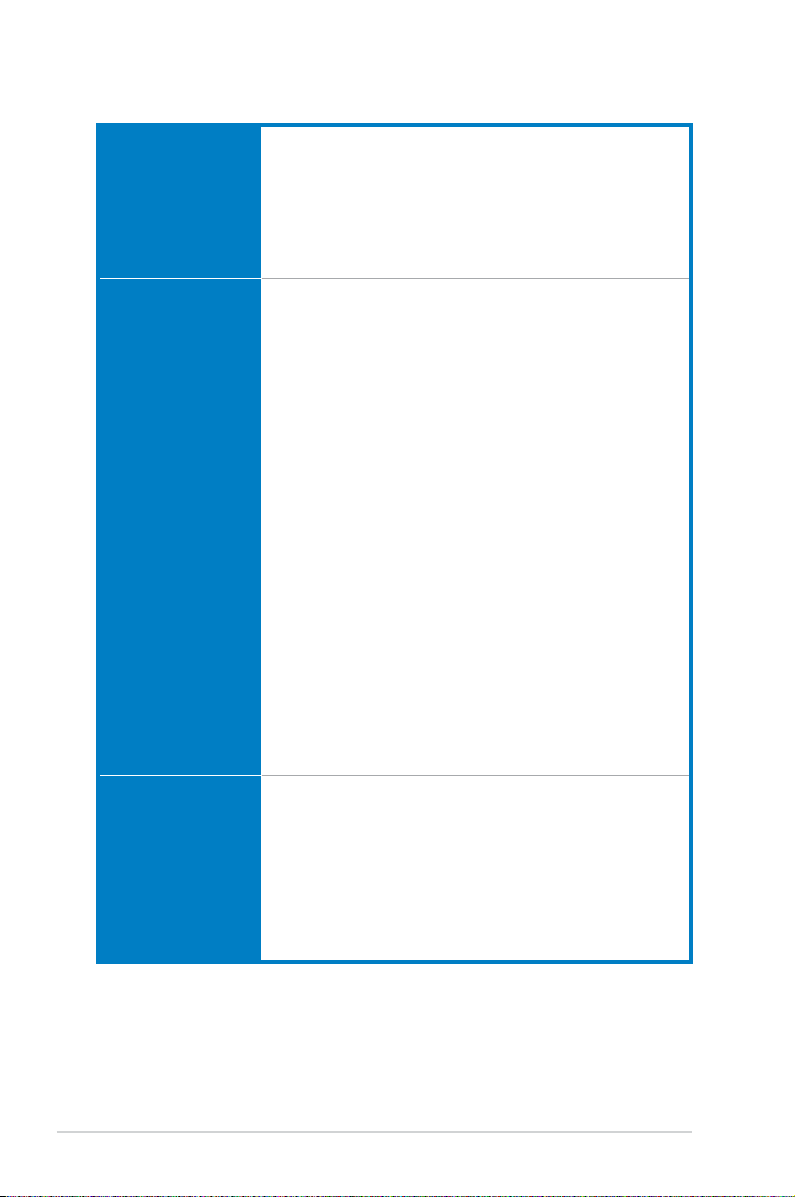
P8B75-V specications summary
USB Intel® B75 Express Chipset
— Supports ASUS USB 3.0 Boost UASP Mode*
— 4 x USB 3.0/2.0 ports (2 ports at midboard, 2 ports at the back
panel)
— 8 x USB 2.0/1.1 ports (4 ports at midboard, 4 ports at the back
panel)
* The USB 3.0 ports only support Windows® 7 or later versions. UASP
only supports Windows® 8.
ASUS unique features ASUS DIGI+VRM
ASUS exclusive
overclocking features
— Digital Power Control: Digital Power Design for the CPU and
iGPU
— ASUS 4+1+1 Phase Power Design
ASUS Protect 3.0
— EPU
— ASUS Anti-Surge Protection
— ESD
— Low EMI
— 100% All high quality conductive polymer capacitors
ASUS Hybrid Switches
— MemOK!
ASUS Exclusive Features:
— USB 3.0 Boost
— Network iControl
— ASUS AI Suite II
— TurboV
— MemOK! Switch
— GPU Boost
— ASUS UEFI BIOS EZ Mode featuring graphics user interface
ASUS Quiet Thermal Solution:
— ASUS Fanless Design: Stylish heatsink solution
— ASUS Fan Xpert
ASUS Q-Design:
— ASUS Q-Slot
ASUS EZ DIY:
— ASUS CrashFree BIOS 3
— ASUS EZ Flash 2
— ASUS MyLogo 2™
Precision Tweaker 2:
— vCore: Adjustable CPU voltage at 0.005V increment
— vCCIO: Adjustable I/O voltage at 0.005V increment
— vDRAM Bus: 190-step Memory voltage control
— vPCH: 190-step Chipset voltage control
SFS (Stepless Frequency Selection):
— BCLK/PCIE frequency tuning from 80MHz up to 300MHz at
0.1MHz increment
Overclocking Protection:
— ASUS C.P.R.(CPU Parameter Recall)
(continued on the next page)
x

P8B75-V specications summary
Back panel I/O ports 1 x PS/2 keyboard port
Internal I/O connectors 2 x USB 2.0/1.1 connectors support additional 4 USB 2.0/1.1ports
BIOS features 128 Mb Flash ROM, UEFI AMI BIOS, PnP, DMI 2.0, WfM 2.0,
Manageability WfM 2.0, DMI 2.0, WOL by PME, WOR by PME, PXE
Accessories 2 x Serial ATA 6.0Gb/s cables
Support DVD contents Drivers
Form factor ATX form factor: 12 in. x 8.6 in. (30.5 cm x 21.9 cm)
1 x PS/2 mouse port
2 x USB 3.0/2.0 ports
4 x USB 2.0/1.1 ports
1 x DVI port
1 x D-Sub port
1 x LAN (RJ-45) port
3-Jack 8-channel audio I/O ports
1 x USB 3.0/2.0 connector supports additional 2 USB 3.0/2.0ports
1 x SATA 6.0 Gb/s connector (gray)
5 x SATA 3.0 Gb/s connectors (blue)
1 x CPU fan connector
2 x Chassis fan connectors
1 x Front panel audio connector
1 x S/PDIF output connector
1 x 24-pin EATX power connector
1 x 8-pin EATX 12V power connector
1 x System panel connector
1 x MemOK! button
1 x COM connector
1 x LPT connector
SM BIOS 2.7, ACPI 4.0, Multi-language BIOS, ASUS EZ Flash 2,
ASUS CrashFree BIOS 3, F12 PrintScreen Function
1 x I/O shield
1 x User Manual
ASUS Utilities
ASUS Update
Anti-virus software (OEM version)
*Specications are subject to change without notice.
xi

xii
Chapter 1
Chapter 1: Product introduction
1.1 Welcome!
Thank you for buying an ASUS® P8B75-V motherboard!
The motherboard delivers a host of new features and latest technologies, making it another
standout in the long line of ASUS quality motherboards!
Before you start installing the motherboard, and hardware devices on it, check the items in
your package with the list below.
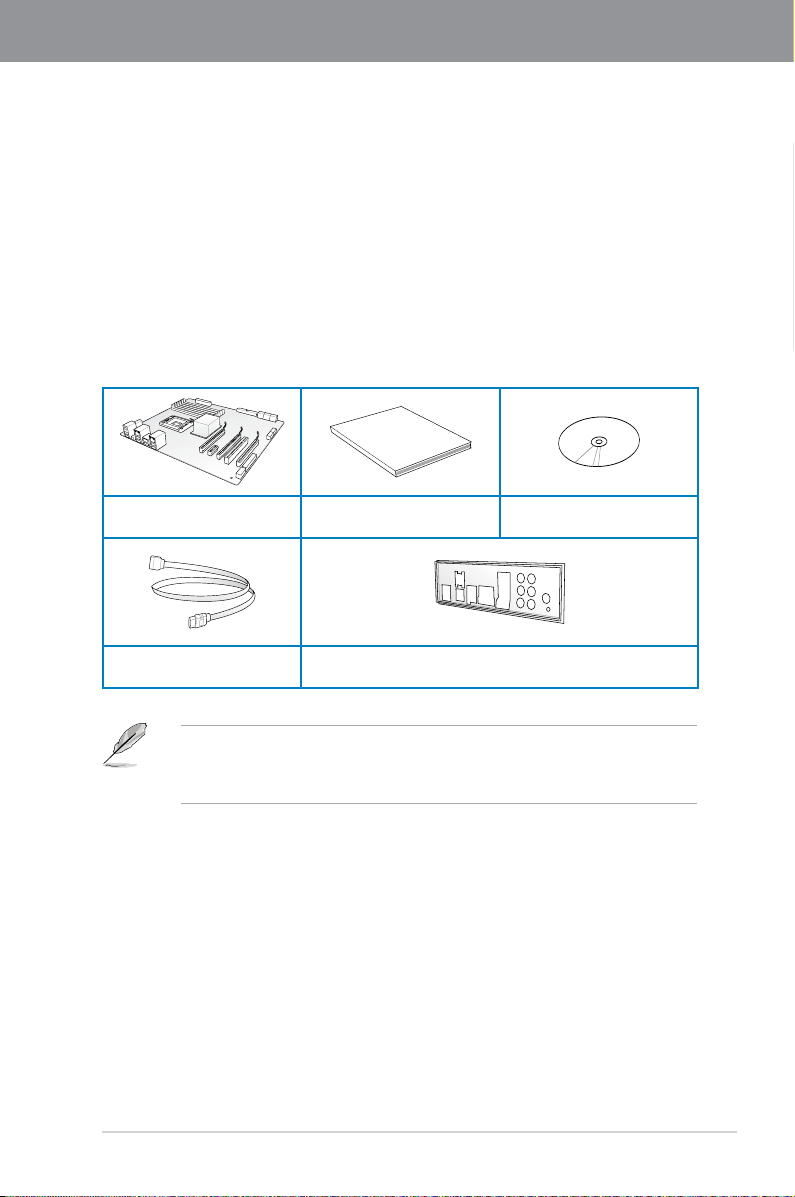
1.2 Package contents
Check your motherboard package for the following items.
ASUS P8B75-V motherboard User manual Support DVD
Chapter 1
2 x Serial ATA 6.0 Gb/s cables 1 x I/O shield
ASUS P8B75-V
• If any of the above items is damaged or missing, contact your retailer.
• The illustrated items above are for reference only. Actual product specications may
vary with different models.
1-1

1.3 Special features
1.3.1 Product highlights
Chapter 1
LGA1155 socket for Intel® Second/Third Generation Core™ i7 / Core™
i5 / Core™ i3, Pentium®, and Celeron® processors
This motherboard supports the Intel® second/third generation Core™ i7 / Core™ i5 / Core™
i3, Pentium®, and Celeron® processors in the LGA1155 package, with memory and PCI
Express controllers integrated to support 2-channel (4 DIMMs) DDR3 memory and 16 PCI
Express 2.0 lanes.
Intel® B75 Express Chipset
The Intel® B75 Express Chipset is the latest single-chipset designed to support the 1155
socket Intel® 3rd/2nd generation Core™ i7 / Core™ i5 / Core™ i3 processors. It provides
improved performance by utilizing serial point-to-point links, allowing increased bandwidth
and stability. In addition, B75 chipset provides 4 USB 3.0 ports that retrieves data 10 times
faster. Moreover, Intel® B75 Express Chipset also supports iGPU function, letting users enjoy
the latest Intel integrated graphic performance.
PCI Express® 3.0
PCI Express® 3.0 (PCIe 3.0) is the latest PCI Express bus standard with improved encoding
schemes that provide twice the performance of the current PCIe 2.0. The total bandwidth
for a x16 link reaches a maximum of 32Gb/s, double the 16 Gb/s of PCIe 2.0 (in x16 mode).
As such, PCIe 3.0 provides userss an unprecendented data speeds, combined with the
convenience and seamless transition offerred by complete backward compatibility with PCIe
1.0 and PCIe 2.0 devices. PCIe 3.0 will become a must-have feature for users who wish to
improve and optimize graphic performance, as well as have the latest technology available to
them.
* PCI 3.0 speed is supported by Intel
Quad-GPU CrossFireX™ Support
The motherboard’s powerful Intel® B75 platform optimizes PCIe allocation in multiple-GPU
congurations of CrossFireX™. This allows you to enjoy a never before-experienced brand
new gaming style.
®
3rd generation processors.
Dual-Channel DDR3 2200(O.C.) / 2133(O.C.) / 2000(O.C.) / 1866(O.C.) /
1600 / 1333 / 1066 MHz Support
The motherboard supports DDR3 memory that features data transfer rates of DDR3 2200(O.
C.) / 2133(O.C.) / 2000(O.C.) / 1866(O.C.) / 1600 / 1333 / 1066 MHz to meet the higher
bandwidth requirements of the latest 3D graphics, multimedia, and Internet applications. The
dual-channel DDR3 architecture enlarges the bandwidth of your system memory to boost
system performance.
Complete USB 3.0 Integration
ASUS facilitates the strategic USB 3.0 accessibility for both the front and rear panel – 4 USB
3.0 ports in total. Experience the latest plug & play connectivity at speeds up to 10 times
faster than USB 2.0. The P8B75-V affords greater convenience to high speed connectivity.
1-2
Chapter 1: Product Introduction

SATA 6.0 Gb/s Support
The Intel® B75 Express Chipset natively supports the next-generation Serial ATA (SATA)
interface, delivering up to 6.0 Gb/s data transfer. ASUS provides SATA 6.0 Gb/s ports with
enhanced scalability, faster data retrieval, and double the bandwidth of current bus systems.
100% All High-quality Conductive Polymer Capacitors
This motherboard uses all high-quality conductive polymer capacitors for durability, improved
lifespan, and enhanced thermal capacity.
1.3.2 ASUS Exclusive Features
DIGI+ VRM — Digital Power Design
All-new digital CPU power controls work perfectly together to match digital power signal
(SVID) requests from the CPU, with ultra-fast sensing and response efciently delivering
precision power. Accurate delivery reduces waste, and provides more stable CPU Vcore
voltages. Users can adjust CPU PWM voltages and frequencies for various overclocking
scenarios, with accurate input through UEFI BIOS tuning or the exclusive ASUS interface.
This proprietary design increases overclocking headroom to push performance to its full
potential.
MemOK!
MemOK! quickly ensures memory boot compatibility. This remarkable memory rescue tool
requires a mere push of a button to patch memory issues. MemOK! determines fail-safe
settings and dramatically improves your system boot success. Get your system up and
running in no time!
USB 3.0 Boost
With USB 3.0 Boost technology, a USB device’s transmission speed is signicantly
increased, adding to an already impressive fast USB 3.0 transfer speed. ASUS software
automatically accelerates data speeds for compatible USB 3.0 peripherals without the need
for any user interaction.
Network iControl
ASUS Network iControl is an intuitive one-stop network control center that makes it easier
for you to manage your network bandwidth and allows you to set, monitor, and schedule the
bandwidth priorities for your network programs. It also allows you to automatically connect to
a PPPoE network for a more convenient online experience.
Chapter 1
AI Suite II
With its user-friendly interface, ASUS AI Suite II consolidates all the exclusive ASUS features
into one simple to use software package. It allows you to supervise overclocking, energy
management, fan speed control, and voltage and sensor readings. This all-in-one software
offers diverse and ease to use functions, with no need to switch back and forth between
different utilities.
ASUS P8B75-V
1-3

ASUS TurboV
Feel the adrenaline rush of real-time OC-now a reality with the ASUS TurboV. This easy OC
tool allows you to overclock without exiting or rebooting the OS; and its user-friendly interface
Chapter 1
makes overclock with just a few clicks away. Moreover, the ASUS OC proles in TurboV
provides the best O.C. settings in different scenarios.
ASUS EPU
Tap into the world’s rst real-time PC power saving chip through a simple onboard switch or
Ai Suite II utility. Get total system-wide energy optimization by automatically detecting current
PC loadings and intelligently moderating power consumption. This also reduces fan noise
and extends component longevity.
ASUS Anti-Surge Protection
This special design prevents expensive devices and the motherboard from damage caused
by power surges from switching power supply (PSU).
1.3.3 ASUS Quiet Thermal Solution
Fanless Design: stylish heatsink solution
The stylish heatsink features a 0-dB thermal solution that offers users a noiseless PC
environment. Not only the beautiful shape upgrades the visual enjoyment for motherboard
users, but also the heatsink design lowers the temperature of the chipset and power phase
area through high efcient heat-exchange. Combined with usability and aesthetics, the ASUS
stylish heatsink will give users an extremely silent and cooling experience with the elegant
appearance!
ASUS Fan Xpert
ASUS Fan Xpert intelligently allows you to adjust the CPU fan and chassis fan speeds
according to different ambient temperatures caused by different climate conditions in different
geographic regions and your PC’s loading. The built-in variety of useful proles offer exible
controls of fan speed to achieve a quiet and cool environment.
1.3.4 ASUS EZ DIY
ASUS UEFI BIOS
The new ASUS UEFI BIOS is an Unied Extensible Firmware Interface that offers a user-
friendly interface that goes beyond traditional keyboard-only BIOS controls to enable more
exible and convenient mouse input. Users can easily navigate the new UEFI BIOS with
the same smoothness as their operating system. It natively supports hard drives larger than
2.2TB in 64-bit, with full storage space utilization, helping deliver far more exciting computing
than traditional BIOS versions.
The exclusive EZ Mode displays frequently-accessed setup info, while the Advanced Mode
is for experienced performance enthusiasts that demand far more intricate system settings.
DRAM information.
1-4
Chapter 1: Product Introduction

Supports hard drives over 2.2TB
ASUS UEFI BIOS natively supports hard drives larger than 2.2TB in 64-bit, with full storage
space utilization helping deliver far more exciting computing than traditional BIOS versions.
ASUS MyLogo2™
This feature allows you to convert your favorite photo into a 256-color boot logo for a more
colorful and vivid image on your screen.
ASUS CrashFree BIOS 3
ASUS CrashFree BIOS 3 is an auto-recovery tool that allows you to restore a corrupted BIOS
le using the bundled support DVD or USB ash disk that contains the latest BIOS le.
ASUS EZ-Flash 2
ASUS EZ Flash 2 is a user-friendly utility that allows you to update the BIOS without using a
bootable oppy disk or an OS-based utility.
ASUS Q-Slot
ASUS Q-Slot is designed to speed up and simplify the DIY process to enhance your DIY
experience.
1.3.5 Other special features
LucidLogix® Virtu Universal MVP™
LucidLogix® Virtu Universal MVP™ is designed for the Intel® Sandy Bridge platform’s
powerful integrated graphics. Its GPU virtualization dynamically assigns tasks to the best
available graphics resources based on power, performance and system load on Windows® 7
based PCs. It allows users to fully utilize the unique capabilities of advanced Sandy Bridge
multimedia features alongside the high end 3D rendering performance provided by installed
graphics cards. When no discrete graphics are needed, the graphics card is put in idle
mode to lower utilization, heat, fan speed and power draw down to near zero, making the
system more environmentally-friendly. For users with diverse needs, LucidLogix® Virtu GPU
virtualization provides great exibility and efciency.
*LucidLogix® Virtu Universal MVP™ supports Windows® 7 operating system.
**Intel® Quick Sync Video feature is supported by 2nd/3rd generation Intel® Core™ processor
family.
Chapter 1
ErP Ready
The motherboard is European Union’s Energy-related Products (ErP) ready, and ErP requires
products to meet certain energy efciency requirement in regards to energy consumptions.
This is in line with ASUS vision of creating environment-friendly and energy-efcient products
through product design and innovation to reduce carbon footprint of the product and thus
mitigate environmental impacts.
ASUS P8B75-V
1-5

Chapter 1
1-6
Chapter 1: Product Introduction

Chapter 2
Chapter 2: Hardware information
2.1 Before you proceed
Take note of the following precautions before you install motherboard components or change
any motherboard settings.
• Unplug the power cord from the wall socket before touching any component.
• Before handling components, use a grounded wrist strap or touch a safely grounded
object or a metal object, such as the power supply case, to avoid damaging them due
to static electricity.
• Hold components by the edges to avoid touching the ICs on them.
• Whenever you uninstall any component, place it on a grounded antistatic pad or in the
bag that came with the component.
• Before you install or remove any component, ensure that the ATX power supply is
switched off or the power cord is detached from the power supply. Failure to do so
may cause severe damage to the motherboard, peripherals, or components.
ASUS P8B75-V
2-1
2.2 Motherboard overview
P8B75-V
PCIEX16_1
PCIEX16_2
PCIEX1_2
PCIEX1_1
PCI1
PCI2
PCI3
USB56USB78
USB3_34
PANEL
SPDIF_OUT
CPU_FAN
CHA_FAN2CHA_FAN1
Lithium Cell
CMOS Power
Super
I/O
ALC
887
DIGI
+VRM
RTL
8111E / F
COM1
8MB
BIOS
8MB
BIOS
SB_PWR
CLRTC
21.9cm(8.6in)
30.5cm(12.0in)
Intel
®
B75
DDR3 DIMM_A1 (64bit, 240-pin module)
DDR3 DIMM_A2 (64bit, 240-pin module)
DDR3 DIMM_B1 (64bit, 240-pin module)
DDR3 DIMM_B2 (64bit, 240-pin module)
USB3_12
USB34
SATA3G_3 SATA3G_2 SATA3G_1
SATA3G_4SATA3G_5 SATA6G_1
MemOK!
DRAM_LED
EATXPWR
LGA1155
AUDIO
KBMS
LAN_USB12
DVI_VGA
AAFP
EATX12V
LPT
1 2 413
5
2
9
8
151617 14 1213 11 9 10
7
5
6
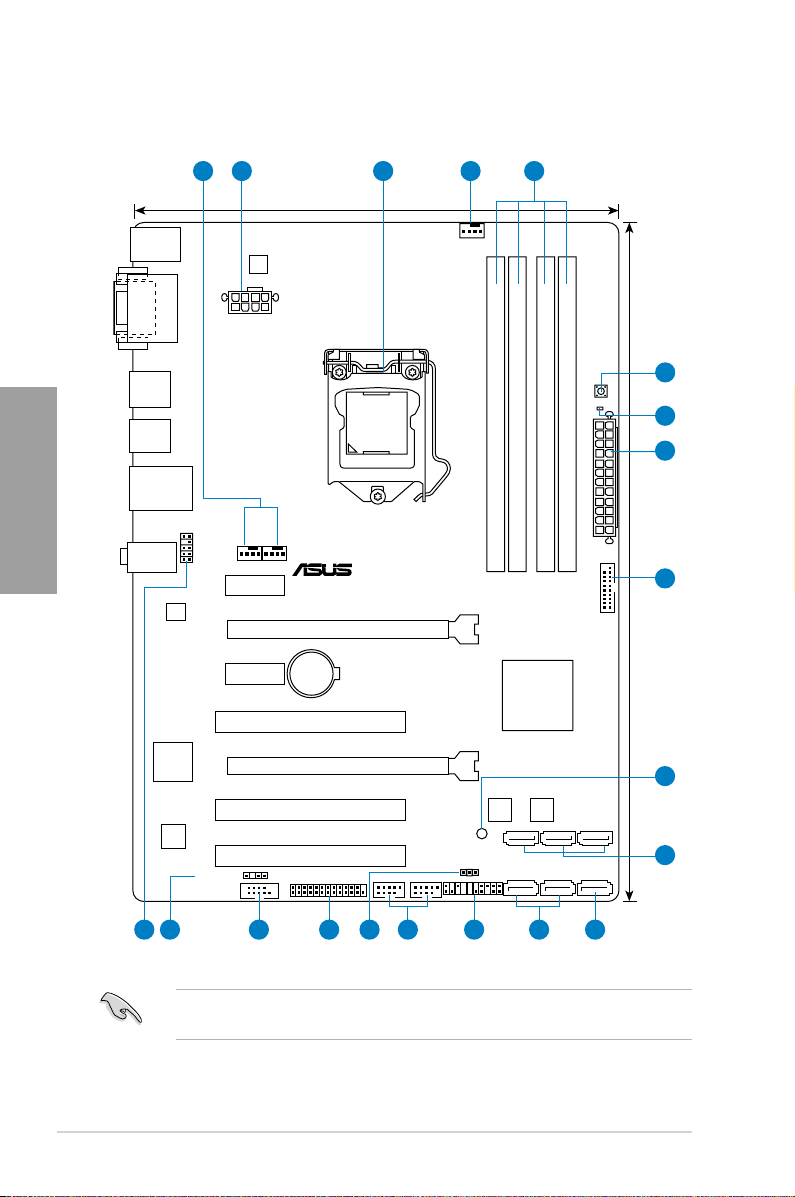
2.2.1 Motherboard layout
Chapter 2
2-2
Refer to
2.2.8 Internal connectors
information about rear panel connectors and internal connectors.
and
2.3.10 Rear panel connection
for more
Chapter 2: Hardware information

Layout contents
Connectors/Jumpers/Slots Page
1. CPU and chassis connectors (4-pin CPU_FAN,
4-pin CHA_FAN1/2)
2. ATX power connectors (24-pin EATXPWR, 8-pin EATX12V)
3. Intel
4.
5. MemOK! switch 2-14
6.
7.
8.
9. Intel
(7-pin SATA3G_1~5 [blue])
10.
(7-pin SATA6G_1 [gray])
11.
12.
13.
14. LPT connector (26-1 pin LPT)
15.
16.
17.
®
LGA1155 CPU socket 2-4
DDR3 DIMM slots 2-5
DRAM LED (DRAM_LED) 2-15
USB 3.0 connector (20-1 pin USB3_34) 2-15
Onboard LED (SB_PWR) 2-15
®
B75 Serial ATA 3.0Gb/s connectors
Intel® B75 Serial ATA 6.0Gb/s connector
System panel connector (20-8 pin PANEL) 2-23
USB 2.0 connectors (10-1 pin USB56, USB78) 2.-18
Clear RTC RAM (3-pin CLRTC) 2-13
Serial port connector (10-1 pin COM1) 2-19
Digital audio connector (4-1 pin SPDIF_OUT) 2-18
Front panel audio connector (10-1 pin AAFP) 2-21
2-20
2-22
2-17
2-16
Chapter 2
2-16
ASUS P8B75-V
2-3
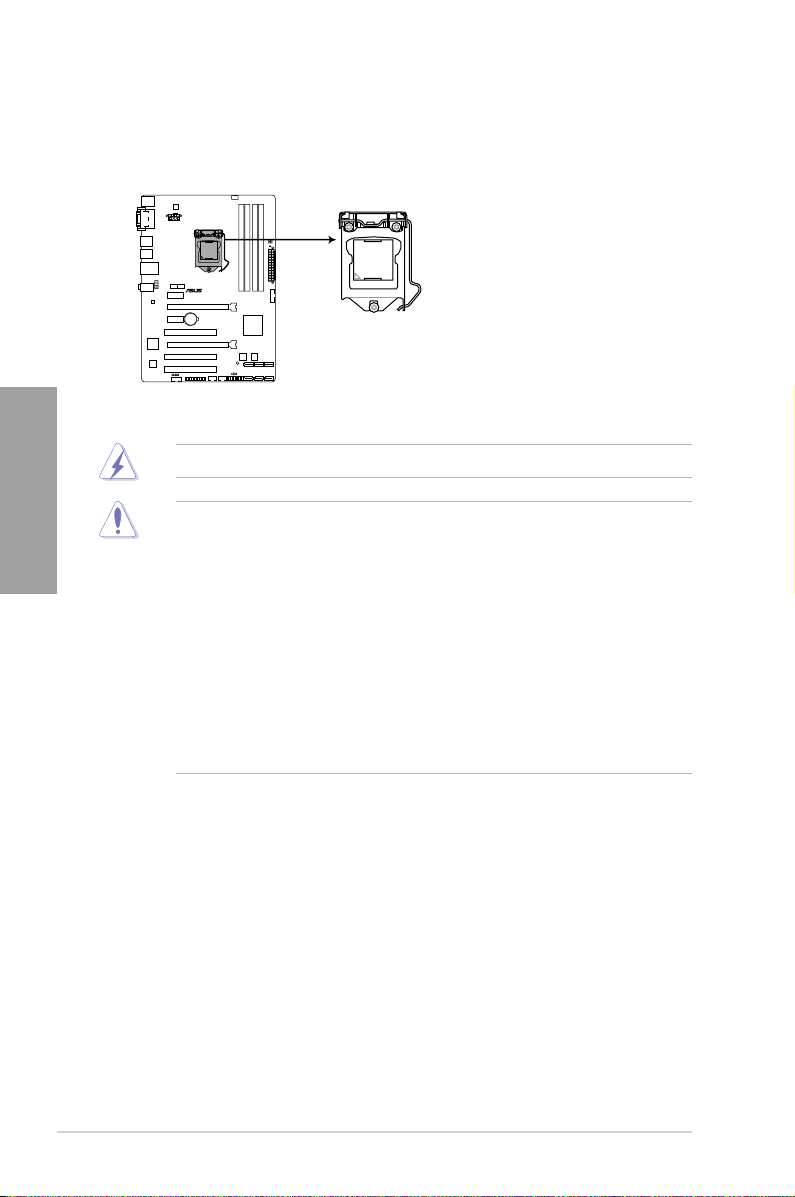
2.2.2 Central Processing Unit (CPU)
P8B75-V
P8B75-V CPU socket LGA1155
The motherboard comes with a surface mount LGA1155 socket designed for the Intel®
2nd/3rd Generation Core™ i7 / Core™ i5 / Core™ i3 processors.
Chapter 2
Ensure that all power cables are unplugged before installing the CPU.
• The LGA1156 CPU is incompatible with the LGA1155 socket. DO NOT install a
LGA1156 CPU on the LGA1155 socket.
• Upon purchase of the motherboard, ensure that the PnP cap is on the socket and
the socket contacts are not bent. Contact your retailer immediately if the PnP cap
is missing, or if you see any damage to the PnP cap/socket contacts/motherboard
components. ASUS will shoulder the cost of repair only if the damage is shipment/
transit-related.
• Keep the cap after installing the motherboard. ASUS will process Return Merchandise
Authorization (RMA) requests only if the motherboard comes with the cap on the
LGA1155 socket.
• The product warranty does not cover damage to the socket contacts resulting from
incorrect CPU installation/removal, or misplacement/loss/incorrect removal of the PnP
cap.
2-4
Chapter 2: Hardware information
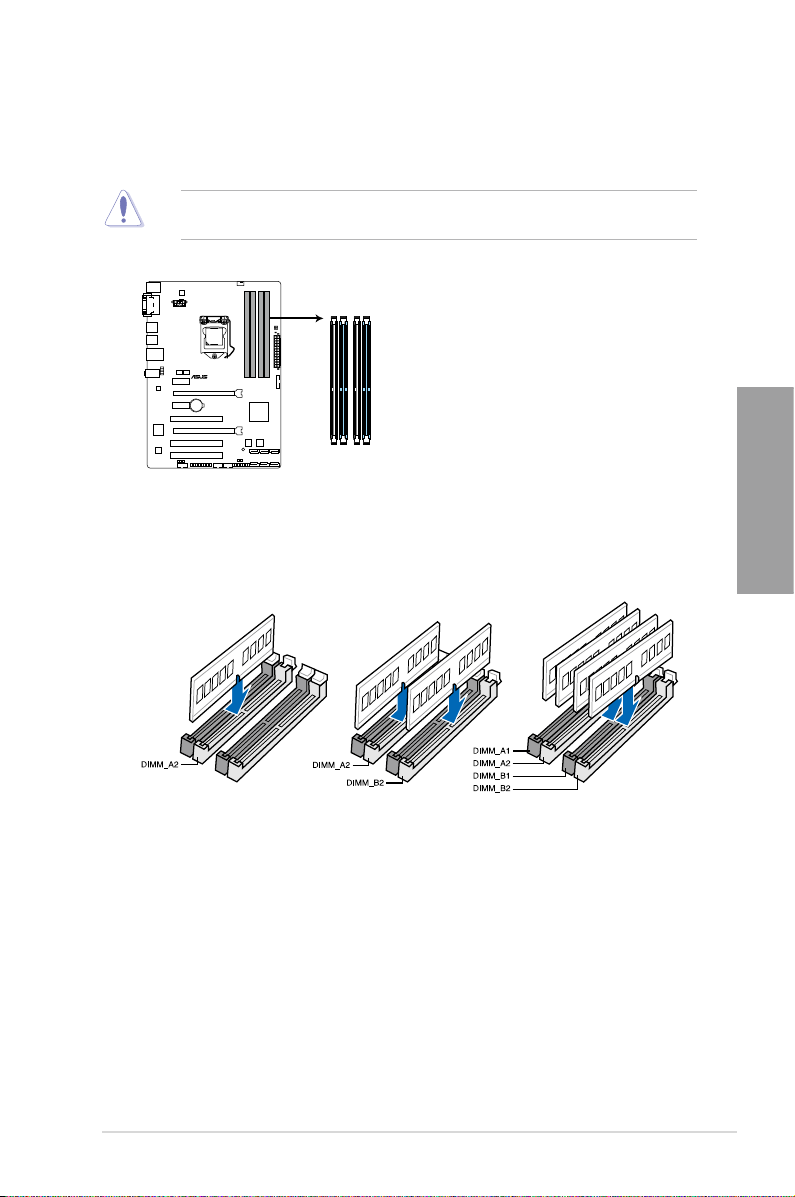
2.2.3 System memory
P8B75-V
P8B75-V 240-pin DDR3 DIMM sockets
DIMM_A1
DIMM_A2
DIMM_B1
DIMM_B2
The motherboard comes with four Double Data Rate 3 (DDR3) Dual Inline Memory Modules
(DIMM) slots.
A DDR3 module is notched differently from a DDR or DDR2 module. DO NOT install a DDR
or DDR2 memory module to the DDR3 slot.
Recommended memory congurations
Chapter 2
ASUS P8B75-V
2-5

Memory congurations
You may install 1GB, 2GB, 4GB and 8GB unbuffered and non-ECC DDR3 DIMMs into the
DIMM sockets.
Chapter 2
• You may install varying memory sizes in Channel A and Channel B. The system maps
the total size of the lower-sized channel for the dual-channel conguration. Any excess
memory from the higher-sized channel is then mapped for single-channel operation.
• According to Intel CPU spec, DIMM voltage below 1.65V is recommended to protect
the CPU.
• Always install DIMMs with the same CAS latency. For optimum compatibility, we
recommend that you obtain memory modules from the same vendor.
• Due to the memory address limitation on 32-bit Windows OS, when you install 4GB
or more memory on the motherboard, the actual usable memory for the OS can be
about 3GB or less. For effective use of memory, we recommend that you do any of the
following:
— Use a maximum of 3GB system memory if you are using a 32-bit Windows OS.
— Install a 64-bit Windows OS when you want to install 4GB or more on the
motherboard.
For more details, refer to the Microsoft® support site at
http://support.microsoft.com/kb/929605/en-us.
• This motherboard does not support DIMMs made up of 512Mb (64MB) chips or less
(Memory chip capacity counts in Megabit, 8 Megabit/Mb = 1 Megabyte/MB).
• The maximum 32GB memory capacity can be supported with 8GB or above DIMMs.
ASUS will update the memory QVL once the DIMMs are available in the market.
• The default memory operation frequency is dependent on its Serial Presence Detect
(SPD), which is the standard way of accessing information from a memory module.
Under the default state, some memory modules for overclocking may operate at a
lower frequency than the vendor-marked value. To operate at the vendor-marked
or at a higher frequency, refer to section
frequency adjustment.
• For system stability, use a more efcient memory cooling system to support a full
memory load (4 DIMMs) or overclocking condition.
3.4 Ai Tweaker menu
for manual memory
2-6
Chapter 2: Hardware information
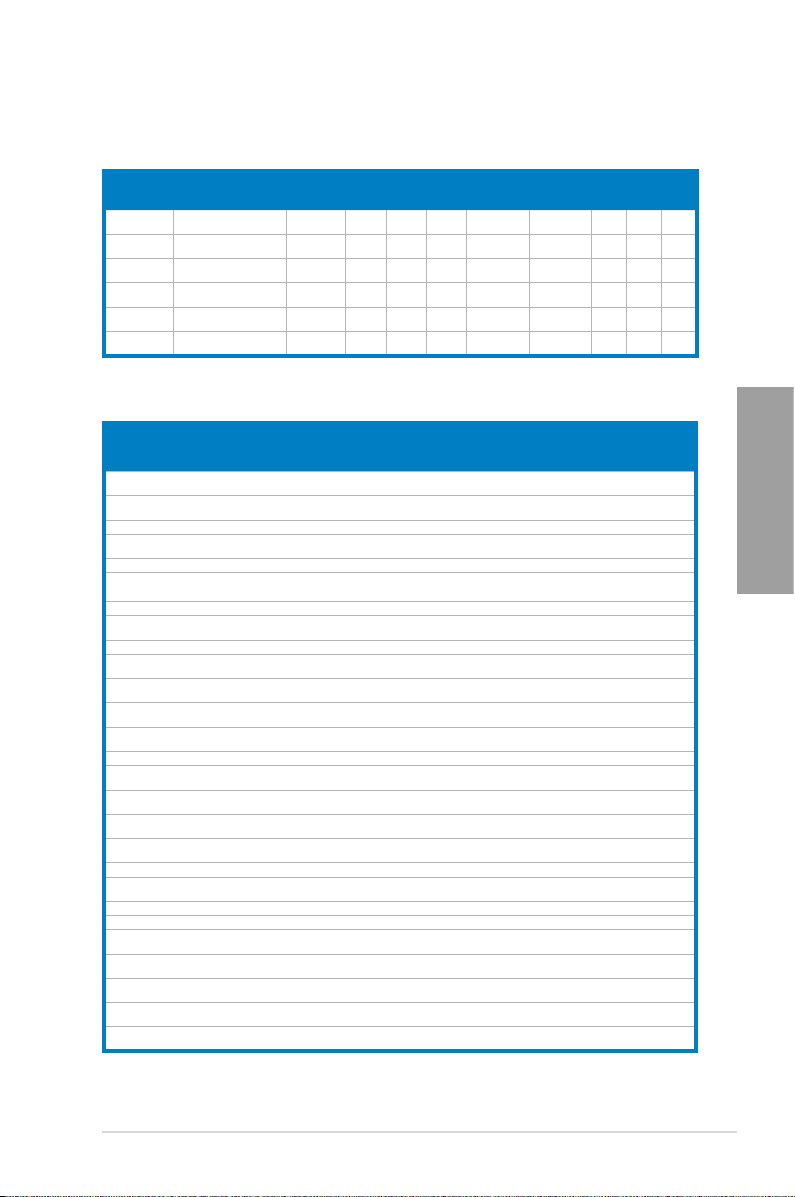
P8B75-V Motherboard Qualied Vendors Lists (QVL)
DDR3 1866 (O.C.) MHz capability
Vendors Part No. Size SS/DS Chip
CORSAIR CMT4GX3M2
CORSAIR CMZ8GX3M2
G.SKILL
G.SKILL F3-14900CL
KINGSTON KHX1866C9
KINGSTON KHX1866C9
A1866C9(XMP)
A1866C9(XMP)
F3-14900CL
9D-8GBXL(XMP)
9Q-8GBXL(XMP)
D3T1K3/3GX(XMP)
D3T1K3/6GX(XMP)
4GB
DS — — 9-9-9-24 1.65V • • •
(2 x 2GB)
8GB
DS — — 9-10-9-27 1.50V • • •
(2 x 4GB)
DS —
8GB
(2 x 4GB)
8GB
DS — — 9-9-9-24 1.6V • • •
(2GBx4)
3GB
SS — — — 1.65V • • •
(3 x 1GB)
6GB
DS — — — 1.65V • • •
(3 x 2GB)
Brand
Chip
Timing Voltage DIMM socket support
No.
9-10-9-28 1.5V
—
(Optional)
A B C
• •
•
DDR3 1333 MHz capability
Vendors Part No. Size SS/DSChip
A-DATA AD31333001GOU 1GB SS A-Data AD30908C8
A-DATA AD3U1333C2G9 2GB SS A-DATA 3CCD-1509H
A-DATA AD63I1B0823EV 2GB SS A-Data 3CCA-1509A — — • • •
A-DATA AM2U139C2P1 2GB SS ADATA 3CCD-1509A
A-DATA AX3U1333C2G9-BP 2GB SS — — — — • • •
A-DATA AXDU1333G
C2G9-2G(XMP)
A-DATA AD63I1C1624EV 4GB DS A-Data 3CCA-1509A — — • • •
A-DATA AM2U139C4P2 4GB DS ADATA 3CCD-1509A
A-DATA SU3U1333W8G9-B 8GB DS ELPIDA J4208BASE-DJ-F — — • • •
Apacer 78.A1GC6.9L1 2GB DS Apacer AM5D5808
Apacer 78.A1GC6.9L1 2GB DS Apacer AM5D5808
Apacer AU02GFA33C9NBGC 2GB DS Apacer AM5D5808
Apacer 78.B1GDE.9L10C 4GB DS Apacer AM5D5908C
CORSAIR CM3X1024-1333C9 1GB SS — — 9-9-9-24 1.60V • • •
CORSAIR TR3X3G1333C9 G 3GB
CORSAIR CMD24GX3M6
A1333C9(XMP)
CORSAIR TW3X4G1333C9D G 4GB
CORSAIR CM3X4GA1333C9N2 4GB DS CORSAIR 256MBDCJG
CORSAIR CMX4GX3M1A1333C9 4GB DS — — 9-9-9-24 1.50V • • •
CORSAIR CMD8GX3M4A1333C7 8GB
Crucial CT12864BA1339.8FF 1GB SS Micron 9FF22D9KPT 9 — • • •
Crucial CT25664BA1339.16FF 2GB DS Micron 9KF27D9KPT 9 — • • •
Crucial BL25664BN
1337.16FF (XMP)
ELPIDA EBJ10UE8EDF0-DJ-F 1GB SS ELPIDA J1108EDS
G.SKILL F3-10600CL8
D-2GBHK(XMP)
G.SKILL F3-10600CL9
D-2GBNQ
G.SKILL F3-10666CL7
T-3GBPK(XMP)
4GB
(2 x 2GB)
(3 x 1GB)
24GB
(6x4GB)
(2 x 2GB)
(4 x 2GB)
6GB
(3 x 2GB)
1GB SS G.SKILL — — — • • •
2GB
(2 x 1GB)
3GB
(3 x 1GB)
SS — — 9-9-9-24 1.25V-1.35V
SS — — 9-9-9-24 1.50V • • •
DS — — 9-9-9-24 1.60V • • •
DS — — 9-9-9-24 1.50V • • •
DS — — 7-7-7-20 1.60V • • •
DS — — 7-7-7-24 1.65V • • •
SS — — 9-9-9-24 1.5V • • •
SS — — 7-7-7-18 1.5~1.6V • • •
(continued on the next page)
Chip No. Timing Voltage DIMM socket
Brand
D-151C E0906
NA1126L
EL1127T
EL1127T
DEWSBG
FEQSBG
APQSBG
EHSBG
ELC0401136
E-DJ-F
— — • • •
— — • • •
— — • • •
(low voltage)
— — • • •
— — • • •
9 — • • •
— — • • •
— — • • •
9-9-9-24 — • • •
— 1.35V
(low voltage)
support
(Optional)
A B C
• • •
• • •
Chapter 2
ASUS P8B75-V
2-7

DDR3 1333 MHz capability
Vendor Part No. Size SS/DSChip Brand Chip No. Timing Voltage DIMM socket
G.SKILL F3-10666CL8
G.SKILL F3-10666CL7
GEIL GV32GB1333C9DC
GEIL GG34GB1333C9DC 4GB
GEIL GV34GB1333C9DC 4GB
GEIL GVP34GB1333C7DC 4GB
Hynix HMT112U6TFR8A-H9 1GB SS Hynix H5TC1G83
Hynix HMT325U6BFR8C-H9 2GB SS Hynix H5TQ2G83
Hynix HMT125U6TFR8A-H9 2GB DS Hynix H5TC1G83
Chapter 2
Hynix HMT351U6
KINGMAX FLFD45F-B8
KINGMAX FLFE85F-C8
KINGMAX FLFE85F-C8
KINGMAX FLFE85F-C8
KINGMAX FLFE85F-B8
KINGMAX FLFF65F-C8
KINGMAX FLFF65F-C8
KINGSTON KVR1333
KINGSTON KVR1333D3
KINGSTON KVR1333D3
KINGSTON KVR1333
KINGSTON KVR1333
KINGSTON KVR1333
KINGSTON KVR1333
KINGSTON KVR1333
KINGSTON KHX1333C7
KINGSTON KHX1333C9
KINGSTON KVR1333
KINGSTON KVR1333
KINGSTON KVR1333
KINGSTON KVR1333
KINGSTON KVR1333
Micron MT8JTF12864
Micron MT8JTF25664
Micron MT8JTF25664
Micron MT16JTF25664
D-4GBECO(XMP)
D-8GBRH(XMP)
BFR8C-H9
KL9 NAES
KF9 CAES
KL9 NAES
KM9 NAES
KL9 NEES
KL9 NEES
KM9 NEES
D3N9/1G
S8N9/2G
S8N9/2G-SP
D3N9/2G
D3N9/2G
D3N9/2G
D3N9/2G-SP
D3N9/2G-SP
D3K2/4GX(XMP)
D3UK2/4GX(XMP)
D3N9/4G
D3N9/4G
D3N9/4G
D3N9/4G
D3N9/4G-SP
AZ-1G4F1
AZ-1G4D1
AZ-1G4M1
AZ-1G4F1
support
4GB
DS — — 8-8-8-8-24 XMP 1.35V • • •
(2 x 2GB)
8GB
DS — — 7-7-7-21 1.5V • • •
(2 x 4GB)
DS —
2GB
(2 x 1GB)
DS GEIL GL1L128
(2 x 2GB)
DS — — 9-9-9-24 1.5V • • •
(2 x 2GB)
DS — — 7-7-7-24 1.5V • • •
(2 x 2GB)
4GB DS Hynix H5TQ2G83
1GB SS KINGMAX KKB8FNW
2GB SS KINGMAX KFC8FMF
2GB SS KINGMAX KFC8FNL
2GB SS KINGMAX KFC8FNM
2GB DS KINGMAX KKB8FNW
4GB DS KINGMAX KFC8FNLX
4GB DS KINGMAX KFC8FNMX
1GB SS ELPIDA J1108BD
2GB SS Micron IID77 D9LGK — 1.5V • • •
2GB SS ELPIDA J2108BC
2GB DS ELPIDA J1108BF
2GB DS KTC D1288JPN
2GB DS ELPIDA J1108BD
2GB DS KTC D1288JEM
2GB DS KINGSTON D1288JPS
4GB
DS — — 7 1.65V • • •
(2 x 2GB)
4GB
DS — — 9 XMP 1.25V • • •
(2 x 2GB)
4GB DS ELPIDA J2108BC
4GB DS ELPIDA J2108BC
4GB DS KTC D2568JE
4GB DS Hynix H5TQ2G
4GB DS KINGSTON D2568JEN
1GB SS Micron 9FF22D9KPT 9 — • • •
2GB SS Micron OJD12D9LGK — — • • •
2GB SS MICRON IJM22 D9PFJ — — • • •
2GB DS Micron 9KF27D9KPT 9 — • • •
— 9-9-9-24
M88BA12N
TFRH9A
BFRH9C
TFRH9A
BFRH9C
BFGNX-27A
XF-DXX-15A
XF-DXX-15A
XF-BXX-15A
BFGNX-26A
F-DXX-15A
F-BXX-15A
BG-DJ-F
SE-DJ-F
BG-DJ-F
DPLD9U
SE-DJ-F
FNGD9U
FPGD9U
SE-DJ-F
SE-DJ-F
NCNGD9U
83AFR
CPGD9U
1.5V
9-9-9-24 1.3V
(low voltage)
— 1.35V
(low voltage)
— — • • •
— 1.35V
(low voltage)
— — • • •
— — • • •
— — • • •
— — • • •
— — • • •
— — • • •
— — • • •
— — • • •
9 1.5V • • •
— 1.5V • • •
9 1.5V • • •
9 1.5V • • •
9 1.5V • • •
— 1.5V • • •
— 1.5V • • •
9 1.5V • • •
— 1.5V • • •
— 1.5V • • •
— — • • •
— 1.5V • • •
A B C
• •
• • •
• • •
• • •
(continued on the next page)
•
2-8
Chapter 2: Hardware information
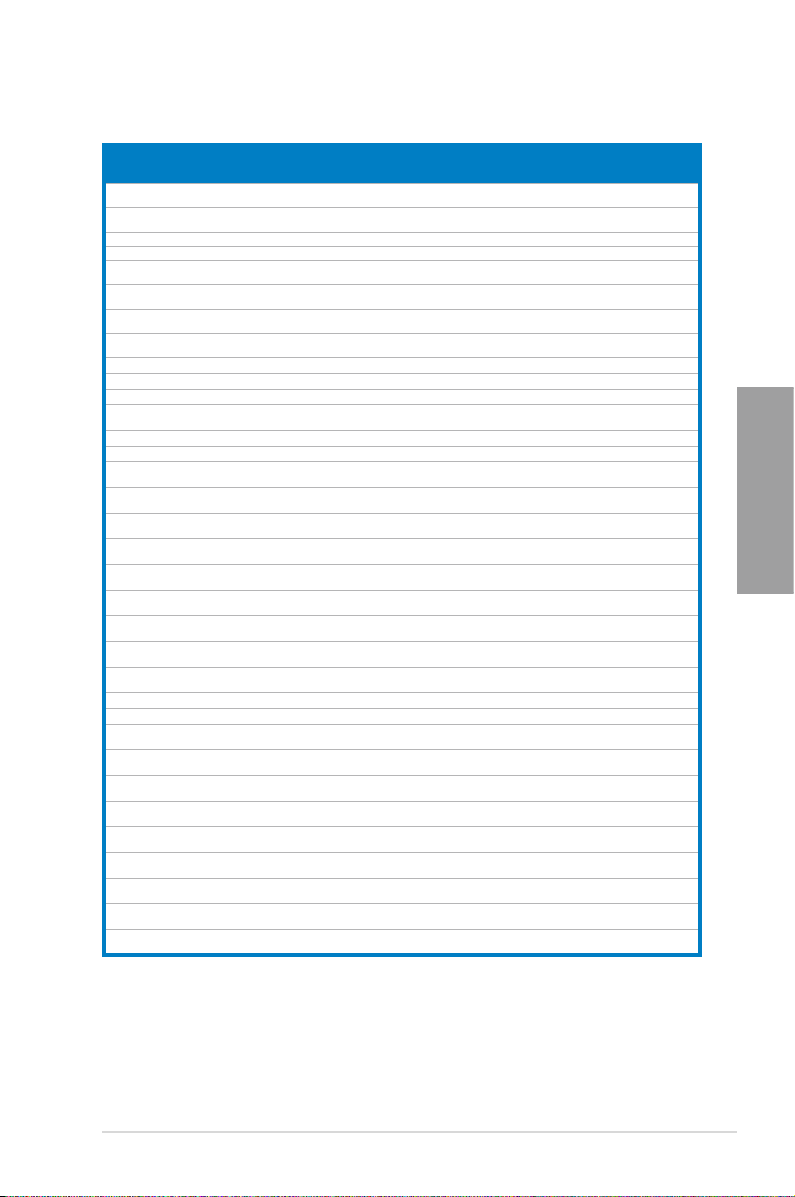
DDR3 1333 MHz capability
Vendor Part No. Size SS/DSChip Brand Chip No. Timing Voltage DIMM socket
Micron MT16JTF51264
NANYA NT4GC64B8
PSC AL7F8G73F-DJ2
PSC AL8F8G73F-DJ2 2GB DS PSC A3P1GF3FGF — — • • •
SAMSUNG M378B287
SAMSUNG M378B577
SAMSUNG M378B567
SAMSUNG M378B527
Super Talent W1333UA1GH 1GB SS Hynix H5TQ1G83TFR 9 — • • •
Super Talent W1333UB2GS 2GB DS SAMSUNG K4B1G0846F 9 — • • •
Super Talent W1333UB4GS 4GB DS SAMSUNG K4B2G0846C — — • • •
Super Talent W1333UX6GM 6GB
Transcend JM1333KLN-2G 2GB SS Micron 0YD77D9LGK — — • • •
Transcend JM1333KLN-2G 2GB SS Hynix H5TQ2G83BZRH9C — — • • •
Century PC3-10600
Elixir M2F2G64C
Elixir M2F4G64C
KINGSHARE KSRPCD3
KINGSTEK KSTD3P
Kingtiger 2GB DIMM
Kingtiger KTG2G13
MARKVISION BMD32048M
MARKVISION BMD34096M
PATRIOT PSD31G13332 1GB DS PATRIOT PM64M8D38U-15 — — • • •
PATRIOT PSD32G13332H 2GB DS — — — — • • •
RAMAXEL RMR1870E
RAMAXEL RMR1870EC
RiDATA E304459CB1
SanMax SMD-4G68
SILICON
POWER
SILICON
POWER
SILICON
POWER
UMAX E41302GP
WINTEC 3WVS31333-2G-
AZ-1G4D1
HG0NF-CG
3FHS-CH9
3DH0-CH9
3FH0-CH9
3CH0-CH9
DDR3-1333 9-9-9
B88G7N-CG
B8HB5N-CG
13332G
C-10600
PC3-10666
33PG3
1333C9-1123
1333C9-1124
D48E8F-1333
58E9F-1333
AG32Cf
H1P-13HZ
SP001GBL
TU133S01
SP001GBL
TU133S02
SP002GBLT
U133S02
0-73BDB
CNR
4GB DS Micron OLD22D9LGK — — • • •
4GB DS NANYA NT5CB256
SS PSC
1GB
1GB SS SAMSUNG K4B1G0846F — — • • •
2GB SS SAMSUNG K4B2G0846D — — • • •
2GB DS SAMSUNG K4B1G0846F — — • • •
4GB DS SAMSUNG K4B2G0846C — — • • •
DS Micron 0BF27D9KPT 9-9-9-24 1.5V • • •
(3x 2GB)
1GB SS NANYA NT5CB128M8DN-CF — — • • •
2GB SS Elixir N2CB2G80GN-CG — — • • •
4GB DS Elixir N2CB2G80BN-CG — — • • •
2GB DS PATRIOT PM128M8D385-15 — — • • •
2GB SS MICRON PE911-125E — — • • •
2GB DS SAMSUNG SEC 904 HCH9
2GB DS — — — — • • •
2GB DS MARKVISION M3D1288P-13 — — • • •
4GB DS MARKVISION M3D2568E-13 — — • • •
2GB DS ELPIDA J1108BDBG-DJ-F — — • • •
4GB DS ELPIDA J2108BCSE-DJ-F — — • • •
4GB DS RiDATA N/A 9 — • • •
4GB DS HYNIX H5TQ2G83BFR H9C — — • • •
1GB SS NANYA NT5CB128M8AN-CG 9 — • • •
1GB SS Elixir N2CB1680AN-C6 9 — • • •
2GB DS Elixir N2CB1680AN-C6 9 — • • •
2GB DS UMAX U2S24D30TP-13 — — • • •
2GB DS AMPO AM3420803-13H — — • • •
M8GN-CG
A3P1GF3FGF —
K4B1G0846D
— — • • •
—
— — • • •
support
A B C
• •
•
Chapter 2
ASUS P8B75-V
2-9
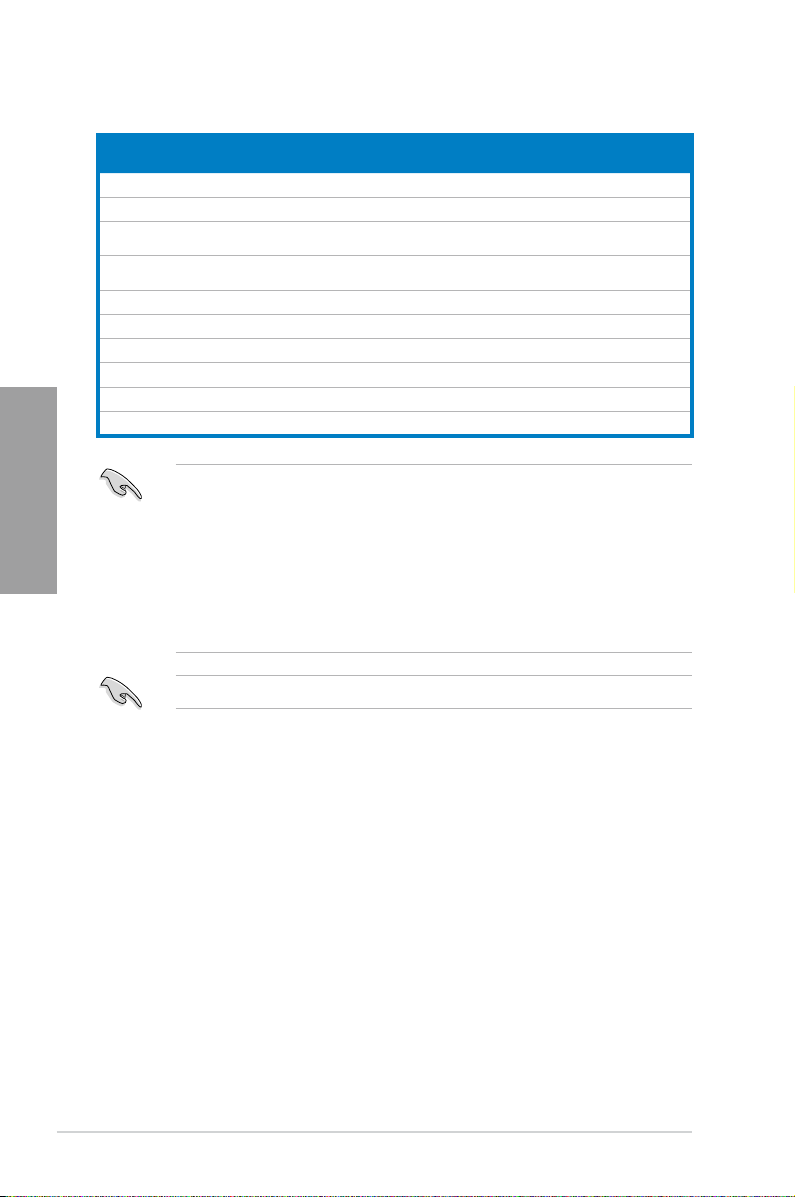
DDR3 1066 MHz capability
Vendors Part No. Size SS/DS Chip
Crucial CT12864B
Crucial CT25664B
ELPIDA EBJ10UE8E
ELPIDA EBJ21UE8E
KINGSTON KVR1066
KINGSTON KVR1066
KINGSTON KVR1066
Micron MT8JTF12864
Micron MT16JTF25664
Chapter 2
Kingtiger 2GB DIMM
Chip No. Timing Voltage DIMM socket
Brand
A1067.8FF
A1067.16FF
DF0-AE-F
DF0-AE-F
D3N7/1G
D3N7/2G
D3N7/4G
AZ-1G1F1
AZ-1G1F1
PC3-8500
1GB SS Micron 9GF22D9KPT 7 — • • •
2GB DS Micron 9HF22D9KPT 7 — • • •
SS ELPIDA
1GB
2GB DS ELPIDA J1108EDSE-DJ-F — 1.35V
1GB SS ELPIDA J1108BFSE-DJ-F 7 1.5V • • •
2GB DS ELPIDA J1108BDSE-DJ-F 7 1.5V • • •
4GB DS Hynix H5TQ2G83AFR 7 1.5V • • •
1GB SS Micron 9GF22D9KPT 7 — • • •
2GB DS Micron 9HF22D9KPT 7 — • • •
2GB DS Hynix H5TQ1G83AFP
J1108EDSE-DJ-F —
G7C
Side(s): SS — Single-sided DS — Double-sided
DIMM support:
• 1 DIMM:
•
Supports one (1) module inserted into any slot as Single-channel memory
conguration.
Supports two (2) modules inserted into either the blue slots or the black
2 DIMMs:
We suggest that you install the module into A2 slot.
slots as one pair of Dual-channel memory conguration.
you install the modules into slots A2 and B2 for better compatibility.
• 4 DIMMs:
Supports four (4) modules inserted into both the blue and black slots as
two pairs of Dual-channel memory conguration.
Visit the ASUS website for the latest QVL.
support (Optional)
A B C
1.35V
(low
voltage)
(low
voltage)
— — • • •
• •
• • •
We suggest that
•
2-10
Chapter 2: Hardware information
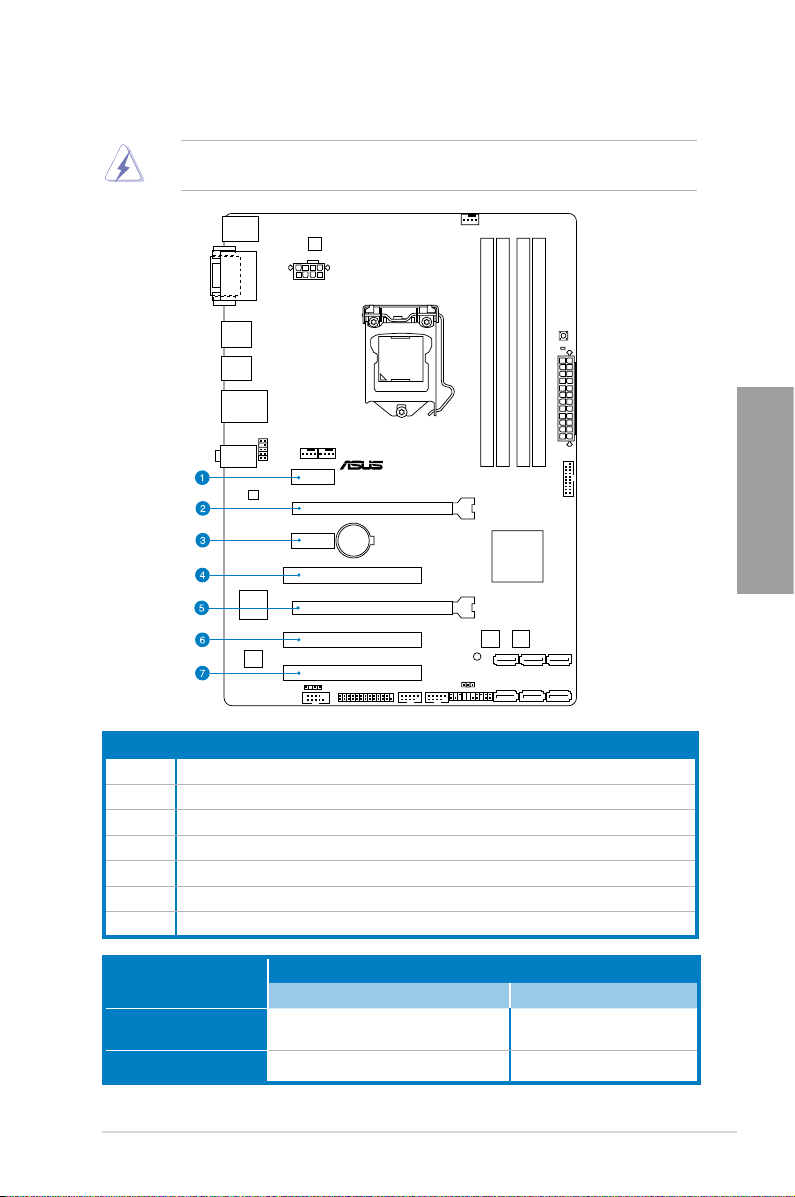
2.2.4 Expansion slots
Ensure to unplug the power cord before adding or removing expansion cards. Failure to do
so may cause you physical injury and damage motherboard components.
Chapter 2
Slot No. Slot Description
1 PCIe 2.0 x1_1 slot
2 PCIe 3.0 x16_1 slot (at x16 mode)
3 PCIe 2.0 x1_2 slot
4 PCI slot 1
5 PCIe 2.0 x16_2 slot (at x4 mode, compatible with PCIe x1 and x4 devices)
6 PCI slot 2
7 PCI slot 3
VGA conguration
Single VGA/PCIe card
Dual VGA/PCIe card
PCI Express operating mode
PCIe 3.0 x16_1 PCIe 2.0 x16_2
x16 (Recommend for single VGA) N/A
x16 x4
ASUS P8B75-V
2-11
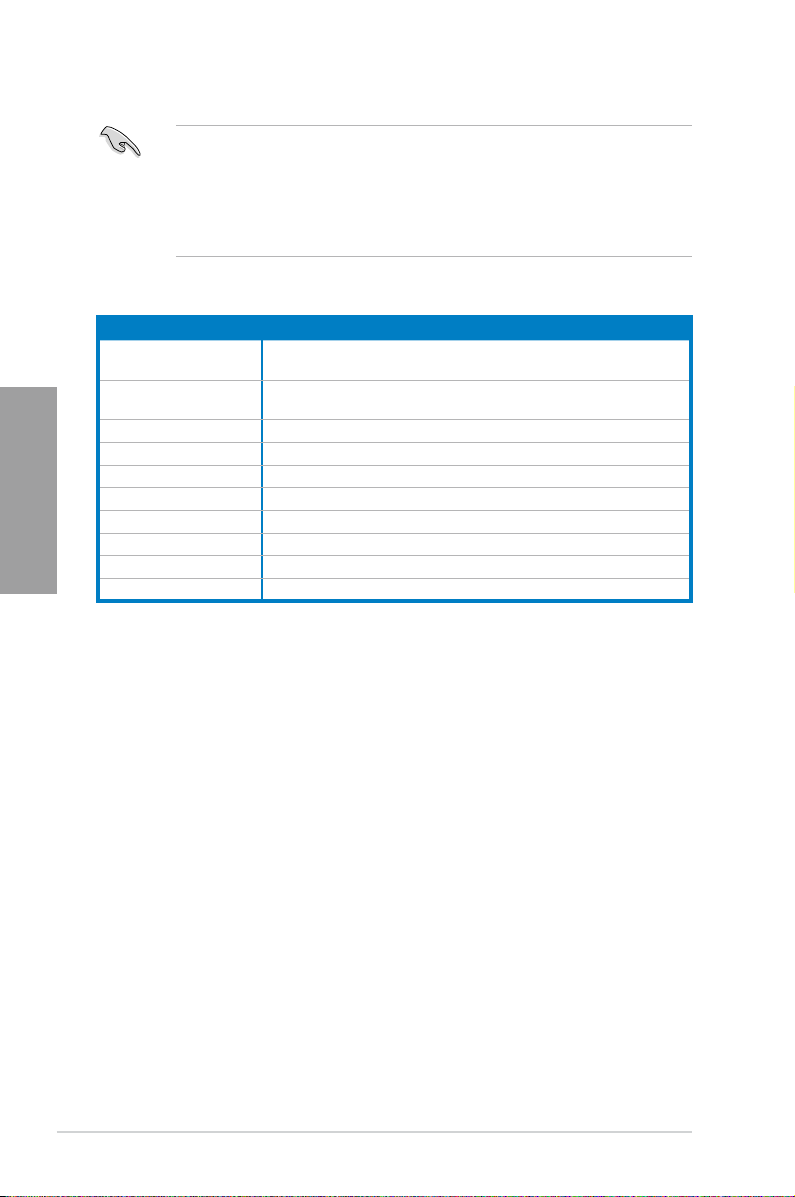
IRQ assignments for this motherboard
Intel PCH SATA
Controller #0
Intel PCH SATA
Chapter 2
Controller #1
PCIE x16_1 shared – – – – – – –
PCIE x16_2 shared – – – – – – –
RTL8111E / F shared – – – – – – –
PCIE x1_1 – shared – – – – – –
PCIE x1_2 – – shared – – – – –
PCI slot 1 shared – – – – – – –
PCI slot 2 – shared – – – – – –
PCI slot 3 – – shared – – – – –
• In single VGA card mode, use the PCIe 3.0 x16_1 slot (blue) for a PCI Express x16
graphics card to get better performance.
• We recommend that you provide sufcient power when running CrossFireX™ mode.
Refer to page 2-23 for details.
• Connect a chassis fan to the motherboard connector labeled CHA_FAN1/2 when using
multiple graphics cards for better thermal environment. See page 2-30 for details.
A B C D E F G H
– – – shared – – – –
– – – shared – – – –
2-12
Chapter 2: Hardware information
Loading…
Справочник Пользователя (English)Справочник Пользователя (English)Справочник Пользователя (Français)Справочник Пользователя (日本語 (にほんご))Справочник Пользователя (Français)Справочник Пользователя (English)Справочник Пользователя (中文(zhōngwén))Справочник Пользователя (日本語 (にほんご))Справочник Пользователя (中文(zhōngwén))Справочник Пользователя (中文(zhōngwén))Справочник Пользователя (English)Справочник Пользователя (中文(zhōngwén))Справочник Пользователя (日本語 (にほんご))Справочник Пользователя (English)
- Topics
- manualsbase, manuals,
- Collection
- manuals_asus; manuals; additional_collections
- Language
- Danish
- Item Size
- 36.4M
- Addeddate
- 2020-06-28 21:44:25
- Collection_added
-
manuals
additional_collections
- Identifier
- manualsbase-id-78678
- Identifier-ark
- ark:/13960/t1nh3jc38
- Ocr
- ABBYY FineReader 11.0 (Extended OCR)
- Ppi
- 300
- Scanner
- Internet Archive Python library 1.9.3
plus-circle Add Review
plus-circle Add Review
comment
Reviews
There are no reviews yet. Be the first one to
write a review.
116
Views
DOWNLOAD OPTIONS
download 1 file
ABBYY GZ download
Temporarily Unavailable
DAISY
For users with print-disabilities
Temporarily Unavailable
EPUB
download 1 file
FULL TEXT download
download 1 file
ITEM TILE download
download 1 file
PAGE NUMBERS JSON download
download 1 file
PDF download
download 1 file
SINGLE PAGE PROCESSED JP2 ZIP download
download 1 file
TORRENT download
download 12 Files
download 6 Original
SHOW ALL
IN COLLECTIONS
Manuals: ASUSTek (Asus)
The Manual Library
Additional Collections
Uploaded by
chris85
on
Manufacturer:ASUS
Category:Computers & Peripherals
Device:ASUS P8B75-V
Name:7series-8GB-QVL
Language:Multilingual
Pages:1
Size:56.61 KB
Manufacturer:ASUS
Category:Computers & Peripherals
Device:ASUS P8B75-V
Name:H77_4DIMM_report
Language:Multilingual
Pages:1
Size:34.88 KB
Manufacturer:ASUS
Category:Computers & Peripherals
Device:ASUS P8B75-V
Name:H77_4DIMM_model_list_report
Language:Multilingual
Pages:1
Size:37.80 KB
Manufacturer:ASUS
Category:Computers & Peripherals
Device:ASUS P8B75-V
Name:Device Report
Language:Multilingual
Pages:18
Size:464.76 KB
Manufacturer:ASUS
Category:Computers & Peripherals
Device:ASUS P8B75-V
Name:Memory-QVL
Language:Multilingual
Pages:8
Size:501.57 KB
Manufacturer:ASUS
Category:Computers & Peripherals
Device:ASUS P8B75-V
Name:B75 memory report
Language:Multilingual
Pages:2
Size:42.15 KB
Manufacturer:ASUS
Category:Computers & Peripherals
Device:ASUS P8B75-V
Name:New_SSD_List
Pages:1
Size:18.19 KB
Manufacturer:ASUS
Category:Computers & Peripherals
Device:ASUS P8B75-V
Name:User’s Manual (English)
Language:English
Version:E8474
Pages:132
Size:11.16 MB
Manufacturer:ASUS
Category:Computers & Peripherals
Device:ASUS P8B75-V
Name:User’s manual(French)
Language:Français
Version:F8474
Pages:134
Size:9.07 MB
Manufacturer:ASUS
Category:Computers & Peripherals
Device:ASUS P8B75-V
Name:User’s Manual (Japanese)
Language:日本語
Version:J8474
Pages:132
Size:7.74 MB
Manufacturer:ASUS
Category:Computers & Peripherals
Device:ASUS P8B75-V
Name:User’s Manual (English)
Language:English
Version:E7970
Pages:136
Size:7.96 MB
Manufacturer:ASUS
Category:Computers & Peripherals
Device:ASUS P8B75-V
Name:UASP_Support_insert_page_low
Version:IE7842
Pages:1
Size:65.15 KB
Manufacturer:ASUS
Category:Computers & Peripherals
Device:ASUS P8B75-V
Name:User’s Manual (Japanese)
Language:日本語
Version:J7641
Pages:132
Size:7.96 MB
Manufacturer:ASUS
Category:Computers & Peripherals
Device:ASUS P8B75-V
Name:User’s manual(French)
Language:Français
Version:F7641
Pages:138
Size:9.62 MB
Manufacturer:ASUS
Category:Computers & Peripherals
Device:ASUS P8B75-V
Name:User’s Manual (Simplified Chinese)
Language:中文(简体)
Pages:136
Size:6.00 MB
Manufacturer:ASUS
Category:Computers & Peripherals
Device:ASUS P8B75-V
Name:User’s Manual(Traditional Chinese)
Language:中文(繁體)
Pages:133
Size:6.10 MB
Manufacturer:ASUS
Category:Computers & Peripherals
Device:ASUS P8B75-V
Name:User’s Manual (Simplified Chinese)
Language:中文中文(简体)
Version:C7641
Pages:136
Size:6.00 MB
Manufacturer:ASUS
Category:Computers & Peripherals
Device:ASUS P8B75-V
Name:User’s Manual(Traditional Chinese)
Language:中文中文(繁體)
Version:C7641
Pages:133
Size:6.10 MB
Manufacturer:ASUS
Category:Computers & Peripherals
Device:ASUS P8B75-V
Name:User’s Manual (English)
Language:English
Version:E7641
Pages:132
Size:11.57 MB
Manufacturer:ASUS
Category:Computers & Peripherals
Device:ASUS P8B75-V
Name:User’s Manual (Simplified Chinese)
Language:中文(简体)
Pages:136
Size:5.99 MB
Manufacturer:ASUS
Category:Computers & Peripherals
Device:ASUS P8B75-V
Name:User’s Manual(Traditional Chinese)
Language:中文(繁體)
Pages:133
Size:6.08 MB
Manufacturer:ASUS
Category:Computers & Peripherals
Device:ASUS P8B75-V
Name:User’s Manual (Simplified Chinese)
Language:中文中文(简体)
Version:C7146
Pages:136
Size:5.99 MB
Manufacturer:ASUS
Category:Computers & Peripherals
Device:ASUS P8B75-V
Name:User’s Manual(Traditional Chinese)
Language:中文中文(繁體)
Version:T7146
Pages:133
Size:6.08 MB
Manufacturer:ASUS
Category:Computers & Peripherals
Device:ASUS P8B75-V
Name:User’s Manual (English)
Language:English
Version:E7146
Pages:133
Size:18.19 MB
Manufacturer:ASUS
Category:Computers & Peripherals
Device:ASUS P8B75-V
Name:User’s Manual (Japanese)
Language:日本語
Version:J7146
Pages:132
Size:7.96 MB
-
Драйверы
87
-
Инструкции по эксплуатации
9
Языки:
ASUS P8B75-V инструкция по эксплуатации
(132 страницы)
- Языки:Английский
-
Тип:
PDF -
Размер:
11.57 MB -
Описание:
P8B75-V User’s Manual (English)
Просмотр
ASUS P8B75-V инструкция по эксплуатации
(132 страницы)
- Языки:Английский
-
Тип:
PDF -
Размер:
11.16 MB -
Описание:
P8B75-V User’s Manual (English)
Просмотр
ASUS P8B75-V инструкция по эксплуатации
(132 страницы)
- Языки:Японский
-
Тип:
PDF -
Размер:
7.96 MB -
Описание:
P8B75-V User’s Manual (Japanese)
Просмотр
ASUS P8B75-V инструкция по эксплуатации
(136 страниц)
- Языки:Китайский
-
Тип:
PDF -
Размер:
5.99 MB -
Описание:
P8B75-V User’s Manual (Simplified Chinese)
Просмотр
ASUS P8B75-V инструкция по эксплуатации
(133 страницы)
- Языки:Китайский
-
Тип:
PDF -
Размер:
6.08 MB -
Описание:
P8B75-V User’s Manual(Traditional Chinese)
Просмотр
ASUS P8B75-V инструкция по эксплуатации
(132 страницы)
- Языки:Японский
-
Тип:
PDF -
Размер:
7.96 MB -
Описание:
P8B75-V User’s Manual (Japanese)
Просмотр
ASUS P8B75-V инструкция по эксплуатации
(138 страниц)
- Языки:Французский
-
Тип:
PDF -
Размер:
9.62 MB -
Описание:
P8B75-V user’s manual(French)
Просмотр
ASUS P8B75-V инструкция по эксплуатации
(132 страницы)
- Языки:Японский
-
Тип:
PDF -
Размер:
7.74 MB -
Описание:
P8B75-V User’s Manual (Japanese)
Просмотр
ASUS P8B75-V инструкция по эксплуатации
(133 страницы)
- Языки:Китайский
-
Тип:
PDF -
Размер:
6.1 MB -
Описание:
P8B75-V User’s Manual(Traditional Chinese)
Просмотр
На NoDevice можно скачать инструкцию по эксплуатации для ASUS P8B75-V. Руководство пользователя необходимо для ознакомления с правилами установки и эксплуатации ASUS P8B75-V. Инструкции по использованию помогут правильно настроить ASUS P8B75-V, исправить ошибки и выявить неполадки.