

H61M-K
Motherboard

E8088
First Edition
March 2013
Copyright © 2013 ASUSTeK COMPUTER INC. All Rights Reserved.
No part of this manual, including the products and software described in it, may be reproduced,
transmitted, transcribed, stored in a retrieval system, or translated into any language in any form or by any
means, except documentation kept by the purchaser for backup purposes, without the express written
permission of ASUSTeK COMPUTER INC. (“ASUS”).
Product warranty or service will not be extended if: (1) the product is repaired, modied or altered, unless
such repair, modication of alteration is authorized in writing by ASUS; or (2) the serial number of the
product is defaced or missing.
ASUS PROVIDES THIS MANUAL “AS IS” WITHOUT WARRANTY OF ANY KIND, EITHER EXPRESS
OR IMPLIED, INCLUDING BUT NOT LIMITED TO THE IMPLIED WARRANTIES OR CONDITIONS OF
MERCHANTABILITY OR FITNESS FOR A PARTICULAR PURPOSE. IN NO EVENT SHALL ASUS, ITS
DIRECTORS, OFFICERS, EMPLOYEES OR AGENTS BE LIABLE FOR ANY INDIRECT, SPECIAL,
INCIDENTAL, OR CONSEQUENTIAL DAMAGES (INCLUDING DAMAGES FOR LOSS OF PROFITS,
LOSS OF BUSINESS, LOSS OF USE OR DATA, INTERRUPTION OF BUSINESS AND THE LIKE),
EVEN IF ASUS HAS BEEN ADVISED OF THE POSSIBILITY OF SUCH DAMAGES ARISING FROM ANY
DEFECT OR ERROR IN THIS MANUAL OR PRODUCT.
SPECIFICATIONS AND INFORMATION CONTAINED IN THIS MANUAL ARE FURNISHED FOR
INFORMATIONAL USE ONLY, AND ARE SUBJECT TO CHANGE AT ANY TIME WITHOUT NOTICE,
AND SHOULD NOT BE CONSTRUED AS A COMMITMENT BY ASUS. ASUS ASSUMES NO
RESPONSIBILITY OR LIABILITY FOR ANY ERRORS OR INACCURACIES THAT MAY APPEAR IN THIS
MANUAL, INCLUDING THE PRODUCTS AND SOFTWARE DESCRIBED IN IT.
Products and corporate names appearing in this manual may or may not be registered trademarks or
copyrights of their respective companies, and are used only for identication or explanation and to the
owners’ benet, without intent to infringe.
Offer to Provide Source Code of Certain Software
This product contains copyrighted software that is licensed under the General Public License (“GPL”),
under the Lesser General Public License Version (“LGPL”) and/or other Free Open Source Software
Licenses. Such software in this product is distributed without any warranty to the extent permitted by the
applicable law. Copies of these licenses are included in this product.
Where the applicable license entitles you to the source code of such software and/or other additional data,
you may obtain it for a period of three years after our last shipment of the product, either
(1) for free by downloading it from http://support.asus.com/download
or
(2) for the cost of reproduction and shipment, which is dependent on the preferred carrier and the location
where you want to have it shipped to, by sending a request to:
ASUSTeK Computer Inc.
Legal Compliance Dept.
15 Li Te Rd.,
Beitou, Taipei 112
Taiwan
In your request please provide the name, model number and version, as stated in the About Box of the
product for which you wish to obtain the corresponding source code and your contact details so that we
can coordinate the terms and cost of shipment with you.
The source code will be distributed WITHOUT ANY WARRANTY and licensed under the same license as
the corresponding binary/object code.
This offer is valid to anyone in receipt of this information.
ASUSTeK is eager to duly provide complete source code as required under various Free Open Source
Software licenses. If however you encounter any problems in obtaining the full corresponding source
code we would be much obliged if you give us a notication to the email address gpl@asus.com, stating
the product and describing the problem (please DO NOT send large attachments such as source code
archives, etc. to this email address).
ii

Contents
Safety information ………………………………………………………………………………………… vi
About this guide ………………………………………………………………………………………….. vii
H61M-K specications summary …………………………………………………………………… ix
Package contents ………………………………………………………………………………………… xii
Product introduction
1.1 Special features ……………………………………………………………………………….. 1-1
1.1.1 Product highlights …………………………………………………………………
1.1.2 ASUS Exclusive Features ………………………………………………………
1.2 Before you proceed …………………………………………………………………………..
1.3 Motherboard overview ………………………………………………………………………
1.3.1 Placement direction ………………………………………………………………
1.3.2 Screw holes …………………………………………………………………………
1.3.3 Motherboard layout ……………………………………………………………….
1.3.4 Layout contents …………………………………………………………………….
1.4 Central Processing Unit (CPU) …………………………………………………………..
1.4.1 CPU installation ……………………………………………………………………
1.4.2 CPU heatsink and fan assembly installation ……………………………
1.5 System memory ………………………………………………………………………………
1.5.1 Overview ……………………………………………………………………………
1.5.2 Memory congurations …………………………………………………………
1.5.3 Installing a DIMM ………………………………………………………………..
1.6 Expansion slots ………………………………………………………………………………
1.6.1 Installing an expansion card …………………………………………………
1.6.2 Conguring an expansion card ……………………………………………..
1.6.3 PCI Express 2.0 x1 slot ………………………………………………………..
1.6.4 PCI Express 3.0/2.0 x16 slot …………………………………………………
1.7 Jumpers
1.8 Connectors ……………………………………………………………………………………..
1.9 Software support …………………………………………………………………………….
………………………………………………………………………………………….1-23
1.8.1 Rear panel ports …………………………………………………………………
1.8.2 Internal connectors ……………………………………………………………..
1.9.1 Installing an operating system ………………………………………………
1.9.2 Support DVD information ……………………………………………………..
1-1
1-2
1-4
1-5
1-5
1-5
1-6
1-7
1-7
1-8
1-10
1-12
1-12
1-13
1-20
1-21
1-21
1-21
1-21
1-22
1-24
1-24
1-25
1-30
1-30
1-30
iii

BIOS information
2.1 Managing and updating your BIOS …………………………………………………….2-1
2.1.1 ASUS Update utility ………………………………………………………………
2.1.2 ASUS EZ Flash 2 ………………………………………………………………….
2.1.3 ASUS CrashFree BIOS 3 utility ………………………………………………
2.1.4 ASUS BIOS Updater ……………………………………………………………..
2.2 BIOS setup program ………………………………………………………………………….
2.3 Main menu ………………………………………………………………………………………
2.3.1 System Language [English] ………………………………………………….
2.3.2 System Date [Day xx/xx/xxxx] ……………………………………………….
2.3.3 System Time [xx:xx:xx] ………………………………………………………..
2.3.4 Security ……………………………………………………………………………..
2.4 Ai Tweaker menu …………………………………………………………………………….
2.4.1 Memory Frequency [Auto] …………………………………………………….
2.4.2 iGPU Max. Frequency [Auto] ………………………………………………..
2.4.3 DRAM Timing Control ………………………………………………………….
2.4.4 CPU Power Management …………………………………………………….
2.5 Advanced menu ………………………………………………………………………………
2.5.1 CPU Conguration ………………………………………………………………
2.5.2 PCH Conguration ………………………………………………………………
2.5.3 SATA Conguration ……………………………………………………………..
2.5.4 System Agent Conguration …………………………………………………
2.5.5 USB Conguration ………………………………………………………………
2.5.6 Onboard Devices Conguration …………………………………………….
2.5.7 APM ………………………………………………………………………………….
2.5.8 Network Stack …………………………………………………………………….
2.6 Monitor menu ………………………………………………………………………………….
2.6.1 CPU Temperature / MB Temperature
2.6.2 CPU / Chassis Fan Speed [xxxx RPM] or [Ignore] / [N/A] …………
2.6.3 CPU Voltage, 3.3V Voltage, 5V Voltage, 12V Voltage ………………
2.6.4 CPU Q-Fan Control [Enabled] ………………………………………………
2.6.5 Chassis Q-Fan Control [Enabled] ………………………………………….
2.7 Boot menu ………………………………………………………………………………………
2.7.1 Fast Boot [Enabled] …………………………………………………………….
2.7.2 Full Screen Logo [Enabled] …………………………………………………..
2.7.3 Bootup NumLock State [On] …………………………………………………
[xxxºC/xxxºF]…………………. 2-23
2-1
2-2
2-3
2-4
2-6
2-10
2-10
2-10
2-10
2-10
2-12
2-13
2-13
2-13
2-13
2-15
2-15
2-18
2-19
2-19
2-20
2-21
2-22
2-22
2-23
2-23
2-24
2-24
2-24
2-26
2-27
2-27
2-28
iv

2.7.4 Wait for ‘F1’ If Error [Enabled] ……………………………………………….2-28
2.7.5 Option ROM Messages [Force BIOS] …………………………………….
2.7.6 INT19 Trap Response [Postponed] ………………………………………..
2.7.7 Setup Mode [EZ Mode] ………………………………………………………..
2.7.8 CSM (Compatibility Support Module) ……………………………………..
2.7.9 Secure Boot ……………………………………………………………………….
2.7.10 Boot Option Priorities …………………………………………………………..
2.7.11 Boot Override ……………………………………………………………………..
2.8 Tools menu ……………………………………………………………………………………..
2.8.1 ASUS EZ Flash 2 Utility ……………………………………………………….
2.8.2 ASUS SPD Information ………………………………………………………..
2.8.3 ASUS O.C. Prole ……………………………………………………………….
2.9 Exit menu ……………………………………………………………………………………….
2-28
2-28
2-28
2-29
2-30
2-33
2-33
2-33
2-33
2-33
2-34
2-35
Appendices
Notices ……………………………………………………………………………………………………… A-1
ASUS contact information ………………………………………………………………………….. A-3
v

Safety information
Electrical safety
To prevent electrical shock hazard, disconnect the power cable from the electrical outlet
•
before relocating the system.
When adding or removing devices to or from the system, ensure that the power cables
•
for the devices are unplugged before the signal cables are connected. If possible,
disconnect all power cables from the existing system before you add a device.
Before connecting or removing signal cables from the motherboard, ensure that all
•
power cables are unplugged.
Seek professional assistance before using an adapter or extension cord. These devices
•
could interrupt the grounding circuit.
Ensure that your power supply is set to the correct voltage in your area. If you are not
•
sure about the voltage of the electrical outlet you are using, contact your local power
company.
If the power supply is broken, do not try to x it by yourself. Contact a qualied service
•
technician or your retailer.
Operation safety
Before installing the motherboard and adding devices on it, carefully read all the manuals
•
that came with the package.
Before using the product, ensure all cables are correctly connected and the power
•
cables are not damaged. If you detect any damage, contact your dealer immediately.
To avoid short circuits, keep paper clips, screws, and staples away from connectors,
•
slots, sockets and circuitry.
Avoid dust, humidity, and temperature extremes. Do not place the product in any area
•
where it may become wet.
Place the product on a stable surface.
•
If you encounter technical problems with the product, contact a qualied service
•
technician or your retailer.
vi

About this guide
This user guide contains the information you need when installing and conguring the
motherboard.
How this guide is organized
This guide contains the following parts:
• Chapter 1: Product introduction
This chapter describes the features of the motherboard and the new technology it
supports.
• Chapter 2: BIOS information
This chapter tells how to change system settings through the BIOS Setup menus.
Detailed descriptions of the BIOS parameters are also provided.
Where to nd more information
Refer to the following sources for additional information and for product and software
updates.
1. ASUS websites
The ASUS website provides updated information on ASUS hardware and software
products. Refer to the ASUS contact information.
2. Optional documentation
Your product package may include optional documentation, such as warranty yers,
that may have been added by your dealer. These documents are not part of the
standard package.
vii
Conventions used in this guide
To ensure that you perform certain tasks properly, take note of the following symbols used
throughout this manual.
DANGER/WARNING: Information to prevent injury to yourself when trying to
complete a task.
CAUTION: Information to prevent damage to the components when trying to
complete a task
IMPORTANT: Instructions that you MUST follow to complete a task. .
NOTE: Tips and additional information to help you complete a task.
Typography
Bold text Indicates a menu or an item to select.
Italics
<Key> Keys enclosed in the less-than and greater-than sign
<Key1> + <Key2> + <Key3> If you must press two or more keys simultaneously, the key
Used to emphasize a word or a phrase.
means that you must press the enclosed key.
Example: <Enter> means that you must press the Enter or
Return key.
names are linked with a plus sign (+).
viii
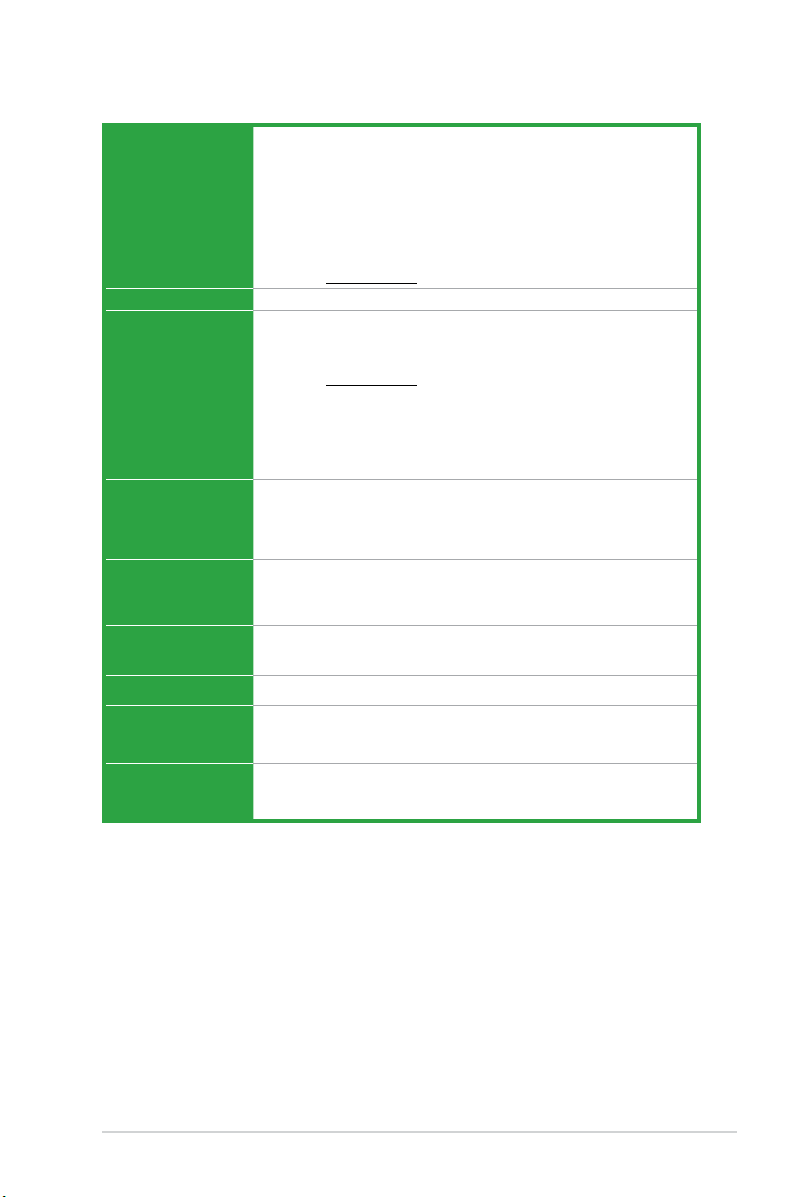
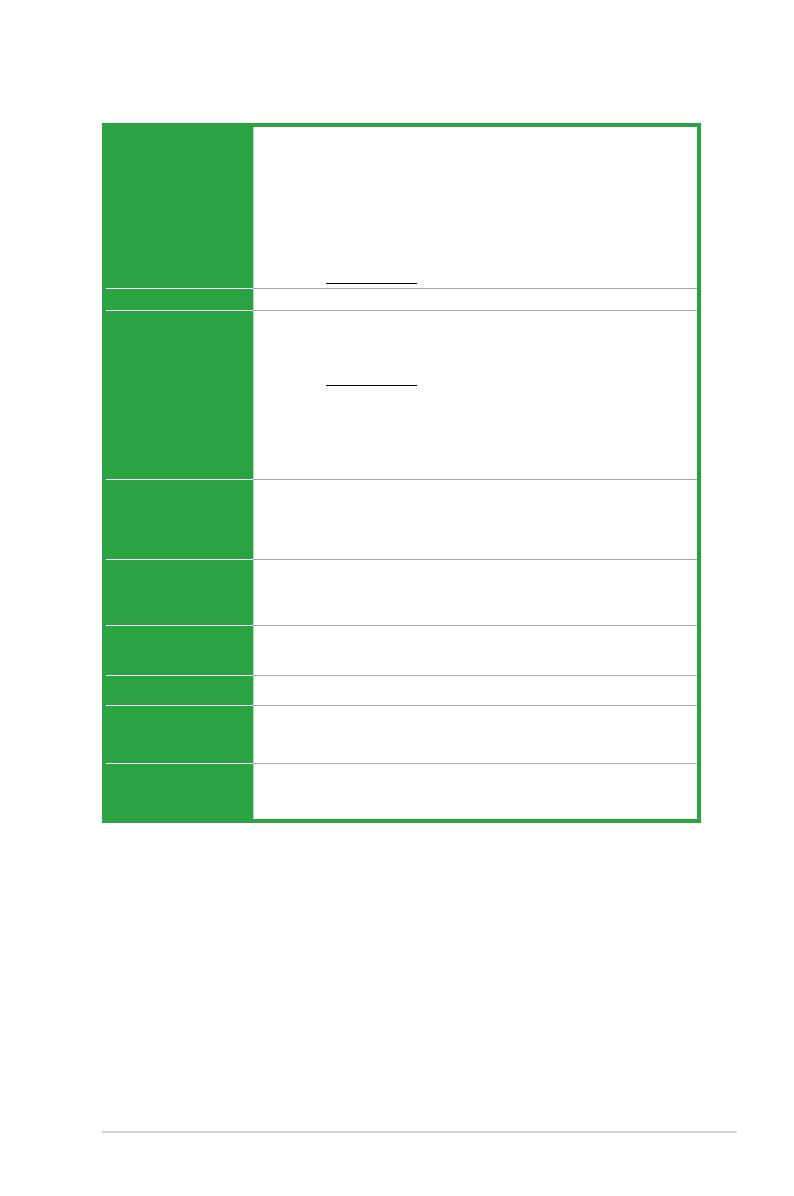
H61M-K specications summary
CPU LGA1155 socket for Intel® 3rd/2nd Generation Core™ i7, Core™ i5, Core™
i3, Pentium®, and Celeron® processors
Supports Intel® 22nm/32nm CPU
Supports Intel® Turbo Boost Technology 2.0
• Up to 77W Thermal Design Power support.
• The Intel
®
Turbo Boost Technology 2.0 support depends on the CPU
types.
• Refer to www.asus.com for Intel
®
CPU support list.
Chipset Intel® H61 Express Chipset
Memory 2 x DIMMs, max. 16GB, DDR3 1600 / 1333 / 1066 MHz, non-ECC, un-
buffered memory
Dual-channel memory architecture
• Refer to www.asus.com for the latest Memory QVL (Qualied Vendors
List).
• When you install a total memory of 4GB capacity or more, Windows
®
32-bit operating system may only recognize less than 3GB. We
recommend a maximum of 3GB system memory if you are using a
Windows® 32-bit operating system.
Expansion slots 1 x PCI Express 3.0*/2.0 x16 slot
2 x PCI Express 2.0 x1 slots
• PCIe 3.0 speed is supported by Intel
®
3rd generation Core™
processors.
VGA Output DVI-D with Max. Resolution: 1920×1200@60Hz
D-SUB with Max. Resolution: 2048×1536@75Hz
Max. UMA Memory: 1024MB
Storage
Intel® H61 Express Chipset:
— 4 x Serial ATA 3 Gb/s connectors
LAN
Realtek® 8111F PCIe Gigabit LAN controller
Audio Realtek® ALC887 8-channel High Denition Audio CODEC
• Use a chassis with HD audio module in the front panel to support an
8-channel audio output.
USB Intel® H61 Express Chipset:
— 8 x USB 2.0/1.1 ports (4 ports at the mid-board, 4 ports at the back
panel)
(continued on the next page)
ix

H61M-K specications summary
ASUS unique
features
Rear panel ports 1 x PS/2 keyboard port (purple)
Internal
connectors/
jumpers
ASUS Anti-Surge Protection
ASUS UEFI BIOS (EZ Mode)
ASUS MyLogo 2
ASUS EZ-Flash 2
ASUS Fan Xpert
ASUS AI Charger
ASUS Crash Free BIOS3
ASUS AI Suite II
ASUS Network iControl*
ASUS Webstorage
• The Network iControl feature does not support Windows
operating systems.
1 x PS/2 mouse port (green)
1 x DVI-D
1 x D-Sub
4 x USB 2.0/1.1 ports
1 x LAN (RJ-45) port
3 x Audio jacks
2 x USB 2.0/1.1 connectors support additional 4 USB 2.0/1.1 ports
4 x SATA 3 Gb/s connectors
1 x 4-pin CPU fan connector
1 x 4-pin chassis fan connector
1 x Front panel audio connector
1 x System panel connector
1 x Speaker connector
1 x 24-pin ATX power connector
1 x 4-pin ATX 12V power connector
1 x Clear CMOS jumper
®
XP/Vista
(continued on the next page)
x

H61M-K specications summary
BIOS features 64 Mb Flash ROM, UEFI BIOS, PnP, DMI v2.0, WfM 2.0, ACPI v2.0a, SM
Manageability
Support DVD Drivers
Form factor
Specications are subject to change without notice.
BIOS v2.7, SLP 3.0, EUP-ready, Multi-language BIOS, ASUS EZ Flash
2, ASUS CrashFree BIOS 3, F12 PrintScreen function, F3 Shortcut
function, and ASUS DRAM SPD (Serial Presence Detect) memory
information
WfM 2.0, DMI v2.0, WOR by PME, PXE
ASUS utilities
ASUS Update
Anti-virus software (OEM version)
ATX form factor: 8.9 in x 6.9 in (22.6 cm x 17.5 cm)
xi
Package contents
H61M-K
PCIEX16
PCIEX1_1
PCIEX1_2
SPEAKER
CLRTC
USBPW1-4
USBPW5-8
USB78
USB56
AAFP
ATX12V
EATXPWR
CPU_FAN
CHA_FAN
BATTERY
Super
I/O
ALC
887
RTL
8111F
RT
8876
64Mb
BIOS
SB_PWR
LGA1155
Intel
®
H61
DDR3 DIMM_A1 (64bit, 240-pin module)
DDR3 DIMM_B1 (64bit, 240-pin module)
SATA3G_3 SATA3G_1
SATA3G_4 SATA3G_2
AUDIO
KBMS
LAN_USB12
USB34
VGA
DVI
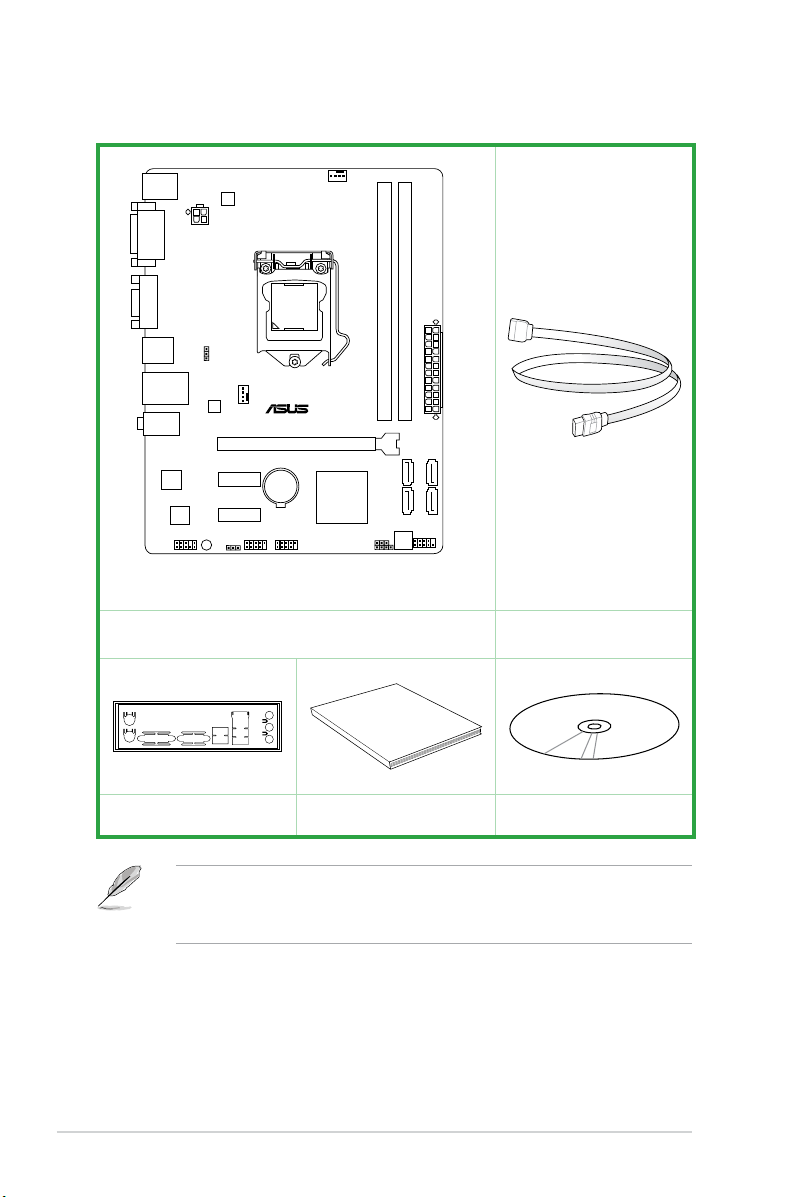
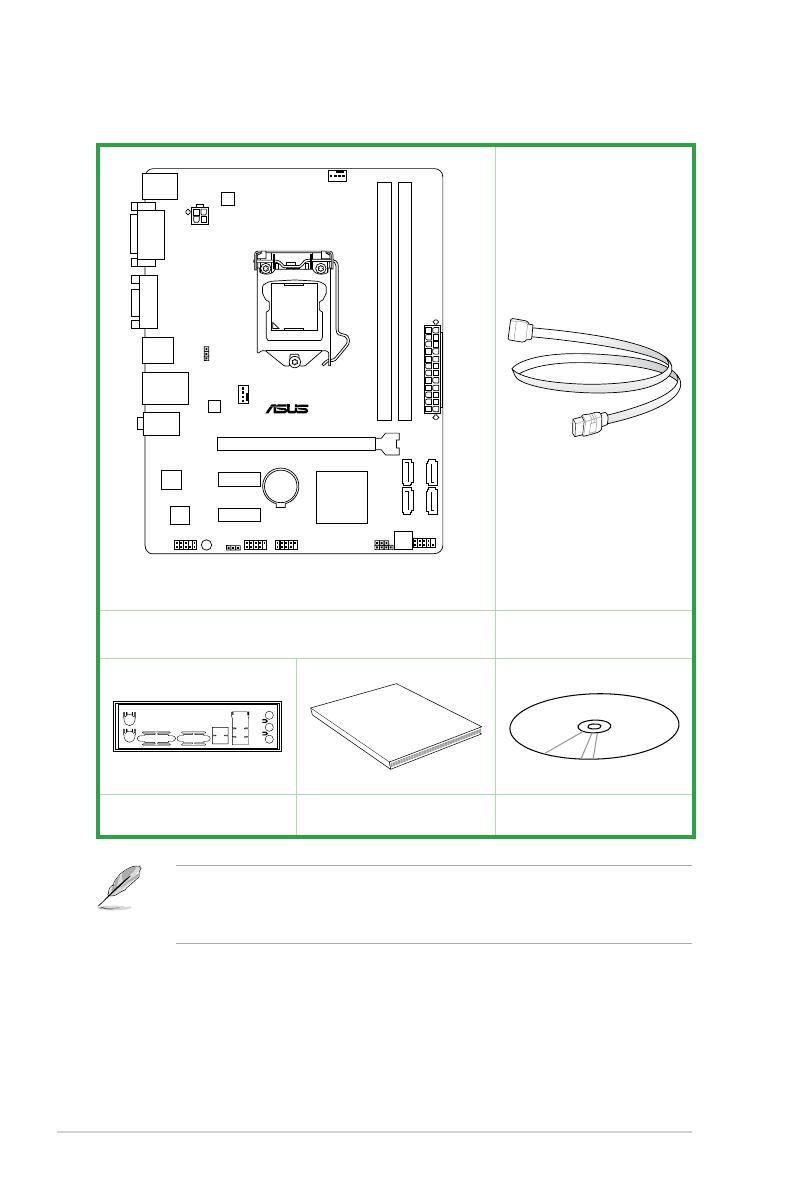
Check your motherboard package for the following items.
ASUS H61M-K motherboard 2 x Serial ATA 3 Gb/s cables
xii
1 x I/O Shield User Guide Support DVD
• If any of the above items is damaged or missing, contact your retailer.
• The illustrations above are for reference only. Actual product specications may vary
with different models.

Product introduction
1
1.1 Special features
1.1.1 Product highlights
LGA1155 socket for Intel® 3rd/2nd Generation Core™ i7, Core™ i5, Core™ i3,
Pentium®, and Celeron® processors
This motherboard supports the Intel® 3rd/2nd generation Core™ i7, Core™ i5, Core™ i3,
Pentium®, and Celeron® processors in the LGA1155 package, with memory and PCI Express
controllers integrated to support onboard graphics out with dedicated chipsets, 2-channel
(2 DIMMs) DDR3 memory, and 16 PCI Express 3.0/2.0 lanes. This provides great graphics
performance. Intel® 3rd/2nd generation Core™ i7, Core™ i5, Core™ i3, Pentium®, and
Celeron® processors are among the most powerful and energy efcient CPUs in the world.
Intel® H61 Express Chipset
The Intel® H61 Express Chipset is the latest single-chipset design to support the new 1155
socket Intel® 3rd/2nd Generation Core™ i7, Core™ i5, Core™ i3, Pentium®, and Celeron®
processors. It provides improved performance by utilizing serial point-to-point links, which
allows increased bandwidth and stability.
Dual-Channel DDR3 1600 / 1333 / 1066 MHz support
The motherboard supports DDR3 memory that features data transfer rates of 1600 / 1333 /
1066 MHz to meet the higher bandwidth requirements of the latest 3D graphics, multimedia,
and Internet applications. The dual-channel DDR3 architecture enlarges the bandwidth of
your system memory to boost system performance.
PCI Express® 3.0
PCI Express® 3.0 (PCIe 3.0) is the latest PCI Express bus standard with improved encoding
schemes that provide twice the performance of the current PCIe 2.0. The total bandwidth
for a x16 link reaches a maximum of 32Gb/s, double the 20 Gb/s of PCIe 2.0 (in x16 mode).
As such, PCIe 3.0 provides users an unprecendented data speeds, combined with the
convenience and seamless transition offerred by complete backward compatibility with PCIe
1.0 and PCIe 2.0 devices. PCIe 3.0 will become a must-have feature for users who wish to
improve and optimize graphic performance, as well as have the latest technology available to
them.
* PCI 3.0 speed is supported by Intel® 3rd generation Core™ processors.
Intel® Smart Connect Technology
Your computer can receive fresh updates for selected applications, even when the system
is in sleep mode. This means less time waiting for applications to update and sync with the
cloud, leading to a more efcient computing experience.
ASUS H61M-K
1-1

Intel® Rapid Start Technology
Intel® Rapid Start Technology allows your system to receive updates for your web
applications in real-time even when your system is in sleep mode, saving wait time and
power usage.
8-channel high denition audio
The onboard 8-channel HD audio (High Denition Audio, previously codenamed Azalia)
CODEC enables high-quality 192KHz/24-bit audio output and jack-detect feature that
automatically detects and identies what types of peripherals are plugged into the audio
I/O jacks and noties users of inappropriate connection, which means there will be no more
confusion of Line-in, Line-out, and Mic jacks.
* Use a chassis with HD audio module in the front panel to support an 8-channel audio output.
Gigabit LAN solution
The onboard LAN controller is a highly integrated Gb LAN controller. It is enhanced with an
ACPI management function to provide efcient power management for advanced operating
systems.
1.1.2 ASUS Exclusive Features
ASUS UEFI BIOS (EZ Mode)
ASUS UEFI BIOS, a UEFI compliant architecture, offers the rst mouse-controlled intuitive
graphical BIOS interface that goes beyond the traditional keyboard-only BIOS controls,
providing you with more exibility, convenience, and easy to navigate EFI BIOS than the
traditional BIOS versions. It offers you with dual selectable modes and native support for hard
drives larger than 2.2 TB.
ASUS UEFI BIOS includes the following new features:
• F12 BIOS snapshot hotkey
• F3 Shortcut for most accessed information
• ASUS DRAM SPD (Serial Presence Detect) information detecting faulty DIMMs, and
helping with difcult POST situations.
Network iControl
Network iControl is an intuitive one-step network control center that makes it easier for you to
manage your bandwidth and allows you to set, monitor, and schedule the bandwidth priorities
for your network programs. It allows you to automatically connect to a PPPoE network for a
more convenient online experience.
* The ASUS Network iControl feature does not support Windows® XP/Vista operating systems.
Ai Charger
Ai Charger is ASUS fast-charging software that supports iPod, iPhone, and iPad.
* Check your USB mobile device if it fully supports the BC 1.1 function.
** The actual charging speed may vary with your USB device’s conditions.
*** Ai Charger is only supported when you set the USB device wake-up jumpers to +5VSB. See
section 1.7 Jumpers for details.
1-2
Chapter 1: Product introduction

AI Suite II
With its user-friendly interface, ASUS AI Suite II integrates several ASUS utilities and allows
you to launch and operate these utilities simultaneously. It allows you to supervise fan speed
control, and voltage and sensor readings. This all-in-one software offers diverse and ease to
use functions, with no need to switch back and forth between different utilities.
ASUS Anti-Surge Protection
This special design protects expensive devices and the motherboard from damage caused
by power surges from switching power supply unit (PSU).
ASUS Fan Xpert
ASUS Fan Xpert intelligently allows you to adjust the CPU fan and chassis fan speeds
according to different ambient temperatures caused by different climate conditions in different
geographic regions and your PC’s loading. The built-in variety of useful proles offer exible
controls of fan speed to achieve a quiet and cool environment.
ASUS MyLogo2™
Turn your favorite photos into 256-color boot logos to personalize your system.
ASUS CrashFree BIOS 3
ASUS CrashFree BIOS 3 is an auto-recovery tool that allows you to restore a corrupted BIOS
le using the bundled support DVD or a USB ash disk that contains the BIOS le.
ASUS EZ Flash 2
ASUS EZ Flash 2 is a user-friendly utility that allows you to update the BIOS without using a
bootable oppy disk or an OS-based utility.
C.P.R. (CPU Parameter Recall)
The BIOS C.P.R. feature automatically restores the CPU default settings when the system
hangs due to overclocking failure. C.P.R. eliminates the need to open the system chassis and
clear the RTC data. Simply shut down and reboot the system, and the BIOS automatically
restores the CPU parameters to their default settings.
ErP ready
The motherboard is European Union´s Energy-related Products (ErP) ready, and ErP
requires products to meet certain energy efciency requirements with regard to energy
consumptions. This is in line with ASUS vision of creating environment-friendly and energy-
efcient products through product design and innovation to reduce carbon footprint of the
product and thus mitigate environmental impacts.
ASUS H61M-K
1-3
1.2 Before you proceed
SB_PWR
ON
Standby Power
Powered Off
OFF
H61M-K
H61M-K Onboard LED
Take note of the following precautions before you install motherboard components or change
any motherboard settings.
• Unplug the power cord from the wall socket before touching any component.
• Before handling components, use a grounded wrist strap or touch a safely grounded
object or a metal object, such as the power supply case, to avoid damaging them due
to static electricity.
• Hold components by the edges to avoid touching the ICs on them.
• Whenever you uninstall any component, place it on a grounded antistatic pad or in the
bag that came with the component.
• Before you install or remove any component, switch off the ATX power supply and
detach its power cord. Failure to do so may cause severe damage to the motherboard,
peripherals, or components.
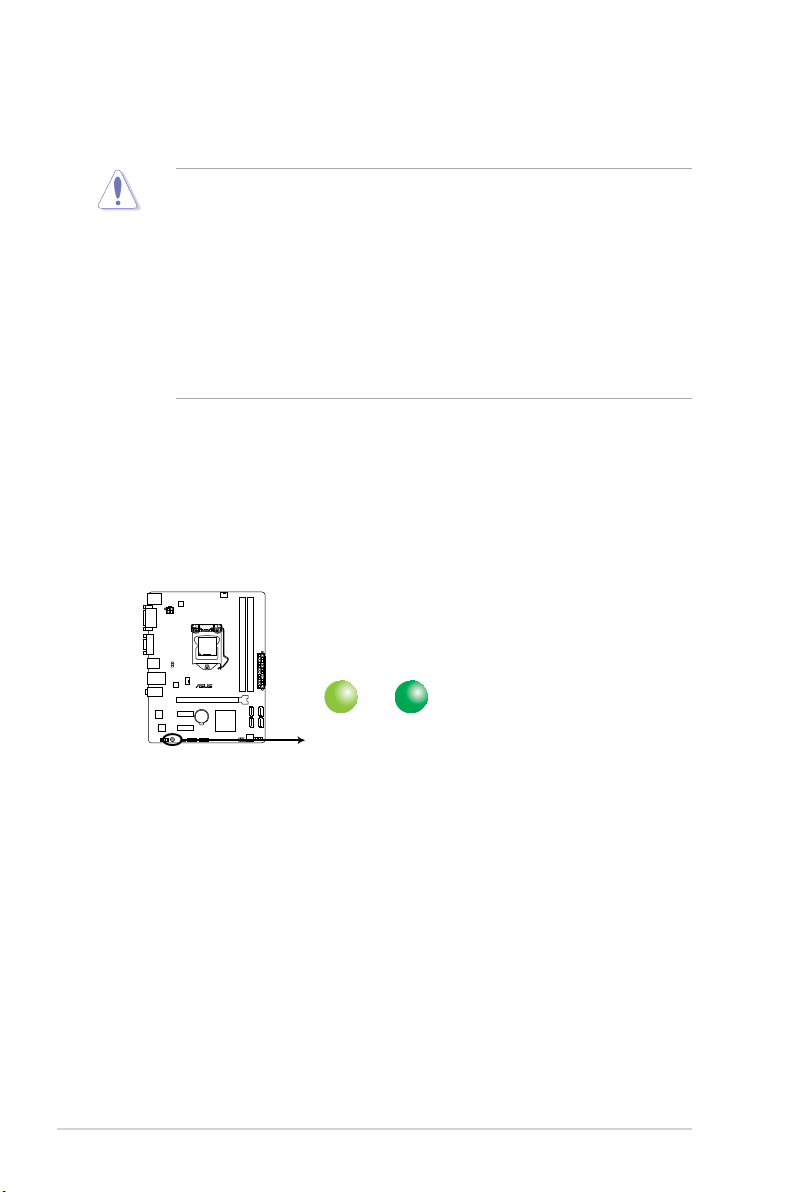
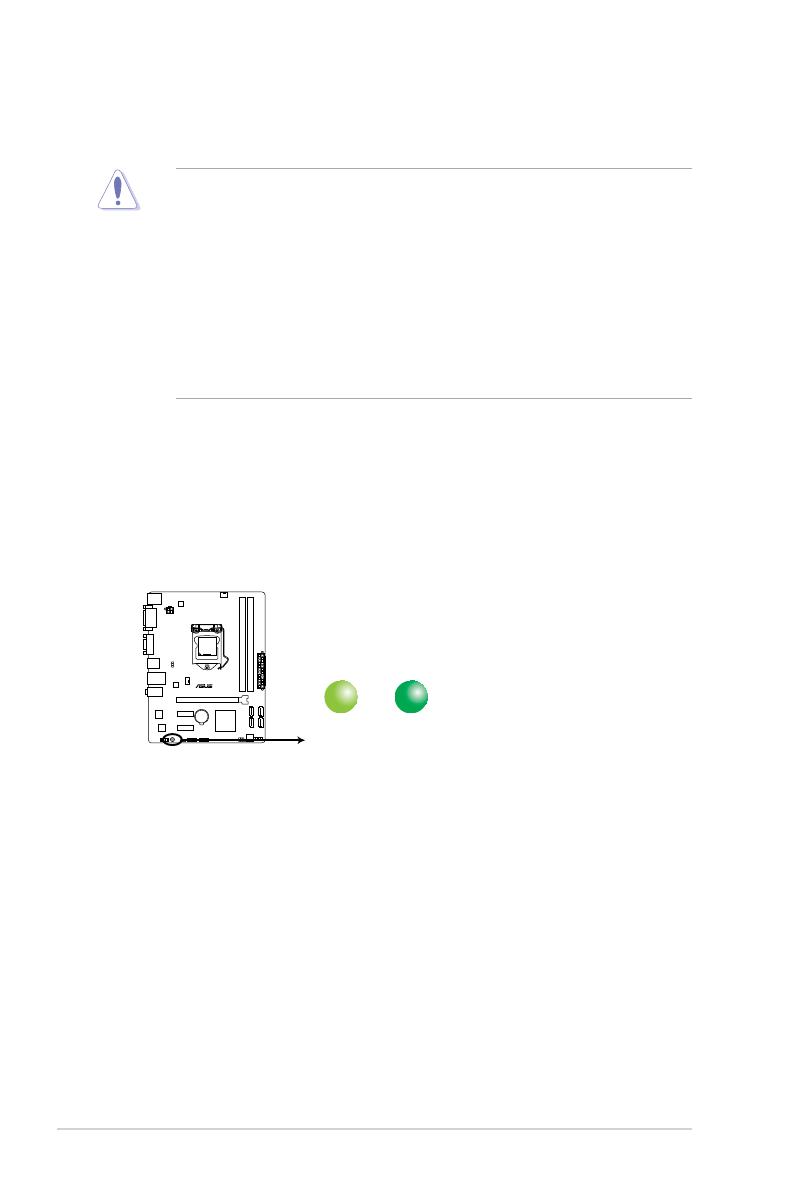
Standby Power LED
The motherboard comes with a standby power LED that lights up to indicate that the system
is ON, in sleep mode, or in soft-off mode. This is a reminder that you should shut down
the system and unplug the power cable before removing or plugging in any motherboard
component. The illustration below shows the location of the onboard LED.
1-4
Chapter 1: Product introduction
1.3 Motherboard overview
1.3.1 Placement direction
When installing the motherboard, ensure that you place it into the chassis in the correct
orientation. The edge with external ports goes to the rear part of the chassis as indicated in
the image below.
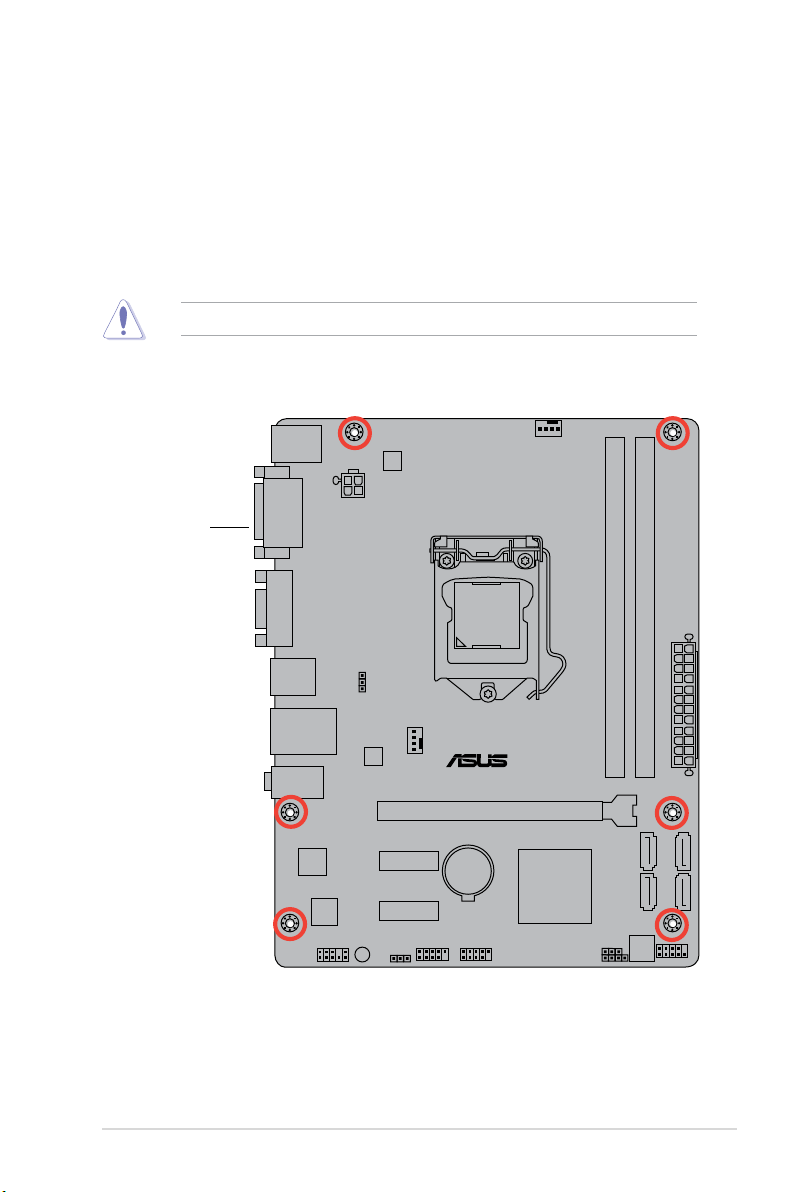
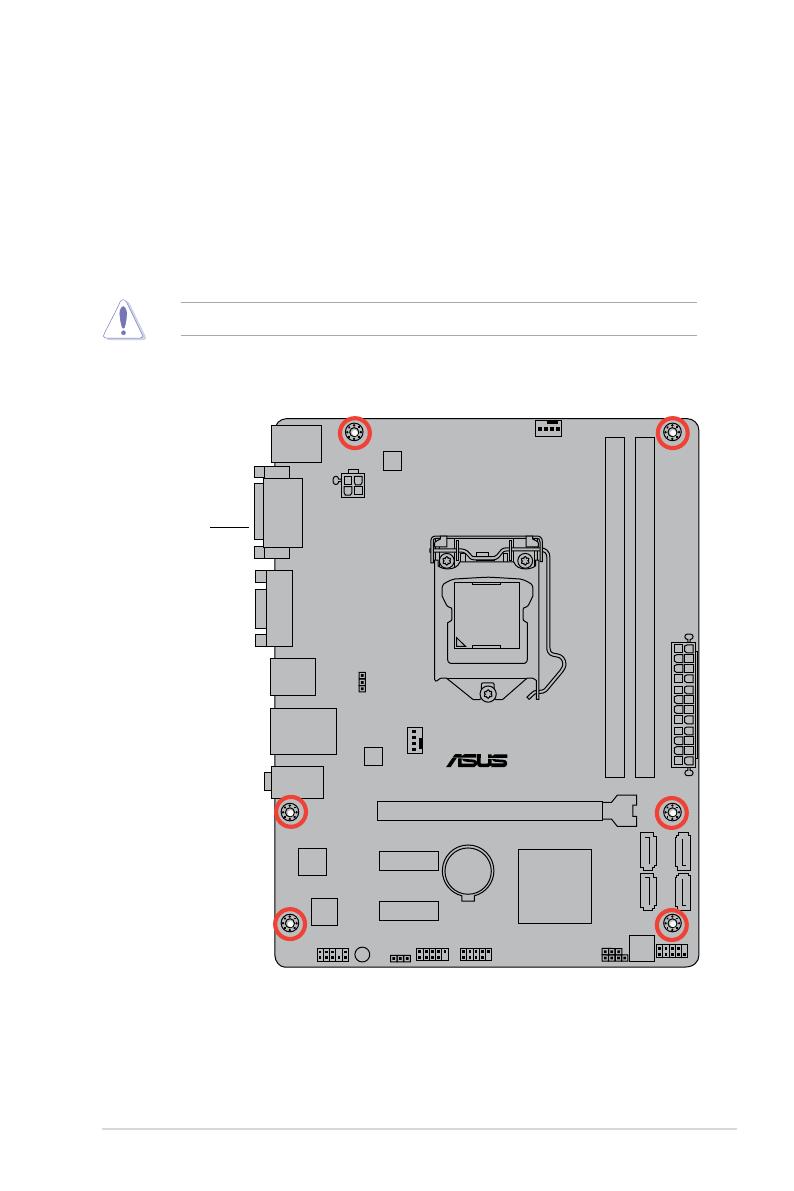
1.3.2 Screw holes
Place six screws into the holes indicated by circles to secure the motherboard to the chassis.
DO NOT overtighten the screws! Doing so can damage the motherboard.
Place this side
towards the rear
of the chassis
ASUS H61M-K
1-5
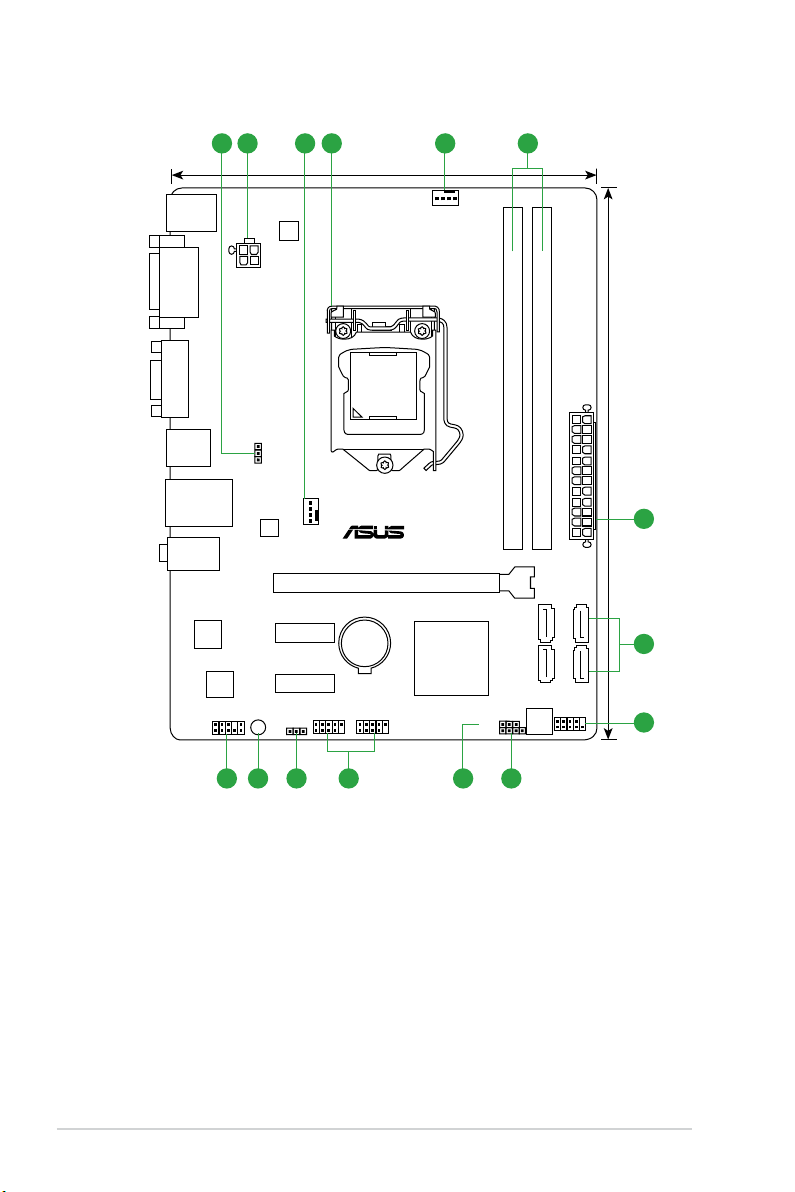
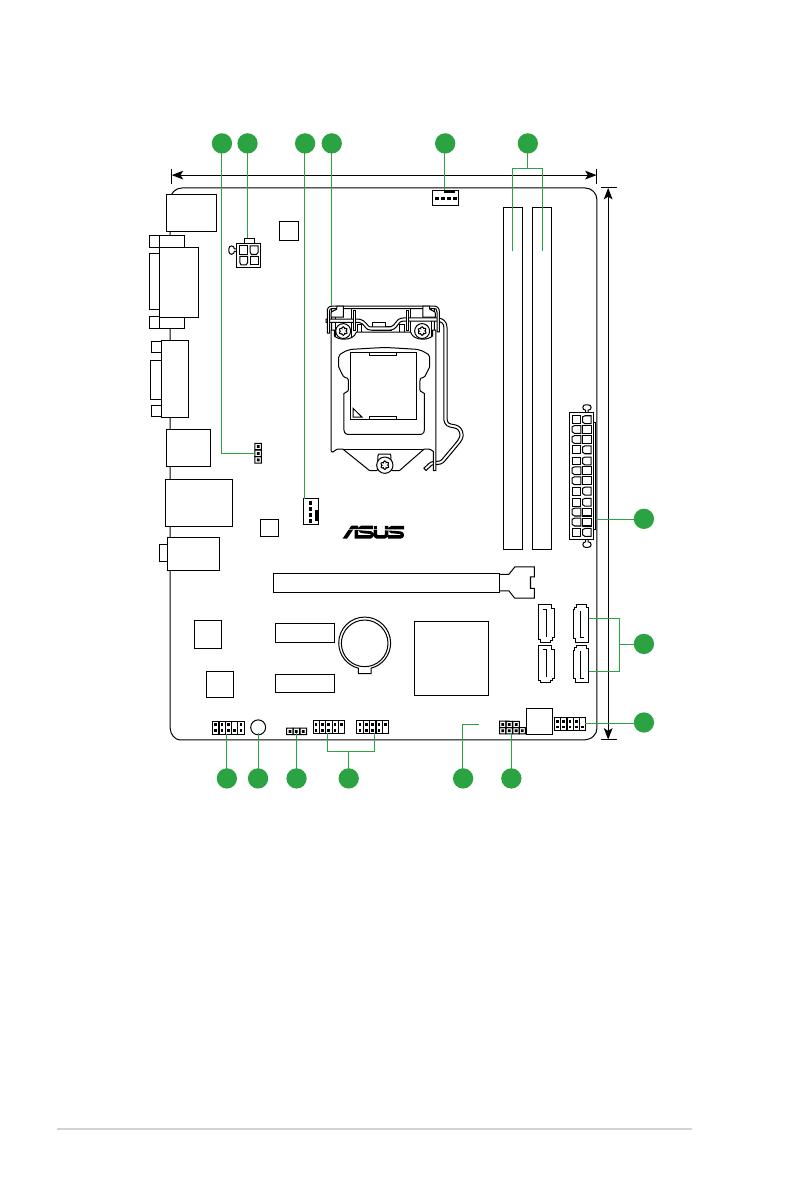
1.3.3 Motherboard layout
H61M-K
PCIEX16
PCIEX1_1
PCIEX1_2
SPEAKER
CLRTC
USBPW1-4
USBPW5-8
USB78
USB56
AAFP
ATX12V
EATXPWR
CPU_FAN
CHA_FAN
BATTERY
Super
I/O
ALC
887
RTL
8111F
RT
8876
64Mb
BIOS
SB_PWR
22.6cm(8.9in)
LGA1155
Intel
®
H61
DDR3 DIMM_A1 (64bit, 240-pin module)
DDR3 DIMM_B1 (64bit, 240-pin module)
SATA3G_3 SATA3G_1
SATA3G_4 SATA3G_2
AUDIO
KBMS
LAN_USB12
USB34
17.5cm(6.9in)
VGA
DVI
2 41 533
7
2
891011112
6
1-6
Chapter 1: Product introduction
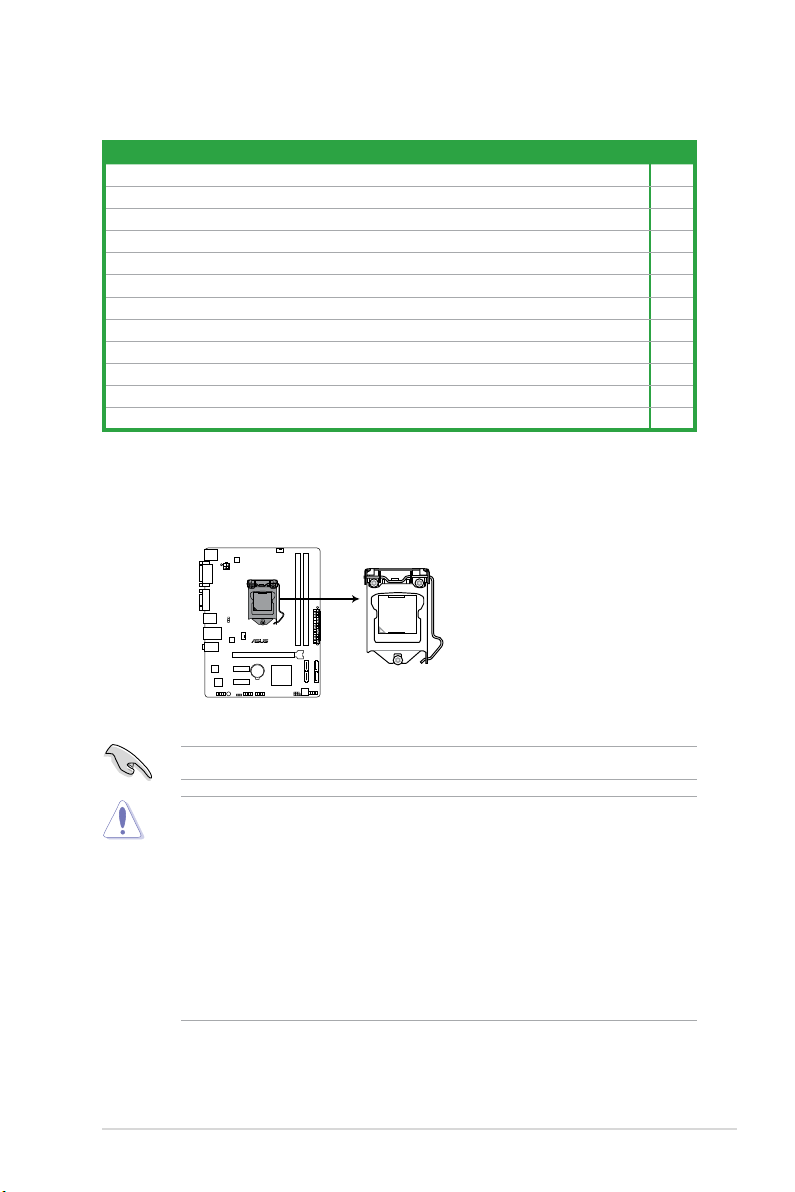
1.3.4 Layout contents
H61M-K
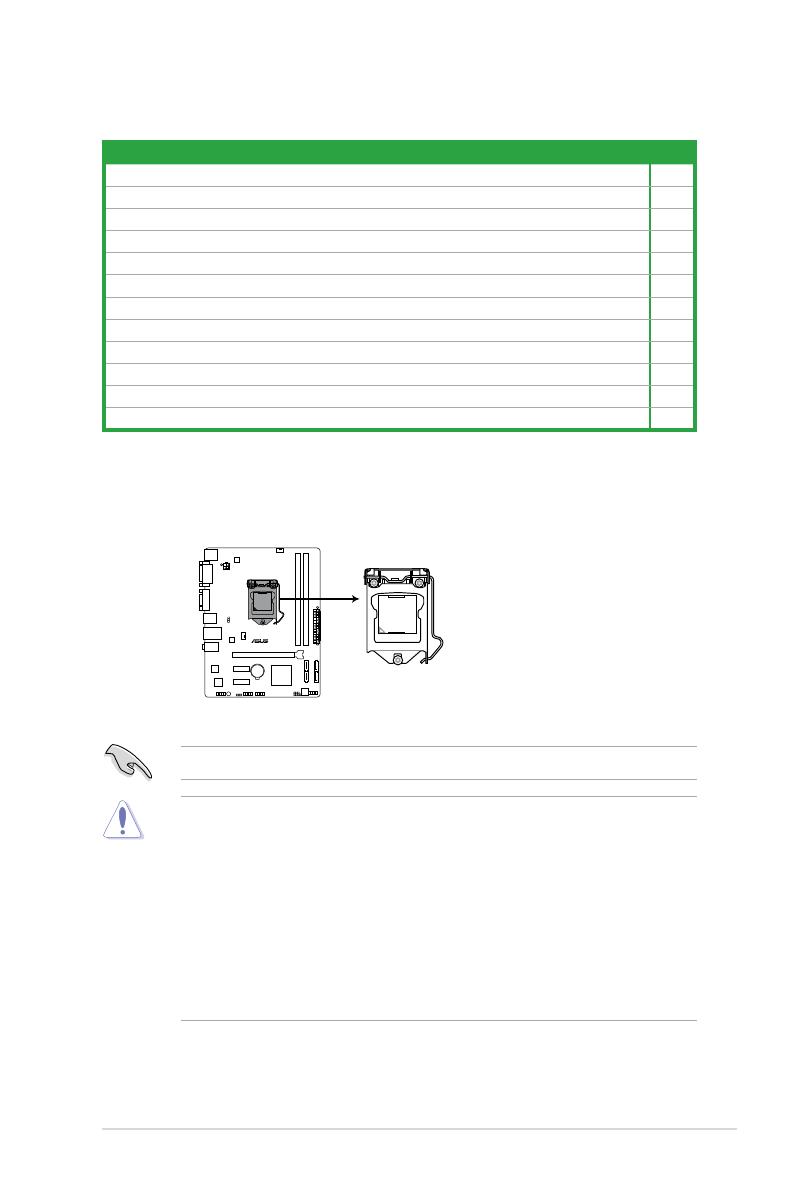
H61M-K CPU socket LGA1155
Connectors/Jumpers/Slots/LED Page
1. USB device wake-up (3-pin PS2_USBPW1~4; USBPW5~8) 1-27
2. ATX power connectors (24-pin EATXPWR, 4-pin ATX12V)
3. CPU and chassis fan connectors (4-pin CPU_FAN, 4-pin CHA_FAN)
®
LGA1155 CPU socket 1-7
4. Intel
5. DDR3 DIMM slots
®
H61 Serial ATA 3.0Gb/s connectors (7-pin SATA3G_1/2/3/4) 1-27
6. Intel
7. System panel connector (10-1 pin F_PANEL)
8. Speaker connector (4-pin SPEAKER)
9. Clear RTC RAM (3-pin CLRTC)
10. USB 2.0 connectors (10-1 pin USB56, USB78)
11. Standby power LED (SB_PWR)
12. Front panel audio connector (10-1 pin AAFP)
1-26
1-28
1-12
1-29
1-29
1-28
1-29
1-5
1-25
1.4 Central Processing Unit (CPU)
The motherboard comes with a surface mount LGA1155 socket designed for the Intel® 3rd /
2nd Generation Core™ i7, i5, i3, Pentium®, and Celeron® processors.
Unplug all power cables before installing the CPU.
• Upon purchase of the motherboard, ensure that the PnP cap is on the socket and
• Keep the cap after installing the motherboard. ASUS will process Return Merchandise
• The product warranty does not cover damage to the socket contacts resulting from
ASUS H61M-K
the socket contacts are not bent. Contact your retailer immediately if the PnP cap
is missing, or if you see any damage to the PnP cap/socket contacts/motherboard
components. ASUS will shoulder the cost of repair only if the damage is shipment/
transit-related.
Authorization (RMA) requests only if the motherboard comes with the cap on the
LGA1155 socket.
incorrect CPU installation/removal, or misplacement/loss/incorrect removal of the PnP
cap.
1-7
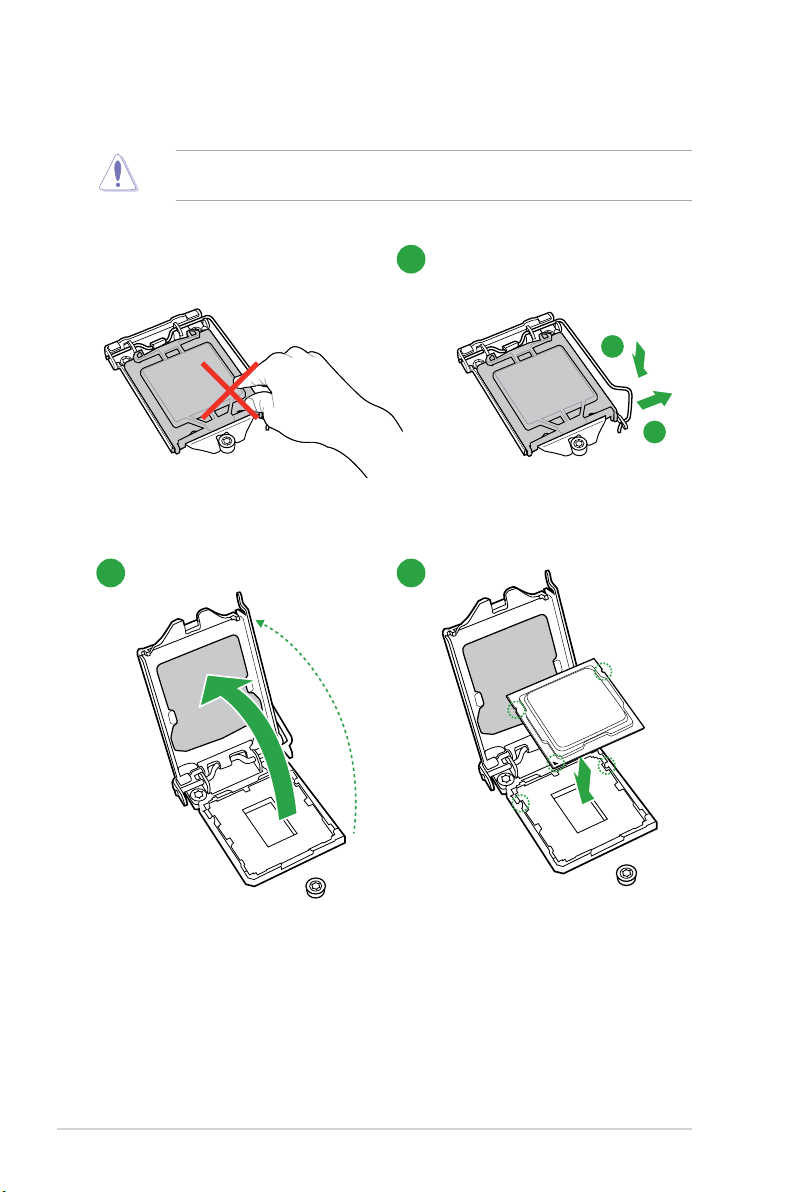
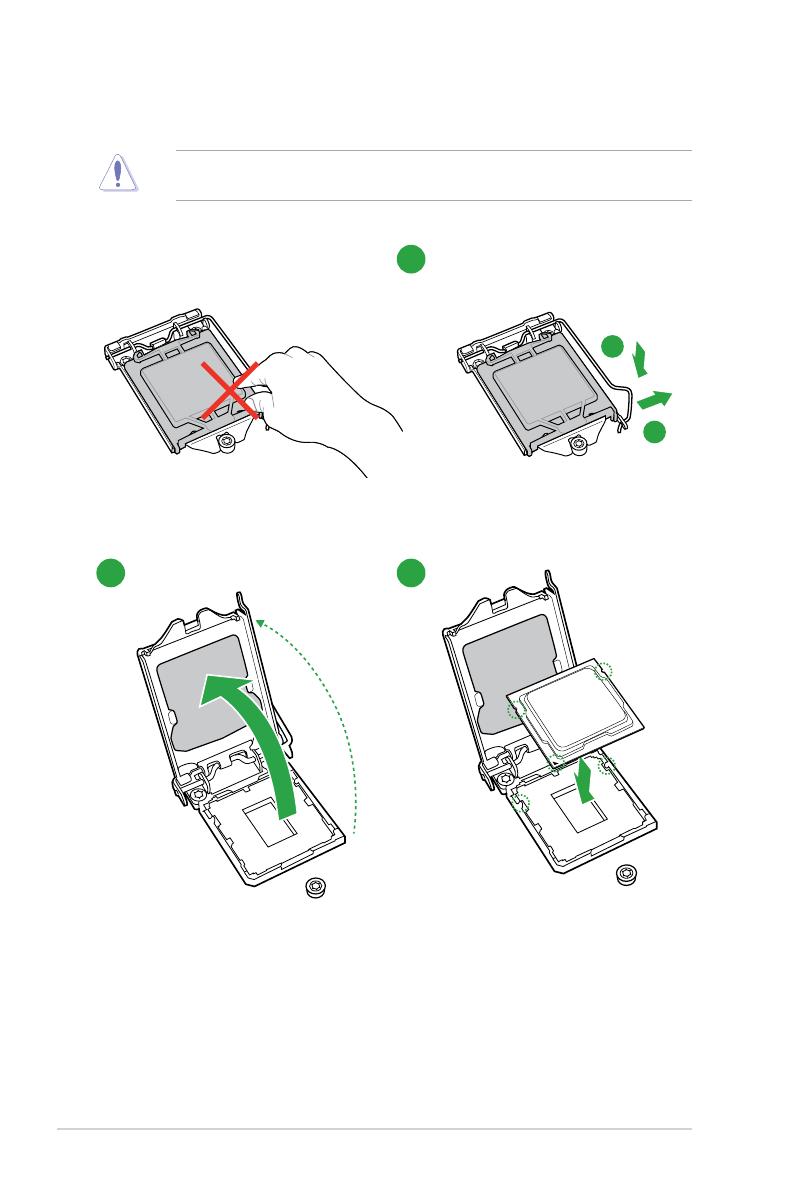
1.4.1 CPU installation
The LGA1156 CPU is not compatible with the LGA1155 socket. DO NOT install an
LGA1156 CPU on the LGA1155 socket.
2 3
1
A
B
1-8
Chapter 1: Product introduction
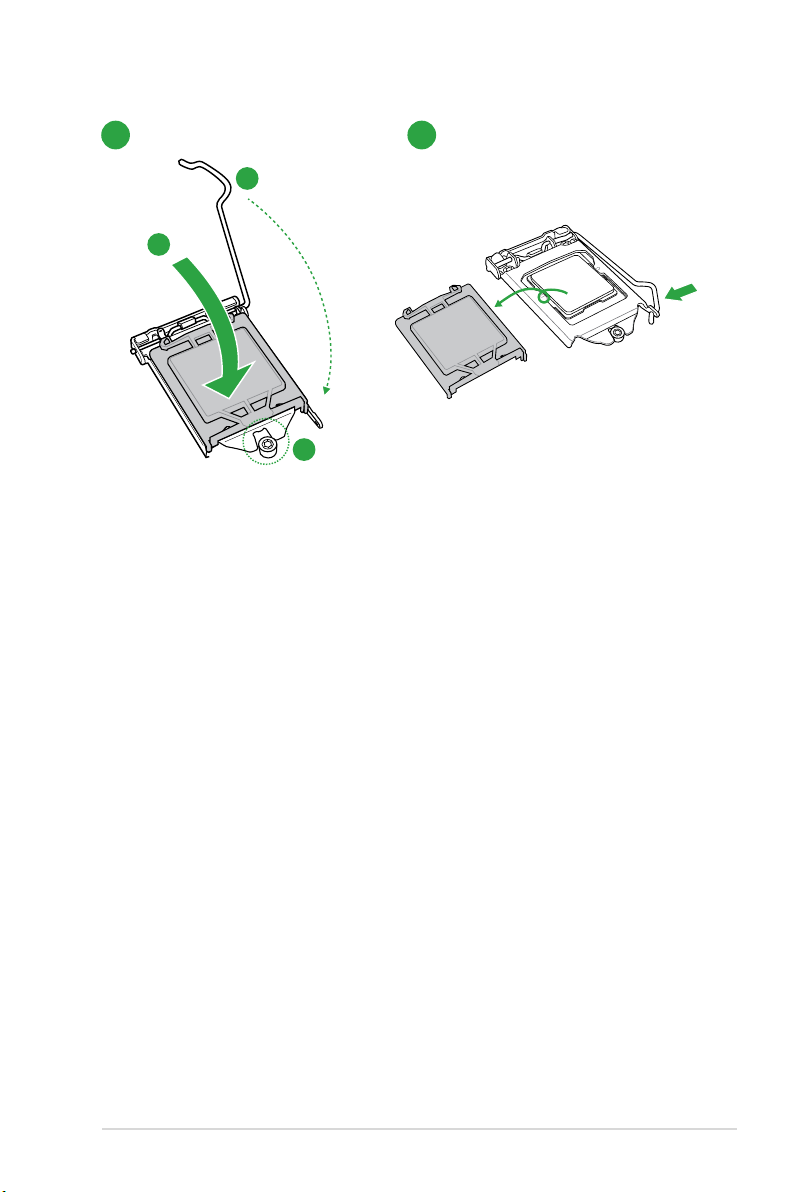
4 5
C
A
B
ASUS H61M-K
1-9
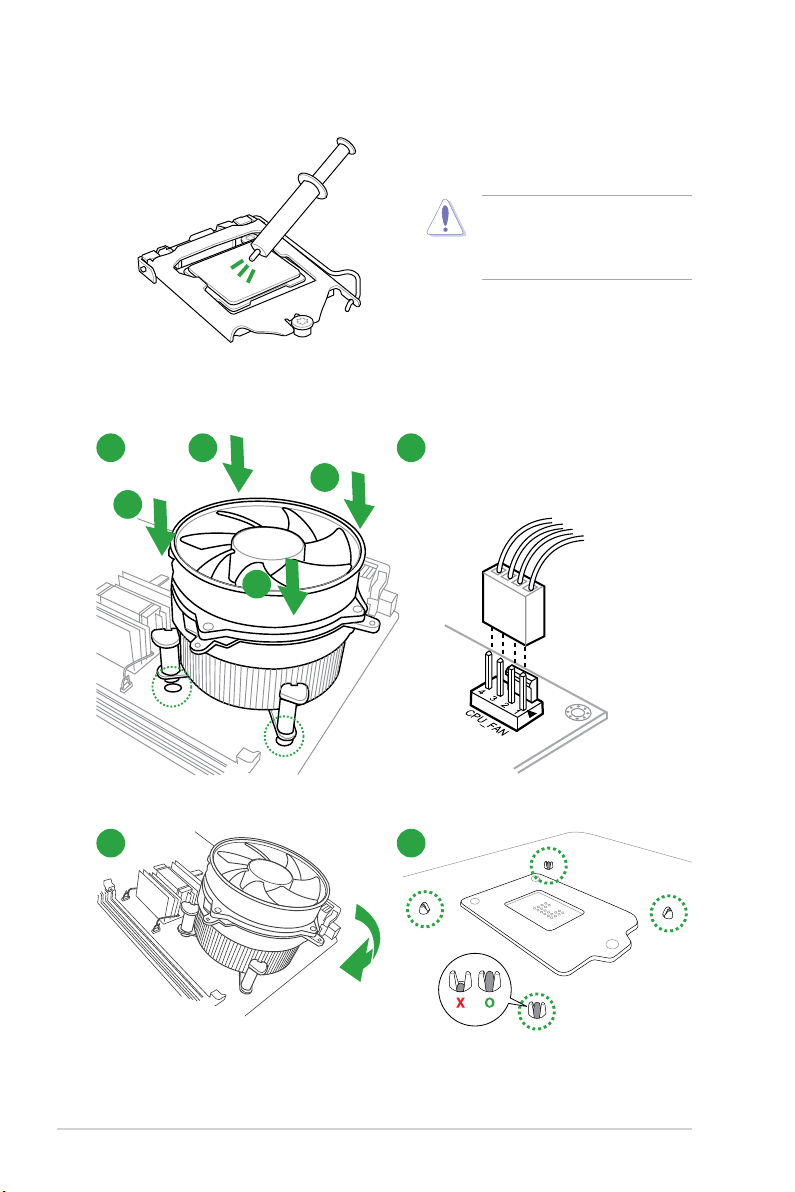
1.4.2 CPU heatsink and fan assembly installation
Apply the Thermal Interface Material
to the CPU heatsink and CPU
before you install the heatsink and
fan if necessary.
To install the CPU heatsink and fan assembly
1 2
A
B
B
A
3 4
1-10
Chapter 1: Product introduction
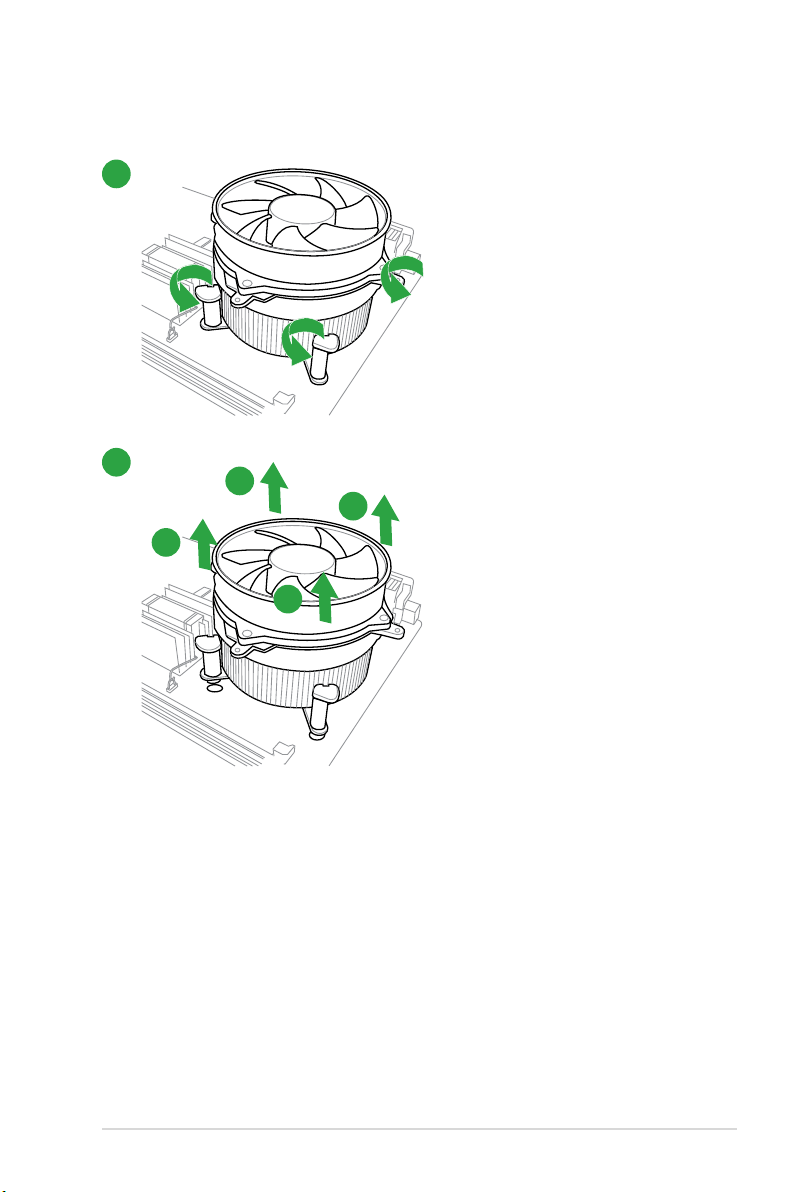
To uninstall the CPU heatsink and fan assembly
1
2
A
B
B
A
ASUS H61M-K
1-11
1.5 System memory
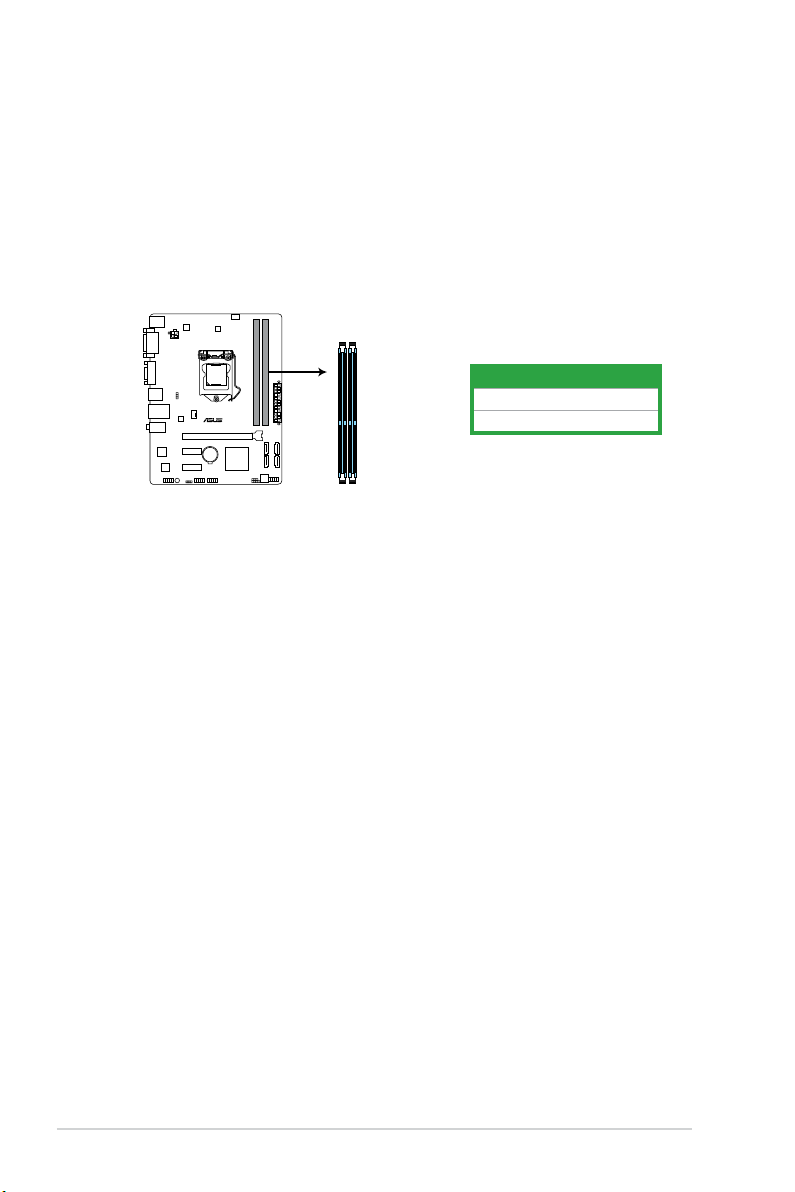
H61M-K
H61M-K 240-pin DDR3 DIMM sockets
DIMM_A1
DIMM_B1
1.5.1 Overview
This motherboard comes with two Double Data Rate 3 (DDR3) Dual Inline Memory Modules
(DIMM) sockets.
A DDR3 module has the same physical dimensions as a DDR2 DIMM but is notched
differently to prevent installation on a DDR2 DIMM socket. DDR3 modules are developed for
better performance with less power consumption.
The gure illustrates the location of the DDR3 DIMM sockets:
Channel Sockets
Channel A DIMM_A1
Channel B DIMM_B1
1-12
Chapter 1: Product introduction

1.5.2 Memory congurations
You may install 1GB, 2GB, 4GB, and 8GB unbuffered non-ECC DDR3 DIMMs into the DIMM
sockets.
• You may install varying memory sizes in Channel A and Channel B. The system maps
the total size of the lower-sized channel for the dual-channel conguration. Any excess
memory from the higher-sized channel is then mapped for single-channel operation.
• Always install DIMMs with the same CAS latency. For optimal compatibility, we
recommend that you install memory modules of the same version or date code (D/C)
from the same vendor. Check with the retailer to get the correct memory modules.
• Memory module with memory frequency higher than 2133 MHz and its corresponding
timing or the loaded XMP Prole is not the JEDEC memory standard. The stability and
compatibility of these memory modules depend on the CPU’s capabilities and other
installed devices.
• Due to the memory address limitation on 32-bit Windows
or more memory on the motherboard, the actual usable memory for the OS can be
about 3GB or less. For effective use of memory, we recommend that you do any of the
following:
— Use a maximum of 3GB system memory if you are using a 32-bit Windows
— Install a 64-bit Windows® OS when you want to install 4GB or more on the
motherboard.
• This motherboard does not support DIMMs made up of 512Mb (64MB) chips or less.
• The default memory operation frequency is dependent on its Serial Presence Detect
(SPD), which is the standard way of accessing information from a memory module.
Under the default state, some memory modules for overclocking may operate at a
lower frequency than the vendor-marked value. To operate at the vendor-marked
or at a higher frequency, refer to section 2.4 Ai Tweaker menu for manual memory
frequency adjustment.
• For system stability, use a more efcient memory cooling system to support a full
memory load (2 DIMMs) or overclocking condition.
®
OS, when you install 4GB
®
OS.
H61M-K Motherboard Qualied Vendors Lists (QVL)
DDR3 2666 (O.C.) MHz capability
Vendors Part No. Size SS/DS
CORSAIR CMD16GX3M4A2666C11(XMP) 4GB DS — — 11-13-13-35 1.65V • •
G.SKILL F3-2666C11Q-16GTXD(XMP) 16GB(4GBx4) DS — — 11-13-13-35 1.65V • •
Chip
Chip NO. Timing Voltage
Brand
ASUS H61M-K
DIMM socket
support (Optional)
1 DIMM 2 DIMMs
1-13
Loading…
Can You Chip In?
Dear Patron: Please don’t scroll past this. The Internet Archive is a nonprofit fighting for universal access to quality information. We build and maintain all our own systems, but we don’t charge for access, sell user information, or run ads. We’d be deeply grateful if you’d join the one in a thousand users that support us financially.
We understand that not everyone can donate right now, but if you can afford to contribute this Thursday, we promise it will be put to good use. Our resources are crucial for knowledge lovers everywhere—so if you find all these bits and bytes useful, please pitch in.
Can You Chip In? Dear Patron: Please don’t scroll past this. The Internet Archive is working to keep the record straight by recording government websites, news publications, historical documents, and more. If you find our work useful, please pitch in.
Free Manuals for ASUS H61M-K
Manufacturer:ASUS
Category:Computers & Peripherals
Device:ASUS H61M-K
Name:DRAM QVL
Language:Multilingual
Pages:8
Size:234.52 KB
Manufacturer:ASUS
Category:Computers & Peripherals
Device:ASUS H61M-K
Name:New_SSD_List
Pages:1
Size:18.19 KB
Manufacturer:ASUS
Category:Computers & Peripherals
Device:ASUS H61M-K
Name:User’s Manual (English)
Language:English
Version:E8088
Pages:82
Size:3.42 MB
Manufacturer:ASUS
Category:Computers & Peripherals
Device:ASUS H61M-K
Name:Quick Start Guide
Language:Multilingual
Pages:2
Size:1.48 MB
Manufacturer:ASUS
Category:Computers & Peripherals
Device:ASUS H61M-K
Name:Quick Start Guide
Version:Q8088
Pages:2
Size:1.48 MB

ii
E8088
First Edition
March 2013
Copyright © 2013 ASUSTeK COMPUTER INC. All Rights Reserved.
No part of this manual, including the products and software described in it, may be reproduced,
transmitted, transcribed, stored in a retrieval system, or translated into any language in any form or by any
means, except documentation kept by the purchaser for backup purposes, without the express written
permission of ASUSTeK COMPUTER INC. (“ASUS”).
Product warranty or service will not be extended if: (1) the product is repaired, modied or altered, unless
such repair, modication of alteration is authorized in writing by ASUS; or (2) the serial number of the
product is defaced or missing.
ASUS PROVIDES THIS MANUAL “AS IS” WITHOUT WARRANTY OF ANY KIND, EITHER EXPRESS
OR IMPLIED, INCLUDING BUT NOT LIMITED TO THE IMPLIED WARRANTIES OR CONDITIONS OF
MERCHANTABILITY OR FITNESS FOR A PARTICULAR PURPOSE. IN NO EVENT SHALL ASUS, ITS
DIRECTORS, OFFICERS, EMPLOYEES OR AGENTS BE LIABLE FOR ANY INDIRECT, SPECIAL,
INCIDENTAL, OR CONSEQUENTIAL DAMAGES (INCLUDING DAMAGES FOR LOSS OF PROFITS,
LOSS OF BUSINESS, LOSS OF USE OR DATA, INTERRUPTION OF BUSINESS AND THE LIKE),
EVEN IF ASUS HAS BEEN ADVISED OF THE POSSIBILITY OF SUCH DAMAGES ARISING FROM ANY
DEFECT OR ERROR IN THIS MANUAL OR PRODUCT.
SPECIFICATIONS AND INFORMATION CONTAINED IN THIS MANUAL ARE FURNISHED FOR
INFORMATIONAL USE ONLY, AND ARE SUBJECT TO CHANGE AT ANY TIME WITHOUT NOTICE,
AND SHOULD NOT BE CONSTRUED AS A COMMITMENT BY ASUS. ASUS ASSUMES NO
RESPONSIBILITY OR LIABILITY FOR ANY ERRORS OR INACCURACIES THAT MAY APPEAR IN THIS
MANUAL, INCLUDING THE PRODUCTS AND SOFTWARE DESCRIBED IN IT.
Products and corporate names appearing in this manual may or may not be registered trademarks or
copyrights of their respective companies, and are used only for identication or explanation and to the
owners’ benet, without intent to infringe.
Offer to Provide Source Code of Certain Software
This product contains copyrighted software that is licensed under the General Public License (“GPL”),
under the Lesser General Public License Version (“LGPL”) and/or other Free Open Source Software
Licenses. Such software in this product is distributed without any warranty to the extent permitted by the
applicable law. Copies of these licenses are included in this product.
Where the applicable license entitles you to the source code of such software and/or other additional data,
you may obtain it for a period of three years after our last shipment of the product, either
(1) for free by downloading it from http://support.asus.com/download
or
(2) for the cost of reproduction and shipment, which is dependent on the preferred carrier and the location
where you want to have it shipped to, by sending a request to:
ASUSTeK Computer Inc.
Legal Compliance Dept.
15 Li Te Rd.,
Beitou, Taipei 112
Taiwan
In your request please provide the name, model number and version, as stated in the About Box of the
product for which you wish to obtain the corresponding source code and your contact details so that we
can coordinate the terms and cost of shipment with you.
The source code will be distributed WITHOUT ANY WARRANTY and licensed under the same license as
the corresponding binary/object code.
This offer is valid to anyone in receipt of this information.
ASUSTeK is eager to duly provide complete source code as required under various Free Open Source
Software licenses. If however you encounter any problems in obtaining the full corresponding source
code we would be much obliged if you give us a notication to the email address [email protected], stating
the product and describing the problem (please DO NOT send large attachments such as source code
archives, etc. to this email address).

iii
Contents
Safety information ………………………………………………………………………………………… vi
About this guide ………………………………………………………………………………………….. vii
H61M-K specications summary …………………………………………………………………… ix
Package contents ………………………………………………………………………………………… xii
Product introduction
1.1 Special features ……………………………………………………………………………….. 1-1
1.1.1 Product highlights …………………………………………………………………
1-1
1.1.2 ASUS Exclusive Features ………………………………………………………
1-2
1.2 Before you proceed …………………………………………………………………………..
1-4
1.3 Motherboard overview ………………………………………………………………………
1-5
1.3.1 Placement direction ………………………………………………………………
1-5
1.3.2 Screw holes …………………………………………………………………………
1-5
1.3.3 Motherboard layout ……………………………………………………………….
1-6
1.3.4 Layout contents …………………………………………………………………….
1-7
1.4 Central Processing Unit (CPU) …………………………………………………………..
1-7
1.4.1 CPU installation ……………………………………………………………………
1-8
1.4.2 CPU heatsink and fan assembly installation ……………………………
1-10
1.5 System memory ………………………………………………………………………………
1-12
1.5.1 Overview ……………………………………………………………………………
1-12
1.5.2 Memory congurations …………………………………………………………
1-13
1.5.3 Installing a DIMM ………………………………………………………………..
1-20
1.6 Expansion slots ………………………………………………………………………………
1-21
1.6.1 Installing an expansion card …………………………………………………
1-21
1.6.2 Conguring an expansion card ……………………………………………..
1-21
1.6.3 PCI Express 2.0 x1 slot ………………………………………………………..
1-21
1.6.4 PCI Express 3.0/2.0 x16 slot …………………………………………………
1-22
1.7 Jumpers
………………………………………………………………………………………….1-23
1.8 Connectors ……………………………………………………………………………………..
1-24
1.8.1 Rear panel ports …………………………………………………………………
1-24
1.8.2 Internal connectors ……………………………………………………………..
1-25
1.9 Software support …………………………………………………………………………….
1-30
1.9.1 Installing an operating system ………………………………………………
1-30
1.9.2 Support DVD information ……………………………………………………..
1-30

iv
BIOS information
2.1 Managing and updating your BIOS ……………………………………………………. 2-1
2.1.1 ASUS Update utility ………………………………………………………………
2-1
2.1.2 ASUS EZ Flash 2 ………………………………………………………………….
2-2
2.1.3 ASUS CrashFree BIOS 3 utility ………………………………………………
2-3
2.1.4 ASUS BIOS Updater ……………………………………………………………..
2-4
2.2 BIOS setup program ………………………………………………………………………….
2-6
2.3 Main menu ………………………………………………………………………………………
2-10
2.3.1 System Language [English] ………………………………………………….
2-10
2.3.2 System Date [Day xx/xx/xxxx] ……………………………………………….
2-10
2.3.3 System Time [xx:xx:xx] ………………………………………………………..
2-10
2.3.4 Security ……………………………………………………………………………..
2-10
2.4 Ai Tweaker menu …………………………………………………………………………….
2-12
2.4.1 Memory Frequency [Auto] …………………………………………………….
2-13
2.4.2 iGPU Max. Frequency [Auto] ………………………………………………..
2-13
2.4.3 DRAM Timing Control ………………………………………………………….
2-13
2.4.4 CPU Power Management …………………………………………………….
2-13
2.5 Advanced menu ………………………………………………………………………………
2-15
2.5.1 CPU Conguration ………………………………………………………………
2-15
2.5.2 PCH Conguration ………………………………………………………………
2-18
2.5.3 SATA Conguration ……………………………………………………………..
2-19
2.5.4 System Agent Conguration …………………………………………………
2-19
2.5.5 USB Conguration ………………………………………………………………
2-20
2.5.6 Onboard Devices Conguration …………………………………………….
2-21
2.5.7 APM ………………………………………………………………………………….
2-22
2.5.8 Network Stack …………………………………………………………………….
2-22
2.6 Monitor menu ………………………………………………………………………………….
2-23
2.6.1 CPU Temperature / MB Temperature
[xxxºC/xxxºF]…………………. 2-23
2.6.2 CPU / Chassis Fan Speed [xxxx RPM] or [Ignore] / [N/A] …………
2-23
2.6.3 CPU Voltage, 3.3V Voltage, 5V Voltage, 12V Voltage ………………
2-24
2.6.4 CPU Q-Fan Control [Enabled] ………………………………………………
2-24
2.6.5 Chassis Q-Fan Control [Enabled] ………………………………………….
2-24
2.7 Boot menu ………………………………………………………………………………………
2-26
2.7.1 Fast Boot [Enabled] …………………………………………………………….
2-27
2.7.2 Full Screen Logo [Enabled] …………………………………………………..
2-27
2.7.3 Bootup NumLock State [On] …………………………………………………
2-28

v
2.7.4 Wait for ‘F1’ If Error [Enabled] ………………………………………………. 2-28
2.7.5 Option ROM Messages [Force BIOS] …………………………………….
2-28
2.7.6 INT19 Trap Response [Postponed] ………………………………………..
2-28
2.7.7 Setup Mode [EZ Mode] ………………………………………………………..
2-28
2.7.8 CSM (Compatibility Support Module) ……………………………………..
2-29
2.7.9 Secure Boot ……………………………………………………………………….
2-30
2.7.10 Boot Option Priorities …………………………………………………………..
2-33
2.7.11 Boot Override ……………………………………………………………………..
2-33
2.8 Tools menu ……………………………………………………………………………………..
2-33
2.8.1 ASUS EZ Flash 2 Utility ……………………………………………………….
2-33
2.8.2 ASUS SPD Information ………………………………………………………..
2-33
2.8.3 ASUS O.C. Prole ……………………………………………………………….
2-34
2.9 Exit menu ……………………………………………………………………………………….
2-35
Appendices
Notices ……………………………………………………………………………………………………… A-1
ASUS contact information ………………………………………………………………………….. A-3

vi
Safety information
Electrical safety
To prevent electrical shock hazard, disconnect the power cable from the electrical outlet
before relocating the system.
When adding or removing devices to or from the system, ensure that the power cables
for the devices are unplugged before the signal cables are connected. If possible,
disconnect all power cables from the existing system before you add a device.
Before connecting or removing signal cables from the motherboard, ensure that all
power cables are unplugged.
Seek professional assistance before using an adapter or extension cord. These devices
could interrupt the grounding circuit.
Ensure that your power supply is set to the correct voltage in your area. If you are not
sure about the voltage of the electrical outlet you are using, contact your local power
company.
If the power supply is broken, do not try to x it by yourself. Contact a qualied service
technician or your retailer.
Operation safety
Before installing the motherboard and adding devices on it, carefully read all the manuals
that came with the package.
Before using the product, ensure all cables are correctly connected and the power
cables are not damaged. If you detect any damage, contact your dealer immediately.
To avoid short circuits, keep paper clips, screws, and staples away from connectors,
slots, sockets and circuitry.
Avoid dust, humidity, and temperature extremes. Do not place the product in any area
where it may become wet.
Place the product on a stable surface.
If you encounter technical problems with the product, contact a qualied service
technician or your retailer.
•
•
•
•
•
•
•
•
•
•
•
•

vii
About this guide
This user guide contains the information you need when installing and conguring the
motherboard.
How this guide is organized
This guide contains the following parts:
• Chapter 1: Product introduction
This chapter describes the features of the motherboard and the new technology it
supports.
• Chapter 2: BIOS information
This chapter tells how to change system settings through the BIOS Setup menus.
Detailed descriptions of the BIOS parameters are also provided.
Where to nd more information
Refer to the following sources for additional information and for product and software
updates.
1. ASUS websites
The ASUS website provides updated information on ASUS hardware and software
products. Refer to the ASUS contact information.
2. Optional documentation
Your product package may include optional documentation, such as warranty yers,
that may have been added by your dealer. These documents are not part of the
standard package.
viii
Conventions used in this guide
To ensure that you perform certain tasks properly, take note of the following symbols used
throughout this manual.
DANGER/WARNING: Information to prevent injury to yourself when trying to
complete a task.
CAUTION: Information to prevent damage to the components when trying to
complete a task
IMPORTANT: Instructions that you MUST follow to complete a task. .
NOTE: Tips and additional information to help you complete a task.
Typography
Bold text Indicates a menu or an item to select.
Italics
Used to emphasize a word or a phrase.
<Key> Keys enclosed in the less-than and greater-than sign
means that you must press the enclosed key.
Example: <Enter> means that you must press the Enter or
Return key.
<Key1> + <Key2> + <Key3> If you must press two or more keys simultaneously, the key
names are linked with a plus sign (+).
ix
(continued on the next page)
H61M-K specications summary
CPU LGA1155 socket for Intel
®
3rd/2nd Generation Core™ i7, Core™ i5, Core™
i3, Pentium
®
, and Celeron
®
processors
Supports Intel
®
22nm/32nm CPU
Supports Intel
®
Turbo Boost Technology 2.0
• Up to 77W Thermal Design Power support.
• The Intel
®
Turbo Boost Technology 2.0 support depends on the CPU
types.
• Refer to www.asus.com for Intel
®
CPU support list.
Chipset Intel
®
H61 Express Chipset
Memory 2 x DIMMs, max. 16GB, DDR3 1600 / 1333 / 1066 MHz, non-ECC, un-
buffered memory
Dual-channel memory architecture
• Refer to www.asus.com for the latest Memory QVL (Qualied Vendors
List).
• When you install a total memory of 4GB capacity or more, Windows
®
32-bit operating system may only recognize less than 3GB. We
recommend a maximum of 3GB system memory if you are using a
Windows
®
32-bit operating system.
Expansion slots 1 x PCI Express 3.0*/2.0 x16 slot
2 x PCI Express 2.0 x1 slots
• PCIe 3.0 speed is supported by Intel
®
3rd generation Core™
processors.
VGA Output DVI-D with Max. Resolution: 1920×1200@60Hz
D-SUB with Max. Resolution: 2048×1536@75Hz
Max. UMA Memory: 1024MB
Storage
Intel
®
H61 Express Chipset:
— 4 x Serial ATA 3 Gb/s connectors
LAN
Realtek
®
8111F PCIe Gigabit LAN controller
Audio Realtek
®
ALC887 8-channel High Denition Audio CODEC
• Use a chassis with HD audio module in the front panel to support an
8-channel audio output.
USB Intel
®
H61 Express Chipset:
— 8 x USB 2.0/1.1 ports (4 ports at the mid-board, 4 ports at the back
panel)

x
ASUS unique
features
ASUS Anti-Surge Protection
ASUS UEFI BIOS (EZ Mode)
ASUS MyLogo 2
ASUS EZ-Flash 2
ASUS Fan Xpert
ASUS AI Charger
ASUS Crash Free BIOS3
ASUS AI Suite II
ASUS Network iControl*
ASUS Webstorage
• The Network iControl feature does not support Windows
®
XP/Vista
operating systems.
Rear panel ports 1 x PS/2 keyboard port (purple)
1 x PS/2 mouse port (green)
1 x DVI-D
1 x D-Sub
4 x USB 2.0/1.1 ports
1 x LAN (RJ-45) port
3 x Audio jacks
Internal
connectors/
jumpers
2 x USB 2.0/1.1 connectors support additional 4 USB 2.0/1.1 ports
4 x SATA 3 Gb/s connectors
1 x 4-pin CPU fan connector
1 x 4-pin chassis fan connector
1 x Front panel audio connector
1 x System panel connector
1 x Speaker connector
1 x 24-pin ATX power connector
1 x 4-pin ATX 12V power connector
1 x Clear CMOS jumper
H61M-K specications summary
(continued on the next page)

xi
H61M-K specications summary
Specications are subject to change without notice.
BIOS features 64 Mb Flash ROM, UEFI BIOS, PnP, DMI v2.0, WfM 2.0, ACPI v2.0a, SM
BIOS v2.7, SLP 3.0, EUP-ready, Multi-language BIOS, ASUS EZ Flash
2, ASUS CrashFree BIOS 3, F12 PrintScreen function, F3 Shortcut
function, and ASUS DRAM SPD (Serial Presence Detect) memory
information
Manageability
WfM 2.0, DMI v2.0, WOR by PME, PXE
Support DVD Drivers
ASUS utilities
ASUS Update
Anti-virus software (OEM version)
Form factor
ATX form factor: 8.9 in x 6.9 in (22.6 cm x 17.5 cm)
xii
Package contents
Check your motherboard package for the following items.
ASUS H61M-K motherboard 2 x Serial ATA 3 Gb/s cables
1 x I/O Shield User Guide Support DVD
• If any of the above items is damaged or missing, contact your retailer.
• The illustrations above are for reference only. Actual product specications may vary
with different models.
H61M-K
PCIEX16
PCIEX1_1
PCIEX1_2
SPEAKER
CLRTC
USBPW1-4
USBPW5-8
USB78
USB56
AAFP
ATX12V
EATXPWR
CPU_FAN
CHA_FAN
BATTERY
Super
I/O
ALC
887
RTL
8111F
RT
8876
64Mb
BIOS
SB_PWR
LGA1155
Intel
®
H61
DDR3 DIMM_A1 (64bit, 240-pin module)
DDR3 DIMM_B1 (64bit, 240-pin module)
SATA3G_3 SATA3G_1
SATA3G_4 SATA3G_2
AUDIO
KBMS
LAN_USB12
USB34
VGA
DVI

1.1 Special features
1.1.1 Product highlights
LGA1155 socket for Intel
®
3rd/2nd Generation Core™ i7, Core™ i5, Core™ i3,
Pentium
®
, and Celeron
®
processors
This motherboard supports the Intel
®
3rd/2nd generation Core™ i7, Core™ i5, Core™ i3,
Pentium
®
, and Celeron
®
processors in the LGA1155 package, with memory and PCI Express
controllers integrated to support onboard graphics out with dedicated chipsets, 2-channel
(2 DIMMs) DDR3 memory, and 16 PCI Express 3.0/2.0 lanes. This provides great graphics
performance. Intel
®
3rd/2nd generation Core™ i7, Core™ i5, Core™ i3, Pentium
®
, and
Celeron
®
processors are among the most powerful and energy efcient CPUs in the world.
Intel
®
H61 Express Chipset
The Intel
®
H61 Express Chipset is the latest single-chipset design to support the new 1155
socket Intel
®
3rd/2nd Generation Core™ i7, Core™ i5, Core™ i3, Pentium
®
, and Celeron
®
processors. It provides improved performance by utilizing serial point-to-point links, which
allows increased bandwidth and stability.
Dual-Channel DDR3 1600 / 1333 / 1066 MHz support
The motherboard supports DDR3 memory that features data transfer rates of 1600 / 1333 /
1066 MHz to meet the higher bandwidth requirements of the latest 3D graphics, multimedia,
and Internet applications. The dual-channel DDR3 architecture enlarges the bandwidth of
your system memory to boost system performance.
PCI Express
®
3.0
PCI Express
®
3.0 (PCIe 3.0) is the latest PCI Express bus standard with improved encoding
schemes that provide twice the performance of the current PCIe 2.0. The total bandwidth
for a x16 link reaches a maximum of 32Gb/s, double the 20 Gb/s of PCIe 2.0 (in x16 mode).
As such, PCIe 3.0 provides users an unprecendented data speeds, combined with the
convenience and seamless transition offerred by complete backward compatibility with PCIe
1.0 and PCIe 2.0 devices. PCIe 3.0 will become a must-have feature for users who wish to
improve and optimize graphic performance, as well as have the latest technology available to
them.
* PCI 3.0 speed is supported by Intel
®
3rd generation Core™ processors.
Intel
®
Smart Connect Technology
Your computer can receive fresh updates for selected applications, even when the system
is in sleep mode. This means less time waiting for applications to update and sync with the
cloud, leading to a more efcient computing experience.
Product introduction
1
ASUS H61M-K
1-1

Intel
®
Rapid Start Technology
Intel
®
Rapid Start Technology allows your system to receive updates for your web
applications in real-time even when your system is in sleep mode, saving wait time and
power usage.
8-channel high denition audio
The onboard 8-channel HD audio (High Denition Audio, previously codenamed Azalia)
CODEC enables high-quality 192KHz/24-bit audio output and jack-detect feature that
automatically detects and identies what types of peripherals are plugged into the audio
I/O jacks and noties users of inappropriate connection, which means there will be no more
confusion of Line-in, Line-out, and Mic jacks.
* Use a chassis with HD audio module in the front panel to support an 8-channel audio output.
Gigabit LAN solution
The onboard LAN controller is a highly integrated Gb LAN controller. It is enhanced with an
ACPI management function to provide efcient power management for advanced operating
systems.
1.1.2 ASUS Exclusive Features
ASUS UEFI BIOS (EZ Mode)
ASUS UEFI BIOS, a UEFI compliant architecture, offers the rst mouse-controlled intuitive
graphical BIOS interface that goes beyond the traditional keyboard-only BIOS controls,
providing you with more exibility, convenience, and easy to navigate EFI BIOS than the
traditional BIOS versions. It offers you with dual selectable modes and native support for hard
drives larger than 2.2 TB.
ASUS UEFI BIOS includes the following new features:
• F12 BIOS snapshot hotkey
• F3 Shortcut for most accessed information
• ASUS DRAM SPD (Serial Presence Detect) information detecting faulty DIMMs, and
helping with difcult POST situations.
Network iControl
Network iControl is an intuitive one-step network control center that makes it easier for you to
manage your bandwidth and allows you to set, monitor, and schedule the bandwidth priorities
for your network programs. It allows you to automatically connect to a PPPoE network for a
more convenient online experience.
* The ASUS Network iControl feature does not support Windows
®
XP/Vista operating systems.
Ai Charger
Ai Charger is ASUS fast-charging software that supports iPod, iPhone, and iPad.
* Check your USB mobile device if it fully supports the BC 1.1 function.
** The actual charging speed may vary with your USB device’s conditions.
*** Ai Charger is only supported when you set the USB device wake-up jumpers to +5VSB. See
section 1.7 Jumpers for details.
Chapter 1: Product introduction
1-2

AI Suite II
With its user-friendly interface, ASUS AI Suite II integrates several ASUS utilities and allows
you to launch and operate these utilities simultaneously. It allows you to supervise fan speed
control, and voltage and sensor readings. This all-in-one software offers diverse and ease to
use functions, with no need to switch back and forth between different utilities.
ASUS Anti-Surge Protection
This special design protects expensive devices and the motherboard from damage caused
by power surges from switching power supply unit (PSU).
ASUS Fan Xpert
ASUS Fan Xpert intelligently allows you to adjust the CPU fan and chassis fan speeds
according to different ambient temperatures caused by different climate conditions in different
geographic regions and your PC’s loading. The built-in variety of useful proles offer exible
controls of fan speed to achieve a quiet and cool environment.
ASUS MyLogo2™
Turn your favorite photos into 256-color boot logos to personalize your system.
ASUS CrashFree BIOS 3
ASUS CrashFree BIOS 3 is an auto-recovery tool that allows you to restore a corrupted BIOS
le using the bundled support DVD or a USB ash disk that contains the BIOS le.
ASUS EZ Flash 2
ASUS EZ Flash 2 is a user-friendly utility that allows you to update the BIOS without using a
bootable oppy disk or an OS-based utility.
C.P.R. (CPU Parameter Recall)
The BIOS C.P.R. feature automatically restores the CPU default settings when the system
hangs due to overclocking failure. C.P.R. eliminates the need to open the system chassis and
clear the RTC data. Simply shut down and reboot the system, and the BIOS automatically
restores the CPU parameters to their default settings.
ErP ready
The motherboard is European Union´s Energy-related Products (ErP) ready, and ErP
requires products to meet certain energy efciency requirements with regard to energy
consumptions. This is in line with ASUS vision of creating environment-friendly and energy-
efcient products through product design and innovation to reduce carbon footprint of the
product and thus mitigate environmental impacts.
ASUS H61M-K
1-3
1.2 Before you proceed
Take note of the following precautions before you install motherboard components or change
any motherboard settings.
• Unplug the power cord from the wall socket before touching any component.
• Before handling components, use a grounded wrist strap or touch a safely grounded
object or a metal object, such as the power supply case, to avoid damaging them due
to static electricity.
• Hold components by the edges to avoid touching the ICs on them.
• Whenever you uninstall any component, place it on a grounded antistatic pad or in the
bag that came with the component.
• Before you install or remove any component, switch off the ATX power supply and
detach its power cord. Failure to do so may cause severe damage to the motherboard,
peripherals, or components.
Standby Power LED
The motherboard comes with a standby power LED that lights up to indicate that the system
is ON, in sleep mode, or in soft-off mode. This is a reminder that you should shut down
the system and unplug the power cable before removing or plugging in any motherboard
component. The illustration below shows the location of the onboard LED.
SB_PWR
ON
Standby Power
Powered Off
OFF
H61M-K
H61M-K Onboard LED
Chapter 1: Product introduction
1-4
1.3 Motherboard overview
1.3.1 Placement direction
When installing the motherboard, ensure that you place it into the chassis in the correct
orientation. The edge with external ports goes to the rear part of the chassis as indicated in
the image below.
DO NOT overtighten the screws! Doing so can damage the motherboard.
1.3.2 Screw holes
Place six screws into the holes indicated by circles to secure the motherboard to the chassis.
Place this side
towards the rear
of the chassis
ASUS H61M-K
1-5
1.3.3 Motherboard layout
H61M-K
PCIEX16
PCIEX1_1
PCIEX1_2
SPEAKER
CLRTC
USBPW1-4
USBPW5-8
USB78
USB56
AAFP
ATX12V
EATXPWR
CPU_FAN
CHA_FAN
BATTERY
Super
I/O
ALC
887
RTL
8111F
RT
8876
64Mb
BIOS
SB_PWR
22.6cm(8.9in)
LGA1155
Intel
®
H61
DDR3 DIMM_A1 (64bit, 240-pin module)
DDR3 DIMM_B1 (64bit, 240-pin module)
SATA3G_3 SATA3G_1
SATA3G_4 SATA3G_2
AUDIO
KBMS
LAN_USB12
USB34
17.5cm(6.9in)
VGA
DVI
2 41 533
7
2
891011112
6
Chapter 1: Product introduction
1-6
Unplug all power cables before installing the CPU.
• Upon purchase of the motherboard, ensure that the PnP cap is on the socket and
the socket contacts are not bent. Contact your retailer immediately if the PnP cap
is missing, or if you see any damage to the PnP cap/socket contacts/motherboard
components. ASUS will shoulder the cost of repair only if the damage is shipment/
transit-related.
• Keep the cap after installing the motherboard. ASUS will process Return Merchandise
Authorization (RMA) requests only if the motherboard comes with the cap on the
LGA1155 socket.
• The product warranty does not cover damage to the socket contacts resulting from
incorrect CPU installation/removal, or misplacement/loss/incorrect removal of the PnP
cap.
1.4 Central Processing Unit (CPU)
The motherboard comes with a surface mount LGA1155 socket designed for the Intel
®
3rd /
2nd Generation Core™ i7, i5, i3, Pentium
®
, and Celeron
®
processors.
1.3.4 Layout contents
H61M-K
H61M-K CPU socket LGA1155
Connectors/Jumpers/Slots/LED Page
1. USB device wake-up (3-pin PS2_USBPW1~4; USBPW5~8) 1-27
2. ATX power connectors (24-pin EATXPWR, 4-pin ATX12V)
1-26
3. CPU and chassis fan connectors (4-pin CPU_FAN, 4-pin CHA_FAN)
1-28
4. Intel
®
LGA1155 CPU socket 1-7
5. DDR3 DIMM slots
1-12
6. Intel
®
H61 Serial ATA 3.0Gb/s connectors (7-pin SATA3G_1/2/3/4) 1-27
7. System panel connector (10-1 pin F_PANEL)
1-29
8. Speaker connector (4-pin SPEAKER)
1-29
9. Clear RTC RAM (3-pin CLRTC)
1-28
10. USB 2.0 connectors (10-1 pin USB56, USB78)
1-29
11. Standby power LED (SB_PWR)
1-5
12. Front panel audio connector (10-1 pin AAFP)
1-25
ASUS H61M-K
1-7
1.4.1 CPU installation
The LGA1156 CPU is not compatible with the LGA1155 socket. DO NOT install an
LGA1156 CPU on the LGA1155 socket.
1
2 3
A
B
Chapter 1: Product introduction
1-8
Asus H61M-K
Motherboard
H61M-K
Инструкция
Посмотреть инструкция для Asus H61M-K бесплатно. Руководство относится к категории материнские платы, 11 человек(а) дали ему среднюю оценку 8.5. Руководство доступно на следующих языках: английский. У вас есть вопрос о Asus H61M-K или вам нужна помощь?
Задайте свой вопрос здесь
Изображения продукта (5)

Ниже вы найдете технические характеристики изделия и руководства по эксплуатации Asus H61M-K.
Материнская плата Asus H61M-K имеет два слота памяти DIMM, поддерживает тактовые частоты памяти 1066,1333,1600,1866,2000,2133,2200 МГц и не ошибочную ECC память. Производитель процессора Intel, совместимые процессорные серии — Intel Celeron, Intel Pentium. Сокет процессора LGA 1155 (Socket H2). Материнская плата имеет два USB 2.0-коннектора и нулевые USB 3.2 Gen 1 (3.1 Gen 1) коннекторов. Поддерживаемые интерфейсы накопителей хранения — SATA II, количество SATA-коннекторов равно 4. Количество коннекторов вентиляторов процессора — 1, АTX Power connector (24-pin) — 1.
Материнская плата Asus H61M-K отличается универсальной совместимостью с процессорами Intel Celeron, Intel Pentium и сокетом процессора LGA 1155 (Socket H2). Поддерживаемые частоты памяти являются широким спектром от 1066 до 2200 МГц, благодаря чему эта материнская плата обеспечивает высокую производительность. Материнская плата оснащена качественными слотами для памяти DIMM, которые обеспечивают надежное хранение и передачу данных. Asus H61M-K также имеет встроенные коннекторы для вентилятора процессора и разъем питания ATX Power connector, что является важными факторами для стабильной работы системы.
Стоит отметить, что материнская плата Asus H61M-K имеет только два USB 2.0 коннектора, нулевой USB 3.2 Gen 1 (3.1 Gen 1) коннектор и поддерживает только интерфейс накопителей хранения SATA II. Это ограничивает возможности расширения системы, но не влияет на ее надежность и качество работы. В целом, материнская плата Asus H61M-K является надежной и универсальной платформой для создания высокопроизводительных систем.
Поддерживаемые типы памяти
DDR3-SDRAM
Производитель процессора
Intel
Поддерживаемые интерфейсы носителя
SATA II
Количество портов USB 2.0
4
Главная
| Бренд | Asus |
| Модель | H61M-K | 90MB0FP0-M0UBY0 |
| Изделие | материнская плата |
| EAN | 4716659587590, 4053162745155, 4716659436225 |
| Язык | английский |
| Тип файла | Руководство пользователя (PDF) |
Память
| Поддерживаемые типы памяти | DDR3-SDRAM |
| Тип слотов памяти | DIMM |
| Каналы памяти | Dual-channel |
| Поддерживаемые частоты памяти | 1066,1333,1600,1866,2000,2133,2200 MHz |
| Количество слотов памяти | 2 |
Процессор
| Производитель процессора | Intel |
| Совместимые серии процессоров | Intel Celeron, Intel Pentium |
| Сокет процессора | LGA 1155 (Socket H2) |
Внутренние порты
| Разъемы USB 2.0 | 2 |
| Разъемы USB 3.2 Gen 1 (3.1 Gen 1) | 0 |
| Число коннекторов SATA | 4 |
| Разъем вентилятора центрального процессора | Да |
| Разъем питания ATX (24-конт.) | Да |
| Количество разъемов питания EATX | 1 |
| Количество разъемов вентилятора корпуса | 1 |
| Количество параллельных разъемов ATA (PATA) | — |
| Аудиоразъем передней панели | Да |
| Периферийные (Molex) разъемы питания (4-конт) | 1 |
| Количество разъемов SATA II | 4 |
| Количество разъемов SATA III | — |
Контроллеры хранения данных
| Поддерживаемые интерфейсы носителя | SATA II |
Порты на задней панели
| Количество портов USB 2.0 | 4 |
| Количество портов USB 3.2 Gen 1 (3.1 Gen 1) Type-A | 0 |
| Количество портов Ethernet LAN ( RJ-45) | 1 |
| Количество портов eSATA | 0 |
| Количество портов PS/2 | 2 |
| Порты FireWire | 0 |
| Линейные выходы наушников | 1 |
| Линейный вход микрофона | Да |
| Количество портов VGA (D-Sub) | 1 |
| Количество портов DVI-D | 1 |
| Количество HDMI портов | 0 |
Сеть
| Подключение Ethernet | Да |
| Контроллер LAN | Realtek 8111F |
| Тип Ethernet интерфейса | Гигабитный Ethernet |
Свойства
| Комплектующие для | ПК |
| Семейство чипсета материнской платы | Intel |
| Чипсет материнской платы | Intel® H61 |
| Формат материнской платы | Микро ATX |
| Выходные звуковые каналы | 7.1 канала |
| Тип источника питания | ATX |
Графический адаптер
| Поддержка технологии параллельной обработки | — |
Слоты расширения
| Слоты PCI Express x1 (поколение 2.x) | 2 |
| Слоты PCI Express x16 (поколение 3.x) | 1 |
BIOS
| Тип BIOS | UEFI |
| Размер памяти BIOS | 64 Mbit |
| Версия ACPI | 2.0a |
| Перемычка Clear CMOS | Да |
Вес и размеры
| Ширина | 226 mm |
| Глубина | 175 mm |
показать больше
Часто задаваемые вопросы
Не можете найти ответ на свой вопрос в руководстве? Вы можете найти ответ на свой вопрос ниже, в разделе часто задаваемых вопросов о Asus H61M-K.
Как подключить передние панельные разъемы на материнской плате Asus H61M-K?
Найдите разъемы передней панели на материнской плате, обычно расположенные около правого нижнего угла. Подключите каждый отдельный провод от передней панели, такие как кнопка питания, кнопка сброса, индикатор питания и индикатор HDD, к соответствующим контактам на материнской плате, следуя схеме в руководстве материнской платы.
Как установить процессор на материнскую плату Asus H61M-K?
Сначала убедитесь, что материнская плата выключена и отключена от питания. Затем осторожно поднимите рычаг сокета процессора, выровняйте процессор со сокетом, убедившись, что треугольные маркеры совпадают, аккуратно поместите процессор в сокет и, наконец, опустите рычаг, чтобы зафиксировать его на месте.
Как подключить блок питания к материнской плате {Asus H61M-K}?
Найдите на материнской плате разъем питания ATX с 24 контактами и соответствующий кабель от источника питания. Выровняйте разъемы и тщательно их соедините, убедившись, что они полностью вошли. Это обеспечит питание материнской платы.
Как установить модули оперативной памяти на материнской плате Asus H61M-K?
Найдите слоты DIMM на материнской плате, они обычно имеют цветовую кодировку. Откройте замки по обе стороны, нажимая на них вовне, затем выровняйте выемки на модуле ОЗУ с слотом и твёрдо вставьте его до щелчка замков на месте. Повторите процесс для дополнительных модулей ОЗУ, если необходимо.
Как обновить BIOS на материнской плате Asus H61M-K?
Посетите официальный сайт Asus, найдите страницу поддержки для вашей конкретной материнской платы и загрузите последний файл обновления BIOS. Сохраните файл на флеш-накопитель USB. Затем во время загрузки системы войдите в настройки BIOS, нажав указанную клавишу (обычно Del или F2), и перейдите в раздел «EZ Flash» или «Обновление BIOS». Выберите флеш-накопитель USB в качестве источника обновления и следуйте инструкциям на экране, чтобы завершить процесс обновления BIOS.
Поддерживает ли материнская плата Asus H61M-K ECC-память?
Нет, материнская плата Asus H61M-K не поддерживает ECC-память. Это означает, что она не подходит для пользователей, которым требуется коррекция ошибок для их памяти.
Может ли материнская плата Asus H61M-K поддерживать высокие частоты памяти?
Да, материнская плата Asus H61M-K поддерживает частоту оперативной памяти до 2200 МГц. Это хорошая новость для пользователей, которым требуется более быстрый производительность памяти.
Сколько слотов под память есть у материнской платы Asus H61M-K?
У материнской платы Asus H61M-K имеется 2 слота под память. Это может ограничить количество установленной памяти, но она всё же может быть подходящей для пользователей с умеренными требованиями к памяти.
Совместима ли материнская плата Asus H61M-K с процессорами Intel?
Да, материнская плата Asus H61M-K совместима с процессорами Intel. Она поддерживает конкретно процессоры серии Intel Celeron и Intel Pentium. Это дает пользователям гибкость в выборе процессора.
Сколько USB 2.0 разъемов есть на материнской плате Asus H61M-K?
У материнской платы Asus H61M-K есть 2 разъема USB 2.0. Это означает, что пользователи могут подключать несколько устройств USB к материнской плате, таких как клавиатуры, мыши и внешние устройства хранения.
Какая ширина Asus H61M-K?
Asus H61M-K имеет ширину 226 mm.
Какая толщина Asus H61M-K?
Asus H61M-K имеет толщину 175 mm.
Инструкция Asus H61M-K доступно в русский?
К сожалению, у нас нет руководства для Asus H61M-K, доступного в русский. Это руководство доступно в английский.
Не нашли свой вопрос? Задайте свой вопрос здесь