

Motherboard
PRIME B450-PLUS

ii
E14214
First Edition
May 2018
Copyright © 2018 ASUSTeK COMPUTER INC. All Rights Reserved.
No part of this manual, including the products and software described in it, may be reproduced,
transmitted, transcribed, stored in a retrieval system, or translated into any language in any form or by any
means, except documentation kept by the purchaser for backup purposes, without the express written
permission of ASUSTeK COMPUTER INC. (“ASUS”).
Product warranty or service will not be extended if: (1) the product is repaired, modied or altered, unless
such repair, modication of alteration is authorized in writing by ASUS; or (2) the serial number of the
product is defaced or missing.
ASUS PROVIDES THIS MANUAL “AS IS” WITHOUT WARRANTY OF ANY KIND, EITHER EXPRESS
OR IMPLIED, INCLUDING BUT NOT LIMITED TO THE IMPLIED WARRANTIES OR CONDITIONS OF
MERCHANTABILITY OR FITNESS FOR A PARTICULAR PURPOSE. IN NO EVENT SHALL ASUS, ITS
DIRECTORS, OFFICERS, EMPLOYEES OR AGENTS BE LIABLE FOR ANY INDIRECT, SPECIAL,
INCIDENTAL, OR CONSEQUENTIAL DAMAGES (INCLUDING DAMAGES FOR LOSS OF PROFITS,
LOSS OF BUSINESS, LOSS OF USE OR DATA, INTERRUPTION OF BUSINESS AND THE LIKE),
EVEN IF ASUS HAS BEEN ADVISED OF THE POSSIBILITY OF SUCH DAMAGES ARISING FROM ANY
DEFECT OR ERROR IN THIS MANUAL OR PRODUCT.
SPECIFICATIONS AND INFORMATION CONTAINED IN THIS MANUAL ARE FURNISHED FOR
INFORMATIONAL USE ONLY, AND ARE SUBJECT TO CHANGE AT ANY TIME WITHOUT NOTICE,
AND SHOULD NOT BE CONSTRUED AS A COMMITMENT BY ASUS. ASUS ASSUMES NO
RESPONSIBILITY OR LIABILITY FOR ANY ERRORS OR INACCURACIES THAT MAY APPEAR IN THIS
MANUAL, INCLUDING THE PRODUCTS AND SOFTWARE DESCRIBED IN IT.
Products and corporate names appearing in this manual may or may not be registered trademarks or
copyrights of their respective companies, and are used only for identication or explanation and to the
owners’ benet, without intent to infringe.
Offer to Provide Source Code of Certain Software
This product contains copyrighted software that is licensed under the General Public License (“GPL”),
under the Lesser General Public License Version (“LGPL”) and/or other Free Open Source Software
Licenses. Such software in this product is distributed without any warranty to the extent permitted by the
applicable law. Copies of these licenses are included in this product.
Where the applicable license entitles you to the source code of such software and/or other additional data,
you may obtain it for a period of three years after our last shipment of the product, either
(1) for free by downloading it from http://support.asus.com/download
or
(2) for the cost of reproduction and shipment, which is dependent on the preferred carrier and the location
where you want to have it shipped to, by sending a request to:
ASUSTeK Computer Inc.
Legal Compliance Dept.
15 Li Te Rd.,
Beitou, Taipei 112
Taiwan
In your request please provide the name, model number and version, as stated in the About Box of the
product for which you wish to obtain the corresponding source code and your contact details so that we
can coordinate the terms and cost of shipment with you.
The source code will be distributed WITHOUT ANY WARRANTY and licensed under the same license as
the corresponding binary/object code.
This offer is valid to anyone in receipt of this information.
ASUSTeK is eager to duly provide complete source code as required under various Free Open Source
Software licenses. If however you encounter any problems in obtaining the full corresponding source
code we would be much obliged if you give us a notication to the email address gpl@asus.com, stating
the product and describing the problem (please DO NOT send large attachments such as source code
archives, etc. to this email address).

iii
Contents
Safety information ………………………………………………………………………….. iv
About this guide …………………………………………………………………………….. iv
Package contents …………………………………………………………………………… vi
PRIME B450-PLUS specications summary …………………………………….. vi
Chapter 1: Product introduction
Motherboard overview ………………………………………………………………….. 1-1
Central Processing Unit (CPU) ………………………………………………………. 1-8
System memory ………………………………………………………………………….. 1-10
Chapter 2: BIOS information
BIOS setup program ……………………………………………………………………… 2-1
EZ Mode ……………………………………………………………………………………….. 2-2
Advanced Mode ……………………………………………………………………………. 2-3
Exit menu ……………………………………………………………………………………… 2-4
Appendix
Notices ………………………………………………………………………………………….A-1
ASUS contact information ……………………………………………………………..A-5

iv
Safety information
Electrical safety
• To prevent electrical shock hazard, disconnect the power cable from the electrical outlet
before relocating the system.
• When adding or removing devices to or from the system, ensure that the power cables
for the devices are unplugged before the signal cables are connected. If possible,
disconnect all power cables from the existing system before you add a device.
• Before connecting or removing signal cables from the motherboard, ensure that all
power cables are unplugged.
• Seek professional assistance before using an adapter or extension cord. These devices
could interrupt the grounding circuit.
• Ensure that your power supply is set to the correct voltage in your area. If you are not
sure about the voltage of the electrical outlet you are using, contact your local power
company.
• If the power supply is broken, do not try to x it by yourself. Contact a qualied service
technician or your retailer.
Operation safety
• Before installing the motherboard and adding components, carefully read all the manuals
that came with the package.
• Before using the product, ensure all cables are correctly connected and the power
cables are not damaged. If you detect any damage, contact your dealer immediately.
• To avoid short circuits, keep paper clips, screws, and staples away from connectors,
slots, sockets and circuitry.
• Avoid dust, humidity, and temperature extremes. Do not place the product in any area
where it may be exposed to moisture.
• Place the product on a stable surface.
• If you encounter technical problems with the product, contact a qualied service
technician or your retailer.
About this guide
This user guide contains the information you need when installing and conguring the
motherboard.
How this guide is organized
This guide contains the following parts:
• Chapter 1: Product introduction
This chapter describes the features of the motherboard and the new technology it
supports. It includes descriptions of the switches, jumpers, and connectors on the
motherboard.
• Chapter 2: BIOS information
This chapter discusses changing system settings through the BIOS Setup menus.
v
Where to nd more information
Refer to the following sources for additional information and for product and software
updates.
1. ASUS websites
The ASUS website provides updated information on ASUS hardware and software
products. Refer to the ASUS contact information.
2. Optional documentation
Your product package may include optional documentation, such as warranty yers,
that may have been added by your dealer. These documents are not part of the
standard package.
Conventions used in this guide
To ensure that you perform certain tasks properly, take note of the following symbols used
throughout this manual.
DANGER/WARNING: Information to prevent injury to yourself when
completing a task.
CAUTION: Information to prevent damage to the components when
completing a task.
IMPORTANT: Instructions that you MUST follow to complete a task.
NOTE: Tips and additional information to help you complete a task.
Typography
Bold text Indicates a menu or an item to select.
Italics
Used to emphasize a word or a phrase.
<Key> Keys enclosed in the less-than and greater-than sign
means that you must press the enclosed key.
Example: <Enter> means that you must press the Enter or
Return key.
<Key1> + <Key2> + <Key3> If you must press two or more keys simultaneously, the key
names are linked with a plus sign (+).
vi
PRIME B450-PLUS specications summary
(continued on the next page)
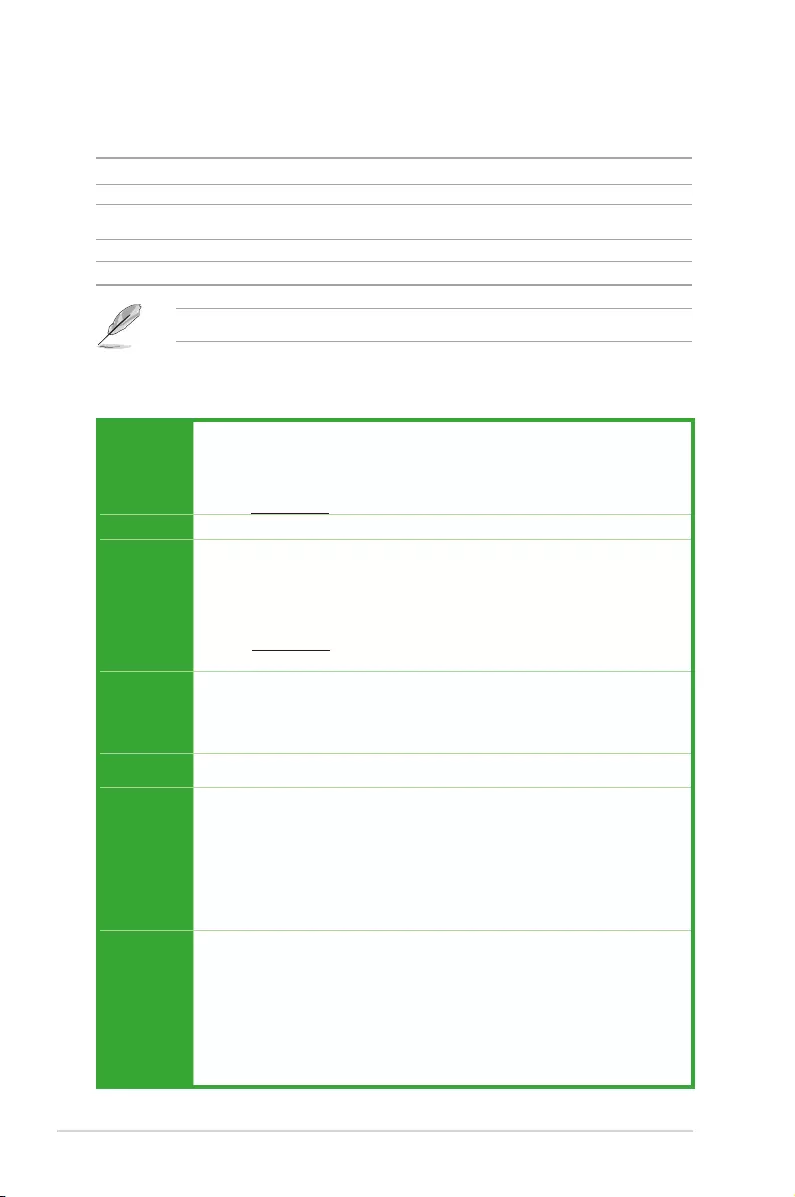
Package contents
Check your motherboard package for the following items.
Motherboard ASUS PRIME B450-PLUS motherboard
Cables 2 x Serial ATA 6.0 Gb/s cables
Accessories 1 x I/O shield
1 x M.2 screw package
Application DVD 1 x Support DVD
Documentation 1 x User Manual
If any of the above items is damaged or missing, contact your retailer.
CPU
AM4 socket for AMD Ryzen™ 2nd Generation / Ryzen™ with Radeon™ Vega
Graphics / Ryzen™ 1st Generation processors
Supports CPU up to 8 cores*
* Due to CPU limitation, CPU cores supported vary by processor.
** Refer to www.asus.com for AMD CPU support list.
Chipset AMD B450 chipset
Memory
AMD Ryzen™ 2nd Generation Processors/AMD Ryzen™ with Radeon™ Vega
Graphics/ Ryzen™ 1st Generation processors:
4 x DIMM, max. 64GB, DDR4 3200(O.C.) / 3000(O.C.)/2800(O.C)/2666/2400/2133
MHz, un-buffered memory
Dual-channel memory architecture
* Refer to www.asus.com for the latest Memory QVL (Qualied Vendors List).
** ECC memory(ECC mode) support varies by CPU.
Graphics
Integrated Graphics in the AMD Ryzen™ with Radeon™ Vega Graphics processors
Multi-VGA output support: HDMI and DVI-D ports
— Supports HDMI 2.0b output with a maximum resolution of 4096 x 2160 @60Hz
— Supports DVI-D output with a maximum resolution of 1920 x 1200 @60Hz
Multi-GPU
support Supports AMD CrossFireX™ Technology
Expansion
slots
AMD Ryzen™ 2nd Generation / Ryzen™ 1st Generation processors:
1 x PCI Express 3.0 x16 slot (max. @x16 mode)
AMD 7th Ryzen™ with Radeon™ Vega Graphics processors:
1 x PCI Express 3.0 x16 slot (max. @x8 mode)
AMD B450 Chipset:
1 x PCI Express 2.0 x16 slot (max. @x4 mode)
3 x PCI Express 2.0 x1 slots
USB
AMD Ryzen™ 2nd Generation/ Ryzen™ with Radeon™ Vega Graphics/ Ryzen™
1st Generation processors:
— 3 x USB 3.1 Gen 1 (up to 5Gbps) ports (2 Type A ports and 1 Type C port at
back panel)
AMD B450 Chipset:
— 2 x USB 3.1 Gen 2 (up to 10 Gbps) ports ( 2 ports at back panel)
— 2 x USB 3.1 Gen 1 (up to 5Gbps) ports ( 2 ports at mid-board)
— 6 x USB 2.0/1.1 ports ( 2 ports at back panel, 4 ports at mid-board)

vii
PRIME B450-PLUS specications summary
(continued on the next page)
Storage
AMD B450 Chipset
— 4 x Serial ATA 6.0 Gb/s connectors with RAID 0, RAID 1 and RAID 10 support
AMD Ryzen™ 2nd Generation/ Ryzen™ with Radeon™ Vega Graphics/
Ryzen™ 1st Generation processors:
— 2 x Serial ATA 6.0 Gb/s connectors with RAID 0, RAID 1 and RAID 10 support
AMD Ryzen™ 2nd Generation/ Ryzen™ with Radeon™ Vega Graphics/
Ryzen™ 1st Generation processors:
— 1 x M.2 socket 3 with M Key, Type 2242/2260/2280/22110 (PCIe 3.0 x4 and
SATA modes) storage devices support*
* The M.2 Socket shares bandwidth with the SATA_5/6 ports, and therefore the SATA_5/6
ports cannot be used when an M.2 device is installed.
LAN Realtek® 8111H Gigabit LAN controller
Audio
Realtek® ALC 887-VD2 8-Channel High Denition Audio CODEC
— LED-illuminated design: Brighten up your build with the gorgeous illuminated
audio trace path
— Audio Shielding: Ensures precision analog/digital separation and greatly reduces
multi-lateral interference
— Dedicated audio PCB layers: Separate layers for left and right channels to guard
the quality of the sensitive audio signals
— Premium Japanese audio capacitors: Provide warm, natural and immersive
sound with exceptional clarity and delity
— Supports jack-detection and front panel jack-retasking
* Use a chassis with HD audio module in the front panel to support an 8-channel audio
output.
ASUS unique
features
Dependable Stability
ASUS 5X PROTECTION III
— ASUS SafeSlot Core — Fortied PCIe Slot prevents damage
— ASUS LANGuard: Protects against LAN surges, lightning strikes and static-
electricity discharges!
— ASUS Overvoltage Protection: World-class circuit-protecting power design
— ASUS Stainless-Steel Back I/O: 3X corrosion-resistance for greater durability!
— ASUS DIGI+ VRM: 6 Phase digital power design
Superb performance
UEFI BIOS
— The most advanced options with a fast response time
ASUS Fan Xpert 4 Core
— Advanced fan and liquid controls for ultimate cooling and quietness
Gaming Scenario
Audio Features
— Audio that roars on the battleeld
ASUS Exclusive Features
— ASUS AI Charger
— ASUS File Transfer
— ASUS AI Suite 3
— ASUS PC Cleaner

viii
PRIME B450-PLUS specications summary
ASUS unique
features
Easy PC DIY
Safe motherboard mounting
— Component-free areas to minimize damage risk
Q-Design
— ASUS Q-DIMM
— ASUS Q-Slot
UEFI BIOS EZ Mode
— Featuring friendly graphics user interface
— ASUS CrashFree BIOS 3
— ASUS EZ Flash 3
ASUS Quiet
Thermal
Solution
Quiet Thermal Design:
— Stylish Fanless Design: MOS Heat-sink & Chipset Heat-sink solution
— ASUS Fan Xpert 4 core
Rear panel I/O
ports
1 x PS/2 Keyboard/Mouse combo port
1 x HDMI port
1 x DVI-D port
1 x LAN (RJ-45) port
2 x USB 3.1 Gen 2 (up to 10 Gbps) ports (Type A,teal blue)
1 x USB 3.1 Gen 1 (up to 5 Gbps) port (Type C)
2 x USB 3.1 Gen 1 (up to 5 Gbps) ports(Type A, blue)
2 x USB 2.0/1.1 ports
3 x Audio jacks support 8-channel audio output
Internal
connectors
1 x USB 3.1 Gen 1 (up to 5Gbps) connector supports additional 2 USB 3.1 Gen
1 ports
2 x USB 2.0/1.1 connectors support additional 4 USB 2.0/1.1 ports
6 x SATA 6.0 Gb/s connectors
1 x M.2 socket 3 for M Key and type 2242/2260/2280/22110 devices
support(both SATA & PCIe mode)
1 x COM connector
1 x Aura RGB Strip header
1 x CPU Fan connector
3 x 4-pin Chassis Fan connectors for both 3-pin(DC mode) and 4-pin(PWM
mode) coolers control
1 x Front panel audio connector
1 x 24-pin EATX power connector
1 x 8-pin EATX 12V power connector
1 x 2-pin Clear CMOS header
1 x System panel connector
1 x S/PDIF out connector
1 x AIO pump header
BIOS features
128 Mb Flash ROM, UEFI AMI BIOS, PnP, SM BIOS 3.1, ACPI 6.1, Multi-
language BIOS, ASUS EZ Flash 3, ASUS CrashFree BIOS 3, F3 My Favorite,
Last Modied log, F12 PrintScreen,F4 AURA ON/OFF, F9 Search and ASUS
DRAM SPD (Serial Presence Detect) memory information
(continued on the next page)

ix
Specications are subject to change without notice.
Manageability WOL by PME, PXE
Support DVD
Drivers
ASUS Utilities
ASUS Update
Anti-virus software (OEM version)
OS support Windows® 10 (64-bit)
Form factor ATX form factor: 12” x 9.2” (30.5 cm x 23.4 cm)
ASUS PRIME B450-PLUS
1-1
Product introduction
1
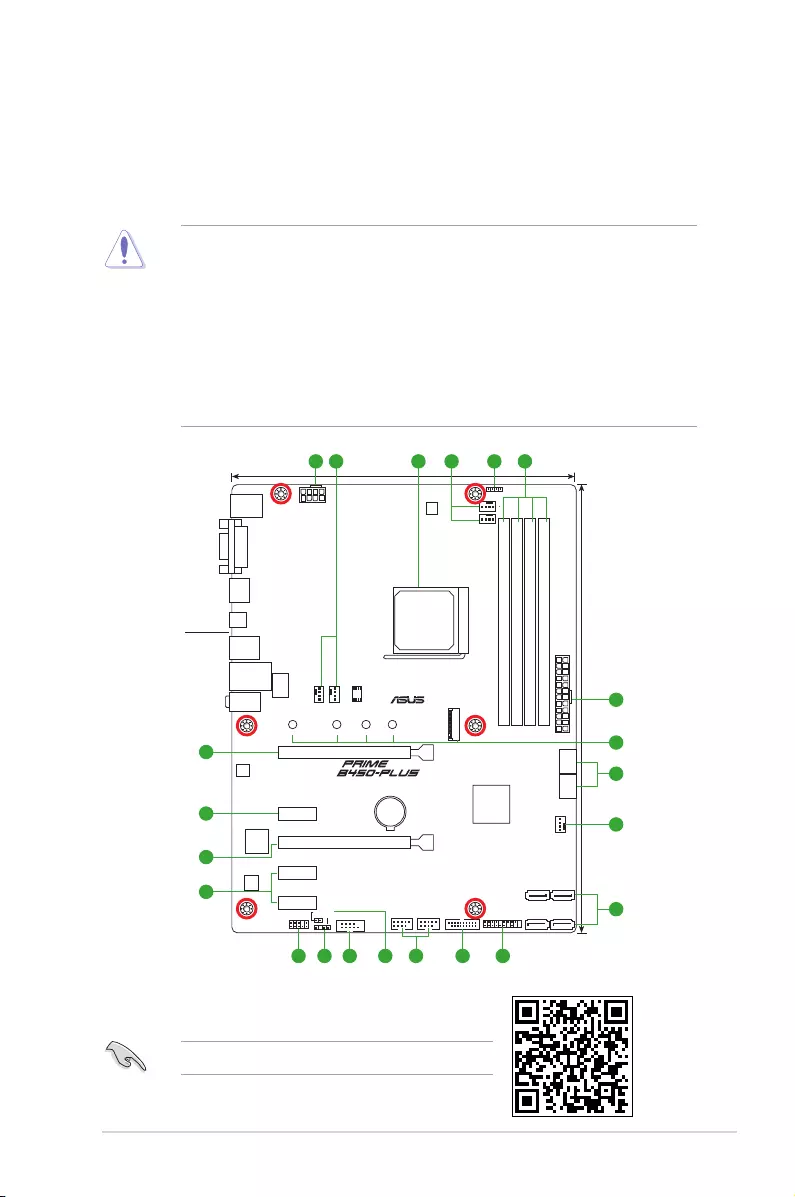
Motherboard overview
• Unplug the power cord from the wall socket before touching any component.
• Before handling components, use a grounded wrist strap or touch a safely grounded
object or a metal object, such as the power supply case, to avoid damaging them due
to static electricity.
• Before you install or remove any component, ensure that the ATX power supply is
switched off or the power cord is detached from the power supply. Failure to do so
may cause severe damage to the motherboard, peripherals, or components.
• Unplug the power cord before installing or removing the motherboard. Failure to do so
can cause you physical injury and damage to motherboard components.
Place this
side towards
the rear of the
chassis
Scan the QR code to get the detailed pin denitions.
DDR4 DIMM_A1 (64bit, 288-pin module)
DDR4 DIMM_A2* (64bit, 288-pin module)
DDR4 DIMM_B1 (64bit, 288-pin module)
DDR4 DIMM_B2* (64bit, 288-pin module)
AIO_PUMP
CPU_FAN
CHA_FAN2
CHA_FAN3
CHA_FAN1
CLRTC
SPDIF_OUT
M.2_1(SOCKET3)
PANEL
AAFP
COM
SATA6G_6 SATA6G_5
EATX12V
EATXPWR
U31G1_12
AMD®
B450
RTL
8111H
U31G2_12
HDMI
U31G1_C5
Super
I/O
PCIEX1_1
PCIEX1_2
228022110 2260 2242
PCIEX1_3
PCIEX16_1
PCIEX16_2
USB56 USB34
RGB_HEADER
LAN_U31G1_34
KBMS
_USB12
DVI
23.4cm(9.2in)
30.5cm(12in)
BATTERY
SOCKET AM4
AUDIO
SATA6G_1SATA6G_2
SATA6G_3SATA6G_4
128Mb
BIOS
ALC
887
LANGuard
DIGI
+VRM
6
1
7
7
2
811121314
1
5
2 2 43
910
15
15
16
16
1-2
Chapter 1: Product introduction
CPU and chassis fan connectors; AIO pump connector (4-pin CPU_FAN,
4-pin CHA_FAN1/2/3; 4-pin AIO_PUMP)
Connect the fan cables to the fan connectors on the motherboard, ensuring that the
black wire of each cable matches the ground pin of the connector.
Do not forget to connect the fan cables to the fan connectors. Insufcient air ow inside
the system may damage the motherboard components. These are not jumpers! Do not
place jumper caps on the fan connectors! The CPU_FAN connector supports a CPU fan
of maximum 1A (12 W) fan power.
AMD AM4 CPU socket
This motherboard comes with an AMD AM4 socket designed for AMD Ryzen™
2nd Generation / Ryzen™ with Radeon™ Vega Graphics / Ryzen™ 1st Generation
processors.
For more details, refer to Central Processing Unit (CPU).
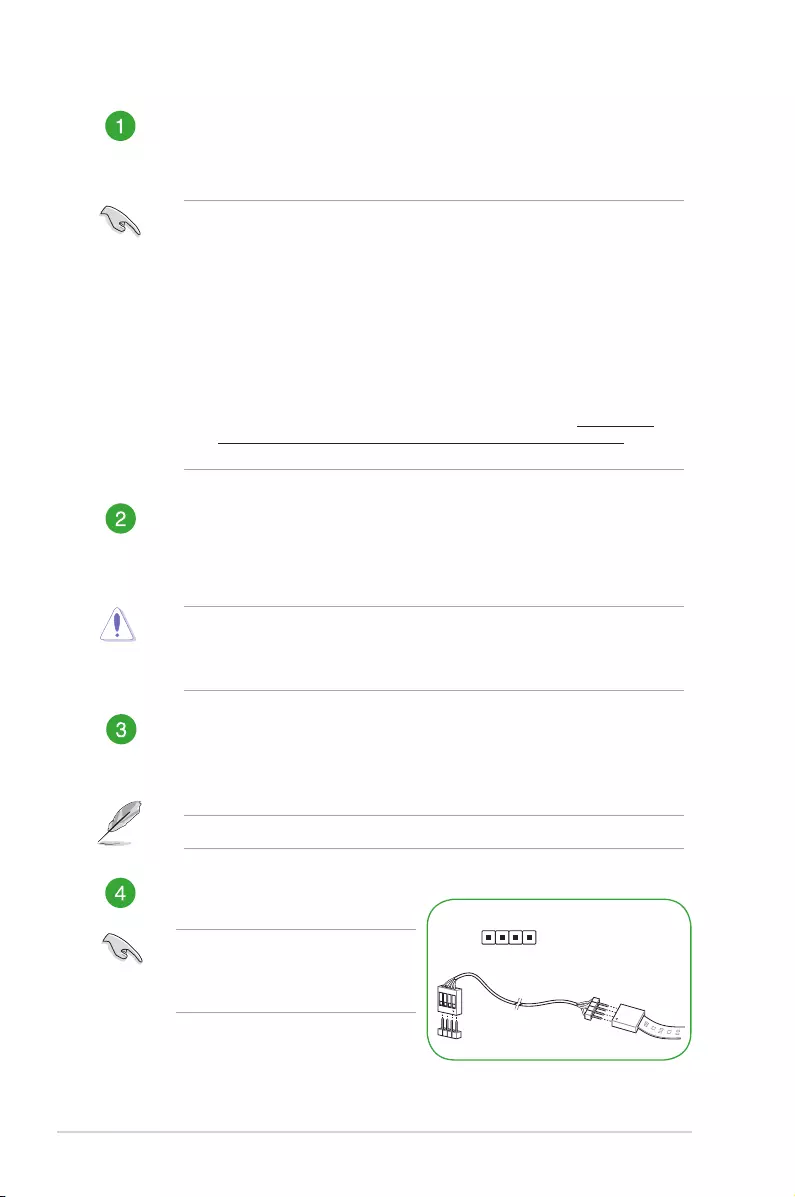
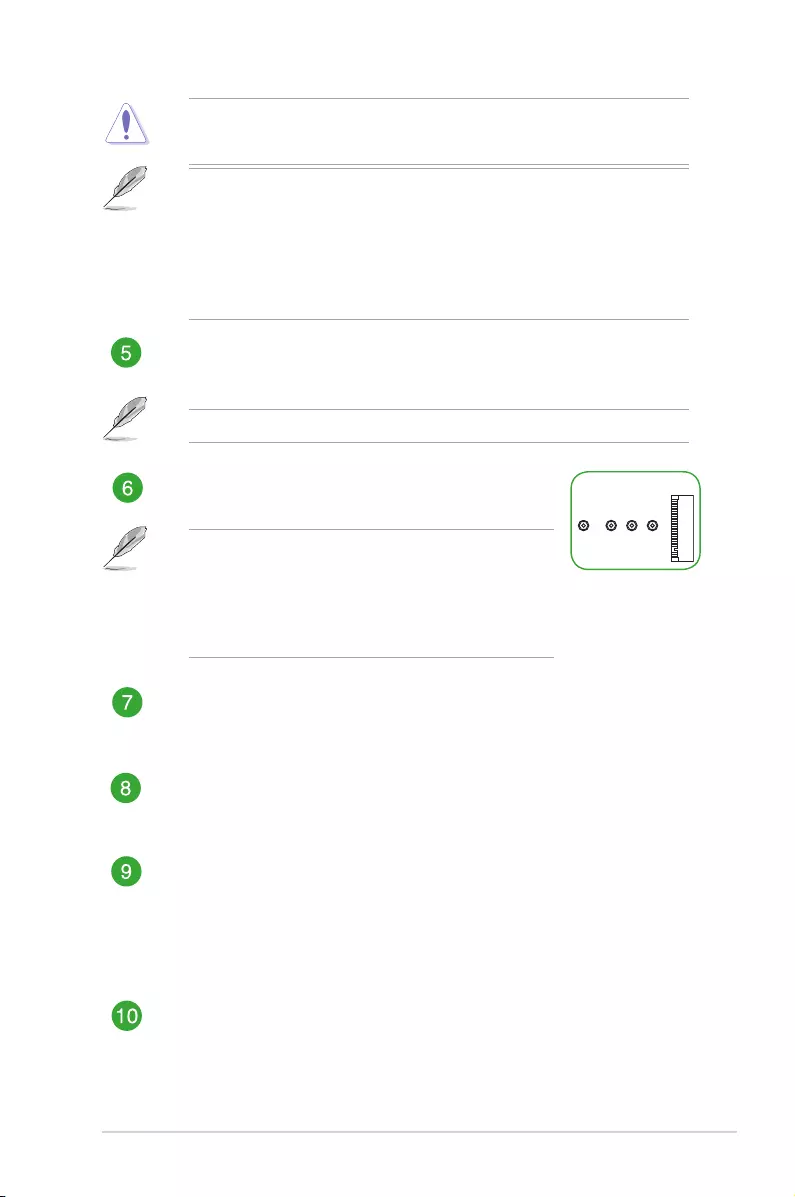
Aura RGB Strip header (4-pin RGB_HEADER)
This header is for RGB LED strip.
ATX power connectors (24-pin EATXPWR, 8-pin EATX12V)
These connectors are for ATX power supply plugs. The power supply plugs are
designed to t these connectors in only one orientation. Find the proper orientation
and push down rmly until the connectors completely t.
• For a fully congured system, we recommend that you use a power supply unit
(PSU) that complies with ATX12V Specication 2.0 (or later version) and provides a
minimum power of 350 W. This PSU type has 24-pin and 8-pin power plugs.
• DO NOT forget to connect the 8-pin EATX +12V power plug. Otherwise, the system
will not boot up.
• We recommend that you use a PSU with higher power output when conguring a
system with more power-consuming devices or when you intend to install additional
devices. The system may become unstable or may not boot up if the power is
inadequate.
•
If you are uncertain about the minimum power supply requirement for your system,
refer to the Recommended Power Supply Wattage Calculator at http://support.
asus.com/PowerSupplyCalculator/PSCalculator.aspx?SLanguage=en-us for
details.
The RGB header supports 5050 RGB
multi-color LED strips (12V/G/R/B), with a
maximum power rating of 3A (12V), and
no longer than 3m.
RB
PIN 1
+12V G R B
ASUS PRIME B450-PLUS
1-3
Before you install or remove any component, ensure that the ATX power supply is
switched off or the power cord is detached from the power supply. Failure to do so may
cause severe damage to the motherboard, peripherals, or components.
• Actual lighting and color will vary with LED strip.
• If your LED strip does not light up, check if the RGB LED extension cable and the
RGB LED strip is connected in the correct orientation, and the 12V connector is
aligned with the 12V header on the motherboard.
• The LED strip will only light up when the system is operating.
• The LED strips are purchased separately.
DDR4 DIMM slots
Install 2 GB, 4 GB, 8 GB, and 16 GB unbuffered DDR4 DIMMs into these DIMM sockets.
For more details, refer to System memory.
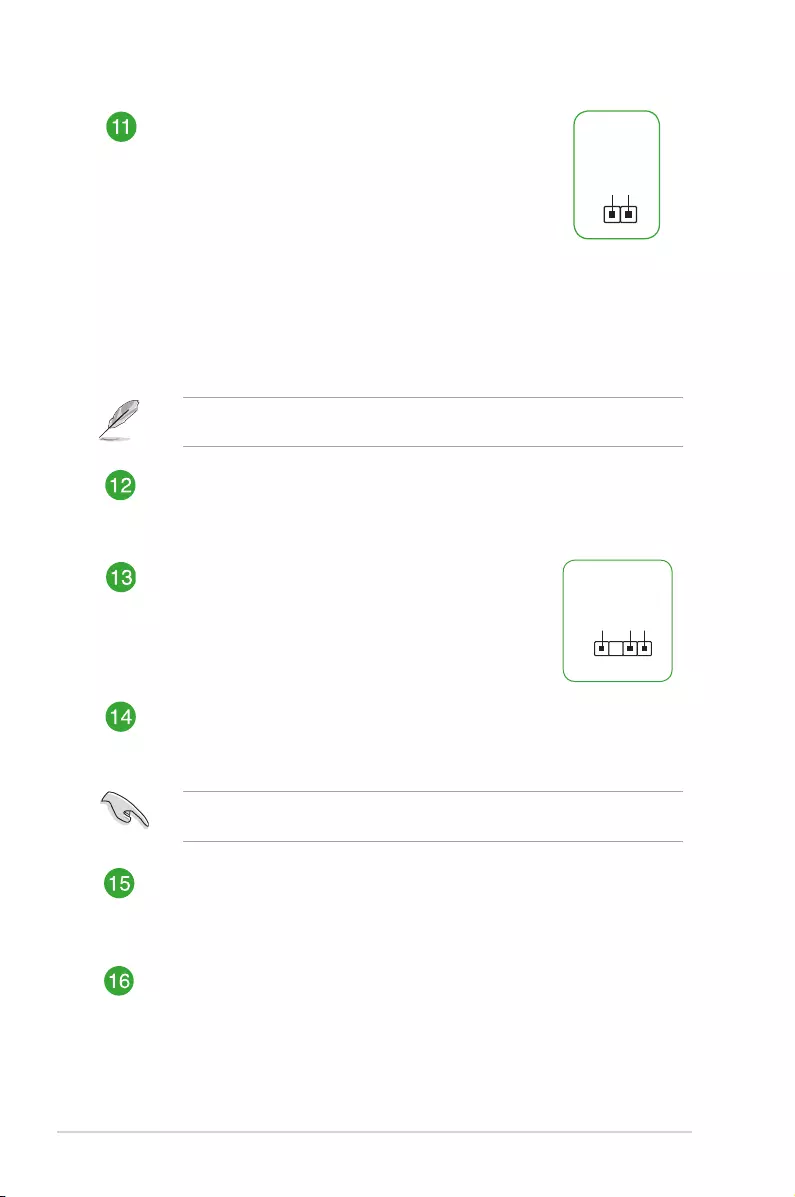
M.2 socket 3
This socket allows you to install M.2 (NGFF) SSD modules.
2280
2260 2242
• The M.2 socket supports PCIe 3.0 x4 mode and SATA
mode M Key design and type 2242 / 2260 / 2280 / 22110
storage devices.
• The M.2 Socket shares bandwidth with the SATA_5/6
ports, and therefore the SATA_5/6 ports cannot be used
when an M.2 device is installed.
AMD Serial ATA 6.0Gb/s connectors (7-pin SATA6G_1~6)
These connectors connect to Serial ATA 6.0 Gb/s hard disk drives via Serial ATA
6.0 Gb/s signal cables.
System panel connector (20-5 pin F_PANEL)
This connector supports several chassis-mounted functions.
USB 3.1 Gen 1 (up to 5Gbps) connector (20-1 pin U31G1_12)
Connect a USB 3.1 Gen 1 module to this connector for additional USB 3.1
Gen 1 front or rear panel ports. This connector complies with USB 3.1 Gen 1
specications and provides faster data transfer speeds of up to 5 Gbps, faster
charging time for USB-chargeable devices, optimized power efciency, and
backward compatibility with USB 2.0.
USB 2.0 connectors (10-1 pin USB34,USB56)
Connect a USB module cable to any of these connectors, then install the module
to a slot opening at the back of the system chassis. These USB connectors comply
with USB 2.0 specications and support up to 480Mbps connection speed.
1-4
Chapter 1: Product introduction
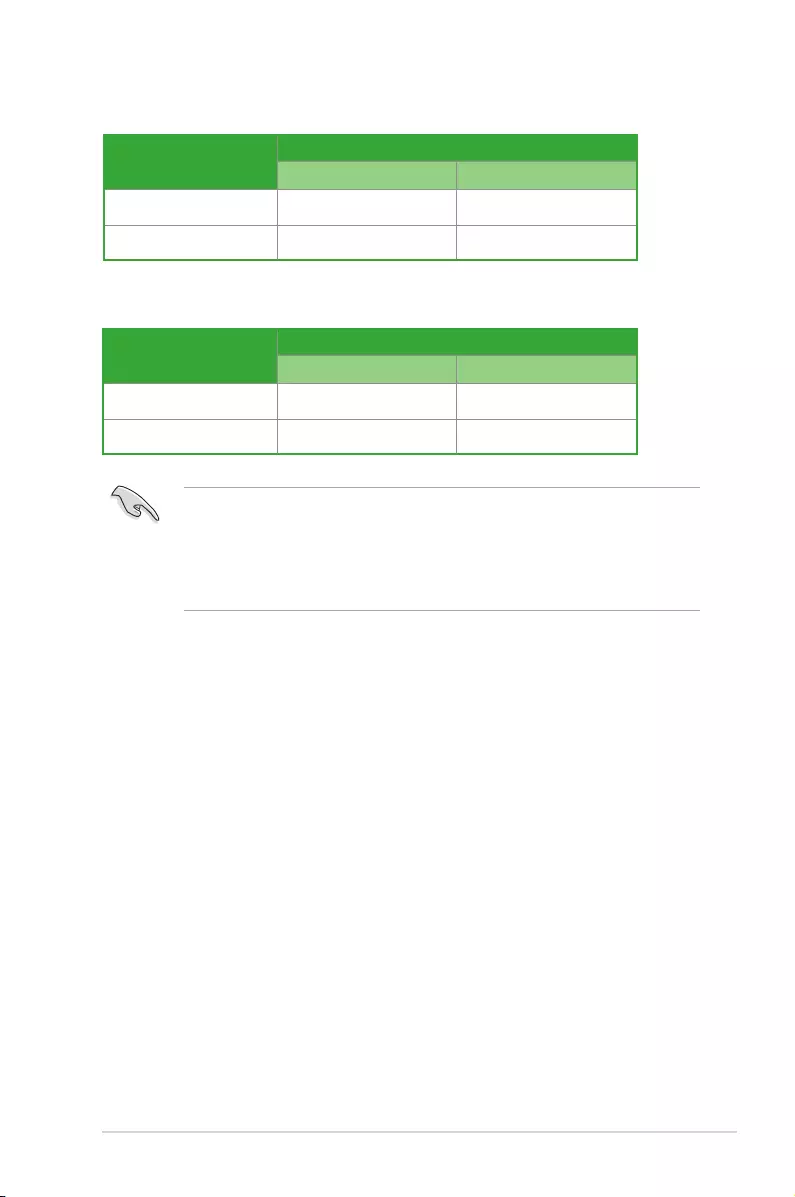
Clear RTC RAM (2-pin CLRTC)
This header allows you to clear the CMOS RTC RAM data of
the system setup information such as date, time, and system
passwords.
To erase the RTC RAM:
1. Turn OFF the computer and unplug the power cord.
2. Use a metal object such as a screwdriver to short the
two pins.
3. Plug the power cord and turn ON the computer.
4. Hold down the <Del> key during the boot process and
enter BIOS setup to re-enter data.
CLRTC
+3V_BAT
GND
If the steps above do not help, remove the onboard battery and short the two pins again
to clear the CMOS RTC RAM data. After clearing the CMOS, reinstall the battery.
Serial port connector (10-1 pin COM)
This connector is for a serial (COM) port. Connect the serial port module cable to
this connector, then install the module to a slot opening at the back of the system
chassis.
Digital audio connector (4-1 pin SPDIF_OUT)
This connector is for an additional Sony/Philips Digital
Interface (S/PDIF) port. Connect the S/PDIF Out module
cable to this connector, then install the module to a slot
opening at the back of the system chassis.
SPDIF_OUT
+5V
SPDIFOUT
GND
PIN 1
Front panel audio connector (10-1 pin AAFP)
This connector is for a chassis-mounted front panel audio I/O module that supports
HD Audio standard. Connect one end of the front panel audio I/O module cable to
this connector.
We recommend that you connect a high-denition front panel audio module to this
connector to avail of the motherboard’s high-denition audio capability.
PCI Express 2.0 x1 slots
This motherboard has three PCI Express 2.0 x1 slots that support PCI Express
x1 network cards, SCSI cards, and other cards that comply with the PCI Express
specications.
PCI Express 3.0 / 2.0 x16 slots
This motherboard supports two PCI Express 3.0 / 2.0 x16 graphic cards that
comply with the PCI Express specications.
ASUS PRIME B450-PLUS
1-5
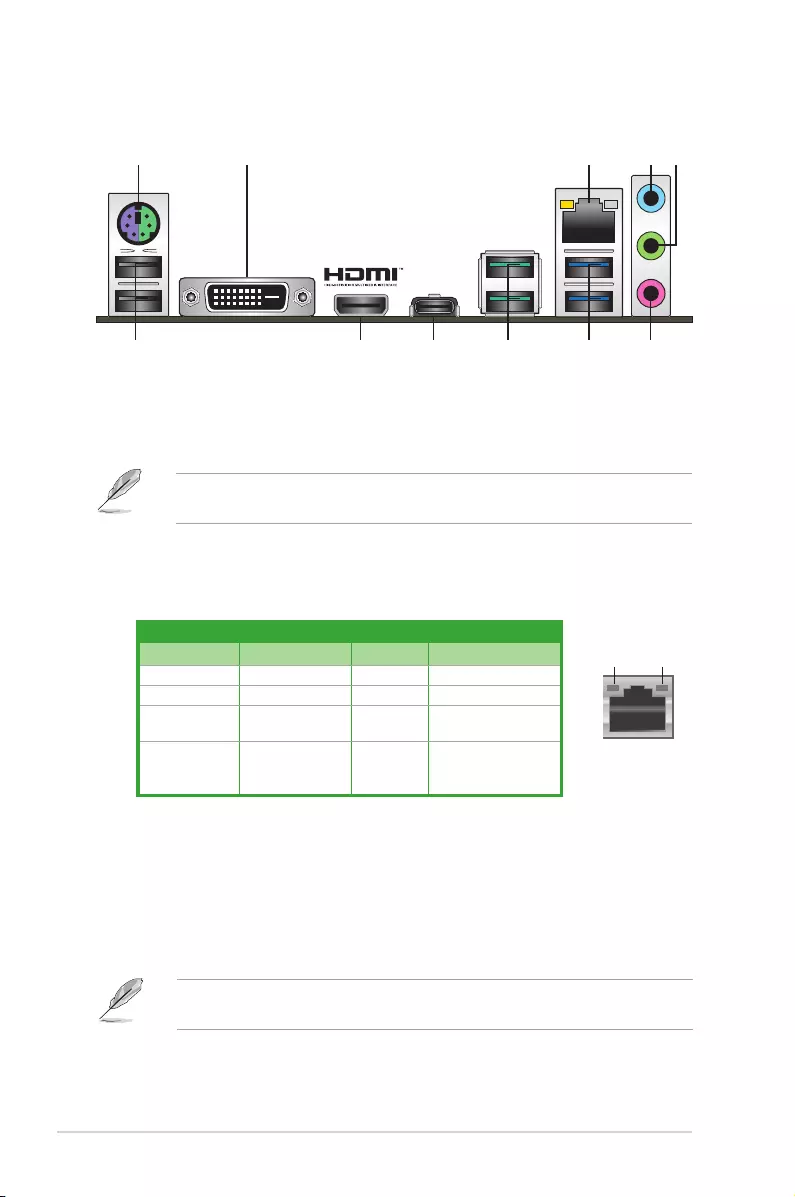
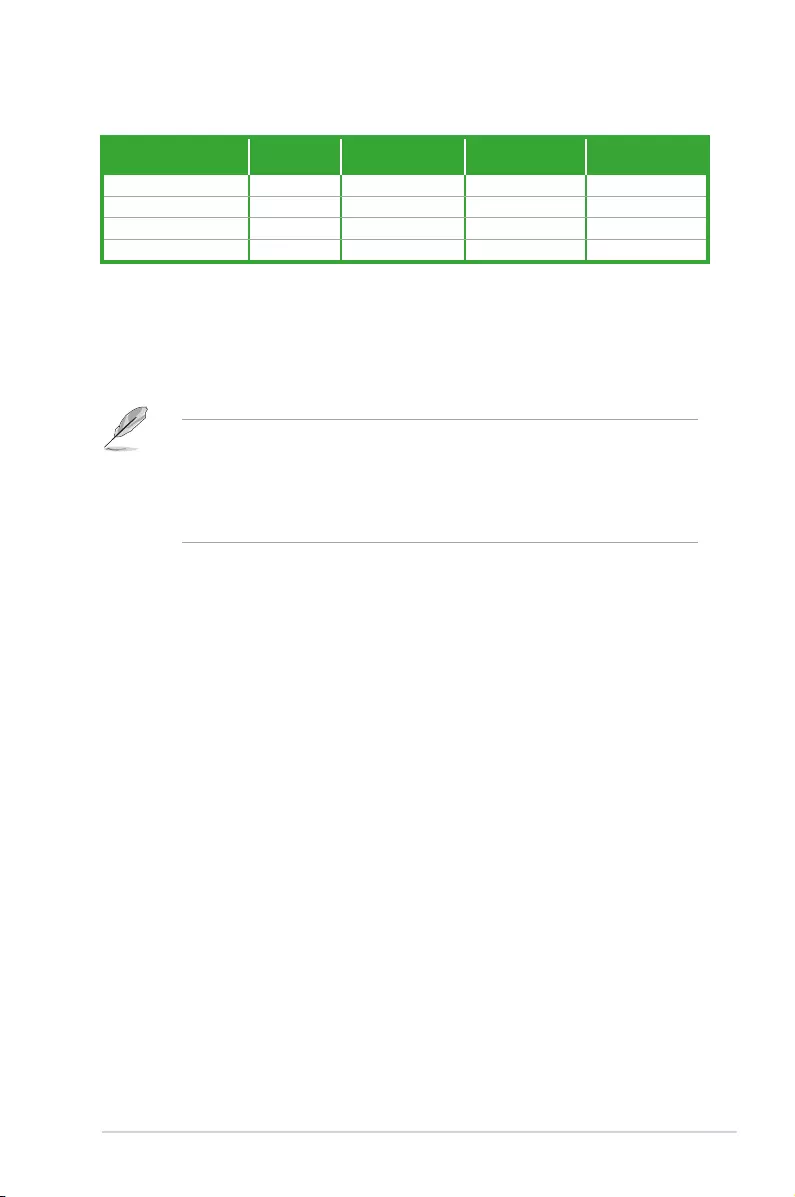
VGA Conguration PCIe operating mode
PCIe 3.0 x16_1 PCIe 2.0 x16_2
Single VGA/PCIe card x16 N/A
Dual VGA/PCIe card x16 x4
AMD Ryzen™ 2nd Generation/ Ryzen™ 1st Generation Processors
• In single VGA card mode, use the PCIe 3.0/2.0 x16_1 slot (gray) for a PCI Express
x16 graphics card to get better performance.
• We recommend that you provide sufcient power when running CrossFireX™ mode.
• Connect chassis fans to the motherboard chassis fan connectors when using multiple
graphics cards for better thermal environment.
AMD Ryzen™ with Radeon™ Vega Graphics Processors
VGA Conguration PCIe operating mode
PCIe 3.0 x16_1 PCIe 2.0 x16_2
Single VGA/PCIe card x8 N/A
Dual VGA/PCIe card x8 x4
1-6
Chapter 1: Product introduction
LAN port
Speed
LED
Activity Link
LED
Activity/Link LED Speed LED
Status Description Status Description
Off No link OFF 10Mbps connection
Orange Linked ORANGE 100Mbps connection
Orange
(Blinking)
Data activity GREEN 1Gbps connection
Orange
(Blinking then
steady)
Ready to wake
up from S5 mode
1. PS/2 Keyboard/Mouse cambo port. This port is for a PS/2 keyboard or mouse.
2. DVI-D port. This port is for any DVI-D compatible device.
DVI-D can not be converted to output from RGB Signal to CRT and is not compatible with
DVI-I.
4 5
6
8 7
2 3
9
1
11 10
Rear panel connectors
3. LAN (RJ-45) port. This port allows Gigabit connection to a Local Area Network (LAN)
through a network hub.
LAN port LED indications
4. Line In port (light blue). This port connects to the tape, CD, DVD player, or other
audio sources.
5. Line Out port (lime). This port connects to a headphone or a speaker. In the 4.1,
5.1and 7.1-channel congurations, the function of this port becomes Front Speaker
Out.
6. Microphone port (pink). This port connects to a microphone.
Refer to the audio conguration table for the function of the audio ports in 2.1, 4.1, 5.1, or
7.1-channel conguration.
ASUS PRIME B450-PLUS
1-7
7. USB 3.1 Gen 1 (up to 5Gbps) ports. These two 9-pin Universal Serial Bus (USB)
ports connect to USB 3.1 Gen 1 devices.
8. USB 3.1 Gen 2 (up to 10Gbps) ports. These 9-pin Universal Serial Bus (USB) ports
are for USB 3.1 Gen 2 devices.
• USB 3.1 Gen 1/Gen 2 devices can only be used for data storage.
• Due to the design of AMD AM4 series chipset, all USB devices connected to the USB
2.0 and USB 3.1 Gen 1/Gen 2 ports are controlled by the xHCI controller.
• We strongly recommend that you connect USB 3.1 Gen 2 devices to USB 3.1 Gen 2
ports for faster and better performance from your USB 3.1 Gen 2 devices.
9. USB 3.1 Gen 1 (up to 5Gbps) port (Type-C). This Universal Serial Bus (USB) Type C
port is for USB 3.1 Gen 1 mobile or peripheral devices.
10. HDMI port. This port is for a High-Denition Multimedia Interface (HDMI) connector,
and is HDCP compliant allowing playback of HD DVD, Blu-ray, and other protected
content.
11. USB 2.0 ports. These 4-pin Universal Serial Bus (USB) ports are for USB 2.0/1.1
devices.
Audio 2.1, 4.1, 5.1 or 7.1-channel conguration
Port Headset
2.1-channel 4.1-channel 5.1-channel 7.1-channel
Light Blue (Rear panel) Line In Rear Speaker Out Rear Speaker Out Rear Speaker Out
Lime (Rear panel) Line Out Front Speaker Out Front Speaker Out Front Speaker Out
Pink (Rear panel) Mic In Mic In Bass/Center Bass/Center
Lime (Front panel) — — — Side Speaker Out
1-8
Chapter 1: Product introduction
Central Processing Unit (CPU)
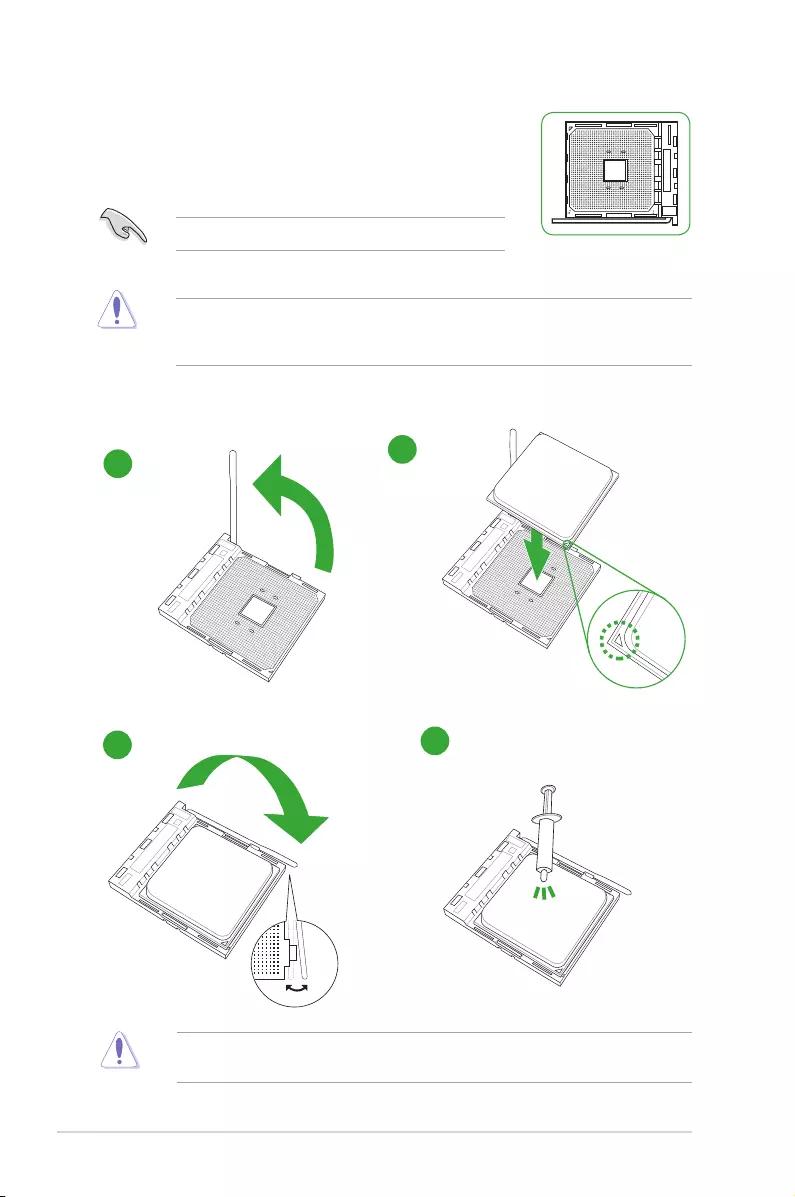
The motherboard comes with an AMD AM4 socket designed for AMD
Ryzen™ 2nd Generation / Ryzen™ with Radeon™ Vega Graphics /
Ryzen™ 1st Generation processors.
Unplug all power cables before installing the CPU.
The AM4 socket has a different pinout from the FM2+/FM2 socket. Ensure that you use a
CPU designed for the AM4 socket. The CPU ts in only one correct orientation. DO NOT
force the CPU into the socket to prevent bending the pins and damaging the CPU!
Installing the CPU
Apply the Thermal Interface Material to the CPU heatsink and CPU before you install the
heatsink and fan if necessary.
1
3
2
4
ASUS PRIME B450-PLUS
1-9
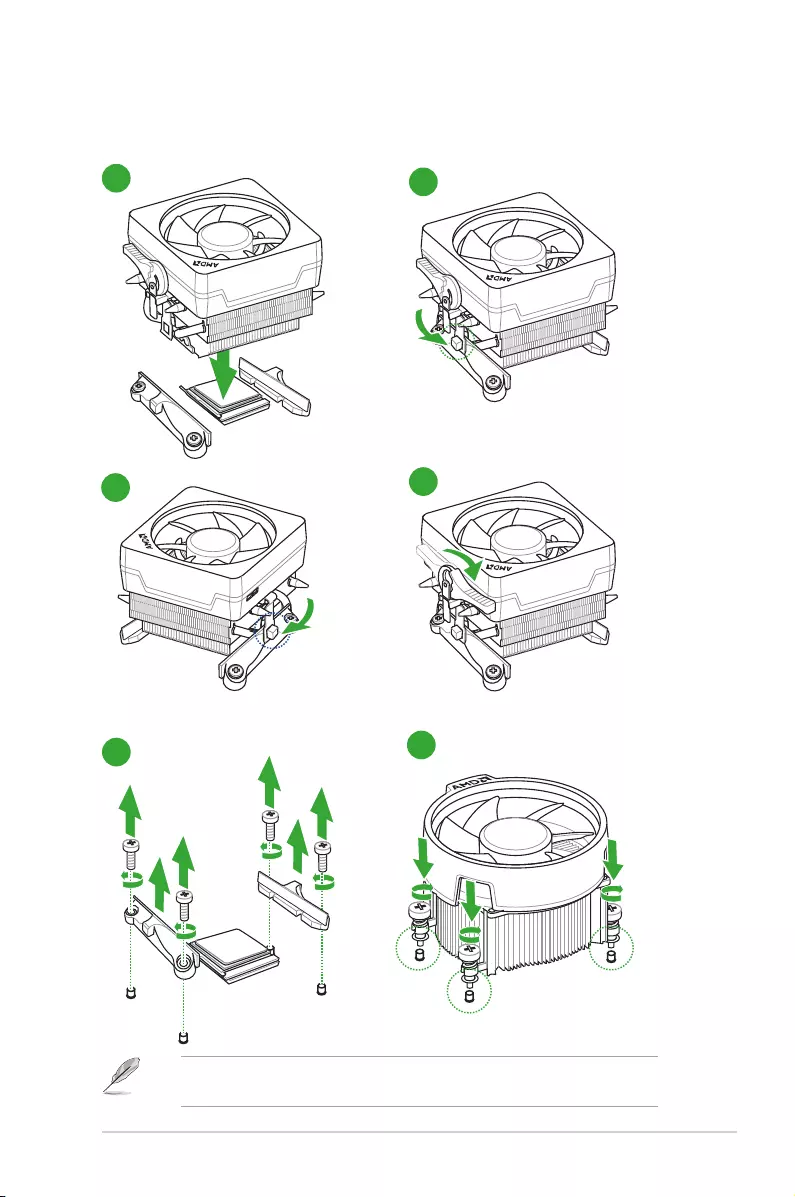
Installing the CPU heatsink and fan assembly
Type 2
Type 1
Remove the screws and the retention module only. Do not remove the plate on the
bottom.
1
12
2
34
1-10
Chapter 1: Product introduction
System memory
Overview
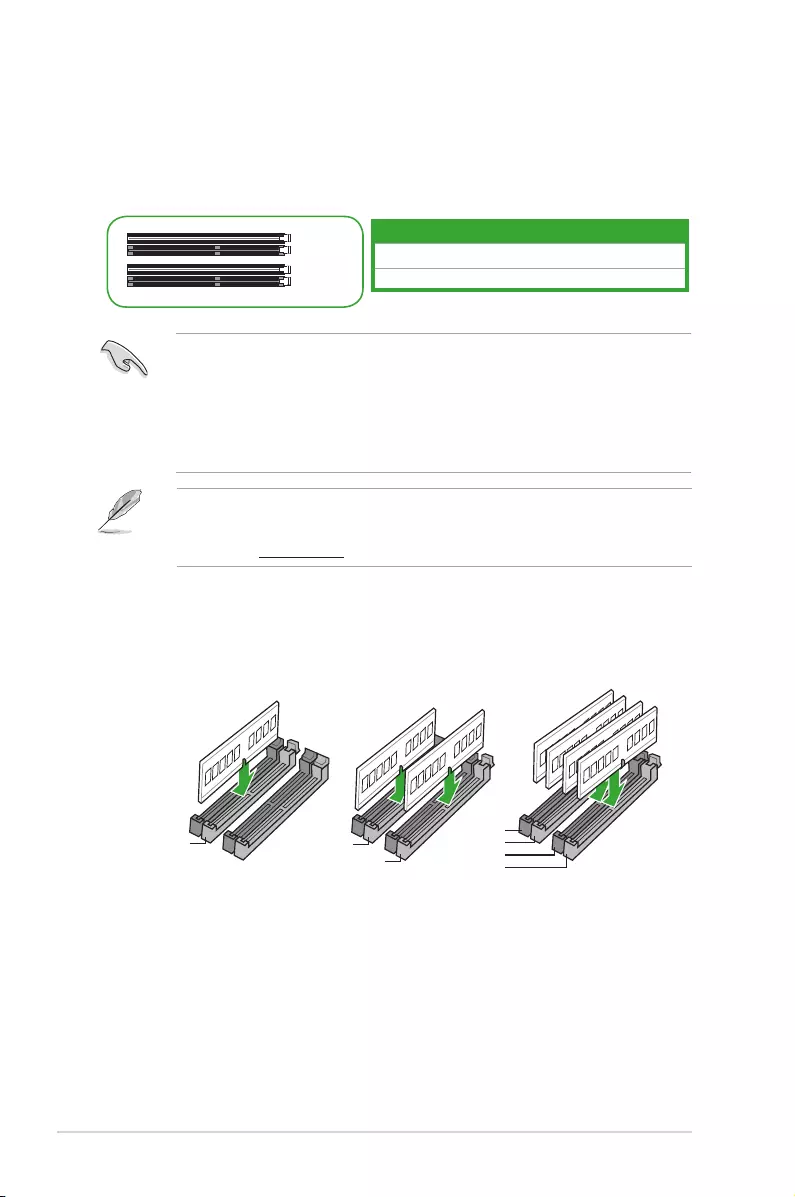
This motherboard comes with four Double Data Rate 4 (DDR4) Dual Inline Memory Module
(DIMM) sockets. The gure illustrates the location of the DDR4 DIMM sockets:
• You may install varying memory sizes in Channel A and Channel B. The system
maps the total size of the lower-sized channel for the dual-channel conguration. Any
excess memory from the higher-sized channel is then mapped for single-channel
operation.
• Always install DIMMs with the same CAS latency. For optimal compatibility, we
recommend that you install memory modules of the same version or date code (D/C)
from the same vendor. Check with the retailer to get the correct memory modules.
Recommended memory conguration
Channel Sockets
Channel A DIMM_A1 & DIMM_A2*
Channel B DIMM_B1 & DIMM_B2*
• For system stability, use a more efcient memory cooling system to support a full
memory load (4 DIMMs).
• Refer to www.asus.com for the latest Memory QVL (Qualied Vendors List)
DIMM_A2*
DIMM_B2*
DIMM_A2* DIMM_A2*
DIMM_A1
DIMM_B1
DIMM_A1
DIMM_A2*
DIMM_B1
DIMM_B2*
ASUS PRIME B450-PLUS
1-11
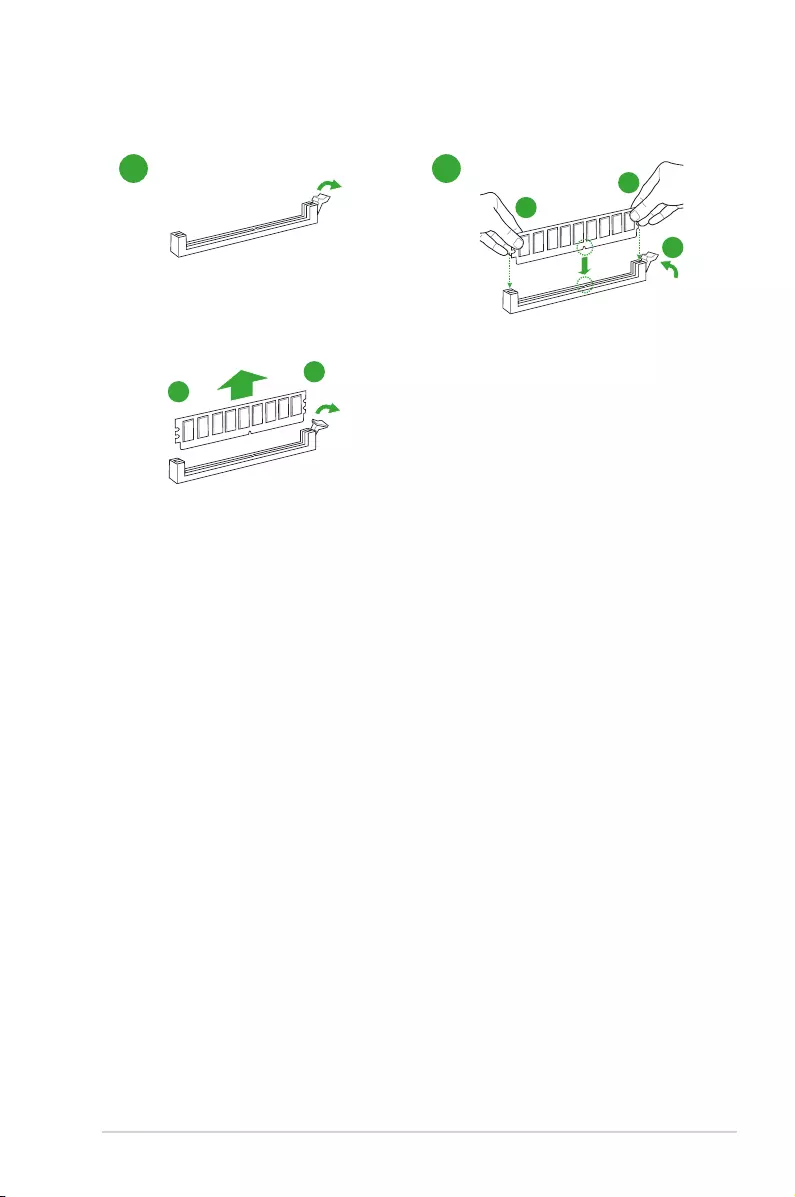
Installing a DIMM
12
To remove a DIMM
B
A
B
A
A
BIOS information
2
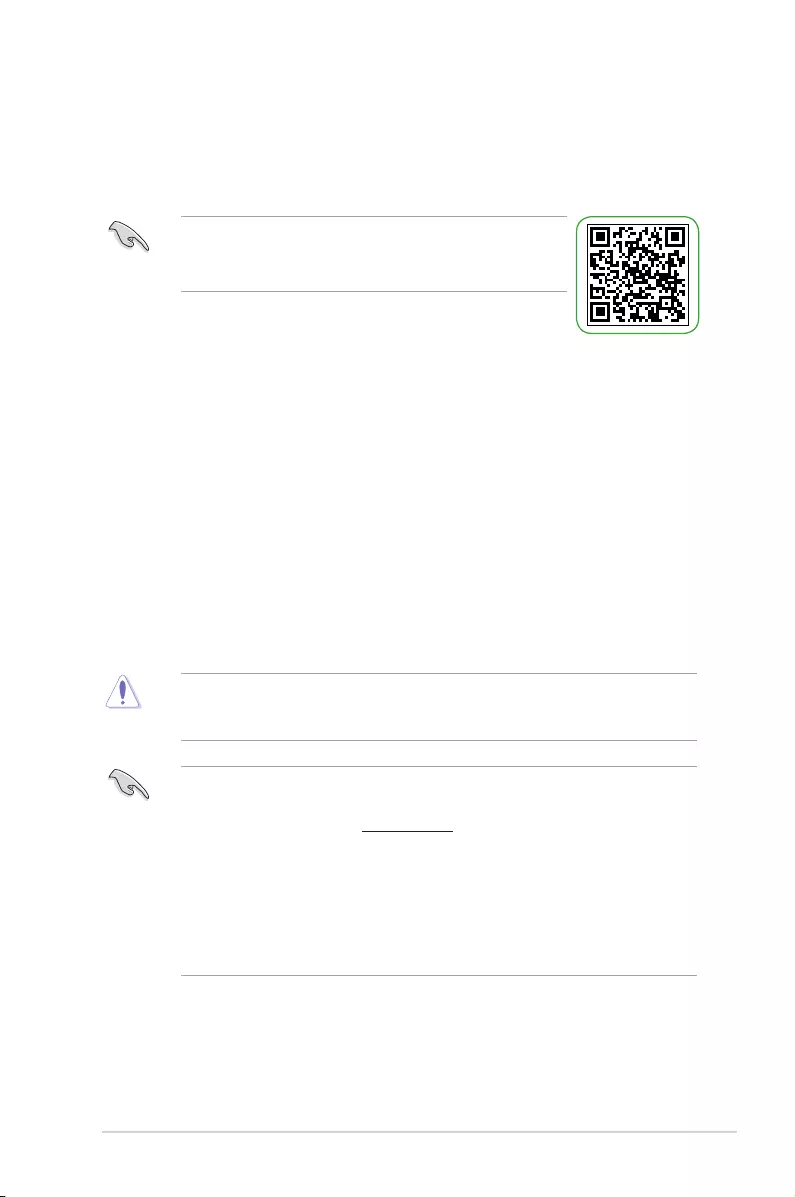
• Scan the QR code to view the BIOS update guide.
• Before using the ASUS CrashFree BIOS 3 utility, rename the
BIOS le in the removable device into PB450PS.CAP.
BIOS setup program
Use the BIOS Setup program to update the BIOS or congure its parameters. The BIOS
screens include navigation keys and brief online help to guide you in using the BIOS Setup
program.
Entering BIOS Setup at startup
To enter BIOS Setup at startup:
Press <Delete> or <F2> during the Power-On Self Test (POST). If you do not press <Delete>
or <F2>, POST continues with its routines.
Entering BIOS Setup after POST
To enter BIOS Setup after POST:
Press <Ctrl>+<Alt>+<Del> simultaneously.
Press the reset button on the system chassis.
Press the power button to turn the system off then back on. Do this option only if you failed to
enter BIOS Setup using the rst two options.
Using the power button, reset button, or the <Ctrl>+<Alt>+<Del> keys to force reset from a
running operating system can cause damage to your data or system. We recommend you
always shut down the system properly from the operating system.
• The BIOS setup screens shown in this section are for reference purposes only, and
may not exactly match what you see on your screen.
• Visit the ASUS website at www.asus.com to download the latest BIOS le for this
motherboard.
• If the system becomes unstable after changing any BIOS setting, load the default
settings to ensure system compatibility and stability. Select the Load Optimized
Defaults item under the Exit menu or press hotkey F5.
• If the system fails to boot after changing any BIOS setting, try to clear the CMOS and
reset the motherboard to the default value. See section Motherboard overview for
information on how to erase the RTC RAM.
BIOS menu screen
The BIOS setup program can be used under two modes: EZ Mode and Advanced Mode.
Press <F7> to change between the two modes.
ASUS PRIME B450-PLUS 2-1
EZ Mode
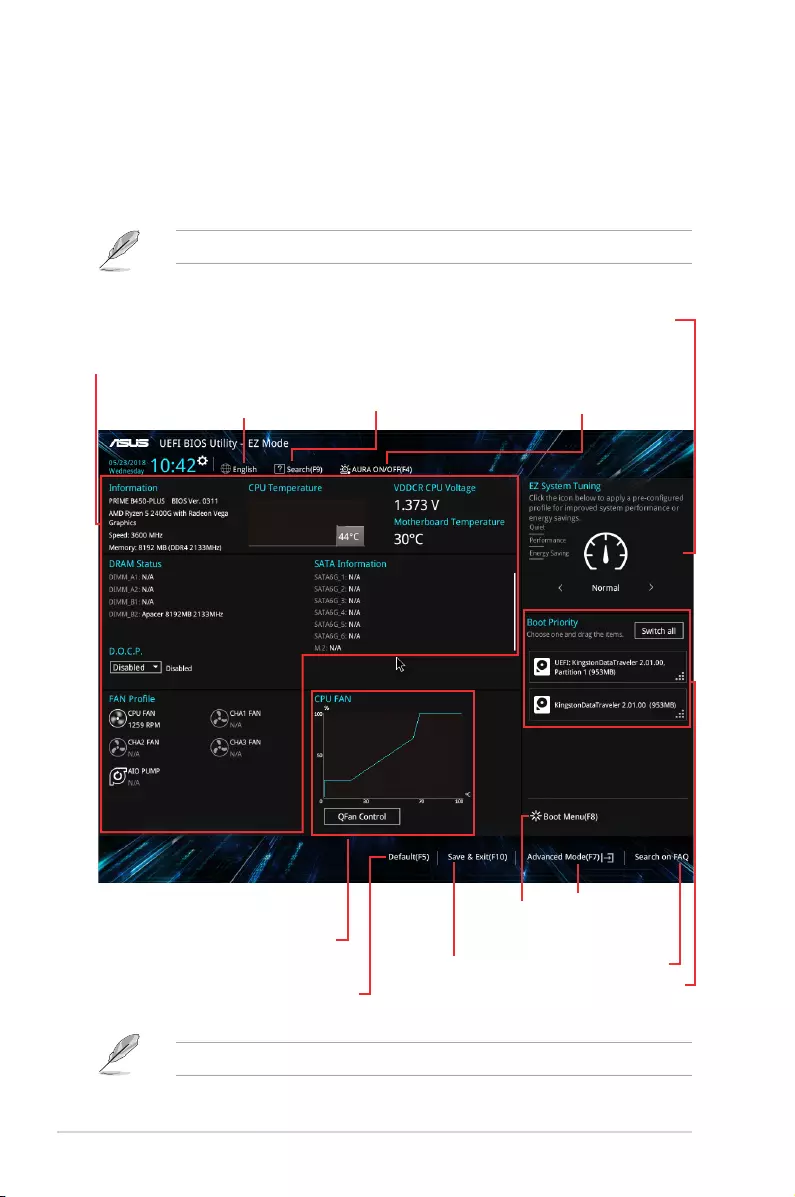
By default, the EZ Mode screen appears when you enter the BIOS setup program. The EZ
Mode provides you an overview of the basic system information, and allows you to select the
display language, system performance mode, fan prole and boot device priority. To access
the Advanced Mode, click Advanced Mode(F7) or press <F7>.
The default screen for entering the BIOS setup program can be changed.
The boot device options vary depending on the devices you installed to the system.
Saves the changes
and resets the
system
Displays the CPU/motherboard
temperature, CPU voltage output,
CPU/chassis fan speed, and SATA
information
Displays the system properties of
the selected mode. Click <Enter> to
switch EZ System Tuning modes
Displays the
Advanced mode
menus
Selects the boot
device priority
Loads optimized
default settings
Shows the
bootable
devices
Displays the CPU Fan’s speed
Click the button to manually
tune the fans Search on FAQ
Turns the RGB LED
lighting or functional
LED on or off
Searches by BIOS item name,
enter the item name to nd
the related item listing
Selects the display
language of the BIOS
setup program
2-2 Chapter 2: BIOS information
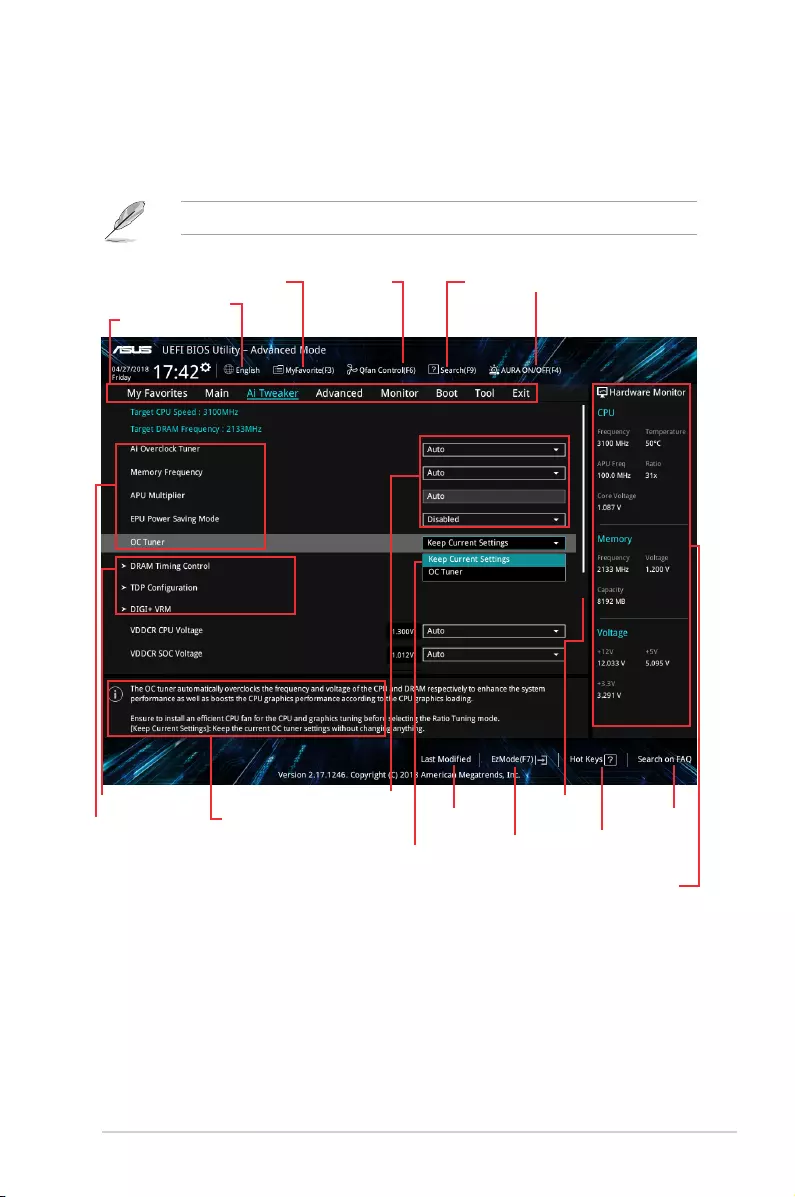
Conguration
elds
Menu bar
General help
Sub-menu items
Menu items
Scroll bar
Last modied
settings
Language
SearchMyFavorite Q-Fan control
Goes back
to EZ Mode
Displays hardware monitoring data
Advanced Mode
The Advanced Mode provides advanced options for experienced end-users to congure the
BIOS settings. The gure below shows an example of the Advanced Mode. Refer to the
following sections for the detailed congurations.
To access the EZ Mode, click EzMode(F7) or press <F7>.
Popup window
Search on
FAQ
Hot Keys
AURA ON/OFF
ASUS PRIME B450-PLUS 2-3
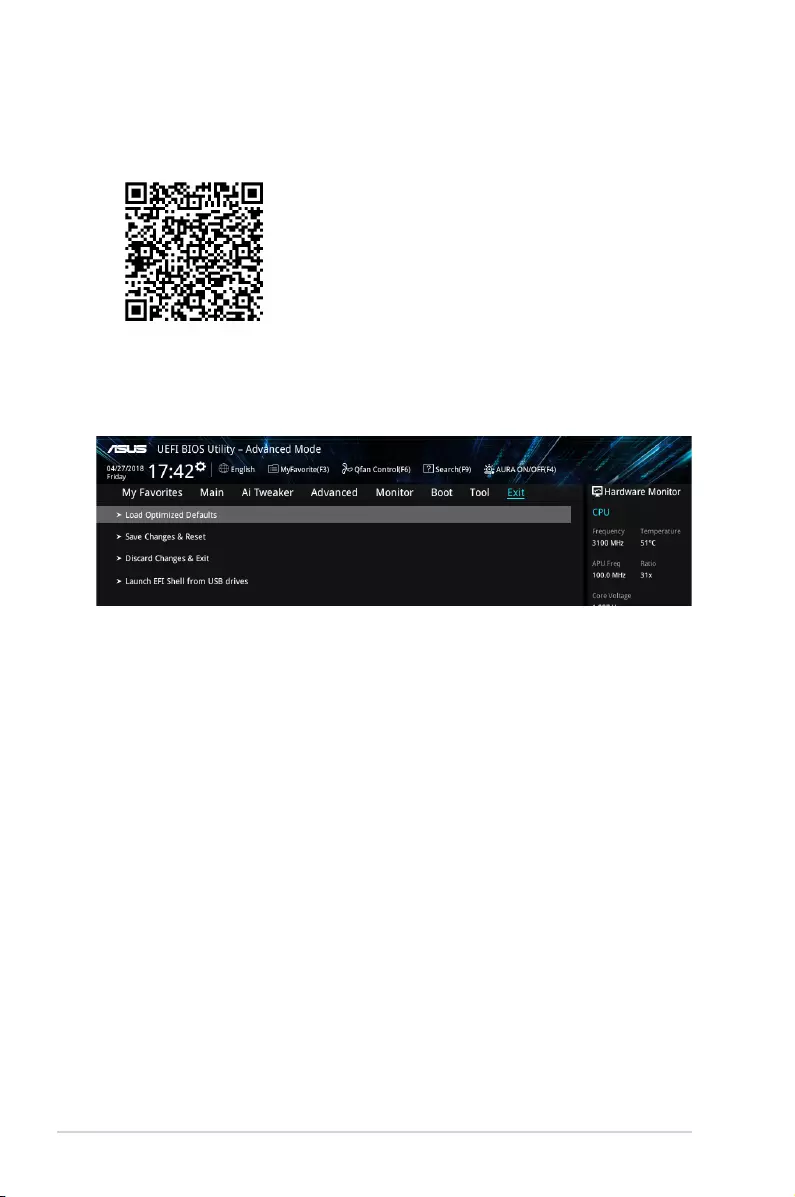
Load Optimized Defaults
This option allows you to load the default values for each of the parameters on the Setup
menus. When you select this option or if you press <F5>, a conrmation window appears.
Select OK to load the default values.
Save Changes & Reset
Once you are nished making your selections, choose this option from the Exit menu to
ensure the values you selected are saved. When you select this option or if you press <F10>,
a conrmation window appears. Select OK to save changes and exit.
Discard Changes & Exit
This option allows you to exit the Setup program without saving your changes. When you
select this option or if you press <Esc>, a conrmation window appears. Select OK to discard
changes and exit.
Launch EFI Shell from USB drives
This option allows you to attempt to launch the EFI Shell application (shellx64.e) from one of
the available USB devices.
Exit menu
The Exit menu items allow you to load the optimal default values for the BIOS items, and
save or discard your changes to the BIOS items.
Search on FAQ
Move your mouse over this button to show a QR code. Scan this QR code with your mobile
device to connect to the ASUS BIOS FAQ web page. You can also scan the QR code below.
2-4 Chapter 2: BIOS information

ASUS PRIME B450-PLUS A-1
Appendix
Notices
Federal Communications Commission Statement
This device complies with Part 15 of the FCC Rules. Operation is subject to the following two
conditions:
• This device may not cause harmful interference.
• This device must accept any interference received including interference that may cause
undesired operation.
This equipment has been tested and found to comply with the limits for a Class B digital
device, pursuant to Part 15 of the FCC Rules. These limits are designed to provide
reasonable protection against harmful interference in a residential installation. This
equipment generates, uses and can radiate radio frequency energy and, if not installed
and used in accordance with manufacturer’s instructions, may cause harmful interference
to radio communications. However, there is no guarantee that interference will not occur
in a particular installation. If this equipment does cause harmful interference to radio or
television reception, which can be determined by turning the equipment off and on, the user
is encouraged to try to correct the interference by one or more of the following measures:
• Reorient or relocate the receiving antenna.
• Increase the separation between the equipment and receiver.
• Connect the equipment to an outlet on a circuit different from that to which the receiver
is connected.
• Consult the dealer or an experienced radio/TV technician for help.
The use of shielded cables for connection of the monitor to the graphics card is required
to assure compliance with FCC regulations. Changes or modications to this unit not
expressly approved by the party responsible for compliance could void the user’s authority
to operate this equipment.
A-2 Appendix
Compliance Statement of Innovation, Science and Economic
Development Canada (ISED)
This device complies with Innovation, Science and Economic Development Canada licence
exempt RSS standard(s). Operation is subject to the following two conditions: (1) this device
may not cause interference, and (2) this device must accept any interference, including
interference that may cause undesired operation of the device.
CAN ICES-3(B)/NMB-3(B)
Déclaration de conformité de Innovation, Sciences et
Développement économique Canada (ISED)
Le présent appareil est conforme aux CNR d’Innovation, Sciences et Développement
économique Canada applicables aux appareils radio exempts de licence. L’exploitation est
autorisée aux deux conditions suivantes : (1) l’appareil ne doit pas produire de brouillage,
et (2) l’utilisateur de l’appareil doit accepter tout brouillage radioélectrique subi, même si le
brouillage est susceptible d’en compromettre le fonctionnement.
CAN ICES-3(B)/NMB-3(B)
VCCI: Japan Compliance Statement
Class B ITE
KC: Korea Warning Statement
ASUS PRIME B450-PLUS A-3
REACH
Complying with the REACH (Registration, Evaluation, Authorisation, and Restriction of
Chemicals) regulatory framework, we published the chemical substances in our products at
ASUS REACH website at http://csr.asus.com/english/REACH.htm.
DO NOT throw the motherboard in municipal waste. This product has been designed to
enable proper reuse of parts and recycling. This symbol of the crossed out wheeled bin
indicates that the product (electrical and electronic equipment) should not be placed in
municipal waste. Check local regulations for disposal of electronic products.
DO NOT throw the mercury-containing button cell battery in municipal waste. This symbol
of the crossed out wheeled bin indicates that the battery should not be placed in municipal
waste.
ASUS Recycling/Takeback Services
ASUS recycling and takeback programs come from our commitment to the highest standards
for protecting our environment. We believe in providing solutions for you to be able to
responsibly recycle our products, batteries, other components as well as the packaging
materials. Please go to http://csr.asus.com/english/Takeback.htm for detailed recycling
information in different regions.
Regional notice for California
WARNING
Cancer and Reproductive Harm —
www.P65Warnings.ca.gov
Google™ License Terms
Copyright© 2018 Google Inc. All Rights Reserved.
Licensed under the Apache License, Version 2.0 (the “License”); you may not use this le
except in compliance with the License. You may obtain a copy of the License at:
http://www.apache.org/licenses/LICENSE-2.0
Unless required by applicable law or agreed to in writing, software distributed under the
License is distributed on an “AS IS” BASIS, WITHOUT WARRANTIES OR CONDITIONS OF
ANY KIND, either express or implied.
See the License for the specic language governing permissions and limitations under the
License.

A-4 Appendix
Română ASUSTeK Computer Inc. declară că acest dispozitiv se conformează
cerinţelor esenţiale şi altor prevederi relevante ale directivelor conexe. Textul
complet al declaraţiei de conformitate a Uniunii Europene se găseşte la:
www.asus.com/support
Srpski ASUSTeK Computer Inc. ovim izjavljuje da je ovaj uređaj u saglasnosti
sa osnovnim zahtevima i drugim relevantnim odredbama povezanih
Direktiva. Pun tekst EU deklaracije o usaglašenosti je dostupan da adresi:
www.asus.com/support
Slovensky Spoločnosť ASUSTeK Computer Inc. týmto vyhlasuje, že toto
zariadenie vyhovuje základným požiadavkám a ostatým príslušným
ustanoveniam príslušných smerníc. Celý text vyhlásenia o zhode pre štáty EÚ
je dostupný na adrese: www.asus.com/support
Slovenščina ASUSTeK Computer Inc. izjavlja, da je ta naprava skladna z
bistvenimi zahtevami in drugimi ustreznimi določbami povezanih direktiv.
Celotno besedilo EU-izjave o skladnosti je na voljo na spletnem mestu:
www.asus.com/support
Español Por la presente, ASUSTeK Computer Inc. declara que este dispositivo
cumple los requisitos básicos y otras disposiciones pertinentes de las
directivas relacionadas. El texto completo de la declaración de la UE de
conformidad está disponible en: www.asus.com/support
Svenska ASUSTeK Computer Inc. förklarar härmed att denna
enhet överensstämmer med de grundläggande kraven och andra
relevanta föreskrifter i relaterade direktiv. Fulltext av EU-försäkran om
överensstämmelse nns på: www.asus.com/support
Українська ASUSTeK Computer Inc. заявляє, що цей пристрій відповідає
основним вимогам та іншим відповідним положенням відповідних
Директив. Повний текст декларації відповідності стандартам ЄС
доступний на: www.asus.com/support
Türkçe AsusTek Computer Inc., bu aygıtın temel gereksinimlerle ve ilişkili
Yönergelerin diğer ilgili koşullarıyla uyumlu olduğunu beyan eder. AB
uygunluk bildiriminin tam metni şu adreste bulunabilir:
www.asus.com/support
Bosanski ASUSTeK Computer Inc. ovim izjavljuje da je ovaj uređaj usklađen
sa bitnim zahtjevima i ostalim odgovarajućim odredbama vezanih direktiva.
Cijeli tekst EU izjave o usklađenosti dostupan je na: www.asus.com/support
English ASUSTeK Computer Inc. hereby declares that this device is in
compliance with the essential requirements and other relevant provisions of
related Directives. Full text of EU declaration of conformity is available at:
www.asus.com/support
Français AsusTek Computer Inc. déclare par la présente que cet appareil est
conforme aux critères essentiels et autres clauses pertinentes des directives
concernées. La déclaration de conformité de l’UE peut être téléchargée à
partir du site Internet suivant : www.asus.com/support
Deutsch ASUSTeK Computer Inc. erklärt hiermit, dass dieses Gerät mit
den wesentlichen Anforderungen und anderen relevanten Bestimmungen
der zugehörigen Richtlinien übereinstimmt. Der gesamte Text der EU-
Konformitätserklärung ist verfügbar unter: www.asus.com/support
Italiano ASUSTeK Computer Inc. con la presente dichiara che questo
dispositivo è conforme ai requisiti essenziali e alle altre disposizioni pertinenti
con le direttive correlate. Il testo completo della dichiarazione di conformità
UE è disponibile all’indirizzo: www.asus.com/support
Русский Компания ASUS заявляет, что это устройство соответствует
основным требованиям и другим соответствующим условиям
соответствующих директив. Подробную информацию, пожалуйста,
смотрите на www.asus.com/support
Български С настоящото ASUSTeK Computer Inc. декларира, че това
устройство е в съответствие със съществените изисквания и другите
приложими постановления на свързаните директиви. Пълният текст на
декларацията за съответствие на ЕС е достъпна на адрес:
www.asus.com/support
Hrvatski ASUSTeK Computer Inc. ovim izjavljuje da je ovaj uređaj sukladan
s bitnim zahtjevima i ostalim odgovarajućim odredbama vezanih direktiva.
Cijeli tekst EU izjave o sukladnosti dostupan je na: www.asus.com/support
Čeština Společnost ASUSTeK Computer Inc. tímto prohlašuje, že toto
zařízení splňuje základní požadavky a další příslušná ustanovení souvisejících
směrnic. Plné znění prohlášení o shodě EU je k dispozici na adrese:
www.asus.com/support
Dansk ASUSTeK Computer Inc. erklærer hermed, at denne enhed er i
overensstemmelse med hovedkravene og andre relevante bestemmelser i de
relaterede direktiver. Hele EU-overensstemmelseserklæringen kan ndes på:
www.asus.com/support
Nederlands ASUSTeK Computer Inc. verklaart hierbij dat dit apparaat
voldoet aan de essentiële vereisten en andere relevante bepalingen van
de verwante richtlijnen. De volledige tekst van de EU-verklaring van
conformiteit is beschikbaar op: www.asus.com/support
Eesti Käesolevaga kinnitab ASUSTeK Computer Inc, et see seade vastab
asjakohaste direktiivide oluliste nõuetele ja teistele asjassepuutuvatele
sätetele. EL vastavusdeklaratsiooni täielik tekst on saadaval järgmisel
aadressil: www.asus.com/support
Suomi ASUSTeK Computer Inc. ilmoittaa täten, että tämä laite on
asiaankuuluvien direktiivien olennaisten vaatimusten ja muiden tätä
koskevien säädösten mukainen. EU-yhdenmukaisuusilmoituksen koko teksti
on luettavissa osoitteessa: www.asus.com/support
Ελληνικά Με το παρόν, η AsusTek Computer Inc. δηλώνει ότι αυτή η
συσκευή συμμορφώνεται με τις θεμελιώδεις απαιτήσεις και άλλες σχετικές
διατάξεις των Οδηγιών της ΕΕ. Το πλήρες κείμενο της δήλωσης συμβατότητας
είναι διαθέσιμο στη διεύθυνση: www.asus.com/support
Magyar Az ASUSTeK Computer Inc. ezennel kijelenti, hogy ez az eszköz
megfelel a kapcsolódó Irányelvek lényeges követelményeinek és egyéb
vonatkozó rendelkezéseinek. Az EU megfelelőségi nyilatkozat teljes szövege
innen letölthető: www.asus.com/support
Latviski ASUSTeK Computer Inc. ar šo paziņo, ka šī ierīce atbilst saistīto
Direktīvu būtiskajām prasībām un citiem citiem saistošajiem nosacījumiem.
Pilns ES atbilstības paziņojuma teksts pieejams šeit: www.asus.com/support
Lietuvių „ASUSTeK Computer Inc.“ šiuo tvirtina, kad šis įrenginys atitinka
pagrindinius reikalavimus ir kitas svarbias susijusių direktyvų nuostatas. Visą
ES atitikties deklaracijos tekstą galima rasti: www.asus.com/support
Norsk ASUSTeK Computer Inc. erklærer herved at denne enheten er i
samsvar med hovedsaklige krav og andre relevante forskrifter i relaterte
direktiver. Fullstendig tekst for EU-samsvarserklæringen nnes på:
www.asus.com/support
Polski Firma ASUSTeK Computer Inc. niniejszym oświadcza, że
urządzenie to jest zgodne z zasadniczymi wymogami i innymi właściwymi
postanowieniami powiązanych dyrektyw. Pełny tekst deklaracji zgodności UE
jest dostępny pod adresem: www.asus.com/support
Português A ASUSTeK Computer Inc. declara que este dispositivo está em
conformidade com os requisitos essenciais e outras disposições relevantes
das Diretivas relacionadas. Texto integral da declaração da UE disponível em:
www.asus.com/support

ASUS PRIME B450-PLUS A-5
ASUS contact information
ASUSTeK COMPUTER INC.
Address 4F, No. 150, Li-Te Road, Peitou, Taipei 112, Taiwan
Telephone +886-2-2894-3447
Fax +886-2-2890-7798
Web site www.asus.com
Technical Support
Telephone +86-21-38429911
Fax +86-21-5866-8722, ext. 9101#
Online support http://qr.asus.com/techserv
ASUS COMPUTER INTERNATIONAL (America)
Address 48720 Kato Rd., Fremont, CA 94538, USA
Telephone +1-510-739-3777
Fax +1-510-608-4555
Web site http://www.asus.com/us/
Technical Support
Support fax +1-812-284-0883
Telephone +1-812-282-2787
Online support http://qr.asus.com/techserv
ASUS COMPUTER GmbH (Germany and Austria)
Address Harkort Str. 21-23, 40880 Ratingen, Germany
Fax +49-2102-959931
Web site http://www.asus.com/de
Online contact http://eu-rma.asus.com/sales
Technical Support
Telephone +49-2102-5789555
Support Fax +49-2102-959911
Online support http://qr.asus.com/techserv
A-6 Appendix
FCC COMPLIANCE INFORMATION
Per FCC Part 2 Section 2.1077
Responsible Party: Asus Computer International
Address: 800 Corporate Way, Fremont
CA 94539.
Phone/Fax No: (510)739-3777/(510)608-4555
hereby declares that the product
compliance statement:
This device complies with part 15 of the FCC Rules. Operation is subject to the
following two conditions: (1) This device may not cause harmful interference,
and (2) this device must accept any interference received, including interference
that may cause undesired operation.
|
Код: 116650 Извините, товара сейчас нет в наличии
Бесплатная доставка Извините, товара сейчас нет в наличии Сравнить Новости интернет-магазина «Лаукар»:23.04.2025 26.02.2025 17.02.2025 Дополнительная информация в категории Материнская плата:Таблица Авторизованных сервисных центров по брендам. Описание Инструкция Отзывы (0) В интернет-магазине бытовой техники «Лаукар» Вы можете скачать инструкцию к товару Материнская плата Asus PRIME B450-PLUS совершенно бесплатно. Все инструкции, представленные на сайте интернет-магазина бытовой техники «Лаукар», предоставляются производителем товара. Для того чтобы скачать инструкцию, Вам необходимо нажать на ссылку «скачать инструкцию», расположенную ниже, а в случае, если ссылки нет, Скачать инструкцию Смотреть инструкцию 
Фирма-производитель оставляет за собой право на внесение изменений в конструкцию, дизайн и комплектацию товара: Материнская плата Asus PRIME B450-PLUS. Пожалуйста, сверяйте информацию о товаре с информацией на |
Manufacturer:ASUS
Category:Computers & Peripherals
Device:ASUS PRIME B450-PLUS
Name:Memory QVL
Language:Multilingual
Pages:6
Size:472.34 KB
Manufacturer:ASUS
Category:Computers & Peripherals
Device:ASUS PRIME B450-PLUS
Name:Memory_QVL_For_AMD_Ryzen_2000_Series_Processors
Language:Multilingual
Pages:21
Size:1.02 MB
Manufacturer:ASUS
Category:Computers & Peripherals
Device:ASUS PRIME B450-PLUS
Name:IE14791_Specification_Updates_for_AMD_B450_Series
Pages:1
Size:112.83 KB
Manufacturer:ASUS
Category:Computers & Peripherals
Device:ASUS PRIME B450-PLUS
Name:PRIME_B450-PLUS_Devices_report.pdf
Language:Multilingual
Pages:19
Size:437.94 KB
Manufacturer:ASUS
Category:Computers & Peripherals
Device:ASUS PRIME B450-PLUS
Name:Quick Start Guide
Language:Multilingual
Pages:2
Size:1.90 MB
Manufacturer:ASUS
Category:Computers & Peripherals
Device:ASUS PRIME B450-PLUS
Name:User’s Manual (Traditional Chinese)
Language:中文(繁體)
Pages:6
Size:1.06 MB
Manufacturer:ASUS
Category:Computers & Peripherals
Device:ASUS PRIME B450-PLUS
Name:User’s Manual (English)
Language:English
Pages:30
Size:2.95 MB
Manufacturer:ASUS
Category:Computers & Peripherals
Device:ASUS PRIME B450-PLUS
Name:User’s Manual (French)
Language:Français
Pages:30
Size:2.33 MB
Manufacturer:ASUS
Category:Computers & Peripherals
Device:ASUS PRIME B450-PLUS
Name:User’s Manual (German)
Language:Deutsch
Pages:30
Size:2.38 MB
Manufacturer:ASUS
Category:Computers & Peripherals
Device:ASUS PRIME B450-PLUS
Name:User’s Manual (Japanese)
Language:日本語
Pages:32
Size:2.63 MB
Manufacturer:ASUS
Category:Computers & Peripherals
Device:ASUS PRIME B450-PLUS
Name:User’s Manual (Simplified Chinese)
Language:中文(简体)
Pages:6
Size:1.27 MB
Manufacturer:ASUS
Category:Computers & Peripherals
Device:ASUS PRIME B450-PLUS
Name:E11133_MB_Pin_Definition (English)
Language:English
Pages:18
Size:1.65 MB
Manufacturer:ASUS
Category:Computers & Peripherals
Device:ASUS PRIME B450-PLUS
Name:T11133_mb_pin_definition_manual (Traditional Chinese)
Language:中文(繁體)
Pages:18
Size:1.73 MB
Manufacturer:ASUS
Category:Computers & Peripherals
Device:ASUS PRIME B450-PLUS
Name:J11133_MB_Pin_Definition_V2_WEB
Language:日本語
Pages:18
Size:1.59 MB
Manufacturer:ASUS
Category:Computers & Peripherals
Device:ASUS PRIME B450-PLUS
Name:MB_PIN_DEFINITION_Manual (Simplified Chinese)
Language:中文(简体)
Pages:18
Size:1.68 MB
Manufacturer:ASUS
Category:Computers & Peripherals
Device:ASUS PRIME B450-PLUS
Name:J13571_BIOS_Update_EM_V4_WEB
Language:日本語
Pages:11
Size:1.13 MB
Manufacturer:ASUS
Category:Computers & Peripherals
Device:ASUS PRIME B450-PLUS
Name:BIOS_Update_Manual_(English)
Language:English
Pages:11
Size:1.60 MB
Manufacturer:ASUS
Category:Computers & Peripherals
Device:ASUS PRIME B450-PLUS
Name:T13571_BIOS_Update(Traditional Chinese)
Language:中文(繁體)
Pages:11
Size:1.72 MB
Manufacturer:ASUS
Category:Computers & Peripherals
Device:ASUS PRIME B450-PLUS
Name:C13571_BIOS_Update (Simplified Chinese)
Language:中文(简体)
Pages:11
Size:1.68 MB
More User Guides for Asus PRIME B450-PLUS:
-
Asus PRIME B450-PLUS Manual (30 pages)
FAQ: Types of Manuals and Their Contents
Asus PRIME B450-PLUS Manuals come in various types, each serving a specific purpose to help users effectively operate and maintain their devices. Here are the common types of Asus PRIME B450-PLUS User Guides and the information they typically include:
- User Manuals: Provide comprehensive instructions on how to use the device, including setup, features, and operation. They often include troubleshooting tips, safety information, and maintenance guidelines.
- Service Instructions: Designed for technicians and repair professionals, these manuals offer detailed information on diagnosing and repairing issues with the device. They include schematics, parts lists, and step-by-step repair procedures.
- Installation Guides: Focus on the installation process of the device, providing detailed instructions and diagrams for proper setup. They are essential for ensuring the device is installed correctly and safely.
- Maintenance Manuals: Provide guidance on routine maintenance tasks to keep the device in optimal condition. They cover cleaning procedures, part replacements, and regular servicing tips.
- Quick Start Guides: Offer a concise overview of the essential steps needed to get the device up and running quickly. They are ideal for users who need immediate assistance with basic setup and operation.
Each type of Asus PRIME B450-PLUS instruction is designed to address specific needs, ensuring users have the necessary information to use, maintain, and repair their devices effectively.
Related Instructions for Asus PRIME B450-PLUS:
1
P5N-MX — Motherboard — Micro ATX
Quick start manual P5N-MX — Motherboard — Micro ATX Quick start manual — 5C3B1T
38
1430
315
2
WL-330GE — Wireless Access Point
Operation & user’s manual Asus WL-330GE — Wireless Access Point User Manual (Operation & user’s manual), @L7H992
72
1121
270
3
X555U
E-manual X555U (Notebook ePDF User Guide, #96UG76)
116
856
172
5
PN250 External HDD
2
1083
271
7
T100 Series
Manual User Guide: Asus T100 Series (916F7N, Upd.Monday 17-03-2025)
18
1207
194
8
PIKE 2008 IMR
72
633
133
10
P5GDC Deluxe
Manual Asus Motherboard Manual (File: asus-p5gdc-deluxe-manual-138, Tuesday 11-02-2025)
138
124
23
Motherboard Devices by Other Brands:
|
Gigabyte GA-H270-Gaming 3 Operation & User’s Manual PDF Manual (@2Y8EY5), Gigabyte GA-H270-Gaming 3 Motherboard (03.01.2025) For more product details, please visit GIGABYTE’s website. 03 Jan 2025 | 44 |
|
|
Texas Instruments TMUX-24PW-EVM Operation & User’s Manual Texas Instruments TMUX-24PW-EVM User Guide (Operation & user’s manual), @67678B User’s Guide 01 Mar 2025 | 24 |
|
|
Radiocrafts RC1880DK Operation & User’s Manual RC1880DK Operation & user’s manual — 36M24Y RC1880DK 21 Nov 2024 | 9 |
|
|
Intersil ISL282x6EVAL1Z Operation & User’s Manual Intersil Motherboard Operation & user’s manual (File: intersil-isl282x6eval1z-operation-user-s-manual-5, Thu 03.2025) 1 13 Mar 2025 | 5 |
Categories:
Ethernet card
All-in-one pcs
Phone
Network Accessory
Indoor Furnishing
Notebooks