

Version 1.0
Published February 2017
Copyright©2017 ASRock INC. All rights reserved.
Copyright Notice:
No part of this documentation may be reproduced, transcribed, transmitted, or
translated in any language, in any form or by any means, except duplication of
documentation by the purchaser for backup purpose, without written consent of
ASRock Inc.
Products and corporate names appearing in this documentation may or may not
be registered trademarks or copyrights of their respective companies, and are used
only for identication or explanation and to the owners’ benet, without intent to
infringe.
Disclaimer:
Specications and information contained in this documentation are furnished for
informational use only and subject to change without notice, and should not be
constructed as a commitment by ASRock. ASRock assumes no responsibility for
any errors or omissions that may appear in this documentation.
With respect to the contents of this documentation, ASRock does not provide
warranty of any kind, either expressed or implied, including but not limited to
the implied warranties or conditions of merchantability or tness for a particular
purpose.
In no event shall ASRock, its directors, ocers, employees, or agents be liable for
any indirect, special, incidental, or consequential damages (including damages for
loss of prots, loss of business, loss of data, interruption of business and the like),
even if ASRock has been advised of the possibility of such damages arising from any
defect or error in the documentation or product.
is device complies with Part 15 of the FCC Rules. Operation is subject to the following
two conditions:
(1) this device may not cause harmful interference, and
(2) this device must accept any interference received, including interference that
may cause undesired operation.
CALIFORNIA, USA ONLY
e Lithium battery adopted on this motherboard contains Perchlorate, a toxic substance
controlled in Perchlorate Best Management Practices (BMP) regulations passed by the
California Legislature. When you discard the Lithium battery in California, USA, please
follow the related regulations in advance.
“Perchlorate Material-special handling may apply, see ww w.dtsc.ca.gov/hazardouswaste/
perchlorate”
ASRock Website: http://www.asrock.com

AUSTRALIA ONLY
Our goods come with guarantees that cannot be excluded under the Australian Consumer
Law. You are entitled to a replacement or refund for a major failure and compensation for
any other reasonably foreseeable loss or damage caused by our goods. You are also entitled
to have the goods repaired or replaced if the goods fail to be of acceptable quality and the
failure does not amount to a major failure. If you require assistance please call ASRock Tel
: +886-2-28965588 ext.123 (Standard International call charges apply)

Contents
Chapter 1 Introduction 1
1.1 Package Contents 1
1.2 Specications 2
1.3 Motherboard Layout 5
1.4 I/O Panel 9
Chapter 2 Installation 12
2.1 Installing the CPU 13
2.2 Installing the CPU Fan and Heatsink 15
2.3 Installing Memory Modules (DIMM) 24
2.4 Expansion Slots (PCI Express Slots) 26
2.5 Jumpers Setup 27
2.6 Onboard Headers and Connectors 28
2.7 M.2_SSD (NGFF) Module Installation Guide (M2_1) 33
Chapter 3 Software and Utilities Operation 36
3.1 Installing Drivers 36
3.2 ASRock Live Update & APP Shop 37
3.2.1 UI Overview 37
3.2.2 Apps 38
3.2.3 BIOS & Drivers 41
3.2.4 Setting 42
3.3 ASRock RGB LED 43
Chapter 4 UEFI SETUP UTILITY 45

4.1 Introduction 45
4.1.1 UEFI Menu Bar 45
4.1.2 Navigation Keys 46
4.2 Main Screen 47
4.3 OC Tweaker Screen 48
4.4 Advanced Screen 49
4.4.1 CPU Conguration 50
4.4.2 North Bridge Conguration 51
4.4.3 South Bridge Conguration 52
4.4.4 Storage Conguration 53
4.4.5 Super IO Conguration 54
4.4.6 ACPI Conguration 55
4.4.7 Trusted Computing 56
4.5 Tools 57
4.6 Hardware Health Event Monitoring Screen 59
4.7 Security Screen 60
4.8 Boot Screen 61
4.9 Exit Screen 63
Chapter 1 Introduction
ank you for purchasing ASRock AB350M / A320M motherboard, a reliable
motherboard produced under ASRock’s consistently stringent quality control.
It delivers excellent performance with robust design conforming to ASRock’s
commitment to quality and endurance.
In this manual, Chapter 1 and 2 contains the introduction of the motherboard
and step-by-step installation guides. Chapter 3 contains the operation guide of the
soware and utilities. Chapter 4 contains the conguration guide of the BIOS setup.
Becau se the motherboard specications and the BIOS soware might be updated, the
content of this manual will be subject to change without notice. In ca se any modications of this manual occur, the updated version will be available on ASRock’s website
without further notice. If you require technical suppor t related to this motherboard,
please visit our website for spe cic information about the model you are using. You
may nd the l atest VGA cards and CPU support list on ASRock ’s website a s well.
ASRock website http://www.a srock .com.
1.1 Package Contents
ASRock AB350M / A320M Motherboard (Micro ATX Form Factor)
•
ASRock AB350M / A320M Quick Installation Guide
•
ASRock AB350M / A320M Support CD
•
1 x I/O Panel Shield
•
2 x Serial ATA (SATA) Data Cables (Optional)
•
1 x Screw for M.2 Socket (Optional)
•
AB350M
A320M
English
1

1.2 Specications
Platform
CPU
Chipset
Memory
•
•
•
•
•
•
•
•
•
•
•
•
* Please refer to Memory Support List on ASRock’s website for
more information. (http://www.asrock.com/)
* Please refer to page 24 for DDR4 UDIMM maximum frequency
support.
•
•
Micro ATX Form Factor
Solid Capacitor design
Supports AMD Socket AM4 A-Series APUs (Bristol Ridge)
and Ryzen Series CPUs (Summit Ridge)
Digi Power design
9 Power Phase design
Supports 95W Air Cooling
AMD Promontory B350 (AB350M)
AMD Promontory A320 (A320M)
Dual Channel DDR4 Memory Technology
2 x DDR4 DIMM Slots
AMD Ryzen series CPUs support DDR4 3200+(OC)/2933
(OC)/2667/2400/2133 ECC & non-ECC, un-buered
memory*
AMD 7th Gen A-Series APUs support DDR4 2400/2133 ECC
& non-ECC, un-buered memory*
Max. capacity of system memory: 32GB
15μ Gold Contact in DIMM Slots
English
2
Expansion
Slot
Audio
1 x PCI Express 3.0 x16 Slot (PCIE2: x16 mode)*
•
* Supports NVMe SSD as boot disks
* AMD Ryzen series CPUs support PCIE2: x16 mode
* AMD 7th A-Series APUs support PCIE2: x8 mode
1 x PCI Express 2.0 x1 Slot
•
7.1 CH HD Audio (Realtek ALC887 Audio Codec)
•
* To congure 7.1 CH HD Audio, it is required to use an HD
front panel audio module and enable the multi-channel audio
feature through the audio driver.
Supports Surge Protection
•
ELNA Audio Caps
•

LAN
Rear Panel
I/O
Storage
PCIE x1 Gigabit LAN 10/100/1000 Mb/s
•
Realtek RTL8111GR
•
Supports Wake-On-LAN
•
Supports Lightning/ESD Protection
•
Supports LAN Cable Detection
•
Supports Energy Ecient Ethernet 802.3az
•
Supports PXE
•
1 x PS/2 Mouse Port
•
1 x PS/2 Keyboard Port
•
2 x USB 2.0 Ports (Supports ESD Protection)
•
6 x USB 3.0 Ports (Supports ESD Protection) (AB350M) /
•
4 x USB 3.0 Ports (Supports ESD Protection) (A320M)
1 x RJ-45 LAN Port with LED (ACT/LINK LED and SPEED
•
LED)
HD Audio Jacks: Line in / Front Speaker / Microphone
•
4 x SATA3 6.0 Gb/s Connectors, support RAID (RAID 0,
•
RAID 1 and RAID 10), NCQ, AHCI and Hot Plug*
1 x Ultra M.2 Socket (M2_1), supports ty pe 2242/2260/2280
•
M.2 SATA3 6.0 Gb/s module and M.2 PCI Express module up
to Gen3 x4 (32 Gb/s) (with Ryzen Series CPU) or Gen3 x2 (16
Gb/s) (with A-Series APU)**
** Supports NVMe SSD as boot disks
** Supports ASRock U.2 Kit
AB350M
A320M
Connector
1 x COM Port Header
•
1 x TPM Header
•
1 x Chassis Intrusion and Speaker Header
•
1 x RGB LED Header
•
* Supports up to 12V/3A, 36W LED Strip
1 x AMD Fan LED Header
•
1 x CPU Fan Connector (4-pin)
•
* e CPU Fan Connector supports the CPU fan of ma ximum
1A (12W) fan power.
2 x Chassis Fan Connectors (1 x 4-pin, 1 x 3-pin)
•
1 x 24 pin ATX Power Connector
•
1 x 8 pin 12V Power Connector
•
1 x Front Panel Audio Connector
•
English
3

BIOS
Feature
Hardware
Monitor
OS
2 x USB 2.0 Headers (Support 4 USB 2.0 ports) (Supports ESD
•
Protection)
1 x USB 3.0 Header (Supports 2 USB 3.0 ports) (Supports ESD
•
Protection)
AMI UEFI Legal BIOS with multilingual GUI support
•
Supports “Plug and Play”
•
ACPI 5.1 compliance wake up events
•
Supports jumperfree
•
SMBIOS 2.3 support
•
DRAM Voltage multi-adjustment
•
CPU/Chassis temperature sensing
•
CPU/Chassis Fan Tachometer
•
CPU/Chassis Quiet Fan
•
CPU/Chassis Fan multi-speed control
•
CASE OPEN detection
•
Voltage monitoring: +12V, +5V, +3.3V, Vcore
•
Microso® Windows® 10 64-bit
•
* For the updated Windows® 10 driver, please visit ASRock’s web-
site for details: http://www.asrock.com
English
4
FCC, CE, WHQL
Certications
* For detailed product information, please visit our website: http://ww w.asrock.com
Please realize that the re is a certain r isk involved with overclo cking, including adju sting the setting in the BIOS, applying Untied Ove rclocking Technology, or using thirdparty o verclocking tools. Overclocking may aect your system’s stability, or even c ause
damage to the components and dev ices of your system. It should be done at your own
risk and expense. We are not responsible for possible damage cau sed by overclocking.
•
ErP/EuP ready (ErP/EuP ready power supply is required)
•
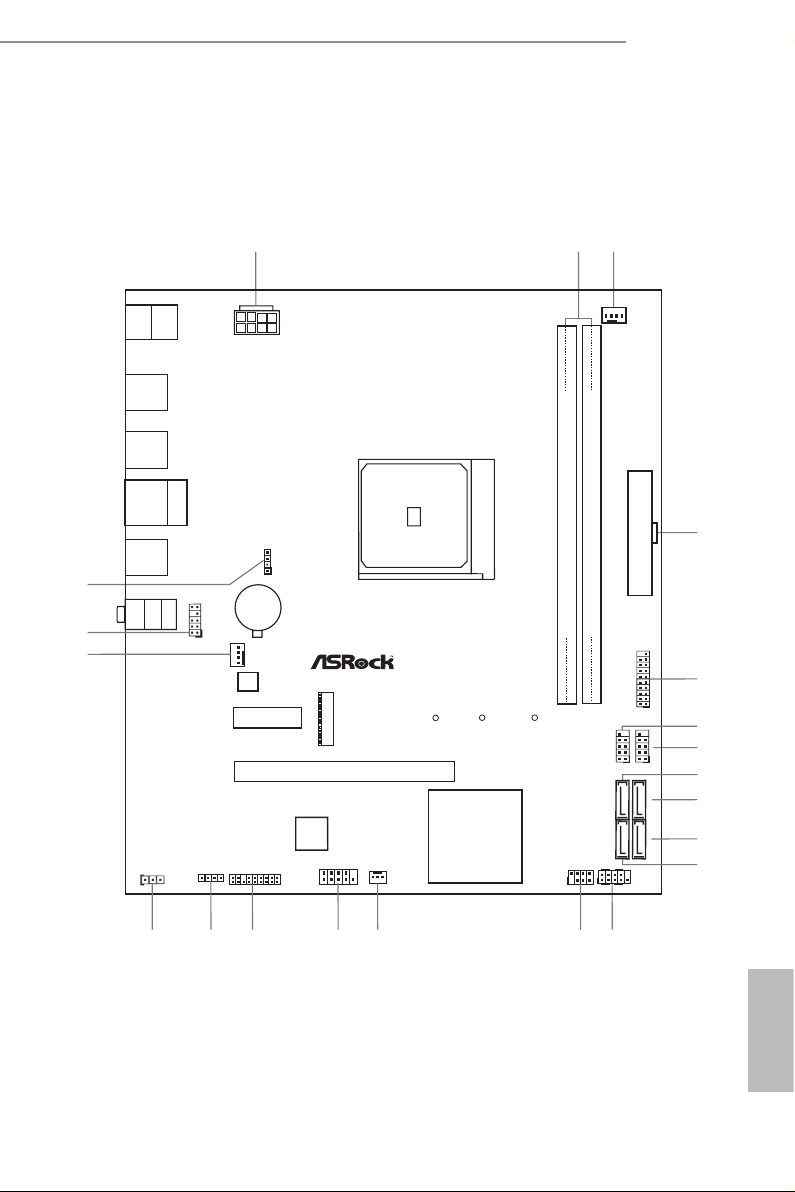
1.3 Motherboard Layout
ATXPWR1
Supe r
I/O
CLRCMOS1
1
PCI E2
HD_AUD IO1
1
CPU_FAN1
Top:
LINE IN
Center :
FRONT
Bottom :
MIC IN
RJ- 45 LAN
USB 2.0
T: USB 1
B: U SB2
SOCKET AM 4
Fro nt U SB 3. 0
1
COM1
CMO S
Bat ter y
ATX12V1
M2_ 1
Ult ra M.2
PCIe G en3 x 4
USB3_7 _8
1
CHA_FAN1
CHA_FAN2
HDLED RESET
PLED PWRBT N
PANEL1
1
RoH S
SPK_CI1
1
PCI E xp re ss 3. 0
DDR 4_A 1 (64 bit , 2 88- pin mo dul e)
DDR 4_B 1 (64 bit , 2 88- pin mo dul e)
PCI E1
AMD
Promontory
B350
PS2
Keyb oard
PS2
Mous e
USB 3.0
T: USB 1
B: U SB2
USB 3.0
T: USB 3
B: U SB4
RGB_LED1
1
AMD_FAN_L E D1
1
M2_1_C T1M2_1_C T2
M2_1_C T3
1
USB_3_4
TPMS1
1
SATA3_3
SATA3_4
SATA3_1
SATA3_2
21
AB35 0M
1
USB_5_6
USB 3.0
T: USB 5
B: U SB6
AB350M:
1
AB350M
A320M
3
2
20
19
BIOS
ROM
17
18
16
15
14
12
13
4
5
6
7
8
9
10
11
English
5

No. Description
1 ATX 12V Power Connector (ATX12V1)
2 2 x 288-pin DDR4 DIMM Slots (DDR4_A1, DDR4_B1)
3 CPU Fan Connector (CPU_FAN1)
4 ATX Power Connector (ATXPWR1)
5 USB 3.0 Header (USB3_7_8)
6 USB 2.0 Header (USB_5_6)
7 USB 2.0 Header (USB_3_4)
8 SATA3 Connector (SATA3_3)
9 SATA3 Connector (SATA3_4)
10 SATA3 Connector (SATA3_2)
11 SATA3 Connector (SATA3_1)
12 System Panel Header (PANEL1)
13 Chassis Intrusion and Speaker Header (SPK_CI1)
14 Chassis Fan Connector (CHA_FAN2)
15 COM Port Header (COM1)
16 TPM Header (TPMS1)
17 RGB LED Header (RGB_LED1)
18 Clear CMOS Jumper (CLRCMOS1)
19 Chassis Fan Connector (CHA_FAN1)
20 Front Panel Audio Header (HD_AUDIO1)
21 AMD Fan LED Header (AMD_FAN_LED1)
English
6
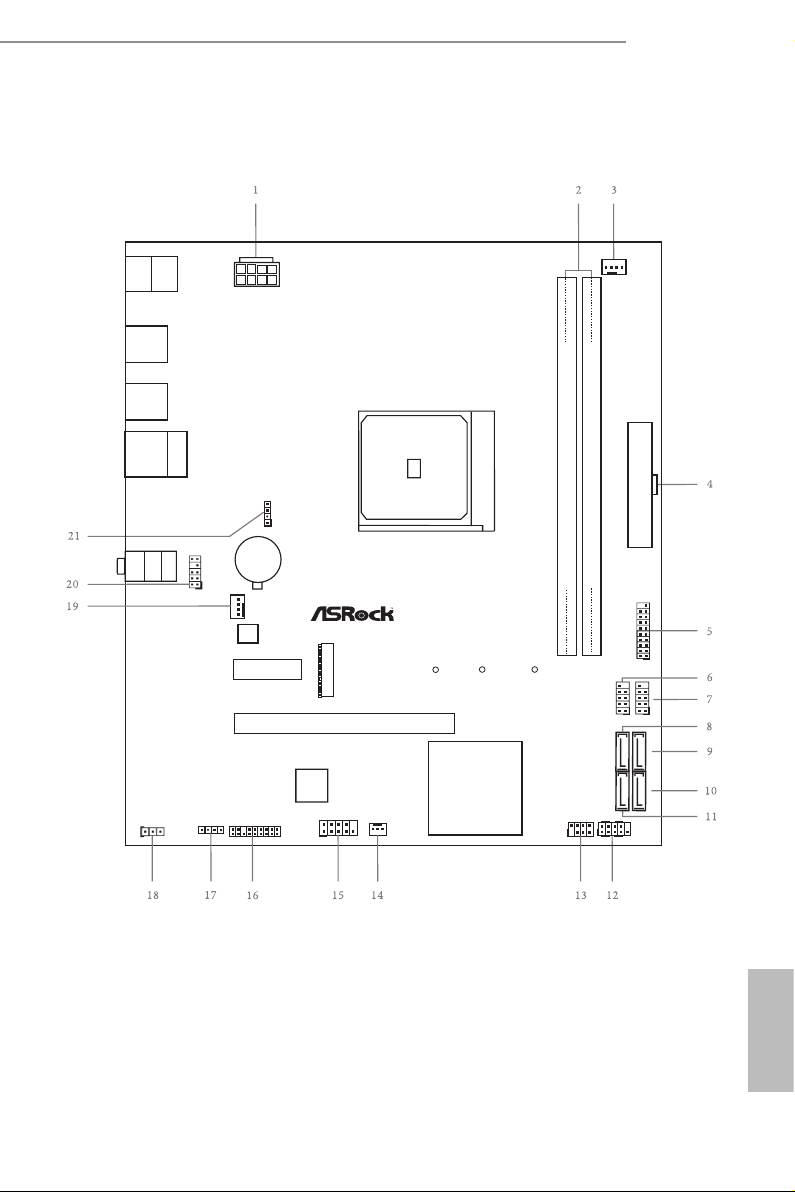
A320M:
ATXPWR1
Supe r
I/O
CLRCMOS1
1
PCI E2
HD_AUD IO1
1
CPU_FAN1
Top:
LINE IN
Center :
FRONT
Bottom :
MIC IN
RJ- 45 LAN
USB 2.0
T: USB 1
B: U SB2
SOCKET AM 4
Fro nt U SB 3. 0
1
COM1
CMO S
Bat ter y
ATX12V1
M2_ 1
Ult ra M.2
PCIe G en3 x 4
USB3_7 _8
1
CHA_FAN1
CHA_FAN2
HDLED RESET
PLED PWRBT N
PANEL1
1
RoH S
SPK_CI1
1
PCI E xp re ss 3. 0
DDR 4_A 1 (64 bit , 2 88- pin mo dul e)
DDR 4_B 1 (64 bit , 2 88- pin mo dul e)
PCI E1
AMD
Promontory
A320
PS2
Keyb oard
PS2
Mous e
USB 3.0
T: USB 1
B: U SB2
USB 3.0
T: USB 3
B: U SB4
RGB_LED1
1
AMD_FAN_L E D1
1
M2_1_C T1M2_1_C T2
M2_1_C T3
1
USB_3_4
TPMS1
1
SATA3_3
SATA3_4
SATA3_1
SATA3_2
A320 M
1
USB_5_6
AB350M
A320M
BIOS
ROM
English
7

No. Description
1 ATX 12V Power Connector (ATX12V1)
2 2 x 288-pin DDR4 DIMM Slots (DDR4_A1, DDR4_B1)
3 CPU Fan Connector (CPU_FAN1)
4 ATX Power Connector (ATXPWR1)
5 USB 3.0 Header (USB3_7_8)
6 USB 2.0 Header (USB_5_6)
7 USB 2.0 Header (USB_3_4)
8 SATA3 Connector (SATA3_3)
9 SATA3 Connector (SATA3_4)
10 SATA3 Connector (SATA3_2)
11 SATA3 Connector (SATA3_1)
12 System Panel Header (PANEL1)
13 Chassis Intrusion and Speaker Header (SPK_CI1)
14 Chassis Fan Connector (CHA_FAN2)
15 COM Port Header (COM1)
16 TPM Header (TPMS1)
17 RGB LED Header (RGB_LED1)
18 Clear CMOS Jumper (CLRCMOS1)
19 Chassis Fan Connector (CHA_FAN1)
20 Front Panel Audio Header (HD_AUDIO1)
21 AMD Fan LED Header (AMD_FAN_LED1)
English
8
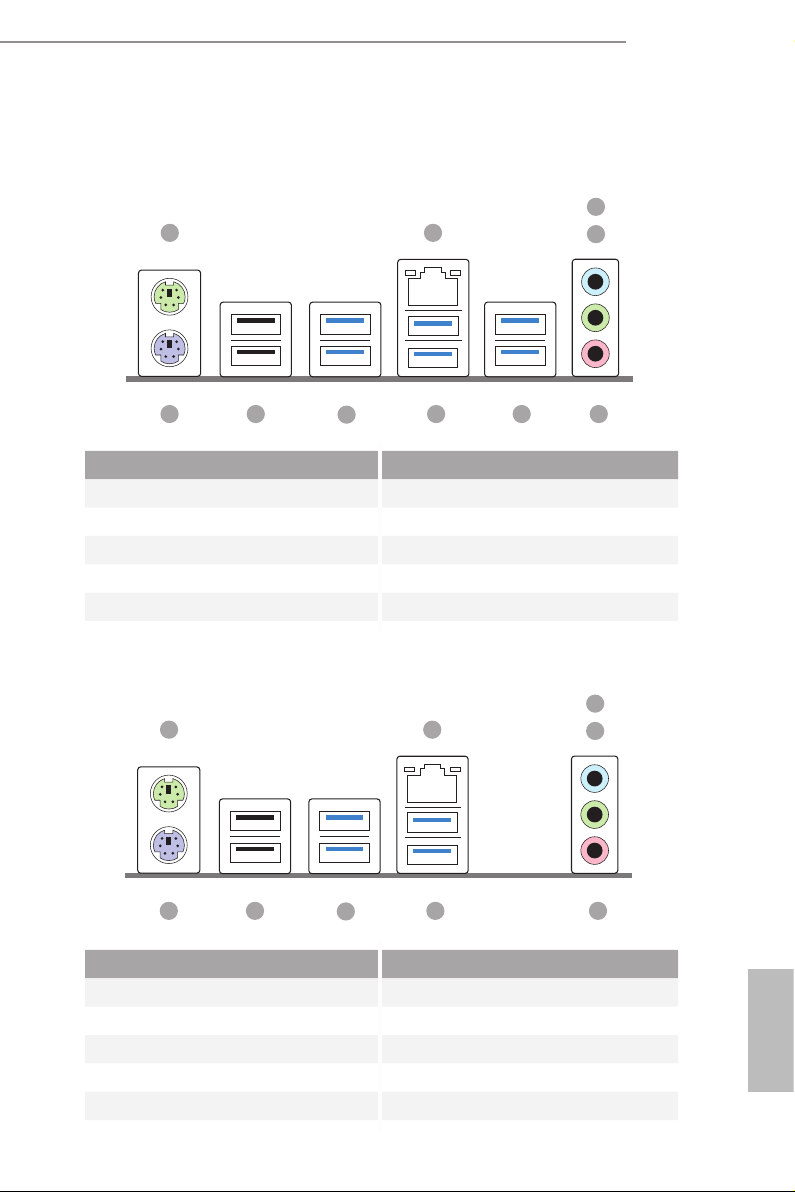
1.4 I/O Panel
AB350M:
1
AB350M
A320M
3
2
4
8
No. Description No. Description
1 PS/2 Mouse Port 6 USB 3.0 Ports (USB3_56)
2 LAN RJ-45 Port* 7 USB 3.0 Ports (USB3_34)
3 Line In (Light Blue)** 8 USB 3.0 Ports (USB3_12)
4 Front Speaker (Lime)** 9 USB 2.0 Ports (USB_12)
5 Microphone (Pink)** 10 PS/2 Keyboard Port
6710 9
A320M:
1
7
No. Description No. Description
1 PS/2 Mouse Port 6 USB 3.0 Ports (USB3_34)
2 LAN RJ-45 Port* 7 USB 3.0 Ports (USB3_12)
3 Line In (Light Blue)** 8 USB 2.0 Ports (USB_12)
4 Front Speaker (Lime)** 9 PS/2 Keyboard Port
5 Microphone (Pink)**
2
69 8
5
3
4
5
English
9
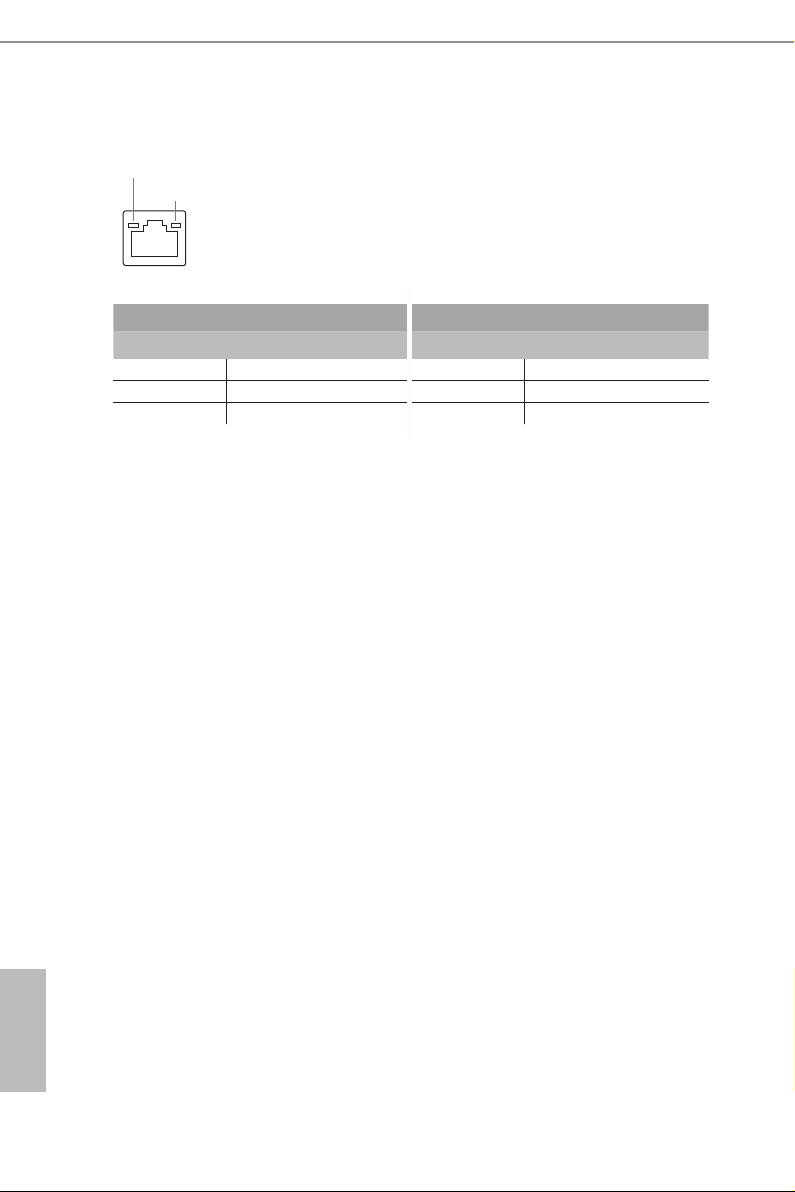
* ere are two LEDs on each LAN port. Please refer to the table below for the LAN port LED indications .
ACT/LINK L ED
SPEED LE D
LAN Por t
Activity / Link LED Speed LED
Status Description Status Description
O No Link O 10Mbps connection
Blinking Data Activity Orange 100Mbps connection
On Link Green 1Gbps connection
English
10
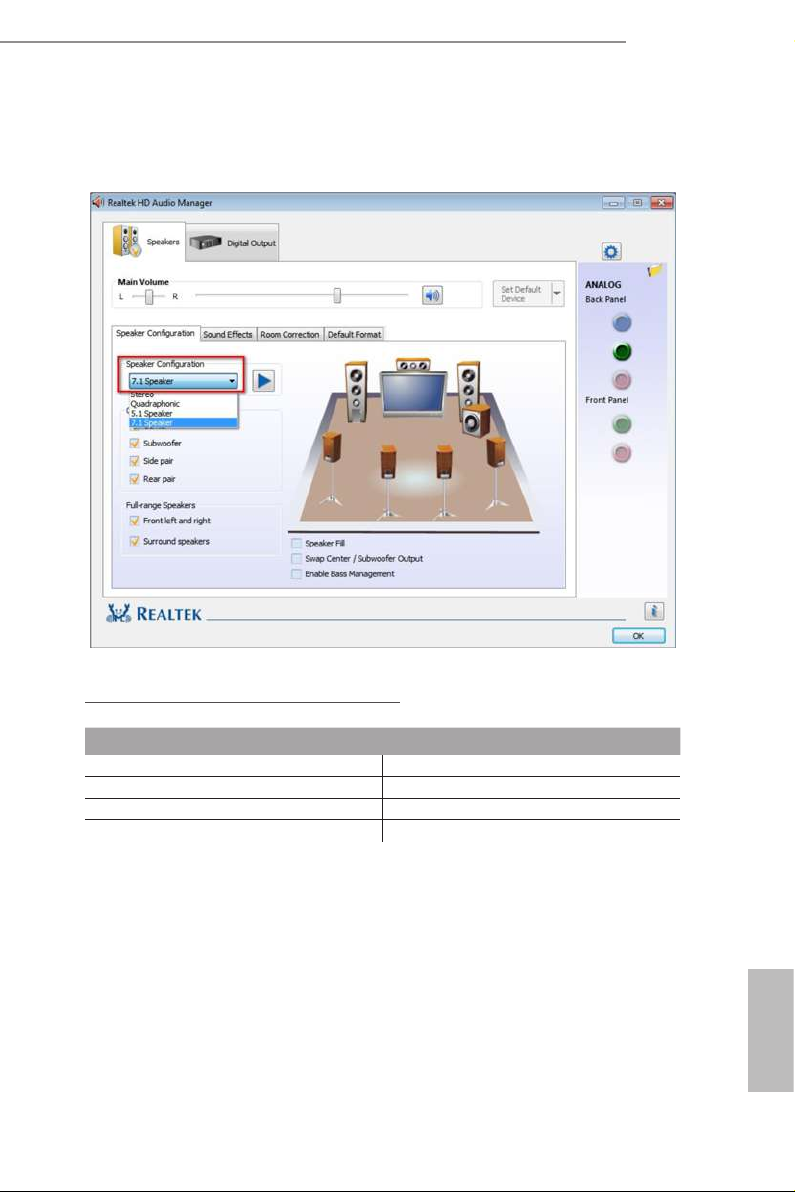
** To congure 7.1 CH HD Audio, it i s required to use an HD front panel audio module and enable the multichannel audio feature through the audio driver.
Please set Speaker Conguration to “7.1 Speaker”in the Realtek HD Audio Manager.
AB350M
A320M
Function of the Audio Por ts in 7.1-channel Con guration:
Port Function
Light Blue (Rear panel) Rear Speaker Out
Lime (Rear panel) Front Speaker Out
Pink (Rear panel) Central /Subwoofer Speaker Out
Lime (Front panel) Side Speaker Out
English
11

Chapter 2 Installation
is is a Micro ATX form factor motherboard. Before you install the motherboard,
study the conguration of your chassis to ensure that the motherboard ts into it.
Pre-installation Precautions
Take note of the following precautions before you install motherboard components
or change any motherboard settings.
Make sure to unplug the power cord before installing or removing the motherboard.
•
Failure to do so may cause physical injuries to you and damages to motherboard
components.
In order to avoid damage from static electricity to the motherboard’s components,
•
NEVER place your motherboard directly on a carpet. Also remember to use a grounded
wrist strap or touch a safety grounded object before you handle the components.
Hold components by the edges and do not touch the ICs.
•
Whenever you uninstall any components, place them on a grounded anti-static pad or
•
in the bag that comes with the components.
When placing screws to secure the motherboard to the chassis, please do not over-
•
tighten the screws! Doing so may damage the motherboard.
English
12
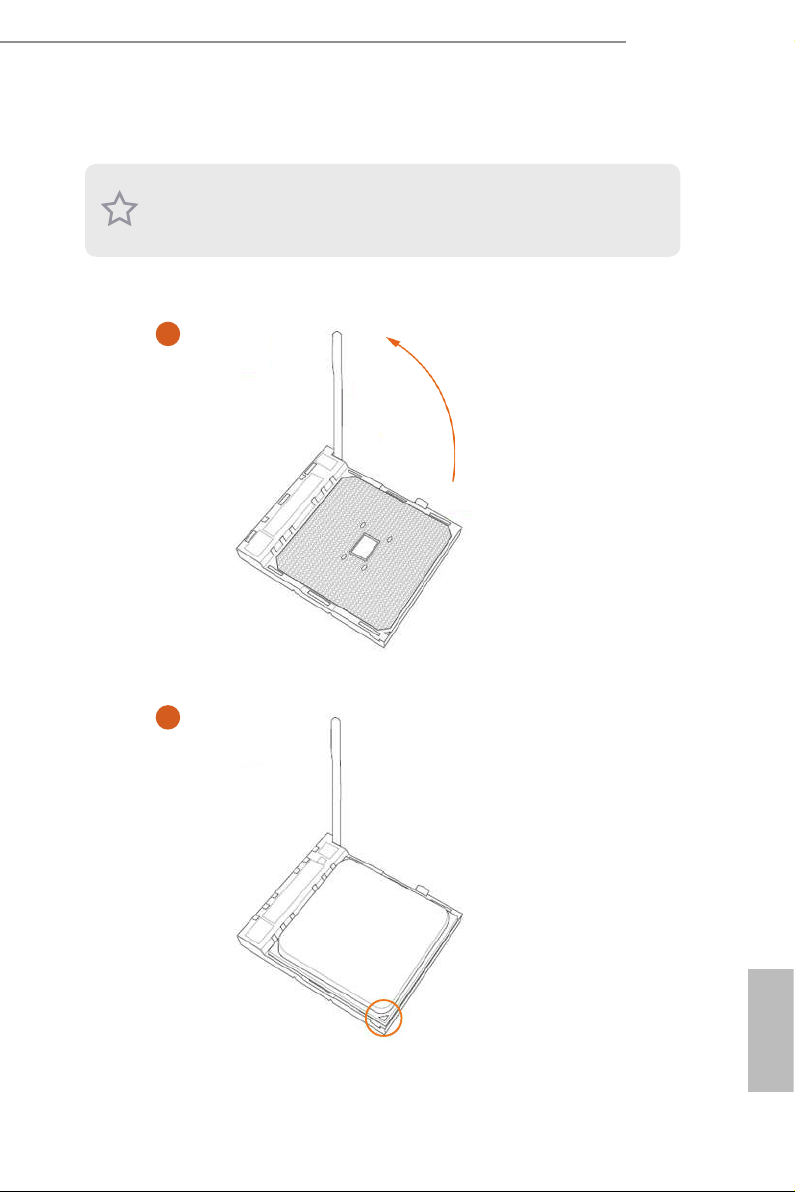
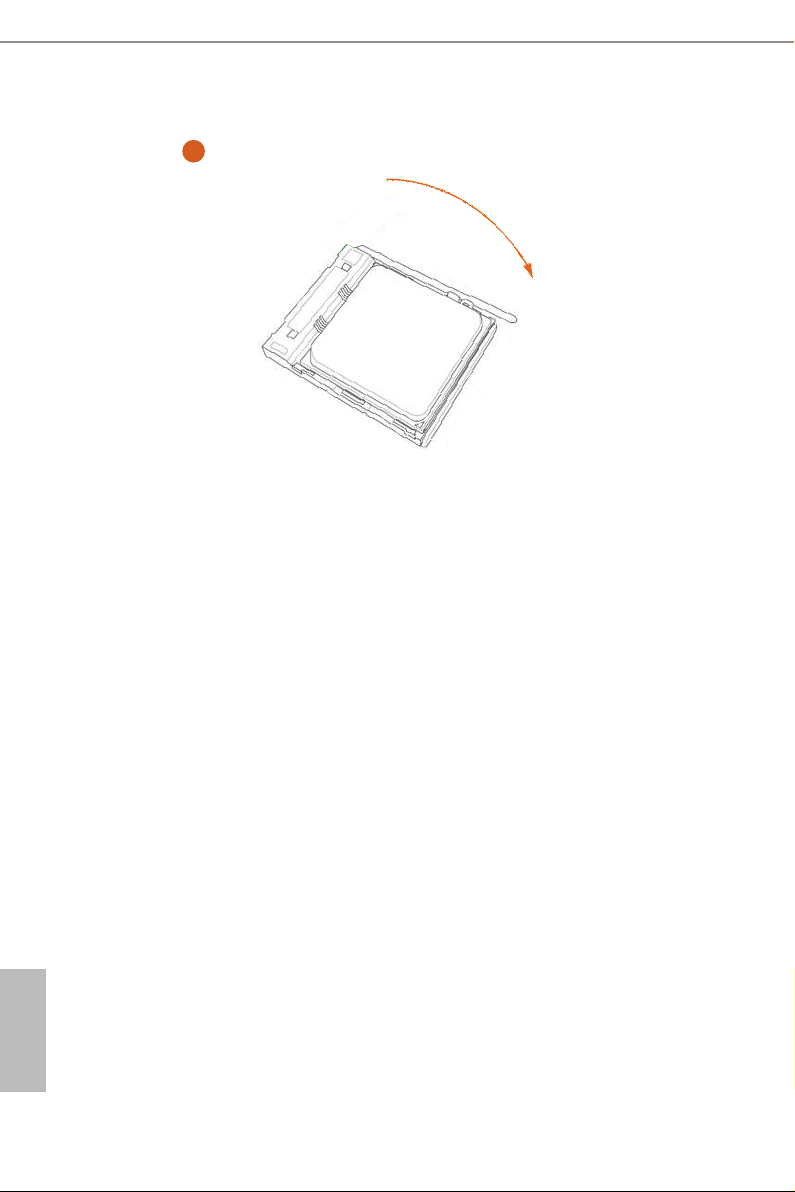
2.1 Installing the CPU
Unplug all power cables be fore installing the CPU.
1
AB350M
A320M
2
English
13
3
English
14
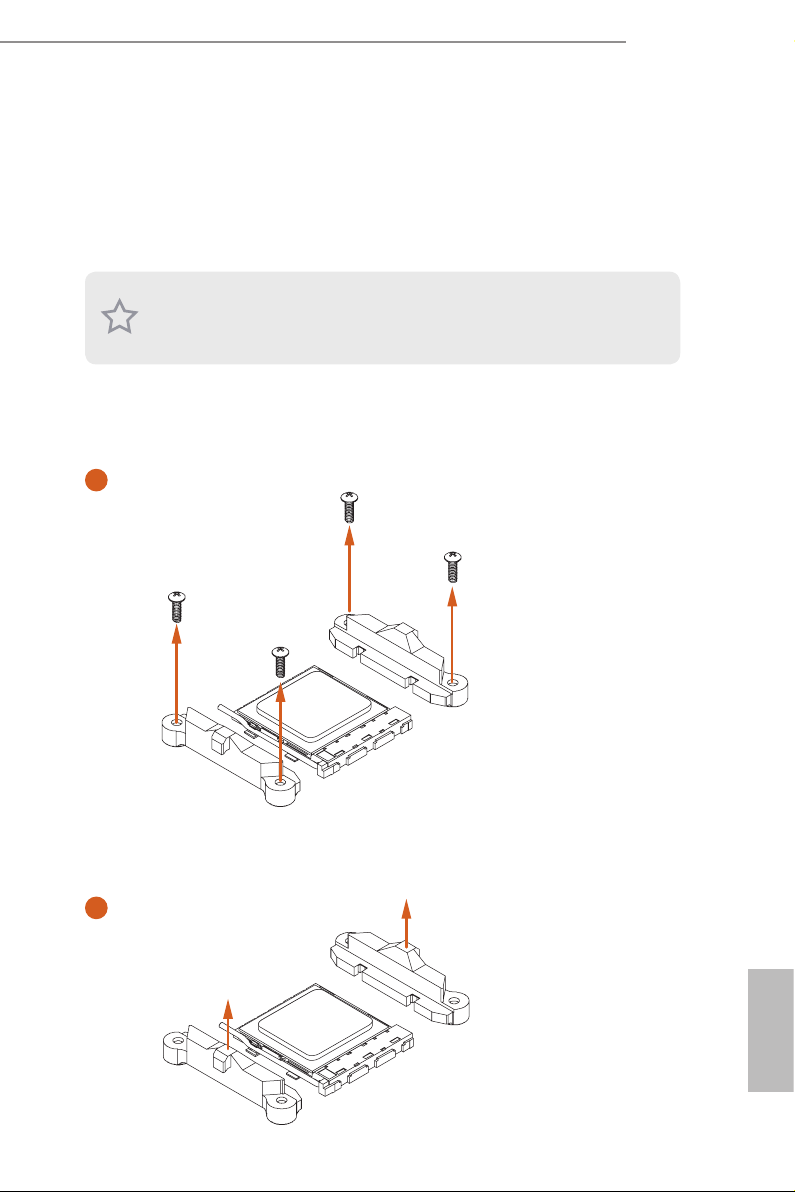
2.2 Installing the CPU Fan and Heatsink
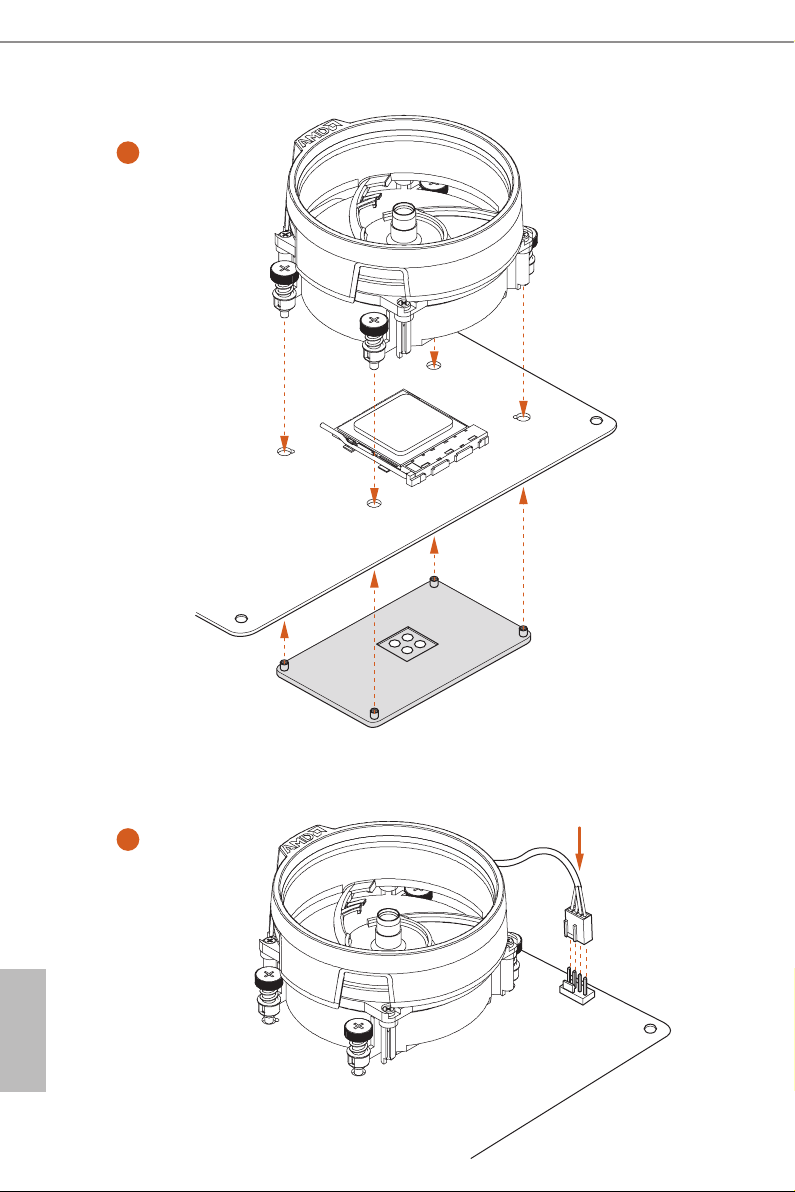
Aer you install the CPU into this motherboard, it is necessary to install a larger
heatsink and cooling fan to dissipate heat. You also need to spray thermal grease
between the CPU and the heatsink to improve heat dissipation. Ma ke sure that the
CPU and the heatsink are securely fastened and in good contact with each other.
Please turn o the power or remove the power cord before changing a CPU or heatsink.
Installing the CPU Box Cooler SR1
1
AB350M
A320M
2
English
15
3
English
16
4
1
N
FA
_
U
P
C
Loading…
Manuals.eu
- Manuals.eu
- ASRock
- Computers & Peripherals
- Mainboards
- A320M-DVS R4.0
- User Manual
×
1
2
3
4
5
6
7
8
9
10
11
12
13
14
15
16
17
18
19
20
21
22
23
24
25
26
27
28
29
30
31
32
33
34
35
36
37
38
39
40
41
42
43
44
45
46
47
48
49
50
51
52
53
54
55
56
57
58
59
60
61
62
63
64
65
66
67
68
69
70
71
72
73
74
75
76
77
78
79
80
81
82
83
⟨
⟩
Copyright © Manuals.eu
Agreement
Privacy Policy
Contact us
View the manual for the Asrock A320M-DVS R4.0 here, for free. This user manual comes under the category motherboards and has been rated by 1 people with an average of a 8.9. This manual is available in the following languages: English. Do you have a question about the Asrock A320M-DVS R4.0?
Ask your question here
Frequently asked questions
Can’t find the answer to your question in the manual? You may find the answer to your question in the FAQs about the Asrock A320M-DVS R4.0 below.
What is the width of the Asrock A320M-DVS R4.0?
The Asrock A320M-DVS R4.0 has a width of 230 mm.
What is the depth of the Asrock A320M-DVS R4.0?
The Asrock A320M-DVS R4.0 has a depth of 201 mm.
What certifications does the Asrock A320M-DVS R4.0 have?
The Asrock A320M-DVS R4.0 has the following certifications: FCC, CE, ErP/EuP.
Is the manual of the Asrock A320M-DVS R4.0 available in English?
Yes, the manual of the Asrock A320M-DVS R4.0 is available in English .
Is your question not listed? Ask your question here
|
Код: 116623 Извините, товара сейчас нет в наличии
Бесплатная доставка Извините, товара сейчас нет в наличии Сравнить Новости интернет-магазина «Лаукар»:23.04.2025 26.02.2025 17.02.2025 Дополнительная информация в категории Материнская плата:Таблица Авторизованных сервисных центров по брендам. Описание Инструкция Отзывы (0) В интернет-магазине бытовой техники «Лаукар» Вы можете скачать инструкцию к товару Материнская плата ASRock A320M-DVS R4.0 совершенно бесплатно. Все инструкции, представленные на сайте интернет-магазина бытовой техники «Лаукар», предоставляются производителем товара. Для того чтобы скачать инструкцию, Вам необходимо нажать на ссылку «скачать инструкцию», расположенную ниже, а в случае, если ссылки нет, Скачать инструкцию Смотреть инструкцию 
Фирма-производитель оставляет за собой право на внесение изменений в конструкцию, дизайн и комплектацию товара: Материнская плата ASRock A320M-DVS R4.0. Пожалуйста, сверяйте информацию о товаре с информацией на |
Version 1.0
Published September 2018
Copyright©2018 ASRock INC. All rights reserved.
Copyright Notice:
No part of this documentation may be reproduced, transcribed, transmitted, or
translated in any language, in any form or by any means, except duplication of
documentation by the purchaser for backup purpose, without written consent of
ASRock Inc.
Products and corporate names appearing in this documentation may or may not
be registered trademarks or copyrights of their respective companies, and are used
only for identication or explanation and to the owners’ benet, without intent to
infringe.
Disclaimer:
Specications and information contained in this documentation are furnished for
informational use only and subject to change without notice, and should not be
constructed as a commitment by ASRock. ASRock assumes no responsibility for
any errors or omissions that may appear in this documentation.
With respect to the contents of this documentation, ASRock does not provide
warranty of any kind, either expressed or implied, including but not limited to
the implied warranties or conditions of merchantability or tness for a particular
purpose.
In no event shall ASRock, its directors, ocers, employees, or agents be liable for
any indirect, special, incidental, or consequential damages (including damages for
loss of prots, loss of business, loss of data, interruption of business and the like),
even if ASRock has been advised of the possibility of such damages arising from any
defect or error in the documentation or product.
is device complies with Part 15 of the FCC Rules. Operation is subject to the following
two conditions:
(1) this device may not cause harmful interference, and
(2) this device must accept any interference received, including interference that
may cause undesired operation.
CALIFORNIA, USA ONLY
e Lithium battery adopted on this motherboard contains Perchlorate, a toxic substance
controlled in Perchlorate Best Management Practices (BMP) regulations passed by the
California Legislature. When you discard the Lithium battery in California, USA, please
follow the related regulations in advance.
“Perchlorate Material-special handling may apply, see www.dtsc.ca.gov/hazardouswaste/
perchlorate”
ASRock Website: http://www.asrock.com